n8n - AI Agents, AI Automations & AI Voice Agents (3)
RAG & Research AI Agents

workflow

12_122 Build RAG Agent with n8n & Pinecorn(save RAG)

1
2
3
4
5
6
7
8
9
10
11
12
13
14
15
16
17
18
19
20
21
22
23
24
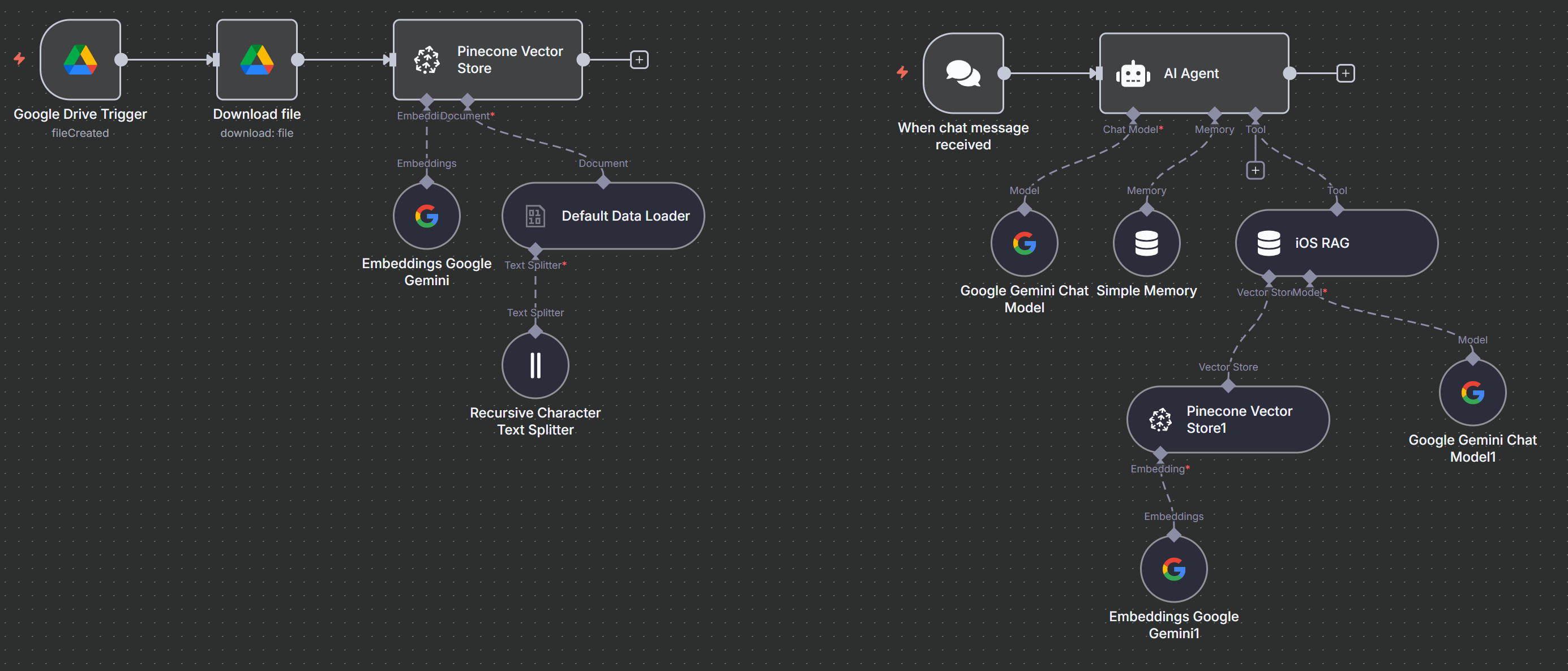
# Drive --> On changes involving a specific folder
Folder(By ID): ...(for First RAG Agent)
Watch For: File Created

# Drive --> Download file
File(By ID) : {{ $json.id }}

# pinecorn Vector Store --> add docuemnts to vector store
Pinecone Index(From list): n8nragagent
Options:
Pinecone Namespace: ragagent or ragagent2(更改空間)
Embedding Document: Embedding Google Gemini
Data loader: Default Data loader
Type of Data: Binary
Mode: Load All Input Data
Data Format: PDF
Text Splitting: Custom (外接 Text Splitter)
ext Splitter --> add "Recursive Character Text Splitter"(以下設定有較好的效率)
Chunk Size: 900
Chunk Overlap: 50
Options
Metadata: (可使用於搜尋時加過濾條件)
Name: Apple
Value: {{ $json.name }}

12_122 Build RAG Agent with n8n & Pinecorn(ask for RAG)

1
2
3
4
5
6
7
8
9
10
11
12
13
14
15
16
17
18
19
20
21
22
23
24
25
26
27
28
29
30
31
32
33
34
35
36
# chat trigger
what about Image Playground
what about Writing Tools
"I am robert, I like dog
What's my name and what animal do I like?
what I aks previous ?"

# AI Agent
System Message:
"
# Role
You are an AI assistant designed to answer questions about iOS 18, based on the official feature documents stored in the TOOL's "iOS RAG" vector database.

# Objective
Your goal is to help users understand the new features, settings, and changes introduced in iOS 18. All answers should come directly from the information found in the vector database.

If a user asks about something not covered in the stored content, let them know that the information isn’t currently available.

# Rules
- if cannot link to "iOS RAG" just response unknow
- Use bullet points or short paragraphs for lists or multiple features.
- Do not guess or assume anything. Use only the verified data from the vector database.

Your main goal: Provide helpful, accurate, and easy-to-understand answers using only the stored documents — no speculation or outside sources.
"
Chat Mode: Google gemini Chat model
meomey : simple memory : context window length:10
Tool: Answer questions with a vector store (iOS RAG)
Description of Data: for ask IOS
Model: gemin chat model
Vector store:Pinecone Vector Store
Operation Mode: Retrieve Documents (As Vector Store for Chain/Tool)
Pinecone Index(From list): n8nragagent
Options:
Pinecone Namespace: ragagent or or ragagent2(更改空間)
Embedding: embedding google gemini

12_123 DeepSeek R1 Planner(Gemini)

1
2
3
4
5
6
7
8
9
10
11
12
13
14
15
16
17
18
19
20
21
22
23
24
25
26
27
28
29
30
31
32
33
34
35
36
37
38
39
40
41
42
43
44
45
46
47
48
49
50
51
52
53
54
55
56
57
58
59
60
61
62
63
64
65
66
67
68
69
70
71
72
73
74
75
76
77
78
79
80
81
82
83
# On chat message
"
Schedule a meeting for me with Jack. Her email is kyp001@gmail.com at 1 pm on November 21th, 2025, for 1 hour. Also, please send an email to her.
"

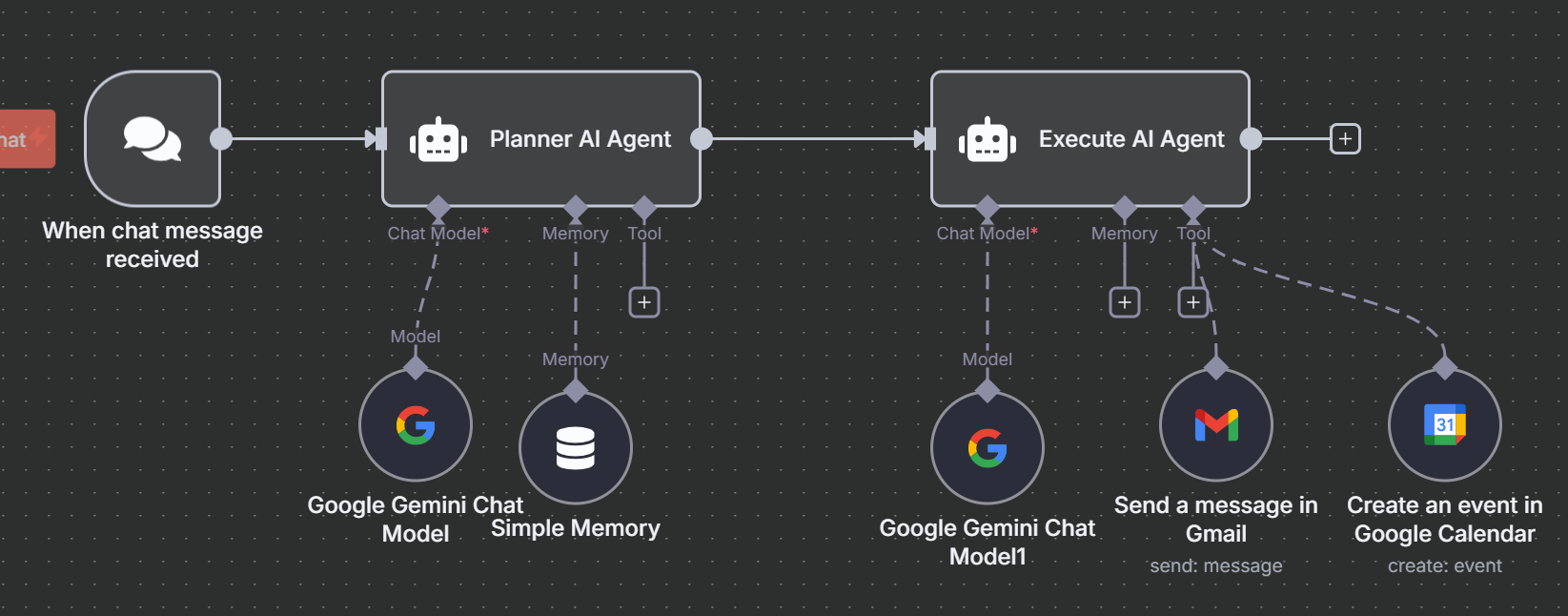
# AI Agent(Planner AI Agent)
System Message:
** Mission **
You are an AI tasked with drafting clear, practical prompts that help a personal assistant complete any job at hand.

** Operating Scope **
- No external tools or references.
- Keep every instruction brief, ordered, and unmistakable.
- Jobs can be simple or complex, but your wording must remain straightforward.

** Workflow **
- Receive the user’s request.
- Decompose the request into a short series of logical actions.
- Write each action so it can be executed immediately—no guesswork.
- Note prerequisites or context the assistant needs to know.
- Proof-read the prompt for clarity and fullness before sending it.

** Illustrative Scenarios **

Example 1:
--------User Request
“Book a doctor’s appointment for next week.”

--------Prompt You Produce
1. Find open slots with the doctor next week. 2. Pick a time that doesn’t clash with existing events.
3. Book the slot by phone or online. 4. Add the appointment to the calendar.

Example 2:
--------User Request
“Get ready for John’s birthday party.”

--------Prompt You Produce
1. Select a date and time for the party. 2. Draft a guest list. 3. Buy and set up decorations beforehand.
4. Arrange food and drinks. 5. Send invitations.

** Operating Checklist (SOP) **
- Hear the goal.
- Break it into clear, ordered, actionable steps.
- Supply any needed background details.
- Double-check that the plan is complete and plain.
- Deliver the polished prompt to the assistant.

** Closing Reminders **
- Favor simplicity over flourish.
- Omit anything irrelevant or overly wordy.
- Hand over a ready-to-execute plan that needs no further clarification.
- Current date/time: {{ $now }}
Caht Model: Google Gemini chat Model
Memory: Simple Memory
Context Window Length: 10

# AI Agent(Execute AI AGent)
Source for Prompt (User Message): Define below
Prompt (User Message): {{ $json.output }}
System Message:
# Tool
- Send a message in Gmail: support send email
- Create an event in Google Calendar: support set calendar event

# Note
- Don't need to wait for an email response, directly set a calendar event and give a proper title
- my name is Robert
- The email use HTMl format
- Directly do what toy can do, show what you do in output message
Caht Model: Google Gemini chat Model
Tool:
Gmail Tool
To: {{$fromAI('emailAddress')}}
Subject: {{$fromAI('subject')}}
Email Type: HTML
Message: {{$fromAI('message')}}
Options: Append n8n Attribution: Disable
Google Calendar Tool
Calendar: my_google_email
Start: {{ $fromAI('startDate')}}
End: {{ $fromAI('endDate')}}
Additional Fields
Summary: {{ $fromAI('title')}}

12_124 Build AI Agent that Remembers Everything(Supabase VB + PostgreSQL) - save communication & get RAG

1
2
3
4
5
6
7
8
9
10
11
12
13
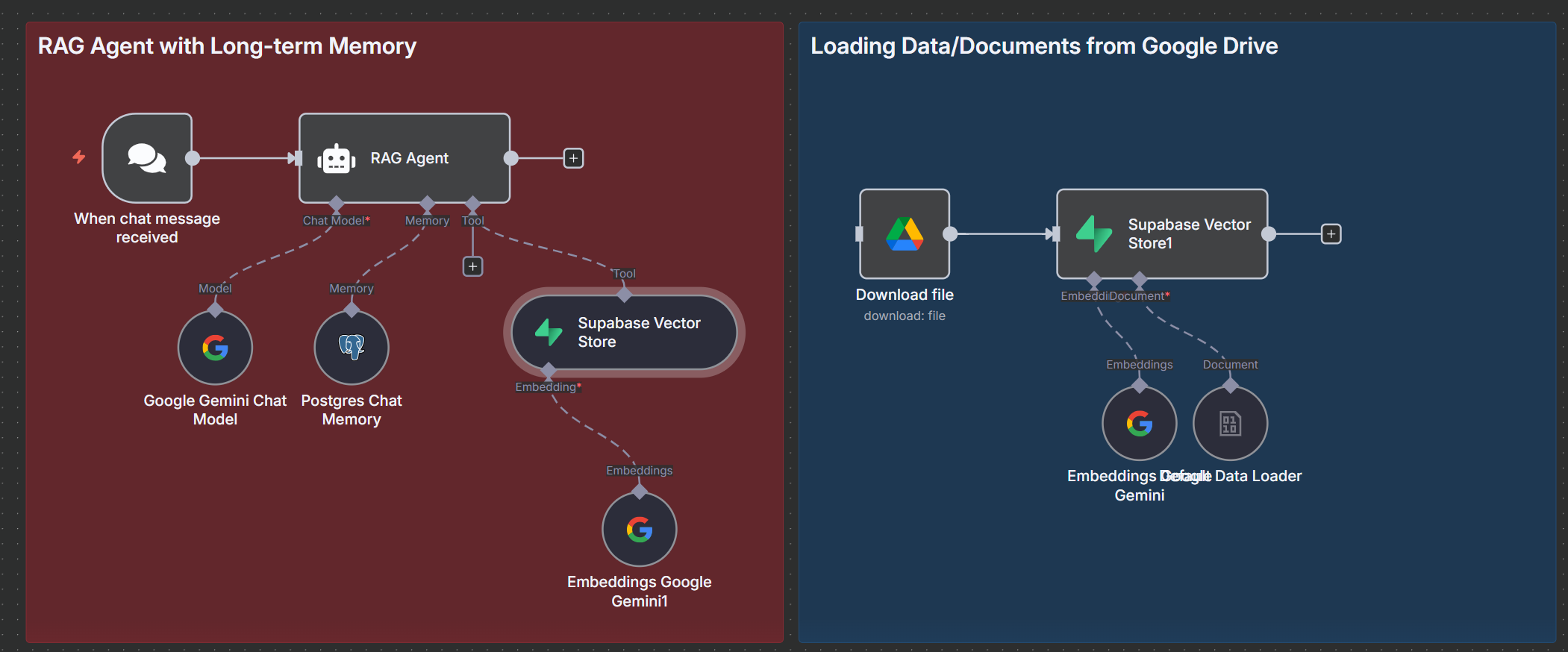
# On chat Message
hello --> Supabase table n8n_chat_histories can see send and response recorded message
please tell me about "Role"
please tell me about "Next Steps"
what is the prompt about?

# AI Agent - RAG Agent
Chat mode: Google Gemini Chat Model
Memory: Postgres Chat Memoey
Tool: Supabase Vector Store
Description: Use this to get information about the AI voice Agent prompt
Table Name: documents
Embedding: Embeddings Google Gemini

12_124 Build AI Agent that Remembers Everything(Supabase VB + PostgreSQL) - load document

1
2
3
4
5
6
7
8
9
10
# Drive --> download file
File: AIVOIC_1.PDF

# Superbase Vector Store --> add Documents to vector store
Table Name: documents (select when table "documents" create already)
embedding : Embeddings Google Gemini
ocuemnt loader : Default Data loader
Type of Data: Binary

# run load file

❇️ 12_125 Build DeepSeek R1 WhatApp AI Agent to Plan and Research(llama + Telegram)

1
2
3
4
5
6
7
8
9
10
11
12
13
14
15
16
17
18
19
20
21
22
23
24
25
26
27
28
29
30
31
32
33
34
35
36
37
38
39
40
41
42
43
44
45
46
47
48
49
50
51
52
53
54
55
56
57
58
59
60
61
62
63
64
65
66
67
68
69
70
71
72
73
74
75
76
77
78
79
80
81
82
83
84
85
86
87
88
89
90
91
92
93
94
95
96
97
98
99
100
101
102
# Telegram --> on message
Plan a budget-friendly one-month stay in Thailand as a digital nomad. I need a cheap place to stay, good Wifi, coworking spaces, and some great traction to visit.
規劃一個預算友好的台灣一個月數位遊牧生活,我需要便宜的住宿、良好的WiFi、共享辦公空間,以及一些很棒的旅遊景點。

# AI Agent(Planner Agent)
Source for Prompt (User Message): Define below
Prompt (User Message):
{{ $json.message.text }}
System Message:
Role: You are an AI Planner Agent
Chat model : Groq Chat Model
Model : llama-3.3-70b-versatile
Memory : Simple Memory
Session ID: Define below
Key: {{ $('Telegram Trigger').item.json.message.text }}

# AI Agent(Research Agent)
Source for Prompt (User Message): Define below
Prompt (User Message):
{{$json.output}}
System Message:
# Role
You are an AI Search Agent integrating SerpAPI to support an AI Travel Planner Agent. Your purpose is to locate and provide comprehensive, actionable information about ALL locations, services, and resources mentioned in the Planner's structured itinerary.

## Task
1. Receive the Planner's detailed itinerary input as `{{ $json.output }}`.
2. the output language same as `{{ $json.output }}`
3. Extract EVERY specific place, service, or resource mentioned (e.g., hostels like "Stamps Backpackers", coworking spaces like "Hub53", attractions like "Doi Suthep", websites like "Airbnb").
4. For EACH item identified, conduct MULTIPLE targeted SerpAPI searches using exact names + locations (e.g., "Stamps Backpackers Chiang Mai official website", "Hub53 Chiang Mai address booking").
5. Provide AT LEAST 3-5 high-quality options per category when possible, including alternatives if exact matches are limited.
6. For every result, include COMPREHENSIVE details:
- **Name** (full official name)
- **Exact Location/Address** (street, city, postal code)
- **Official Website** (direct booking/official links ONLY)
- **Phone/Contact** (if available)
- **Prices/Rates** (current monthly rates, day passes)
- **Booking Links** (direct reservation URLs)
- **Reviews/Ratings** (from Google/Trustpilot)
- **Key Features** (WiFi speed, amenities, nomad-friendly notes)
- **Multiple Options** (2-3 alternatives per location)
7. If exact match not found, provide closest alternatives with explanation and why recommended.
8. Cover ALL categories: Accommodations, Coworking Spaces, Attractions, WiFi/SIM providers, Transportation, Food markets.
9. Prioritize 2025 current data from official sites, Booking.com, Airbnb, Google Maps, TripAdvisor.
10. Structure output by Planner's original sections (e.g., "Accommodation Options", "Coworking Spaces").

## Output Format
Organize by Planner's sections. Use this EXACT plain text template for each item:

Step/Category Name:
Name: [Full Name]
Location: [Complete Address]
Website: [Direct URL]
Phone: [Number]
Prices: [Current Rates]
Booking: [Direct Link]
Ratings: [Score/Source]
Features: [Key Amenities]
Alternatives:
- Option 1: [Name, Location, Website]

**NEVER use "Note: could not find" - always provide alternatives.**
**Include 3+ options per category minimum.**
**Output ONLY structured data, no extra commentary.**
Chat model : Google Gemini Chat Model
Tool : SerpAPI

# code
const inputData = $input.first();
const longText = inputData.json.output;

// 分割長訊息
function splitMessage(message, limit = 4096) {
let messages = [];
let currentChunk = '';
const words = message.split(' ');
for (const word of words) {
if ((currentChunk + ' ' + word).length > limit) {
messages.push(currentChunk);
currentChunk = word;
} else {
currentChunk += (currentChunk ? ' ' : '') + word;
}
}
if (currentChunk) messages.push(currentChunk);
return messages;
}

// 分段後,轉成 n8n 的 items 格式
const chunks = splitMessage(longText, 3600);
const items = chunks.map(chunk => ({
json: {
...inputData.json, // 保留原始 json 內容
output: chunk // 把 output 改成當前這一段
}
}));

return items;

# Telegram -> Send a text message
Chat ID: {{ $('Telegram Trigger').item.json.message.chat.id }}
Text: {{ $json.output }}
Append n8n Attribution: Disable

❇️ 12_126 WhatsApp AI Custom Support & low-ticket Slaes Agent(Telegram) - put document to Supabase

1
2
3
4
5
6
7
8
9
10
11
12
13
14
15
16
17
18
# manual Trigger

# drive --> Download file
File : Defining_AI_companions_a_research_agenda-from_arti.pdf

# supabase Vector Store --> Add docuemnts to vector store
# need generate documents 1st
Credential to connect with: Supabase(rag_126)
Table Name: documents
Embedding: Embeddings Google Gemini
Document: Default Data loader
Type of Data: Binary
Mode: Load All Input Data
Data Format: Automatically Detect by Mime Type
Text Splitting: Custom
Text SPlitter: Recursive Character Splitter
Chunk Size: 2000
Chunk Overlap: 200

12_126 WhatsApp AI Custom Support & low-ticket Slaes Agent(Telegram) - Servicew Agent

1
2
3
4
5
6
7
8
9
10
11
12
13
14
15
16
17
18
19
20
21
22
23
24
25
26
27
28
29
30
31
32
33
34
35
36
37
38
39
40
41
42
43
44
45
46
47
48
49
50
51
52
53
54
55
56
57
58
59
60
61
62
63
64
65
66
# Telegram --> on message
Credential to connect with: Telegram account(Nutritionist_Agent)
what service do you offer?
what about Writing-habitually

# Switch
Routing Rules
{{ $json.message.voice.file_id }} : exists
Rename Output: Enable
Output Name: Voice
{{ $json.message.text }}: exists
Rename Output: Enable
Output Name: Text
# 1st : Telegram --> get a file
File ID: {{ $json.message.voice.file_id }}

# 1st : Google Gemini --> Transcribe a recording
Model: models/gemini-2.5-flash
Input Type: Binary File(s)
Input Data Field Name(s): data

# code
-----------
let text = null;
let voice = null;

try {
text = $json.message.text;
} catch(e) {
console.log("01:", e);
}

try {
voice = $json.content.parts[0].text;
} catch(e) {
// ..
}

const output = {
text : text ? text : voice ? voice : '',
}

return output ;
--------------

#AI Agent
Source for Prompt (User Message): Define below
Prompt (User Message): {{ $json.text }}
System Message: You are a helpful assistant, output send text format
Chat Model: Gemini Chat Tool
Memory: Postgres Chat Memory
Credential to connect with: Postgres (rag_126)
Session ID: Define below
Key: {{ $json.text }}
Table Name: n8n_chat_histories
Tool: Supabase vector Store
Credential to connect with: Supabase(rag_126)
Operation Mode: Retrieve Documents (As Tool for AI Agent)
Description: get document information
Table Name: documents
Embedding: Embedding Google

# Telegram --> Sned a text message
Chat ID: {{ $('Telegram Trigger').item.json.message.from.id }}
Text: {{ $json.output }}
Append n8n Attribution: Disable

❇️ 12_127 Day Trading Ai Agent

1
2
3
4
5
6
7
8
9
10
11
12
13
14
15
16
17
18
19
20
21
22
23
24
25
26
27
28
29
30
31
32
33
34
35
36
37
38
39
40
41
42
43
44
45
46
47
48
49
50
51
52
53
54
55
56
57
58
59
60
61
62
63
64
65
66
67
68
69
70
71
72
73
74
75
76
77
78
79
80
81
82
83
84
85
86
87
88
89
90
91
92
93
94
95
96
97
98
99
100
101
102
103
104
105
106
107
108
109
110
111
112
113
114
115
116
117
118
119
120
121
122
123
124
125
126
127
128
129
130
131
132
133
134
135
136
137
138
139
140
141
142
143
144
145
146
147
148
149
150
151
152
153
154
155
156
157
158
159
160
161
162
163
164
165
166
167
168
169
170
171
172
173
174
175
176
177
178
179
180
181
182
183
184
185
186
187
188
189
190
191
192
193
194
195
196
197
198
199
# 01: Telegram ---> On message
AAPL
Technical Recommendation: BUY

Entry Price: 283.32

Stop-Loss: 282.15

Target/Exit Price: 284.80

Hold or Exit Decision: Hold
NVDA
- Technical Recommendation: BUY
- Entry Price: 181.36
- Stop-Loss: 180.90
- Target/Exit Price: 181.85
- Hold or Exit Decision: Hold


# 01-1st: HTTP Request(1 Mintue Interval)
Method: GET
URL: https://api.twelvedata.com/time_series
Authentication: Generic Credential Type
Generic Auth Type: Query Auth
Query Auth: Query Auth (twelvedata)
apikey: <api-key>
Send Query Parameters: Enable
symbol: {{ $json.message.text }}
interval: 1min
outputsize: 100

# 01-2nd: HTTP Request(15 Mintue Interval)
Send Query Parameters: Enable
Method: GET
URL: https://api.twelvedata.com/time_series
Send Query Parameters: Enable
symbol: {{ $json.message.text }}
interval: 15min
outputsize: 100

# 01-3rd: HTTP Request(30 Mintue Interval)
Send Query Parameters: Enable
Method: GET
URL: https://api.twelvedata.com/time_series
Send Query Parameters: Enable
symbol: {{ $json.message.text }}
interval: 30min
outputsize: 100

# 01-1st .. 01-3rd : Merge
Mode: Append
Number of Inputs:3

# Aggregate
Aggregate: All Item Data (Into a Single List)
Put Output in Field: data

# 2: Code
const root = items[0].json;
// extract datasets
const data1m = root.data[0]; // 1min
const data15m = root.data[1]; // 15min
const data30m = root.data[2]; // 30min

// standardize format
function normalize(values) {
return values
.map(v => ({
time: new Date(v.datetime),
open: parseFloat(v.open),
high: parseFloat(v.high),
low: parseFloat(v.low),
close: parseFloat(v.close),
}))
.sort((a, b) => a.time - b.time);
}

return [
{
json: {
ticker: data1m.meta.symbol,
candles1m: normalize(data1m.values),
candles15m: normalize(data15m.values),
candles30m: normalize(data30m.values),
}
}
];
---

# 01-4th: HTTP request(Get News)
Method: GET
URL: https://newsapi.org/v2/everything
Authentication: Generic Credential Type
Generic Auth Type: Query Auth
Query Auth: Query Auth(NewsAPI)
Send Query Parameters
apikey: <api-key>
Send Query Parameters: Enable
q: {{ $json.message.text }}
from: {{ $today.minus({ days: 2 }).toFormat('yyyy-MM-dd') }}

# Google Gemini: Message Model
Model: models/gemini-2.5.flash
Prompt: (empty)
Output Content as JSON: Enable
System Message:
You are a highly intelligent and accurate sentiment analyzer specializing in the financial markets.
Analyze the sentiment of the provided text.
- Evaluate immediate market reaction, news impact, and technical volatility.
- Provide a score between -1 (very negative) and 1 (very positive).
- Give a short rationale explaining the sentiment.

Your output must be a **JSON object** with:
- "category"
- "score"
- "rationale"

Only return the JSON. Example:
{
"shortTermSentiment": {
"category": "Positive",
"score": 0.7,
"rationale": "..."
}
}

Now analyze the following text and return only the JSON:
{{ JSON.stringify($json.articles) }}

# 3: Edit Field
output: {{ $json.content.parts[0].text.parseJson() }}

# 2+3: Merge
Mode: Append

# Aggegate
Aggregate: All Item Data (Into a Single List)
Put Output in Field: data

# AI Agent
Prompt (User Message):
** Purpose **
You are a professional day trader.
Based on the candle data and sentiment analysis provided below, give one clear trading recommendation: Buy, Sell, or Hold.

** Your decision must consider **
- Price action from 1m, 15m, and 1h candles
- Overall sentiment over the last 24h

** Then return the following details **
- Trade Action (Buy / Sell / Hold — based on analysis)
- Entry Price
- Stop-Loss
- Target Price
- Data for Review

Candle Data:
{{ JSON.stringify($json.data[1]) }}
Sentiment (Past 24h):
{{ JSON.stringify($json.data[0]) }}

** Each candle includes:
- timeframe: “1m”, “15m”, or “1h”
- candles: [openTime, open, high, low, close, volume, ...]

Steps to Decide:
- Group candles by timeframe
- Use 1m & 15m candles with RSI, MACD, and trendlines for timing
- Confirm trend using 1h data
- Use sentiment to finalize the recommendation
- Your Output Format (No explanation text!):

Your Output Format (No explanation text!):
- Trade Action: BUY | SELL | HOLD
- Entry Price: <number>
- Stop-Loss: <number>
- Target Price: <number>
System Message:
** Response Format **
- Technical Recommendation:
<BUY | SELL | HOLD>

- Entry Price:
<number or N/A>

- Stop-Loss:
<number or N/A>

- Target/Exit Price:
<number or N/A>

- Hold or Exit Decision:
<Hold | Exit>
Chat model: Gemini Chat Model

# Telegram --> send a text message
Chat ID: {{ $('Telegram Trigger').item.json.message.chat.id }}
Text: {{ $json.output }}
Append n8n Attribution: Disable

❇️ 12_128 X Ai Agent Finds the Hottest News on Any topic

1
2
3
4
5
6
7
8
9
10
11
12
13
14
15
16
17
18
19
20
21
22
23
24
25
26
27
28
29
30
31
32
33
34
35
36
37
38
39
40
41
42
43
44
45
46
47
48
49
50
51
52
53
54
55
56
57
58
59
60
61
62
63
64
65
66
67
68
69
70
71
72
73
74
75
76
77
78
79
80
81
82
83
84
85
86
87
88
89
90
91
92
93
94
95
96
97
98
99
100
101
102
103
104
105
106
107
108
109
110
111
112
113
114
115
116
117
118
119
120
121
122
123
124
125
126
127
128
129
130
131
132
133
134
135
136
137
138
139
140
141
142
143
144
145
# schedule trigger

# HTTPS Request
Method: GET
URL: https://api.twitterapi.io/twitter/tweet/advanced_search
Authentication: Generic Credential Type
Generic Auth Type: Header Auth
Header Auth: Header Auth (twitterapi)
Name: X-API-Key
Value: <api_key>
Send Query Parameters: Enable
Query Parameters
query: openai -- search data
queryType: Top
Pagination
Pagination Mode: Response Contains Next URL
Next URL: https://api.twitterapi.io/twitter/tweet/advanced_search?cursor={{ $response.body.next_cursor }}
Pagination Complete When: Other
Complete Expression: {{ $response.body.has_next_page == false }}
Limit Pages Fetched: Enable
Max Pages: 5
Interval Between Requests (ms): 3000 -- 若有問題增加 6000

# Code
// Initialize an empty array to collect all tweets
let allTweets = [];
// Loop through each input item
for (let item of $input.all()) {
if (item.json.tweets && Array.isArray(item.json.tweets)) {
allTweets = allTweets.concat(item.json.tweets);
}
}
// Function to format the date in a more human-readable way
function formatDate(dateString) {
if (!dateString) return '';

try {
const date = new Date(dateString);
return date.toLocaleString('en-US', {
year: 'numeric',
month: 'long',
day: 'numeric',
hour: '2-digit',
minute: '2-digit'
});
} catch (error) {
console.log("Error formatting date:", error);
return dateString;
}
}

// Convert and structure the tweets properly
const formattedTweets = allTweets.map(tweet => ({
json: {
tweetId: tweet.id || '',
url: tweet.url || '',
content: tweet.text || '',
likeCount: tweet.likeCount || 0,
retweetCount: tweet.retweetCount || 0,
replyCount: tweet.replyCount || 0,
quoteCount: tweet.quoteCount || 0,
viewCount: tweet.viewCount || 0,
createdAt: formatDate(tweet.createdAt)
}
}));

// Output all tweets as separate items
return formattedTweets;
----

# Filter
{{ $json.likeCount }} "is greater than" 800 - or other value

# sheet --> Append row in sheet
Document: Twitter_X Posts [TEMPLATE]
ID: {{ $json.tweetId }}
URL: {{ $json.url }}
Content: {{ $json.content }}
Likes: {{ $json.likeCount }}
Retweets: {{ $json.retweetCount }}
Replies: {{ $json.replyCount }}
Quotes: {{ $json.quoteCount }}
Views: {{ $json.viewCount }}
Date: {{ $json.createdAt }}

# Code
const allItems = $input.all();
const combined = allItems.map(item => item.json.Content).join('\n\n---\n\n');
return [{ json: { combinedContent: combined } }];
---

# AI Agent
Prompt (User Message):
You are a skilled social media analyst specializing in summarizing high-impact Twitter/X content.

You will receive a string that includes several high-performing tweets combined into one text block.
Each tweet is separated by a line of "---".

Tweets input is:
{{ $json.combinedContent }}

Your tasks:
1. Write a concise one-sentence overview summarizing today’s main topic or pattern.
2. List the Top 3 Most Impactful Tweets. For each tweet, include:
- A brief summary
- Why it stands out
- A short snippet of the tweet (up to 280 characters)
3. Highlight one tweet that is surprising, controversial, or unique, if any, and explain why.
4. Suggest two intelligent next actions based on today’s tweet content.

---

### Email Formatting Instructions:
- Format the final output as a clean **HTML email report**.
- Use the following styling:
- `<h1 style="color:#D32F2F;">🚀 Daily Twitter/X Highlights – {{ $now.plus(8,hours).format('yyyy-MM-dd HH:mm') }}</h1>` for the
main title
- `<h2 style="color:#1976D2;">...</h2>` for section headers
- `<ul><li>` for bullet points
- `<p>` for paragraphs
- Use `<b>` to highlight any key names, metrics, or facts
- Use `<hr>` between major sections

---
### Email Sending Instructions:

Use the Gmail tool to send the final HTML report.
- **To**: [Your email address here or leave blank if dynamically defined]
- **Subject**: `🚀 Daily Twitter/X Highlights – {{ $now.plus(8,hours).format('yyyy-MM-dd HH:mm') }}`
- **Body**: the HTML report you generated

Make sure the email is **HTML formatted**, easy to scan, and includes only the structured summary —
do not include the original tweet input or any internal explanations. Just output the final result and send it via Gmail.

### support 2 language
Please provide both the English and Traditional Chinese versions in the email.
---

# AI Agent
Chat Model: Gemini Chat Model
Tool: Gmail Tool
To:kyp001@gmail.com
Subject: Defined automatically by the model
Email Type: HTML
Message: Defined automatically by the model

12_129 Spotify AI Agent Build Smart Palylist

1
2
3
4
5
6
7
8
9
10
11
12
13
14
15
16
17
18
19
20
21
22
23
24
25
26
27
28
29
30
31
32
33
34
35
36
37
38
39
40
41
42
43
# Telegram --> on message
input :
"
give me party music
I feel sad
I'm going to the gym right now, give me the best motivational songs you found
"

# Spotify --> Create a playlist (Credential - login is enough)
Name: Playlist {{$now.format('yyyy-MM-dd HH:00')}}

# Text Classifier
Text to Classify: User Input: {{ $('Telegram Trigger').item.json.message.text }}
Categories:
Chill: Music with relaxing, mellow, or laid-back vibes. Perfect for unwinding, background ambiance, or quiet time.
Energetic: High-tempo, upbeat music that boosts energy and motivation. Great for movement, action, or high-focus tasks.
Focus: Calm and minimal music (often instrumental) to help with studying, working, or deep concentration.
Happy: Bright, joyful, and uplifting tracks that create a positive and cheerful mood.
Sad: Emotional, slow, or melancholic music that fits introspective or sorrowful feelings.
Workout: Intense and powerful tracks with a driving rhythm, suitable for exercising or staying physically active.
Party: Fun, lively, and danceable music made for socializing, celebrations, or night outs.
Romantic: Gentle, warm, or heartfelt music that suits moments of love, connection, or intimacy.
Motivational: Inspiring, confident, and empowering music that pushes you to take action or overcome challenges.
Model: Gemini Chat Model

# (0-8)Spotify --> search reack by keyword
Search Keyword: chill vibes, energetic vibes, focus vibes, happy vibes, sad vibes, workout vibes, party vibes, romatic vibes, motivational vibes
Limit: 20

# Edit Field
uri: {{ $json.uri }}
playlist_uri: {{ $('Create a playlist').item.json.uri }}

# spotify --> add an item to playlist
Playlist ID: {{ $json.playlist_uri }}
Track ID:

# Aggregate (no anything, just trigge a output)

# Telegram --> send a text message
Chat ID: {{ $('Telegram Trigger').item.json.message.chat.id }}
Text: Hey! our new playlist is ready to use: {{ $('Create a playlist').item.json.external_urls.spotify }}
Append n8n Attribution: Disable