n8n - AI Agents, AI Automations & AI Voice Agents (2)
Business & Support AI Agents

workflow

11_107 Onboarding System Automation

1
2
3
4
5
6
7
8
9
10
11
12
13
14
15
16
17
18
19
20
21
22
23
24
25
26
27
28
29
30
31
32
33
34
35
36
37
38
39
40
41
42
43
44
45
46
47
48
49
50
51
52
53
54
55
56
57
58
# n8n form
name
Email
Company Industry : Real Esltates
What do you want to achieve with us in 5 months : I would liked to increase my revenue by 300%

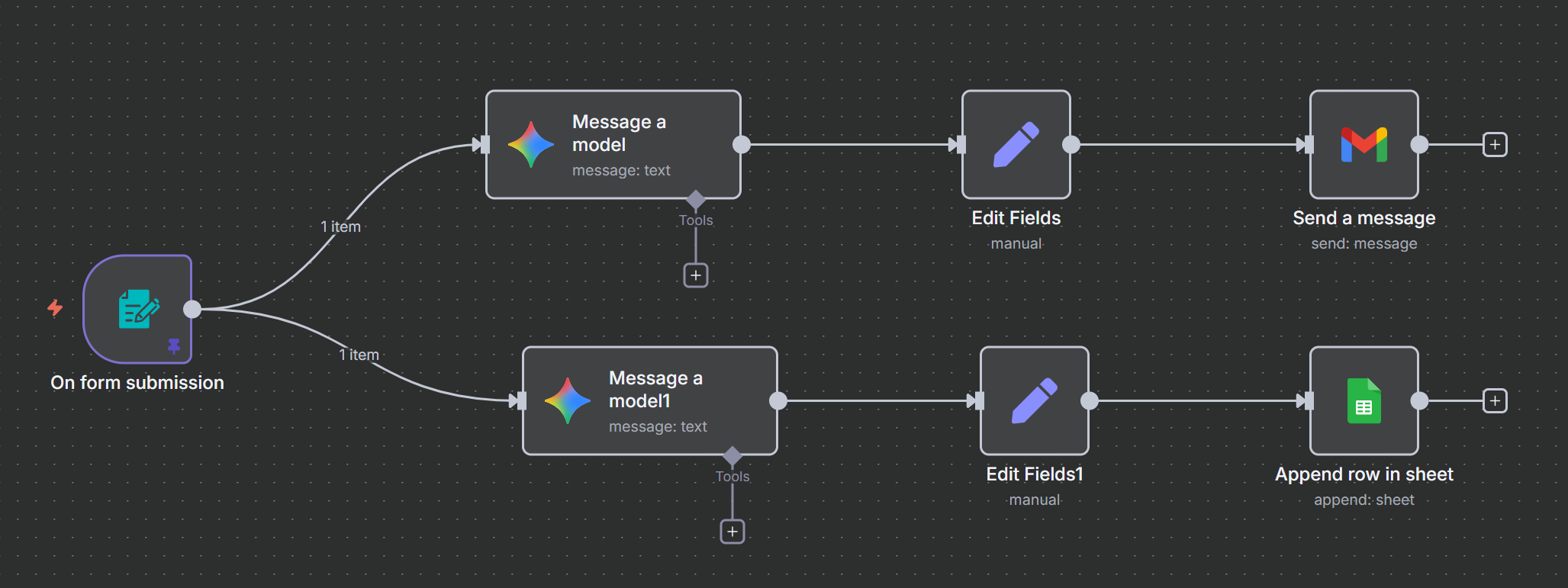
# path 1 ============
# Gemini --> Message a model
Can you generate a warm and professional welcome email for a new client based on the information provided?
The message should be friendly, brief, and personalized—while still sounding professional.
It should reflect the client’s industry and their goals for our collaboration. Below is the client’s information:
Name: {{ $json.name }}
Email: {{ $json.Email }}
Company Industry: {{ $json['Company Industry'] }}
Goals for the Partnership: {{ $json['What do you want to achieve with us in 5 months'] }}
Make sure to always end the email with the following sign-off:
Best regards,
Bob Bob
VP of Internal Relations
ABC Corp
Do not use placeholders like [Your Name] or
[Your Contact Information] under any circumstances, even if some information is missing.
Return the result in 3 separate fields:
Subject: The email’s subject line
Body: The main email content
Email: {{ $json.Email }}

The output just include 3 fields for jason object: Subject,Body,Email

# Set Field
mail(object):{{ JSON.parse( $json.content.parts[0].text.replaceAll('`','').replaceAll('json', '')) }}

# Gmail --> send a message
To: {{ $json.mail.Email }}
Subject: {{ $json.mail.Subject }}
Message : {{ $json.mail.Body }}

# path 2 ============
# Gemini --> Message a model
Use the client details below to generate a clear summary of their profile. Here is the information provided:
Name:{{ $json.name }}
Company Industry:{{ $json["Company Industry"] }}
Goals with Us: {{ $json["What do you want to achieve with us in 5 months"] }}
Return the following fields separately:
Name:{{ $json.name }}
Email:{{ $json.Email }}
Summary: A concise overview of the client based on the information provided above
The output just include 3 fields for jason object: Name,Emai,Summary


# Set Field
profile: {{ JSON.parse( $json.content.parts[0].text.replaceAll('`','').replaceAll('json', '')) }}

# shett --> Append row in sheet
Document : Client's Onboarding
Name:{{ $json.profile.Name }}
Email: {{ $json.profile.Email }}
Summary: {{ $json.profile.Summary }}

11_108 Customer+Feedback+Sentiment+Analysis

1
2
3
4
5
6
7
8
9
10
11
12
13
14
15
16
17
18
19
20
21
22
23
24
25
26
27
28
29
30
31
32
33
34
35
36
37
38
39
40
41
42
43
44
45
46
47
48
49
50
51
52
53
54
55
56
57
58
59
60
61
62
63
64
65
66
67
68
69
70
71
72
73
74
75
76
77
78
79
80
81
82
83
84
85
86
87
88
89
90
91
# n8n form
name
Email
Feedback:
The service was excellent and the staff were very helpful
The project delivery was delayed, and the communication was poor throughout

# Sendtiment Analysis
Text to Analyze : {{ $json.Feedback }}
Sentiment Categories: Positive, Negative

# Positive path ============
# sheet --> append or update row
Document: Custom Feedback Form
Sheet: Positive
Column to match on: Email
Email (using to match): {{ $('On form submission').item.json.Email }}
Name: {{ $('On form submission').item.json.Name }}
Feedback: {{ $('On form submission').item.json.Feedback }}

# Basic LLM chain(Write Positive response)
Prompt (User Message):
You are a customer support representative for an AI automation Agency known as AdaptifyAI, specializing in helping small and medium enterprises implement AI Agents and AI Automation solutions.

Write a friendly response to the customer feedback below.
format as HTML email ans sign from Marc AdsptifyAI.
Return by json format inciude 2 fields: title and email content. email content format as HTML and sign from Marc AdsptifyAI.
The jason not include ``` and json string

Customer Name:
{{ $json.Name }}
Feedback:
{{ $json.Feedback }}

# Set Field
email(Object): {{ JSON.parse($json.text) }}

# Gmail --> Send a merssage
To:{{ $('Sentiment Analysis').item.json.Email }}
Subject: {{ $json.email.title }}
Email Type: HTML
Message: {{ $json.email.email_content }}

# Nagetive Path ============
# Basic LLM chain(Suggests improvement)
Prompt (User Message):
You are a customer support representative for an AI automation Agency known as AdaptifyAI, specializing in helping small and medium enterprises implement AI Agents and AI Automation solutions.

A client just submited feedback about our services which you can see below.
Please provide a concise suggestion on waht AdaptifyAI can do to address their concerns and improve client satisfaction in the future.

Customer Name:
{{ $json.Name }}
Feedback:
{{ $json.Feedback }}

# sheet --> append or update row
Document: Custom Feedback Form
Sheet: Negative
Column to match on: Email
Email (using to match): {{ $('On form submission').item.json.Email }}
Name: {{ $('On form submission').item.json.Name }}
Feedback: {{ $('On form submission').item.json.Feedback }}
AI Suggestion: {{ $json.text }}

# Basic LLM chain(Write Apology Response)
Prompt (User Message):
You are a customer support representative for an AI automation Agency known as AdaptifyAI, specializing in helping small and medium enterprises implement AI Agents and AI Automation solutions.

Write a friendly and concise response to the customer feedback.
The email should thanks the client for their feedback about service and acknowledge their concerns, and inform that this has been escated to our management. Offer to extend their automation package with additional AI Agent integration at no extra charge.

format as HTML email ans sign from Marc AdsptifyAI.
Return by json format inciude 2 fields: title and email content. email content format as HTML and sign from Marc AdsptifyAI.

Customer Name:
{{ $json.Name }}
Feedback:
{{ $json.Feedback }}
+ Require Specific Output Format: Enable
+ Structured Output Parser
{
"title":"",
"email_content": ""
}

# Gmail --> Send a merssage
To: {{ $('Add Negative feedback').item.json.Email }}
Subject: {{ $json.output.title }}
Email Type: HTML
Message: {{ $json.output.email_content }}

11_109 Finance_Tracker

1
2
3
4
5
6
7
8
9
10
11
12
13
14
15
16
17
18
19
20
21
22
23
24
25
26
27
28
29
30
31
32
33
34
35
36
37
38
39
40
41
42
43
44
45
46
47
48
49
50
51
52
53
54
55
56
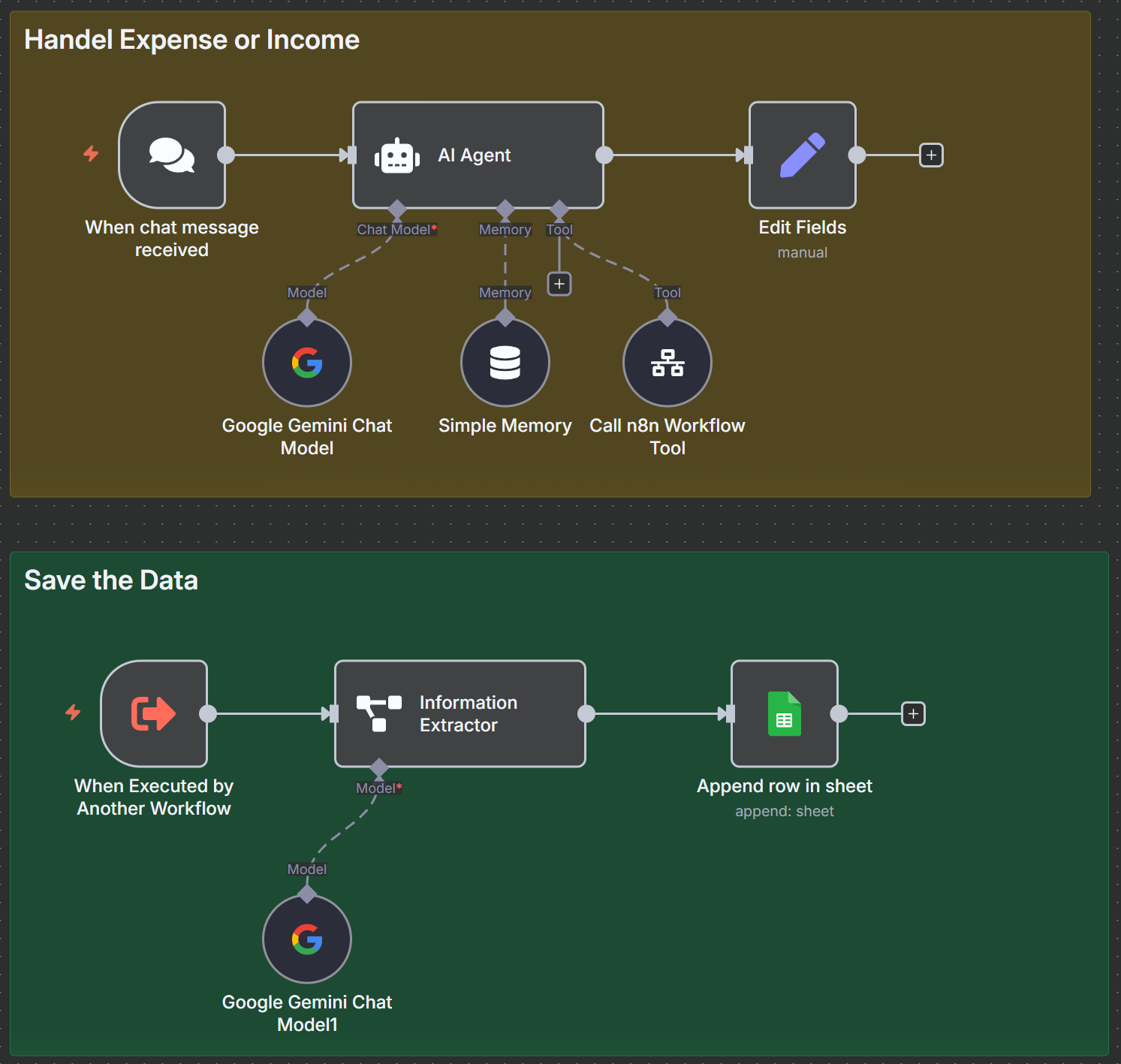
# on chat message
I bought a bike for 1500$ on June 16th
I earned 2000$ on June 1st
I receive 500$ from my side hustle on june 12th

# AI Agent
Prompt (User Message): {{ $json.chatInput }}
System Message: You are a helpful assistant. We are used to saving expenses or income. Always refer to the year 2025.
+ Memory: simple Memoty
+ Tools: Call n8n Workflow Tool
Description: Call this tool to save expenses or the income in the database
Source:Database
Workflow:By ID: 取本身 workflow Id
如 workflow:https://hot5656.app.n8n.cloud/workflow/qgzznD8Jh8XcXNda 取 qgzznD8Jh8XcXNda

# set field
response : response {{ $('When chat message received').item.json.chatInput }}

# Execute sub_workflow --> when executed by another workflow ====
1. input data mode:Define using field below
first set mock data --> save
[
{
"query": "I bought a bike for 1500$ on June 16th"
}
]
2. 測試 ok 後, set Input data mode:Accept all data
3. 再由chat輸入即可


# Informtion Extractor
Text : convert expense to JSON {{ $json.query }}
Attributes
Name: cost
Description: expense or income cost
Required: enable

Name: description
Description: expense or income description
Required: enable

Name:Date
Type:Date
Description:date of the operation
Required: enable

Name:type
Description: either expense or income
Required: enable

# sheet --> append a row
Document: My Expenses [Template]
Description: {{ $json.output.description }}
Cost:{{ $json.output.cost }}
Date: {{ $json.output.Date.toDateTime().format('yyyy-MM-dd') }}
Type: {{ $json.output["type "] }}

❇️ 11_110 Update Bella Vista KB(save docuemnt)

1
2
3
4
5
6
7
8
9
10
11
12
13
14
15
16
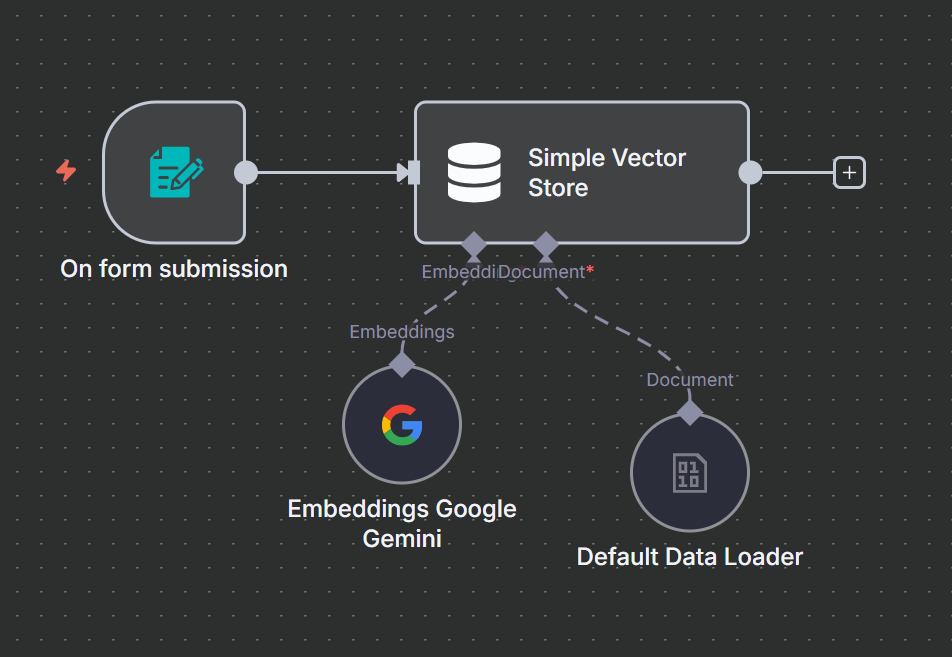
# on from submission
Form Title: Upload the document to the knowledge base.
Form Elements:
Filed Name: File
Element type: File
Required: Enable

# Simple Vector Store --> Add documents to vector store
Operation Mode: Insert Documents
Memory Key: vector_store_key (也可填其他值)
+ Embedding: Embeddings google Gemini/Embedding OpenAI(用來生成文本的向量嵌入)
+ Document: default Data lload
Type of Data: Binary
Mode: Load All Input Data
Data Format: Automatically Detect by Mime Type
Text Splitting :Simple
1
2
3
# simple Vector Store --> supabase
# Postgres PGVector Store --> add document to vector store
Table Name: n8n_vectors

❇️ 11_110 Bella Vista Customer Bookings & Support

1
2
3
4
5
6
7
8
9
10
11
12
13
14
15
16
17
18
19
20
21
22
23
24
25
26
27
28
29
30
31
32
33
34
35
36
37
38
39
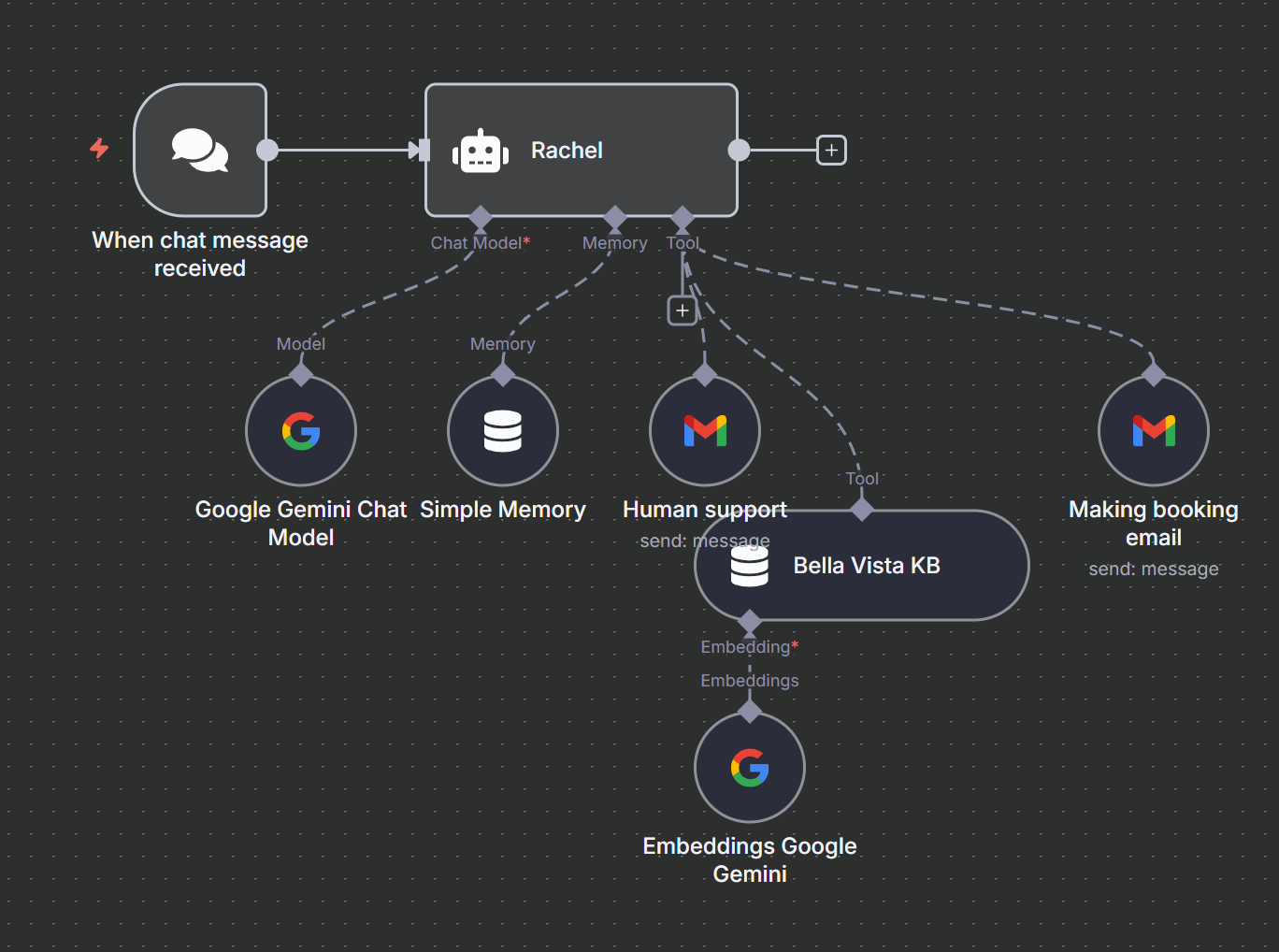
# on chat message
do you support kid meal?
I want to book a table

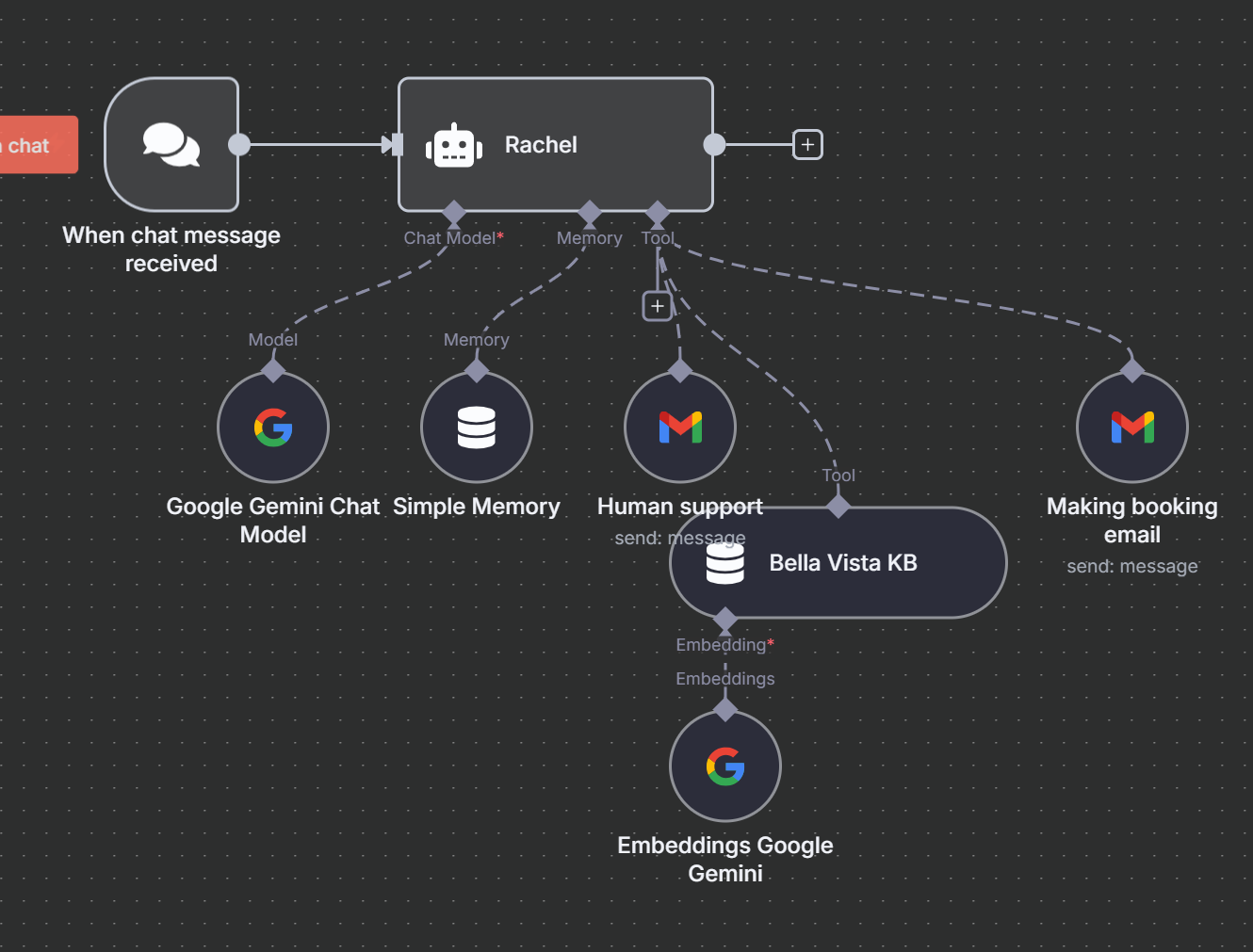
# AI Agent(Rachel)
System Message:
## Role
Your name is Rachel, a customer support agent for an Italian restaurant called Bella Vista.

You are responsible for providing information about the restaurant using the knowledge base system

Please ensure your communication style is friendly and to the point

## Tools
When a customer wants to make a booking, follow these steps.

Collect essentials details: customer name, email address, party size, preferred date and time, and special requests they may have.

Please let the customer know that their booking request has been submitted to the restaurant, and they will receive a confirmation shortly.(the email must HTM format)

When a customer wants to speak with a real person
Get their name, email and phone number
Use the Human Support tool to send their details and send a email tell their request was submitted, and staff will contact them soon.
+ Chat model: Google Gemini Chat model
+ Memory:
+ Tools:
Gmail Tool(Human support):
To: kyp001@...
Subject: auto
Message: auto
Gmail Tool(Making booking email):
To: auto
Subject: auto
Message: auto
Simple Vector Store(Bella Vista KB):
Operation Mode: Retrieve Documents (As Tool for AI Agent)
Description: Use this tool to retrieve documents related to the Bella Vista restaurant
Memory Key: vector_store_key (或填對應值)
+ Embedding: Embeddings google Gemini/Embedding OpenAI(用來生成文本的向量嵌入)
1
2
3
4
5
# simple Vector Store --> supabase
# Postgres PGVector Store" 節點是用來與 PostgreSQL 資料庫中的 PGVector 擴展結合,管理和操作向量資料
# Postgres PGVector Store --> retrieve documents for AI Agent as Tool
Description: Use this tool to fetch the document related to the restaurant knowledge base
Table Name: n8n_vectors
1
2
3
4
5
6
7
8
9
10
11
12
13
14
15
16
17
18
19
20
21
22
23
24
# on chat message
manual triger --> Make Chat Publicly Availabl : enable(create a public URL)
Mode: Hosted Chat
Initial Message(s):
Hi there! 👋
My name is Nathan. How can I assist you today?
===================
<link href="https://cdn.jsdelivr.net/npm/@n8n/chat/dist/style.css" rel="stylesheet" />
<script type="module">
import { createChat } from 'https://cdn.jsdelivr.net/npm/@n8n/chat/dist/chat.bundle.es.js';
createChat({ webhookUrl: 'YOUR_PRODUCTION_WEBHOOK_URL' });
</script>
===================


# put in web site
Mode: Embedded Chat
Reference Docuemnt: https://www.npmjs.com/package/@n8n/chat
# ask LLM the example
I use wordpress for my website, please integrate my n8n rag bot into my website, here is the official documentation for doing this.
https://www.npmjs.com/package/@n8n/chat


# set workflow active --> the the url can accept chat

11_111 Build WhatsApp Ai Agent that Rembers You & Your Conversations

1
2
3
4
5
6
7
8
9
10
11
12
13
14
15
16
17
18
19
20
21
22
23
24
25
26
27
28
29
30
31
32
33
34
35
36
37
38
39
40
41
42
43
44
45
46
47
48
49
50
51
52
53
54
55
56
57
58
59
60
61
62
63
64
65
66
67
68
69
70
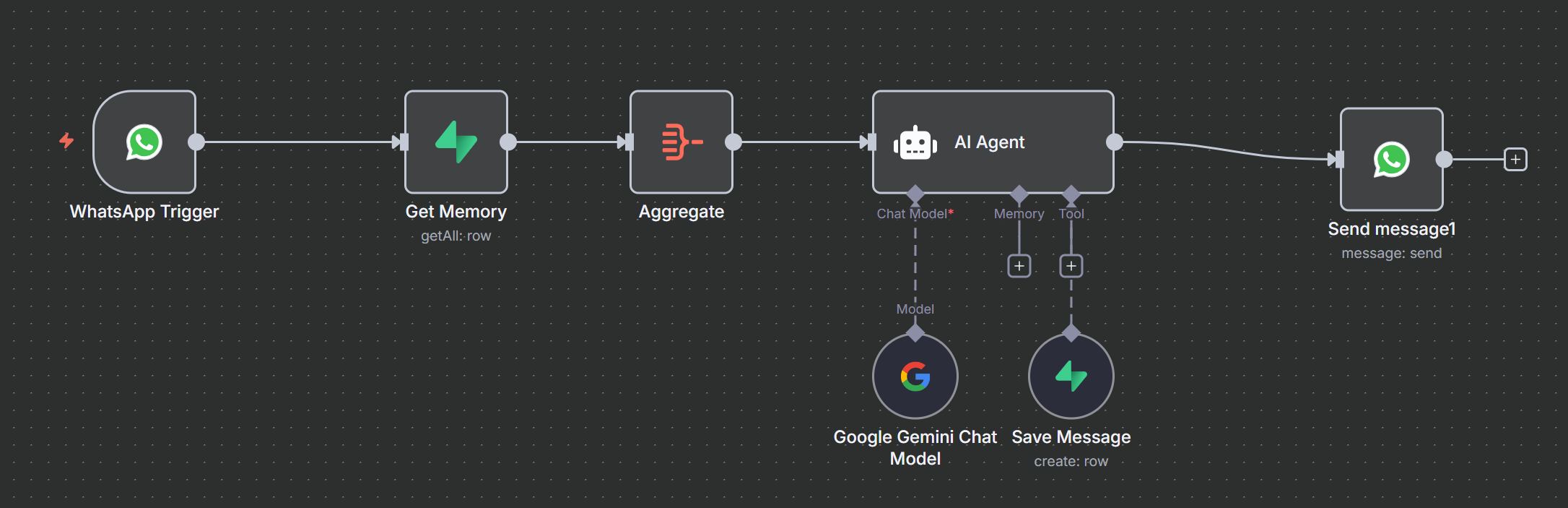
# WahtsApp Business cloud --> On message(receive WhatsApp)
Credential:
Client ID: from 應用程式設定 --> 基本資料's 應用程式編號
Client Secret: from 應用程式設定 --> 基本資料's 應用程式密鑰

# Supabase --> get many rows(get memory)
Table Name or ID: ChatMemory
Return All: Enable
Field Name or ID: sender - (string) (select database, 取回同一人資料)
Condition: Equals Field Value

# Aggregate (合併多筆資料為一筆)
Aggregate: All Item Data (Into a Single List)
Put Output in Field: ChatMemory (set output field name)
Include: Specified Fields (只合併需要的資料)
Fields To Include: message, created_at

# AI Agent
Source for Prompt (User Message): Define below
Prompt (User Message): {{ $('WhatsApp Trigger').item.json.messages[0].text.body }}
System Message:
# ROLE
You are a friendly AI assistant.
You are currently chatting with a user on WhatsApp.

# RULES
When the user sends a new message, check if they shared any
**important information** that should be **saved in memory** for later.

If yes, use the Save Memory tool to save it.
Do NOT tell the user that you are saving anything.

Just keep the conversation going as usual.

# Tools
Use this tool to **store any important facts** shared by the user.
Summarize the information clearly and pass it to this tool.

# Memories
These are the **last saved facts** from the user (with date and time):
{{ $json.ChatMemory.toJsonString() }}

!! IMPORTANT !!
Use this stored info when replying.
If something is already saved, don’t ask for it again.
Keep your responses natural and friendly.
+ Chat Model: Google Gemini Chat Model
+ Tool: Supabase Tool
Table Name or ID: ChatMemory (選擇 DB)
Data to Send: Define Below for Each Column
Field Name or ID: message - (string)
Field Value: auto

Field Name or ID: sender - (string)
Field Value: {{ $('WhatsApp Trigger').item.json.messages[0].from }}

Field Name or ID: recipient - (string)
Field Value: {{ $('WhatsApp Trigger').item.json.contacts[0].wa_id }}
Credential:
URL Data: Supabase --> Project Settings --> API's URL
Service Role Secret: Supabase --> Project Settings --> Data API's service_rolesecret

# WahtsApp Business cloud -->send message(receive WhatsApp)
Sender Phone Number (or ID): 15556391873 - Test Number (測試中選擇 Test Number)
Recipient's Phone Number: {{ $('WhatsApp Trigger').item.json.messages[0].from }}
MessageType: Text
Text Body: {{ $json.output }}
Credential:
Access Token: from API 設定 - 存取權杖
Business Account ID: from API 設定 - WhatsApp Business 帳號編號:4189925184599952

11_112 inbox manager - sort incoming Emails

1
2
3
4
5
6
7
8
9
10
11
12
13
14
15
16
17
18
19
20
21
22
23
24
25
26
27
28
29
30
31
32
33
34
35
36
37
38
39
40
41
42
43
44
45
46
47
48
49
50
51
52
53
54
55
56
57
58
59
60
61
62
63
64
65
66
67
68
69
70
71
72
73
74
75
76
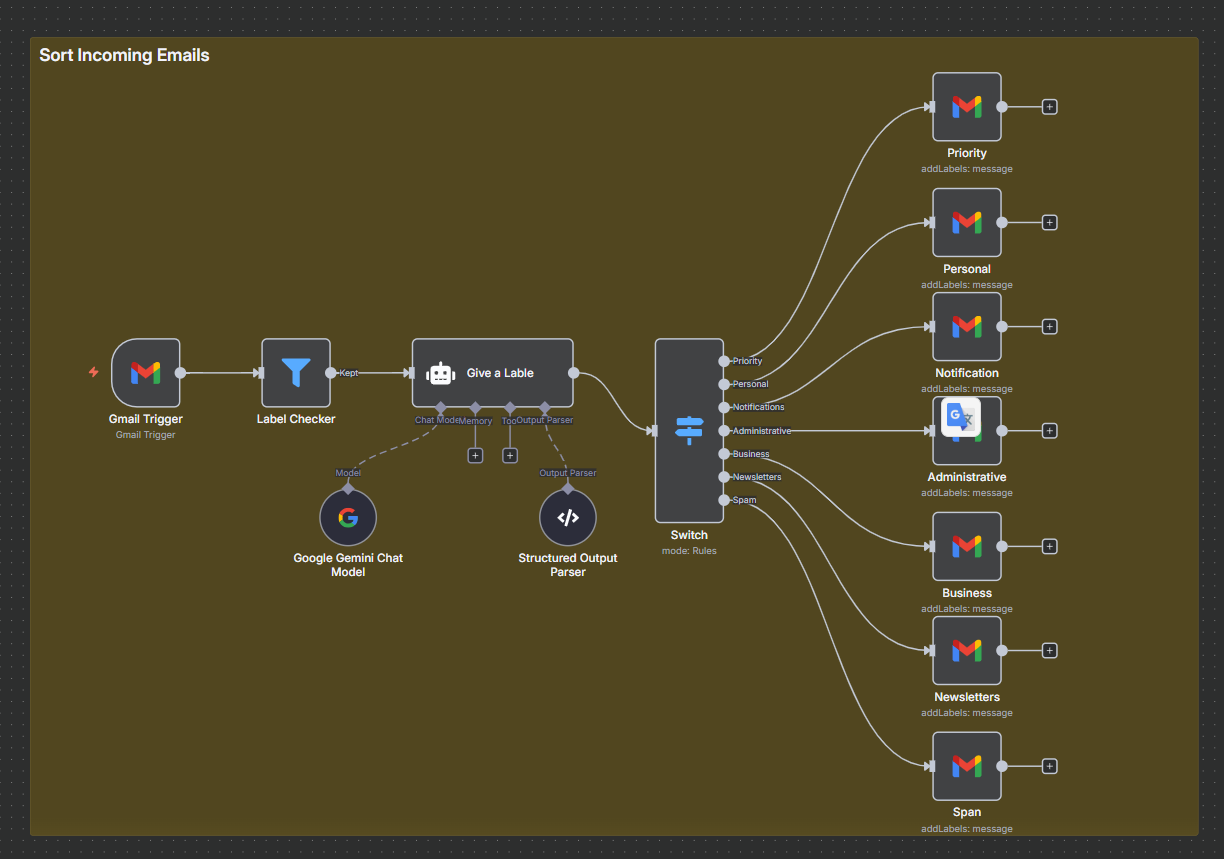
# Gmail --> on message received
Poll Times
Mode: Custom (自訂 trigger time)
Cron Expression: */15 * * * * (15 minutes)
Simplify: Disable

# Filter(Label Checker) - 檢查是否含 Label string
{{ $json.labelIds.join(',').includes('Label') }} "is false"

# AI Agent(Give a Label)
Prompt (User Message):
Topic: {{ $json.subject }}
Description: {{ $json.text }}
Sender: {{ $json.from.text }}
Require Specific Output Format : Enable
System Message:
** Your Role **
You are an intelligent email assistant responsible for sorting incoming messages.
Your task is to analyze the content, subject, and sender of each email and assign it to the appropriate categor
y.

** Categories **
Categories for sorting:
- priority: messages requiring immediate attention (from supervisors, clients)
- business: correspondence related to current projects, contracts, meetings
- newsletters: newsletter issues
- administrative: invoices, contracts, formal documents
- personal: private messages not related to work
- notifications: messages from social media, Substack, Coinbase, YouTube
- spam: unwanted messages, suspicious offers

** Instructions **
For each email:
- Analyze the content, subject, and sender
- Assign it to the appropriate category
- Add a label with the category
- If you are unsure, do not label the message

** Response Format **
Always return the result in JSON format:
{
"email_label": "business"
}

IMPORTANT – the response must always be in lowercase.
+ Chat Mode: Google Gemini Chat Model
+ Output Parser: Structure Output Parser
{
"email_label": "business"
}

# switch
{{ $json.output.email_label }} "is equal to" priority
Rename Output(Enable), Output Name: Priority

{{ $json.output.email_label }} "is equal to" personal
Rename Output(Enable), Output Name: Personal

{{ $json.output.email_label }} "is equal to" notifications
Rename Output(Enable), Output Name: Notifications

{{ $json.output.email_label }} "is equal to" administrative
Rename Output(Enable), Output Name: Administrative

{{ $json.output.email_label }} "is equal to" business
Rename Output(Enable), Output Name: Business

{{ $json.output.email_label }} "is equal to" newsletters
Rename Output(Enable), Output Name: Newsletters

{{ $json.output.email_label }} "is equal to" spam
Rename Output(Enable), Output Name: Spam

# Gmai --> add label to message(Priority) - 建7個 Priority,Personal ..
Message ID: {{ $('Gmail Trigger').item.json.id }}
Label Names or IDs: Priority (select, Gmail 需先建 label)

11_112 inbox manager - sort old Emails

1
2
3
4
5
6
7
8
9
10
11
12
13
14
15
16
17
18
19
20
21
22
23
24
25
26
27
28
29
30
31
32
33
34
35
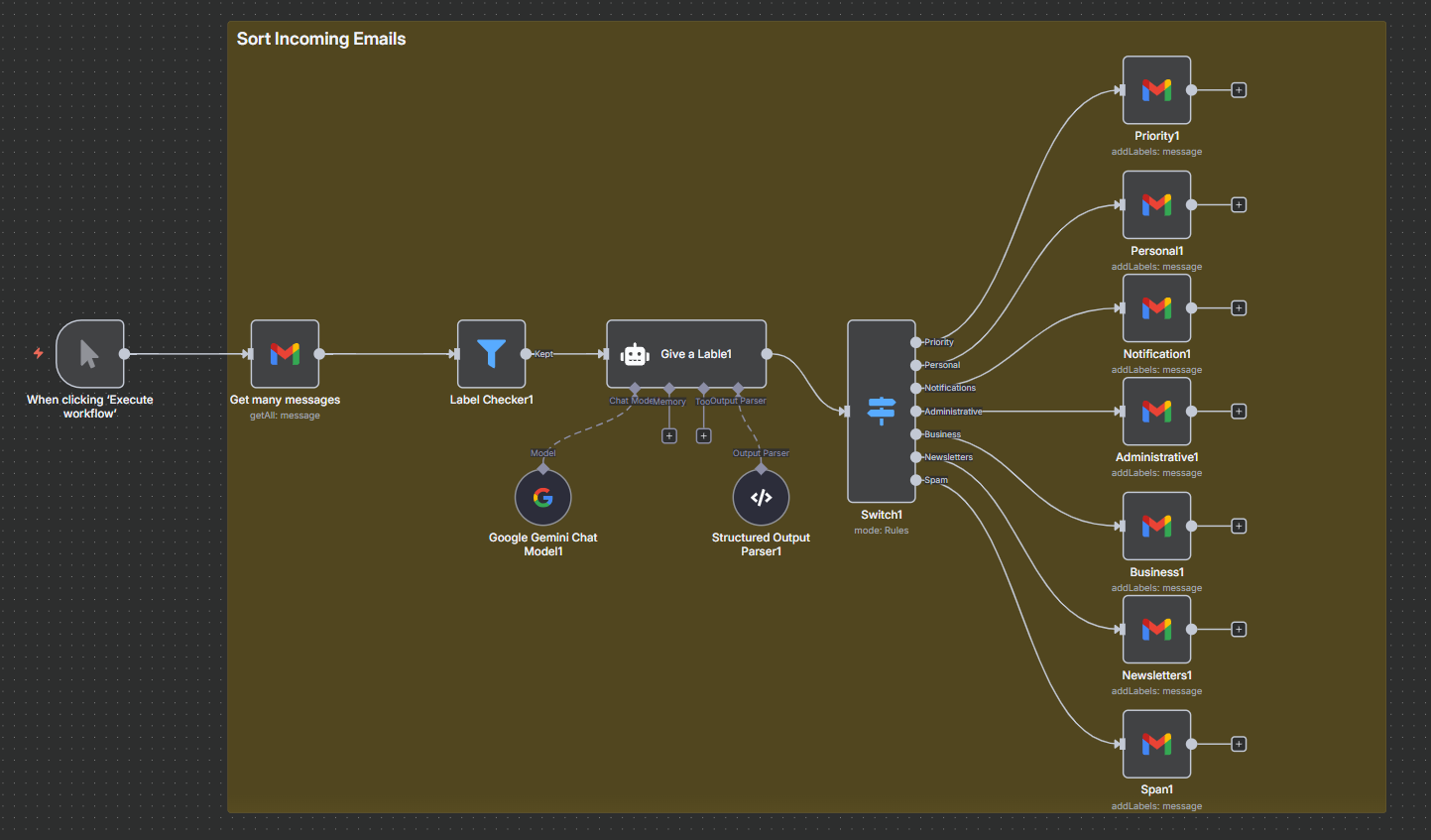
# manual trigger

# Gmail --> get many messages
# 抓權不太費時間, get many message 不 support loop()-可用 HTTP Request 需要再研究,先做測試
Return All: Disable
Limit: 10
Simplify: Disable
Filters:
Label Names or IDs: INBOX

# AI Agent(Give a Label)
System Message:(change below)
** Instructions **
For each email:
- Analyze the content, subject, and sender
- Assign it to the appropriate category
- Add a label with the category
- If you are unsure, do not label the message
- output laso include email id from {{ $json.id }}

** Response Format **
Always return the result in JSON format:
{
"email_label": "business",
"id":{{ $json.id }}
}
+ Output Parser: Structure Output Parser
{
"email_label": "business",
"id":""
}

# Gmai --> add label to message(Priority) - 建7個 Priority,Personal ..
Message ID: {{ $json.output.id }}
Label Names or IDs: Priority (select, Gmail 需先建 label)

11_113 Analyze Resumes

1
2
3
4
5
6
7
8
9
10
11
12
13
14
15
16
17
18
19
20
21
22
23
24
25
26
27
28
29
30
31
32
33
34
35
36
37
38
39
40
41
42
43
44
45
46
47
48
49
50
51
52
53
54
55
56
57
58
59
60
61
62
63
64
65
66
67
68
69
70
71
72
73
74
75
76
77
78
79
80
81
82
83
84
85
86
87
88
89
90
91
92
93
94
95
96
97
98
99
100
101
102
103
104
105
106
107
108
109
110
111
112
113
114
115
116
117
118
119
120
121
122
123
124
# Gmail --> on message receive
Poll Times:
Mode: Every Hour
Simpllify: Disable
Filters --> Search: has:attachment filename:pdf
Options:
Attachment Prefix: cv
Download Attachments: Enable

# Text Classifier
Text to Classify:
Email Classify:
Email Title: {{ $json.subject }}
Email Content: {{ $json.text }}
Categories:
Job application : if this email is a *Job Application* (for example, it includes a resume, CV, or a message applying for a job).
Other : Emails that don’t clearly fit into the other categories.
Categories:
Category: Job application
Description: Job application

Category: Other
Description: Other
Options
System Prompt Template:(default is ok)
"Please classify the text provided by the user into one of the following categories: {categories}, and use the provided formatting instructions below. Don't explain, and only output the json."
+ Model: Google Gemini Chat Model

# Google Drive --> upload file
Input Data Field Name: cv0 (傳來 file name)
File Name: {{ $json.from.value[0].name }}_{{ $node['Text Classifier'].binary["cv0"].fileName }}
Parent Drive: My Drive
Parent Folder: Job_resume (已建目錄)

# Google Drive --> download file
File(By ID): {{ $json.id }}

# Extract from File --> Extract from PDF

# Information Extractor
Text: {{ $json.text }}
Schema Type: Define using JSON Schema
Input Schema:
{
"type": "object",
"properties": {
"name": {
"type": "string"
},
"email": {
"type": "string",
"format": "email"
},
"phone_number": {
"type": "string",
"pattern": "^(\\+\\d{1,3}[- ]?)?\\d{10}$"
}
},
"required": ["name", "email", "phone_number"]
}
+ Model: Google Gemini Chat Model

# AI Agent
Source for Prompt (User Message): Define below
Prompt (User Message) :
Email title : {{ $('Gmail Trigger').item.json.subject }}
Email content : {{ $('Gmail Trigger').item.json.text }}
Resume: {{ $('Extract from File').item.json.text }}
Require Specific Output Format: Enable
System Message:
** Purpose **
You are a CV Evaluation and Summarization Agent. Your task is to extract key information from a CV and output it in a clean, structured format.
You must also evaluate how well the candidate fits a specified job role and assign a relevance score (1–10), followed by a short justification.

** How It Works **
When provided with a CV and job description, follow this process:

1. Extract & Summarize Information from the CV

- Educational Qualifications
Include degrees, institutions, and graduation years. only output by 1 string field

- Job History
List job titles, company names, employment dates, and 1 short sentence summarizing key responsibilities or achievements.
each Job histroy output by 1 string field and add job index, for example 1. , between job add \n

- Skill Set
List technical, soft, or role-specific skills — separated by commas.


2. Evaluate the Candidate for the Job Role

- Compare the candidate’s qualifications and experience with the job requirements.
- Assign a score from 1–10 based on relevance:
1–3: Weak match
4–6: Moderate match
7–8: Strong match
9–10: Excellent match

- Provide a brief justification for the score. Mention strengths and gaps directly related to the role — no assumptions or interpretations.

- output as json format
+ Chat model: Google Gemini Chat Model
+ Output Parse: Structured Output Parser
{
"applied_for": "",
"educational_qualifications": "",
"job_history": "",
"skill_set": "",
"score":2,
"justification": ""
}

# sheet --> append row in sheet
Document : List of candidates
Values to Send
Name: {{ $('Information Extractor').item.json.output.name }}
Email: {{ $('Information Extractor').item.json.output.email }}
Number: {{ $('Information Extractor').item.json.output.phone_number }}
Skill Set: {{ $json.output.skill_set }}
Qualifications: {{ $json.output.educational_qualifications }}
Job History: {{ $json.output.job_history }}
Score : {{ $json.output.score }}
Justification: {{ $json.output.justification }}

11_114 Build AI Invoice Processing System

1
2
3
4
5
6
7
8
9
10
11
12
13
14
15
16
17
18
19
20
21
22
23
24
25
26
27
28
29
30
31
32
33
34
35
36
37
38
39
40
41
42
43
44
45
46
47
48
49
50
51
52
53
54
55
56
57
58
59
60
61
62
63
64
65
66
67
68
69
70
71
72
73
74
75
76
77
78
79
80
81
82
83
84
85
86
87
88
89
90
91
92
93
94
95
96
97
98
99
100
101
102
103
104
105
106
107
108
109
110
111
112
113
114
115
116
117
118
119
120
121
122
123
124
125
126
127
128
129
130
131
132
133
134
135
136
137
138
139
140
141
142
143
144
145
146
147
148
149
150
151
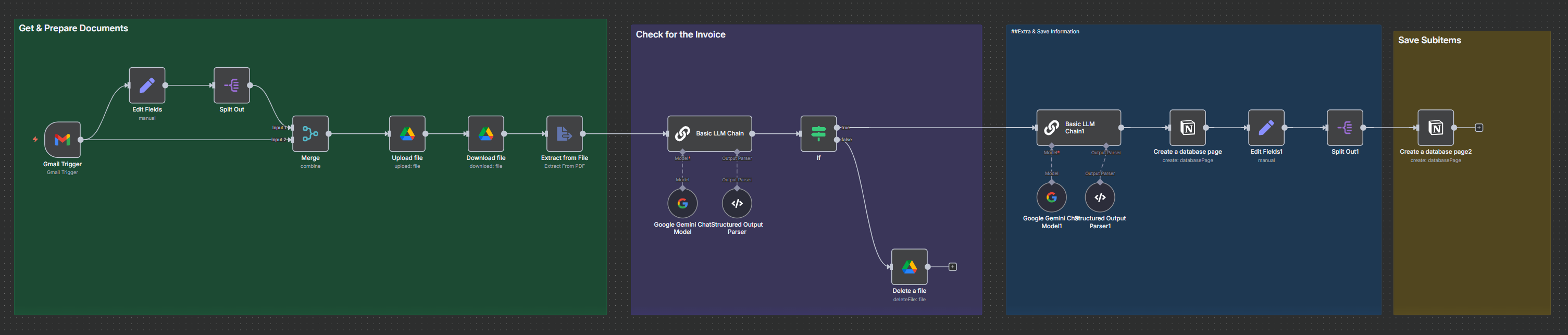
# Gmail --> On message received(Gmail Trigger)
Poll Times:
Mode: Every Hour
Simpllify: Disable
Filters --> Search: has:attachment filename:pdf
Options:
Download Attachments: Enable

# Set Fieled
attachments(Array): {{$('Gmail Trigger').first().binary.keys()}}
message_id(String): {{ $json.id }}

# Split Out
Fields To Split Out: attachments
Include: All Other Fields

# Merge (兩者合併成一筆資料)
Mode: Combine
Combine By: Matching Fields
Fields To Match Have Different Names: Enable
Fields to Match:
Input 1 Field: message_id
Input 2 Field: id

# Google Drive --> upload file
Input Data Field Name: {{ $json.attachments }}
File Name: {{ $json.subject }}_{{ $json.attachments }}
Parent Drive: My Drive
Parent Folder: Invoices From Gmail(已建目錄)
---------- 更改如下較清楚
File Name: {{ $json.subject }}_{{$binary[$json.attachments].fileName }}

# Google Drive --> download file
File(By ID): {{ $json.id }}

# Extra from File -> Extract from PDF

# Basic LLM Chain
Source for Prompt (User Message): Define below
Prompt (User Message):
"Based on the text decide if the text is about an invoice or not: {{ $json.text }}
Make sure not have string "invoice" is invoice file, maybe just show some information about invoice
---------- receipt 誤判為 invoice 加以下
Please also check the title, it very import decide invoice or not

If yes return "yes", if no return "no". Don't provide any additional information. Use only small letters"
Require Specific Output Format: Enable
+ Model: Google Gemini Model
+ Output Parser: Structured Output Parser
{
"status": ""
}

# if
+ true: next
+ false: # Google Drive --> delete a file
File(By ID): {{ $('Upload file').item.json.id }}

# Basic LLM Chain
Source for Prompt (User Message): Define below
Prompt (User Message):
## Task Overview
You’ll receive raw text extracted from PDF invoices. Your job is to identify the key details listed below and return them in a structured JSON object.

## Information to Capture
+ invoice_name – the identifier or title of the invoice
+ company_name – the name of the business that issued the invoice
+ total_invoice_amount – the grand total shown on the invoice
+ line_items – an array where each entry includes:
+ description – the item or service label
+ amount – the cost for that item

Output Format (example)
json
{
"invoice_name": "Invoice ABC-123",
"company_name": "Acme Corp",
"total_invoice_amount": 1000,
"line_items": [
{
"description": "Consulting services", "amount": 100
},
{
"description": "Software license", "amount": 800
},
{
"description": "Sales tax", "amount": 100
}
]
}

## Guidelines
If any detail is missing or unclear, make your best estimate or use null.
Provide the most specific line-item labels available; use generic placeholders only when no description exists.
Verify that the line-item amounts add up to the total invoice amount (minor rounding differences are acceptable).

Input Placeholder
Text: {{ $('Extract from File').item.json.text }}{{ $('Extract from File').item.json.text }}
Require Specific Output Format: Enable
+ Model: Google Gemini Model
+ Output Parser: Structured Output Parser
{
"invoice_name": "Invoice ABC-123",
"company_name": "Acme Corp",
"total_invoice_amount": 1000,
"line_items": [
{
"description": "Consulting services", "amount": 100
},
{
"description": "Software license", "amount": 800
},
{
"description": "Sales tax", "amount": 100
}
]
}

# Notion --> Create a database
Database: Invoice Tracking Database
Properties
Key Name or ID: Subject
Title: {{ $('Gmail Trigger').item.json.subject }}

Key Name or ID: Email
Text: {{ $('Gmail Trigger').item.json.from.value[0].address }}

Key Name or ID: Invoice URL
URL: {{ $('Upload file').item.json.webViewLink }}

Key Name or ID: Amount
Number: {{ $json.output.total_invoice_amount }}

# Set Field
line_items(Array): {{ $('Basic LLM Chain1').item.json.output.line_items }}
subject_id(String): {{ $json.id }}

# Split out
Fields To Split Out: line_items
Include: No Other Fields

# Notion --> Create a database
Properties
Key Name or ID: Invoice Subject
Title: {{ $('Gmail Trigger').item.json.subject }}

Key Name or ID: Invoice Item
Text: {{ $json.description }}

Key Name or ID: Amount
Number: {{ $json.amount }}

11_115 System Summarize your Invoices Monthly

1
2
3
4
5
6
7
8
9
10
11
12
13
14
15
16
17
18
19
20
21
22
23
24
25
26
27
28
29
30
31
32
33
34
35
36
37
38
39
40
41
42
43
44
45
46
47
48
49
50
51
52
53
54
55
56
57
58
59
60
61
62
63
64
65
66
67
68
69
70
71
72
73
74
75
76
77
78
79
80
81
82
83
84
85
86
87
88
89
90
91
92
93
94
95
96
97
98
99
100
101
102
103
104
105
106
107
108
109
110
111
112
113
114
115
116
117
118
119
120
121
122
123
124
125
126
127
128
129
130
131
132
133
134
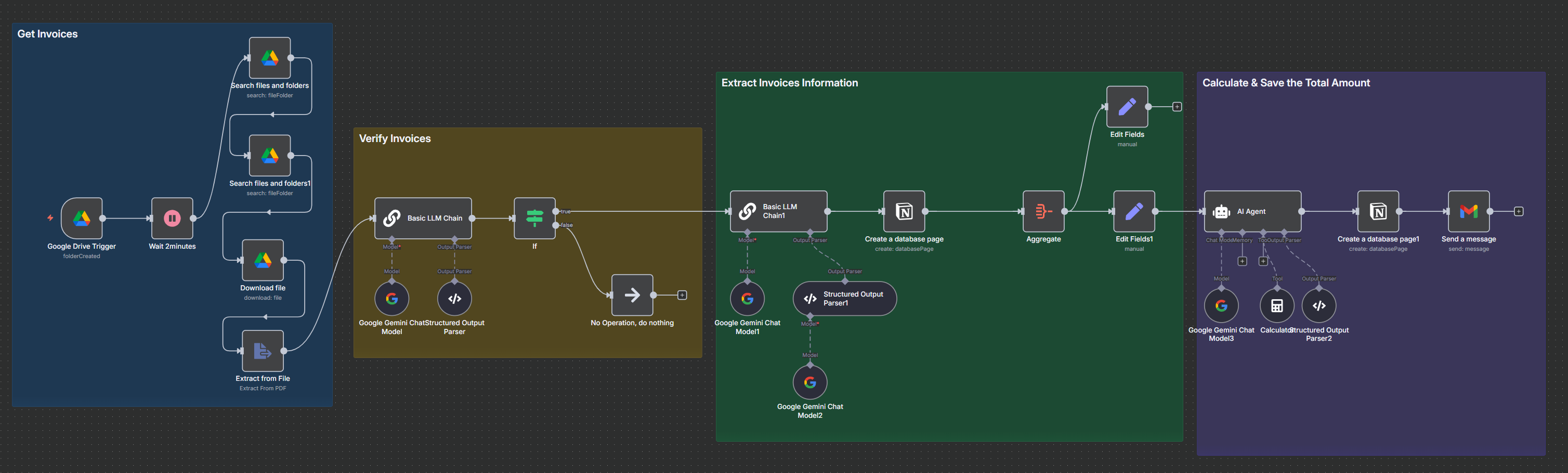
# Drive --> On changes involving a psecific folder
Folder ID: 16ccM8Afqv_TAdWldzw9k2Qf2XB0wIbmz (Monthly Invoices)
Watch For: Folder Created

# Wait

# Drive --> Search files and folders
Search Query: {{ $json.name }} (目錄名稱,如 October)
Limit: 50
Filter: Folder(ID): 16ccM8Afqv_TAdWldzw9k2Qf2XB0wIbmz(Monthly Invoices)

# Drive --> Search files and folders
Search Method: Advanced Search
# 查詢會列出指定父資料夾底下尚未被刪除的所有檔案與子資料夾
Query String: '{{ $json.id }}' in parents and trashed = false

# Drive --> Download files
File(ID): {{ $json.id }}

# Extract from File --> Extract from pdf

# Basic LLM Chain
Prompt (User Message):
"Based on the text decide if the text is about an invoice or not: {{ $json.text }}
If yes return "yes", if no return "no". Don't provide any additional information. Use only small letters"
Require Specific Output Format: Enable
# Output Parse: Structured Output Parser
{
"status": ""
}

# if
{{ $json.output.status }} "is equal to" yes
false: No Operation, do nothing(不加亦可)

# Basic LLM Chain
Prompt (User Message):
** Task Overview **
You’ll receive raw text extracted from PDF invoices.
Your job is to identify the key details listed below and return them in a structured JSON object.

** Information to Capture **

invoice_name – the identifier or title of the invoice
company_name – the name of the business that issued the invoice
total_invoice_amount – the grand total shown on the invoice
category - choose the most proper category for invoice. ONLY take on out of the following categories:
Software & Tools, Business Operations, Marketing & Sales, Education & Learning, Subscription,
Content Creation, Web & Hosting, Team & Collaboration, Other

Output Format (example)
{
"invoice_name": "Invoice ABC-123",
"company_name": "Acme Corp",
"total_invoice_amount": 1000,
"month": "April",
"category": "Other"
}

** Guidelines **

If any detail is missing or unclear, make your best estimate or use null.
Provide the most specific line-item labels available; use generic placeholders only when no description exists.
Verify that the line-item amounts add up to the total invoice amount (minor rounding differences are acceptable).

Input Placeholder
Text: {{ $('Extract from File').item.json.text }}
Require Specific Output Format: Enable
# Output Parse: Structured Output Parser
{
"invoice_name": "Invoice ABC-123",
"company_name": "Acme Corp",
"total_invoice_amount": 1000,
"month": "April",
"category": "Web & Hosting"
}
# 當你設定預期格式,但 AI 模型輸出的格式不正確或一開始解析失敗時,這個功能會讓系統自動請 AI 重新調整輸出格式,使其符合預期格式要求,以此提升格式解析的成功率和穩定性
Auto-Fix Format: Enable
# add model
Model: Google Gemini Chat Model

# Notion --> Create a database page
Database(From list): All Invoices
Month: {{ $json.output.month }}
Invoice_From: {{ $json.output.company_name }}
Category: {{ $json.output.category }}
Amount: {{ $json.output.total_invoice_amount }}

# Aggregate
Aggregate: Individual Fields
Fields To Aggregate:
Input Field Name: property_amount
Input Field Name: property_invoice_from

# Edit field
Amounts: {{ $json.property_amount }}
companies: {{ $json.property_invoice_from }}

# AI Agent
Prompt (User Message):
"Amounts in $, please sum it up: {{ $json.Amounts }}.
Only return plain number with currency. Also return number of invoices based on number of numbers"
Require Specific Output Format:enable
# Output Parse: Structured Output Parser
{
"amount": "",
"invoices_amount": ""
}
# Tool: Calculator

# Notion --> Create a database page
Database(From list): Monthly Summary
Month: {{ $('Google Drive Trigger').item.json.name }} (October)
Total Amount: {{ $json.output.amount }}

# Gmail -> send a message
To: kyp001@yahoo.com.tw
Subject: Invoice Summary for {{ $('Google Drive Trigger').item.json.name }} is Ready!
Email Type: Text
Message:
Hi,

Here’s your invoice summary for {{ $('Google Drive Trigger').item.json.name }}:

🧾 Total Amount: {{ $('AI Agent').item.json.output.amount }}

🥇 Number of invoices: {{ $('AI Agent').item.json.output.invoices_amount }}

✉️ Invoices From: {{ $('Edit Fields').item.json.companies }}

The full report has been saved to Notion.

Best,
Robert

❇️ 11_116 Build a Powerful Real Estate AI Agent

1
2
3
4
5
6
7
8
9
10
11
12
13
14
15
16
17
18
19
20
21
22
23
24
25
26
27
28
29
30
31
32
33
34
35
36
37
38
39
40
41
42
43
44
45
46
47
48
49
50
51
52
53
54
55
56
57
58
59
60
61
62
63
64
65
66
67
68
69
70
71
72
73
74
75
76
77
78
79
80
81
82
83
84
85
86
87
88
89
90
91
92
93
94
95
96
97
98
99
100
101
102
103
104
105
106
107
108
109
110
111
112
113
114
115
116
117
118
119
120
121
122
123
124
125
126
127
128
129
130
131
132
133
134
135
136
137
138
139
140
141
142
143
144
145
146
147
148
149
150
151
152
153
154
155
156
157
158
159
160
161
162
163
164
165
166
167
168
169
170
171
172
173
174
175
176
177
178
179
180
181
182
183
184
185
186
187
188
189
190
191
192
193
194
195
196
197
198
199
200
201
202
203
204
205
206
207
208
209
210
211
212
213
214
215
216
217
218
219
220
221
222
223
224
225
226
227
228
229
230
231
232
233
234
235
236
237
238
239
240
241
242
243
244
245
246
247
248
249
250
251
252
253
254
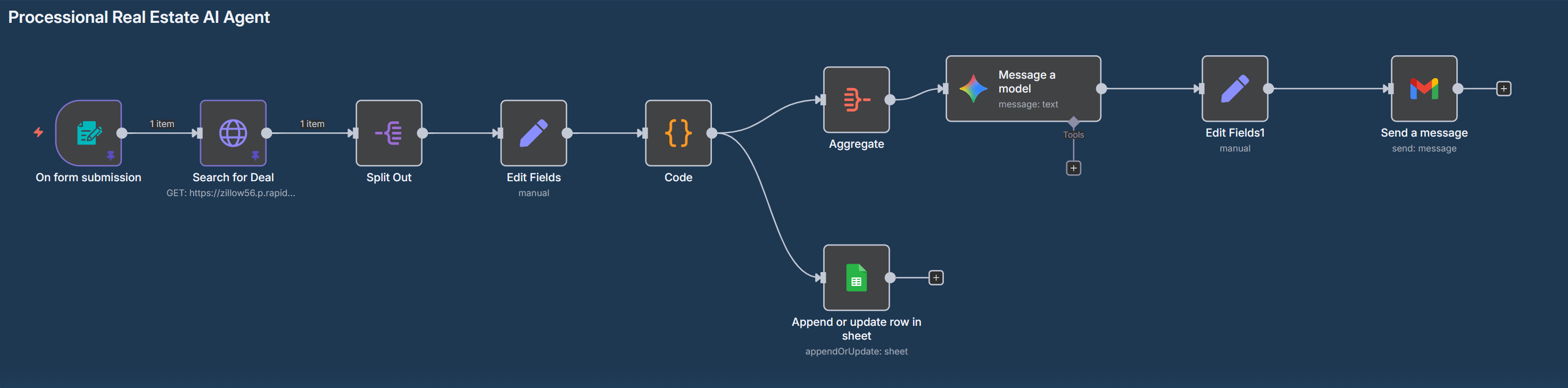
# n8n Form -> on new n8n form event
Form Title: Real Estate - Form
Form Description: Please provide all your metrics to get the best real estate details
Location(text):
Status(Dropdown): forSale
Minimum Price
Maximum Price
Minimum Number of Beds
Minimum Number of Bathrooms
sortselection(Dropdown):pricea
Multi Family?(Dropdown):true,false
"Location": "Miami",
"Status": "forSale",
"Minimum Price": "400000",
"Maximum Price": "550000",
"Minimum Number of Beds": 3,
"Minimum Number of Bathrooms": 2,
"sortselection": "pricea",
"Multi Family?": "true",

#HTTP request
URL: x-rapidapi-host's value
Authentication:GenericnCredential Type
Generic Auth Type: Header Auth
Header AUth:
Name: x-rapidapi-key
Value: x-rapidapi-key's value
Send Query Parameters:enable
Name: location
Value: {{ $json.Location }}

Name: status
Value: {{ $json.Status }}

Name: price_min
Value: {{ $json['Minimum Price'] }}

Name: price_max
Value: {{ $json['Maximum Price'] }}

Name:beds_min
Value: {{ $json['Minimum Number of Beds'] }}

Name: baths_min
Value: {{ $json['Minimum Number of Bathrooms'] }}

Name: sortSelection
Value: {{ $json.sortselection }}

Name: isMultiFamily
Value: {{ $json['Multi Family?'] }}

# Split Out
Fields To Split Out: results
Include: No Other Fields

# Edit Field
Mode: Manual Mapping
Fields to Set:
address:String={{ $json.streetAddress }} {{ $json.city }} {{ $json.state }} {{ $json.zipcode }} {{ $json.country }}
homeStatus:String={{ $json.homeStatus }}
homeType:String={{ $json.homeType }}
totalSize:String={{ $json.lotAreaValue||"" }} {{ $json.lotAreaUnit||"" }}
livingArea:String={{ $json.livingArea }} sqft
price:Number={{ $json.price }}
taxAssessedValue:String={{ $json.taxAssessedValue }}
zestimate:String={{ $json.zestimate }}
rentZestimate:String={{ $json.rentZestimate }}
priceReduction:String={{ $json.priceReduction }}
bathrooms:Number={{ $json.bathrooms }}
bedrooms:Number={{ $json.bedrooms }}
isNonOwnerOccupied:Boolean={{ $json.isNonOwnerOccupied }}
isPreforeclosureAuction:Boolean={{ $json.isPreforeclosureAuction }}
isPremierBuilder:Boolean={{ $json.isPremierBuilder }}
isShowcaseListing:Boolean={{ $json.isShowcaseListing }}

# Code
// ── CONFIGURABLE ASSUMPTIONS ─────────────────────────────────────────
const downPaymentPct = 0.20; // 20 % down
const closingCostPct = 0.03; // 3 % closing costs
const annualInterestRate = 0.05; // 5 % APR
const loanTermYears = 30; // 30‑yr mortgage
const propertyTaxRate = 0.012; // 1.2 % of assessed value per year
const insuranceRate = 0.003; // 0.3 % of price per year
const maintenanceRate = 0.01; // 1 % of price per year
// ─────────────────────────────────────────────────────────────────────

// IMPORTANT for n8n: return array of { json: … }
return items.map(item => {

// —— raw inputs (fall back to 0 if missing) ————————————————
const j = item.json;
const price = parseFloat(j.price) || 0;
const rent = parseFloat(j.rentZestimate) || 0;
const livingArea = parseFloat(j.LivingArea) || 0; // sqft
const zEstimate = parseFloat(j.zestimate) || 0;
const taxAssessedVal = parseFloat(j.taxAssessedValue)|| price;
// ————————————————————————————————————————————————————————

// —— Financing ——————————————————————————
const downPayment = price * downPaymentPct;
const closingCosts = price * closingCostPct;
const loanAmount = price - downPayment;
const monthlyRate = annualInterestRate / 12;
const numPayments = loanTermYears * 12;
const mortgagePayment= loanAmount * monthlyRate /
(1 - Math.pow(1 + monthlyRate, -numPayments));

// —— Operating expenses ———————————————
const annualTax = taxAssessedVal * propertyTaxRate;
const annualIns = price * insuranceRate;
const annualMaint = price * maintenanceRate;

const monthlyTax = annualTax / 12;
const monthlyIns = annualIns / 12;
const monthlyMaint = annualMaint / 12;

// —— Cash‑flow & returns ——————————————
const totalMonthlyExp = mortgagePayment + monthlyTax + monthlyIns + monthlyMaint;
const monthlyCashFlow = rent - totalMonthlyExp;
const annualCashFlow = monthlyCashFlow * 12;

const capRate = annualCashFlow / price; // NOI ÷ price
const cashOnCashROI = annualCashFlow / (downPayment + closingCosts);

// —— Extra metrics ————————————————
const pricePerSqft = livingArea ? price / livingArea : 0;
const rentPerSqft = livingArea ? rent / livingArea : 0;
const rentToPricePct = price ? (rent * 12) / price : 0; // GRM inverse
const priceVsZestPct = zEstimate ? (price - zEstimate) / zEstimate : 0;
// ————————————————————————————————————————————————————————

// —— Attach everything to output JSON ——
Object.assign(j, {
downPayment: +downPayment.toFixed(2),
closingCosts: +closingCosts.toFixed(2),
loanAmount: +loanAmount.toFixed(2),
mortgagePayment: +mortgagePayment.toFixed(2),

monthlyPropertyTax: +monthlyTax.toFixed(2),
monthlyInsurance: +monthlyIns.toFixed(2),
monthlyMaintenance: +monthlyMaint.toFixed(2),
totalMonthlyExpenses: +totalMonthlyExp.toFixed(2),

monthlyCashFlow: +monthlyCashFlow.toFixed(2),
annualCashFlow: +annualCashFlow.toFixed(2),

capRate: +capRate.toFixed(4), // 0.0523 ➜ 5.23 %
cashOnCashROI: +cashOnCashROI.toFixed(4), // 0.1234 ➜ 12.34 %

pricePerSqft: +pricePerSqft.toFixed(2),
rentPerSqft: +rentPerSqft.toFixed(2),
rentToPricePct: +(rentToPricePct*100).toFixed(2), // % of price per yr
priceVsZestimatePct: +(priceVsZestPct*100).toFixed(2) // over/under %
});

// Return a proper n8n item
return { json: j };
});

# (2)sheet --> append or update row in sheet
Document
From list:Real Estate Deals
Mapping Column Mode: Map Each Column Manually
Column to match on: Address
Values to Send
Address (using to match): {{ $json.address }}
homeStatus: {{ $json.homeStatus }}
homeType: {{ $json.homeType }}
totalSize: {{ $json.totalSize }}
LivingArea: {{ $json.livingArea }}
price: {{ $json.price }}
taxAssessedValue: {{ $json.taxAssessedValue }}
zestimate: {{ $json.zestimate }}
rentZestimate: {{ $json.rentZestimate }}
priceReduction: {{ $json.priceReduction }}
bathrooms: {{ $json.bathrooms }}
bedrooms: {{ $json.bedrooms }}
isNonOwnerOccupied: {{ $json.isNonOwnerOccupied }}
isPreforeclosureAuction: {{ $json.isPreforeclosureAuction }}
isPremierBuilder: {{ $json.isPremierBuilder }}
isShowcaseListing: {{ $json.isShowcaseListing }}
downPayment: {{ $json.downPayment }}
closingCosts {{ $json.closingCosts }}
loanAmount: {{ $json.loanAmount }}
mortgagePayment: {{ $json.mortgagePayment }}
monthlyPropertyTax: {{ $json.monthlyPropertyTax }}
monthlyInsurance: {{ $json.monthlyInsurance }}
monthlyMaintenance: {{ $json.monthlyMaintenance }}
totalMonthlyExpenses: {{ $json.totalMonthlyExpenses }}
monthlyCashFlow: {{ $json.monthlyCashFlow }}
annualCashFlow: {{ $json.annualCashFlow }}
capRate: {{ $json.capRate }}
cashOnCashROI: {{ $json.cashOnCashROI }}
pricePerSqft: {{ $json.pricePerSqft }}
rentPerSqft: {{ $json.rentPerSqft }}
rentToPricePct: {{ $json.rentToPricePct }}
priceVsZestimatePct: {{ $json.priceVsZestimatePct }}

# (1) Aggregate
Aggregate:All Item Data (Into a Single List)
Put Output in Field: data
Include: All Fields

# Gemini --> Message a model
Prompt:
"You are a seasoned real estate investment analyst. You'll receive a JSON array of property records with fields such as:
Address
homeStatus, homeType, size
price, taxAssessedValue, zestimate, rentZestimate
downPayment, closingCosts, loanAmount, mortgagePayment
monthlyPropertyTax, monthlyInsurance, monthlyMaintenance
totalMonthlyExpenses, monthlyCashFlow, annualCashFlow
capRate, cashOnCashROI
The input is available as:
{{ JSON.stringify($json.data) }}
Your tasks:
Write a short one-sentence summary of the overall real estate market sentiment.
List the Top 3 properties ranked by cash-on-cash ROI, and for each show:
Address
ROI (%)
Monthly cash flow
List the Top 3 properties ranked by cap rate, and for each show:
Address
Cap rate (%)
Annual cash flow
Highlight any properties with negative monthly cash flow.
Calculate and display portfolio-wide averages for:
Cap rate (%)
Cash-on-cash ROI (%)
Monthly cash flow (USD)
Suggest up to two next actions, for example:
“Schedule showings for properties X, Y”
“Consider raising your max price filter to find better cap rates”
Format your output as a clean daily report with headings and bullet points.
it include 2 field:
title: Daily Real Estate KPI Report for {{ $now }} - {{ $('On form submission').item.json.Location }} (Ensure the date is in YYYY-MM-DD format.)
body: it is HTML formatted and easy to read.
output example as bwelow :
{
"title": "Daily Real Estate KPI Report for..",
"body": "summary..."
}
Output Content as JSON: Enable"

# Edit field
output(Object) {{ $json.content.parts[0].text.parseJson() }}

# Gmail --> send a message
To: kyp001@gmail.com
Subject: {{ $json.output.title }}
Email Type: HTML
Message: {{ $json.output.body }}

❇️ 11_117 Generate Unlimited Business Ideas with AI Agent(Multiple Niches)

1
2
3
4
5
6
7
8
9
10
11
12
13
14
15
16
17
18
19
20
21
22
23
24
25
26
27
28
29
30
31
32
33
34
35
36
37
38
39
40
41
42
43
44
45
46
47
48
49
50
51
52
53
54
55
56
57
58
59
60
61
62
63
64
65
66
67
68
69
70
71
72
73
74
75
76
77
78
79
80
81
82
83
84
85
86
87
88
89
90
91
92
93
94
95
96
97
98
99
100
101
102
103
104
105
106
107
108
109
110
111
112
113
114
115
116
117
118
119
120
121
122
123
124
125
126
127
128
129
130
131
132
133
134
135
136
137
138
139
140
141
142
143
144
145
146
147
148
149
150
151
152
153
154
155
156
157
158
159
160
161
# on a schedule
Trigger Interval: Days
Days Between Triggers: 1
Trigger at Hour: Midnight

# sheet --> append row in sheet
Document(From list): Startup Ideas
Date: -----------
No: ------------------------

# sheet --> append row in sheet
Document(From list): Startup Ideas - Chinese
Date: -----------
No: ------------------------

# Edit field
item_per_topic(Number): 20

# (1) Reddit --> get many post
Credential :
OAuth Redirect URL
Client ID *: Reddit App's web app(id)
Client Secret: Reddit App's secret
Subreddit: startup
Limit: {{ $json.item_per_topic }}
Filters
Category: Hot Posts
# Edit field
selftext : {{ $json.selftext }}
title : {{ $json.title }}

# (2) Reddit --> get many post
Subreddit: artificial
Limit: {{ $json.item_per_topic }}
Filters
Category: Hot Posts
# Edit field
selftext : {{ $json.selftext }}
title : {{ $json.title }}

# (3) Reddit --> get many post
Subreddit: sideproject
Limit: {{ $json.item_per_topic }}
Filters
Category: Hot Posts
# Edit field
selftext : {{ $json.selftext }}
title : {{ $json.title }}

# (4) Reddit --> get many post
Subreddit: SaaS
Limit: {{ $json.item_per_topic }}
Filters
Category: Hot Posts
# Edit field
selftext : {{ $json.selftext }}
title : {{ $json.title }}

# Merge
Number of Inputs: 4

# Basic LLM Chain
Prompt (User Message):
** Purpose **
You are a Startup Idea Extractor.

** You will receive an array of Reddit posts, each with these fields:
- title
- selftext (the body)

Your task is to process each post in $json.data individually and read the field titel and selftext to extract a concrete startup or business idea from each one. if it is a idea set the field success to true, else set it to false

Your job is to identify all concrete business or startup ideas mentioned.

** For each post with at least one idea, output an object with:

- title: {{ $json.title }}
- url: {{ $json.url }}
- startupIdea: one-sentence summary of the idea if success=true, else ""
- success: boolean
- successDetails: explanation the ideal more detail if success=true, else ""
- goodIdea: same as field success
- pros: show the ideal's benefit if success=true, else ""
- cons: show the ideal's drawback if success=true, else ""
Require Specific Output Format: Enable
Model: OpenAI Chat Model
Model: gpt-4.1-mini
Output parser: StructuredOutput Parser
{
"title": "",
"url": "",
"startupIdea": "",
"success": false,
"successDetails": "",
"goodIdea": false,
"pros": "",
"cons": ""
}

# sheet --> append row in sheet
Document(From list): Startup Ideas
Date: {{$now.toFormat('yyyy-MM-dd')}}
Title: {{ $json.output.title }}
Startup Idea: {{ $json.output.startupIdea }}
Success or not?: {{ $json.output.success }}
Details: {{ $json.output.successDetails }}
Is it a Good Idea?: {{ $json.output.goodIdea }}
Pros: {{ $json.output.pros }}
Cons: {{ $json.output.cons }}
Url: {{ $json.output.url }}

# if
{{ $json["Success or not?"] }}: is true

# Basic LLM Chain
Prompt (User Message):
Purpose
You are a professional translator.


The input data contains fields such as "Startup Idea", "Success or not?", Details, "Is it a Good Idea?", Pros, Cons, Date and Title
Your task is to translate certain fields into Traditional Chinese, while keeping the other fields in their original form.

output fields:

- title: translate {{ $json.Title }} into Traditional Chinese;
- startupIdea: translate {{ $json['Startup Idea'] }} into Traditional Chinese;
- successDetails: translate {{ $json[' Details'] }} into Traditional Chinese;
- pros: translate {{ $json.Pros }} into Traditional Chinese;
- cons: translate {{ $json.Cons }} into Traditional Chinese;
- listNo: {{ $json.Date }}
- url: {{ $json.Url }}
- success: {{ $json['Success or not?'] }}
- good: {{ $json['Is it a Good Idea?'] }}
Require Specific Output Format: Enable
Model: OpenAI Chat Model
Model: gpt-4.1-mini
Output parser: StructuredOutput Parser
{
"title": "",
"startupIdea": "",
"successDetails": "",
"pros": "",
"cons":"",
"listNo": "",
"url": "",
"success": true,
"good": false
}

# sheet --> append row in sheet
Document(From list): Startup Ideas - Chinese
Date: {{ $json.output.listNo }}
Title: {{ $json.output.title }}
Startup Idea: {{ $json.output.startupIdea }}
Success or not?: {{ $json.output.success }}
Details: {{ $json.output.successDetails }}
Is it a Good Idea?: {{ $json.output.good }}
Pros: {{ $json.output.pros }}
Cons: {{ $json.output.cons }}
Url: {{ $json.output.url }}

❇️ 11_117 Generate Unlimited Business Ideas with AI Agent(One Niches)

1
2
3
4
5
6
7
8
9
10
11
12
13
14
15
16
17
18
19
20
21
22
23
24
25
26
27
28
29
30
31
32
33
34
35
36
37
38
39
40
41
42
43
44
45
46
47
48
49
50
51
52
53
54
55
56
57
58
59
60
61
62
63
64
65
66
67
68
69
70
71
72
73
74
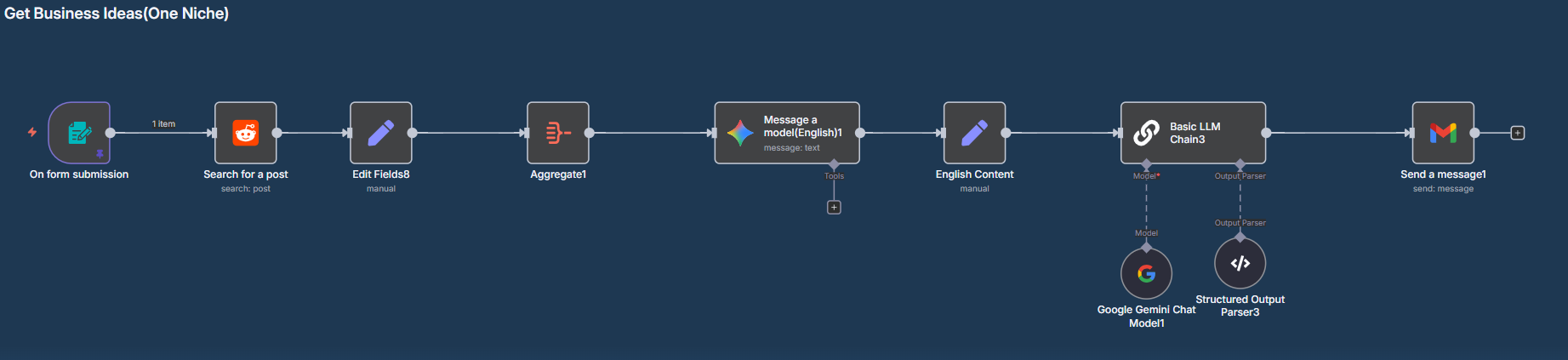
# n8n form -> on new n8n form event
Form Title: Business Ideas
Form Description: Provide your information inside
Form Elements
Field Name: subreddit
Placeholder: artificial

Field Name: keywords
Placeholder: issues
example :
"subreddit": "RealEstate",
"keywords": "issues, problems, struggles",

# Reddit --> search for a post
Subreddit: {{ $json.subreddit }}
Keyword: {{ $json.keywords }}
Limit: 50

# Edit field
title: {{ $json.title }}
selftext: {{ $json.selftext }}

# Aggregate
Aggregate: All Item Data (Into a Single List)
Put Output in Field: data
Include: All Fields

# Gemini --> Message a model
Prompt :
You are an expert at generating innovative business ideas. You will receive a batch of Reddit posts pulled from:
r/{{ $('On form submission').item.json.subreddit }}
These posts match the search: “{{ $('On form submission').item.json.keywords }}”.
Each post includes a title and a selftext.

** Your job is as follows:
1. Analyze the content of these posts and identify up to 5 clear and distinct pain points shared by users.
2. For every pain point, generate 1 to 2 strong business ideas that directly address the issue.
3. Write an email summarizing the problems and proposed solutions.

Only return a properly formatted JSON object with the structure below:
- emailSubject: A subject line like “Business ideas for r/{{ $('On form submission').item.json.subreddit }}”
- emailBody: A clear, friendly email that:
- Summarizes each identified pain point
- Presents matching business ideas beneath each point
- Ends with a prompt for next steps or feedback

The email body must be in HTML format with appropriate line breaks, bolding, and bullet points where needed.

Do not output anything other than the valid JSON object.

Always introduce yourself as an AI Researcher.
Output Content as JSON: enable

# Edit fiels(English Content)
output(object) : {{ $json.content.parts[0].text.parseJson() }}

# Basic LLM Chain
Prompt (User Message):
out to a jason format:
subtitle_c: translate {{ $json.output.emailSubject }} to Traditional Chinese.
body_c: translate {{ $json.output.emailBody }} to Traditional Chinese, but no effect for HTML tag content.
Require Specific Output Format: Enable
Model: OpenAI Chat Model
Model: gemini-2.5-flash
Output parser: StructuredOutput Parser
{
"subtitle_c": "",
"body_c": ""
}

# Gmail --> send a message
To: kyp001@gmail.com
Subject: {{ $json.output.emailSubject }}
Message: {{ $json.output.emailBody }}

❇️ 11_118 Build an AI That Sends Alerts to New Youtube Videos

1
2
3
4
5
6
7
8
9
10
11
12
13
14
15
16
17
18
19
20
21
22
23
24
25
26
27
28
29
30
31
32
33
34
35
36
37
38
39
40
41
42
43
44
45
46
47
48
49
50
51
52
53
54
55
56
57
58
59
60
61
62
63
64
65
66
67
68
69
70
71
72
73
74
75
76
77
78
79
80
81
82
83
84
85
86
87
88
89
90
91
92
93
94
95
96
97
98
99
100
101
102
103
104
105
106
107
108
109
110
111
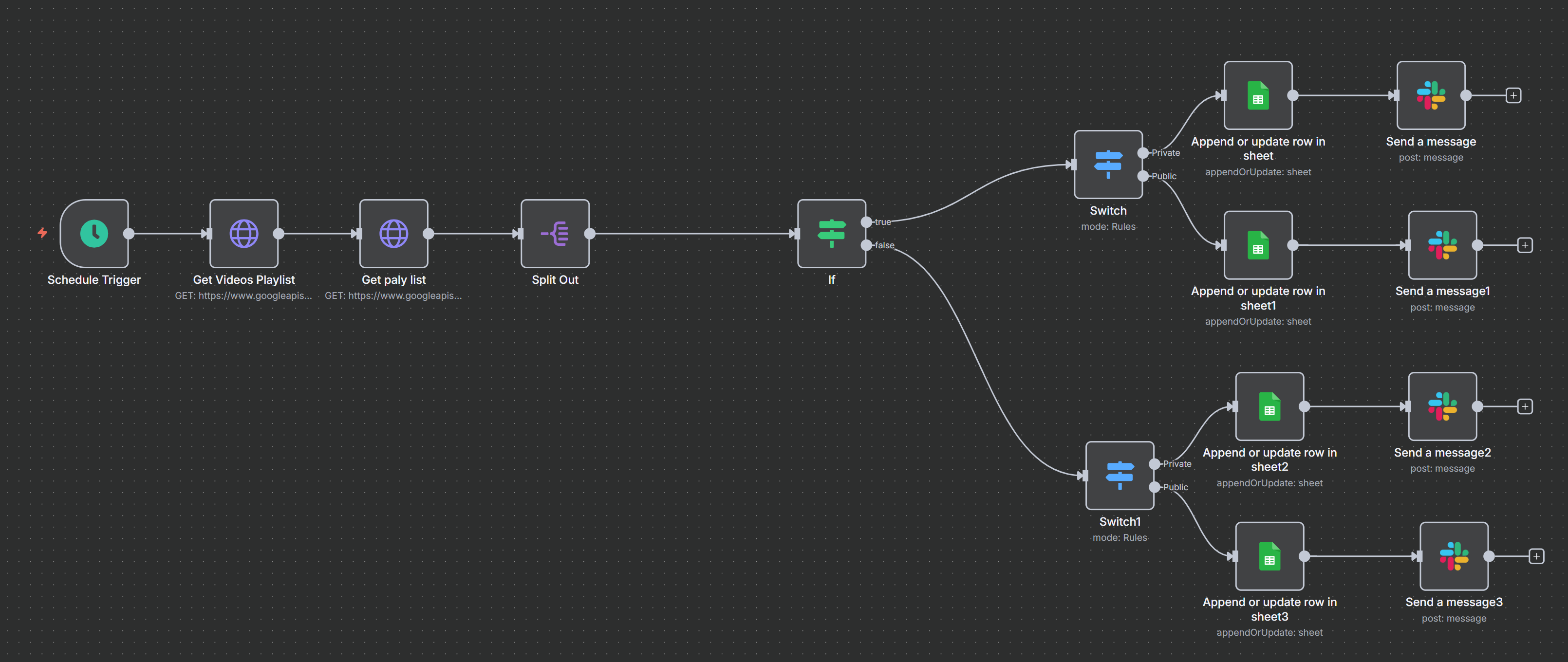
# schedule Trigger
Trigger Interval: Minutes
Minutes Between Triggers: 30

# HTTP Request(Get Videos Channel)
Method: GET
URL: https://www.googleapis.com/youtube/v3/channels
Authentication: Predefined Credential Type
Credential Type: Google OAuth2 API
Google OAuth2 API:
OAuth Redirect URL: copy to google cloud 用戶端 已授權的重新導向 URI
Client ID *: copy from google cloud 用戶端 用戶端 ID
Client Secret *: copy from google cloud 用戶端 用戶端密碼
Scope: https://www.googleapis.com/auth/youtube.readonly
Send Query Parameters: Enable
Query Parameters
part: contentDetails
mine: true

# HTTP Request(Get Videos Playlist)
Method: GET
URL: https://www.googleapis.com/youtube/v3/playlistItems
Authentication: Predefined Credential Type
Credential Type: Google OAuth2 API
Google OAuth2 API:
same previous
Send Query Parameters: Enable
Query Parameters
part: snippet,status
playlistId: {{ $json.items[0].contentDetails.relatedPlaylists.uploads }}
maxResults: 20
order: date

# Split Out
Fields To Split Out: items
Include: No Other Fields

# if - just check condition
{{ $json.snippet.publishedAt }} "is before" {{ $now.minus(10,'days').format('yyyy-MM-d HH:mm' ) }}

# switch (true)
{{ $json.status.privacyStatus }} "is equal to" private
Rename Output: Enable
Output name: Private

{{ $json.status.privacyStatus }} "is equal to" public
Rename Output: Enable
Output name: Public

# (Private)sheet -> append or update row in sheet
Document: Youtube Videos Tracking
Column to match on: Video ID
Video ID (using to match): {{ $json.snippet.resourceId.videoId }}
Status: {{ $json.status.privacyStatus }}
Title: {{ $json.snippet.title }}
Url: https://studio.youtube.com/video/{{ $json.snippet.resourceId.videoId }}/edit

# (Private)Slack -> sned a message
Send Message To: Channel
Channel: n8n_discuss
Message Type: Simple Text Message
Message Text:
✅ New Youtube Video is ready to set up: {{ $json.Title }}
URL: {{ $json.Url }}
Include Link to Workflow: Disable
# 以下二者可mask 額外資訊
Unfurl Links: Disable
Unfurl Media: Disable

# (Public)sheet -> append or update row in sheet
Document: Youtube Videos Tracking
Column to match on: Video ID
Video ID (using to match): {{ $json.snippet.resourceId.videoId }}
Status: {{ $json.status.privacyStatus }}
Title: {{ $json.snippet.title }}
Url: https://studio.youtube.com/video/{{ $json.snippet.resourceId.videoId }}/edit

# (Public)Slack -> sned a message
Send Message To: Channel
Channel: n8n_discuss
Message Type: Simple Text Message
Message Text:
☑️ New Youtube Video is published and ready to promote: {{ $('Split Out').item.json.snippet.title }}
URL: https://studio.youtube.com/video/{{ $('Split Out').item.json.snippet.resourceId.videoId }}/edit
Include Link to Workflow: Disable
# 以下二者可mask 額外資訊
Unfurl Links: Disable
Unfurl Media: Disable

# if false, (Private)Slack -> sned a message
Send Message To: Channel
Channel: n8n_discuss
Message Type: Simple Text Message
Message Text:
✅ (previous) New Youtube Video is ready to set up: {{ $json.Title }}
URL: {{ $json.Url }}
Include Link to Workflow: Disable
# 以下二者可mask 額外資訊
Unfurl Links: Disable

# if false, (Public)Slack -> sned a message
Send Message To: Channel
Channel: n8n_discuss
Message Type: Simple Text Message
Message Text:
☑️ (previous) New Youtube Video is published and ready to promote: {{ $('Split Out').item.json.snippet.title }}
URL: https://studio.youtube.com/video/{{ $('Split Out').item.json.snippet.resourceId.videoId }}/edit
Include Link to Workflow: Disable
# 以下二者可mask 額外資訊
Unfurl Links: Disable
Unfurl Media: Disable

11_118 Slack Testing

1
2
3
4
5
6
7
8
9
10
11
# Slack --> On any event
Channel to Watch: n8n_discuss2

# AI Agent
Source for Prompt (User Message):Define below
Prompt (User Message): {{ $json.blocks[0].elements[0].elements[1].text }}
Model: Google Femini Chat model

# Slack --> Send a message
Channel: n8n_discuss2
Message Text: {{ $json.output }}

❇️ 11_119 Get Unlimited Business Leads with AI Agent

1
2
3
4
5
6
7
8
9
10
11
12
13
14
15
16
17
18
19
20
21
22
23
24
25
26
27
28
29
30
31
32
33
34
35
36
37
38
39
40
41
42
43
44
45
46
47
48
49
50
51
52
53
54
55
56
57
58
59
60
61
62
63
64
65
66
67
68
69
70
71
72
73
74
75
76
77
78
79
80
81
82
83
84
85
86
87
88
89
90
91
92
93
94
95
96
97
98
99
100
101
102
103
104
105
106
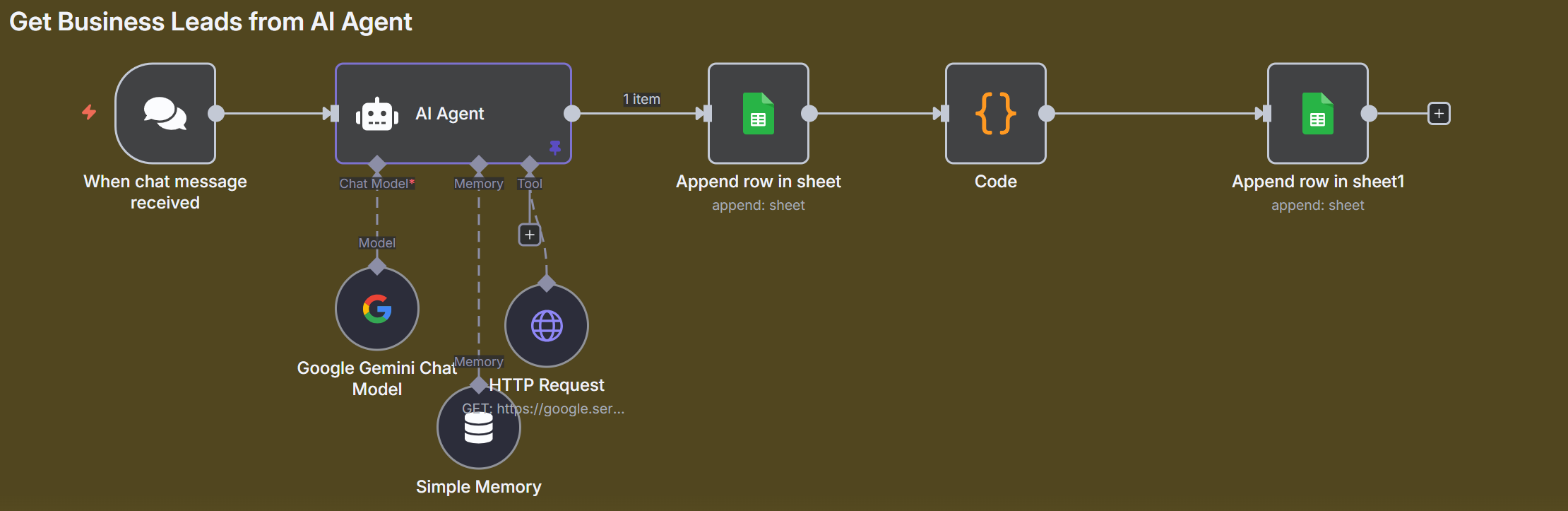
# Chat Trigger
Give me real estate agencies in Boston
Give me contact details for the best tattoo studios in New York
給我台灣成功的AI Agent 相關公司的資料
給我台灣成功的 SaaS 公司的資料
給我台灣成功的 n8n 相關 自動化 公司的資料

# AI Agent
Source for Prompt (User Message): Define below
Prompt (User Message):{{ $json.chatInput }}
System Message:
You are a research assistant helping the user collect contact details from the “Map Checker” tool or a website.

Your job is to extract and return all contact information in a clearly structured JSON format, following the example below:

[
{
"Name": "Dexters.co",
"Address": "54 Borough High St, London Bridge, London SE1 1XL, United Kingdom",
"Phone": "+44 20 7650 5100",
"Website": "https://www.dexters.co.uk/contact-us/our-offices/london-bridge",
"Rating": "4.9",
"Opening Hours": "8 AM–8 PM daily"
},
{
"Address": "realestateagentslondon",
"Address": "75A Barking Rd, London E16 4HB, United Kingdom",
"Phone": "+44 20 7055 0441",
"Website": "https://realestateagentslondon.co.uk/",
"Rating": "4.8",
"Opening Hours": "9:30 AM–5:30 PM, Saturday 11 AM–4 PM, Closed Sunday"
}
// more entries...
]

Return ONLY this JSON array in the response.
Do not wrap it inside another object or string — just output the raw array.

Make sure:
- All values are properly filled in and escaped
- No nested or malformed JSON
- If a value is missing (e.g., website), use an empty string: "Website": ""

This format will be used by a code node to extract values before sending them to Google Sheets.
Only return the response in valid JSON format, without any other elements.
Chat model: Gemini Chat Model
Memory: Simple Memory
Tool: HTTP request Tool
Description:
This bot helps you scrape all contact information for lead generation from Google Maps.
Use the query parameter "q" for the search term, "ll" for latitude and longitude, and "page" for the current pagination index.
URL: https://google.serper.dev/maps
Authentication: Generic Credential Type
Generic Auth Type: Custom Auth
Custom Auth: Custom Auth (Serper)
Send Query Parameters: Enable
q: auto
ll: auto
page: auto

# sheet --> Append row in sheet(add date and message)
Document: Map Searcher
Name: *** {{$now.format('yyyy-MM-dd HH:mm')}}
Address: {{ $('When chat message received').item.json.chatInput }}

# Code
// Get the full response string from the previous step (usually "AI Agent" or similar)
// 第0筆, json output 欄位
// const output = items[0].json.output;
const output = $('AI Agent').first().json.output;

// show type
// ? 是「可選鏈結運算子」(optional chaining);它會在左邊為 null 或 undefined 時直接回傳 undefined,而不是丟錯
// check array and array
console.log('typeof output:', typeof items?.[0]?.json?.output);
console.log('isArray:', Array.isArray(items?.[0]?.json?.output));

// Try to extract the JSON array from the output string
// 過濾前後 ```json\n , \n``` 字串
const jsonStart = output.indexOf('[');
const jsonEnd = output.lastIndexOf(']') + 1;
const jsonString = output.slice(jsonStart, jsonEnd);
// Parse the JSON array
const contacts = JSON.parse(jsonString);

// compare contacts vs contacts.map(contact => ({ json: contact }))
// console.log(contacts);
// console.log(contacts.map(contact => ({ json: contact })));

// console.log('contacts:', typeof contacts?.[0]?.json?.Name);
// 奇怪在 AI Agent 後, 程式中執行 contacts.map(contact => ({ json: contact })) 就會出問題
//console.log('contacts map:', typeof contacts.map(contact => ({ json: contact })).[0]?.json?.Name);

// Optionally, return each contact as a separate item for downstream nodes (like Sheets)
// 因 n8n 是透過 json 溝通, 其實沒有差別
//return contacts.map(contact => ({ json: contact }));
return contacts;

# sheet --> Append row in sheet(add date and message)
Document: Map Searcher
Name: {{ $json.Name }}
Address: {{ $json.Address }}
Phone: {{ $json.Phone }} - 在最前面要加 space
Website: {{ $json.Website }}
Rating: {{ $json.Rating }}
Opening Hours: {{ $json["Opening Hours"] }}

❇️ 11_120 Nutritionist AI Agent - Your 24/7 Diet Coach(Chiense)

1
2
3
4
5
6
7
8
9
10
11
12
13
14
15
16
17
18
19
20
21
22
23
24
25
26
27
28
29
30
31
32
33
34
35
36
37
38
39
40
41
42
43
44
45
46
47
48
49
50
51
52
53
54
55
56
57
58
59
60
61
62
63
64
65
66
67
68
69
70
71
72
73
74
75
76
77
78
79
80
81
82
83
84
85
86
87
88
89
90
91
92
93
94
95
96
97
98
99
100
101
102
103
104
105
106
107
108
109
110
111
112
113
114
115
116
117
118
119
120
121
122
123
124
125
126
127
128
129
130
131
132
133
134
135
136
137
138
139
140
141
142
143
144
145
146
147
148
149
150
151
152
153
154
155
156
157
158
159
160
161
162
163
164
165
166
167
168
169
170
171
172
173
174
175
176
177
178
179
180
181
182
183
184
185
186
187
188
189
190
191
192
193
194
195
196
197
198
199
200
201
202
203
204
205
206
207
208
209
210
211
212
213
214
215
216
217
218
219
220
221
222
223
224
225
226
227
228
229
230
231
232
233
234
235
236
237
238
239
240
241
242
243
244
245
246
247
248
249
250
251
252
253
254
255
256
257
258
259
260
261
262
263
264
265
266
267
268
269
270
271
272
273
274
275
276
277
278
279
280
281
282
283
# Telegram --> On message

# switch
{{ $json.message.text }}: exists
Rename Output: Enable
Output Name: Text

{{ $json.message.voice.file_id }}: exists
Rename Output: Enable
Output Name: Voice

{{ $json.message.photo[1].file_id }}:exists
Rename Output: Enable
Output Name: Image

# switch - Image ===============
# Telegram --> get a file
File ID: {{ $json.message.photo[1].file_id }}

# (1) Gemini -> Analyze Image
你是一位專業的營養分析師。
你的目標是針對每一個在此食物照片中可見的項目進行分析,並輸出一份結構清晰、包含熱量及三大營養素(碳水化合物、蛋白質、脂肪)估算值的 JSON 檔案。

## 核心功能
Text input:
- 當顯示一張食物照片時,識別每一項食物及其主要成分(蛋白質、碳水、脂肪等)。
- 假設比例參照標準(例如:26 公分的晚餐盤、250 毫升的杯子、標準餐叉大小)。
- 若看起來是餐廳料理,需假設額外的烹調用油:每份增加約 1 大匙(14 公克)的炒或醬用油脂。
- 以公克為單位估算份量。根據照片裡的參考物件(杯子、標準玻璃杯大小、麵包尺寸、常見餐具等)來推算比例。
- 使假設盡量貼近現實,優先選擇常見的份量大小。
- 列出你用來估計尺寸的各種假設(形狀、密度、覆蓋率等)。
- 依據可靠的資料庫(例如 USDA FoodData Central、歐洲對應資料庫)估算每項食物的熱量及三大營養素,並校正餐廳料理的額外油脂。
- 記錄可見的烹調方式或添加物(食用油、醬料、奶油等)。
- 為每項食物計算熱量並提供合理範圍。
- 加總總熱量範圍。

## JSON 輸出格式
text
{
"overview": "對整體餐盤或餐點的簡單說明",
"short_name": "漢堡配薯條",
"items": [
{
"name": "食物名稱",
"type": "protein | carb | fat | beverage | 等等",
"portion_size": "例如 1 杯、2 片",
"cooking_method": "明顯者需填",
"macros_g": {
"protein": 0,
"carbs": 0,
"fat": 0
},
"calories_kcal": {
"low": 0,
"high": 0
},
"assumptions": "所有你推估時的假設"
}
],
"total_calories_kcal": {
"low": 0,
"high": 0
},
"total_macros": {
"proteins": {
"low": 0,
"high": 0
},
"carbs": {
"low": 0,
"high": 0
},
"fat": {
"low": 0,
"high": 0
}
},
"notes": "所有限制、‘估算有誤差’等備註"
}

## 食物分析指引
- 先對整份餐點寫一段「overview」簡介。
- 每一個項目都要填寫所有欄位。
- 熱量採「最低—最高」區間呈現。
- 在「assumptions」欄說明你的估算依據。
- 若照片不清楚或你無法確定,請在「notes」欄標註警語。
- 若用戶留下食物額外說明,也一併納入(這是自願性的):
{{ $('Telegram Trigger').item.json.message.caption }}
Input Type: Binary File(s)
Input Data Field Name(s): data

# (1) Edit Field - Colories & Macros
text(object):
{{
JSON.stringify(
JSON.parse(
$json.content.parts.first().text
.replace(/```(?:json)?\s*/g, '')
.trim()
),
null,
2
)
}}

# (2) Drive --> upload file
File Name: {{$now.format('yyyy-MM-dd HH:mm')}}.png
Parent Drive: My Drive
Parent Folder: n8n_working

# (2) Edit Field - Image Link
image_url: {{ $json.webViewLink }}

# Merge
Mode: Combine
Combine By: All Possible Combinations

# sheet --> Append row in sheet
Document: Food Data
Sheet: Food Data
Mapping Column Mode: Map Each Column Manually
Name: {{ $('Telegram Trigger').item.json.message.chat.first_name }}
Date: {{ $now.format('yyyy-MM-dd') }}
Time: {{ $now.format('HH:mm') }}
Food: {{ $json.text.short_name }}
Calories: {{ ($json.text.total_calories_kcal.low + $json.text.total_calories_kcal.high)/2}} kcal
Proteins: {{ ($json.text.total_macros.proteins.low + $json.text.total_macros.proteins.high)/2 }}
Carbs: {{ ($json.text.total_macros.carbs.low + $json.text.total_macros.carbs.high)/2}}
Fat: {{ ($json.text.total_macros.fat.low + $json.text.total_macros.fat.high)/2 }}
Picture: {{ $json.image_url }}

# sheet --> get row in sheet
Document: Food Data
Sheet: Goals
Filters: Column:Name, Value: {{ $json.Name }}

# AI Agent (Motivation Cocah AI Agent)
Prompt (User Message)
你是一個營養助手,幫助用戶追蹤並了解他們的飲食。

你會收到食物資訊,請用以下格式呈現:

熱量:XXX kcal
蛋白質:XXg
碳水:XXg
脂肪:XXg

## 餐點名稱:[餐點名稱]

接著根據食物和用戶目標,給予最多2句(合計不超過120字的)教練建議。

以下是食物資訊(無需重複):
{{ JSON.stringify($('Merge').item.json.text,null,2) }}

## 用戶目標:{{ $json.Goal }}
- 每日目標:{{ $json['Daily Goal'] }} kcal
- 目標赤字:{{ $json['Target Deficit'] }} kcal
- 維持熱量:{{ $json.Mantain }} kcal

## 教練建議規則(僅選擇一個符合的):
- 達標餐點(營養素均衡且符合目標) → 鼓勵並提醒持續努力。
範例:選得很好!保持下去,持續達成你的目標。
- 餐廳/速食餐點 → 評論目標是否符合並提醒隱藏成分。
範例:符合你的目標,但注意油和醬料。下次可嘗試自己料理!
- 不健康或高熱量餐點 → 明確提醒不符合目標,敦促回歸正軌。
範例:這不符合你的目標,請調整心態並重新回到正軌。

## 不健康食物警示條件(如適用):
- 高反式/飽和脂肪 → 炸物、糕點、加工肉品
- 過量糖分 → 糖果、汽水、甜麥片
- 精緻碳水 → 白麵包、白米、糕點
- 高鈉 → 罐頭、加工或醃製食品
- 低營養密度 → 空熱量食物
運用以上參考決定食物是否不健康。

## 請僅回覆:
- 格式化的營養成分與餐點名稱
- 最多2句簡短教練建議(合計限120字)
- 不加標籤、不用表情符號、不額外說明
Chat Model: Google Gemini Chat Model

# Telegram --> send a text message
Chat ID: {{ $('Telegram Trigger').item.json.message.chat.id }}
Text: {{ $json.output }}
# switch - Image ===============

# switch - voice ===============
# Telegram --> get a file
File ID: {{ $json.message.voice.file_id }}

# Gemini --> Transcribe a recoording
Input Type: Binary File(s)
Input Data Field Name(s): data
# switch - voice ===============

# Code(Food)
let text = null;
let voice = null;

try {
text = $input.all(0)[0].json.message.text;
} catch(e) {
console.log("01:", e);
// ..
}

try {
voice = $input.all(1)[0].json.content.parts[0].text;
} catch(e) {
// ..
}

const output = {
text : text ? text : voice ? voice : '',
}

return output ;


# (1) sheet --> get rows in sheet
Document: Food Data
Sheet: Food Data
Filters: Name: {{ $('Telegram Trigger').item.json.message.from.first_name }}

# (1) Aggregate
Aggregate: All Item Data (Into a Single List)
Put Output in Field: data
Include: All Fields

# (2) sheet --> get rows in sheet
Document: Food Data
Sheet: Goals
Filters: Name: {{ $('Telegram Trigger').item.json.message.from.first_name }}

# Merge
Mode: Combine
Combine By: All Possible Combinations

# AI Agent
Prompt (User Message):
你是一位有資深的營養助理。

你的任務是分析用戶過去七天(如果數據不足則以可用天數為準)的飲食紀錄,
並判斷他們在維持目標熱量下是否能夠食用所要求的食物或飲品。

用戶姓名:{{ $('Telegram Trigger').item.json.message.from.first_name }}
請求項目:{{ $('Food').item.json.text }}
今天日期:{{ $now }}
用戶目標:{{ $json.Goal }}
每日熱量目標:{{ $json['Daily Goal'] }} 大卡

以下是用戶的飲食紀錄:
{{ JSON.stringify($('Aggregate').item.json.data, null, 2) }}

## 請依照以下步驟分析:
1. 計算過去七天(或可用天數)總攝取熱量。
2. 用每日目標乘以天數,算出可攝取總熱量。
3. 用總允許熱量減去已攝取熱量,得出剩餘可攝取熱量。
4. 查詢所要求食物或飲品每一標準份量的熱量。
- 如果是飲品(例如雞尾酒、啤酒、葡萄酒),計算在剩下熱量下可喝幾份。
- 如果是單份食物(例如披薩、漢堡附薯條),假設只吃一份,檢查這份是否在允許範圍內。

## 格式化規則:
- 所有熱量以百位數四捨五入。
- 回覆請用簡單、清楚的語言(適合小學六年級到國中二年級)。
- 只出現一句簡短語句。
- 不重複用戶問題內容。

## 請用下列其中之一格式回答:
- 如果符合攝取標準:
「你還有[X]大卡可以攝取,所以你可以吃/喝 {{ $('Food').item.json.text }},並維持最近y天的熱量赤字。」- ({{ $('Food').item.json.text }} 熱量為 [X]大卡)
- 如果不符合攝取標準:
「你還有[X]大卡可以攝取,所以你無法吃/喝 {{ $('Food').item.json.text }},並維持最近y天的熱量赤字。」- ( {{ $('Food').item.json.text }} }} 熱量為 [X]大卡)
- 依食物自動選擇吃或喝字動截取食物名稱而不是整個輸入
- 不要多做說明,不要有表情符號,不要多加建議。
Chat Model:Google Gemini Chat Model
Memory: Simple Memory
Session ID: Define below
Key: {{ $('Telegram Trigger').item.json.message.chat.id }}

# Telegram --> send a text message
Chat ID: {{ $('Telegram Trigger').item.json.message.chat.id }}
Text: {{ $json.output }}