n8n - AI Agents, AI Automations & AI Voice Agents (1)
install n8n
Hostinger n8n VPS hosting
1 | install as guide flow |
install in windows(Node.js)
1 | 1. search n8n github |
install in Mac(Node.js)
1 | 1. node.js install |
coding
JSON or “Set Field”
Genernal
1 | # Selectors (`.first()`, `.last()`, `.all()`) |
❇️ Translate JSON string to json
1 | # 基本轉換:JSON.stringify({ name: "John", age: 30 }) 會得到 {"name":"John","age":30} 字串 |
❇️ Edit field - 2 condition(僅對單一 輸入 node 有用)
1 | {{ $json.message.text != null ? $json.message.text : |
Google Drive
1 | # Drive --> Search files and folders |
Regular Expression
1 | # 把所有雙引號 " 取代為已轉義的 ",確保字串在 JSON、JS 字面量或序列化時不會因未轉義引號而破壞語法 |
❇️ Code
array to json output
1 | const items = [ |
convert data to a file mp3
1 | return [ |
remove special character
1 | // n8n code node 轉換前面資料 |
string to json
1 | const responseText = $input.first().json.content.parts[0].text |
10_95Customer+Data+Processor+Complex+(Data+Cleaning+Example)
1 | const items = $input.all(); |
10_95Weather+Message+Generator+Example
1 | const items = $input.all(); |
10_95Sales+Calculator+Example
1 | const items = $input.all(); |
10_95Data+Format+Converter+Example
1 | const items = $input.all() |
10_96 class example
1 | // get data |
10_106 add additional field
1 | const user = $input.item.json; |
10_106 await and call API
1 | const user = $input.item.json; |
10_106 reduce process data
1 | const users = $items(); |
10_106 create csv binary file
1 | const allUsers = $("4. Fetch External Data (Advanced)").all() |
❇️ 11_119 AI Agent output string,convert to json
1 | // Get the full response string from the previous step (usually "AI Agent" or similar) |
❇️ code check from 2 source
1 | let text = null; |
❇️ data string 分段
1 | const inputData = $input.first(); |
JavaScrip Function
function string
1 | .length |
function number
1 | (4.135678).round(3) |
function array
1 | $json.array.length |
function object && bollen
1 | $json.object.keys() |
function Other
1 | {{$now}} : [DateTime: 2025-09-27T23:26:01.837+08:00] |
function
1 | # check if something is an array |
Example
1 | {{ JSON.stringify($json.user) }} |
Tool
Slack
Create : Slack API
1 | # 1. Slack 建立 channel : 要先建立工作空間(一個組織或團隊的工作空間(Workspace)) |
google standard node
1 | # get API |
google HTTP Request(YouTube) - Youtube PlaylistItems Doc or Youtube PlaylistItems Doc-TW
1 | # channel |
Telegram token
1 | login |
Airtable token
1 | # add a base |
❇️google Gemini API key - Google AI Studio - ❇️Usage, ❇️Condition
1 | login |
google API key for Youtube
1 | google cloud console |
Reddit App
1 | https://www.reddit.com/prefs/apps |
Notion
Notion Integrations 建立 內部整合密鑰
1 | # 建立 內部整合密鑰 |
1 | # 建立 File Uploaded - Google Drive(表格) |
1 | ** duplicate other database |
peplexity API key
1 | User |
Apify token
1 | Apify login |
Supabase
Supabase use for RAG
1 | New Project --> |
Supabase use for whatsapp
1 | New Project --> |
Supabase use for recorded communication and RAG : Supabase Vector Store node –> quickstart for setting up your vector store
1 | New Project --> |
facebook developer WhatsApp
建立應用程式
1 | facebook developer |
Client ID & ient Secret(receive from WhatsApp)
1 | --> 我的應用程式 |
權杖 及 Account ID(send to WhatsApp)
1 | --> 我的應用程式 |
Rapid - zillow(By Sabri)
1 | # get Aillow key |
pinecorn - for RAG
1 | Pinecorn --> Create index |
groq - for mamny LLM, free limit, support Model
1 | # API keys |
SerpAPI - free 250 searches / month
1 | # API Key : get API |
Setting
API return code
1 | 2xx(success): 200 |
prompt
1 | ## Role & Purpose |
❇️ custom key in header
1 | Authentication:GenericnCredential Type |
❇️ twelvedata - set key at Query Parameters
1 | # 1. set at Query Parameters |
GNews - set key at Query Parameters
1 | # set at Authentication |
NewsAPI - set key at Query Parameters
1 | # set at Authentication |
Twitter API
1 | # set at Authentication |
Perplexity - ask Perplexity API
1 | # set at Authentication |
Rapid - zillow
1 | URL: x-rapidapi-host's value |
This message was sent automatically with n8n
1 | Add Field --> Append n8n Attribution : disable |
n8n Community
enable
1 | # enable Community node support |
install by n8n cloud
1 | # Conver text to speetch(11 labs) |
install by n8n hosting
1 | User --> setting --> Cmmunity Nodes --> install searching |
node
n8n form : on form submission
1 | Form Title : Contact Form |
send a message to Slack : Slack –> send a message
1 | # Slack OAuth2 API |
add user to google contract : google contracts –> create a contract
1 | operation : Create |
wait message from Telegram’s bot “ on app event -> telegram –> on message
1 | -> set credential (hugginFace cannot support telegram, change to n8n cloud) |
AI Agent framework :AI agent node
1 | # n8n 針對 AI Agent 節點(AI Agent / OpenAI Chat Model 等)設定了每日免費請求次數限制。當你觸發超過這個免費次數,就會看到這類 rate limit exceeded 或 too many requests 的訊息。 |
Gemini response ask : Google Gemini Chat model(link to AIn Agent Chat Model)
1 | --> set API key |
Sen to Telgram : Telegram –> send a text message
1 | # Telegram 文字訊息的長度限制是 最多 4,096 個字元(字符)。這個限制適用於單條文字訊息,不論是純文字還是帶格式的內容17。 |
Google Driver –> On change involving a specific Folder
1 | Folder : Demo |
Google Driver–> Share File
1 | # 若對方非 gmail email, access 時會回送 mail 要求設定權限 |
Airtable –>Create a record
1 | Base:Untitled Base, |
download file from google drive : google drive–> download file
1 | File : {{ $json.id }} |
Gemini Transcribe : Gogle Gemini –> Transcribe a recoding
1 | Model: gemini-2.5.flash or Flash Live |
Gemini Summarize : Gogle Gemini –> Message a model
1 | Model: gemini-2.5.flash or Pro |
save to Notion : Notion –> Append a block
1 | Credential : Internal Integration Secret: |
update to Notion database : Notion –> Create a database page
1 | # from node : Google Driver –> On change involving a specific Folder(Demo) |
get a google doc : Google Docs –> Get document
1 | # from node : Google Driver –> On change involving a specific Folder(n8n testing) |
precess by Gemini : Gemini –> Meessage a modem
1 | Model : gemini-2.5-flash |
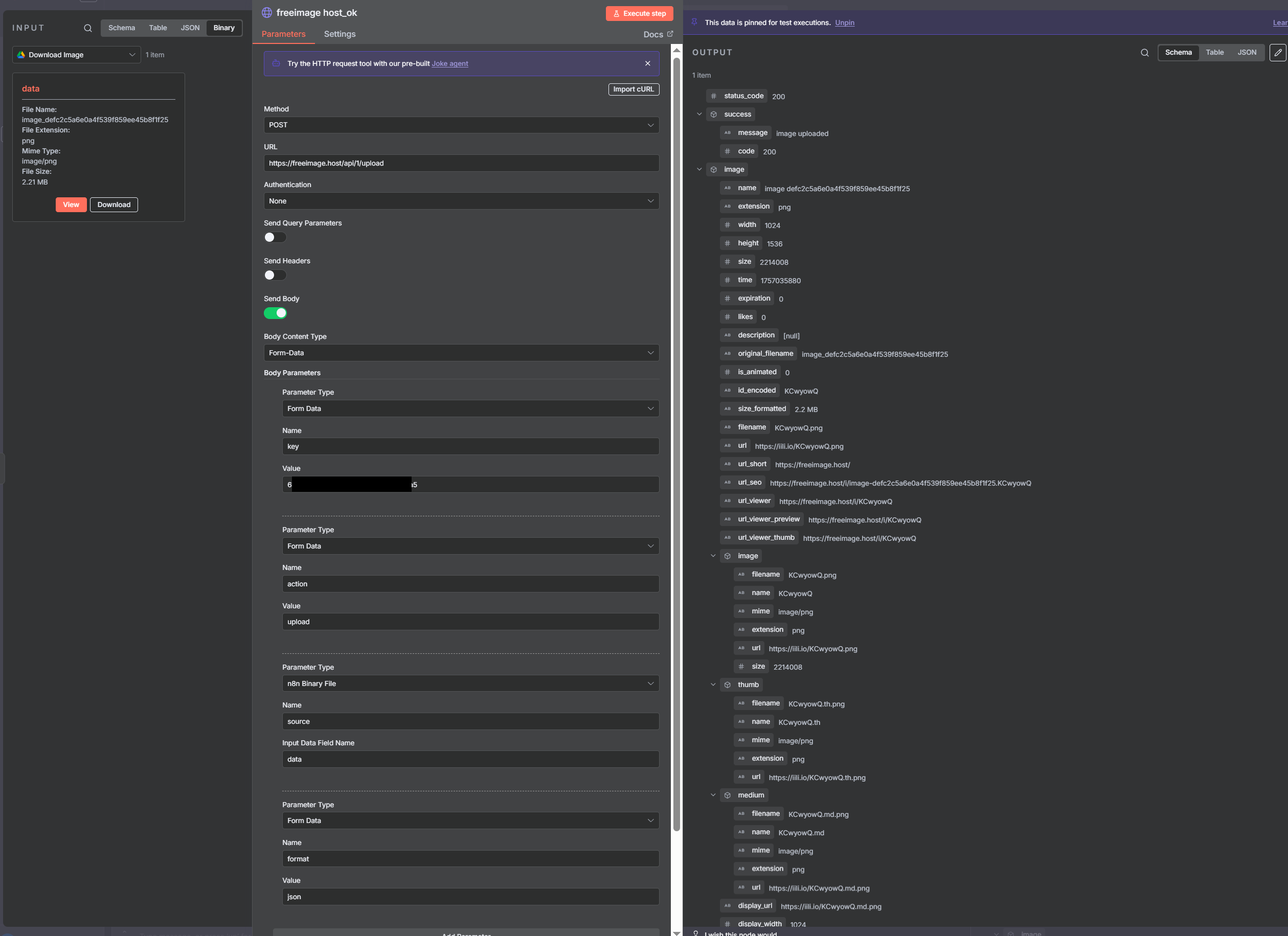
http request(freeimage host)
1 | Method: POST |
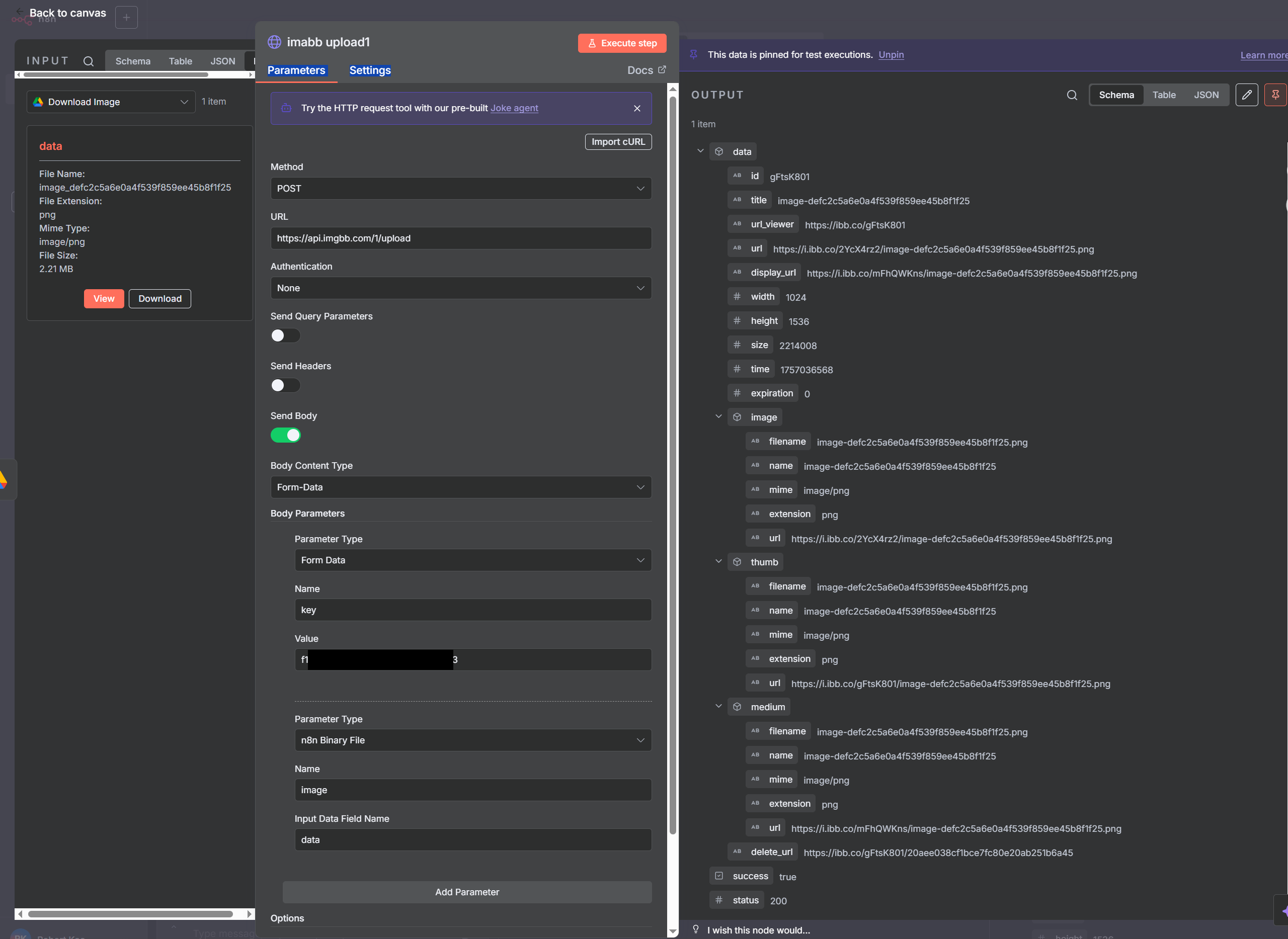
http request(imgbb)
1 | Method: POST |
http request(API Market free image & video upload)
1 | Method: POST |

basc LLM Chain + Model : Use for simple prompt-and-response tasks with no advanced logic
Information Extractor + Model : extractor data
Sentimat Anaysys + Model : Use to detect tone (positive, negative, neutral) in text.
Text Classifier + Model : Use to sort text into categories
Summarization chain : Use to condense long content into a short summary
Split : Turn a list item(s) into separate items
Splitter
- Character Text Splitter
- 依「字元數」分段,可指定分隔符(如換行、句號或自訂符號),再按固定長度切塊。
- 優點是邏輯簡單、效能高,但容易在句子或段落中間硬切,語義連貫性較差,適合只需要粗略切片的情境。
- Recursive Character Text Splitter
- 同樣以「字元」為限制,但會「遞歸」按層級嘗試:先用段落、再句子、再單字等分割,盡量讓每個 chunk 在不超過長度限制下保持自然語段。
- 一般 RAG / 向量搜尋工作流比較推薦用這個,因為能在控制長度的同時保留較完整的上下文結構。
- Token Splitter
- 不是看字元,而是先把文字轉成模型用的 BPE「token」,再按 token 數量(例如 500 tokens 一塊)切分,最後再轉回文字。
- 最大優點是能精準對齊 LLM 的上下文長度限制,輸入長度控制更準確,適合直接拿去給 OpenAI 等模型做 embedding 或對話。
如果只想選一個「通用、安全的」做法,平常在 n8n 裡處理長文、做向量資料庫檢索,通常優先選 Recursive Character Text Splitter;需要精確控制 token 上限(例如怕超過 4k / 8k token)時再改用 Token Splitter。
- Recursive Character Text Splitter 裡,Chunk Size 決定「每塊文字的最大字元數」,Chunk Overlap 則是「相鄰兩塊之間重疊的字元數」
- 參數概念說明
1.Chunk Size:每個 chunk 最長可以包含多少個字元,超過時就會依分隔符(段落、句子、空白等)往下切。
2.Chunk Overlap:相鄰 chunk 之間要重複多少字元,用來保留上下文,避免一句話剛好被切斷時語意斷裂。 - 實務上的建議數值
- 一般 RAG 文本(技術文件、網頁、PDF 段落等),常見設定為
- Chunk Size 約 400–1,000 字元
- Chunk Overlap 約 10–25% 的 Chunk Size(例如 400 / 100、800 / 160)。
- 有人示範在 n8n 中用 Recursive Character Text Splitter 時,採用 Chunk Size 400、Overlap 100 作為範例設定,兼顧語意與長度控制。
- 依你的情境調整
- 長、結構較完整的文章(技術白皮書、部落格):可選擇 Chunk Size 600–1,000,Overlap 100–200,讓每塊有更多上下文,適合「摘要、解釋」類問題。
- 短內容、問答精準檢索(FAQ、聊天記錄切段):可用 Chunk Size 300–600,Overlap 50–120,讓召回更細粒度,避免一次抓到太大段文。
- 參數概念說明
workflow
Perplexity
Smart Perlexity AI Agent
1 | On chat message : |
Perlexity Node
1 | On chat message : |
Perplexity Node(HTTP Request)
1 | On chat message : |
example AI automation from Templeate
1 | n8n home |
AI Automation Feedback Collect form
on form submission
1 | Form Title :Feedback Form |
google sheets –> append row in sheet
1 | docuemnt : Feedback Collection |
AI Agent from scratch
chat Trigger
1 | send : Can you please send an email to Boss that I need to reschedule our upcoming meeting? |
AI Agent
1 | # add option --> system message |
AI Agent - Chat Model : Gemini chat model
1 | model : gemini-2.5-flash |
AI Agent - Memory : simple memory
1 | # 保留 message |
AI Agent - Tool : Google Sheets Tool
1 | set name : Contacts |
AI Agent - Tool : Gmail Tool
1 | set name : Gmail_Tool |
Get Daily News
Schedule Trigger
Edit Field : set topic value : “World News” , “AI” …
HTTP request#1-GNews, HTTP request#2-news API : for 2 new source
1 | # Get GNews Articles |
Merge
AI AGent(1)
1 | # Prompt: |
gooogle Gemini –> message a model(2):use prompt as AI AGent
Telegram –> send a text message
Generate Video prompt
Schedule Trigger
AI Agent - Create a Idea
1 | # Prompt: |
AI Agent - Create a Video prompt
1 | # Prompt: |
google sheets –> append row in sheet
Gemini - Create a Video prompt
Schedule Trigger
Edit field (Schedule Trigger cannot trigger Gemini) : Gemini = “run”
Gemini –> message a model - Create a Idea : set follow AI Agent
Code (string to json)
1 | const responseText = $input.first().json.content.parts[0].text |
Gemini –> message a model - Create a Video prompt : set follow AI Agent
google sheets –> append row in sheet
LinkedinPost Generator
n8n form : on form submission
1 | # set |
LinkedIn Post Destcription AI Agent
1 | tool : HTTP Request(name -Search Web) |
1 | # 2nd (prompt put to this) |
Create Image Prompt
1 | Chat model : Google Gemini Chat model |
1 | # 2nd (prompt put to this) |
Generate Title
1 | Chat model : Google Gemini Chat model |
1 | # 2nd (prompt put to this) |
OpenAI –> Generate an image
1 | Model : DALL-E3 (more cheap) |
goopgle Drive –> upload file
1 | add File name, Folder |
Gmail –> send a message
1 | subtitle : Your LinkedIn Post is published |
Automation to Manage and Classify Gmail
Gmail Trigger
1 | Mode :every minite |
Information Extractor
1 | tool: gemini chat model |
if
1 | Condition : {{ $json.output.senderName }} (string) is not empty |
Edit Field + Merge
1 | # 1st |
Edit Field(Clean Data)
1 | message_id:{{ $('Gmail Trigger').item.json.id }} |
Text classifier
1 | tool: gemini chat model |
Gmail –> add labbel to message
1 | # Gmail add Label 1st |
Gmail –> Replay to a message
1 | Message ID : {{ $('Clean Data').item.json.message_id }} |
Make Better Think
chat trigger
Gemini –> Message a model
1 | #tool:Think |
sheet –> append row in sheet
1 | Docuemnt: Think tools Test |
AI story
1 | # chat trigger(input example) |
Viral Youtube Posting
1 | # Schedule trigger |
Crecte Socia Media in Seconds
1 | # google sheet --> on row added |
Building an AI Agent Instruction From Scratch
1 | # Chat Trigger |
Create an AI Agent Instructions
1 | # chat trigger |
wait workflow
- if length limite add flow for it : Telegrame, Notion
- Line Bot
- Audio Transcribe : NotebookLM
- scan youtube some channge upgrade, down mp3 file
- google API how to set project, cost or limit ?
- gemini limite?
Ref
- reference
- API document
- channel
- workflow example
- practice and using
- case study
- I built a self-healing home lab with n8n
- I’m saving $40+ every month thanks to these 5 n8n automations
- Self-Hosted n8n Hosting from US$59.40 for 2 Years (50% off, US$2.58/Month)
- Build Anything With the n8n Code Node : The Secret to Advanced Automations
- Easy AI workflow automation: Deploy n8n on Cloud Run
- The 5 Hottest AI-Powered Side Hustles That Actually Seem Plausible
- Tools
- ❇️ VERT - 檔案轉換
- ❇️ Online doc Translator - 文字檔翻譯 or 轉換格式
- Source
- ❇️ pexels - 免費圖庫,影片