n8n - local setup

基本

節點

  • 命令執行節點:執行特定任務
    • 傳送郵件(Send Email)
    • 創建紀錄(Create Record)
    • 提出API要求(Make API Request)
    • 取得問自訊息(Get Text Messages)
    • 設定行事曆事件(Set CAlendar Event)
  • 資料傳輸節點:變更或處理傳輸中的資料
    • 資料設定(Set):新增資料(Add fields),變更值(change values),減少資料(reduce data)
    • 彙總(Aggregate):將資料合併為單一輸出
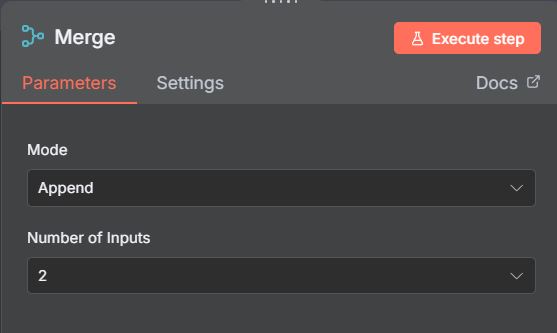
    • 合併(Merge):結合兩個來源資料
  • 邏輯節點:條件決策
    • If
    • Switch
    • Wait

  • google cloud

Issue

windows container 不見了

1
2
3
4
5
6
7
8
9
10
11
12
13
14
15
16
17
18
19
20
21
22
23
24
25
D:\work_temp\to_run\basic-sqlite v1.0.2\basic-sqlite>docker ps
CONTAINER ID IMAGE COMMAND CREATED STATUS PORTS NAMES

D:\work_temp\to_run\basic-sqlite v1.0.2\basic-sqlite>docker ps -a
CONTAINER ID IMAGE COMMAND CREATED STATUS PORTS NAMES

D:\work_temp\to_run\basic-sqlite v1.0.2\basic-sqlite>docker volume ls
DRIVER VOLUME NAME
local basic-sqlite_n8n_data

# fix container 不見了, -d 容器在背景執行, 終端機不會被佔用
D:\work_temp\to_run\basic-sqlite v1.0.2\basic-sqlite>docker-compose up -d
[+] Running 5/5
✔ Network basic-sqlite_traefik-public Created 0.0s
✔ Network basic-sqlite_internal Created 0.0s
✔ Container basic-sqlite-n8n-1 Started 0.8s
✔ Container basic-sqlite-traefik-1 Started 0.7s
✔ Container basic-sqlite-ngrok-1 Started

# 只可以看到, container 以下的 image
D:\work_temp\to_run\basic-sqlite v1.0.2\basic-sqlite>docker ps
CONTAINER ID IMAGE COMMAND CREATED STATUS PORTS NAMES
00eed5ad2100 ngrok/ngrok:latest "/nix/store/1qpvcjc0…" 15 minutes ago Up About a minute 0.0.0.0:4040->4040/tcp, [::]:4040->4040/tcp basic-sqlite-ngrok-1
08e122d2135a traefik:latest "/entrypoint.sh --pr…" 15 minutes ago Up About a minute 0.0.0.0:80->80/tcp, [::]:80->80/tcp, 0.0.0.0:443->443/tcp, [::]:443->443/tcp basic-sqlite-traefik-1
fb7cede0fd33 n8nio/n8n:latest "tini -- /docker-ent…" 15 minutes ago Up About a minute 0.0.0.0:5678->5678/tcp, [::]:5678->5678/tcp basic-sqlite-n8n-1

Install

Tool

  • Ngrok(安全隧道服務):免費但有流量限制
    • 將localhost服務變成公開網址工具
    • 建立安全加密通道,方便外部訪問
    • 適合測試、演示、臨時共享
  • Trefix:反向代理服務器
    • 智慧型網路流量總管,自動管理路由
    • 簡單多個後端服務訪問入口
    • 輕鬆實現 HTTPS 加密與負載平衡
  • n8n:AI自動化工作留
    • 視覺化自動化平台,用節點串接服務與API
    • 將AI能力嵌入日常工作流程
    • 開源、可自行部署、掌握控制權

Template(模板)

  1. Ngrok + Traefix + n8n + SQLITE
  2. Ngrok + Traefix + n8n + PostgreSQL(PostgreSQL 工作流可以並行, 提升性能)
  3. Ngrok + Traefix + n8n + PostgreSQL + pgAdminQL(pgAdminQL 為 PostgreSQL後台)

Windows Install(Ngrok + Traefix + n8n + SQLITE)

安裝 Docker

不用登入(登入可有較多的下載,但目前只下載3個 Ngrok + Traefix + n8n,所以不用登入)

Ngrok setup - free account 限制
1
2
3
4
5
6
7
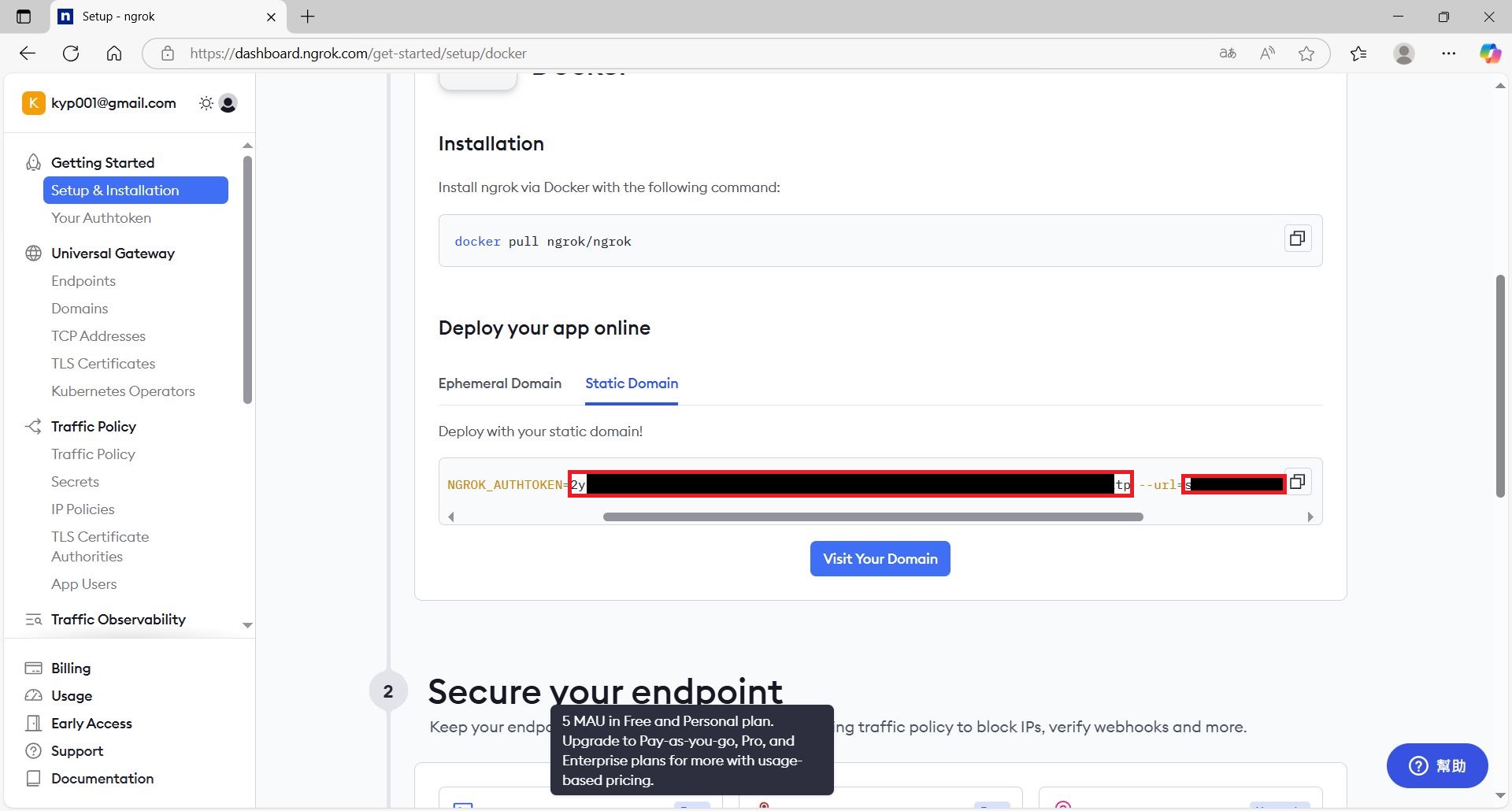
1. 註冊登入(認證可 skip) --> Docker
2. "Static Domain" 按 Claim yout free static doman(即可產生 Ngrok 給的帳號網址)
3. url 即為 Ngrok 網址
4. copy NGROK_AUTHTOKEN and url, put to .env
# Ngrok Settings
NGROK_DOMAIN=your_ngrok_domain
NGROK_AUTHTOKEN=your_ngrok_authtoken
Trefix 設定密碼
  • 產生 MD5 密碼 : Dan’s Tools 輸入任意字串,產生MD5 Hash
  • copy MD5 Hash to .env
1
TRAEFIK_DASHBOARD_PASSWORD_HASH=$$apr1$$MD5_Hash
安裝 n8n(.env set already, 啟動模板)
1
docker-compose up -d
登入 n8n
  • 記的驗證,可提供一些功能以後使用

  • local http://localhost:5678/ 或遠端使用 Ngrok url 登入

更新 n8n
1
2
docker-compose pull
docker-compose up -d
command
1
2
3
4
5
6
7
8
9
10
11
12
13
14
15
16
17
18
19
20
21
22
23
24
25
26
27
28
29
30
31
32
33
34
35
36
37
38
39
40
41
42
43
44
45
46
47
48
49
50
51
52
53
54
55
56
# wsl command
# need run at C:\Windows\system32>
PS C:\Windows\system32> wsl --list
Windows 子系統 Linux 版發佈:
docker-desktop-data (預設值)
Ubuntu-20.04

PS C:\Windows\system32> wsl --update
正在安裝:Windows 子系統 Linux 版
已完成安裝 Windows 子系統 Linux 版。

PS C:\Windows\system32> wsl --list
WSL 正在完成升級...
Windows 子系統 Linux 版發佈:
docker-desktop-data (預設)
Ubuntu-20.04

PS C:\Windows\system32> wsl --list --verbose
NAME STATE VERSION
* docker-desktop-data Stopped 2
Ubuntu-20.04 Stopped 2

PS C:\Windows\system32> wsl --version
WSL 版本: 2.5.9.0
核心版本: 6.6.87.2-1
WSLg 版本: 1.0.66
MSRDC 版本: 1.2.6074
Direct3D 版本: 1.611.1-81528511
DXCore 版本: 10.0.26100.1-240331-1435.ge-release
Windows 版本: 10.0.19045.5854

# create image
docker-compose pull
# create image + 在背景執行
docker-compose up -d
# 停止並移除所有服務容器與網路
docker-compose down

# 列出 Docker 容器
docker ps # 只看正在運行的容器
docker ps -a # 看所有(包含已停止)的容器
# docker ps example
C:\Windows\System32>docker --version
Docker version 28.2.2, build e6534b4

C:\Windows\System32>docker ps
CONTAINER ID IMAGE COMMAND CREATED STATUS PORTS NAMES
00eed5ad2100 ngrok/ngrok:latest "/nix/store/1qpvcjc0…" 3 days ago Up 2 hours 0.0.0.0:4040->4040/tcp, [::]:4040->4040/tcp basic-sqlite-ngrok-1
08e122d2135a traefik:latest "/entrypoint.sh --pr…" 3 days ago Up 2 hours 0.0.0.0:80->80/tcp, [::]:80->80/tcp, 0.0.0.0:443->443/tcp, [::]:443->443/tcp basic-sqlite-traefik-1
fb7cede0fd33 n8nio/n8n:latest "tini -- /docker-ent…" 3 days ago Up 2 hours 0.0.0.0:5678->5678/tcp, [::]:5678->5678/tcp basic-sqlite-n8n-1

# show n8n log
C:\Windows\System32>docker logs basic-sqlite-n8n-1
User settings loaded from: /home/node/.n8n/config
Initializing n8n process
n8n ready on ::, port 5678

Mac Install(Ngrok + Traefix + n8n + PostgreSQL)

  1. command + shift + . 可看到 .env
  2. 右鍵 –> info 才可改檔名
安裝 Docker
Ngrok setup - free account 限制
1
2
3
4
1. copy NGROK_AUTHTOKEN and url, put to .env
# Ngrok Settings
NGROK_DOMAIN=your_ngrok_domain
NGROK_AUTHTOKEN=your_ngrok_authtoken
Database User and Password in .env(可不設定)
Trefix 設定密碼
  • 產生 MD5 密碼 : Dan’s Tools 輸入任意字串,產生MD5 Hash
安裝 n8n(.env set already, 啟動模板)
1
docker compose up -d
更新 n8n
1
2
docker-compose pull
docker compose up -d

install to HuggingFace Spacess

  • HuggingFace Space + Supabase Progress(n8n postgres)+upstash Redis
Issue
chrome can run, but brave cannot run : change from private to public
set Supabase
1
2
3
4
5
6
1. Create a new project(free account 最多兩個),有 Database Password and Project ID
2. project name n8nHugginFace
3. Connect
--> Connection String
--> Type SQLAlchemy
--> Transaction pooler
set HuggingFace
1
2
3
4
5
6
7
8
9
10
11
12
13
14
15
16
17
18
19
20
21
22
23
1. Space
--> search "ai+n8n"
--> Sort: Most likes
--> fuliai (較複雜)
--> search "N8n"
--> Sort: Most likes
--> baoyin2024 push
--> 右上角 3點 選 "Duplicate this Space"
set : GENERIC_TIMEZONE(Asia/Taipei),TZ(Asia/Taipei),DB_POSTGRESDB_PASSWORD(Database Password), DB_POSTGRESDB_USER(Database user), N8N_ENCRYPTION_KEY(填 n8ntesting 即可),DB_POSTGRESDB_HOST(填 Database host),N8N_EDITOR_BASE_URL(前面修成你的 Owner),WEBHOOK_URL(前面修成你的 Owner),N8N_HOST(前面修成你的 Owner)
Visibility 可設 Private or Public
N8N_PORT 為 7860
--> 按 Duplicate Space(即可開始安裝)
--> 見 n8n is starting up. Please wait
--> refresh 頁面 即可看到入 n8n 後台
--> HugginFace Editor 才是真正的後台 link: https://hot5656-n8n-free.hf.space
--> Files 可見模板之更新狀態
--> Settings Factory rebuild 回重新 build (原加入 workflow 會存在)
2. test Webhook
--> add Webhook node
--> copy production URL
--> Listen for test event
--> post copy to browser + "?name=HC" : show "{"message":"Workflow was started"}"
--> Webhook query show : name:HC
set upstash
1
2
3
4
5
6
7
8
9
10
11
12
13
14
15
16
17
18
19
1. Rddis --> Create database
--> name : n8nHuggingFace
--> Primary Region : California
--> Next --> Next
--> Create
2. n8n add Redis --> Publish message to redis channel
--> Create new Credetial
--> Host : upstash endpoint
Password : upstash token
Port : same no change
SSl : enable
User 不用填
--> Save
3. test Redis
--> add node AI agent
--> 點 memory pin
--> Redis Chat Memory
--> Session Time To Live : 60 (此 session 60s 後刪除)
如做 line OA, 客戶 line Id 可和 session key 結合, 可接客戶資訊和對話過程存於 Redis, 當此 session 結束時可將這些東西存到另一個database

工作流

Issues

access 不到 excel –> 另存為 google sheet

notes

1
2
3
4
5
6
7
8
9
10
11
12
13
14
# add work flash
點加號 或 按 tab 鍵

# node setting
1. Retry On Fail : 失敗從試次數間隔
2. On Error : 重試失敗處理方式(stop, mail or other)

# node 命名 : example Get_Task_Data
# 便利貼可做成 workflow block


# webhook : source 通知變動
# on form : n8n 提供表單填寫
# on chat message : 畫面下層輸入觸發
workflow type

  1. 非AI工作流程(Workflow) : 表單 –> 建檔分流 –> 寄追蹤信/寄會議信 –> 寄通知
  2. LLM工作流程(Non-Agentic Workflow) : 表單 –> 建檔分流 –> LLM內容生成 –> 寄追蹤信/寄會議信 –> 寄通知
  3. AI代理工作流程(AI-Agentic Workflow) : 表單 –> 建檔分流 –> AI Agent(資料調用,信件撰寫,確認) –> 寄追蹤信/寄會議信 –> 寄通知

wokflow example

  • fromSheetGmail : n8n form –> response email –> send email to team
  • fromSheetLLMGmail : n8n form –> 透過LLM寫信 –> response email –> send email to team

nodes

Edit Filed(set) : 資料篩選
1
2
1. 拖入 name : Englsh
1. 拖入 value : {{ $json.English }}
n8n Form –> On n8n new Form(Form 輸入)
1
2
# 輸入格式可選: string,DrodownList,Textarea...
# option -> Append n8n Attribution --> Disable(Form show n8n)
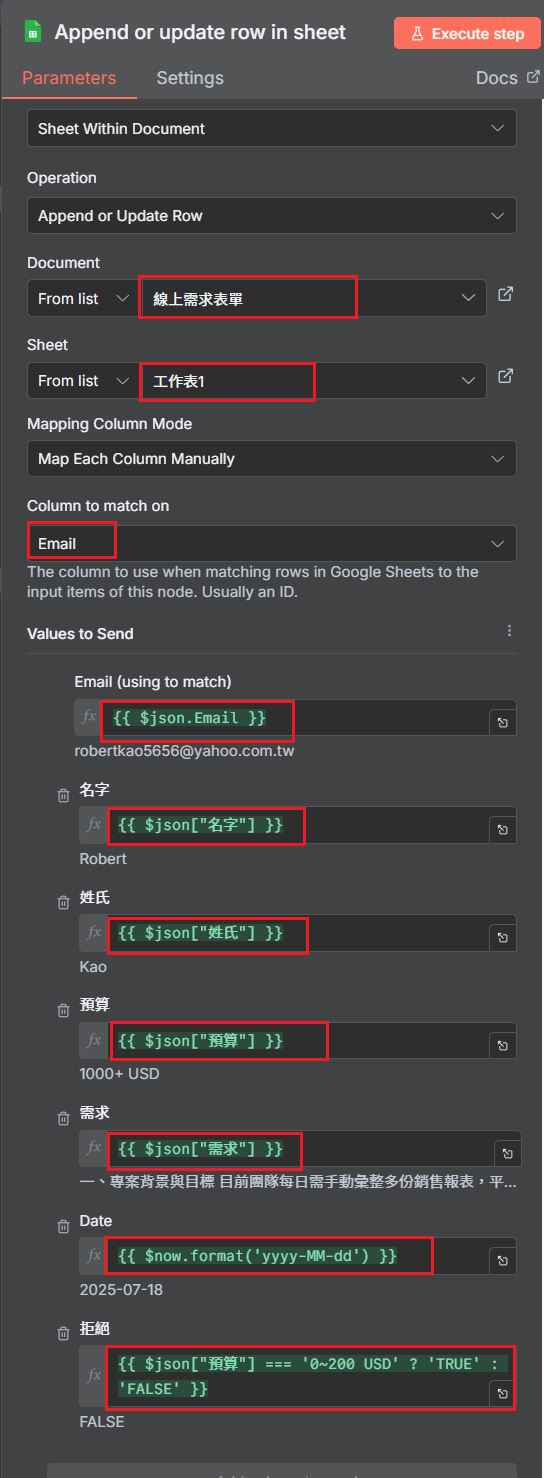
gooogle sheet –> append or upddate row in sheet(資料存入 sheet)
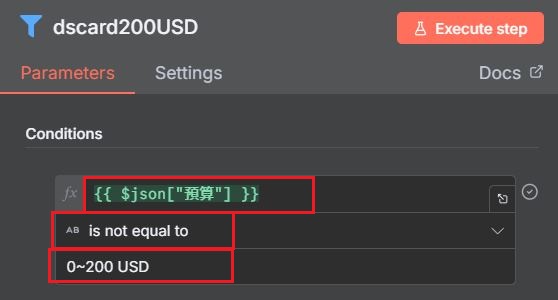
Filter(擋下)
Flow -> Switch(分流)
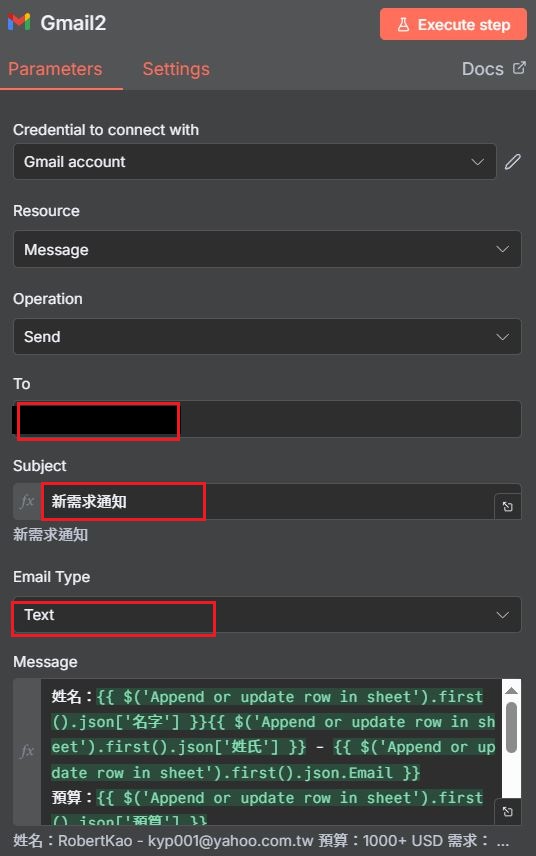
gmail -> send a message
1
1. google gmail API enable
Merge(合併資料流)

Prompt and code

date for now
1
{{ $now.format('yyyy-MM-dd') }}
prompt for TRUE or FALSE
1
2
3
1. 幫我寫一段n8n可以用的單行的{{}}程式,判斷輸入值使否等於"0~200 USD"輸出TRUE, 否則輸出FALSE
2. 我想要輸出 大寫的 TRUE 及 FALSE
{{ $json.input === '0~200 USD' ? 'TRUE' : 'FALSE' }}
prompt 追蹤信件
1
2
3
4
1. 幫我寫一封追蹤信件,目的是確認需求並且隱晦的引領預算到1000+ USD,不超過300字
2. 我要將此信件做成公定格式,讓其他需求可以套用 ..信件內容
3. 我要將此信件做成公定格式,讓其他需求可以套用,請用較模糊的問話方式 ..信件內容
4. 幫我做上述信件HTML 優化
prompt 接洽信件
1
2
3
1. 寫一封積極預約信件,讓對方感受到被重視和急迫性 ..信件內容
2. 幫我優化成非客製模式(可適用於不同產業),我們公司主營自動化,目的為讓客戶主動做會議邀約,簡短切中要點
3. 幫我做上述信件HTML 優化

add google account to n8n

add google Seets account
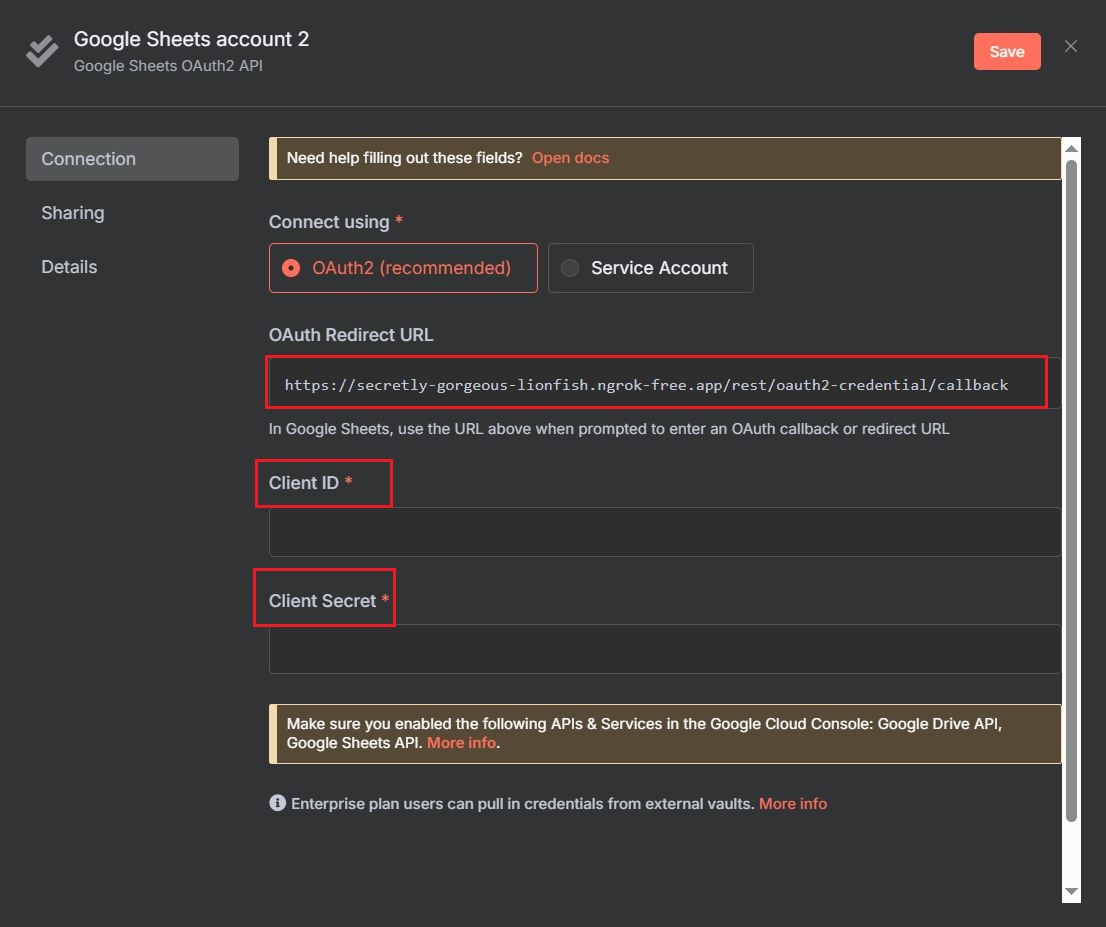
1
2
3
add workflow --> google sheet get row(s) in sheet
--> google Seets account
--> create new credential
Create google Sheets account
1
2
3
4
5
6
7
8
9
10
11
12
13
14
15
google cloud --> console(控制台) 
--> 1.API 服務 or 2. 資訊主頁 --> 前往 API 總覽
--> OAuth 同意畫面
第一次專案設定
應用程式名稱 : 填 n8n
使用者支援電子郵件 : 填 email
目標應用 : 外部
聯絡資訊 : 填 email
建立
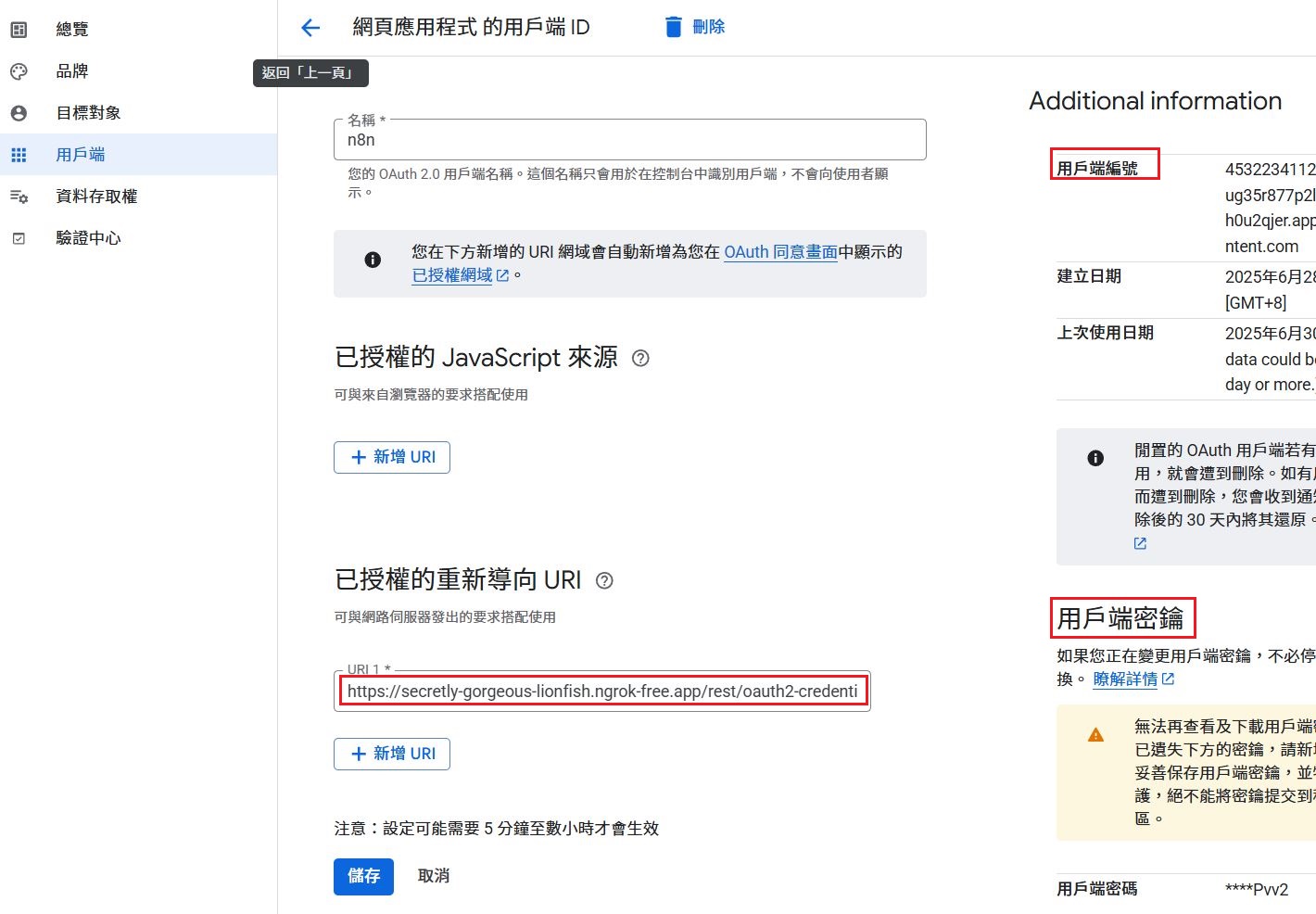
--> 用戶端(建立用戶端)
應用程式類型 : 網頁應用程式
名稱 : 填 n8n
已授權的重新導向 URI : 填 copy from google sheets account [Oauth Redirect URL]
建立
--> copy 用戶端編號,密碼 填回 Google Sheets account
Create google 目標對象:如上進入 OAuth 同意畫面
1
2
3
# for 測試 設定
OAuth 同意畫面 --> 測試使用者
--> Add user(輸入使用者 google main)
Enable Google sheet API
1
search google sheets API --> 啟用
Enable google drive API
1
search google drive API --> 啟用
google Sheets account Sing
1
2
google Seets account --> Update cerdential(pen icon)
--> Sign in with Google
1:15:27

Other

1
2
3
4
5
6
7
gaoyiping@gaoyipingdeMacBook-Pro minimal-postgres % docker --version
Docker version 28.1.1, build 4eba377

# RAG
enbedding Model:OpenAi,Google,microsoft 都有

compress HTML

參考

Ngrok , https://dashboard.ngrok.com/, google