Master Flutter and Dart

Getting Started with Flutter Develop

Setting Up

  • IDE(vscode)
  • SDK(flutter)
  • Screen Sharing - Vysor(screen Copy Android)

JIT/AOT

  • Just in Time Compilation(JIT)
  • Ahead of Time Compilation(AOT)

First App : Timer App

Start

lib/main.dart
1
2
3
4
5
6
7
8
9
10
11
12
13
14
15
16
17
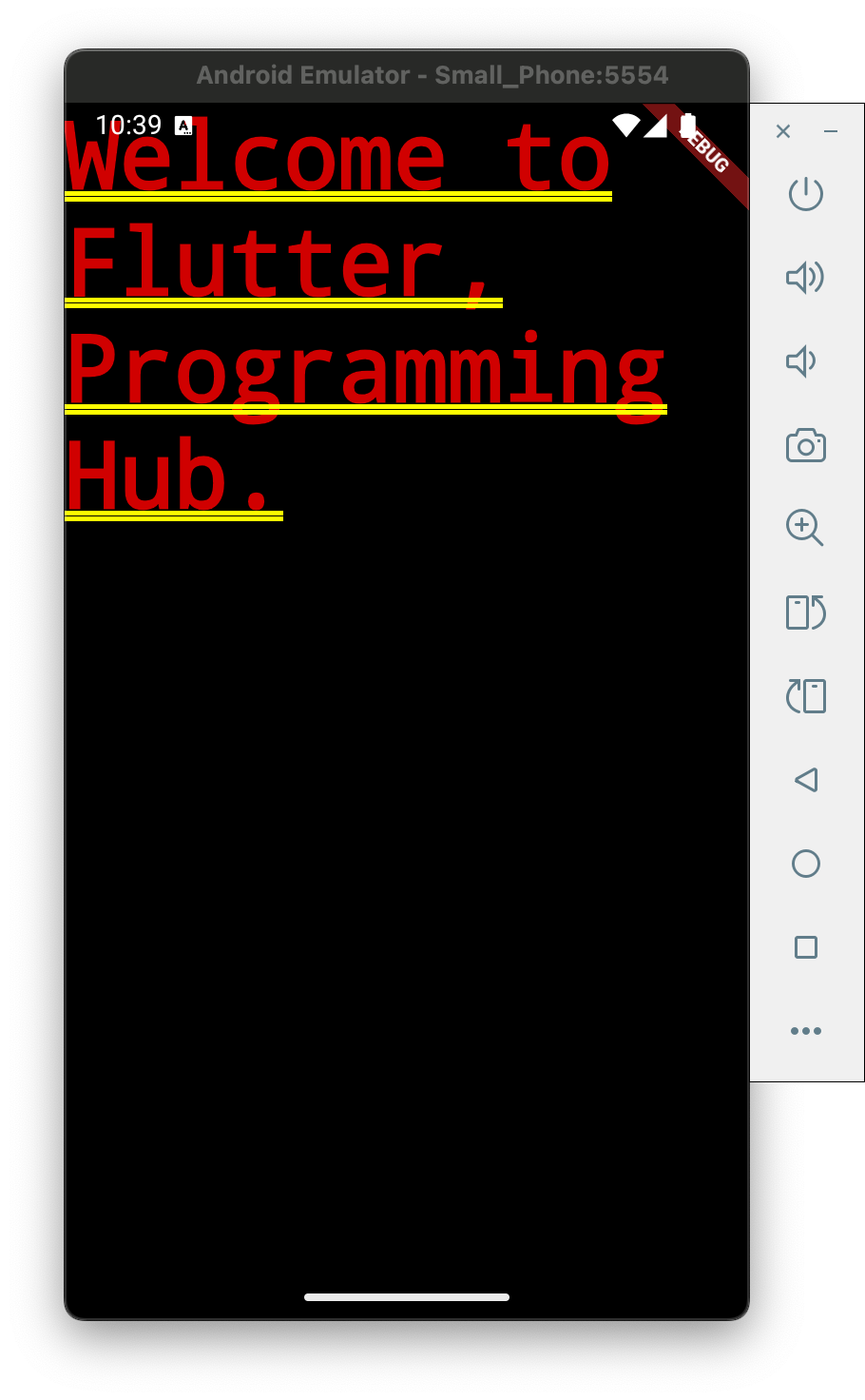
import 'package:flutter/material.dart';

void main() {
runApp(MyApp());
}

class MyApp extends StatelessWidget{
// kyp : build function - for UI create
@override
Widget build(BuildContext context) {
// kyp : Material App for android
// Cupertino App for iOS
return MaterialApp(
home: Text("Welcome to Flutter, Programming Hub."),
);
}
}

add open screen/timer scree

lib/main.dart
1
2
3
4
5
6
7
8
9
10
11
12
13
14
15
16
17
18
import 'package:flutter/material.dart';
import 'package:programminghub/home/home_screen.dart';

void main() {
runApp(MyApp());
}

class MyApp extends StatelessWidget{
// kyp : build function - for UI create
@override
Widget build(BuildContext context) {
// kyp : Material App for android
// Cupertino App for iOS
return MaterialApp(
home: HomeScreen()
);
}
}
lib/home/home_screen.dart
1
2
3
4
5
6
7
8
9
10
11
12
13
14
15
16
17
18
19
20
21
22
23
24
25
26
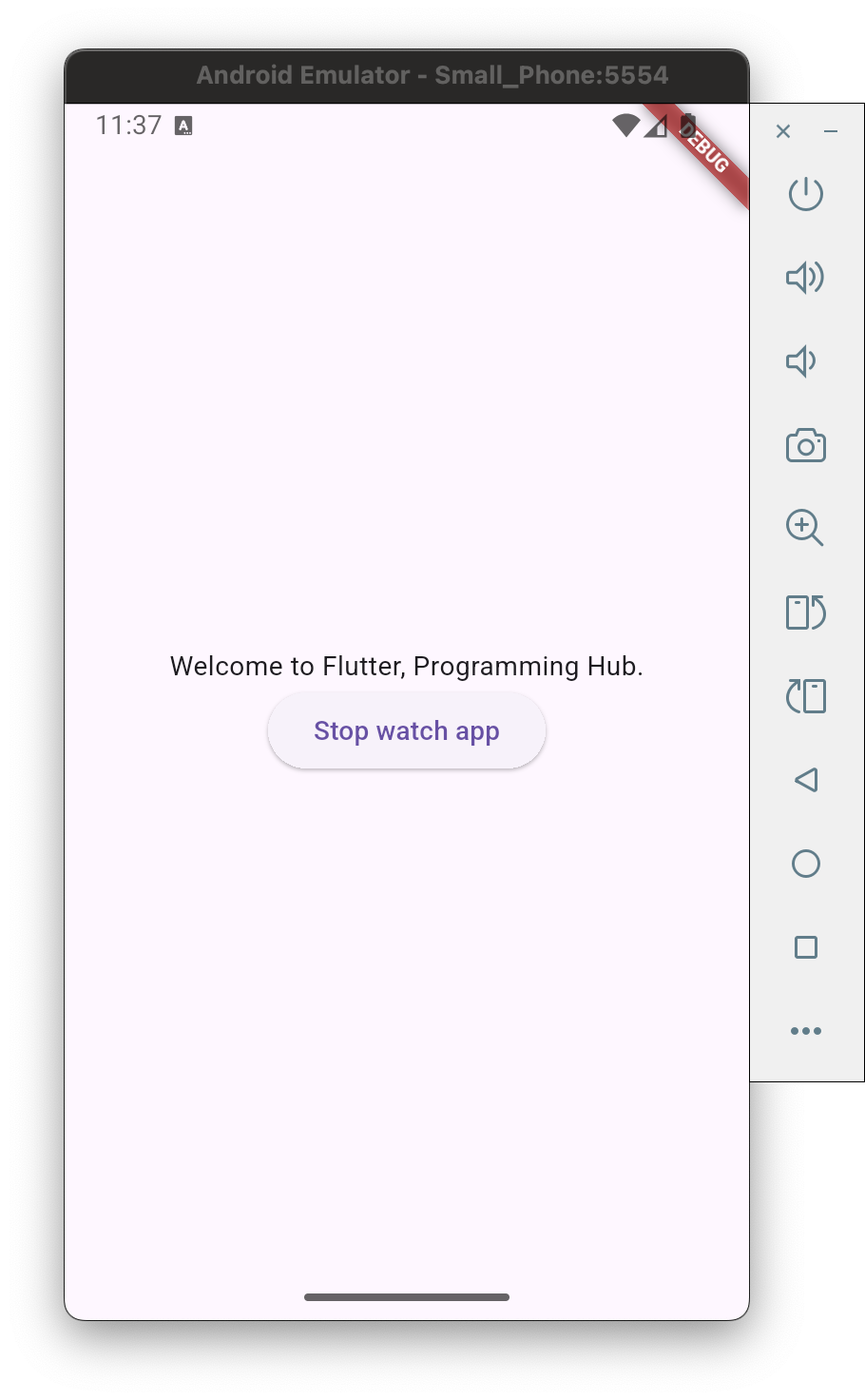
import 'package:flutter/material.dart';
import '../timer/timer_screen.dart';

class HomeScreen extends StatelessWidget{
@override
Widget build(BuildContext context) {
// kyp : Scaffold - phone 範圍
return Scaffold(
body: Center(
child: Column(
mainAxisAlignment: MainAxisAlignment.center,
children: [
Text("Welcome to Flutter, Programming Hub."),
ElevatedButton(
// TimerScreen
onPressed: (){
Navigator.push(context, MaterialPageRoute(builder: (context) => TimerScreen()));
},
child: Text("Stop watch app"),
),
],
),
),
);
}
}
lib/timer/timer_screen.dart
1
2
3
4
5
6
7
8
9
10
11
12
13
14
15
16
17
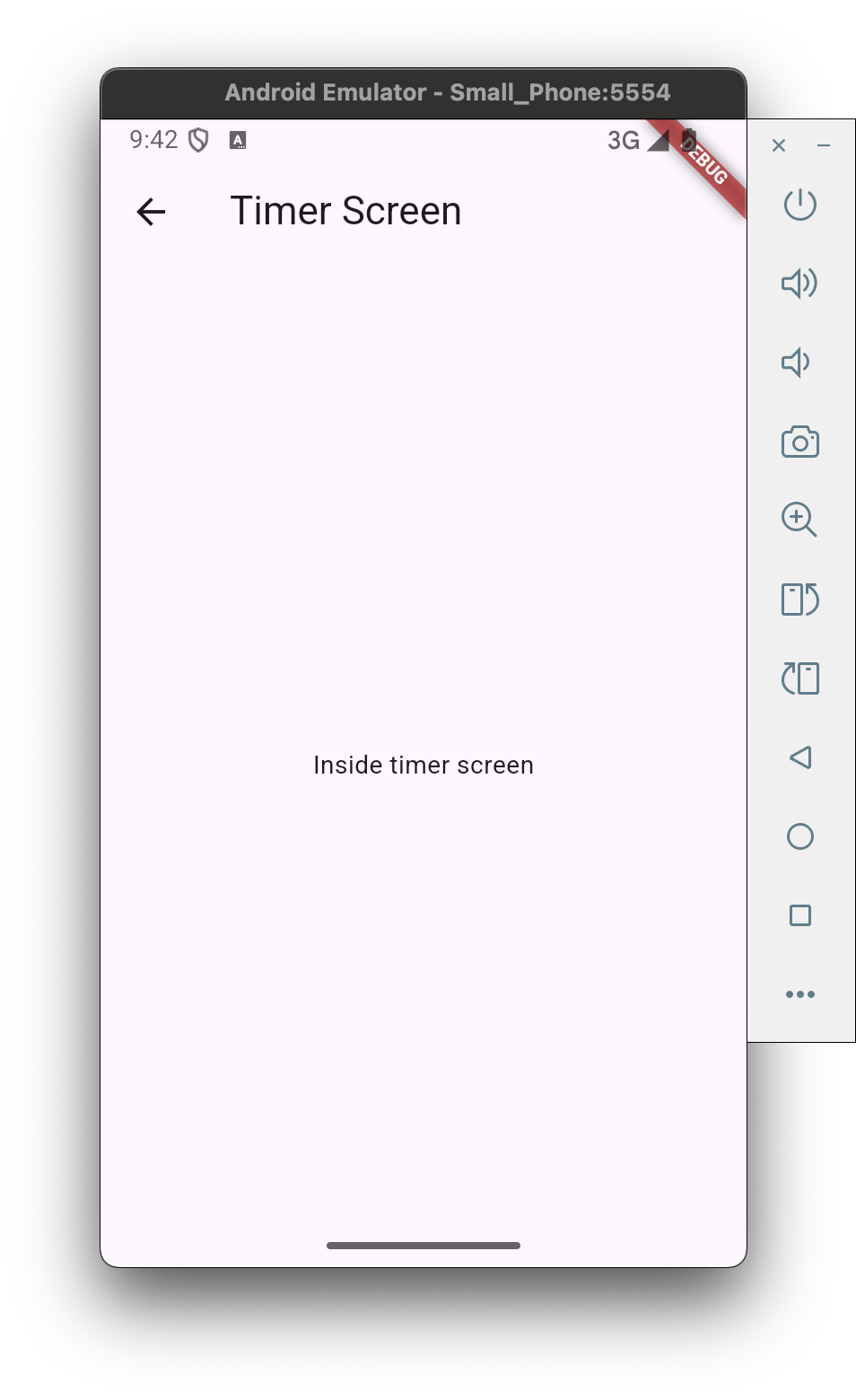
import 'package:flutter/material.dart';

class TimerScreen extends StatelessWidget{
@override
Widget build(BuildContext context) {
// kyp : Scaffold - phone 範圍
return Scaffold(
// push 到本頁會自動加返回箭頭
appBar: AppBar(
title: Text("Timer Screen"),
),
body: Center(
child: Text("Inside timer screen"),
),
);
}
}

timer start/stop

lib/home/home_screen.dart
1
2
3
4
5
6
7
8
9
10
11
12
13
14
15
16
17
18
19
20
21
22
23
24
25
26
27
import 'package:flutter/material.dart';
import '../timer/timer_screen.dart';

class HomeScreen extends StatelessWidget{
@override
Widget build(BuildContext context) {
// kyp : Scaffold - phone 範圍
return Scaffold(
body: Center(
child: Column(
// 設定column垂直座標於中間
mainAxisAlignment: MainAxisAlignment.center,
children: [
Text("Welcome to Flutter, Programming Hub."),
ElevatedButton(
// TimerScreen
onPressed: (){
Navigator.push(context, MaterialPageRoute(builder: (context) => TimerScreen()));
},
child: Text("Stopwatch app"),
),
],
),
),
);
}
}
lib/timer/timer_screen.dart
1
2
3
4
5
6
7
8
9
10
11
12
13
14
15
16
17
18
19
20
21
22
23
24
25
26
27
28
29
30
31
32
33
34
35
36
37
38
39
40
41
42
43
44
45
46
47
48
49
50
51
52
53
54
55
56
57
58
59
60
61
62
63
64
65
66
67
68
69
70
71
72
73
74
75
76
77
78
79
80
81
82
83
84
85
86
87
88
89
90
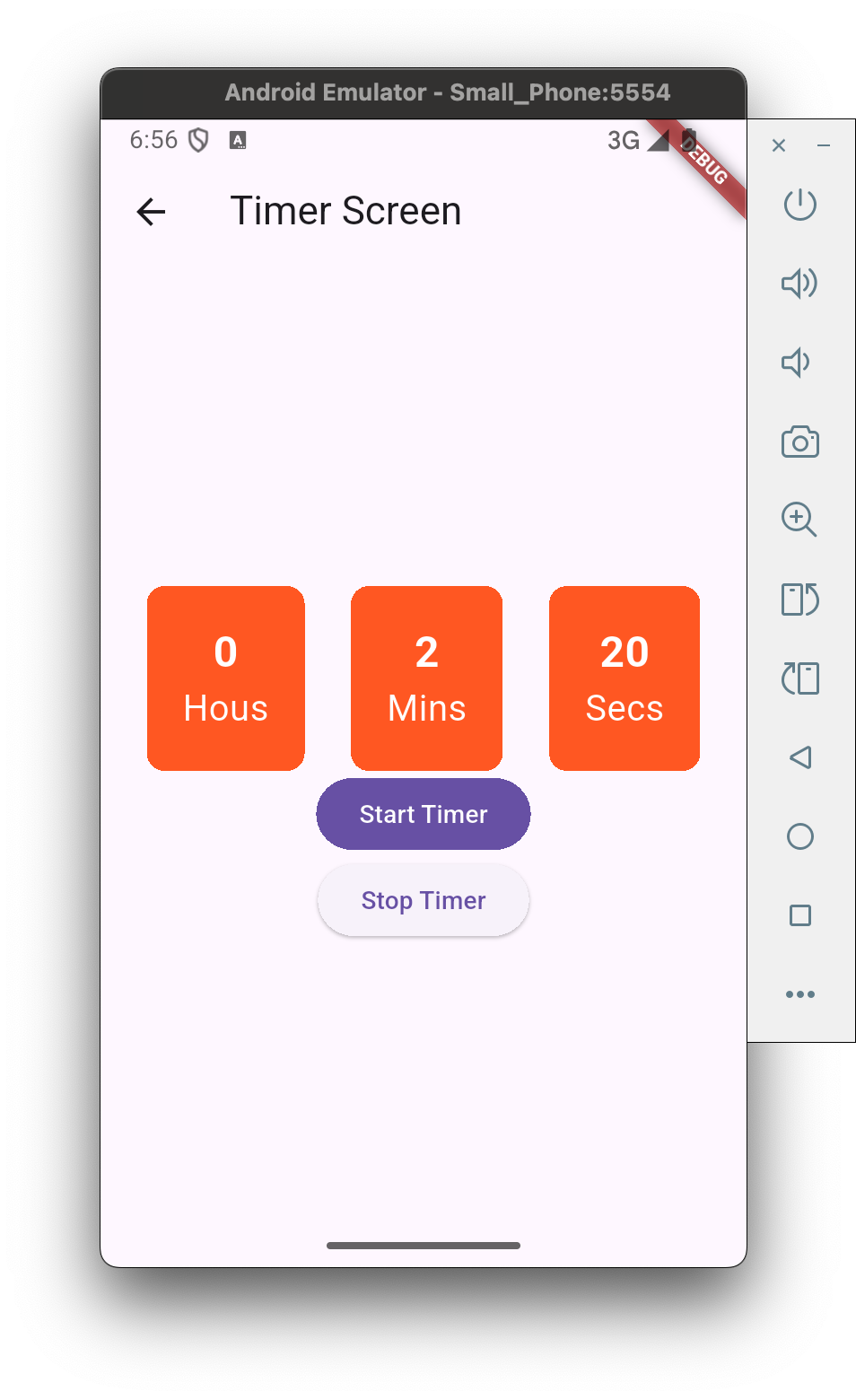
import 'package:flutter/material.dart';
import 'dart:async';
import 'timer_container.dart';

class TimerScreen extends StatefulWidget{
@override
State<StatefulWidget> createState() {
return TimerScreenState();
}
}

// class TimerScreenState extends StatelessWidget{
// TimerScreen's state control
class TimerScreenState extends State<TimerScreen>{
int secondPassed = 0;
int displaySecs = 0;
int displayMins = 0;
int displayHours = 0;
// _ 表示它是私有變數
Timer? _timer;
bool isTimerActive = false;

@override
Widget build(BuildContext context) {
// kyp : Scaffold - phone 範圍
return Scaffold(
// push 到本頁會自動加返回箭頭
appBar: AppBar(
title: Text("Timer Screen"),
),
body: Center(
child : Column(
mainAxisAlignment: MainAxisAlignment.center,
children: [
Row(
mainAxisAlignment: MainAxisAlignment.spaceEvenly,
// mainAxisSize: MainAxisSize.,
children: [
TimerContainer(timerLabel: "Hous",timerVlaue: displayHours.toString(),),
TimerContainer(timerLabel: "Mins",timerVlaue: displayMins.toString(),),
TimerContainer(timerLabel: "Secs",timerVlaue: displaySecs.toString(),),
],
),
FilledButton(
onPressed: (){
if (isTimerActive == false) {
isTimerActive = true;
_timer = Timer.periodic(Duration(seconds:1), (timer){
calculateTime();
});
}
},
child: Text("Start Timer"),
),
ElevatedButton(
onPressed: (){
_timer?.cancel();
isTimerActive = false;
},
child: Text("Stop Timer"),
),
],
),
),
);
}

// 當這個畫面(widget)被關閉或銷毀(dispose)時,要記得:
// 先停止 _timer,不讓它繼續跑(避免資源浪費或錯誤)
// 再呼叫父類別的 dispose() 方法,讓 Flutter 幫你清掉其他資源
@override
void dispose() {
// 如果 _timer 不是 null 才呼叫 cancel()
_timer?.cancel();
super.dispose();
}

void calculateTime(){
secondPassed++;
displaySecs = secondPassed % 60;
// ~ 傳回整數
displayMins = (secondPassed ~/ 60) % 60;
displayHours = secondPassed ~/ 3600;
// 安全地更新 UI
// true 這個 widget 還活著,可以安全使用 setState()
if (mounted) {
setState(() {});
}
}
}
lib/timer/timer_container.dart
1
2
3
4
5
6
7
8
9
10
11
12
13
14
15
16
17
18
19
20
21
22
23
24
25
26
27
28
29
30
31
32
33
34
35
36
37
38
39
40
41
42
43
44
import 'package:flutter/material.dart';

class TimerContainer extends StatelessWidget{
String timerLabel;
String timerVlaue;

TimerContainer({required this.timerLabel, required this.timerVlaue});

@override
Widget build(BuildContext context) {
return Container(
padding: EdgeInsets.all(20),
decoration: BoxDecoration(
// set block color
color: Colors.deepOrange,
borderRadius: BorderRadius.circular(10),
),
// add column
child: Column(
// 設定column垂直座標於中間
mainAxisAlignment: MainAxisAlignment.center,
// 設定最小高度
mainAxisSize: MainAxisSize.min,
children: [
Text(
timerVlaue,
style: TextStyle(
fontSize: 24,
color: Colors.white,
fontWeight: FontWeight.bold,
),
),
Text(
timerLabel,
style: TextStyle(
fontSize: 20,
color: Colors.white,
),
),
],
),
);
}
}

Dart

Encapsulation

1
2
3
4
5
6
7
8
9
10
11
12
13
14
15
16
17
18
19
20
21
22
23
24
25
26
27
28
29
30
31
32
33
34
35
36
37
38
39
// encapsulation
class Employee {
int _employeeId;
String _employeeName;

Employee(this._employeeId, this._employeeName);

String getName() {
return this._employeeName;
}

int getEmployeeId() {
return this._employeeId;
}

int getSalaryDetail() {
if (_employeeId == 1) {
return 10000;
} else if (_employeeId == 3) {
return 8000;
} else {
return 0;
}
}
}

void main() {
Employee employee1 = Employee(1, "Robert");
String employeeName1 = employee1.getName();
int employeeId1 = employee1.getEmployeeId();
int salary1 = employee1.getSalaryDetail();
print("name : $employeeName1");
print("id : $employeeId1");
print("salary: $salary1");

Employee employee3 = Employee(3, "Bill");
int salary3 = employee3.getSalaryDetail();
print("salary: $salary3");
}

Inheritance

1
2
3
4
5
6
7
8
9
10
11
12
13
14
15
16
17
18
19
20
21
22
23
24
25
26
27
28
29
30
31
32
33
34
35
36
37
38
39
40
41
42
43
44
45
46
47
48
49
50
51
52
53
54
55
56
57
58
59
60
61
62
63
64
65
66
67
68
69
70
71
72
73
74
75
76
77
78
79
80
81
82
83
84
85
86
87
88
89
90
91
92
93
94
95
96
97
98
// inheritance
// abstract class 建立子類必須遵守的接口/規範
abstract class PrintPersonDteails {
void printName();
void printAge();
}

class Person extends PrintPersonDteails {
String name;
int age;

Person({required this.name, required this.age});

@override
void printName() {
print("Person has a name $name");
}

@override
void printAge() {
print("Person has a age $age");
}
}

class Student extends Person {
String studentName;
int age;
String specialization;

Student({
required this.studentName,
required this.age,
required this.specialization,
}) : super(name: studentName, age: age);

@override
void printName() {
print(
"Student $studentName has a specialization course in $specialization",
);
}
}

// mixin 用來把多個類別共用的功能抽出來重複使用,不用繼承。
mixin Exercise {
void breathingExercises(int seconds) {
print("This person can hold its breath for $seconds seconds");
}

void runningExercises() {
print("This person does running exercise");
}
}

class Swimmer extends Person with Exercise {
String swimmerName;
int swimmerAge;

Swimmer({required this.swimmerName, required this.swimmerAge})
: super(name: swimmerName, age: swimmerAge);
}

class Professional extends Person with Exercise {
String personName;
int personAge;
String careerName;

Professional({
required this.personName,
required this.personAge,
required this.careerName,
}) : super(name: personName, age: personAge);
}

void main() {
Person person1 = Person(name: "Pratic", age: 23);
person1.printName();
person1.printAge();

Student student1 = Student(
studentName: "Shantanu",
age: 12,
specialization: "Comp Science Enginering",
);
student1.printName();

Swimmer swimmer1 = Swimmer(swimmerName: "Avitaj", swimmerAge: 18);
swimmer1.printName();
swimmer1.breathingExercises(50);

Professional prof1 = Professional(
personName: "Vivek",
personAge: 33,
careerName: "Doctor",
);
prof1.printName();
prof1.runningExercises();
}

null safety, final, late

1
2
3
4
5
6
7
8
9
10
11
12
13
14
15
16
17
18
19
20
21
22
23
24
25
26
27
28
29
30
31
32
33
34
35
36
37
38
39
40
41
42
43
44
// null safety, final, late
// final 表示這個變數 只能被賦值一次(不可變),一旦給值就不能再改變了
// late 表示這個變數稍後才初始化,但保證在使用前一定會有值
// ? mean a variable can be null

// 空值合併運算子 null-coalescing operator
// 如果「原本的值」不是 null,就用它;
// 如果是 null,就使用「預設值」。
//
// String? name;
// String displayName = name ?? "訪客";
// print(displayName); // 結果會是:訪客

// ??=(空值指定運算子)
// 只有在變數是 null 的時候才賦值。
//
// String? username;
// username ??= "預設使用者";
// print(username); // 輸出:預設使用者


final double pi = 3.1416;
late int x;
void main() {
String? name;
if (name == null) {
name = "Flutter app development";
} else {
print("Vlaue is already assigned");
}

print("Memory locaton ${name.hashCode}");
print(name);

String? name2 = name;
print("Memory locaton for name2 ${name2.hashCode}");
print(name);

// pi = 5;
x = 5;
double areaOfCircle = pi * x * x;
print("Area of circle $areaOfCircle");
}

Loop

1
2
3
4
5
6
7
8
9
10
11
12
13
14
15
16
17
18
19
20
21
22
23
24
25
26
27
28
29
30
31
32
33
34
35
// loop
void main() {
int i = 0;
print("for loop");
for (i = 0; i < 10; i++) {
print(i);
}

int j = 1;
print("while loop");
while (j < 5) {
int x = 4 * j;
print(x);
j++;
}

print("do while");
int k = 10;
do {
int y = 6 * k;
print("Value of y $y");
k--;
} while (k > 0);

print("list for");
List<int> numberList = [1, 12, 14, 33, 28];
for (var num in numberList) {
print(num);
}

print("list forEach");
numberList.forEach((int presentNumber) {
print("Present number $presentNumber");
});
}

add BMI Calculator

lib/home/home_screen.dart

1
2
3
4
5
6
7
8
9
10
11
12
13
14
15
16
17
18
19
20
21
22
23
24
25
26
27
28
29
30
31
32
33
34
import 'package:flutter/material.dart';
import 'package:programminghub/bmicalc/bmi_calculator_screen.dart';
import '../timer/timer_screen.dart';

class HomeScreen extends StatelessWidget{
@override
Widget build(BuildContext context) {
// kyp : Scaffold - phone 範圍
return Scaffold(
body: Center(
child: Column(
// 設定column垂直座標於中間
mainAxisAlignment: MainAxisAlignment.center,
children: [
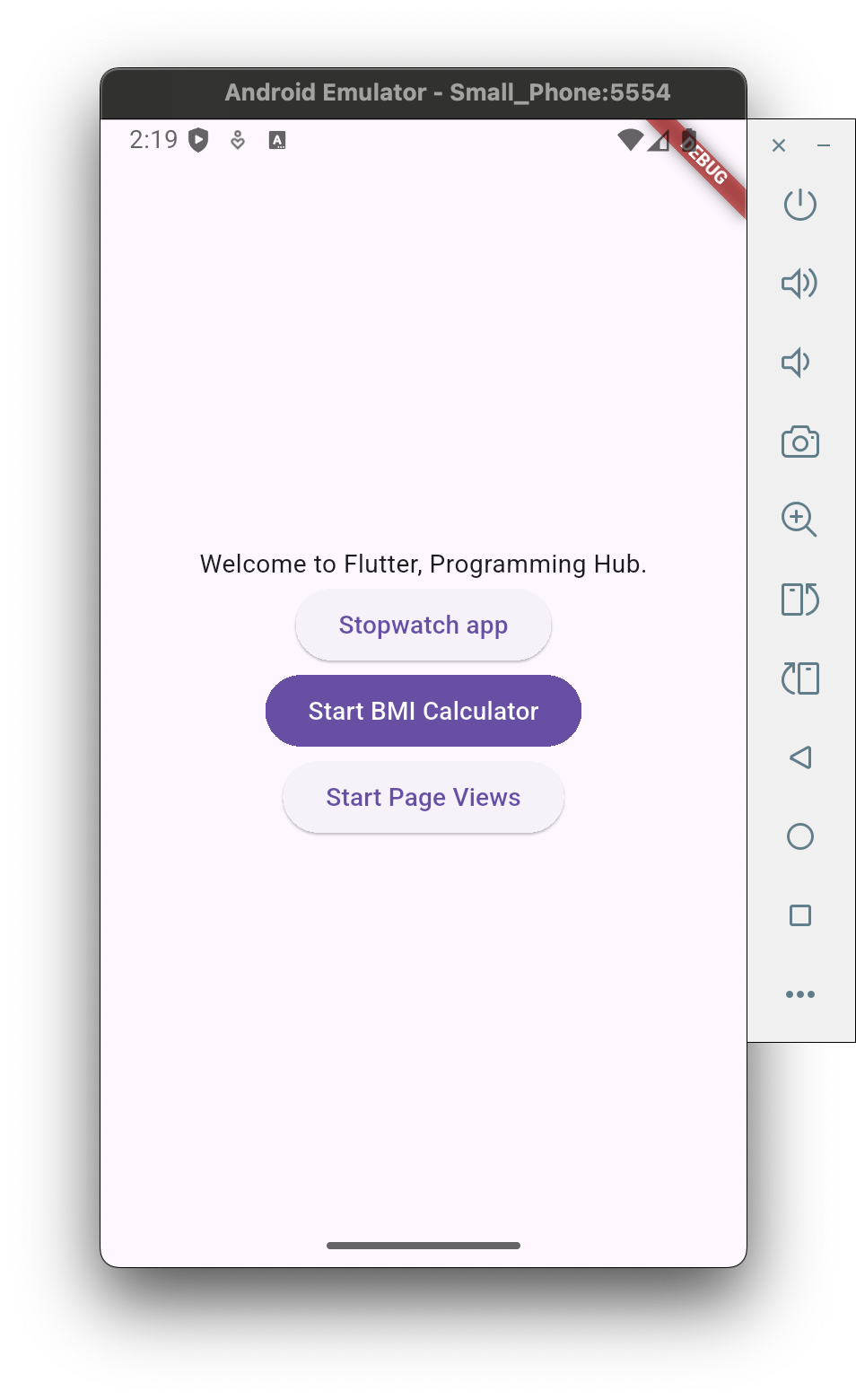
Text("Welcome to Flutter, Programming Hub."),
ElevatedButton(
// TimerScreen
onPressed: (){
Navigator.push(context, MaterialPageRoute(builder: (context) => TimerScreen()));
},
child: Text("Stopwatch app"),
),
FilledButton(
onPressed: (){
Navigator.push(context, MaterialPageRoute(builder: (context) => BmiCalculatorScreen()));
},
child: Text("Start BMI Calculator"),
),
],
),
),
);
}
}

lib/bmicalc/bmi_calculator_screen.dart

1
2
3
4
5
6
7
8
9
10
11
12
13
14
15
16
17
18
19
20
21
22
23
24
25
26
27
28
29
30
31
32
33
34
35
36
37
38
39
40
41
42
43
44
45
46
47
48
49
50
51
52
53
54
55
56
57
58
59
60
61
62
63
64
65
66
67
68
69
70
71
72
73
74
75
76
77
78
79
80
81
82
83
84
85
86
87
88
89
import 'package:flutter/material.dart';
import 'package:programminghub/bmicalc/bmi_calc_input_field.dart';

class BmiCalculatorScreen extends StatefulWidget {
@override
State<StatefulWidget> createState() {
return _BmiCalculatorScreenState();
}
}

class _BmiCalculatorScreenState extends State<BmiCalculatorScreen> {
GlobalKey<FormState> _formKey = GlobalKey();
TextEditingController weightControl = TextEditingController();
TextEditingController heightControl = TextEditingController();
double bmiIndex = 0.0;

@override
Widget build(BuildContext context) {
return Scaffold(
appBar: AppBar(
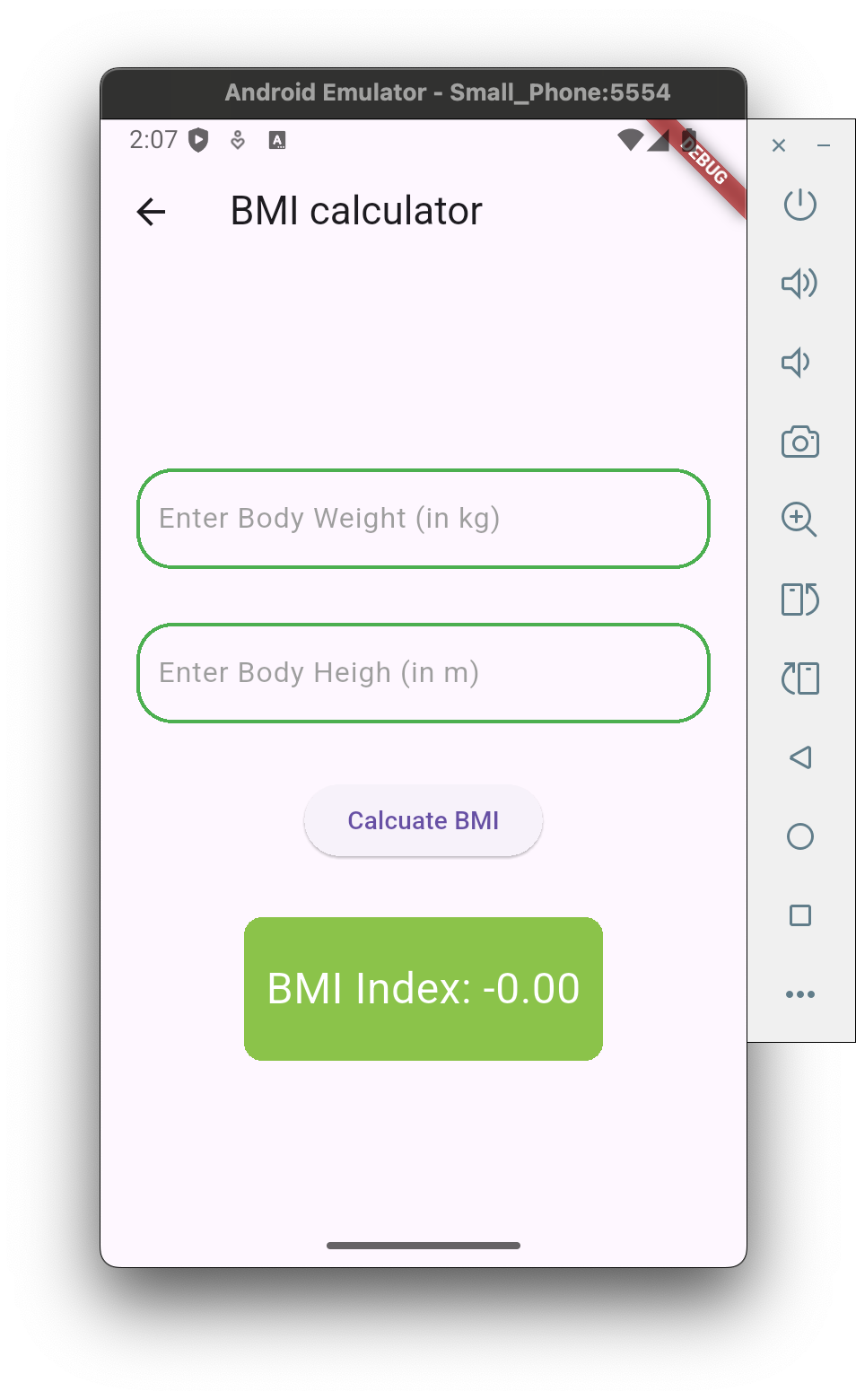
title: Text("BMI calculator"),
),
body: Center(
// child: Text("Inside BMI Calc Screen"),
child: Padding(
padding: EdgeInsets.only(left:20, right:20),
child: Form(
key: _formKey,
child: Column(
mainAxisAlignment: MainAxisAlignment.center,
children: [
BmiCalcuInputField(
inputHint: "Enter Body Weight (in kg)",
errorToDisplay: "Invalid input for weight",
inputontroller: weightControl,
),
SizedBox(
height: 30,
),
BmiCalcuInputField(
inputHint: "Enter Body Heigh (in m)",
errorToDisplay: "Invalid input for height",
inputontroller: heightControl,
),
SizedBox(
height: 30,
),
ElevatedButton(
onPressed: () {
if(_formKey.currentState!= null && _formKey.currentState!.validate()) {
print("Weight input ${weightControl.text}");
print("Height input ${heightControl.text}");
double weightInKg = double.parse(weightControl.text);
double heightInMeter = double.parse(heightControl.text);
bmiIndex = weightInKg / (heightInMeter * heightInMeter);
setState(() {

});
}
},
child: Text("Calcuate BMI"),
),
SizedBox(
height: 30,
),
Container(
width: 200,
height: 80,
decoration: BoxDecoration(
borderRadius: BorderRadius.circular(10),
color: Colors.lightGreen,
),
alignment: Alignment.center,
child: Text(
"BMI Index: -${bmiIndex.toStringAsFixed(2)}",
style: TextStyle(
color: Colors.white,
fontSize: 24,
),
),
),
],
),
),
),
),
);
}
}

lib/bmicalc/bmi_calculator_input_field.dart

1
2
3
4
5
6
7
8
9
10
11
12
13
14
15
16
17
18
19
20
21
22
23
24
25
26
27
28
29
30
31
32
33
34
35
36
37
38
39
40
41
42
43
44
45
46
47
48
49
50
51
52
53
54
55
56
57
58
59
60
import 'package:flutter/material.dart';

class BmiCalcuInputField extends StatelessWidget {
String inputHint;
String errorToDisplay;
TextEditingController inputontroller;

BmiCalcuInputField({required this.inputHint, required this.errorToDisplay, required this.inputontroller });


@override
Widget build(Object context) {
return TextFormField(
controller: inputontroller,
keyboardType: TextInputType.number,
decoration: InputDecoration(
hintText: inputHint,
hintStyle: TextStyle(
color: Colors.grey,
),
focusedBorder: OutlineInputBorder(
borderSide: BorderSide(
width: 2,
color: Colors.blue,
),
borderRadius: BorderRadius.circular(20),
),
enabledBorder: OutlineInputBorder(
borderSide: BorderSide(
width: 2,
color: Colors.green,
),
borderRadius: BorderRadius.circular(20),
),
errorBorder: OutlineInputBorder(
borderSide: BorderSide(
width: 2,
color: Colors.red,
),
borderRadius: BorderRadius.circular(20),
),
focusedErrorBorder: OutlineInputBorder(
borderSide: BorderSide(
width: 2,
color: Colors.brown,
),
borderRadius: BorderRadius.circular(20),
),
),
validator: (String? input) {
if (input !=null && input.isNotEmpty){
return null;
}
else {
return errorToDisplay;
}
} ,
);
}
}

Add Page Views

pubspec.yaml

1
2
# Implementing carousel animations in app
carousel_slider: ^5.0.0

home/home_screen.dart - home page

1
2
3
4
5
6
7
8
9
10
11
12
13
14
15
16
17
18
19
20
21
22
23
24
25
26
27
28
29
30
31
32
33
34
35
36
37
38
39
40
41
import 'package:flutter/material.dart';
import 'package:programminghub/bmicalc/bmi_calculator_screen.dart';
import 'package:programminghub/pageviews/page_view_demonstration_screen.dart';
import '../timer/timer_screen.dart';

class HomeScreen extends StatelessWidget{
@override
Widget build(BuildContext context) {
// kyp : Scaffold - phone 範圍
return Scaffold(
body: Center(
child: Column(
// 設定column垂直座標於中間
mainAxisAlignment: MainAxisAlignment.center,
children: [
Text("Welcome to Flutter, Programming Hub."),
ElevatedButton(
// TimerScreen
onPressed: (){
Navigator.push(context, MaterialPageRoute(builder: (context) => TimerScreen()));
},
child: Text("Stopwatch app"),
),
FilledButton(
onPressed: (){
Navigator.push(context, MaterialPageRoute(builder: (context) => BmiCalculatorScreen()));
},
child: Text("Start BMI Calculator"),
),
ElevatedButton(
onPressed: (){
Navigator.push(context, MaterialPageRoute(builder: (context) => PageViewDemonstrationScreen()));
},
child: Text("Start Page Views"),
),
],
),
),
);
}
}

pageviews/page_view_demonstration_screen.dart - page views

1
2
3
4
5
6
7
8
9
10
11
12
13
14
15
16
17
18
19
20
21
22
23
import 'package:flutter/material.dart';
import 'package:programminghub/pageviews/page1.dart';
import 'package:programminghub/pageviews/page2.dart';
import 'package:programminghub/pageviews/page3.dart';

class PageViewDemonstrationScreen extends StatelessWidget{
@override
Widget build(BuildContext context) {
return Scaffold(
// PageView 是 Fl​​utter 中用於實現頁面滑動切換的核心控件
body: Center(
// child: Text("Inside pageviews"),
child: PageView(
children: [
Page1(),
Page2(),
Page3(),
],
),
),
);
}
}

pageviews/page1.dart

1
2
3
4
5
6
7
8
9
10
11
12
13
14
15
16
17
18
19
20
21
22
23
24
25
26
27
28
29
30
31
32
33
34
35
36
37
38
39
40
41
42
import 'package:flutter/material.dart';

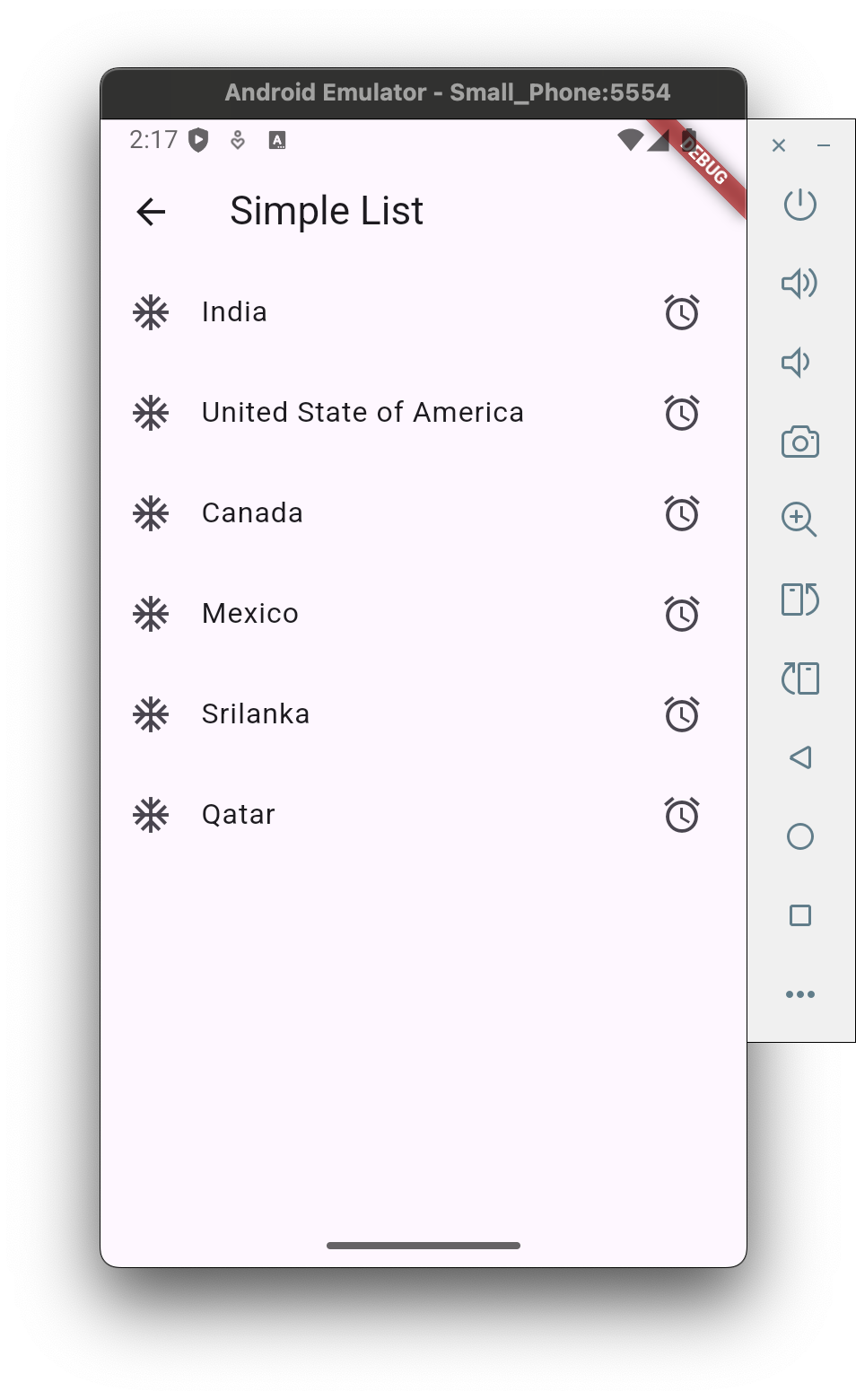
List<String> countriesList = [
"India",// 0
"United State of America",// 1
"Canada",// 2
"Mexico",
"Srilanka",
"Qatar",
];

class Page1 extends StatelessWidget{
@override
Widget build(BuildContext context) {
return Scaffold(
appBar: AppBar(
title: Text("Simple List"),
),
body: Center(
// child: Text("Inside page 1"),

// child: ListView.builder(
// itemCount: 99,
// itemBuilder: (BuildContext context, int index){
// return Text("Hello $index");
// }
// ),

child: ListView.builder(
itemCount: countriesList.length,
itemBuilder: (BuildContext context, int index){
return ListTile(
leading: Icon(Icons.ac_unit),
title: Text(countriesList[index]),
trailing: Icon(Icons.access_alarm_sharp),
);
}
),
),
);
}
}

pageviews/page2.dart

1
2
3
4
5
6
7
8
9
10
11
12
13
14
15
16
17
18
19
20
21
22
23
24
25
26
27
28
29
30
31
32
33
34
35
36
37
38
39
40
41
42
43
44
45
46
47
import 'package:flutter/material.dart';

class Page2 extends StatelessWidget{
List<String> officeToList = [
"Metting 10:30 am",
"Task Before Lunch",
"Task After Lunch",
"TCalls from Client",
"Task Before Lunch",
"Prepare report",
] ;

// 這個 context 是 Flutter 中非常重要的參數,用來:
// 存取 Theme, Navigator, MediaQuery, Scaffold, 等上層 widget 的資料或功能。
// ListTile.divideTiles 就需要這個 context 來取得主題資料(像是分隔線的顏色等)。
@override
Widget build(BuildContext contextPassed) {
return Scaffold(
appBar: AppBar(
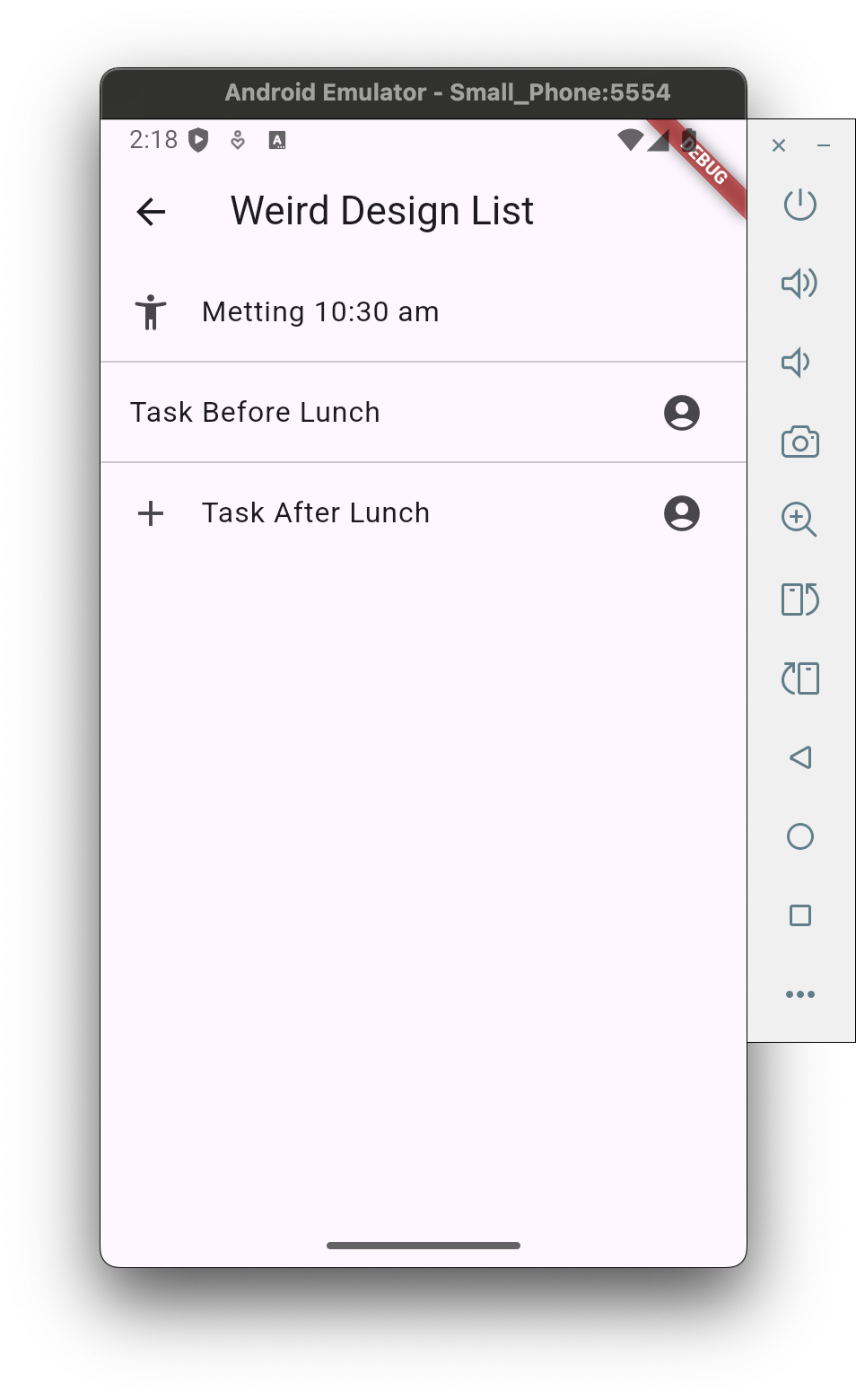
title: Text("Weird Design List"),
),
body: Center(
child: ListView(
// 幫你自動在 ListTile 中間插入分隔線(Divider)
children: ListTile.divideTiles(
context: contextPassed,
tiles: [
ListTile(
leading: Icon(Icons.accessibility_new_rounded),
title: Text(officeToList[0]),
),
ListTile(
title: Text(officeToList[1]),
trailing: Icon(Icons.account_circle),
),
ListTile(
leading: Icon(Icons.add),
title: Text(officeToList[2]),
trailing: Icon(Icons.account_circle),
),
],
).toList(),
),
),
);
}
}

pageviews/page3.dart

1
2
3
4
5
6
7
8
9
10
11
12
13
14
15
16
17
18
19
20
21
22
23
24
25
26
27
28
29
30
31
32
33
34
35
36
37
38
39
40
41
42
43
44
45
46
47
48
49
50
51
52
53
54
55
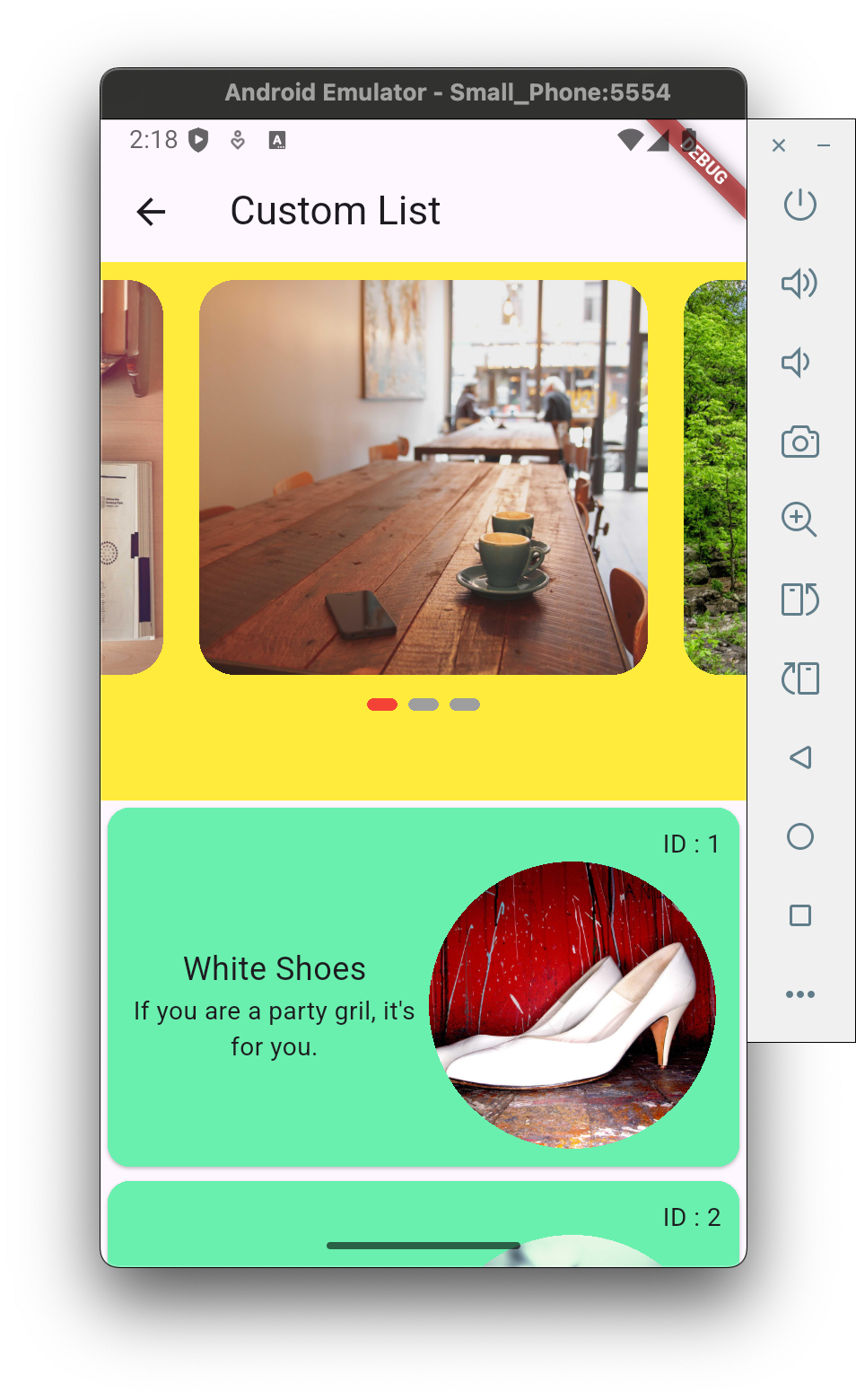
import 'package:flutter/material.dart';
import 'package:programminghub/pageviews/display_carousel_widget.dart';
import 'package:programminghub/pageviews/get_page3_data.dart';
import 'package:programminghub/pageviews/page3_item_widget.dart';
import 'package:programminghub/pageviews/page3_model.dart';

class Page3 extends StatelessWidget{
List<Page3Model> page3Data = GetPage3Data().getData();

@override
Widget build(BuildContext context) {
return Scaffold(
appBar: AppBar(
title: Text("Custom List"),
),
body: Center(
// child: Text("Inside page 3"),
child: SingleChildScrollView(
child: Column(
children: [
DisplayCarouselWidget(),

// 建立一個動態的清單
ListView.builder(
// 讓 ListView 只佔用實際內容高度,不會無限延伸。
shrinkWrap: true,
// 禁止 ListView 自己滾動,因為外層已經有 SingleChildScrollView 了,避免滾動衝突。
physics: NeverScrollableScrollPhysics(),
itemCount: page3Data.length, // 長度
// 建立每一個清單項目,這裡會傳入目前的 index
itemBuilder: (BuildContext context, int index){
Page3Model currentModel = page3Data[index];
// return Image.network(currentModel.imgaeUrl);
return Page3ItemWidget(currentModelData: currentModel);
}
),
],
),
),
// child: Column(
// children: [
// DisplayCarouselWidget(),
// ListView.builder(
// itemCount: page3Data.length,
// itemBuilder: (BuildContext context, int index){
// Page3Model currentModel = page3Data[index];
// return Image.network(currentModel.imgaeUrl);
// }
// ),
// ],
// ),
),
);
}
}

pageviews/page3_model.dart - page model

1
2
3
4
5
6
7
8
9
10
11
12
13
14
// data model
class Page3Model {
int imageId;
String imgaeUrl;
String title;
String description;

Page3Model( {
required this.imageId,
required this.imgaeUrl,
required this.title,
required this.description,
});
}
1
2
3
4
5
6
7
8
9
10
11
12
13
14
15
16
17
18
19
20
21
22
23
24
25
26
27
28
29
30
31
32
33
34
35
36
37
38
39
40
41
42
43
44
45
46
47
48
49
50
51
52
53
54
55
56
57
58
59
60
61
62
63
64
65
66
67
68
69
70
71
72
73
74
75
76
77
78
79
80
81
82
83
84
85
86
87
88
89
90
91
92
93
94
95

import 'package:flutter/material.dart';
import 'package:carousel_slider/carousel_slider.dart';


class DisplayCarouselWidget extends StatefulWidget {
@override
State<StatefulWidget> createState() {
return _DisplayCarouselWidgetState();
}
}

class _DisplayCarouselWidgetState extends State<DisplayCarouselWidget>{
List<String> imagesList = [
"https://fastly.picsum.photos/id/42/3456/2304.jpg?hmac=dhQvd1Qp19zg26MEwYMnfz34eLnGv8meGk_lFNAJR3g",
"https://fastly.picsum.photos/id/28/4928/3264.jpg?hmac=GnYF-RnBUg44PFfU5pcw_Qs0ReOyStdnZ8MtQWJqTfA",
"https://fastly.picsum.photos/id/20/3670/2462.jpg?hmac=CmQ0ln-k5ZqkdtLvVO23LjVAEabZQx2wOaT4pyeG10I",
];

CarouselSliderController carouselScrollController = CarouselSliderController();

int activePage = 2;

@override
Widget build(BuildContext context) {
return Container(
height: 300,
color: Colors.yellow,
alignment: Alignment.center,
// child: Text("Carousel will be show here"),
child: Column(
children: [
CarouselSlider.builder(
carouselController: carouselScrollController,
itemCount: imagesList.length,
itemBuilder: (BuildContext context, int itemIndex, int pageViewIndex) =>
Container(
// child: Text(itemIndex.toString()),
margin: EdgeInsets.all(10),
decoration: BoxDecoration(
borderRadius: BorderRadius.circular(20),
image: DecorationImage(
image: NetworkImage(imagesList[itemIndex]),
fit: BoxFit.cover,
),
),
),
options: CarouselOptions(
// 自動播放輪播
autoPlay: true,
// 滑動時有彈性效果
scrollPhysics: BouncingScrollPhysics(),
// 設定寬高比
aspectRatio: 1.5,
// 每一頁佔據 75% 的寬度,產生左右預覽效果
viewportFraction: 0.75,
// 預設顯示第 3 頁(index from 0)
initialPage: 2,
// 當頁面改變時,更新 activePage 並呼叫 setState 重新渲染。
onPageChanged: (index, reason){
activePage = index;
setState(() {

});
}
),
),
Row(
// children: [],
mainAxisAlignment: MainAxisAlignment.center,
// .asMap() 會把 List 轉成 Map,key 是索引(index),value 是圖片網址。
// .entries 取得所有的 (index, value) 配對。
children: imagesList.asMap().entries.map(
(entry) {
return Container(
height: 7,
width: 17,
// 讓指示器之間有間距
margin: EdgeInsets.all(3),
decoration: BoxDecoration(
// 讓指示器有圓角,看起來更圓滑
borderRadius: BorderRadius.circular(5),
// 如果目前頁面(activePage)等於這個指示器的索引,就顯示紅色(代表選中)。
// 其他則顯示灰色(未選中)。
color: (activePage == entry.key) ? Colors.red : Colors.grey,
),
);
}
).toList(),
),
],
),
);
}
}

pageviews/get_page3_data.dart - get page data

1
2
3
4
5
6
7
8
9
10
11
12
13
14
15
16
17
18
19
20
21
22
23
24
25
26
27
28
29
30
31
32
33
34
35
36
37
38
39
40
41
42
43
import 'package:programminghub/pageviews/page3_model.dart';

// get data
class GetPage3Data{
List<Page3Model> getData(){
List<Page3Model> imagedataList = [];

Page3Model firstImage = Page3Model(
imageId: 1,
imgaeUrl: "https://fastly.picsum.photos/id/21/3008/2008.jpg?hmac=T8DSVNvP-QldCew7WD4jj_S3mWwxZPqdF0CNPksSko4",
title: "White Shoes",
description: "If you are a party gril, it's for you.",
);

Page3Model secondImage = Page3Model(
imageId: 2,
imgaeUrl: "https://fastly.picsum.photos/id/23/3887/4899.jpg?hmac=2fo1Y0AgEkeL2juaEBqKPbnEKm_5Mp0M2nuaVERE6eE",
title: "Fork",
description: "It's for your meal.",
);

Page3Model thirdImage = Page3Model(
imageId: 3,
imgaeUrl: "https://fastly.picsum.photos/id/22/4434/3729.jpg?hmac=fjZdkSMZJNFgsoDh8Qo5zdA_nSGUAWvKLyyqmEt2xs0",
title: "Man at road",
description: "The man wal at road, May he are going to work.",
);

Page3Model fourthImage = Page3Model(
imageId: 4,
imgaeUrl: "https://fastly.picsum.photos/id/30/1280/901.jpg?hmac=A_hpFyEavMBB7Dsmmp53kPXKmatwM05MUDatlWSgATE",
title: "The cup",
description: "Do you want a coffee, it is fit foe you",
);

imagedataList.add(firstImage);
imagedataList.add(secondImage);
imagedataList.add(thirdImage);
imagedataList.add(fourthImage);

return imagedataList;
}
}

pageviews/page3_item_widget.dart - card data

1
2
3
4
5
6
7
8
9
10
11
12
13
14
15
16
17
18
19
20
21
22
23
24
25
26
27
28
29
30
31
32
33
34
35
36
37
38
39
40
41
42
43
44
45
46
47
48
49
50
51
52
53
54
55
56
57
58
import 'package:flutter/material.dart';
import 'package:programminghub/pageviews/page3_model.dart';

// return card widget
class Page3ItemWidget extends StatelessWidget {
Page3Model currentModelData ;

Page3ItemWidget({required this.currentModelData});

@override
Widget build(BuildContext context) {
return Card(
color: Colors.greenAccent,
child: Padding(
padding: EdgeInsets.all(10),
child: Column(
children: [
Align(
alignment: Alignment.topRight,
child: Text("ID : ${currentModelData.imageId}"),
),
Row(
children: [
Expanded(
flex: 1,
child: Column(
children: [
Text(
currentModelData.title,
style: TextStyle(
fontSize: 18,
fontWeight: FontWeight.w400,
),
),
Text(
currentModelData.description,
textAlign: TextAlign.center,
),
],
),
),
Expanded(
flex: 1,
child: CircleAvatar(
maxRadius: 80,
backgroundImage: NetworkImage(currentModelData.imgaeUrl),
// child: Image.network(currentModelData.imgaeUrl),
),
),
],
),
],
),
),
// Image.network(currentModelData.imgaeUrl),
);
}
}

reference