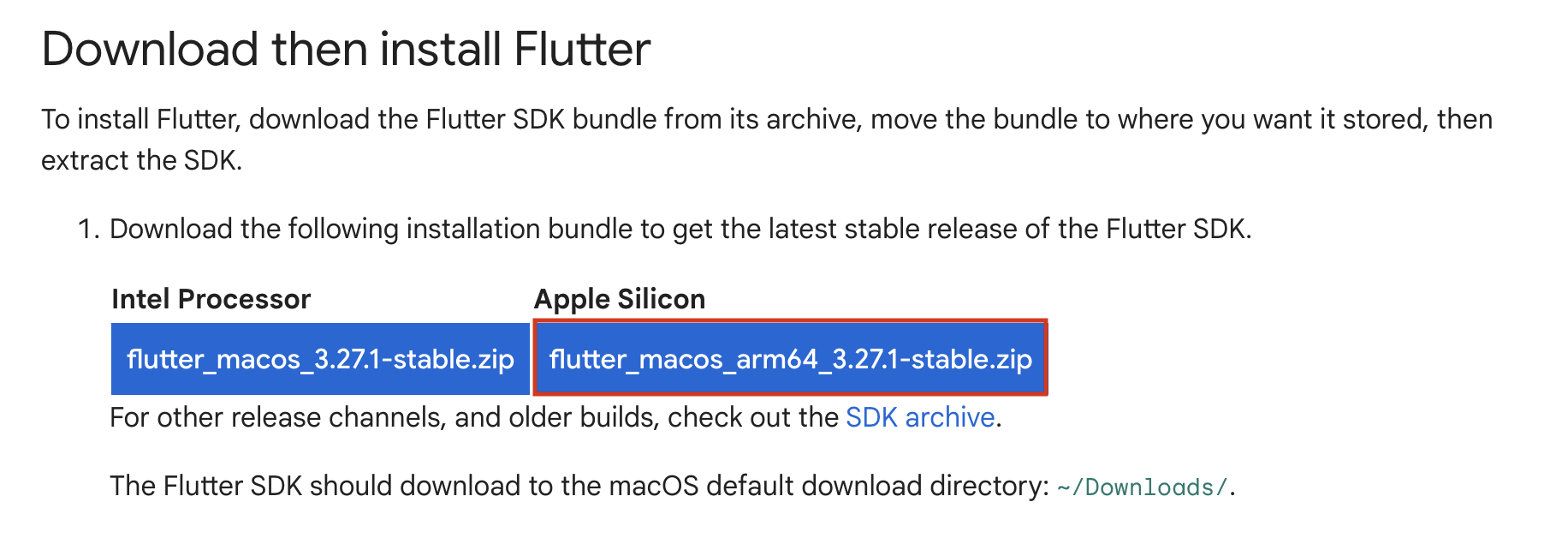
# If it exists, open the Zsh environmental variable file ~/.zshenv in your text editor. If it doesn't, create ~/.zshenv. # Copy the following line and paste it at the end of your ~/.zshenv file. export PATH=$HOME/development/flutter/bin:$PATH
# open new terminal, check flutter flutter --version # check install list flutter doctor
gaoyiping@gaoyipingdeMacBook-Pro ~ % flutter doctor Doctor summary (to see all details, run flutter doctor -v): [✓] Flutter (Channel stable, 3.29.1, on macOS 15.3 24D60 darwin-arm64, locale zh-Hant-TW) [✗] Android toolchain - develop for Android devices ✗ Unable to locate Android SDK. Install Android Studio from: https://developer.android.com/studio/index.html On first launch it will assist you in installing the Android SDK components. (or visit https://flutter.dev/to/macos-android-setup for detailed instructions). If the Android SDK has been installed to a custom location, please use `flutter config --android-sdk` to update to that location.
[✓] Xcode - develop for iOS and macOS (Xcode 16.2) [✓] Chrome - develop for the web [✓] Android Studio (version 2024.3) [✓] VS Code (version 1.97.2) [✓] Connected device (3 available) [✓] Network resources
! Doctor found issues in 1 category.
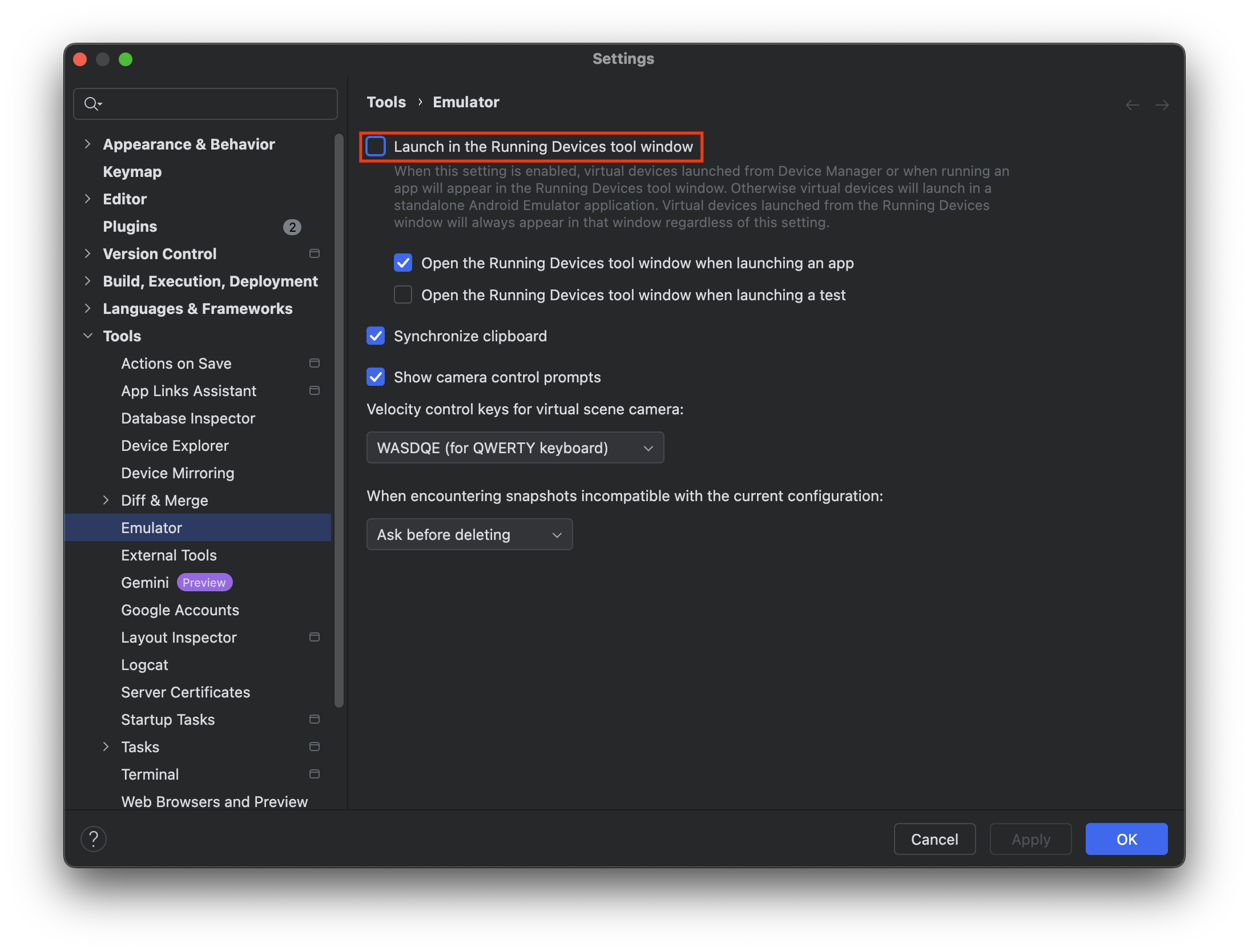
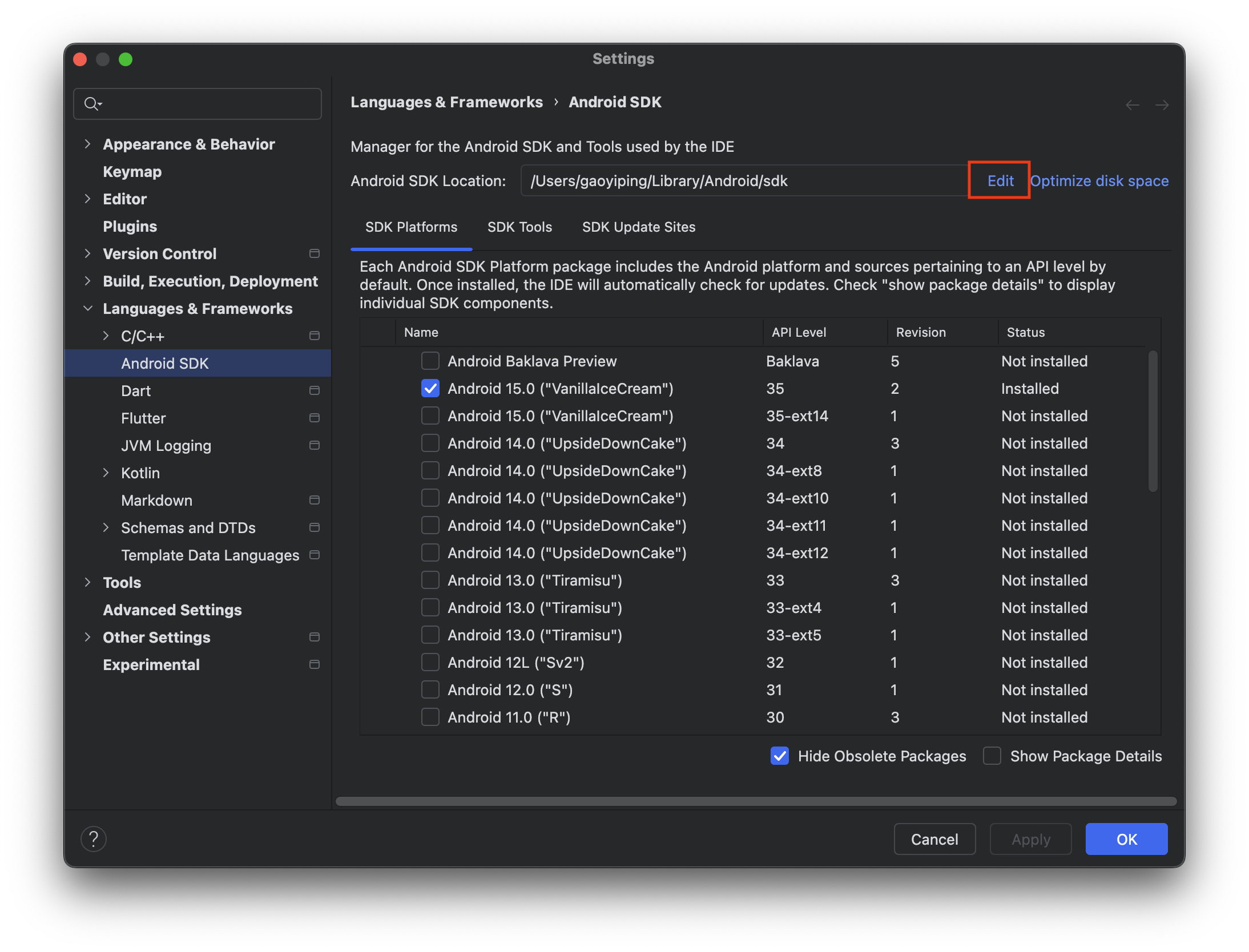
install Android sdk Android Studio -> Settings -> Langues & Frameworks -> Android SDK –> Edit then “next run…” or Android Studio -> Tool -> SDK manager
修正 Android 其他問題
1 2 3 4 5 6 7 8 9 10 11 12
# 缺少 cmdline-tools: cmdline-tools 組件缺失,需要安裝。你可以執行以下命令來安裝它: # # install by Android Studio # Android Studio -> Tools -> SDK manager -> SDK Tools -> Android SDK Command-line Tool(latest)
# Android 許可狀態未知: 你需要接受 Android SDK 許可協議。可以透過執行以下命令來接受: flutter doctor --android-licenses
flutter doctor [!] Android toolchain - develop for Android devices (Android SDK version 35.0.0) ✗ cmdline-tools component is missing Run `path/to/sdkmanager --install "cmdline-tools;latest"` See https://developer.android.com/studio/command-line for more details. ✗ Android license status unknown. Run `flutter doctor --android-licenses` to accept the SDK licenses. See https://flutter.dev/to/macos-android-setup for more details. # 缺少 cmdline-tools: cmdline-tools 組件缺失,需要安裝。你可以執行以下命令來安裝它: # # install by Android Studio # Android Studio -> Tools -> SDK manager -> SDK Tools -> Android SDK Command-line Tool(latest)
# Android 許可狀態未知: 你需要接受 Android SDK 許可協議。可以透過執行以下命令來接受: flutter doctor --android-licenses
flutter doctor [!] Android toolchain - develop for Android devices (Android SDK version 35.0.0) ✗ cmdline-tools component is missing Run `path/to/sdkmanager --install "cmdline-tools;latest"` See https://developer.android.com/studio/command-line for more details. ✗ Android license status unknown. Run `flutter doctor --android-licenses` to accept the SDK licenses. See https://flutter.dev/to/macos-android-setup for more details. [!] Xcode - develop for iOS and macOS (Xcode 16.2) ✗ CocoaPods not installed. CocoaPods is a package manager for iOS or macOS platform code. Without CocoaPods, plugins will not work on iOS or macOS. For more info, see https://flutter.dev/to/platform-plugins For installation instructions, see https://guides.cocoapods.org/using/getting-started.html#installation
gaoyiping@gaoyipingdeMacBook-Pro ~ % sudo gem install cocoapods Password: ERROR: Error installing cocoapods: The last version of activesupport (>= 5.0, < 8) to support your Ruby & RubyGems was 6.1.7.10. Try installing it with `gem install activesupport -v 6.1.7.10` and then running the current command again activesupport requires Ruby version >= 3.1.0. The current ruby version is 2.6.10.210.
# error gaoyiping@gaoyipingdeMacBook-Pro ~ % sudo gem install cocoapods Password: ERROR: Error installing cocoapods: The last version of activesupport (>= 5.0, < 8) to support your Ruby & RubyGems was 6.1.7.10. Try installing it with `gem install activesupport -v 6.1.7.10` and then running the current command again activesupport requires Ruby version >= 3.1.0. The current ruby version is 2.6.10.210.
# test flutter doctor [!] Android toolchain - develop for Android devices (Android SDK version 35.0.0) ✗ cmdline-tools component is missing Run `path/to/sdkmanager --install "cmdline-tools;latest"` See https://developer.android.com/studio/command-line for more details. ✗ Android license status unknown. Run `flutter doctor --android-licenses` to accept the SDK licenses. See https://flutter.dev/to/macos-android-setup for more details. [✓] Xcode - develop for iOS and macOS (Xcode 16.2)
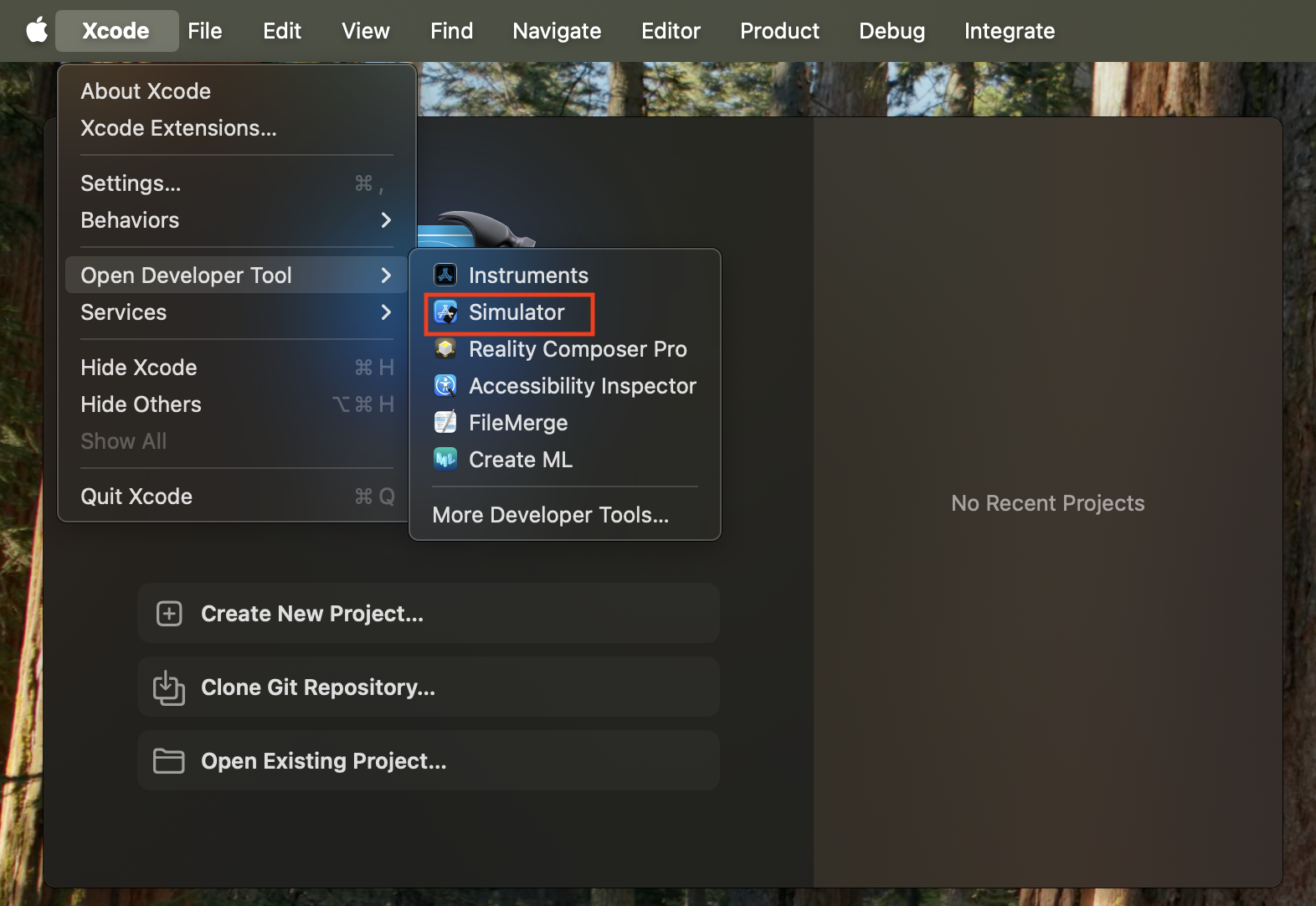
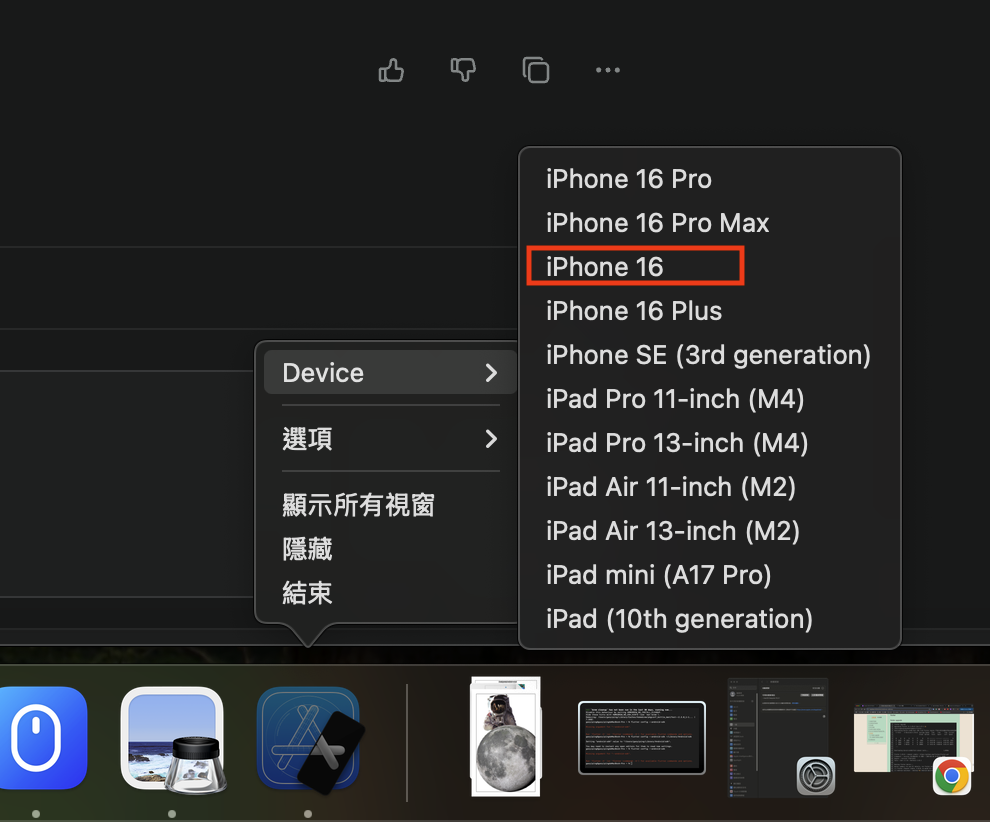
Run iOS simulator
In Xcode, go to Open Developer Tool > Simulator
Search for “Simulator” in Spotlight
open by VsCode or Android Studio
Vs Code
command
Cmd+Shift+P
flutter special
Widget Wrap select : Control + Shift + R (click Right -> Refactor)
flutter upgrade Upgrading Flutter to 3.29.0 from 3.27.1 in /Users/gaoyiping/development/flutter... Downloading Darwin arm64 Dart SDK from Flutter engine f73bfc4522dd0bc87bbcdb4bb3088082755c5e87... % Total % Received % Xferd Average Speed Time Time Time Current Dload Upload Total Spent Left Speed
Running flutter doctor... Doctor summary (to see all details, run flutter doctor -v): [✓] Flutter (Channel stable, 3.29.0, on macOS 15.3 24D60 darwin-arm64, locale zh-Hant-TW) [✓] Android toolchain - develop for Android devices (Android SDK version 35.0.0) [✓] Xcode - develop for iOS and macOS (Xcode 16.2) [✓] Chrome - develop for the web [✓] Android Studio (version 2024.2) [✓] VS Code (version 1.97.0) [✓] Connected device (3 available) [✓] Network resources
flutter pub outdated Changing current working directory to: /Users/gaoyiping/work/git/flutter-bootcamp-udemy/taskly Showing outdated packages. [*] indicates versions that are not the latest available.
# install java brew install openjdk@17 ==> Downloading https://formulae.brew.sh/api/formula.jws.json ==> Downloading https://formulae.brew.sh/api/cask.jws.json ==> Downloading https://ghcr.io/v2/homebrew/core/openjdk/17/manifests/17.0.14-1 ######################################################################################################################################################################################################################################################### 100.0% ==> Fetching openjdk@17 ==> Downloading https://ghcr.io/v2/homebrew/core/openjdk/17/blobs/sha256:ad49acafe0bbbd4e5459f386239fb2dc44171965d69a5071e4d403f14ea61a2f ######################################################################################################################################################################################################################################################### 100.0% ==> Pouring openjdk@17--17.0.14.arm64_sequoia.bottle.1.tar.gz ==> Caveats For the system Java wrappers to find this JDK, symlink it with sudo ln -sfn /opt/homebrew/opt/openjdk@17/libexec/openjdk.jdk /Library/Java/JavaVirtualMachines/openjdk-17.jdk
openjdk@17 is keg-only, which means it was not symlinked into /opt/homebrew, because this is an alternate version of another formula.
If you need to have openjdk@17 first in your PATH, run: echo'export PATH="/opt/homebrew/opt/openjdk@17/bin:$PATH"' >> /Users/gaoyiping/.zshrc
For compilers to find openjdk@17 you may need to set: export CPPFLAGS="-I/opt/homebrew/opt/openjdk@17/include" ==> Summary 🍺 /opt/homebrew/Cellar/openjdk@17/17.0.14: 636 files, 304.2MB ==> Running `brew cleanup openjdk@17`... Disable this behaviour by setting HOMEBREW_NO_INSTALL_CLEANUP. Hide these hints with HOMEBREW_NO_ENV_HINTS (see `man brew`).
# show java version gaoyiping@gaoyipingdeMacBook-Pro android % java -version openjdk version "17.0.14" 2025-01-21 OpenJDK Runtime Environment Homebrew (build 17.0.14+0) OpenJDK 64-Bit Server VM Homebrew (build 17.0.14+0, mixed mode, sharing)
Gradle and Gradlew
add dumpVersion in build.gradle.kts
1 2 3 4 5 6 7 8 9 10 11 12
tasks.register("dumpVersion") { doLast { val versionFile = file("version.txt") versionFile.writeText(""" Version Code: ${flutter.versionCode} Version Name: ${flutter.versionName} Min SDK: ${flutter.minSdkVersion} Target SDK: ${flutter.targetSdkVersion} """.trimIndent()) println("Version information written to version.txt") } }
Here are the highlights of this release: - Daemon JVM auto-provisioning - Enhancements for Scala plugin and JUnit testing - Improvements for build authors and plugin developers
For more details see https://docs.gradle.org/8.13/release-notes.html
Build time: 2025-02-25 09:22:14 UTC Revision: 073314332697ba45c16c0a0ce1891fa6794179ff
Kotlin: 2.0.21 Groovy: 3.0.22 Ant: Apache Ant(TM) version 1.10.15 compiled on August 25 2024 Launcher JVM: 23.0.2 (Homebrew 23.0.2) Daemon JVM: /opt/homebrew/Cellar/openjdk/23.0.2/libexec/openjdk.jdk/Contents/Home (no JDK specified, using current Java home) OS: Mac OS X 15.3 aarch64
# run gaoyiping@gaoyipingdeMacBook-Pro android % gradle dumpVersion
> Task :app:dumpVersion Version information written to version.txt
[Incubating] Problems report is available at: file:///Users/gaoyiping/work/git/flutter-bootcamp-udemy/taskly/build/reports/problems/problems-report.html
Deprecated Gradle features were used in this build, making it incompatible with Gradle 9.0.
You can use '--warning-mode all' to show the individual deprecation warnings and determine if they come from your own scripts or plugins.
For more on this, please refer to https://docs.gradle.org/8.13/userguide/command_line_interface.html#sec:command_line_warnings in the Gradle documentation.
BUILD SUCCESSFUL in 7s 6 actionable tasks: 6 executed
# version.txt(in file) Version Code: 1 Version Name: 1.0.0 Min SDK: 21 Target SDK: 35
Here are the highlights of this release: - Support for Java 23 - Faster configuration cache - Better configuration cache reports
For more details see https://docs.gradle.org/8.10.2/release-notes.html
Starting a Gradle Daemon, 1 incompatible Daemon could not be reused, use --status for details
> Configure project :path_provider_android Your project is configured with Android NDK 26.3.11579264, but the following plugin(s) depend on a different Android NDK version: - path_provider_android requires Android NDK 27.0.12077973 Fix this issue by using the highest Android NDK version (they are backward compatible). Add the following to /Users/gaoyiping/work/git/flutter-bootcamp-udemy/taskly/android/app/build.gradle.kts:
android { ndkVersion = "27.0.12077973" ... }
> Task :app:dumpVersion Version information written to version.txt
Deprecated Gradle features were used in this build, making it incompatible with Gradle 9.0.
You can use '--warning-mode all' to show the individual deprecation warnings and determine if they come from your own scripts or plugins.
For more on this, please refer to https://docs.gradle.org/8.10.2/userguide/command_line_interface.html#sec:command_line_warnings in the Gradle documentation.
BUILD SUCCESSFUL in 15s 7 actionable tasks: 7 executed
# dump #2 gaoyiping@gaoyipingdeMacBook-Pro android % ./gradlew dumpVersion > Task :app:dumpVersion Version information written to version.txt
Deprecated Gradle features were used in this build, making it incompatible with Gradle 9.0.
You can use '--warning-mode all' to show the individual deprecation warnings and determine if they come from your own scripts or plugins.
For more on this, please refer to https://docs.gradle.org/8.10.2/userguide/command_line_interface.html#sec:command_line_warnings in the Gradle documentation.
Your project is configured with Android NDK 26.3.11579264
1 2 3 4 5 6 7 8 9 10 11 12 13 14 15 16 17 18 19
Launching lib/main.dart on sdk gphone64 arm64 in debug mode... Your project is configured with Android NDK 26.3.11579264, but the following plugin(s) depend on a different Android NDK version: - path_provider_android requires Android NDK 27.0.12077973 Fix this issue by using the highest Android NDK version (they are backward compatible). Add the following to /Users/gaoyiping/work/git/flutter-bootcamp-udemy/taskly/android/app/build.gradle.kts:
android { ndkVersion = "27.0.12077973" ... }
✓ Built build/app/outputs/flutter-apk/app-debug.apk I/flutter (28980): [IMPORTANT:flutter/shell/platform/android/android_context_gl_impeller.cc(94)] Using the Impeller rendering backend (OpenGLES). W/HWUI (28980): Failed to choose config with EGL_SWAP_BEHAVIOR_PRESERVED, retrying without... W/HWUI (28980): Failed to initialize 101010-2 format, error = EGL_SUCCESS I/Gralloc4(28980): mapper 4.x is not supported Connecting to VM Service at ws://127.0.0.1:63311/mU9Fz3V7bms=/ws Connected to the VM Service. ....
Your project is configured with Android NDK 26.3.11579264, but the following plugin(s) depend on a different Android NDK version: - camera_android_camerax requires Android NDK 27.0.12077973 - firebase_core requires Android NDK 27.0.12077973 - firebase_storage requires Android NDK 27.0.12077973 - flutter_plugin_android_lifecycle requires Android NDK 27.0.12077973 - permission_handler_android requires Android NDK 27.0.12077973 Fix this issue by using the highest Android NDK version (they are backward compatible). Add the following to /Users/gaoyiping/work/git/flutter/master-flutter-and-dart/programminghub/android/app/build.gradle.kts:
* What went wrong: Execution failed for task ':app:processDebugGoogleServices'. > File google-services.json is missing. The Google Services Plugin cannot function without it. Searched locations: /Users/gaoyiping/work/git/flutter/master-flutter-and-dart/programminghub/android/app/src/debug/google-services.json, /Users/gaoyiping/work/git/flutter/master-flutter-and-dart/programminghub/android/app/src/debug/google-services.json, /Users/gaoyiping/work/git/flutter/master-flutter-and-dart/programminghub/android/app/src/google-services.json, /Users/gaoyiping/work/git/flutter/master-flutter-and-dart/programminghub/android/app/src/debug/google-services.json, /Users/gaoyiping/work/git/flutter/master-flutter-and-dart/programminghub/android/app/src/Debug/google-services.json, /Users/gaoyiping/work/git/flutter/master-flutter-and-dart/programminghub/android/app/google-services.json
* Try: > Run with --stacktrace option to get the stack trace. > Run with --info or --debug option to get more log output. > Run with --scan to get full insights. > Get more help at https://help.gradle.org.
BUILD FAILED in 5s Error: Gradle task assembleDebug failed with exit code 1
warning: [options] source value 8 is obsolete and will be removed in a future release warning: [options] target value 8 is obsolete and will be removed in a future release warning: [options] To suppress warnings about obsolete options, use -Xlint:-options. 3 warnings warning: [options] source value 8 is obsolete and will be removed in a future release warning: [options] target value 8 is obsolete and will be removed in a future release warning: [options] To suppress warnings about obsolete options, use -Xlint:-options. 3 warnings e: file:///Users/gaoyiping/.gradle/caches/8.10.2/transforms/9b018e3170113d6fc57578a6d48cd669/transformed/jetified-play-services-measurement-impl-22.4.0-api.jar!/META-INF/java.com.google.android.gms.libs.filecompliance.proto_file_access_api_type_kt_proto_lite.kotlin_moduleModule was compiled with an incompatible version of Kotlin. The binary version of its metadata is 2.1.0, expected version is 1.8.0. e: file:///Users/gaoyiping/.gradle/caches/8.10.2/transforms/9b018e3170113d6fc57578a6d48cd669/transformed/jetified-play-services-measurement-impl-22.4.0-api.jar!/META-INF/third_party.kotlin.protobuf.src.commonMain.kotlin.com.google.protobuf.kotlin_only_for_use_in_proto_generated_code_its_generator_and_tests.kotlin_moduleModule was compiled with an incompatible version of Kotlin. The binary version of its metadata is 2.1.0, expected version is 1.8.0. e: file:///Users/gaoyiping/.gradle/caches/8.10.2/transforms/9b018e3170113d6fc57578a6d48cd669/transformed/jetified-play-services-measurement-impl-22.4.0-api.jar!/META-INF/third_party.kotlin.protobuf.src.commonMain.kotlin.com.google.protobuf.kotlin_shared_runtime.kotlin_moduleModule was compiled with an incompatible version of Kotlin. The binary version of its metadata is 2.1.0, expected version is 1.8.0. e: file:///Users/gaoyiping/.gradle/caches/8.10.2/transforms/d46efa473af2ff731cfae5ea2010b3f1/transformed/jetified-play-services-measurement-api-22.4.0-api.jar!/META-INF/java.com.google.android.gmscore.integ.client.measurement_api_measurement_api.kotlin_moduleModule was compiled with an incompatible version of Kotlin. The binary version of its metadata is 2.1.0, expected version is 1.8.0.
FAILURE: Build failed with an exception.
* What went wrong: Execution failed for task ':app:compileDebugKotlin'. > A failure occurred while executing org.jetbrains.kotlin.compilerRunner.GradleCompilerRunnerWithWorkers$GradleKotlinCompilerWorkAction > Compilation error. See logfor more details
* Try: > Run with --stacktrace option to get the stack trace. > Run with --info or --debug option to get more log output. > Run with --scan to get full insights. > Get more help at https://help.gradle.org.
BUILD FAILED in 16s
┌─ Flutter Fix ────────────────────────────────────────────────────────────────────────────────────┐ │ [!] Your project requires a newer version of the Kotlin Gradle plugin. │ │ Find the latest version on https://kotlinlang.org/docs/releases.html#release-details, then │ │ update the │ │ version number of the plugin with id "org.jetbrains.kotlin.android"in the plugins block of │ │ /Users/gaoyiping/work/git/flutter/master-flutter-and-dart/programminghub/android/settings.gradle │ │ . │ │ │ │ Alternatively (if your project was created before Flutter 3.19), update │ │ /Users/gaoyiping/work/git/flutter/master-flutter-and-dart/programminghub/android/build.gradle │ │ ext.kotlin_version = '<latest-version>' │ └──────────────────────────────────────────────────────────────────────────────────────────────────┘ Error: Gradle task assembleDebug failed with exit code 1
Exited (1).
android/settings.gradle
1 2 3 4 5 6 7
plugins {
    id("dev.flutter.flutter-plugin-loader") version "1.0.0"
    id("com.android.application") version "8.7.0" apply false
    // kyp: change
    // id("org.jetbrains.kotlin.android") version "1.8.22" apply false
    id "org.jetbrains.kotlin.android" version "2.1.0" apply false
}
pluginManagement { val flutterSdkPath = run { val properties = java.util.Properties() file("local.properties").inputStream().use { properties.load(it) } val flutterSdkPath = properties.getProperty("flutter.sdk") require(flutterSdkPath != null) { "flutter.sdk not set in local.properties" } flutterSdkPath }
* What went wrong: Execution failed for task ':app:compileDebugKotlin'. > A failure occurred while executing org.jetbrains.kotlin.compilerRunner.GradleCompilerRunnerWithWorkers$GradleKotlinCompilerWorkAction > Compilation error. See logfor more details
* Try: > Run with --stacktrace option to get the stack trace. > Run with --info or --debug option to get more log output. > Run with --scan to get full insights. > Get more help at https://help.gradle.org.