(2) 機器學習最強入門:基礎數學/機率/統計邁向AI真實數據

邏輯迴歸 - 信用卡,葡萄酒,糖尿病

邏輯迴歸觀念

邏輯迴歸(logistic Regression)是一種常見的統計分析模型,邏輯迴歸經過一個邏輯(或稱 sigmoid)函數轉換,將輸出限制在0~1之間

應用邏輯函數

線性函數觀念 :
$y = \beta_0 + \beta_1x$
將上述函數玷辱 Sigmoid 函數得到以下結果 :
$ f(x) = \frac{1}{e^{-x}} = \frac{1}{e^{-(\beta_0 + \beta_1x)}} $
有時以下列公式表示邏輯迴歸模型 :
$ P(Y=1|X) = \frac{1}{e^{-(\beta_0 + \beta_1x)}} $
P(Y=1|X) 代表給定變數X下,Y等於1的機率,實務上是使用大概似估計法(Maximum Linkelihood Estimation,MLE)來進行求解

1
2
3
4
5
6
7
8
9
10
11
12
13
14
15
# 邏輯迴歸運算
import numpy as np

def logistic_regression(beta0, beta1, x):
return 1/( 1 + np.exp(-(beta0 + beta1 * x)))

beta0 = -6.5
beta1 = 0.0002

x_values = [4000, 80000]
for x in x_values:
print(f"x = {x:5d}, logistic迴歸輸出 {logistic_regression(beta0, beta1, x)}")

# x = 4000, logistic迴歸輸出 0.0033348073074133443
# x = 80000, logistic迴歸輸出 0.9999251537724895

邏輯迴歸模型基礎應用

邏輯迴歸模型語法基礎
1
2
3
4
5
6
7
8
9
10
11
12
13
14
15
16
17
18
19
20
21
22
23
24
25
26
27
28
29
30
31
32
33
34
35
36
37
38
39
40
41
42
43
44
45
46
47
48
49
50
51
52
53
54
55
from joblib import dump
from sklearn.linear_model import LogisticRegression
from sklearn.model_selection import train_test_split
from sklearn.metrics import accuracy_score
import numpy as np

# 20 個申請人年齡,年收入,已有債務
applicants = np.array([
[25, 50000, 10000],
[35, 60000, 8000],
[45, 70000, 12000],
[55, 80000, 00000],
[65, 60000, 9000],
[30, 40000, 12000],
[40, 70000, 8000],
[50, 80000, 10000],
[60, 80000, 8000],
[33, 50000, 11000],
[26, 55000, 15000],
[36, 65000, 7500],
[46, 75000, 13000],
[56, 85000, 10000],
[66, 65000, 8500],
[31, 45000, 11000],
[41, 75000, 8500],
[51, 65000, 9500],
[61, 85000, 8500],
[34, 55000, 12000]
])

# 違約紀錄 1:違約
defaults = np.array([1,0,0,0,1,1,0,0,0,1,1,0,0,0,1,1,0,0,0,1])

# 拆分訓練集及測試集
X_train, X_test, y_train, y_test = train_test_split(applicants,\
defaults, test_size=0.2, random_state=10)

# 建立邏輯迴歸模型
model = LogisticRegression()
# 使用訓練集訓練模型
model.fit(X_train, y_train)

# 使用模型進行測試
y_pred = model.predict(X_test)
# 計算準確度
print(f"準確度 : {accuracy_score(y_test, y_pred)}")
print(f"真實數據\n {y_test}")
print(f"估計數據\n {y_pred}")

dump(model, 'bank_ch24_1_2.joblib')
# 準確度 : 1.0
# 真實數據
# [0 1 1 0]
# 估計數據
# [0 1 1 0]
1
2
3
4
5
6
7
8
9
10
11
12
13
14
15
16
17
18
19
20
21
22
# 測試應用公式
from joblib import load

model = load('bank_ch24_1_2.joblib')
age = eval(input("請輸入年齡 : "))
income = eval(input("請輸入年收入 :"))
debt = eval(input("請輸入債務 :"))

y_pred = model.predict([[age, income, debt]])
if y_pred[0] == 1:
print("違規")
else:
print("未違規")

# 請輸入年齡 : 50
# 請輸入年收入 :60000
# 請輸入債務 :1000
# 未違規
# 請輸入年齡 : 50
# 請輸入年收入 :60000
# 請輸入債務 :2000
# 違規
多分類演算法
1
2
3
4
5
6
7
8
9
10
11
12
13
14
15
16
17
18
19
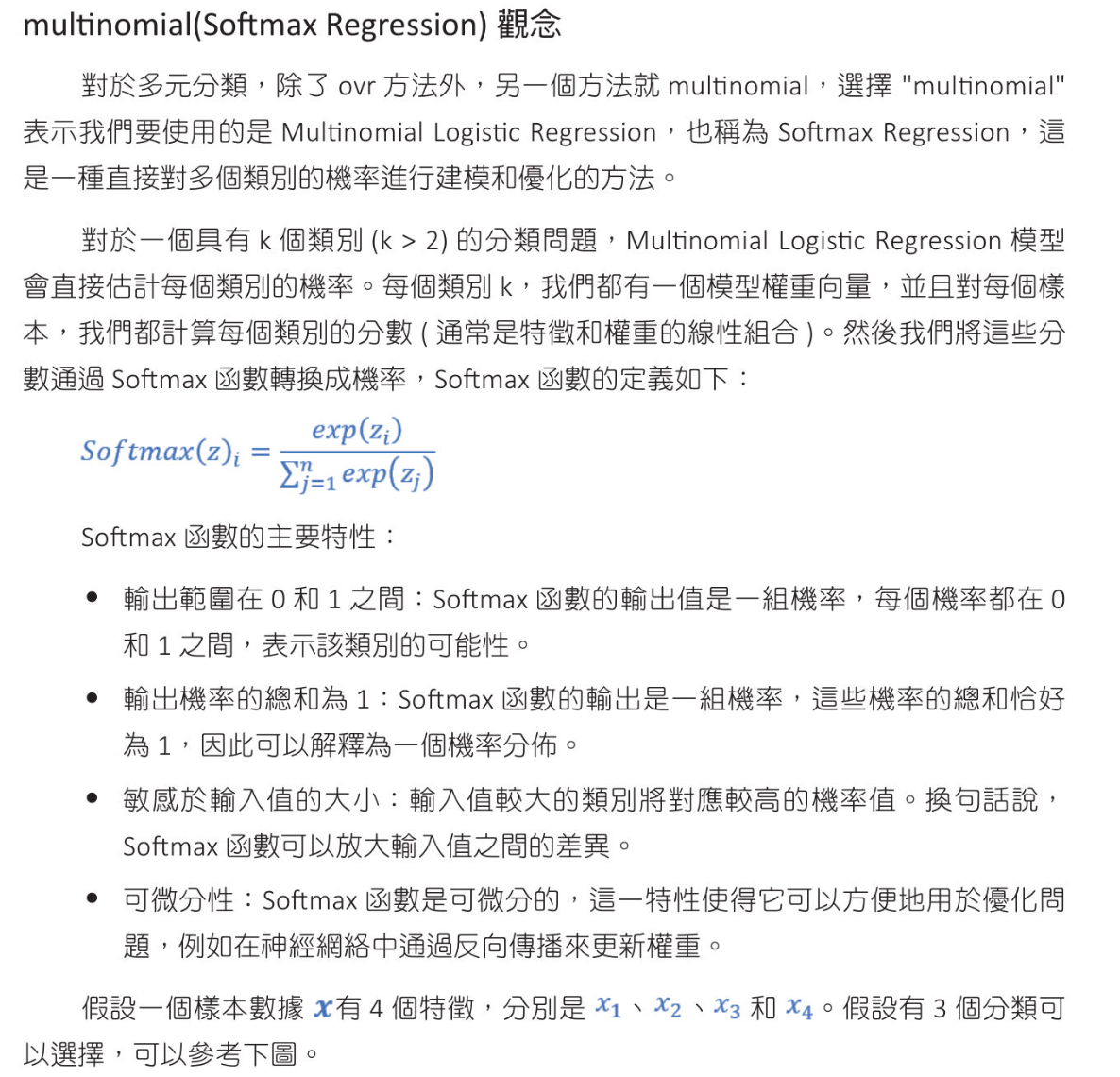
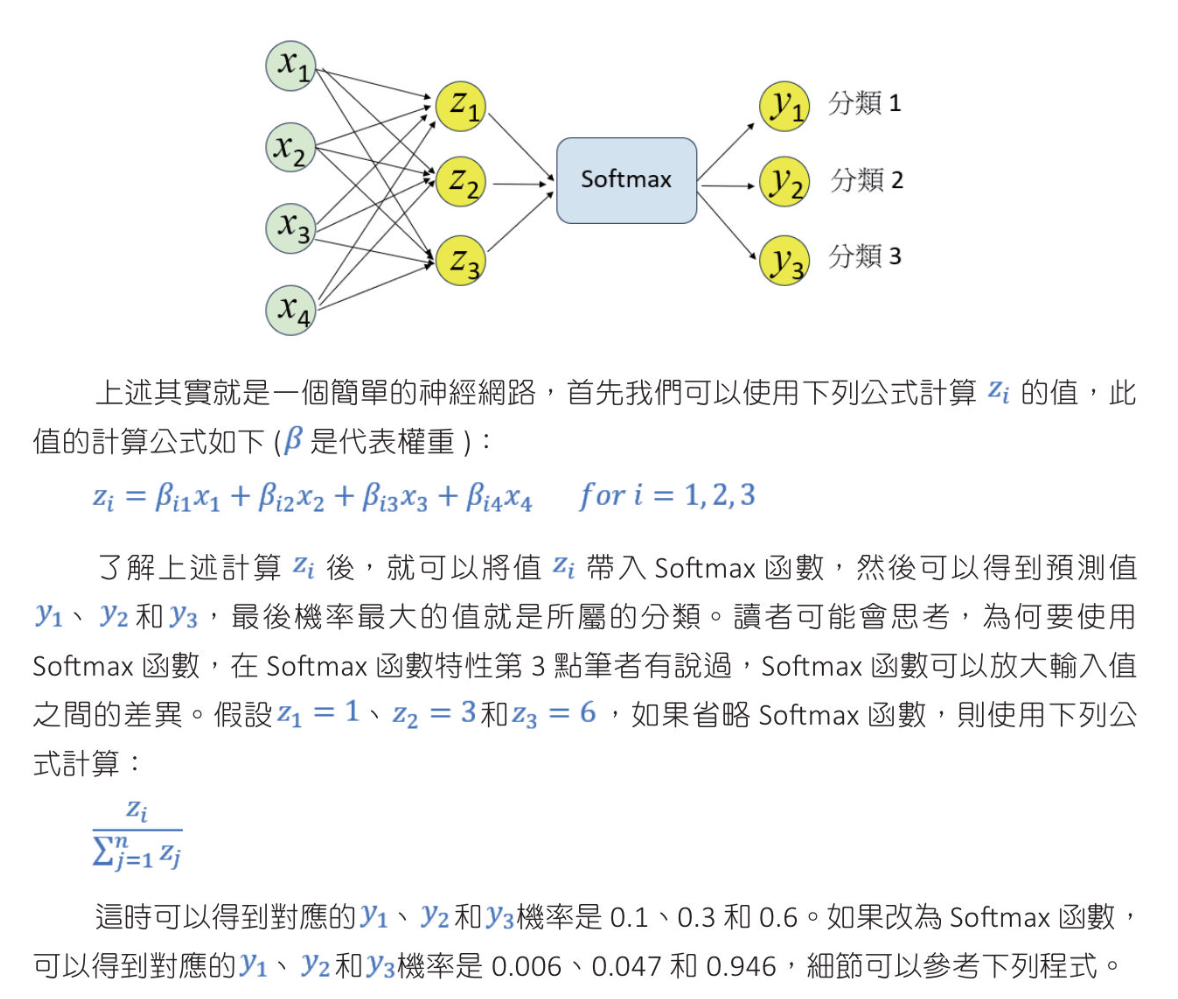
from math import exp
def non_softmax(input_vector):
molecular = [j for j in input_vector]
p = [round(i/sum(molecular),3) for i in input_vector]
return p

def softmax(input_vector):
# 計算分子
exponents = [exp(j) for j in input_vector]
# 先加總分母
# 分子除以分母
p = [round(exp(i)/sum(exponents), 3) for i in input_vector]
return p

print(f"一般公式 : {non_softmax([1, 3, 6])}")
print(f"softmax公式: {softmax([1, 3, 6])}")

# 一般公式 : [0.1, 0.3, 0.6]
# softmax公式: [0.006, 0.047, 0.946]

信用卡數據集計算

數據集內容
挑選重要特徵
1
2
3
4
5
6
7
8
9
10
11
12
13
14
15
16
17
18
19
20
21
22
23
24
25
26
27
28
29
30
31
32
33
34
35
36
37
38
39
40
41
42
43
44
45
46
47
48
49
50
51
52
53
54
55
56
57
58
59
60
61
62
63
64
65
66
67
68
69
70
71
72
73
74
75
76
77
78
79
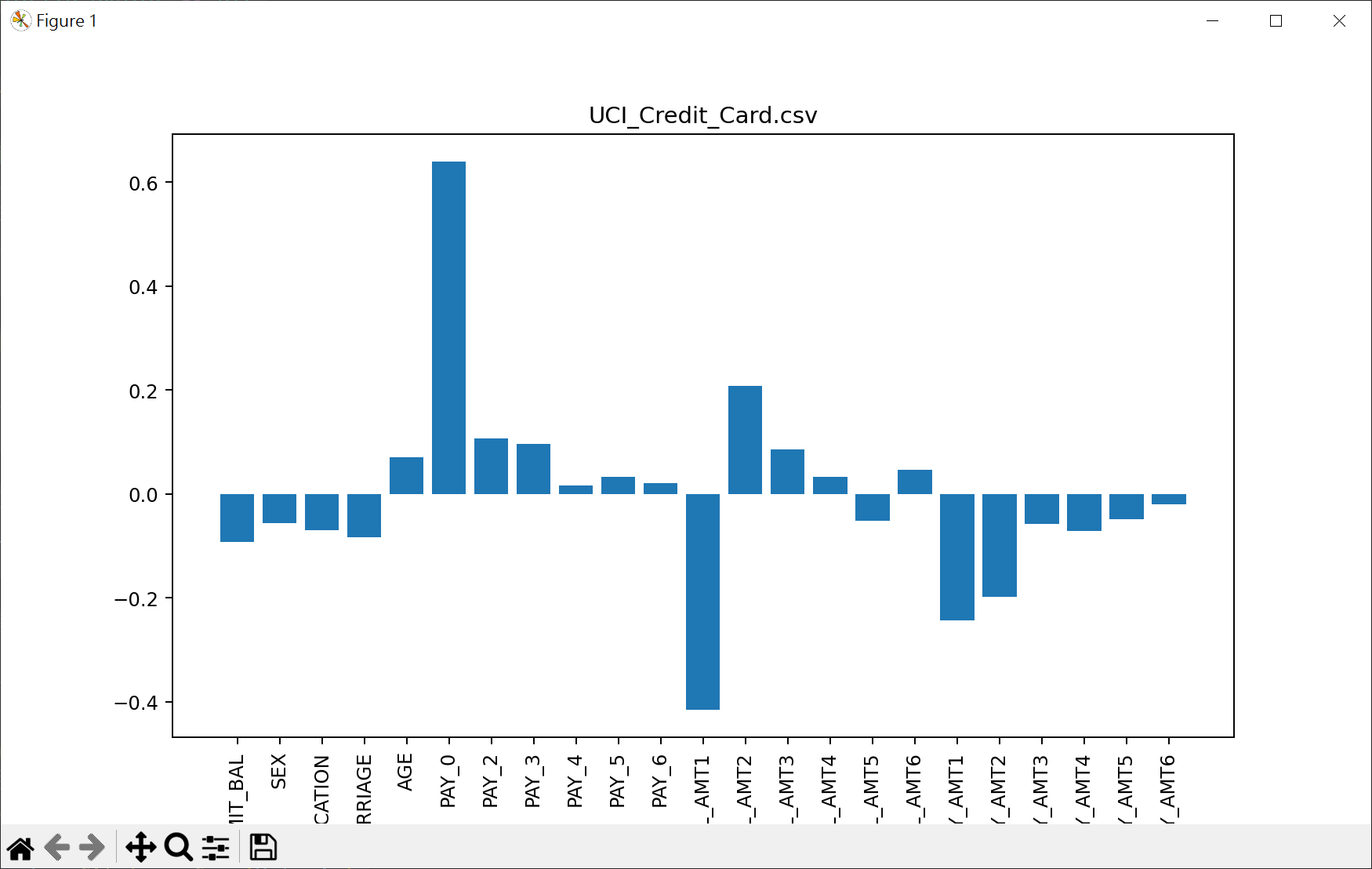
# 繪出特徵值
import pandas as pd
from sklearn.model_selection import train_test_split
from sklearn.linear_model import LogisticRegression
from sklearn.preprocessing import StandardScaler
import matplotlib.pyplot as plt

# 讀取數據
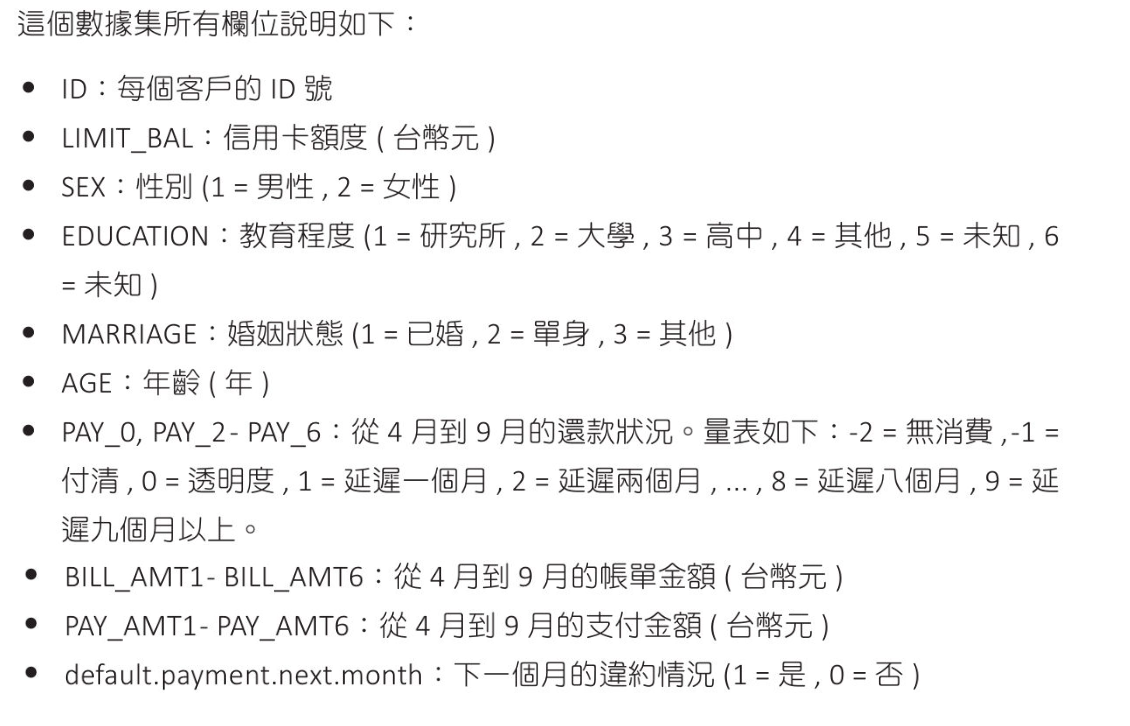
data = pd.read_csv('UCI_Credit_Card.csv')

# # 顯示所有 columns
# pd.set_option('display.max_columns', None)
# # 設定顯示每 row 長度
# pd.set_option('display.width', 300)
# print(data.head())

# 定義特徵和目標變數
features = data.drop(["ID", "default.payment.next.month"], axis=1)
X = features
y = data["default.payment.next.month"]

# 分割測試數據與測試數據
X_train, X_test, y_train, y_test = \
train_test_split(X, y, test_size=0.2, random_state=10)

# 特徵縮放(標準化)
# fit_transform 用於訓練數據:
# fit 計算訓練數據的均值和方差
# transform 使用這些計算出的均值和方差對訓練數據進行標準化
# transform 用於測試數據:
# 只使用訓練數據計算出的均值和方差來標準化測試數據,不會重新計算均值和方差
# 這樣做是為了避免數據洩漏,確保測試數據的標準化過程不受訓練數據的影響,同時保持測試數據的獨立性和真實性
scaler = StandardScaler()
X_train = scaler.fit_transform(X_train)
X_test = scaler.transform(X_test)

# 建立邏輯迴歸模型 + 使用訓練集訓練模型
model = LogisticRegression()
model.fit(X_train, y_train)

# 獲取特徵重要性
importance = model.coef_[0]

# 總結特徵重要性
for i, score in enumerate(importance):
print(f"特徵: {features.columns[i]:10s}, 分數: {score:.5f}")

# 繪製特徵重要性
plt.figure(figsize=(10,6))
plt.bar([x for x in range(len(importance))], importance)
# plt.xticks([x for x in range(len(importance))], features, rotation='vertical')
plt.xticks([x for x in range(len(importance))], features, rotation=90)
plt.xticks()
plt.title('UCI_Credit_Card.csv')
plt.show()

# 特徵: LIMIT_BAL , 分數: -0.09251
# 特徵: SEX , 分數: -0.05675
# 特徵: EDUCATION , 分數: -0.07002
# 特徵: MARRIAGE , 分數: -0.08346
# 特徵: AGE , 分數: 0.06998
# 特徵: PAY_0 , 分數: 0.63988
# 特徵: PAY_2 , 分數: 0.10731
# 特徵: PAY_3 , 分數: 0.09626
# 特徵: PAY_4 , 分數: 0.01599
# 特徵: PAY_5 , 分數: 0.03251
# 特徵: PAY_6 , 分數: 0.02136
# 特徵: BILL_AMT1 , 分數: -0.41557
# 特徵: BILL_AMT2 , 分數: 0.20846
# 特徵: BILL_AMT3 , 分數: 0.08524
# 特徵: BILL_AMT4 , 分數: 0.03273
# 特徵: BILL_AMT5 , 分數: -0.05235
# 特徵: BILL_AMT6 , 分數: 0.04633
# 特徵: PAY_AMT1 , 分數: -0.24341
# 特徵: PAY_AMT2 , 分數: -0.19772
# 特徵: PAY_AMT3 , 分數: -0.05722
# 特徵: PAY_AMT4 , 分數: -0.07154
# 特徵: PAY_AMT5 , 分數: -0.04787
# 特徵: PAY_AMT6 , 分數: -0.02067
用最相關2個特徵,設計邏輯迴歸模型
1
2
3
4
5
6
7
8
9
10
11
12
13
14
15
16
17
18
19
20
21
22
23
24
25
26
27
28
29
30
31
32
33
34
35
36
37
38
39
40
41
42
43
44
45
# 用最相關2個特徵,設計邏輯迴歸模型
import pandas as pd
from sklearn.model_selection import train_test_split
from sklearn.linear_model import LogisticRegression
from sklearn.preprocessing import StandardScaler
import matplotlib.pyplot as plt
from sklearn.metrics import accuracy_score

# 讀取數據
data = pd.read_csv('UCI_Credit_Card.csv')

# 定義特徵和目標變數
X = data[['PAY_0','BILL_AMT1']]
y = data["default.payment.next.month"]

# 分割測試數據與測試數據
X_train, X_test, y_train, y_test = \
train_test_split(X, y, test_size=0.2, random_state=10)

# 特徵縮放(標準化)
# fit_transform 用於訓練數據:
# fit 計算訓練數據的均值和方差
# transform 使用這些計算出的均值和方差對訓練數據進行標準化
# transform 用於測試數據:
# 只使用訓練數據計算出的均值和方差來標準化測試數據,不會重新計算均值和方差
# 這樣做是為了避免數據洩漏,確保測試數據的標準化過程不受訓練數據的影響,同時保持測試數據的獨立性和真實性
scaler = StandardScaler()
X_train = scaler.fit_transform(X_train)
X_test = scaler.transform(X_test)

# 建立邏輯迴歸模型 + 使用訓練集訓練模型
model = LogisticRegression()
model.fit(X_train, y_train)

# 在訓練集進行預測並計算準確率
train_pred = model.predict(X_train)
train_accuracy = accuracy_score(y_train, train_pred)
print(f"訓練集數據準確率 Accuracy: {train_accuracy*100:.2f}%")

test_pred = model.predict(X_test)
test_accuracy = accuracy_score(y_test, test_pred)
print(f"測試集數據準確率 Accuracy: {test_accuracy*100:.2f}%")

# 訓練集數據準確率 Accuracy: 81.15%
# 測試集數據準確率 Accuracy: 81.67%
用最全部特徵,設計邏輯迴歸模型(差異不大)
1
2
3
4
5
6
7
8
# 用最全部特徵,設計邏輯迴歸模型

# 定義特徵和目標變數
X = data.drop(["ID", "default.payment.next.month"], axis=1)
y = data["default.payment.next.month"]

# 訓練集數據準確率 Accuracy: 81.01%
# 測試集數據準確率 Accuracy: 81.30%

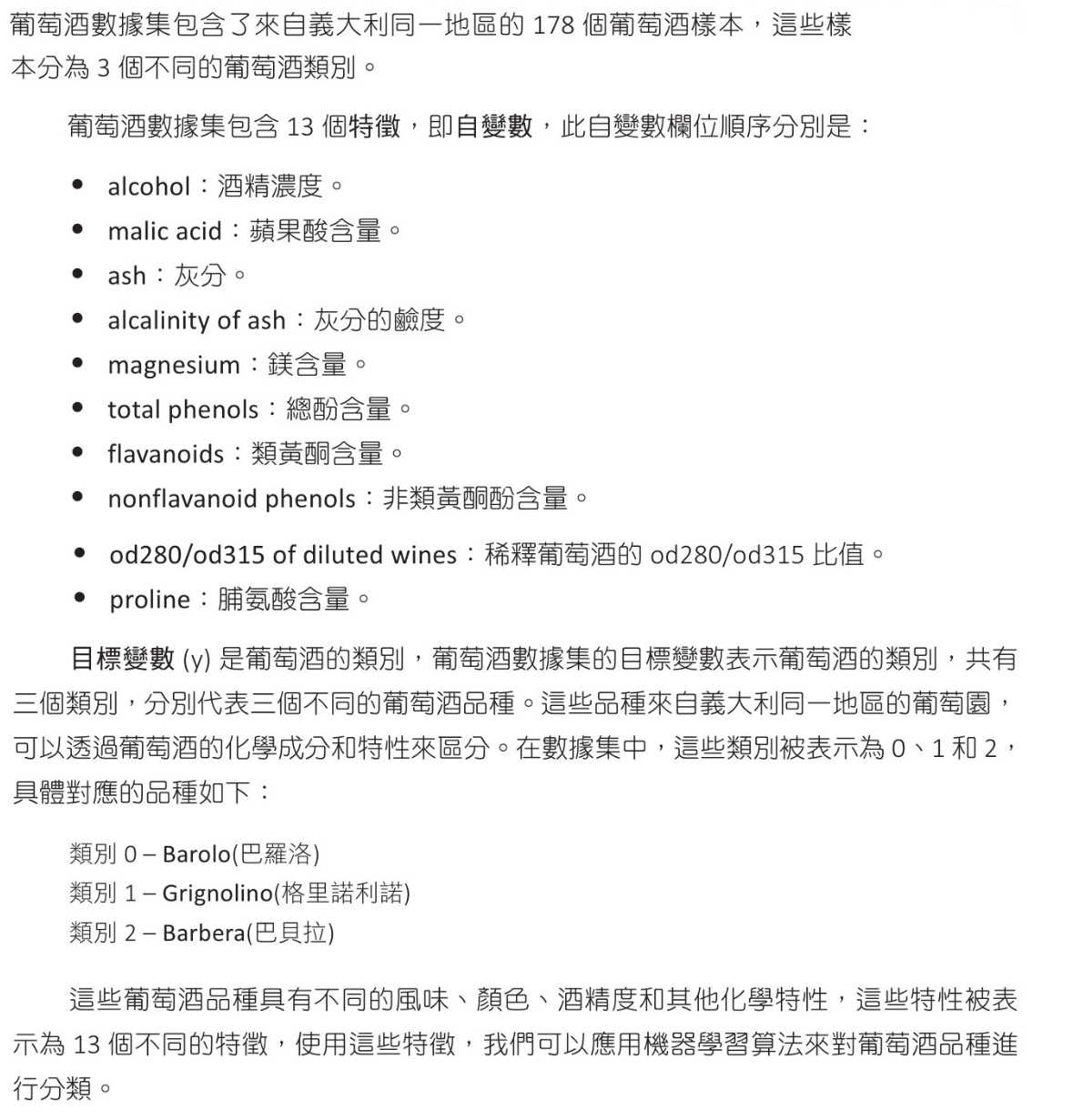
葡萄酒數據

數據內容
1
2
3
4
5
6
7
8
9
10
11
12
13
14
15
16
17
18
19
20
21
22
23
24
25
26
27
28
29
30
31
32
33
34
35
36
37
from sklearn import datasets

wine = datasets.load_wine()
print(f"自變數 樣本外型 : {wine.data.shape}")
print(f"目標變數樣本外型 : {wine.target.shape}")

# 輸出特徵值名稱
print("自變數特徵值名稱")
print(wine.feature_names)

# 輸出三組自變數
print("自變數特徵值")
print(wine.data[:3])

# 輸出三組目標變數
print("目標變數特徵值")
print(wine.target[:3])

# 描述特徵值名稱
print("描述特徵值名稱")
print(wine.DESCR)

# 自變數 樣本外型 : (178, 13)
# 目標變數樣本外型 : (178,)
# 自變數特徵值名稱
# ['alcohol', 'malic_acid', 'ash', 'alcalinity_of_ash', 'maglavanoids', 'nonflavanoid_phenols', 'proanthocyanins', 'co0/od315_of_diluted_wines', 'proline']
# 自變數特徵值
# [[1.423e+01 1.710e+00 2.430e+00 1.560e+01 1.270e+02 2.800e
# 2.800e-01 2.290e+00 5.640e+00 1.040e+00 3.920e+00 1.065e
# [1.320e+01 1.780e+00 2.140e+00 1.120e+01 1.000e+02 2.650e
# 2.600e-01 1.280e+00 4.380e+00 1.050e+00 3.400e+00 1.050e
# [1.316e+01 2.360e+00 2.670e+00 1.860e+01 1.010e+02 2.800e
# 3.000e-01 2.810e+00 5.680e+00 1.030e+00 3.170e+00 1.185e
# 目標變數特徵值
# [0 0 0]
# 描述特徵值名稱
# ...
使用邏輯演算法執行葡萄酒分類
1
2
3
4
5
6
7
8
9
10
11
12
13
14
15
16
17
18
19
20
21
22
23
24
25
26
27
28
29
30
31
32
33
34
35
36
37
38
39
40
41
42
43
44
45
46
47
48
49
50
51
52
53
54
55
56
57
58
59
60
61
62
63
64
65
from sklearn.datasets import load_wine
from sklearn.model_selection import train_test_split
from sklearn.linear_model import LogisticRegression
from sklearn.metrics import accuracy_score, classification_report
from sklearn.metrics import confusion_matrix

# load 葡萄酒數據
wine = load_wine()

# 分割測試數據與測試數據
X_train, X_test, y_train, y_test = \
train_test_split(wine.data, wine.target, test_size=0.2, random_state=9)

# 建立邏輯迴歸分類器,使用 OvR
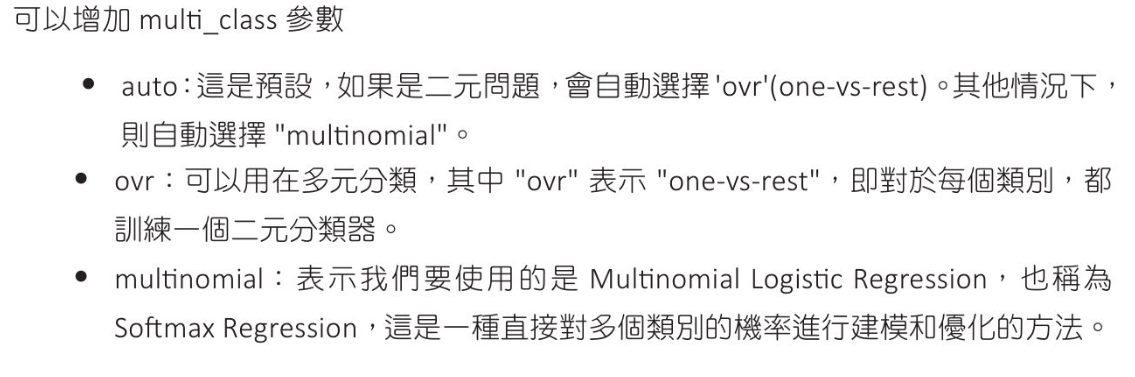
# multi_class: ovr, multination and auto
# max_iter 最大迭代數,達到後將停止最佳化,default 100
log_reg = LogisticRegression(multi_class='ovr', max_iter=10000)

# 訓練分類器
log_reg.fit(X_train, y_train)

# 進行預測
y_pred = log_reg.predict(X_test)
print(f"測試的真實分類\n{y_test}")
print("-"*70)
print(f"測試的目標分類\n{y_pred}")
print("="*70)

# 計算準確度
acc = accuracy_score(y_test, y_pred)
print(f"準確度(Accuracy Score):{acc:.2f}")
print("-"*70)

# 計算混淆矩陣並輸出
# 測試準確對照表
conf_mat = confusion_matrix(y_test, y_pred)
print(f"混淆矩陣(Confusion Matix):\n{conf_mat}")
print("-"*70)

# 生成分類報告
# 測試報告
report = classification_report(y_test, y_pred)
print(f"分類報告(Classification Report)\n{report}")

# 測試的真實分類
# [0 0 0 2 0 0 2 2 2 1 2 0 2 1 1 0 1 1 0 0 0 0 0 0 0 2 1 1 0 1 0 1 1 0 1 2]
# ----------------------------------------------------------------------
# 測試的目標分類
# [0 0 0 2 0 0 2 2 2 1 2 0 2 1 1 0 1 1 0 0 0 0 0 0 0 2 1 1 0 1 0 1 1 0 1 2]
# ======================================================================
# 準確度(Accuracy Score):1.00
# ----------------------------------------------------------------------
# 混淆矩陣(Confusion Matix):
# [[17 0 0]
# [ 0 11 0]
# [ 0 0 8]]
# ----------------------------------------------------------------------
# 分類報告(Classification Report)
# precision recall f1-score support
# 0 1.00 1.00 1.00 17
# 1 1.00 1.00 1.00 11
# 2 1.00 1.00 1.00 8
# accuracy 1.00 36
# macro avg 1.00 1.00 1.00 36
# weighted avg 1.00 1.00 1.00 36

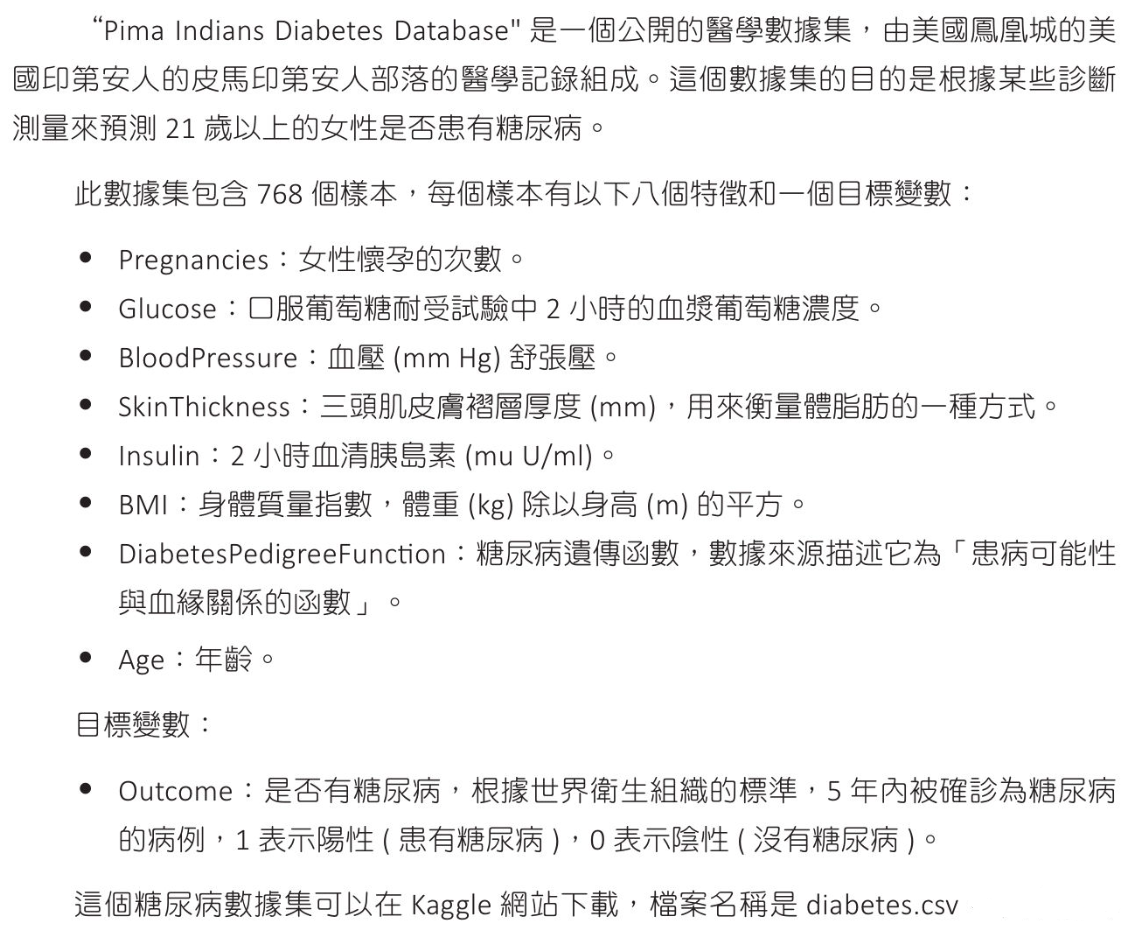
糖尿病數據

數據內容
1
2
3
4
5
6
7
8
9
10
11
12
13
14
15
16
17
18
19
20
21
22
23
24
25
26
27
28
29
30
31
32
33
34
35
36
37
38
39
40
41
42
43
44
import pandas as pd

# 讀取糖尿病數據
df = pd.read_csv('diabetes.csv')

# 顯示所有 columns
pd.set_option('display.max_columns', None)
# 設定顯示每 row 長度
pd.set_option('display.width', 200)
print(df.head())
print("-"*70)

# 設定輸出到第二位小數
pd.set_option('display.float_format', '{:.2f}'.format)
print('輸出數據統計資訊')
print(df.describe())

# 檢查是否有缺失值
print(df.isnull().sum())

# Pregnancies Glucose BloodPressure SkinThickness Insulin BMI DiabetesPedigreeFuncti
# 0 6 148 72 35 0 33.6 0.6
# 1 1 85 66 29 0 26.6 0.3
# 2 8 183 64 0 0 23.3 0.6
# 3 1 89 66 23 94 28.1 0.1
# 4 0 137 40 35 168 43.1 2.2
# ----------------------------------------------------------------------
# 輸出數據統計資訊
# Pregnancies Glucose BloodPressure SkinThickness Insulin BMI DiabetesPedigreeF
# count 768.00 768.00 768.00 768.00 768.00 768.00
# mean 3.85 120.89 69.11 20.54 79.80 31.99
# 50% 3.00 117.00 72.00 23.00 30.50 32.00 0.37 29.00 0.00
# 75% 6.00 140.25 80.00 32.00 127.25 36.60 0.63 41.00 1.00
# max 17.00 199.00 122.00 99.00 846.00 67.10 2.42 81.00 1.00
# Pregnancies 0
# Glucose 0
# BloodPressure 0
# SkinThickness 0
# Insulin 0
# BMI 0
# DiabetesPedigreeFunction 0
# Age 0
# Outcome 0
# dtype: int64
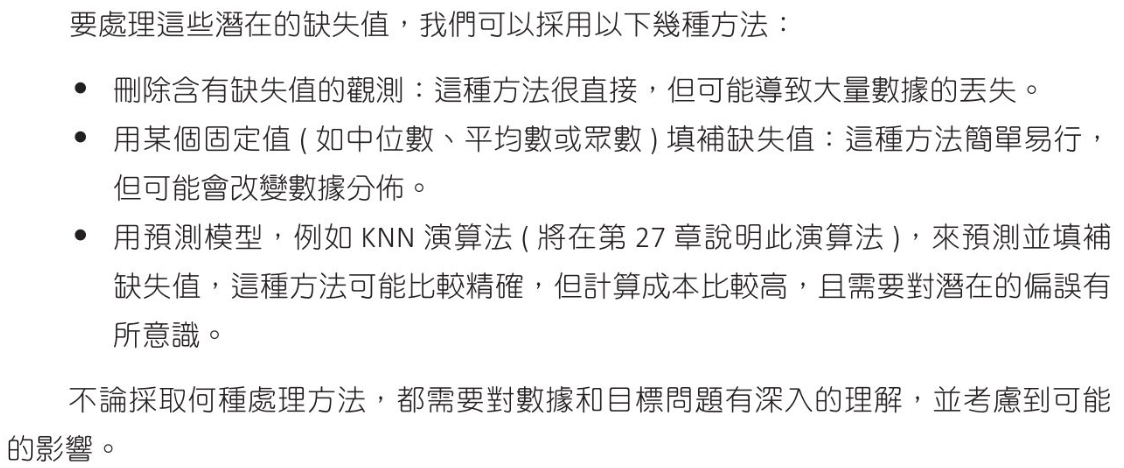
處理潛在缺失值(0)
1
2
3
4
5
6
7
8
9
10
11
12
13
14
15
16
17
# 中位數填補區失值
import pandas as pd

# 讀取糖尿病數據
df = pd.read_csv('diabetes.csv')

# 可能存在缺失特徵
columns_with_potential_missing_values = ['BloodPressure', 'SkinThickness', 'Insulin', 'BMI'
]

# 將0值,替換為中位數
for column in columns_with_potential_missing_values:
median = df[column].median()
df[column] = df[column].replace(to_replace=0, value=median )

# 存入新的csv
df.to_csv('new_diabetes.csv', index=False)
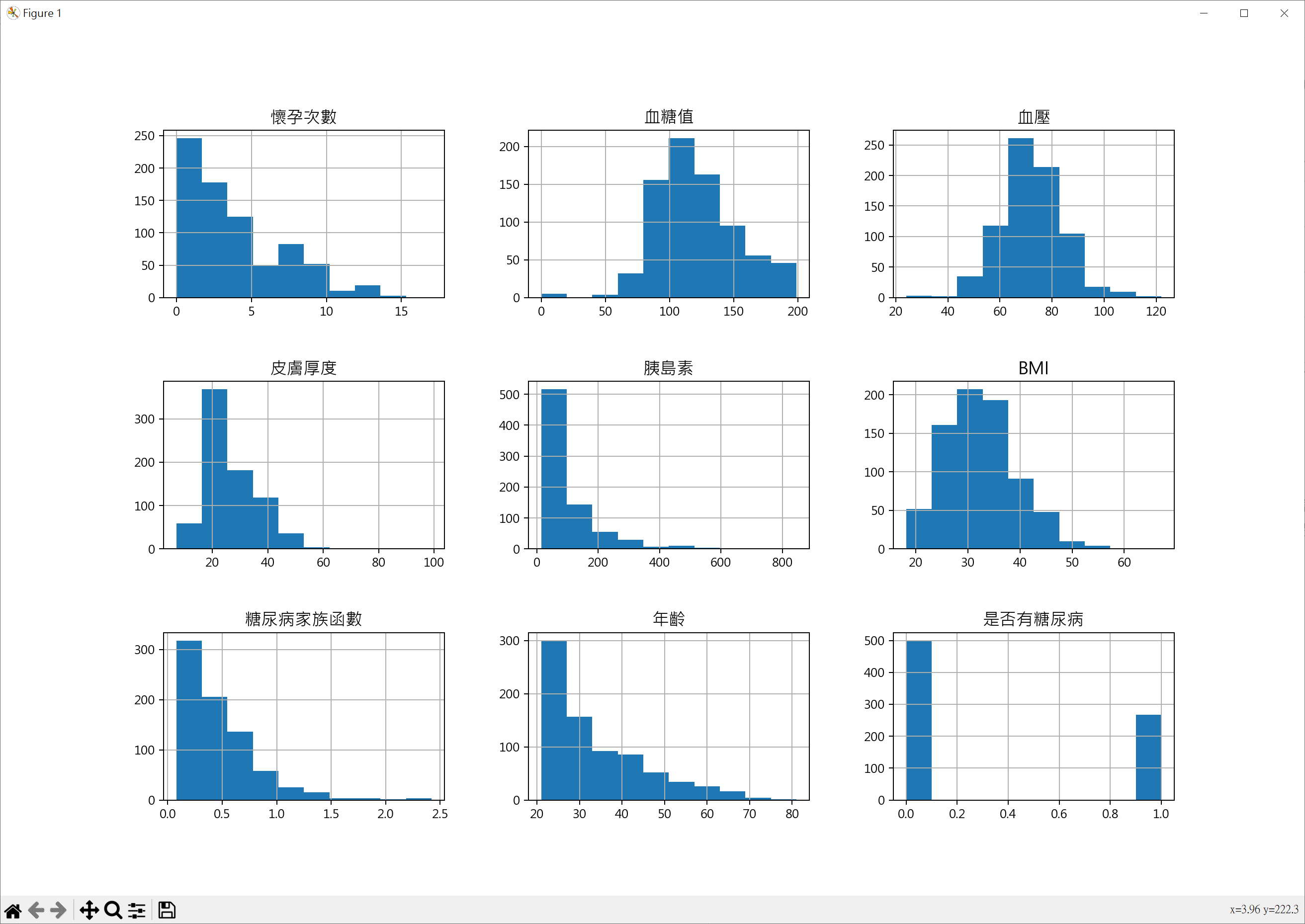
特徵直方圖
1
2
3
4
5
6
7
8
9
10
11
12
13
14
15
16
17
18
19
20
21
22
import pandas as pd
import matplotlib.pyplot as plt

# windows 使用 微軟正黑體
plt.rcParams["font.family"] = ["Microsoft JhengHei"]
# 顯示負號
plt.rcParams["axes.unicode_minus"] = False

# 讀取糖尿病數據
df = pd.read_csv('new_diabetes.csv')

titles = ['懷孕次數','血糖值','血壓','皮膚厚度','胰島素',
'BMI','糖尿病家族函數','年齡','是否有糖尿病']

fig = plt.figure(figsize=(15,10))
for i, col in enumerate(df.columns, 1):
ax = fig.add_subplot(3, 3, i)
df[col].hist(bins=10, ax=ax)
ax.set_title(titles[i-1], fontsize=14)

plt.subplots_adjust(wspace=0.3, hspace=0.5)
plt.show()
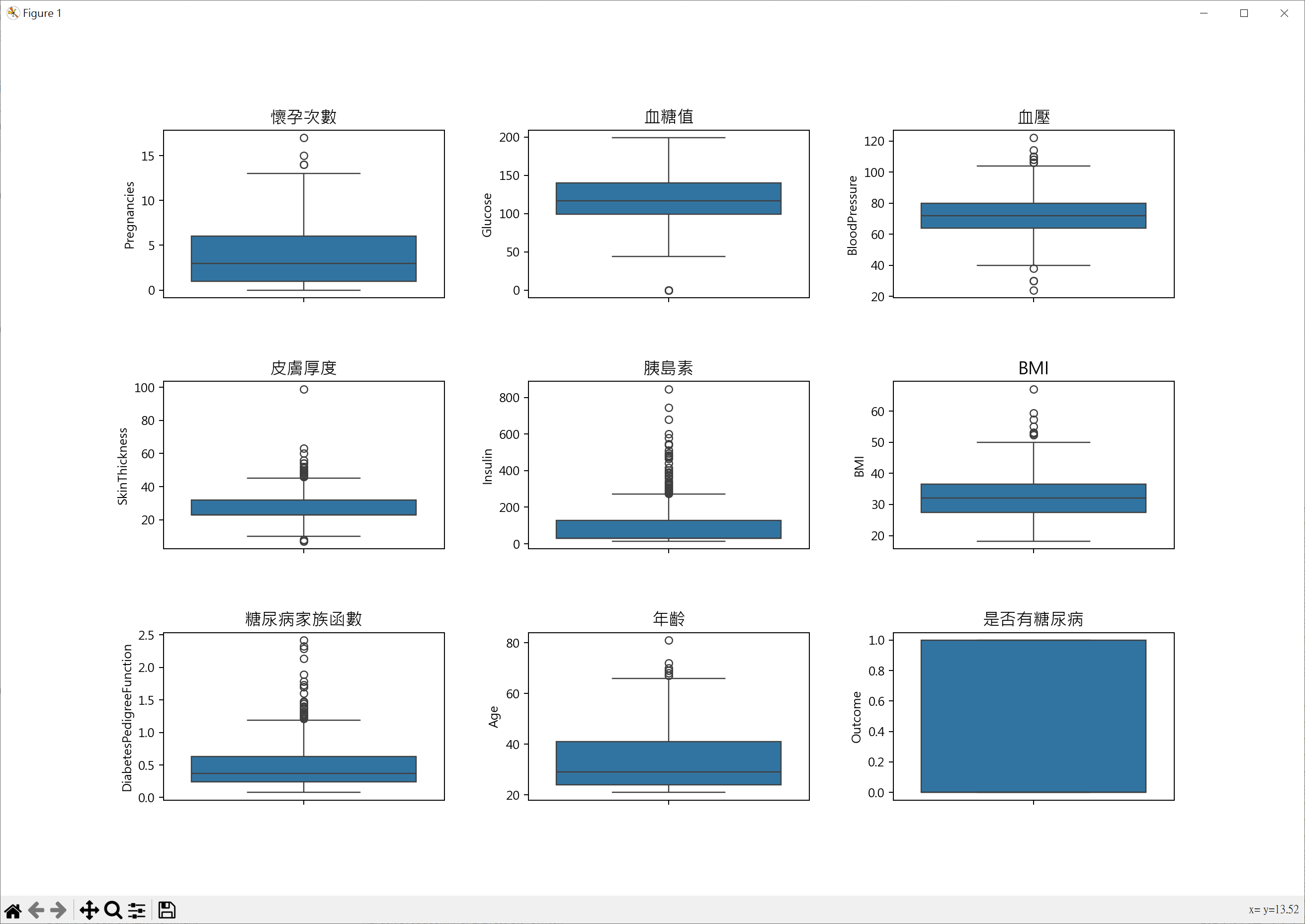
特徵箱形圖
1
2
3
4
5
6
7
8
9
10
11
12
13
14
15
16
17
18
19
20
21
22
23
import pandas as pd
import matplotlib.pyplot as plt
import seaborn as sns

# windows 使用 微軟正黑體
plt.rcParams["font.family"] = ["Microsoft JhengHei"]
# 顯示負號
plt.rcParams["axes.unicode_minus"] = False

# 讀取糖尿病數據
df = pd.read_csv('new_diabetes.csv')

titles = ['懷孕次數','血糖值','血壓','皮膚厚度','胰島素',
'BMI','糖尿病家族函數','年齡','是否有糖尿病']

fig = plt.figure(figsize=(15,10))
for i, col in enumerate(df.columns, 1):
ax = fig.add_subplot(3, 3, i)
sns.boxplot(y=df[col], ax=ax)
ax.set_title(titles[i-1], fontsize=14)

plt.subplots_adjust(wspace=0.3, hspace=0.5)
plt.show()
用所有特徵做糖尿病患者預估
1
2
3
4
5
6
7
8
9
10
11
12
13
14
15
16
17
18
19
20
21
22
23
24
25
26
27
28
29
30
31
32
33
34
35
36
37
38
39
40
41
42
43
44
45
46
47
48
49
50
51
52
53
54
55
56
57
58
59
60
61
62
63
64
65
66
67
68
69
70
71
72
73
74
75
76
77
78
79
80
81
82
83
import pandas as pd
from sklearn.model_selection import train_test_split
from sklearn.linear_model import LogisticRegression
from sklearn.preprocessing import StandardScaler
from sklearn.metrics import accuracy_score
from sklearn.metrics import confusion_matrix, roc_auc_score

# 讀取糖尿病數據
df = pd.read_csv('new_diabetes.csv')

# 定義特徵及目標變數
X = df.drop(["Outcome"], axis=1)
y = df["Outcome"]

# 分割測試數據與測試數據
X_train, X_test, y_train, y_test = \
train_test_split(X, y, test_size=0.2, random_state=5)

# 特徵縮放(標準化)
scaler = StandardScaler()
X_train = scaler.fit_transform(X_train)
X_test = scaler.transform(X_test)

# 建立邏輯迴歸模型 + 使用訓練集訓練模型
model = LogisticRegression()
model.fit(X_train, y_train)

# # 訓練集進行預測並計算準確率
# train_pred = model.predict(X_train)
# train_accuracy = accuracy_score(y_train, train_pred)
# print(f"訓練集數據準確率 Accuracy: {train_accuracy*100:.2f}%")
# # 測試集進行預測並計算準確率
# test_pred = model.predict(X_test)
# test_accuracy = accuracy_score(y_test, test_pred)
# print(f"測試集數據準確率 Accuracy: {test_accuracy*100:.2f}%")

# 測試集進行預測並計算準確率
y_pred = model.predict(X_test)
# Series 轉成 array
print(f"測試真實分類\n{y_test.to_numpy()}")
print("-"*70)
print(f"測試預測分類\n{y_pred}")
print("="*70)

# 列印準確率
print(f"Accuracy: {accuracy_score(y_test, y_pred):.5f}")
print("="*70)

# 計算混淆矩陣並輸出
# 測試準確對照表
conf_mat = confusion_matrix(y_test, y_pred)
print(f"混淆矩陣(Confusion Matix):\n{conf_mat}")
print("="*70)

# 預測採集樣本為正類的機率
# AUC-ROC(Area Under the Receiver Operating Characteristic Curve)分數
# 是一種評估二分類模型性能的指標。它表示模型區分正類和負類的能力,範圍從0.0到
# 1.0,1.0表示完美區分,0.5表示隨機猜測。
# model.predict_proba(X_test)[:,0]表為0的機率, model.predict_proba(X_test)[:,1]表為1的機率
y_pred_prob = model.predict_proba(X_test)[:,1]
print(f"AOC-ROC: {roc_auc_score(y_test, y_pred_prob):.5f}")

# 測試真實分類
# [0 0 0 0 0 0 1 0 1 0 1 1 0 0 0 0 0 0 0 0 0 1 0 1 0 0 0 0 0 0 0 0 0 0 1 0 0
# 1 0 0 1 0 0 0 0 1 1 0 0 1 1 0 1 1 0 1 0 0 0 0 1 0 1 0 1 0 0 1 0 1 1 0 0 1
# 1 0 0 1 1 0 0 1 1 0 0 0 0 0 0 0 0 0 0 0 0 1 1 1 0 0 0 0 1 1 0 1 0 0 1 0 0
# 1 0 0 0 0 0 1 0 0 1 1 0 1 1 0 0 0 0 0 1 1 1 0 1 1 1 0 1 0 0 1 1 1 0 0 1 1
# 0 0 1 0 0 0]
# ----------------------------------------------------------------------
# 測試預測分類
# [0 0 0 0 0 0 0 1 1 0 0 0 1 0 0 0 0 1 0 0 0 1 0 1 0 0 0 0 0 0 0 0 0 0 1 0 0
# 0 0 0 0 0 0 1 0 1 1 0 0 0 1 0 1 0 0 1 0 0 0 0 1 1 1 0 1 0 0 0 1 0 1 0 0 1
# 1 0 0 1 1 0 0 1 1 1 0 0 0 0 0 0 1 0 0 0 0 1 1 0 0 0 0 0 1 1 0 1 0 0 1 0 0
# 1 0 0 0 0 0 1 0 0 1 1 0 0 1 0 0 0 0 0 0 0 1 0 0 0 1 0 1 0 0 1 0 1 0 0 0 0
# 0 0 1 0 0 1]
# ======================================================================
# Accuracy: 0.82468
# ======================================================================
# 混淆矩陣(Confusion Matix):
# [[91 9]
# [18 36]]
# ======================================================================
# AOC-ROC: 0.87019
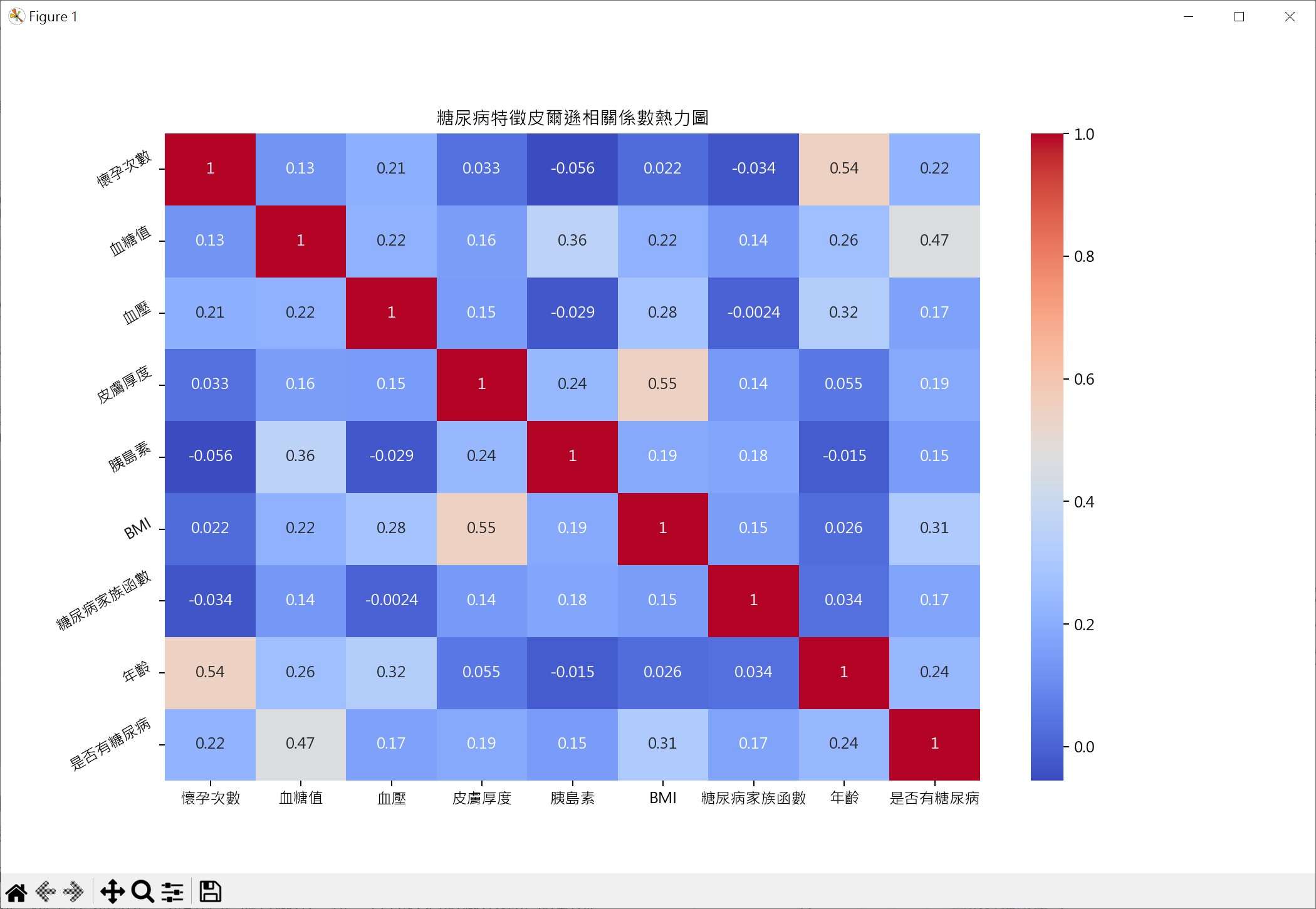
繪製皮爾遜相關係數熱圖
1
2
3
4
5
6
7
8
9
10
11
12
13
14
15
16
17
18
19
20
21
import pandas as pd
import matplotlib.pyplot as plt
import seaborn as sns

import matplotlib.pyplot as plt
# windows 使用 微軟正黑體
plt.rcParams["font.family"] = ["Microsoft JhengHei"]
# 顯示負號
plt.rcParams["axes.unicode_minus"] = False

# 讀取糖尿病數據
df = pd.read_csv('new_diabetes.csv')

df.columns = ['懷孕次數','血糖值','血壓','皮膚厚度','胰島素',
'BMI','糖尿病家族函數','年齡','是否有糖尿病']

plt.figure(figsize=(12,10))
sns.heatmap(df.corr(), annot=True, cmap='coolwarm' )
plt.title('糖尿病特徵皮爾遜相關係數熱力圖')
plt.yticks(rotation=30)
plt.show()
用最相關皮爾遜相關係數做糖尿病預估
1
2
3
4
5
6
7
8
9
10
11
12
13
14
15
16
17
18
19
20
21
22
23
24
25
26
27
28
29
30
31
32
33
34
35
36
37
38
39
40
41
42
43
44
45
46
47
48
49
50
51
52
53
54
55
56
57
58
59
60
61
62
63
64
65
66
67
68
69
70
71
72
73
74
75
76
77
78
79
80
81
82
83
import pandas as pd
from sklearn.model_selection import train_test_split
from sklearn.linear_model import LogisticRegression
from sklearn.preprocessing import StandardScaler
from sklearn.metrics import accuracy_score
from sklearn.metrics import confusion_matrix, roc_auc_score

# 讀取糖尿病數據
df = pd.read_csv('new_diabetes.csv')

# 以 Outcome 皮爾遜相關係數為基礎,由大到小排列
correlation = df.corr()['Outcome'].sort_values(ascending=False)

# 選擇最相關特徵
cor_nums = 2
features = correlation.index[1:cor_nums+1]
print(f'輸出相關係數:{features}')

# 定義特徵及目標變數
X = df[features]
y = df["Outcome"]

# 分割測試數據與測試數據
X_train, X_test, y_train, y_test = \
train_test_split(X, y, test_size=0.2, random_state=5)

# 特徵縮放(標準化)
scaler = StandardScaler()
X_train = scaler.fit_transform(X_train)
X_test = scaler.transform(X_test)

# 建立邏輯迴歸模型 + 使用訓練集訓練模型
model = LogisticRegression()
model.fit(X_train, y_train)

# 測試集進行預測並計算準確率
y_pred = model.predict(X_test)
# Series 轉成 array
print(f"測試真實分類\n{y_test.to_numpy()}")
print("-"*70)
print(f"測試預測分類\n{y_pred}")
print("="*70)

# 列印準確率
print(f"Accuracy: {accuracy_score(y_test, y_pred):.5f}%")
print("="*70)

# 計算混淆矩陣並輸出
# 測試準確對照表
conf_mat = confusion_matrix(y_test, y_pred)
print(f"混淆矩陣(Confusion Matix):\n{conf_mat}")
print("="*70)

# 預測採集樣本為正類的機率
# AUC-ROC(Area Under the Receiver Operating Characteristic Curve)分數
# 是一種評估二分類模型性能的指標。它表示模型區分正類和負類的能力,範圍從0.0到
# 1.0,1.0表示完美區分,0.5表示隨機猜測。
# model.predict_proba(X_test)[:,0]表為0的機率, model.predict_proba(X_test)[:,1]表為1的機率
y_pred_prob = model.predict_proba(X_test)[:,1]
print(f"AOC-ROC: {roc_auc_score(y_test, y_pred_prob):.5f}")

# 輸出相關係數:Index(['Glucose', 'BMI'], dtype='object')
# 測試真實分類
# [0 0 0 0 0 0 1 0 1 0 1 1 0 0 0 0 0 0 0 0 0 1 0 1 0 0 0 0 0 0 0 0 0 0 1 0 0
# 1 0 0 1 0 0 0 0 1 1 0 0 1 1 0 1 1 0 1 0 0 0 0 1 0 1 0 1 0 0 1 0 1 1 0 0 1
# 1 0 0 1 1 0 0 1 1 0 0 0 0 0 0 0 0 0 0 0 0 1 1 1 0 0 0 0 1 1 0 1 0 0 1 0 0
# 1 0 0 0 0 0 1 0 0 1 1 0 1 1 0 0 0 0 0 1 1 1 0 1 1 1 0 1 0 0 1 1 1 0 0 1 1
# 0 0 1 0 0 0]
# ----------------------------------------------------------------------
# 測試預測分類
# [0 0 0 0 0 0 0 1 1 0 0 0 0 0 0 0 0 0 0 0 0 1 0 1 0 0 0 1 0 0 0 0 0 0 1 0 0
# 0 0 0 0 0 0 1 0 1 1 0 0 0 1 0 1 0 0 1 0 0 0 0 1 1 1 0 1 0 0 0 1 0 1 0 0 1
# 1 1 0 1 0 0 0 1 1 1 0 0 0 0 0 1 1 0 0 0 0 1 1 0 0 0 0 0 1 1 0 1 0 0 1 0 0
# 1 0 0 0 0 0 1 0 0 1 1 0 0 0 0 0 0 0 0 0 0 0 0 0 0 1 0 1 0 0 1 0 1 0 0 0 0
# 0 0 1 0 0 1]
# ======================================================================
# Accuracy: 0.79870%
# ======================================================================
# 混淆矩陣(Confusion Matix):
# [[90 10]
# [21 33]]
# ======================================================================
# AOC-ROC: 0.85861

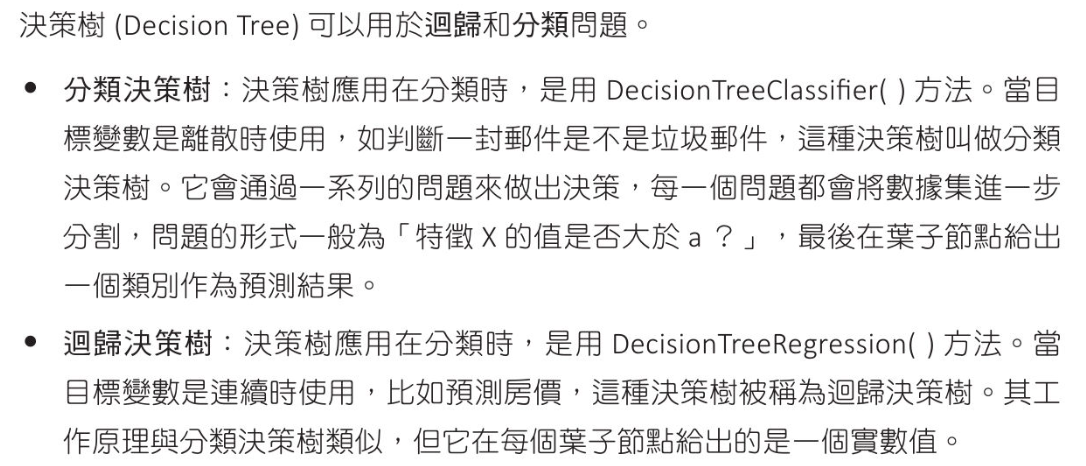
決策樹 - 葡萄酒,鐵達尼號,Telco,Retail

決策樹觀念

應用在分類問題

應用在迴歸問題
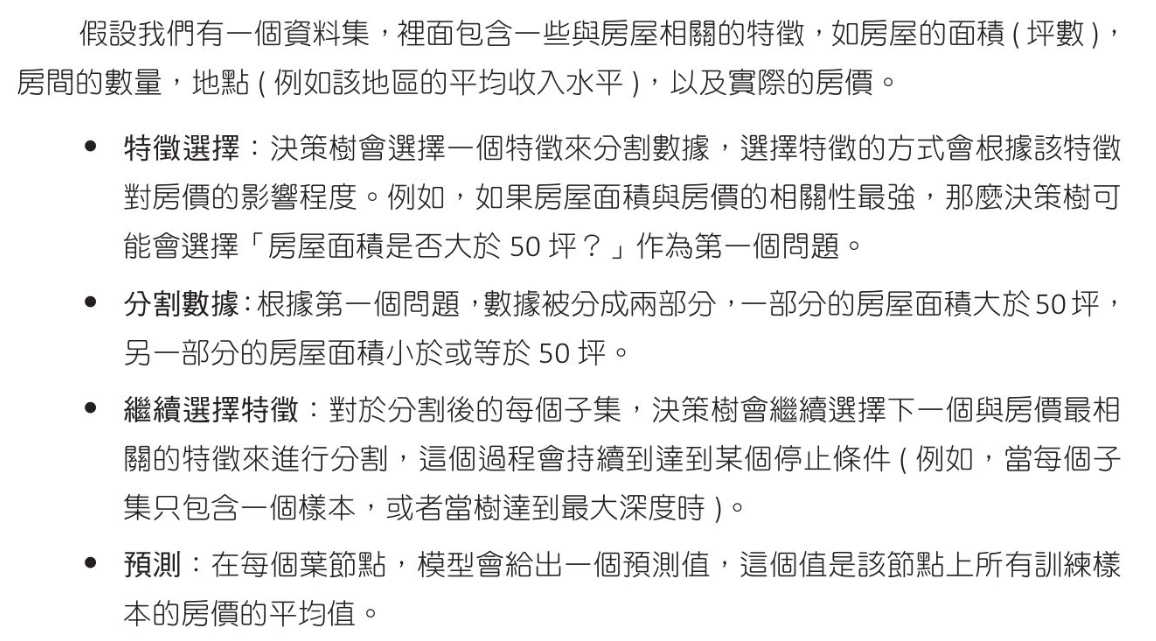
天氣數據應用

建立決策樹模型
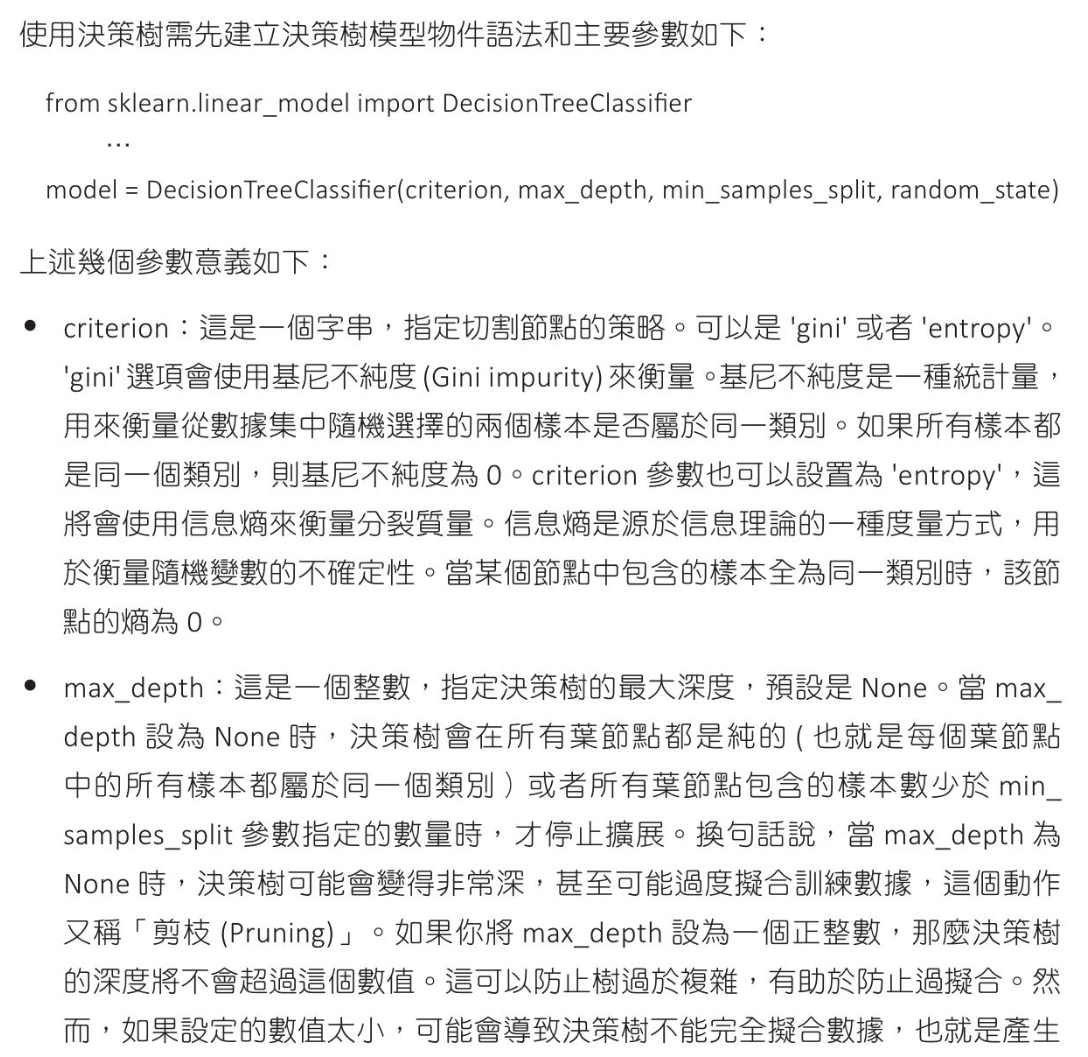
天氣數據實例
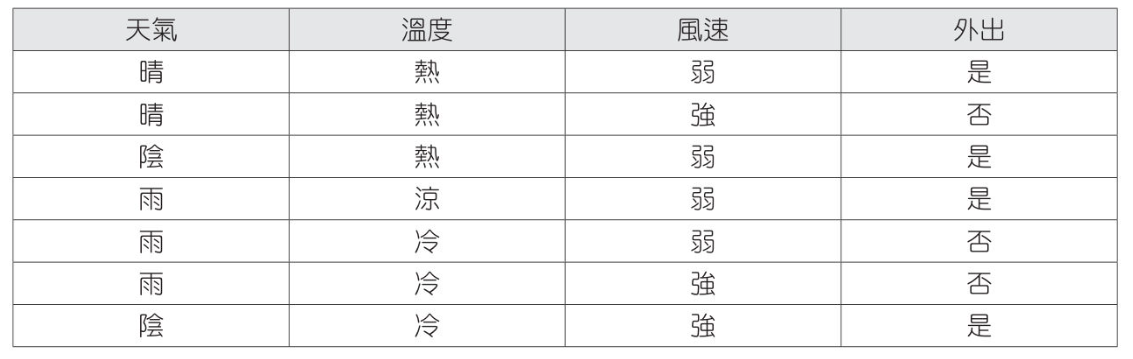
1
2
3
4
5
6
7
8
9
10
11
12
13
14
15
16
17
18
19
20
21
22
23
24
25
26
27
28
29
30
31
32
33
34
35
36
37
38
39
40
41
42
43
44
45
46
47
48
49
50
51
52
53
54
55
56
57
58
59
60
61
62
63
64
65
from sklearn.preprocessing import LabelEncoder
from sklearn.tree import DecisionTreeClassifier
import numpy as np

# 定義特徵和目標變數
features = [['晴','熱','弱'],['晴','熱','強'],['陰','熱','弱'],
['雨','涼','弱'],['雨','冷','弱'],['雨','冷','強'],
['陰','冷','強']]
labels = ['是','否','是','是','否','否','是']

label_encoders = []
features_encoded = []
# 將特徵變數轉為數字編碼
for i in range(len(features[0])):
# 特徵編碼
le = LabelEncoder()
feature_encoded = le.fit_transform([row[i] for row in features])
features_encoded.append(feature_encoded)
# 紀錄文字轉數字公式(1)
label_encoders.append(le)
# 3*7 array 轉成 7*3
features_encoded = np.array(features_encoded).T
print(f"特徵標籤編碼:\n{features_encoded}")

# 將目標變數轉為數字編碼
label_encoder_label = LabelEncoder()
labels_encoded = label_encoder_label.fit_transform(labels)
print(f"目標變數編碼:\n{labels_encoded}")

# 建立決策樹模型並進行訓練
dtc = DecisionTreeClassifier()
dtc.fit(features_encoded, labels_encoded)

# 用新的觀察值來進行預測
test_features = [['晴','涼','弱']]
# 建立二維 0 矩陣
test_features_encoded = np.zeros((1, len(test_features[0])))
# print(test_features_encoded)

for i in range(len(test_features[0])):
# 利用 文字轉數字公式(1) 設定對應值
test_features_encoded[0, i] = label_encoders[i].transform([test_features[0][i]])[0]
print(f'測試數據編碼\n{test_features_encoded}')

# 輸出預測數字標籤
pred = dtc.predict(test_features_encoded)
print(f'預測結果 : {pred}')

# 轉換輸出數字為文字
print(f'預測結果 : {label_encoder_label.inverse_transform(pred)[0]}')

# 特徵標籤編碼:
# [[0 2 0]
# [0 2 1]
# [1 2 0]
# [2 1 0]
# [2 0 0]
# [2 0 1]
# [1 0 1]]
# 目標變數編碼:
# [1 0 1 1 0 0 1]
# 測試數據編碼
# [[0. 1. 0.]]
# 預測結果 : [1]
# 預測結果 : 是

葡萄酒數據 - 分類應用

預設條件處理葡萄酒數據
1
2
3
4
5
6
7
8
9
10
11
12
13
14
15
16
17
18
19
20
21
22
23
24
25
26
27
28
29
30
31
32
33
34
35
36
37
38
39
40
41
42
43
44
45
46
47
from sklearn.datasets import load_wine
from sklearn.model_selection import train_test_split
from sklearn.metrics import accuracy_score
from sklearn.tree import DecisionTreeClassifier

# load 葡萄酒數據
wine = load_wine()

# 分割測試數據與測試數據
X_train, X_test, y_train, y_test = \
train_test_split(wine.data, wine.target, test_size=0.2, random_state=9)

# 建立決策樹模型並進行訓練
dtc = DecisionTreeClassifier()
dtc.fit(X_train, y_train)

# 進行預測
y_pred = dtc.predict(X_test)

# 預測結果比較
print(f"測試的真實分類\n{y_test}")
print("-"*70)
print(f"測試的目標分類\n{y_pred}")
print("="*70)
print(f"測試第1個標籤 :{y_pred[0]}")
print(f"測試第1個標籤各分類機率:{dtc.predict_proba(X_test[:1])}")
print("="*70)

# 列印準確率
print(f"方法1 測試數據準確率 : {accuracy_score(y_test, y_pred)}")

# 另一方法準確率
print(f"方法2 訓練數據準確率 : {dtc.score(X_train, y_train)}")
print(f"方法2 測試數據準確率 : {dtc.score(X_test, y_test)}")

# 測試的真實分類
# [0 0 0 2 0 0 2 2 2 1 2 0 2 1 1 0 1 1 0 0 0 0 0 0 0 2 1 1 0 1 0 1 1 0 1 2]
# ----------------------------------------------------------------------
# 測試的目標分類
# [0 0 0 2 0 0 2 2 2 1 2 0 2 1 1 0 1 1 0 1 0 0 0 0 0 2 1 1 0 1 0 1 1 0 1 2]
# ======================================================================
# 測試第1個標籤 :0
# 測試第1個標籤各分類機率:[[1. 0. 0.]]
# ======================================================================
# 方法1 測試數據準確率 : 0.9722222222222222
# 方法2 訓練數據準確率 : 1.0
# 方法2 測試數據準確率 : 0.9722222222222222
使用兩個特徵,更改深度
1
2
3
4
5
6
7
8
9
10
11
12
13
14
15
16
17
18
19
20
21
22
23
24
25
26
27
28
29
30
31
32
33
34
35
36
37
38
39
40
41
42
43
44
45
46
47
48
49
50
51
52
53
54
55
56
57
58
59
60
61
62
63
64
65
66
67
from sklearn.datasets import load_wine
from sklearn.model_selection import train_test_split
from sklearn.metrics import accuracy_score
from sklearn.tree import DecisionTreeClassifier
from joblib import dump

# load 葡萄酒數據
wine = load_wine()
# 取前兩個特徵
X = wine.data[:,:2]

# 分割測試數據與測試數據
X_train, X_test, y_train, y_test = \
train_test_split(X, wine.target, test_size=0.2, random_state=9)

# 建立決策樹模型並進行訓練(max_depth=1)
dtc1 = DecisionTreeClassifier(max_depth=1)
dtc1.fit(X_train, y_train)
# 進行預測
y_pred = dtc1.predict(X_test)
# 預測結果比較
print(f"測試的真實分類\n{y_test}")
print("-"*70)
print(f"測試的目標分類\n{y_pred}")
print("-"*70)
print(f"max_depth=1 測試數據準確率 : {dtc1.score(X_test, y_test):.2f}")
print("="*70)

# 建立決策樹模型並進行訓練(max_depth=3)
dtc3 = DecisionTreeClassifier(max_depth=3)
dtc3.fit(X_train, y_train)
# 進行預測
y_pred = dtc3.predict(X_test)
# 預測結果比較
print(f"測試的真實分類\n{y_test}")
print("-"*70)
print(f"測試的目標分類\n{y_pred}")
print("-"*70)
print(f"max_depth=1 測試數據準確率 : {dtc3.score(X_test, y_test):.2f}")
print("="*70)

# 儲存公式
# add feature name and class_names
feature_names = ['alcohol','malic_acid']
class_names = ['Barolo','Grignolino','Barbera']
dump((dtc3, feature_names, class_names), 'dtc3.joblib')

# 儲存公式
# default feature name, no class name
# dump(dtc3, 'dtc3.joblib')

# 測試的真實分類
# [0 0 0 2 0 0 2 2 2 1 2 0 2 1 1 0 1 1 0 0 0 0 0 0 0 2 1 1 0 1 0 1 1 0 1 2]
# ----------------------------------------------------------------------
# 測試的目標分類
# [0 0 0 0 0 0 0 0 1 1 1 0 1 1 1 0 1 1 0 0 0 0 0 0 0 0 1 1 0 1 0 1 1 0 1 0]
# ----------------------------------------------------------------------
# max_depth=1 測試數據準確率 : 0.78
# ======================================================================
# 測試的真實分類
# [0 0 0 2 0 0 2 2 2 1 2 0 2 1 1 0 1 1 0 0 0 0 0 0 0 2 1 1 0 1 0 1 1 0 1 2]
# ----------------------------------------------------------------------
# 測試的目標分類
# [0 0 0 2 0 0 0 2 1 1 1 0 1 1 1 0 1 1 0 0 0 0 0 0 0 2 1 1 0 1 0 1 1 0 1 2]
# ----------------------------------------------------------------------
# max_depth=1 測試數據準確率 : 0.89
# ======================================================================
繪製決策樹
安裝
  • 安裝 Graphviz
    1
    pip install graphviz
  • 下載 graphviz program
  • 解壓縮至 computer
  • set path
    1
    2
    3
    4
    5
    6
    7
    8
    9
    10
    11
    12
    13
    14
    15
    16
    17
    18
    19
    20
    # set from vscode example
    {
    "terminal.integrated.profiles.windows": {
    "PowerShell": {
    "source": "PowerShell",
    "env": {
    "PATH": "${env:PATH};D:\\app\\python_other\\Graphviz-12.0.0-win64\\bin"
    }
    },
    "Command Prompt": {
    "path": [
    "${env:windir}\\System32\\cmd.exe"
    ],
    "env": {
    "PATH": "${env:PATH};D:\\app\\python_other\\Graphviz-12.0.0-win64\bin"
    }
    }
    },
    "terminal.integrated.defaultProfile.windows": "PowerShell"
    }
繪製
1
2
3
4
5
6
7
8
9
10
11
12
13
14
15
16
17
18
19
20
# 繪製決策樹
# pip install Graphviz
from joblib import load
from sklearn import tree
from graphviz import Source

# dtc3.joblib include feature name and class_names

# default feature name, no class name
dtc, feature_names, class_names = load('dtc3.joblib')

# add feature name and class_names
# feature_names = ['alcohol','malic_acid']
# class_names = ['Barolo','Grignolino','Barbera']
grpah = Source(tree.export_graphviz(dtc, out_file=None, feature_names=feature_names, class_names=class_names, filled=True))

# default feature name, no class name
# grpah = Source(tree.export_graphviz(dtc, out_file=None))
grpah.format = 'png'
grpah.render(filename='dtc_tree', view=True)
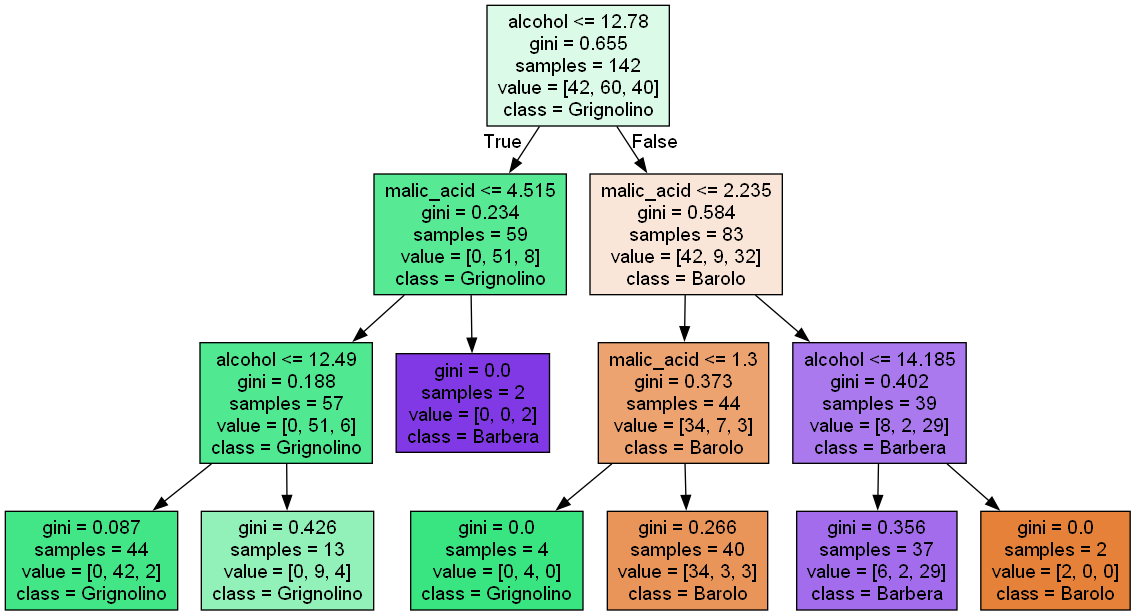
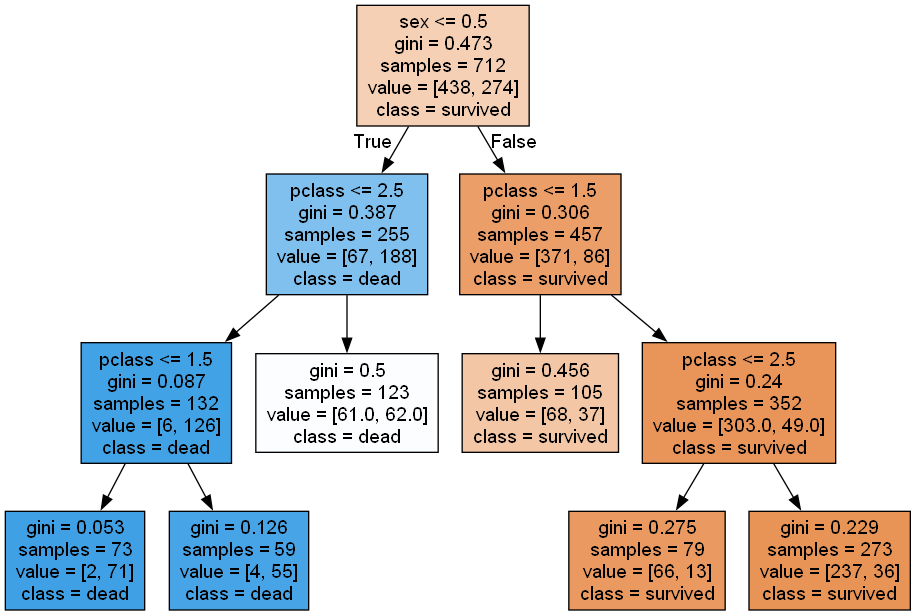
  • 使用 gini 演算法
  • value 表示各類別包含數量
  • 顏色表示歸類類別

鐵達尼號 - 分類應用

鐵達尼數據
1
2
3
4
5
6
7
8
9
10
11
12
13
14
15
16
17
18
19
20
21
22
23
24
25
26
27
28
29
30
31
32
33
34
35
36
37
38
39
40
41
42
43
44
45
46
47
48
49
50
51
52
53
54
55
56
57
58
59
60
61
62
63
64
65
66
67
68
69
70
71
72
73
74
75
76
77
78
import seaborn as sns
import pandas as pd

# 顯示所有 columns
pd.set_option('display.max_columns', None)
# 設定顯示每 row 長度
pd.set_option('display.width', 300)

# load 數據
titanic = sns.load_dataset('titanic')

# 查看數據基本欄位資料
print(titanic.info())

# 查看數據統計資料
print(titanic.describe())

# 顯示前5筆資料
print(titanic.head())

# 檢查資料缺失
print(titanic.isnull().sum())


# <class 'pandas.core.frame.DataFrame'>
# RangeIndex: 891 entries, 0 to 890
# Data columns (total 15 columns):
# # Column Non-Null Count Dtype
# --- ------ -------------- -----
# 0 survived 891 non-null int64
# 1 pclass 891 non-null int64
# 2 sex 891 non-null object
# 3 age 714 non-null float64
# 4 sibsp 891 non-null int64
# 5 parch 891 non-null int64
# 6 fare 891 non-null float64
# 7 embarked 889 non-null object
# 8 class 891 non-null category
# 9 who 891 non-null object
# 10 adult_male 891 non-null bool
# 11 deck 203 non-null category
# 12 embark_town 889 non-null object
# 13 alive 891 non-null object
# 14 alone 891 non-null bool
# dtypes: bool(2), category(2), float64(2), int64(4), object(5)
# memory usage: 80.7+ KB
# None
# survived pclass age sibsp parch fare
# count 891.000000 891.000000 714.000000 891.000000 891.000000 891.000000
# mean 0.383838 2.308642 29.699118 0.523008 0.381594 32.204208
# std 0.486592 0.836071 14.526497 1.102743 0.806057 49.693429
# min 0.000000 1.000000 0.420000 0.000000 0.000000 0.000000
# 25% 0.000000 2.000000 20.125000 0.000000 0.000000 7.910400
# 50% 0.000000 3.000000 28.000000 0.000000 0.000000 14.454200
# 75% 1.000000 3.000000 38.000000 1.000000 0.000000 31.000000
# max 1.000000 3.000000 80.000000 8.000000 6.000000 512.329200
# survived pclass sex age sibsp parch fare embarked class who adult_male deck embark_town alive alone
# 0 0 3 male 22.0 1 0 7.2500 S Third man True NaN Southampton no False
# 1 1 1 female 38.0 1 0 71.2833 C First woman False C Cherbourg yes False
# 2 1 3 female 26.0 0 0 7.9250 S Third woman False NaN Southampton yes True
# 3 1 1 female 35.0 1 0 53.1000 S First woman False C Southampton yes False
# 4 0 3 male 35.0 0 0 8.0500 S Third man True NaN Southampton no True
# survived 0
# pclass 0
# sex 0
# age 177
# sibsp 0
# parch 0
# fare 0
# embarked 2
# class 0
# who 0
# adult_male 0
# deck 688
# embark_town 2
# alive 0
# alone 0
# dtype: int64
決策樹設計鐵達尼號預測
1
2
3
4
5
6
7
8
9
10
11
12
13
14
15
16
17
18
19
20
21
22
23
24
25
26
27
28
29
30
31
32
33
34
35
36
37
38
39
40
41
42
43
44
45
46
47
48
49
50
51
52
53
54
55
56
57
58
59
60
61
62
63
64
65
66
67
68
69
70
71
72
73
74
75
76
77
78
79
80
81
82
83
84
85
86
87
88
89
90
91
92
93
94
95
import seaborn as sns
import pandas as pd
from sklearn.model_selection import train_test_split
from sklearn.metrics import classification_report
from sklearn.metrics import confusion_matrix
from sklearn.tree import DecisionTreeClassifier

# load 數據
titanic_data = sns.load_dataset('titanic')
# 選取有用特徵
titanic_data = titanic_data[['survived','pclass','sex','age','sibsp',
'parch','fare','embarked']]

# print(titanic_data)
# print(titanic_data['age'])
# 年齡補上中位數年齡
titanic_data['age'] = titanic_data['age'].fillna(titanic_data['age'].median())
# 登船港口用眾位數取代缺失值
# mode() 傳回的是一個包含眾數的 Series,因此需要取 [0] 來獲取第一個眾數
titanic_data['embarked'] = titanic_data['embarked'].fillna(titanic_data['embarked'].mode()[0])

# 對性別,登船港口 執行 on-hot 編碼
# get_dummies 是 Pandas 中的一個函數,用於將分類變數轉換為一個或多個虛擬變數(dummy variables)。
# 這些虛擬變數可以用於機器學習模型,因為大多數模型不能直接處理非數值型資料。
titanic_data = pd.get_dummies(titanic_data, columns=['sex', 'embarked'])

# 分割數據為訓練集及測試集
X = titanic_data.drop('survived', axis=1)
y = titanic_data['survived']
X_train, X_test, y_train, y_test = \
train_test_split(X, y, test_size=0.2, random_state=5)

print(titanic_data.head())

# 建立決策樹模型並進行訓練
dtc = DecisionTreeClassifier(random_state=5)
dtc.fit(X_train, y_train)

# 進行預測
y_pred = dtc.predict(X_test)

# 預測結果比較
print(f"測試的真實分類\n{y_test.to_numpy()}")
print("-"*70)
print(f"測試的目標分類\n{y_pred}")
print("="*70)

# 準確率
print(f"準確率 : {dtc.score(X_test, y_test):.2f}")

# 計算混淆矩陣並輸出
# 測試準確對照表
conf_mat = confusion_matrix(y_test, y_pred)
print(f"混淆矩陣(Confusion Matix):\n{conf_mat}")
print("-"*70)

# 生成分類報告
# 測試報告
report = classification_report(y_test, y_pred)
print(f"分類報告(Classification Report)\n{report}")

# survived pclass age sibsp parch fare sex_female sex_male embarked_C embarked_Q embarked_S
# 0 0 3 22.0 1 0 7.2500 False True False False True
# 1 1 1 38.0 1 0 71.2833 True False True False False
# 2 1 3 26.0 0 0 7.9250 True False False False True
# 3 1 1 35.0 1 0 53.1000 True False False False True
# 4 0 3 35.0 0 0 8.0500 False True False False True
# 測試的真實分類
# [0 0 0 1 0 0 1 1 1 0 0 0 1 1 0 1 1 0 0 0 0 1 1 1 0 0 1 1 0 0 0 1 1 1 1 1 0
# 1 0 0 0 1 1 1 0 0 1 1 0 0 0 0 1 0 1 0 0 0 0 1 0 0 0 0 1 0 0 0 1 0 1 0 0 0
# 0 0 0 0 1 1 0 0 0 0 1 1 0 1 0 1 0 0 1 0 1 0 1 0 0 0 1 0 0 0 1 1 0 0 0 1 0
# 0 0 1 1 1 1 1 1 1 1 1 0 1 0 1 1 0 0 0 0 0 0 0 1 0 0 0 0 0 0 0 0 0 0 1 0 1
# 0 1 1 0 0 0 0 0 1 0 0 0 0 1 0 0 1 0 1 0 0 0 1 0 1 1 0 0 0 1 0]
# ----------------------------------------------------------------------
# 測試的目標分類
# [0 0 0 0 1 0 1 0 1 0 1 0 0 1 0 1 0 1 0 0 1 1 1 0 0 0 0 1 0 0 0 1 0 0 1 1 0
# 0 0 0 0 1 1 0 0 0 1 1 0 0 0 1 1 0 0 0 0 0 0 1 0 0 0 0 1 0 0 0 1 0 1 0 1 0
# 1 0 0 0 1 1 0 0 0 0 1 1 0 1 0 1 1 0 1 0 1 0 1 0 0 0 1 1 0 0 1 1 0 0 0 1 0
# 0 0 0 1 1 1 0 1 0 0 0 0 1 0 1 0 0 0 0 0 0 0 0 1 0 0 0 0 0 0 0 0 1 0 1 1 1
# 0 0 1 0 0 0 0 1 1 0 0 0 0 0 0 1 1 0 1 0 0 0 1 0 1 1 0 0 0 1 0]
# ======================================================================
# 準確率 : 0.82
# 混淆矩陣(Confusion Matix):
# 111位沒有存活: 98正確 19錯誤
# 62位存活: 19正確 13錯誤
# [[98 13]
# [19 49]]
# ----------------------------------------------------------------------
# 分類報告(Classification Report)
# precision recall f1-score support
# 0 0.84 0.88 0.86 111
# 1 0.79 0.72 0.75 68
# accuracy 0.82 179
# macro avg 0.81 0.80 0.81 179
# weighted avg 0.82 0.82 0.82 179
交叉分析表格介紹
1
2
3
4
5
6
7
8
9
10
11
12
13
14
15
16
import pandas as pd

# 建立 DataFrame
df = pd.DataFrame({
'性別':['男','男','女','男','女','女','女','男','男','女'],
'喜好':['籃球','足球','籃球','足球','籃球','足球','籃球','籃球','棒球','棒球']
})

# 創建交叉分析表
cross_tbl = pd.crosstab(df['性別'], df['喜好'])
print(cross_tbl)

# 喜好 棒球 籃球 足球
# 性別
# 女 1 3 1
# 男 1 2 2
鐵達尼號交叉分析
1
2
3
4
5
6
7
8
9
10
11
12
13
14
15
16
17
18
19
20
21
22
23
24
25
26
27
28
29
30
31
32
33
34
35
36
37
38
39
40
41
42
43
44
45
46
47
48
49
50
51
52
53
54
55
56
57
58
59
60
61
62
63
64
65
66
67
68
69
70
71
72
73
74
75
76
77
78
79
80
81
82
83
84
85
86
87
88
89
90
91
import seaborn as sns
import pandas as pd
from sklearn.model_selection import train_test_split
from sklearn.tree import DecisionTreeClassifier
from sklearn.preprocessing import LabelEncoder
from sklearn import tree
from graphviz import Source
from sklearn.metrics import confusion_matrix

# load 數據
titanic_data = sns.load_dataset('titanic')
# 選取有用特徵
titanic_data = titanic_data[['survived','pclass','sex']]

# 將 sex 轉位數字
sex_encoder = LabelEncoder()
# print(titanic_data['sex'])
sex_encoded = sex_encoder.fit_transform(titanic_data['sex'])
titanic_data['sex'] = sex_encoded
# print(titanic_data['sex'])
# male=1 female=0

# 分割數據為訓練集及測試集
X = titanic_data.drop('survived', axis=1)
y = titanic_data['survived']
X_train, X_test, y_train, y_test = \
train_test_split(X, y, test_size=0.2, random_state=5)

# 建立決策樹模型並進行訓練
dt_classifier = DecisionTreeClassifier()
dt_classifier.fit(X_train, y_train)

# 進行預測
y_pred = dt_classifier.predict(X_test)

# 預測結果比較
print("1表存活")
print(f"測試的真實分類\n{y_test.to_numpy()}")
print("-"*70)
print(f"測試的目標分類\n{y_pred}")
print("="*70)

# 準確率
print(f"準確率 : {dt_classifier.score(X_test, y_test):.2f}")

# 預測採集樣本為正類的機率
# AUC-ROC(Area Under the Receiver Operating Characteristic Curve)分數
# 是一種評估二分類模型性能的指標。它表示模型區分正類和負類的能力,範圍從0.0到
# 1.0,1.0表示完美區分,0.5表示隨機猜測。
# pre_rate[:,0]表為0的機率, pre_rate[:,0]表為1的機率
pre_rate = dt_classifier.predict_proba(X_test)
# 交叉分析表
print('1表female')
cross_tbl = pd.crosstab(pre_rate[:,0],
columns=[X_test['pclass'], X_test['sex']])
print(cross_tbl)

#add feature name and class_names
feature_names = ['pclass','sex']
class_names = ['survived','dead']
grpah = Source(tree.export_graphviz(dt_classifier, out_file=None, feature_names=feature_names, class_names=class_names, filled=True))

grpah.format = 'png'
grpah.render(filename='dt_classifier_tree', view=True)

# 1表存活
# 測試的真實分類
# [0 0 0 1 0 0 1 1 1 0 0 0 1 1 0 1 1 0 0 0 0 1 1 1 0 0 1 1 0 0 0 1 1 1 1 1 0
# 1 0 0 0 1 1 1 0 0 1 1 0 0 0 0 1 0 1 0 0 0 0 1 0 0 0 0 1 0 0 0 1 0 1 0 0 0
# 0 0 0 0 1 1 0 0 0 0 1 1 0 1 0 1 0 0 1 0 1 0 1 0 0 0 1 0 0 0 1 1 0 0 0 1 0
# 0 0 1 1 1 1 1 1 1 1 1 0 1 0 1 1 0 0 0 0 0 0 0 1 0 0 0 0 0 0 0 0 0 0 1 0 1
# 0 1 1 0 0 0 0 0 1 0 0 0 0 1 0 0 1 0 1 0 0 0 1 0 1 1 0 0 0 1 0]
# ----------------------------------------------------------------------
# 測試的目標分類
# [0 0 0 0 0 0 1 0 1 0 0 0 0 1 0 1 0 1 0 0 0 1 1 1 0 0 0 0 0 0 0 0 1 0 1 0 0
# 0 0 0 0 1 0 0 0 0 1 1 0 0 1 1 1 0 0 0 0 0 0 1 0 1 0 0 1 0 0 0 0 0 1 0 1 0
# 1 0 0 1 1 1 0 0 0 0 1 1 1 1 0 0 0 0 1 0 1 0 1 0 0 0 0 1 0 0 1 1 0 0 0 1 0
# 0 1 0 1 1 1 0 1 1 1 0 0 1 0 1 0 0 1 0 0 0 0 0 1 0 0 0 0 0 0 0 0 1 0 1 0 1
# 0 0 1 0 0 0 0 1 0 0 0 0 0 0 0 0 1 1 1 0 0 0 1 0 1 1 0 0 0 1 0]
# ======================================================================
# 準確率 : 0.79
# 1表female
# pclass 1 2 3
# sex 0 1 0 1 0 1
# row_0
# 0.027397 21 0 0 0 0 0
# 0.067797 0 0 17 0 0 0
# 0.495935 0 0 0 0 21 0
# 0.647619 0 17 0 0 0 0
# 0.835443 0 0 0 29 0 0
# 0.868132 0 0 0 0 0 74

Telco 電信公司(from Kaggle) - 分類應用

數據內容
1
2
3
4
5
6
7
8
9
10
11
12
13
14
15
16
17
18
19
20
21
22
23
24
25
26
27
28
29
30
31
32
33
34
35
36
37
38
39
40
41
42
43
44
45
46
47
48
49
50
51
52
53
54
55
56
57
58
59
60
61
62
63
64
65
66
67
68
69
70
71
72
73
74
75
76
77
78
79
80
81
82
83
84
85
86
87
88
89
90
91
92
93
94
95
96
97
98
99
100
101
102
103
104
105
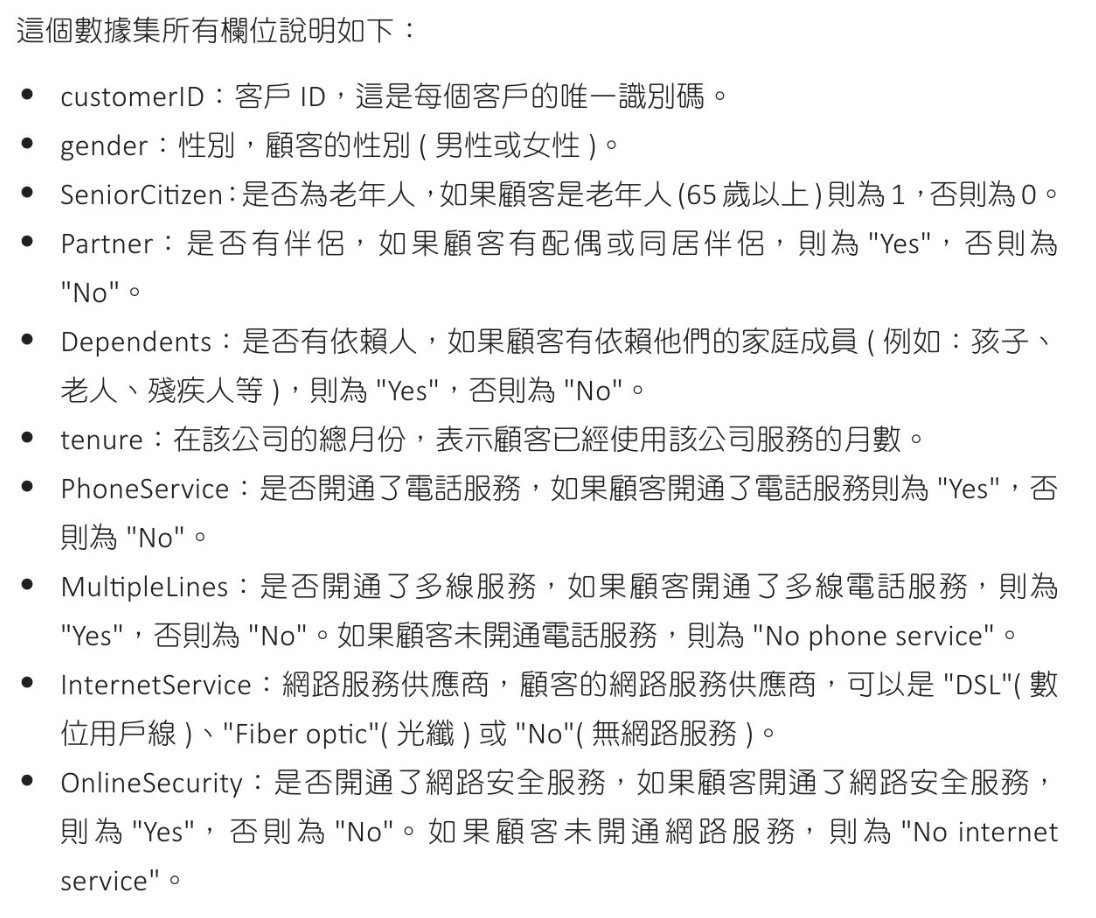
import pandas as pd
from sklearn.preprocessing import LabelEncoder

# 讀取數據
df = pd.read_csv('WA_Fn-UseC_-Telco-Customer-Churn.csv')

# remove field ID
df = df.drop(['customerID'], axis=1)

# 標籤轉成數值
for column in df.columns:
if df[column].dtype == 'object':
le = LabelEncoder()
df[column] = le.fit_transform(df[column])
if column != 'TotalCharges':
# 列出原符號和對應的數值
label_mapping = dict(zip(le.classes_, le.transform(le.classes_)))
print(f"{column} {label_mapping}")

# show 數據統計資料及檢查資料缺失
print(df.isnull().info())
print(df.isnull().sum())

# 刪除缺失值,處理缺失數據(本例其實不需要)
df= df.dropna()

# show 數據統計資料及檢查資料缺失
# print(df.isnull().info())
# print(df.isnull().sum())

# show 5 records
print(df.head())


# gender {'Female': 0, 'Male': 1}
# Partner {'No': 0, 'Yes': 1}
# Dependents {'No': 0, 'Yes': 1}
# PhoneService {'No': 0, 'Yes': 1}
# MultipleLines {'No': 0, 'No phone service': 1, 'Yes': 2}
# InternetService {'DSL': 0, 'Fiber optic': 1, 'No': 2}
# OnlineSecurity {'No': 0, 'No internet service': 1, 'Yes': 2}
# OnlineBackup {'No': 0, 'No internet service': 1, 'Yes': 2}
# DeviceProtection {'No': 0, 'No internet service': 1, 'Yes': 2}
# TechSupport {'No': 0, 'No internet service': 1, 'Yes': 2}
# StreamingTV {'No': 0, 'No internet service': 1, 'Yes': 2}
# StreamingMovies {'No': 0, 'No internet service': 1, 'Yes': 2}
# Contract {'Month-to-month': 0, 'One year': 1, 'Two year': 2}
# PaperlessBilling {'No': 0, 'Yes': 1}
# PaymentMethod {'Bank transfer (automatic)': 0, 'Credit card (automatic)': 1, 'Electronic check': 2, 'Mailed check': 3}
# Churn {'No': 0, 'Yes': 1}
# <class 'pandas.core.frame.DataFrame'>
# RangeIndex: 7043 entries, 0 to 7042
# Data columns (total 20 columns):
# # Column Non-Null Count Dtype
# --- ------ -------------- -----
# 0 gender 7043 non-null bool
# 1 SeniorCitizen 7043 non-null bool
# 2 Partner 7043 non-null bool
# 3 Dependents 7043 non-null bool
# 4 tenure 7043 non-null bool
# 5 PhoneService 7043 non-null bool
# 6 MultipleLines 7043 non-null bool
# 7 InternetService 7043 non-null bool
# 8 OnlineSecurity 7043 non-null bool
# 9 OnlineBackup 7043 non-null bool
# 10 DeviceProtection 7043 non-null bool
# 11 TechSupport 7043 non-null bool
# 12 StreamingTV 7043 non-null bool
# 13 StreamingMovies 7043 non-null bool
# 14 Contract 7043 non-null bool
# 15 PaperlessBilling 7043 non-null bool
# 16 PaymentMethod 7043 non-null bool
# 17 MonthlyCharges 7043 non-null bool
# 18 TotalCharges 7043 non-null bool
# 19 Churn 7043 non-null bool
# dtypes: bool(20)
# memory usage: 137.7 KB
# None
# gender 0
# SeniorCitizen 0
# Partner 0
# Dependents 0
# tenure 0
# PhoneService 0
# MultipleLines 0
# InternetService 0
# OnlineSecurity 0
# OnlineBackup 0
# DeviceProtection 0
# TechSupport 0
# StreamingTV 0
# StreamingMovies 0
# Contract 0
# PaperlessBilling 0
# PaymentMethod 0
# MonthlyCharges 0
# TotalCharges 0
# Churn 0
# dtype: int64
# gender SeniorCitizen Partner Dependents ... PaymentMethod MonthlyCharges TotalCharges Churn
# 0 0 0 1 0 ... 2 29.85 2505 0
# 1 1 0 0 0 ... 3 56.95 1466 0
# 2 1 0 0 0 ... 3 53.85 157 1
# 3 1 0 0 0 ... 0 42.30 1400 0
# 4 0 0 0 0 ... 2 70.70 925 1
決策樹數據分析
1
2
3
4
5
6
7
8
9
10
11
12
13
14
15
16
17
18
19
20
21
22
23
24
25
26
27
28
29
30
31
32
33
34
35
36
37
38
39
40
41
42
43
44
45
46
47
48
49
50
51
52
53
54
55
56
57
58
59
60
61
62
63
64
65
66
67
68
69
70
71
72
73
74
75
76
77
78
79
import pandas as pd
from sklearn.preprocessing import LabelEncoder
import pandas as pd
from sklearn.model_selection import train_test_split
from sklearn.metrics import classification_report
from sklearn.metrics import confusion_matrix
from sklearn.tree import DecisionTreeClassifier

# 讀取數據
df = pd.read_csv('WA_Fn-UseC_-Telco-Customer-Churn.csv')

# remove field ID
# df = df.drop(['customerID'], axis=1)

# 標籤轉成數值
for column in df.columns:
if df[column].dtype == 'object':
le = LabelEncoder()
df[column] = le.fit_transform(df[column])
# if column != 'TotalCharges':
# # 列出原符號和對應的數值
# label_mapping = dict(zip(le.classes_, le.transform(le.classes_)))
# print(f"{column} {label_mapping}")

X = df.drop('Churn', axis=1)
y = df['Churn']
X_train, X_test, y_train, y_test = \
train_test_split(X, y, test_size=0.2, random_state=1)

# 建立決策樹模型並進行訓練
# dtc = DecisionTreeClassifier()
# max_depth=5
print("max_depth=5")
dtc = DecisionTreeClassifier(max_depth=5)
dtc.fit(X_train, y_train)

# 進行預測
y_pred = dtc.predict(X_test)

# 準確率
print(f"準確率 : {dtc.score(X_test, y_test)}")

# 計算混淆矩陣並輸出
# 測試準確對照表
conf_mat = confusion_matrix(y_test, y_pred)
print(f"混淆矩陣(Confusion Matix):\n{conf_mat}")
print("-"*70)

# 生成分類報告
# 測試報告
report = classification_report(y_test, y_pred)
print(f"分類報告(Classification Report)\n{report}")

# 準確率 : 0.73
# 混淆矩陣(Confusion Matix):
# [[1267 277]
# [ 287 282]]
# ----------------------------------------------------------------------
# 分類報告(Classification Report)
# precision recall f1-score support
# 0 0.82 0.82 0.82 1544 --> 預測顧客未流失精確度 0.82
# 1 0.50 0.50 0.50 569 --> 預測顧客流失精確度 0.5
# accuracy 0.73 2113
# macro avg 0.66 0.66 0.66 2113
# weighted avg 0.73 0.73 0.73 2113

# max_depth=5
# 準確率 : 0.8048261178140526
# 混淆矩陣(Confusion Matix):
# [[953 108]
# [167 181]]
# ----------------------------------------------------------------------
# 分類報告(Classification Report)
# precision recall f1-score support
# 0 0.85 0.90 0.87 1061
# 1 0.63 0.52 0.57 348
# accuracy 0.80 1409
# macro avg 0.74 0.71 0.72 1409
# weighted avg 0.80 0.80 0.80 1409
了解特徵對模型的重要性
1
2
3
4
5
6
7
8
9
10
11
12
13
14
15
16
17
18
19
20
21
22
23
24
25
26
27
28
29
30
31
32
33
34
35
36
37
38
39
40
41
42
43
44
45
46
47
48
49
50
51
52
53
54
55
56
57
58
59
60
61
62
63
64
import pandas as pd
from sklearn.preprocessing import LabelEncoder
from sklearn.model_selection import train_test_split
from sklearn.tree import DecisionTreeClassifier
import matplotlib.pyplot as plt

# 讀取數據
df = pd.read_csv('WA_Fn-UseC_-Telco-Customer-Churn.csv')

# remove field ID
# df = df.drop(['customerID'], axis=1)

# 標籤轉成數值
for column in df.columns:
if df[column].dtype == 'object':
le = LabelEncoder()
df[column] = le.fit_transform(df[column])
# if column != 'TotalCharges':
# # 列出原符號和對應的數值
# label_mapping = dict(zip(le.classes_, le.transform(le.classes_)))
# print(f"{column} {label_mapping}")

X = df.drop('Churn', axis=1)
y = df['Churn']
X_train, X_test, y_train, y_test = \
train_test_split(X, y, test_size=0.3, random_state=5)

# 建立決策樹模型並進行訓練
# max_depth=5
print("max_depth=5")
dtc = DecisionTreeClassifier(max_depth=5)
dtc.fit(X_train, y_train)

# 輸出特徵重要性
importances = dtc.feature_importances_
for feat, importance in zip(X.columns, importances):
print(f"特徵 : {feat:20s} 重要性 : {importance}" )

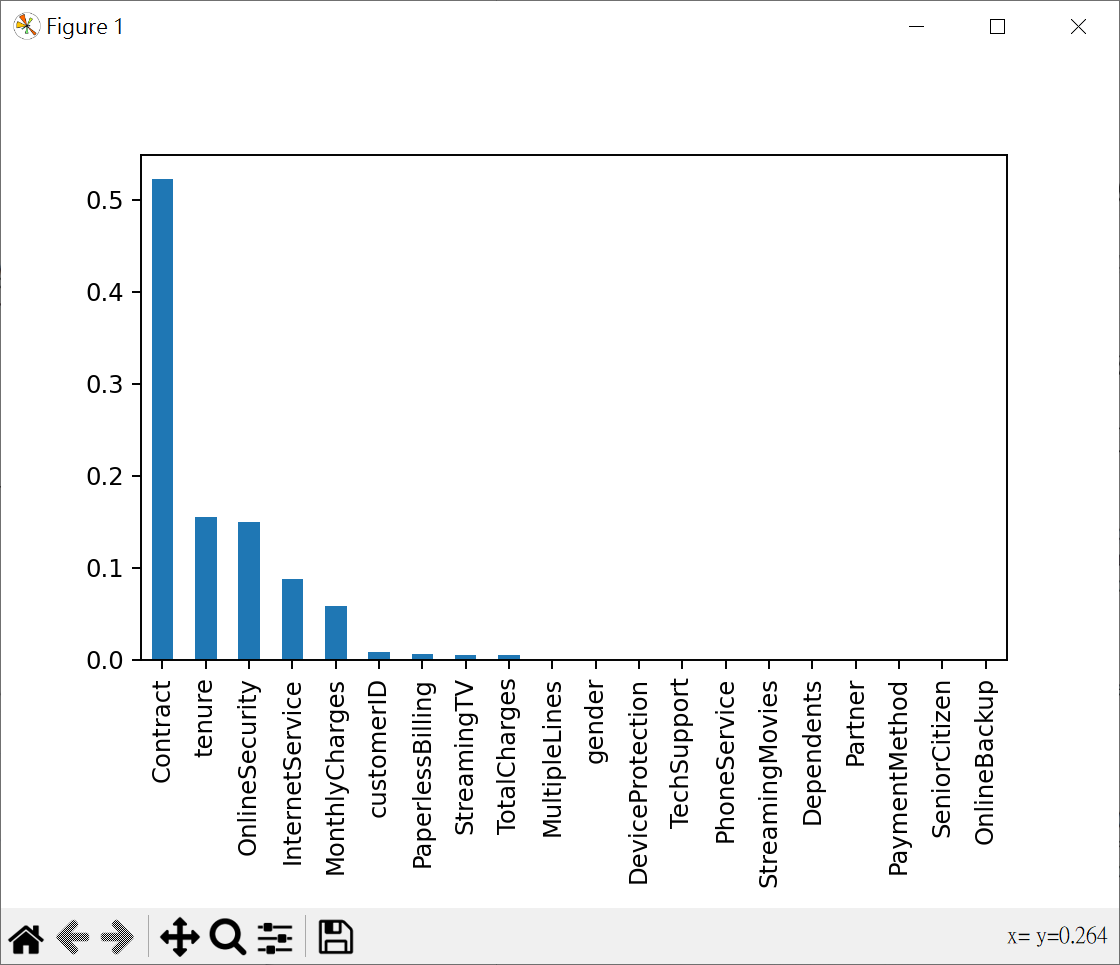
feature_imp = pd.Series(dtc.feature_importances_,
index=X.columns).sort_values(ascending=False)
feature_imp.plot(kind='bar')
plt.show()

max_depth=5
# 特徵 : customerID 重要性 : 0.00910320798378901
# 特徵 : gender 重要性 : 0.0
# 特徵 : SeniorCitizen 重要性 : 0.0
# 特徵 : Partner 重要性 : 0.0
# 特徵 : Dependents 重要性 : 0.0
# 特徵 : tenure 重要性 : 0.1548386776499358
# 特徵 : PhoneService 重要性 : 0.0
# 特徵 : MultipleLines 重要性 : 0.0
# 特徵 : InternetService 重要性 : 0.08820670934335376
# 特徵 : OnlineSecurity 重要性 : 0.15018233747881019
# 特徵 : OnlineBackup 重要性 : 0.0
# 特徵 : DeviceProtection 重要性 : 0.0
# 特徵 : TechSupport 重要性 : 0.0
# 特徵 : StreamingTV 重要性 : 0.00531089171150569
# 特徵 : StreamingMovies 重要性 : 0.0
# 特徵 : Contract 重要性 : 0.5228059535911008
# 特徵 : PaperlessBilling 重要性 : 0.006369190962804586
# 特徵 : PaymentMethod 重要性 : 0.0
# 特徵 : MonthlyCharges 重要性 : 0.05825142168000398
# 特徵 : TotalCharges 重要性 : 0.004931609598696093
使用最重要5個特徵做決策樹數據分析
1
2
3
4
5
6
7
8
9
10
11
12
13
14
15
16
17
18
19
20
21
22
23
24
25
26
27
28
29
30
31
32
33
34
35
36
37
38
39
40
41
42
43
44
45
46
47
48
49
50
51
52
53
54
55
56
57
58
59
60
61
62
63
64
import pandas as pd
from sklearn.preprocessing import LabelEncoder
import pandas as pd
from sklearn.model_selection import train_test_split
from sklearn.metrics import classification_report
from sklearn.metrics import confusion_matrix
from sklearn.tree import DecisionTreeClassifier

# 讀取數據
df = pd.read_csv('WA_Fn-UseC_-Telco-Customer-Churn.csv')

selected_features = ['Contract','tenure','OnlineSecurity',
'InternetService','MonthlyCharges']
target = 'Churn'

# 標籤轉成數值
for column in selected_features:
if df[column].dtype == 'object':
le = LabelEncoder()
df[column] = le.fit_transform(df[column])
# 目標變數轉成數值
labsel_encoder_target = LabelEncoder()
df[target] = labsel_encoder_target.fit_transform(df[target])

X_train, X_test, y_train, y_test = \
train_test_split(df[selected_features], df[target], test_size=0.2, random_state=1)

# 建立決策樹模型並進行訓練
# dtc = DecisionTreeClassifier()
# max_depth=5
print("max_depth=5")
dtc = DecisionTreeClassifier(max_depth=5)
dtc.fit(X_train, y_train)

# 進行預測
y_pred = dtc.predict(X_test)

# 準確率
print(f"準確率 : {dtc.score(X_test, y_test)}")

# 計算混淆矩陣並輸出
# 測試準確對照表
conf_mat = confusion_matrix(y_test, y_pred)
print(f"混淆矩陣(Confusion Matix):\n{conf_mat}")
print("-"*70)

# 生成分類報告
# 測試報告
report = classification_report(y_test, y_pred)
print(f"分類報告(Classification Report)\n{report}")

# max_depth=5
# 準確率 : 0.8090844570617459
# 混淆矩陣(Confusion Matix):
# [[962 99]
# [170 178]]
# ----------------------------------------------------------------------
# 分類報告(Classification Report)
# precision recall f1-score support
# 0 0.85 0.91 0.88 1061
# 1 0.64 0.51 0.57 348
# accuracy 0.81 1409
# macro avg 0.75 0.71 0.72 1409
# weighted avg 0.80 0.81 0.80 1409
交叉驗證 - 決策樹最佳深度調整

GridSearchCV() 可用於有系統地遍歷多種參數組合
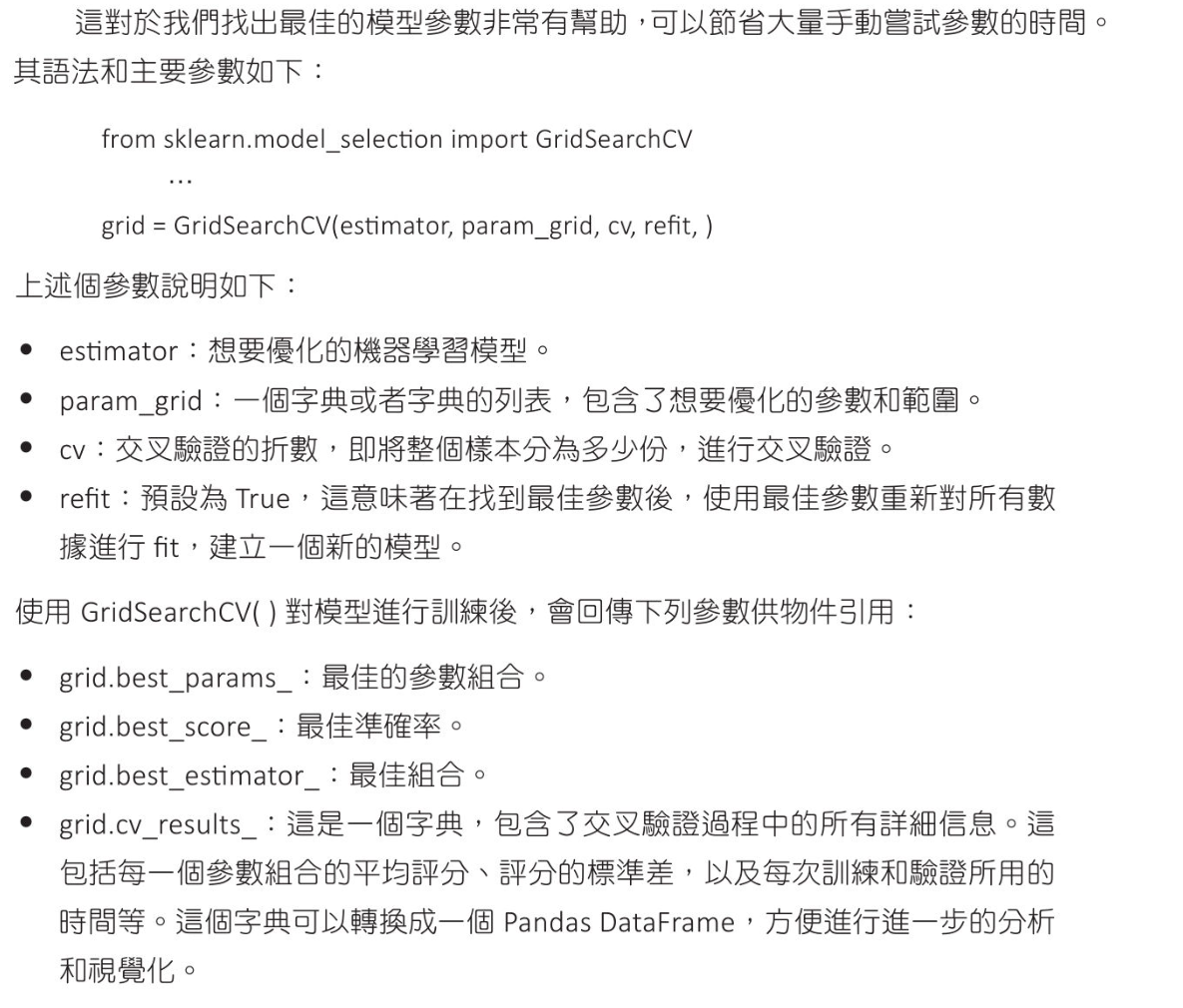
1
2
3
4
5
6
7
8
9
10
11
12
13
14
15
16
17
18
19
20
21
22
23
24
25
26
27
28
29
30
31
32
33
34
35
36
37
38
39
40
41
42
43
44
45
46
47
48
49
50
51
52
53
54
import pandas as pd
from sklearn.preprocessing import LabelEncoder
import pandas as pd
from sklearn.model_selection import train_test_split, GridSearchCV
from sklearn.metrics import classification_report, accuracy_score
# from sklearn.metrics import confusion_matrix
from sklearn.tree import DecisionTreeClassifier

# 讀取數據
df = pd.read_csv('WA_Fn-UseC_-Telco-Customer-Churn.csv')

selected_features = ['Contract','tenure','OnlineSecurity',
'InternetService','MonthlyCharges']
target = 'Churn'

# 標籤轉成數值
for column in selected_features:
if df[column].dtype == 'object':
le = LabelEncoder()
df[column] = le.fit_transform(df[column])
# 目標變數轉成數值
labsel_encoder_target = LabelEncoder()
df[target] = labsel_encoder_target.fit_transform(df[target])

X_train, X_test, y_train, y_test = \
train_test_split(df[selected_features], df[target], test_size=0.2, random_state=1)

# 設定調整參數
params = {'max_depth': [3, 4, 5, 6, 7, 10, 15, 20]}
# 建立決策樹模型
clf = GridSearchCV(DecisionTreeClassifier(), params, cv=5)
clf.fit(X_train, y_train)
# 顯示最佳參數
print(f"Best parameters:{clf.best_params_}")
print("-"*70)
# 進行預測
y_pred = clf.predict(X_test)
# 準確率
print(f"準確率 : {accuracy_score(y_test, y_pred)}")
print("-"*70)
# 生成分類報告
# 測試報告
print(classification_report(y_test, y_pred))

# Best parameters:{'max_depth': 5}
# ----------------------------------------------------------------------
# 準確率 : 0.8090844570617459
# ----------------------------------------------------------------------
# precision recall f1-score support
# 0 0.85 0.91 0.88 1061
# 1 0.64 0.51 0.57 348
# accuracy 0.81 1409
# macro avg 0.75 0.71 0.72 1409
# weighted avg 0.80 0.81 0.80 1409

Retail Data Analytics - 迴歸應用

決策樹迴歸,可處理連續值(對比線性迴歸模型,更容易受到極端值的影響,並且可能在訓練數據不足下產生過度擬合)

用簡單數據預估房價
1
2
3
4
5
6
7
8
9
10
11
12
13
14
15
16
17
18
19
20
21
22
23
24
25
26
27
28
29
30
31
32
33
34
35
36
37
38
39
40
41
42
43
from sklearn.tree import DecisionTreeRegressor
from sklearn.model_selection import train_test_split
from sklearn.metrics import r2_score
import numpy as np
from sklearn import tree
from graphviz import Source

# 假設X代表房子面積,y代表房價
X = np.array([50, 60, 70, 80, 90, 100, 110, 120, 130, 140, 150])
y = np.array([150000, 180000, 200000, 230000, 260000, 280000,
300000, 330000, 360000, 380000, 400000 ])

# X 改為二維
X = X.reshape(-1, 1)

X_train, X_test, y_train, y_test = \
train_test_split(X, y, test_size=0.2, random_state=5)

# 建立決策樹回歸模型
tree_reg = DecisionTreeRegressor(max_depth=3, random_state=10)
# 擬合模型
tree_reg.fit(X_train, y_train)

# 進行預測
y_pred = tree_reg.predict(X_test)

# R平方係數
r2 = r2_score(y_test, y_pred)

# 輸出預測結果
print(f"R平方係數:{r2}")
print(f"實際房價: {y_test}")
print(f"預測房價: {y_pred}")


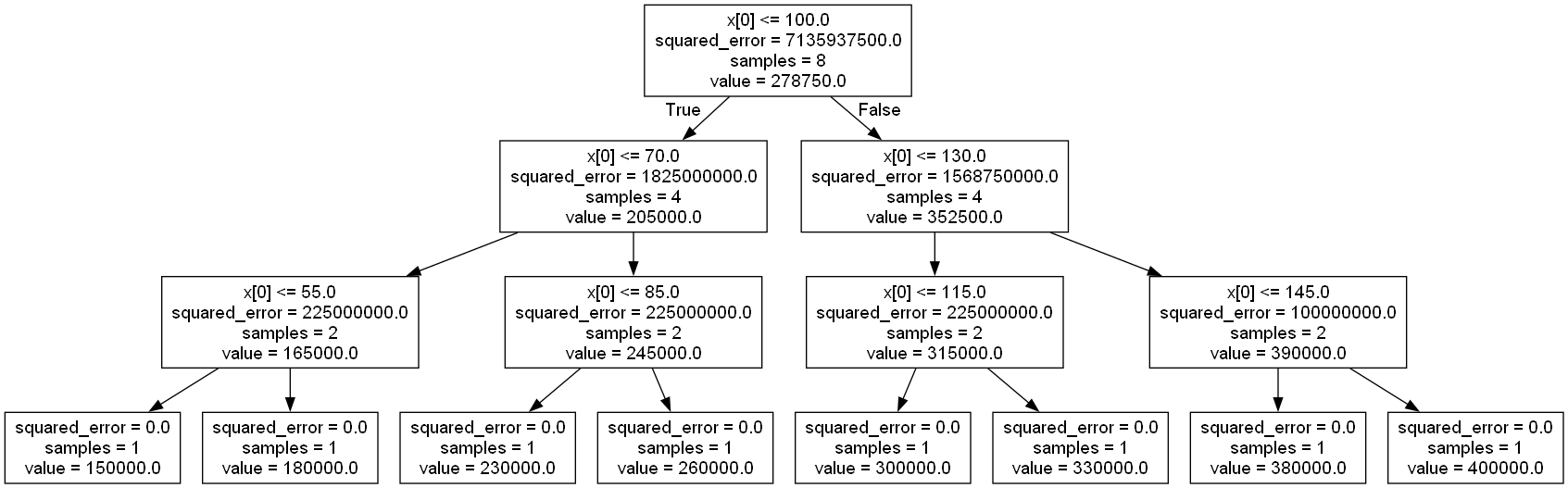
grpah = Source(tree.export_graphviz(tree_reg, out_file=None))

grpah.format = 'png'
grpah.render(filename='tree_reg', view=True)

# R平方係數:0.8671875
# 實際房價: [280000 360000 200000]
# 預測房價: [260000. 330000. 180000.]
Retail Data Analytics
1
2
3
4
5
6
7
8
9
10
11
12
13
14
15
16
17
18
19
20
21
22
23
24
25
26
27
28
29
30
31
32
33
34
35
36
37
38
39
40
41
42
43
44
45
46
47
48
49
50
51
52
53
54
55
56
57
58
59
60
61
62
63
64
65
66
67
68
69
70
71
72
73
74
import pandas as pd
from sklearn.tree import DecisionTreeRegressor
from sklearn.model_selection import train_test_split
from sklearn.metrics import r2_score

# 顯示所有 columns
pd.set_option('display.max_columns', None)
# 設定顯示每 row 長度
pd.set_option('display.width', 300)

# 讀取數據
sales_df = pd.read_csv('sales.csv')
features_df = pd.read_csv('features.csv')
stores_pd = pd.read_csv('stores.csv')

# 合併 features_df, sales_df, link key = 'Store' + 'Date'
merged_df = pd.merge(sales_df, features_df, on=['Store', 'Date'], how='left')
# 合併 stores_pd, link key = 'Store'
final_df = pd.merge(merged_df, stores_pd, on=['Store'], how='left')

# Date 轉為日期型數據
final_df['Date'] = pd.to_datetime(final_df['Date'], format='%d/%m/%Y')

# 提出年份及月份
final_df['Year'] = final_df['Date'].dt.year
final_df['Month'] = final_df['Date'].dt.month

# 將 Type 轉成類型數據
# 將 Type 列的資料類型轉換為 category 類型
# .cat.codes:將類別型資料轉換為對應的數字編碼。每個類別將被分配一個整數編碼(從0開始)
final_df['Type'] = final_df['Type'].astype('category').cat.codes

# print 區失值統計
# print(final_df.head())
# print(final_df.isnull().sum())

# 處理區失值
final_df.fillna(0, inplace=True)


# 刪除 IsHoliday_y, 將 IsHoliday_x 改為 IsHoliday
final_df = final_df.drop('IsHoliday_y', axis=1)
final_df = final_df.rename(columns={'IsHoliday_x': 'IsHoliday'})

# 將結果存為 RetailDataAnalytics.csv
final_df.to_csv('RetailDataAnalytics.csv', index=False)

# 定義特徵變量和目標變量
X = final_df.drop(['Weekly_Sales', 'Date'], axis=1)
y = final_df['Weekly_Sales']

# 劃分訓練集和測試集
X_train, X_test, y_train, y_test = \
train_test_split(X, y, test_size=0.2, random_state=5)

# 建立決策樹回歸模型
model = DecisionTreeRegressor(random_state=5)
# 擬合模型
model.fit(X_train, y_train)

# 進行預測
y_pred = model.predict(X_test)

print(f"y_test={y_test.to_numpy()}")
print(f"y_pred={y_pred}")

# R平方係數
r2 = r2_score(y_test, y_pred)
print(f"R平方係數:{r2:.3f}")

# y_test=[21376.88 2020.91 4372.62 ... 16527.55 37469.44 107.32]
# y_pred=[1.680736e+04 1.787640e+03 4.751260e+03 ... 1.441381e+04 3.348333e+04
# 2.557000e+01]
# R平方係數:0.945

隨機森林樹-波士頓房價,鐵達尼號,Telco,收入分析

決策樹簡單易懂,但資料若有變動常有不準的形況,隨機森林樹(Random Forest)是將一堆決策樹組織起來這樣可以獲得比較好的結果
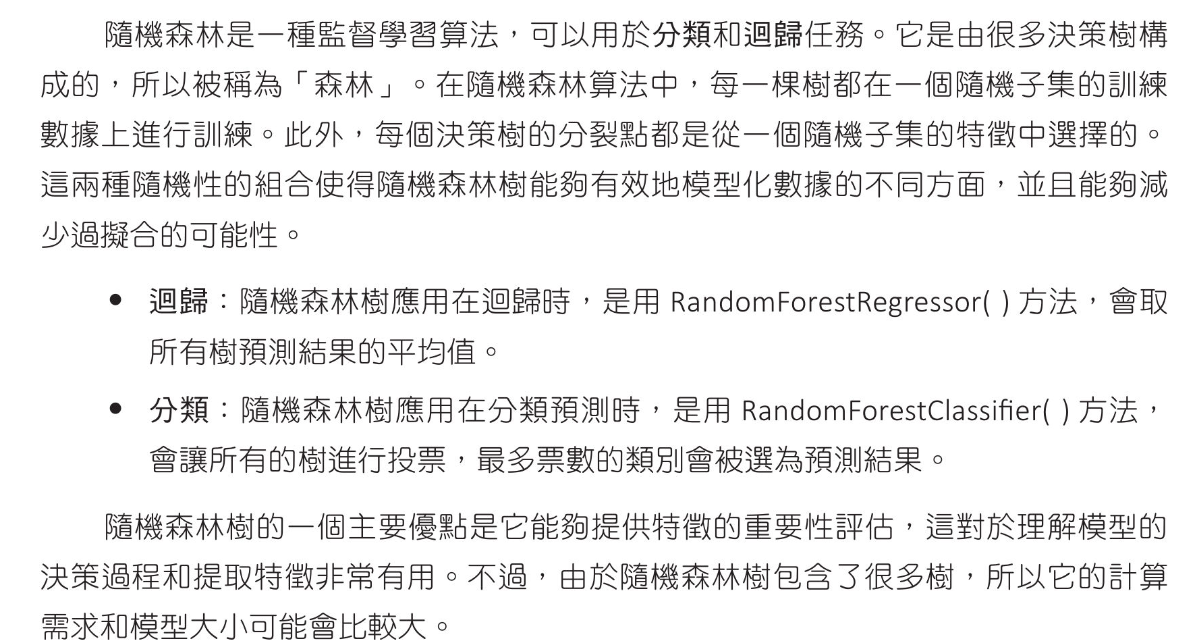
波士頓房價 - 迴歸應用

簡單數據執行森林樹的應用
1
2
3
4
5
6
7
8
9
10
11
12
13
14
15
16
17
18
19
20
21
22
23
24
25
26
27
# 簡單數據執行隨機森林(迴歸應用)
from sklearn.ensemble import RandomForestRegressor
import numpy as np

# 建立一個小型數據集
X = np.array([[1], [2], [3], [4], [5], [6], [7], [8], [9], [10]])
y = np.array([2, 4, 6, 8, 10, 12, 14, 16, 18, 20])

# 建立森林隨機模型
# n_estimators 設計隨機森林有機棵樹,更多的樹可能會有更好的性能
# 但也同時增加訓練時間及模型的大小(default 100)
estimators = 100
rt = RandomForestRegressor(n_estimators=estimators, random_state=42)

# 訓練模型
rt.fit(X, y)

#進行預測
X_new = np.array([[5.5], [6.5], [7.5]])
predictions = rt.predict(X_new)
print(f"estimators = {estimators}")
print(f"預測結果:{predictions}")

# estimators = 100
# 預測結果:[10.46 12.56 14.4 ]
# estimators = 1000
# 預測結果:[10.414 12.45 14.404]
波士頓房價森林樹的應用

得到比線性迴歸更好的R平方判定係數

1
2
3
4
5
6
7
8
9
10
11
12
13
14
15
16
17
18
19
20
21
22
23
24
25
26
27
28
29
30
31
32
33
34
35
36
from sklearn.ensemble import RandomForestRegressor
import numpy as np
import pandas as pd
from sklearn.model_selection import train_test_split
from sklearn.metrics import r2_score,mean_squared_error

# boston data url : http://lib.stat.cmu.edu/datasets/boston
boston = pd.read_csv("boston.csv", sep='\s+')

X = boston.drop('MEDV', axis=1)
y = boston['MEDV']

# 分割測試數據與測試數據
X_train, X_test, y_train, y_test = \
train_test_split(X, y, test_size=0.2, random_state=1)


# 建立森林隨機模型
# n_estimators 設計隨機森林有機棵樹,更多的樹可能會有更好的性能
# 但也同時增加訓練時間及模型的大小(default 100)
rt = RandomForestRegressor(n_estimators=100, random_state=42)

# 訓練模型
rt.fit(X_train, y_train)

#進行預測
y_pred = rt.predict(X_test)

# 計算評估指標
r2 = r2_score(y_test, y_pred)
print(f"R-squared : {r2:.3f}")
mse = mean_squared_error(y_test, y_pred)
print(f"Mean Squared Error : {mse:.3f}")

# R-squared : 0.914
# Mean Squared Error : 8.523

鐵達尼號 - 分類應用

得到和決策樹相同的準確率

1
2
3
4
5
6
7
8
9
10
11
12
13
14
15
16
17
18
19
20
21
22
23
24
25
26
27
28
29
30
31
32
33
34
35
36
37
38
39
40
41
42
43
44
45
46
47
48
49
50
51
52
53
54
55
56
57
58
59
60
61
62
63
64
65
66
67
68
69
70
71
72
73
74
75
76
77
78
79
80
81
82
83
84
85
86
87
88
89
90
91
92
93
94
95
import seaborn as sns
import pandas as pd
from sklearn.model_selection import train_test_split
from sklearn.metrics import classification_report
from sklearn.metrics import confusion_matrix,accuracy_score
from sklearn.tree import DecisionTreeClassifier
from sklearn.ensemble import RandomForestClassifier

# load 數據
titanic_data = sns.load_dataset('titanic')
# 選取有用特徵
titanic_data = titanic_data[['survived','pclass','sex','age','sibsp',
'parch','fare','embarked']]

# print(titanic_data)
# print(titanic_data['age'])
# 年齡補上中位數年齡
titanic_data['age'] = titanic_data['age'].fillna(titanic_data['age'].median())
# 登船港口用眾位數取代缺失值
# mode() 傳回的是一個包含眾數的 Series,因此需要取 [0] 來獲取第一個眾數
titanic_data['embarked'] = titanic_data['embarked'].fillna(titanic_data['embarked'].mode()[0])

# 對性別,登船港口 執行 on-hot 編碼
# get_dummies 是 Pandas 中的一個函數,用於將分類變數轉換為一個或多個虛擬變數(dummy variables)。
# 這些虛擬變數可以用於機器學習模型,因為大多數模型不能直接處理非數值型資料。
titanic_data = pd.get_dummies(titanic_data, columns=['sex', 'embarked'])

# 分割數據為訓練集及測試集
X = titanic_data.drop('survived', axis=1)
y = titanic_data['survived']
X_train, X_test, y_train, y_test = \
train_test_split(X, y, test_size=0.2, random_state=5)

# 建立模型
rf_classifier = RandomForestClassifier(random_state=5)
rf_classifier.fit(X_train, y_train)
# 進行預測
y_pred = rf_classifier.predict(X_test)


# print(titanic_data.head())

# # 建立決策樹模型並進行訓練
# dtc = DecisionTreeClassifier(random_state=5)
# dtc.fit(X_train, y_train)

# # 進行預測
# y_pred = dtc.predict(X_test)

# 預測結果比較
print(f"測試的真實分類\n{y_test.to_numpy()}")
print("-"*70)
print(f"測試的目標分類\n{y_pred}")
print("="*70)

# 準確率
print(f"準確率 : {accuracy_score(y_test, y_pred):.2f}")

# 計算混淆矩陣並輸出
# 測試準確對照表
conf_mat = confusion_matrix(y_test, y_pred)
print(f"混淆矩陣(Confusion Matix):\n{conf_mat}")
print("-"*70)

# 生成分類報告
# 測試報告
report = classification_report(y_test, y_pred)
print(f"分類報告(Classification Report)\n{report}")

# 測試的真實分類
# [0 0 0 1 0 0 1 1 1 0 0 0 1 1 0 1 1 0 0 0 0 1 1 1 0 0 1 1 0 0 0 1 1 1 1 1 0
# 1 0 0 0 1 1 1 0 0 1 1 0 0 0 0 1 0 1 0 0 0 0 1 0 0 0 0 1 0 0 0 1 0 1 0 0 0
# 0 0 0 0 1 1 0 0 0 0 1 1 0 1 0 1 0 0 1 0 1 0 1 0 0 0 1 0 0 0 1 1 0 0 0 1 0
# 0 0 1 1 1 1 1 1 1 1 1 0 1 0 1 1 0 0 0 0 0 0 0 1 0 0 0 0 0 0 0 0 0 0 1 0 1
# 0 1 1 0 0 0 0 0 1 0 0 0 0 1 0 0 1 0 1 0 0 0 1 0 1 1 0 0 0 1 0]
# ----------------------------------------------------------------------
# 測試的目標分類
# [0 0 0 0 1 0 1 0 1 0 1 0 0 1 0 1 0 0 0 0 0 1 1 1 0 0 0 1 0 0 0 1 1 0 1 1 0
# 0 0 0 0 1 0 0 0 0 1 1 1 0 0 1 1 0 0 0 1 0 0 1 0 1 0 0 1 0 0 0 1 0 1 0 1 0
# 1 0 0 1 1 1 0 0 0 0 1 1 0 1 0 0 0 0 1 0 1 0 1 0 0 0 1 1 0 0 1 1 0 0 0 0 0
# 0 0 0 1 1 1 0 1 0 0 1 1 1 0 1 0 0 0 0 0 0 0 0 1 0 0 0 0 0 0 0 0 1 0 1 0 1
# 0 1 1 0 0 0 0 1 1 0 0 0 0 0 0 0 1 0 1 0 0 0 1 0 1 1 0 0 0 1 1]
# ======================================================================
# 準確率 : 0.82
# 混淆矩陣(Confusion Matix):
# [[97 14]
# [18 50]]
# ----------------------------------------------------------------------
# 分類報告(Classification Report)
# precision recall f1-score support
# 0 0.84 0.87 0.86 111
# 1 0.78 0.74 0.76 68
# accuracy 0.82 179
# macro avg 0.81 0.80 0.81 179
# weighted avg 0.82 0.82 0.82 179

Telco 客戶流失 - 分類應用

準確率差一點點

1
2
3
4
5
6
7
8
9
10
11
12
13
14
15
16
17
18
19
20
21
22
23
24
25
26
27
28
29
30
31
32
33
34
35
36
37
38
39
40
41
42
43
44
45
46
47
48
49
50
51
52
53
54
55
import pandas as pd
from sklearn.preprocessing import LabelEncoder
import pandas as pd
from sklearn.model_selection import train_test_split
from sklearn.metrics import classification_report
from sklearn.metrics import confusion_matrix
# from sklearn.tree import DecisionTreeClassifier
from sklearn.ensemble import RandomForestClassifier

# 讀取數據
df = pd.read_csv('WA_Fn-UseC_-Telco-Customer-Churn.csv')

# 選擇特及目標變數
selected_features = ['Contract','tenure','OnlineSecurity',
'InternetService','MonthlyCharges']
target = 'Churn'

# 標籤轉成數值
for column in selected_features:
if df[column].dtype == 'object':
le = LabelEncoder()
df[column] = le.fit_transform(df[column])
# 目標變數轉成數值
labsel_encoder_target = LabelEncoder()
df[target] = labsel_encoder_target.fit_transform(df[target])

X_train, X_test, y_train, y_test = \
train_test_split(df[selected_features], df[target], test_size=0.2, random_state=1)


# 建立模型
# n_estimators 設計隨機森林有機棵樹,更多的樹可能會有更好的性能
# 但也同時增加訓練時間及模型的大小(default 100)
# max_depth=5
dtc = RandomForestClassifier(n_estimators=100, max_depth=5, random_state=1)
dtc.fit(X_train, y_train)
# 進行預測
y_pred = dtc.predict(X_test)

# 準確率
print(f"準確率 : {dtc.score(X_test, y_test)}")

# 生成分類報告
# 測試報告
report = classification_report(y_test, y_pred)
print(f"分類報告(Classification Report)\n{report}")

# 準確率 : 0.8062455642299503
# 分類報告(Classification Report)
# precision recall f1-score support
# 0 0.85 0.91 0.88 1061
# 1 0.64 0.49 0.56 348
# accuracy 0.81 1409
# macro avg 0.74 0.70 0.72 1409
# weighted avg 0.79 0.81 0.80 1409

美國成年人收入分析(kaggle) - 分類應用

adult.csv 數據

1
2
3
4
5
6
7
8
9
10
11
12
13
14
15
16
17
18
19
20
21
22
23
24
25
26
27
28
29
30
31
32
33
34
35
36
37
38
39
40
41
42
43
44
45
46
47
48
49
import pandas as pd
import numpy as np
from sklearn.preprocessing import LabelEncoder

# 讀取 csv
data = pd.read_csv('adult.csv')

# 顯示所有 columns
pd.set_option('display.max_columns', None)
# 設定顯示每 row 長度
pd.set_option('display.width', 300)

# 將 ? 轉成 np.nan
data = data.replace('?', np.nan)
# show 檢查資料缺失
# size 48842,max nan 2809
# print(data.info())
# print(data.isnull().sum())
# 刪除包含缺失
data = data.dropna()
# show 檢查資料缺失
# size 45222
# print(data.info())
# print(data.isnull().sum())
# 列出前五筆
print(data.head())
print("-"*180)

# 將類別轉成數字
le = LabelEncoder()
categorical_features = [i for i in data.columns if data.dtypes[i]=='object' ]
for col in categorical_features:
data[col] = le.fit_transform(data[col])
print(data.head())

# age workclass fnlwgt education educational-num marital-status occupation relationship race gender capital-gain capital-loss hours-per-week native-country income
# 0 25 Private 226802 11th 7 Never-married Machine-op-inspct Own-child Black Male 0 0 40 United-States <=50K
# 1 38 Private 89814 HS-grad 9 Married-civ-spouse Farming-fishing Husband White Male 0 0 50 United-States <=50K
# 2 28 Local-gov 336951 Assoc-acdm 12 Married-civ-spouse Protective-serv Husband White Male 0 0 40 United-States >50K
# 3 44 Private 160323 Some-college 10 Married-civ-spouse Machine-op-inspct Husband Black Male 7688 0 40 United-States >50K
# 5 34 Private 198693 10th 6 Never-married Other-service Not-in-family White Male 0 0 30 United-States <=50K
# ------------------------------------------------------------------------------------------------------------------------------------------------------------------------------------
# age workclass fnlwgt education educational-num marital-status occupation relationship race gender capital-gain capital-loss hours-per-week native-country income
# 0 25 2 226802 1 7 4 6 3 2 1 0 0 40 38 0
# 1 38 2 89814 11 9 2 4 0 4 1 0 0 50 38 0
# 2 28 1 336951 7 12 2 10 0 4 1 0 0 40 38 1
# 3 44 2 160323 15 10 2 6 0 2 1 7688 0 40 38 1
# 5 34 2 198693 0 6 4 7 1 4 1 0 0 30 38 0

使用決策樹處理年收入預估
1
2
3
4
5
6
7
8
9
10
11
12
13
14
15
16
17
18
19
20
21
22
23
24
25
26
27
28
29
30
31
32
33
34
35
36
import pandas as pd
import numpy as np
from sklearn.preprocessing import LabelEncoder
from sklearn.model_selection import train_test_split
from sklearn.tree import DecisionTreeClassifier
from sklearn.metrics import accuracy_score

# 讀取 csv
data = pd.read_csv('adult.csv')

# 將 ? 轉成 np.nan
data = data.replace('?', np.nan)

# 將類別轉成數字
le = LabelEncoder()
categorical_features = [i for i in data.columns if data.dtypes[i]=='object' ]
for col in categorical_features:
data[col] = le.fit_transform(data[col])

# 特徵值及目標值
X = data.drop('income', axis=1)
y = data['income']

X_train, X_test, y_train, y_test = \
train_test_split(X, y, test_size=0.2, random_state=5)

# 建立決策樹模型並進行訓練
dtc = DecisionTreeClassifier(random_state=5)
dtc.fit(X_train, y_train)
# 進行預測
y_pred = dtc.predict(X_test)

# 準確率
print(f"準確率 : {accuracy_score(y_test, y_pred):.3f}")

# 準確率 : 0.809
特徵之重要性
1
2
3
4
5
6
7
8
9
10
11
12
13
14
15
16
17
18
19
20
21
22
23
24
25
26
27
28
29
30
31
32
33
34
35
36
37
38
39
40
41
42
43
44
45
46
47
48
49
50
51
52
53
54
55
56
57
58
# 特徵之重要性
import pandas as pd
import numpy as np
from sklearn.preprocessing import LabelEncoder
from sklearn.model_selection import train_test_split
from sklearn.tree import DecisionTreeClassifier
import matplotlib.pyplot as plt

# 讀取 csv
data = pd.read_csv('adult.csv')

# 將 ? 轉成 np.nan
data = data.replace('?', np.nan)

# 將類別轉成數字
le = LabelEncoder()
categorical_features = [i for i in data.columns if data.dtypes[i]=='object' ]
for col in categorical_features:
data[col] = le.fit_transform(data[col])

# 特徵值及目標值
X = data.drop('income', axis=1)
y = data['income']

X_train, X_test, y_train, y_test = \
train_test_split(X, y, test_size=0.2, random_state=42)

# 建立決策樹模型並進行訓練
dtc = DecisionTreeClassifier(random_state=5)
dtc.fit(X_train, y_train)
# 進行預測
y_pred = dtc.predict(X_test)

# 輸出特徵重要性
importances = dtc.feature_importances_
for feat, importance in zip(X.columns, importances):
print(f"特徵 : {feat:20s} 重要性 : {importance}" )

feature_imp = pd.Series(dtc.feature_importances_,
index=X.columns).sort_values(ascending=False)
feature_imp.plot(kind='bar')
plt.show()

# 特徵 : age 重要性 : 0.11978703368273183
# 特徵 : workclass 重要性 : 0.032764901917090215
# 特徵 : fnlwgt 重要性 : 0.2056924305712409
# 特徵 : education 重要性 : 0.0129702048255056
# 特徵 : educational-num 重要性 : 0.11355184888333343
# 特徵 : marital-status 重要性 : 0.006535999243215993
# 特徵 : occupation 重要性 : 0.0539721412011748
# 特徵 : relationship 重要性 : 0.1987225583756099
# 特徵 : race 重要性 : 0.013271473606213178
# 特徵 : gender 重要性 : 0.0021772976656923393
# 特徵 : capital-gain 重要性 : 0.11284501812585948
# 特徵 : capital-loss 重要性 : 0.04032376245073732
# 特徵 : hours-per-week 重要性 : 0.07132449271050804
# 特徵 : native-country 重要性 : 0.0160608367410867
# 特徵 : native-country 重要性 : 0.018187854563646542
使用7個最重要特徵做決策樹處理年收入預估 - 並沒有比較好
1
2
3
4
5
6
7
8
9
10
11
12
13
14
15
16
17
18
19
20
21
22
23
24
25
26
27
28
29
30
31
32
33
34
35
36
37
38
39
40
41
42
43
44
45
46
47
48
49
import pandas as pd
import numpy as np
from sklearn.preprocessing import LabelEncoder
from sklearn.model_selection import train_test_split
from sklearn.tree import DecisionTreeClassifier
from sklearn.metrics import accuracy_score

# 讀取 csv
data = pd.read_csv('adult.csv')

# 將 ? 轉成 np.nan
data = data.replace('?', np.nan)

# 將類別轉成數字
le = LabelEncoder()
categorical_features = [i for i in data.columns if data.dtypes[i]=='object' ]
for col in categorical_features:
data[col] = le.fit_transform(data[col])

# 特徵值及目標值
X = data.drop('income', axis=1)
y = data['income']

# 使用所有特徵訓練決策樹並計算特徵重要性
dtc = DecisionTreeClassifier(random_state=5)
dtc.fit(X, y)
importances = dtc.feature_importances_
features = X.columns

# 獲得最重要7個特徵
# p.argsort 取出由小到大 array's index
indices = np.argsort(importances)[-7:]
# top 7 features' name
top_features = [features[i] for i in indices]

X = data[top_features]
X_train, X_test, y_train, y_test = \
train_test_split(X, y, test_size=0.2, random_state=5)

# 建立決策樹模型並進行訓練
dtc = DecisionTreeClassifier(random_state=5)
dtc.fit(X_train, y_train)
# 進行預測
y_pred = dtc.predict(X_test)

# 準確率
print(f"準確率 : {accuracy_score(y_test, y_pred):.3f}")

# 準確率 : 0.803
使用隨機森林處理收入預估 - 得到較準確結果
1
2
3
4
5
6
7
8
9
10
11
12
13
14
15
16
17
18
19
20
21
22
23
24
25
26
27
28
29
30
31
32
33
34
35
36
37
38
39
import pandas as pd
import numpy as np
from sklearn.preprocessing import LabelEncoder
from sklearn.model_selection import train_test_split
from sklearn.ensemble import RandomForestClassifier
from sklearn.metrics import accuracy_score

# 讀取 csv
data = pd.read_csv('adult.csv')

# 將 ? 轉成 np.nan
data = data.replace('?', np.nan)

# 將類別轉成數字
le = LabelEncoder()
categorical_features = [i for i in data.columns if data.dtypes[i]=='object' ]
for col in categorical_features:
data[col] = le.fit_transform(data[col])

# 特徵值及目標值
X = data.drop('income', axis=1)
y = data['income']

X_train, X_test, y_train, y_test = \
train_test_split(X, y, test_size=0.2, random_state=5)

# 建立模型
# n_estimators 設計隨機森林有機棵樹,更多的樹可能會有更好的性能
# 但也同時增加訓練時間及模型的大小(default 100)
# max_depth=5 深度設定
dtc = RandomForestClassifier(n_estimators=100, random_state=5)
dtc.fit(X_train, y_train)
# 進行預測
y_pred = dtc.predict(X_test)

# 準確率
print(f"準確率 : {accuracy_score(y_test, y_pred):.3f}")

# 準確率 : 0.854

KNN 演算法 - 鳶尾花,小行星撞地球

KNN(K-Nearest Neighbors K-最近鄰) 演算法基礎觀念
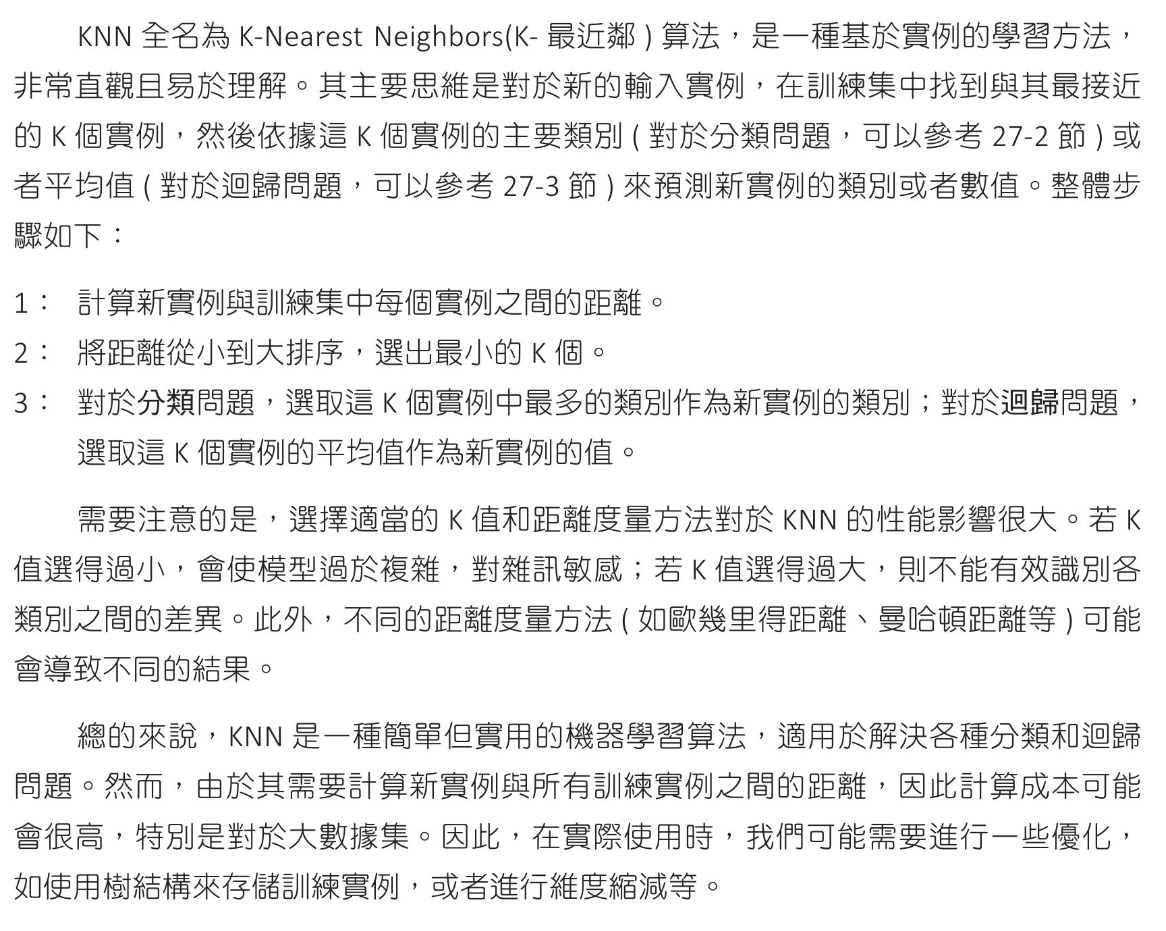
電影推薦,足球射門 - 分類應用

簡單例子
1
2
3
4
5
6
7
8
9
10
11
12
13
14
15
16
17
18
19
20
21
22
23
# 簡單例子
from sklearn.neighbors import KNeighborsClassifier

X = [[0], [1], [2], [3]]
y = [0, 0, 1, 1]

# 建立模型,進行訓練
# n_neighbors=3 取最近 3 點
knn = KNeighborsClassifier(n_neighbors=3)
knn.fit(X, y)

x = 1.1
print(f"x={x} 分類是 :{knn.predict([[x]])}")
print(f"x={x} 分類機率:{knn.predict_proba([[x]])}")

x = 1.6
print(f"x={x} 分類是 :{knn.predict([[x]])}")
print(f"x={x} 分類機率:{knn.predict_proba([[x]])}")

# x=1.1 分類是 :[0]
# x=1.1 分類機率:[[0.66666667 0.33333333]] - 0 的機率 0.66, 1 的機率 0.33
# x=1.6 分類是 :[1]
# x=1.6 分類機率:[[0.33333333 0.66666667]] - 3 的機率 0.33, 1 的機率 0.66
電影推薦
1
2
3
4
5
6
7
8
9
10
11
12
13
14
15
16
17
18
19
20
21
22
23
24
25
26
27
28
29
30
31
32
33
34
35
# 喜好電影預測
from sklearn.neighbors import KNeighborsClassifier
import numpy as np

# 電影數據(韓兩個特徵)
movies = np.array([
[8, 7], # 動作片
[9, 8], # 動作片
[10, 9], # 動作片
[7, 6], # 動作片
[1, 2], # 喜劇片
[2, 1], # 喜劇片
[3, 4] # 喜劇片
])

# 電影類型(0:動作片,1:喜劇片)
lables = np.array([0, 0, 0, 0, 1, 1, 1])

# 建立模型,進行訓練
# n_neighbors=3 取最近 3 點
knn = KNeighborsClassifier(n_neighbors=3)
knn.fit(movies, lables)

# Kwei 喜好電影類型-特徵 [6, 7]
kwei_movie = np.array([6, 7]).reshape(1,-1)

# 預測 Kwei 電影類型
prediction = knn.predict(kwei_movie)

if prediction == 0:
print("推薦 Kwei 動作片")
else:
print("推薦 Kwei 喜劇片")

# 推薦 Kwei 動作片
1
2
3
4
5
6
7
8
9
10
11
12
13
14
15
16
17
18
19
20
21
22
23
24
25
26
27
28
29
30
31
32
33
34
35
36
37
38
39
40
41
42
43
44
45
46
47
48
49
50
51
52
53
54
55
56
57
58
59
60
# 喜好電影預測
from sklearn.neighbors import KNeighborsClassifier
import numpy as np

# 電影數據(韓兩個特徵)
movies = np.array([
[8, 7], # 動作片
[9, 8], # 動作片
[10, 9], # 動作片
[7, 6], # 動作片
[1, 2], # 喜劇片
[2, 1], # 喜劇片
[3, 4] # 喜劇片
])

# 電影類型(0:動作片,1:喜劇片)
lables = np.array([0, 0, 0, 0, 1, 1, 1])

# 電影名稱
movie_names = np.array([
"Mission Impossible",
"搶救雷恩大兵",
"玩命關頭",
"雷神索爾",
"真善美",
"愛情停損點",
"雙手的溫柔"
])

# 建立模型,進行訓練
# n_neighbors=3 取最近 3 點
knn = KNeighborsClassifier(n_neighbors=3)
knn.fit(movies, lables)

# Kwei 喜好電影類型-特徵 [8, 7]
kwei_movie = np.array([8, 7]).reshape(1,-1)

# 找出與 Kwei 電影喜好,最接近3部電影
distences, indices = knn.kneighbors(kwei_movie)
print(f"最接近喜好的距離: {distences}")
print(f"最接近喜好的索引: {indices}")
print("="*70)

# 多維陣列轉成list
index = indices.flatten()
print(index)

# 列出 Kwel 喜好最接近3部電影
print("列出 Kwel 喜好最接近3部電影")
for i in index:
print(f"{movie_names[i]} {movies[i]}")

# 最接近喜好的距離: [[0. 1.41421356 1.41421356]]
# 最接近喜好的索引: [[0 1 3]]
# ======================================================================
# [0 1 3]
# 列出 Kwel 喜好最接近3部電影
# Mission Impossible [8 7]
# 搶救雷恩大兵 [9 8]
# 雷神索爾 [7 6]
足球進球分析
1
2
3
4
5
6
7
8
9
10
11
12
13
14
15
16
17
18
19
20
21
22
23
24
25
26
27
28
29
30
31
32
33
34
35
36
37
38
39
40
41
42
43
44
# 足球進球分析
from sklearn.neighbors import KNeighborsClassifier
import numpy as np

# distance 距離, angle 角度, goal 1=進球
distance = [10, 20, 10, 30, 20, 30, 15, 25, 20, 15]
angle = [30, 45, 60, 30, 60, 75, 45, 60, 70, 90]
goal = [1, 1, 0, 1, 0, 0, 1, 0, 0, 1]

# 整理數據
# 1D array 合成 2D array
X = np.column_stack((distance, angle))
y = np.array(goal)

# 建立模型,進行訓練
# n_neighbors=3 取最近 3 點
knn = KNeighborsClassifier(n_neighbors=3)
knn.fit(X, y)

# 輸入球員數據
new_distance = float(input("輸入射門距離(公尺):"))
new_angle = float(input("輸入射門角度:"))
new_player = np.array([[new_distance, new_angle]])

# 預測是否能進球
prediction = knn.predict(new_player)
prediction_proba = knn.predict_proba(new_player)

# 輸出結果
print(f"是否進球(0沒進,1進球):{prediction}")
print(f"不進球機率: {prediction_proba[0][0]:.3f}")
print(f"進球 機率: {prediction_proba[0][1]:.3f}")

# 輸入射門距離(公尺):36
# 輸入射門角度:63
# 是否進球(0沒進,1進球):[0]
# 不進球機率: 1.000
# 進球 機率: 0.000
#
# 輸入射門距離(公尺):35
# 輸入射門角度:48
# 是否進球(0沒進,1進球):[1]
# 不進球機率: 0.333
# 進球 機率: 0.667
繪製分類決策邊界(ecision Boundary)
線性回歸數據集-繪製散點圖
1
2
3
4
5
6
7
8
9
10
11
12
13
14
15
16
17
18
19
20
21
22
23
from sklearn.datasets import make_blobs
import matplotlib.pyplot as plt

# make_blobs 是 Scikit-learn 庫中用於生成合成數據集的函數
# 這個函數主要用於創建聚類算法的測試數據集
# 主要參數和返回值
# n_samples: 要生成的樣本數。
# centers: 簇的中心數量或具體坐標。如果是整數,則隨機生成指定數量的簇中心;如果是數組,則使用提供的坐標作為簇中心。
# n_features: 每個樣本的特徵數。即每個數據點的維度。
# cluster_std: 每個簇的標準差。可設置單一值或數組,數組時可為每個簇指定不同的標準差。
# random_state: 用於確保生成的數據集的一致性,方便重現結果。
# 返回值
# X: 包含數據點的數組,每行是一個數據點。
# y: 每個數據點所屬簇的標籤數組。
# 生成數據
X, y = make_blobs(n_samples=200, centers=2, random_state=8)

# print(f"X={X}")
# print(f"y={y}")
# 顯示散點圖
plt.scatter(X[:,0], X[:,1], c=y, edgecolor='b')

plt.show()
繪製分類邊界
1
2
3
4
5
6
7
8
9
10
11
12
13
14
15
16
17
18
19
20
21
22
23
24
25
26
27
28
29
30
31
32
33
34
35
36
37
38
39
40
41
42
43
44
45
46
47
48
49
50
51
52
53
54
55
56
57
58
59
60
61
62
63
64
65
66
67
68
69
70
71
72
73
74
75
76
77
78
79
80
81
82
83
84
85
86
87
88
89
90
91
92
93
94
95
96
97
98
99
100
101
102
103
104
105
from sklearn.datasets import make_blobs
from sklearn.neighbors import KNeighborsClassifier
import matplotlib.pyplot as plt
import numpy as np

# 生成數據
X, y = make_blobs(n_samples=200, centers=2, random_state=8)

# 建立模型,進行訓練
# n_neighbors=3 取最近 3 點
k = 3
knn = KNeighborsClassifier(n_neighbors = k)
knn.fit(X, y)

# 設定繪圖區域
x_min, x_max = X[:,0].min() - 1, X[:,0].max() + 1
y_min, y_max = X[:,1].min() - 1, X[:,1].max() + 1

# 產生所有平面座標(這些陣列是二維的)
# xx, yy = np.meshgrid(np.arange(x_min, x_max, 0.01),
# np.arange(y_min, y_max, 0.01))
# more quickly
xx, yy = np.meshgrid(np.arange(x_min, x_max, 0.1),
np.arange(y_min, y_max, 0.1))

print(f"xx = {xx}")
print(f"yy = {yy}")

# ravel() 方法將二維陣列壓平成一維陣列
# np.c_ 按列合併多個一維陣列,生成一個新的二維陣
Z = knn.predict(np.c_[xx.ravel(), yy.ravel()])
print(f"np.c_[] = {np.c_[xx.ravel(), yy.ravel()]}")
print(f"Z = {Z}")
# Z 的 shape same as xx
Z = Z.reshape(xx.shape)
print(xx.shape)
print(f"Z(reshape) = {Z}")

# 繪製等高線圖(Filled Contour Plot)
# plt.contourf 會填充等高線之間的區域,形成帶有顏色的圖像,這些顏色對應於不同的數值範圍。
# 使用方法
# plt.contourf 的基本用法是將網格點的座標和對應的數值數據傳遞給它,然後它會繪製出填充的等高線。
# 參數
# X, Y:
# 這些是網格的橫坐標和縱坐標數組。通常由 np.meshgrid 生成。
# Z:
# 這是對應於網格點的數值數據,用於確定等高線的位置。Z 的形狀應該與 X 和 Y 的形狀相同。
# levels(可選):
# 指定等高線的數量或其具體值。若未指定,Matplotlib 會自動選擇適當的等高線數量和間距。
# cmap(可選):
# 這個參數指定色彩地圖(colormap),決定不同數值範圍對應的顏色。預設情況下會使用 Matplotlib 的預設色彩地圖。
# alpha(可選):
# 透明度,數值範圍為 0 到 1。alpha=0.3 代表圖形有 30% 的透明度。
plt.contourf(xx, yy, Z, alpha=0.3)

# plt.contour 繪製等高線但不填充
# plt.contour(xx, yy, Z, alpha=0.3)

# 顯示散點圖
plt.scatter(X[:,0], X[:,1], c=y, edgecolor='b')

plt.show()

# xx = [[ 3.33366829 3.43366829 3.53366829 ... 10.73366829 10.83366829
# 10.93366829]
# [ 3.33366829 3.43366829 3.53366829 ... 10.73366829 10.83366829
# 10.93366829]
# [ 3.33366829 3.43366829 3.53366829 ... 10.73366829 10.83366829
# 10.93366829]
# ...
# [ 3.33366829 3.43366829 3.53366829 ... 10.73366829 10.83366829
# 10.93366829]
# [ 3.33366829 3.43366829 3.53366829 ... 10.73366829 10.83366829
# 10.93366829]
# [ 3.33366829 3.43366829 3.53366829 ... 10.73366829 10.83366829
# 10.93366829]]
# yy = [[-2.89105765 -2.89105765 -2.89105765 ... -2.89105765 -2.89105765
# -2.89105765]
# [-2.79105765 -2.79105765 -2.79105765 ... -2.79105765 -2.79105765
# -2.79105765]
# [-2.69105765 -2.69105765 -2.69105765 ... -2.69105765 -2.69105765
# -2.69105765]
# ...
# [12.80894235 12.80894235 12.80894235 ... 12.80894235 12.80894235
# 12.80894235]
# [12.90894235 12.90894235 12.90894235 ... 12.90894235 12.90894235
# 12.90894235]
# [13.00894235 13.00894235 13.00894235 ... 13.00894235 13.00894235
# 13.00894235]]
# np.c_[] = [[ 3.33366829 -2.89105765]
# [ 3.43366829 -2.89105765]
# [ 3.53366829 -2.89105765]
# ...
# [10.73366829 13.00894235]
# [10.83366829 13.00894235]
# [10.93366829 13.00894235]]
# Z = [1 1 1 ... 0 0 0]
# (160, 77)
# Z(reshape) = [[1 1 1 ... 1 1 1]
# [1 1 1 ... 1 1 1]
# [1 1 1 ... 1 1 1]
# ...
# [0 0 0 ... 0 0 0]
# [0 0 0 ... 0 0 0]
# [0 0 0 ... 0 0 0]]
繪製分類邊界 - 調整隨機種子及k值
  • k=1 會造成決策邊界對於異常值,錯誤標記值非常敏感
  • k值放到很大時,會有欠擬合的問題
  • KNN 演算法關鍵點就是找到k值,可以獲得最好的分類
  • 欠擬合
    • 低測試準確率
    • 改進:調整 K 值,增加特徵,減少噪音(對數據進行清理和預處理),使用更複雜的模型
1
2
3
4
5
6
7
8
9
10
11
12
13
14
15
16
17
18
19
20
21
22
23
24
25
26
27
28
29
30
31
32
33
34
35
36
37
38
39
40
41
42
43
44
45
46
47
48
49
50
51
52
53
54
55
56
57
58
59
60
61
62
63
64
65
66
67
68
from sklearn.datasets import make_blobs
from sklearn.neighbors import KNeighborsClassifier
import matplotlib.pyplot as plt
import numpy as np

# 生成數據
X, y = make_blobs(n_samples=200, centers=2, random_state=30)

# 設定繪圖區域
x_min, x_max = X[:,0].min() - 1, X[:,0].max() + 1
y_min, y_max = X[:,1].min() - 1, X[:,1].max() + 1

# 產生所有平面座標(這些陣列是二維的)
# xx, yy = np.meshgrid(np.arange(x_min, x_max, 0.01),
# np.arange(y_min, y_max, 0.01))
# more quickly
xx, yy = np.meshgrid(np.arange(x_min, x_max, 0.1),
np.arange(y_min, y_max, 0.1))

k_values = [1, 3, 5, 7]

# 建立四個子圖
fig, axs = plt.subplots(2, 2, figsize=(10,10))

for k, ax in zip(k_values, axs.ravel()):
# 建立模型,進行訓練
knn = KNeighborsClassifier(n_neighbors = k)
knn.fit(X, y)

# ravel() 方法將二維陣列壓平成一維陣列
# np.c_ 按列合併多個一維陣列,生成一個新的二維陣
Z = knn.predict(np.c_[xx.ravel(), yy.ravel()])
# Z 的 shape same as xx
Z = Z.reshape(xx.shape)

# 繪製等高線圖
ax.contourf(xx, yy, Z, alpha=0.3)

# 顯示散點圖
ax.scatter(X[:,0], X[:,1], c=y, edgecolor='b')
ax.set_title(f"KNN, random_state=30, k={k}")

k_values = [5, 7, 29, 49]

# 建立四個子圖
fig, axs = plt.subplots(2, 2, figsize=(10,10))

for k, ax in zip(k_values, axs.ravel()):
# 建立模型,進行訓練
knn = KNeighborsClassifier(n_neighbors = k)
knn.fit(X, y)

# ravel() 方法將二維陣列壓平成一維陣列
# np.c_ 按列合併多個一維陣列,生成一個新的二維陣
Z = knn.predict(np.c_[xx.ravel(), yy.ravel()])
# Z 的 shape same as xx
Z = Z.reshape(xx.shape)

# 繪製等高線圖
ax.contourf(xx, yy, Z, alpha=0.3)

# 顯示散點圖
ax.scatter(X[:,0], X[:,1], c=y, edgecolor='b')
ax.set_title(f"KNN, random_state=30, k={k}")

# 調整子圖距離
plt.subplots_adjust(wspace=0.2, hspace=0.4)
plt.show()
多類分析

錯誤原因應該是資料重疊,分成4類應較為適當

1
2
3
4
5
6
7
8
9
10
11
12
13
14
15
16
17
18
19
20
21
22
23
24
25
26
27
28
29
30
31
32
33
34
35
36
37
38
39
40
41
42
43
44
45
46
from sklearn.datasets import make_blobs
from sklearn.neighbors import KNeighborsClassifier
import matplotlib.pyplot as plt
from sklearn.metrics import accuracy_score
import numpy as np

# 生成數據
X, y = make_blobs(n_samples=500, centers=5, random_state=8)

# 建立模型,進行訓練
# n_neighbors=3 取最近 3 點
k = 3
knn = KNeighborsClassifier(n_neighbors = k)
knn.fit(X, y)

# 設定繪圖區域
x_min, x_max = X[:,0].min() - 1, X[:,0].max() + 1
y_min, y_max = X[:,1].min() - 1, X[:,1].max() + 1

# 產生所有平面座標(這些陣列是二維的)
# xx, yy = np.meshgrid(np.arange(x_min, x_max, 0.01),
# np.arange(y_min, y_max, 0.01))
# more quickly
xx, yy = np.meshgrid(np.arange(x_min, x_max, 0.1),
np.arange(y_min, y_max, 0.1))

# ravel() 方法將二維陣列壓平成一維陣列
# np.c_ 按列合併多個一維陣列,生成一個新的二維陣
Z = knn.predict(np.c_[xx.ravel(), yy.ravel()])
# Z 的 shape same as xx
Z = Z.reshape(xx.shape)

# 繪製等高線圖(Filled Contour Plot)
plt.contourf(xx, yy, Z, alpha=0.3)

# 顯示散點圖
plt.scatter(X[:,0], X[:,1], c=y, edgecolor='b')

# 顯示準確度
y_pred = knn.predict(X)
accuracy = accuracy_score(y, y_pred)
print(f"準確率 : {accuracy}")

plt.show()

# 準確率 : 0.952

房價計算,選舉準備香腸 - 迴歸應用

KNN迴歸應用 - 簡單實例
1
2
3
4
5
6
7
8
9
10
11
12
13
14
15
16
# KNN迴歸應用 - 簡單實例
from sklearn.neighbors import KNeighborsRegressor

X = [[0] ,[1] ,[2], [3]]
y = [0, 0, 1, 2]

knn = KNeighborsRegressor(n_neighbors=2)
knn.fit(X, y)

x = 1.5
print(f'x = {x} --> {knn.predict([[x]])}')
x = 2.5
print(f'x = {x} --> {knn.predict([[x]])}')

# x = 1.5 --> [0.5]
# x = 2.5 --> [1.5]
KNN迴歸應用 - 房價預估
1
2
3
4
5
6
7
8
9
10
11
12
13
14
15
16
17
18
19
20
21
# KNN迴歸應用 - 房價預估
from sklearn.neighbors import KNeighborsRegressor
import numpy as np

# 訓練數據(坪)
X_train = np.array([50, 80, 120, 150, 200, 250, 300]).reshape(-1, 1)
# 目標數值(價格萬元)
y_train = np.array([180, 280, 360, 420, 580, 720, 850])

# 建立模型 k=3, 擬合模型
knn = KNeighborsRegressor(n_neighbors=3)
knn.fit(X_train, y_train)

# 預測新的房子價格
X_new = np.array([110]).reshape(-1, 1)
y_pred = knn.predict(X_new)

# 輸出結果
print(f"{X_new[0,0]}坪的房子預估價格為 {y_pred[0]:.2f} 萬元")

# 110坪的房子預估價格為 353.33 萬元
1
2
3
4
5
6
7
8
9
10
11
12
13
14
15
16
17
18
19
20
21
22
# KNN迴歸應用 - 房價預估2
from sklearn.neighbors import KNeighborsRegressor
import numpy as np

# 訓練數據(坪)
X_train = np.array([[50,15], [80,10], [120,5], [150,3],
[200,2], [250,1], [300,0.5]])
# 目標數值(價格萬元)
y_train = np.array([180, 280, 360, 420, 580, 720, 850])

# 建立模型 k=3, 擬合模型
knn = KNeighborsRegressor(n_neighbors=3)
knn.fit(X_train, y_train)

# 預測新的房子價格
X_new = np.array([[180, 7]])
y_pred = knn.predict(X_new)

# 輸出結果
print(f"{X_new[0,0]}{X_new[0,1]}年的房子預估價格為 {y_pred[0]:.2f} 萬元")

# 180坪 7年的房子預估價格為 453.33 萬元
選舉造勢與準備烤香腸數量
1
2
3
4
5
6
7
8
9
10
11
12
13
14
15
16
17
18
19
20
21
22
23
24
# 造勢烤香腸預估
from sklearn.neighbors import KNeighborsRegressor
import numpy as np

# 訓練數據
X_train = np.array([[0, 3, 3], [2, 4, 3], [2, 5, 6], [1, 4, 2],
[2, 3, 1], [1, 5, 4], [0, 1, 1], [2, 4, 3],
[2, 2, 4], [1, 3, 5], [1, 5, 5], [2, 5, 1]])
# 目標數值
y_train = np.array([100, 250, 350, 180, 170, 300, 50,
275, 230, 165, 320, 210])

# 建立模型 k=5, 擬合模型
knn = KNeighborsRegressor(n_neighbors=5)
knn.fit(X_train, y_train)

# 預測準備香腸數
X_new = np.array([[1, 5, 2]])
y_pred = knn.predict(X_new)

# 輸出結果
print(f"應該準備 {int(y_pred[0])} 條香腸")

# 應該準備 243 條香腸
KKK 模型回歸線分析
繪製散點圖
1
2
3
4
5
6
7
8
9
10
11
12
13
14
15
16
17
18
import matplotlib.pyplot as plt
from sklearn.datasets import make_regression

# 生成線性數據
# make_regression 用於生成合成線性回歸數據集的函數
# 主要參數
# n_samples(樣本數量):指定要生成的數據點數量。默認值為 100。
# n_features(特徵數量):每個數據點的特徵數量。在回歸問題中,這表示自變量的個數。
# n_informative(有用特徵數量):對於回歸任務有實際影響的特徵數量。默認值是 n_features。
# noise(噪聲):目標變量中添加的高斯噪聲的標準差。這個參數用來模擬數據中的隨機誤差或不確定性。
# random_state(隨機種子):用於控制生成數據集的隨機性。設置這個值可以保證每次生成相同的數據集,方便結果重現。
# 返回值
# X:生成的特徵數據集,是一個形狀為 (n_samples, n_features) 的二維數組。
# y:對應的目標變量,是一個形狀為 (n_samples,) 的一維數組。
X, y = make_regression(n_features=1, noise=20, random_state=10)

plt.scatter(X, y, c='y', edgecolors='b')
plt.show()
繪製KNN迴歸曲線

設定k值 2,3,4,5 同時計算 R平方判定係數,得到最好模型的k值

1
2
3
4
5
6
7
8
9
10
11
12
13
14
15
16
17
18
19
20
21
22
23
24
25
26
27
28
29
30
31
32
33
34
35
36
37
38
39
40
41
42
43
44
import matplotlib.pyplot as plt
from sklearn.datasets import make_regression
from sklearn.neighbors import KNeighborsRegressor
import numpy as np

# windows 使用 微軟正黑體
plt.rcParams["font.family"] = ["Microsoft JhengHei"]
# 顯示負號
plt.rcParams["axes.unicode_minus"] = False

# 生成線性數據
X, y = make_regression(n_features=1, noise=20, random_state=10)

# 建立 X 區間含 300 點
xx = np.linspace(X.min(), X.max(), 300).reshape(-1, 1)

k_values = [2, 3, 4, 5]
fig, axs = plt.subplots(2, 2, figsize=(10,10))

for k, ax in zip(k_values, axs.ravel()):
# 建立模型, 擬合模型
knn = KNeighborsRegressor(n_neighbors=k)
knn.fit(X, y)

# 計算平方係數
r2 = knn.score(X, y)
print(f"k = {k}, R平方係數: {r2:.3f}")

# 繪製迴歸線
yy = knn.predict(xx)
ax.plot(xx, yy)

# 繪製散點圖
ax.scatter(X, y, c='y', edgecolors='b')
ax.set_title(f"KNN-Regression k={k} R 平方係數={r2:.3f}")

# 調整子圖間距
plt.subplots_adjust(wspace=0.2, hspace=0.2)
plt.show()

# k = 2, R平方係數: 0.871(最好模型)
# k = 3, R平方係數: 0.838
# k = 4, R平方係數: 0.800
# k = 5, R平方係數: 0.788

鳶尾花數據-分類應用

鳶尾花數據內容
輸出數據集
1
2
3
4
5
6
7
8
9
10
11
12
13
14
15
16
17
18
19
from sklearn import datasets

# load 鳶尾花數據
iris = datasets.load_iris()
print(f"自變數 樣本外形 : {iris.data.shape}")
print(f"目標變數樣本外形 : {iris.target.shape}")

# 特徵名稱
print(f"特徵名稱\n {iris.feature_names}")

# 描述特徵名稱
print(f"描述特徵名稱\n {iris.DESCR}")

# 自變數 樣本外形 : (150, 4)
# 目標變數樣本外形 : (150,)
# 特徵名稱
# ['sepal length (cm)', 'sepal width (cm)', 'petal length (cm)', 'petal width (cm)']
# 描述特徵名稱
# .. _iris_dataset:
用 Pandas 顯示鳶尾花數據
1
2
3
4
5
6
7
8
9
10
11
12
13
14
15
16
17
18
19
20
21
22
23
24
25
26
27
28
29
30
31
32
33
34
35
36
37
38
39
# pandas 顯示鳶尾花數據
from sklearn import datasets
import pandas as pd

# 顯示所有 columns
pd.set_option('display.max_columns', None)
# 設定顯示每 row 長度
pd.set_option('display.width', 200)

# load 鳶尾花數據
iris = datasets.load_iris()

df = pd.DataFrame(iris.data, columns=iris.feature_names)
df['species'] = iris.target

print(df.head())

# 轉鳶尾花數據為標籤
df['species'] = df['species'].map({0:'setosa', 1:'versicolor', 2:'virginica'})
print(df.head())
print(df.groupby('species').size())

# sepal length (cm) sepal width (cm) petal length (cm) petal width (cm) species
# 0 5.1 3.5 1.4 0.2 0
# 1 4.9 3.0 1.4 0.2 0
# 2 4.7 3.2 1.3 0.2 0
# 3 4.6 3.1 1.5 0.2 0
# 4 5.0 3.6 1.4 0.2 0
# sepal length (cm) sepal width (cm) petal length (cm) petal width (cm) species
# 0 5.1 3.5 1.4 0.2 setosa
# 1 4.9 3.0 1.4 0.2 setosa
# 2 4.7 3.2 1.3 0.2 setosa
# 3 4.6 3.1 1.5 0.2 setosa
# 4 5.0 3.6 1.4 0.2 setosa
# species
# setosa 50
# versicolor 50
# virginica 50
# dtype: int64
繪製特徵散點圖
1
2
3
4
5
6
7
8
9
10
11
12
13
14
15
16
17
18
19
20
21
22
23
24
25
26
27
28
29
30
31
32
33
from sklearn import datasets
import pandas as pd
import matplotlib.pyplot as plt
import seaborn as sns

# load 鳶尾花數據
iris = datasets.load_iris()

# 將數據轉成 DataFrame format
df = pd.DataFrame(iris.data, columns=iris.feature_names)
df['species'] = iris.target

# 轉鳶尾花數據為標籤
df['species'] = df['species'].map({0:'setosa', 1:'versicolor', 2:'virginica'})

# windows 使用 微軟正黑體
plt.rcParams["font.family"] = ["Microsoft JhengHei"]

# seaborn 是一個基於 matplotlib 的 Python 資料視覺化庫,旨在提供更高層次的界面來繪製統計圖表。
# sns.scatterplot() 特別用於繪製散點圖,其主要目的是展示兩個變量之間的關係或分佈情況。每個數據點在圖上對應於資料集中一組特定的 x 和 y 座標值。
# 主要參數說明
# x 和 y: 定義散點圖的 X 軸和 Y 軸資料。這些資料可以是資料框(DataFrame)中的列名,指定要繪製的變量。
# data: 資料來源,通常是一個 pandas 資料框(DataFrame)。這個參數指定了要繪製圖表的數據集合。
# hue: 用於根據某一類別變量的值對數據點進行著色,以便在圖中視覺上區分不同的組別。
# style: 根據某一類別變量的值改變數據點的形狀,以區分不同的類別。
# size: 根據某一數值變量的大小改變數據點的大小。
# palette: 定義數據點顏色的調色板,可以是內置的顏色列表或自定義顏色列表。
# markers: 設置不同組別的數據點標記樣式,可以指定具體的標記形狀。
# alpha: 控制數據點的透明度,取值範圍為 0 到 1,0 為完全透明,1 為完全不透明。
# 傘點圖
sns.scatterplot(data=df, x='sepal length (cm)', y = 'sepal width (cm)', style='species', hue='species')
plt.title("花萼長度(sepal length) vs 花萼寬度(sepal width)")
plt.show()
繪製成對數據特徵散點圖
1
2
3
4
5
6
7
8
9
10
11
12
13
14
15
16
17
18
19
20
21
22
23
24
25
26
27
28
29
30
31
32
33
34
35
# 設計機器學習模型,繪製所有變數的散點圖,也是認識數據特徵的好方法
from sklearn import datasets
import pandas as pd
import matplotlib.pyplot as plt
import seaborn as sns

# load 鳶尾花數據
iris = datasets.load_iris()

# 將數據轉成 DataFrame format
df = pd.DataFrame(iris.data, columns=iris.feature_names)
df['species'] = iris.target

# 轉鳶尾花數據為標籤
df['species'] = df['species'].map({0:'setosa', 1:'versicolor', 2:'virginica'})

# sns.pairplot() 主要用於資料探索(exploratory data analysis, EDA),
# 可以幫助分析師快速了解數據中的變量之間的關係、數據的分佈情況和潛在的相關性。
# 主要參數說明
# data: 指定要繪製的資料框(DataFrame),這是必須提供的參數。
# hue: 用於設置根據某個類別變量對數據點進行顏色區分。例如,可以使用顏色來區分不同的類別標籤。
# vars: 指定要包括在圖中的變量列表。如果未指定,將使用資料框中的所有數值變量。
# kind: 指定對角線上的圖形類型,可以是 "scatter"(散點圖)、"kde"(核密度估計)或 "hist"(直方圖)。默認為 "scatter"。
# diag_kind: 指定對角線上的圖形類型,可以是 "auto"、"hist"(直方圖)或 "kde"(核密度估計)。默認為 "auto",
# 這意味著 hue 變量是類別變量時顯示直方圖,否則顯示核密度估計。
# palette: 設定調色盤,用於設置不同類別的顏色。
# markers: 用於指定不同類別的數據點標記樣式。
# plot_kws: 提供其他繪圖參數,這些參數會傳遞給底層的 seaborn 繪圖函數。
# 使用 pairplot 繪製 sepal length(花萼長度) 和 petal length(花瓣長度) 兩個特徵的圖形
# 繪兩個特徵
sns.pairplot(df, vars=['sepal length (cm)', 'petal length (cm)'], hue='species')
# 繪所有個特徵
sns.pairplot(df, hue='species')

plt.show()
繪製鳶尾花決策邊界
1
2
3
4
5
6
7
8
9
10
11
12
13
14
15
16
17
18
19
20
21
22
23
24
25
26
27
28
29
30
31
32
33
34
35
36
37
38
39
40
41
42
43
44
from sklearn import datasets
import pandas as pd
import matplotlib.pyplot as plt
import seaborn as sns
from sklearn.neighbors import KNeighborsClassifier
import numpy as np

# windows 使用 微軟正黑體
plt.rcParams["font.family"] = ["Microsoft JhengHei"]

# load 鳶尾花數據
iris = datasets.load_iris()
print()
X = iris.data[: , :2]
y = iris.target

# 建立模型,進行訓練
knn = KNeighborsClassifier(n_neighbors=1)
knn.fit(X, y)

# 設定繪圖區域
x_min, x_max = X[:,0].min() - 1, X[:,0].max() + 1
y_min, y_max = X[:,1].min() - 1, X[:,1].max() + 1

# 產生所有平面座標
xx, yy = np.meshgrid(np.arange(x_min, x_max, 0.1),
np.arange(y_min, y_max, 0.1))

# 將 xx, yy 先扁平化再組成二維陣列,然後預估分類
Z = knn.predict(np.c_[xx.ravel(), yy.ravel()])
Z = Z.reshape(xx.shape)
plt.contourf(xx, yy, Z, alpha=0.3)

# 顯示散點圖
scatter = plt.scatter(X[:,0], X[:,1], c=y, edgecolors='b')

# 增加圖例
handle, labels = scatter.legend_elements()
plt.legend(handle, iris.target_names, title='鳶尾花品種')

plt.title('KNN for 鳶尾花Iris, k=1')
plt.xlabel('花萼長度sepal length')
plt.ylabel('花萼寬度sepal width')
plt.show()
繪製鳶尾花決策邊界(不同k值)
1
2
3
4
5
6
7
8
9
10
11
12
13
14
15
16
17
18
19
20
21
22
23
24
25
26
27
28
29
30
31
32
33
34
35
36
37
38
39
40
41
42
43
44
45
46
47
48
49
from sklearn import datasets
import pandas as pd
import matplotlib.pyplot as plt
import seaborn as sns
from sklearn.neighbors import KNeighborsClassifier
import numpy as np

# windows 使用 微軟正黑體
plt.rcParams["font.family"] = ["Microsoft JhengHei"]

# load 鳶尾花數據
iris = datasets.load_iris()
X = iris.data[: , :2]
y = iris.target

# 建立模型,進行訓練
knn = KNeighborsClassifier(n_neighbors=1)
knn.fit(X, y)

# 設定繪圖區域
x_min, x_max = X[:,0].min() - 1, X[:,0].max() + 1
y_min, y_max = X[:,1].min() - 1, X[:,1].max() + 1

# 產生所有平面座標
xx, yy = np.meshgrid(np.arange(x_min, x_max, 0.01),
np.arange(y_min, y_max, 0.01))

fig, axs = plt.subplots(2, 2, figsize=(10,10))
k_values = [3, 5, 19, 49]

for k, ax in zip(k_values, axs.ravel()):
# 將 xx, yy 先扁平化再組成二維陣列,然後預估分類
Z = knn.predict(np.c_[xx.ravel(), yy.ravel()])
Z = Z.reshape(xx.shape)
ax.contourf(xx, yy, Z, alpha=0.3)

# 顯示散點圖
scatter = ax.scatter(X[:,0], X[:,1], c=y, edgecolors='b')

# 增加圖例
handle, labels = scatter.legend_elements()
ax.legend(handle, iris.target_names, title='鳶尾花品種')

ax.set_title(f'KNN for 鳶尾花Iris, k={k}')
ax.set_xlabel('花萼長度sepal length')
ax.set_ylabel('花萼寬度sepal width')

plt.subplots_adjust(wspace=0.2, hspace=0.2)
plt.show()
計算最優k值

k<43 有較好的準確度

1
2
3
4
5
6
7
8
9
10
11
12
13
14
15
16
17
18
19
20
21
22
23
24
25
26
27
28
29
30
31
32
33
34
35
36
37
38
39
40
41
42
43
44
45
46
47
48
49
50
51
52
53
54
55
56
57
58
59
60
61
62
63
64
65
66
67
68
69
70
71
72
73
74
75
76
77
78
79
80
81
82
83
84
85
86
87
88
89
90
91
92
93
94
95
96
# 計算最優k值 (k<43 有較好的準確度)
from sklearn import datasets
# import pandas as pd
import matplotlib.pyplot as plt
# import seaborn as sns
from sklearn.neighbors import KNeighborsClassifier
# import numpy as np
from sklearn.model_selection import train_test_split
from sklearn.metrics import accuracy_score

# windows 使用 微軟正黑體
plt.rcParams["font.family"] = ["Microsoft JhengHei"]

# load 鳶尾花數據
iris = datasets.load_iris()
X = iris.data
y = iris.target

# 分割訓練集和測試集
X_train, X_test, y_train, y_test = train_test_split(X, y,
test_size=0.1, random_state=42)

# 設定所有準確度列表
accuracy_scores = []

k_values = list(range(1, 100, 2))
for k in k_values:
# 建立模型,進行訓練
knn = KNeighborsClassifier(n_neighbors=k)
knn.fit(X_train, y_train)

y_pred = knn.predict(X_test)
# 計算準確度
accuracy = accuracy_score(y_test, y_pred)
accuracy_scores.append(accuracy)
print(f'k={k}, 準確度: {accuracy:.3f}')

# 繪製圖表
plt.figure()
plt.plot(k_values, accuracy_scores, marker='o')
plt.title('鳶尾花預估準確值 vs k值')
plt.xlabel('k 值')
plt.ylabel('準確度')
plt.grid(True)
plt.show()

# k=1, 準確度: 1.000
# k=3, 準確度: 1.000
# k=5, 準確度: 1.000
# k=7, 準確度: 0.933
# k=9, 準確度: 1.000
# k=11, 準確度: 1.000
# k=13, 準確度: 1.000
# k=15, 準確度: 1.000
# k=17, 準確度: 1.000
# k=19, 準確度: 1.000
# k=21, 準確度: 1.000
# k=23, 準確度: 1.000
# k=25, 準確度: 1.000
# k=27, 準確度: 1.000
# k=29, 準確度: 1.000
# k=31, 準確度: 1.000
# k=33, 準確度: 1.000
# k=35, 準確度: 1.000
# k=37, 準確度: 1.000
# k=39, 準確度: 1.000
# k=41, 準確度: 1.000
# k=43, 準確度: 1.000
# k=45, 準確度: 0.933
# k=47, 準確度: 0.933
# k=49, 準確度: 0.933
# k=51, 準確度: 1.000
# k=53, 準確度: 1.000
# k=55, 準確度: 1.000
# k=57, 準確度: 0.933
# k=59, 準確度: 0.933
# k=61, 準確度: 0.933
# k=63, 準確度: 0.933
# k=65, 準確度: 0.933
# k=67, 準確度: 0.933
# k=69, 準確度: 0.933
# k=71, 準確度: 0.933
# k=73, 準確度: 0.933
# k=75, 準確度: 0.933
# k=77, 準確度: 0.933
# k=79, 準確度: 0.933
# k=81, 準確度: 0.933
# k=83, 準確度: 0.933
# k=85, 準確度: 0.933
# k=87, 準確度: 0.933
# k=89, 準確度: 0.733
# k=91, 準確度: 0.733
# k=93, 準確度: 0.733
# k=95, 準確度: 0.733
# k=97, 準確度: 0.733
# k=99, 準確度: 0.733

小行星撞地球-分類應用

Kaggle NANA ASteroids Classification 數據
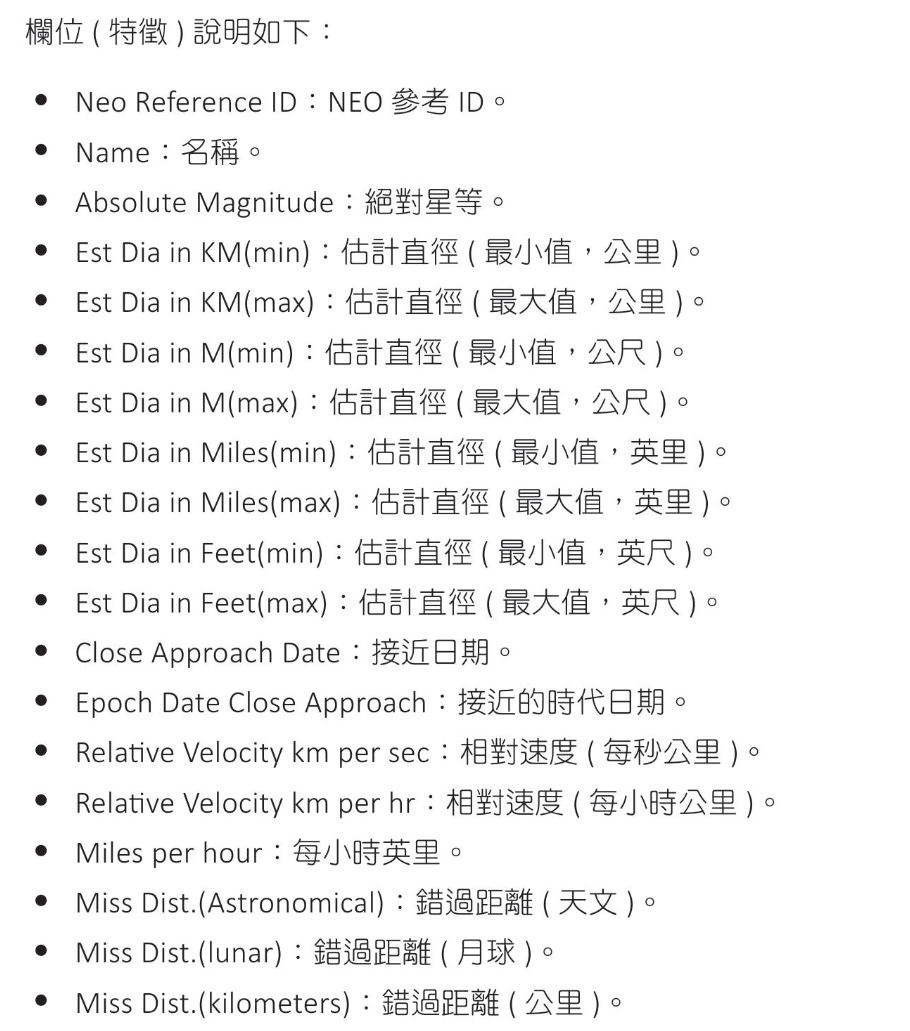
1
2
3
4
5
6
7
8
9
10
11
12
13
14
15
16
17
18
19
20
import pandas as pd

# 讀取數據
df = pd.read_csv('nasa.csv')

# 列出5筆
print(df.head)

# <bound method NDFrame.head of Neo Reference ID Name Absolute Magnitude ... Mean Motion Equinox Hazardous
# 0 3703080 3703080 21.600 ... 0.590551 J2000 True
# 1 3723955 3723955 21.300 ... 0.845330 J2000 False
# 2 2446862 2446862 20.300 ... 0.559371 J2000 True
# 3 3092506 3092506 27.400 ... 0.700277 J2000 False
# 4 3514799 3514799 21.600 ... 0.726395 J2000 True
# ... ... ... ... ... ... ... ...
# 4682 3759007 3759007 23.900 ... 0.787436 J2000 False
# 4683 3759295 3759295 28.200 ... 0.884117 J2000 False
# 4684 3759714 3759714 22.700 ... 0.521698 J2000 False
# 4685 3759720 3759720 21.800 ... 0.543767 J2000 False
# 4686 3772978 3772978 19.109 ... 0.550729 J2000 False
預處理資料
1
2
3
4
5
6
7
8
9
10
11
12
13
14
15
16
17
18
19
20
21
22
23
24
25
26
27
28
29
30
31
32
33
34
35
36
37
38
39
40
41
import pandas as pd

# 讀取數據
df = pd.read_csv('nasa.csv')

# 刪除資料
df = df.drop(['Name', 'Neo Reference ID', 'Est Dia in M(min)',
'Est Dia in M(max)', 'Est Dia in Miles(min)',
'Est Dia in Miles(max)', 'Est Dia in Feet(min)',
'Est Dia in Feet(max)', 'Epoch Date Close Approach',
'Relative Velocity km per hr', 'Miles per hour',
'Miss Dist.(Astronomical)', 'Miss Dist.(lunar)',
'Miss Dist.(miles)', 'Equinox'],
axis=1)

# 將 'Hazardous' True/False 轉為 1/0
df['Hazardous'] = df['Hazardous'].map({True:1, False:0})

# 將 'Close Approach Date' 和 'Orbit Determination Date'
# 轉為日期時間物件,再轉為時間戳記
# test format
# df['Close Approach Date'] = pd.to_datetime(df['Close Approach Date'])
# df['Orbit Determination Date'] = pd.to_datetime(df['Orbit Determination Date'])
df['Close Approach Date'] = pd.to_datetime(df['Close Approach Date']).astype('int64') // 10**9
df['Orbit Determination Date'] = pd.to_datetime(df['Orbit Determination Date']).astype('int64') // 10**9

# 列出5筆
print(df.head)

# <bound method NDFrame.head of Absolute Magnitude Est Dia in KM(min) Est Dia in KM(max) Close Approach Date Relative Velocity km per sec Miss Dist.(kilometers) ... Perihelion Arg Aphelion Dist Perihelion Time Mean Anomaly Mean Motion Hazardous
# 0 21.600 0.127220 0.284472 788918400 6.115834 6.275369e+07 ... 57.257470 2.005764 2.458162e+06 264.837533 0.590551 1
# 1 21.300 0.146068 0.326618 788918400 18.113985 5.729815e+07 ... 313.091975 1.497352 2.457795e+06 173.741112 0.845330 0
# 2 20.300 0.231502 0.517654 789523200 7.590711 7.622912e+06 ... 248.415038 1.966857 2.458120e+06 292.893654 0.559371 1
# 3 27.400 0.008801 0.019681 790128000 11.173874 4.268362e+07 ... 18.707701 1.527904 2.457902e+06 68.741007 0.700277 0
# 4 21.600 0.127220 0.284472 790128000 9.840831 6.101082e+07 ... 158.263596 1.483543 2.457814e+06 135.142133 0.726395 1
# ... ... ... ... ... ... ... ... ... ... ... ... ... ...
# 4682 23.900 0.044112 0.098637 1473292800 22.154265 6.187511e+06 ... 276.395697 1.581299 2.457708e+06 304.306025 0.787436 0
# 4683 28.200 0.006089 0.013616 1473292800 3.225150 9.677324e+05 ... 42.111064 1.153835 2.458088e+06 282.978786 0.884117 0
# 4684 22.700 0.076658 0.171412 1473292800 7.191642 9.126775e+06 ... 274.692712 2.090708 2.458300e+06 203.501147 0.521698 0
# 4685 21.800 0.116026 0.259442 1473292800 11.352090 3.900908e+07 ... 180.346090 1.787733 2.458288e+06 203.524965 0.543767 0
# 4686 19.109 0.400641 0.895860 1473292800 35.946852 6.916986e+07 ... 222.436688 2.071980 2.458319e+06 184.820424 0.550729 0
預測小行星撞地球準確率
1
2
3
4
5
6
7
8
9
10
11
12
13
14
15
16
17
18
19
20
21
22
23
24
25
26
27
28
29
30
31
32
33
34
35
36
37
38
39
40
41
42
43
44
45
46
47
48
49
50
51
52
53
54
55
56
57
58
59
60
61
62
63
64
65
66
67
68
69
70
71
72
73
74
75
76
77
78
import pandas as pd
from sklearn.model_selection import train_test_split
from sklearn.preprocessing import StandardScaler
from sklearn.neighbors import KNeighborsClassifier
from sklearn.metrics import accuracy_score,confusion_matrix
from sklearn.metrics import classification_report

# 讀取數據
df = pd.read_csv('nasa.csv')

# 刪除資料
df = df.drop(['Name', 'Neo Reference ID', 'Est Dia in M(min)',
'Est Dia in M(max)', 'Est Dia in Miles(min)',
'Est Dia in Miles(max)', 'Est Dia in Feet(min)',
'Est Dia in Feet(max)', 'Epoch Date Close Approach',
'Relative Velocity km per hr', 'Miles per hour',
'Miss Dist.(Astronomical)', 'Miss Dist.(lunar)',
'Miss Dist.(miles)', 'Equinox'],
axis=1)

# 將 'Hazardous' True/False 轉為 1/0
df['Hazardous'] = df['Hazardous'].map({True:1, False:0})

# 將 'Close Approach Date' 和 'Orbit Determination Date'
# 轉為日期時間物件,再轉為時間戳記
df['Close Approach Date'] = pd.to_datetime(df['Close Approach Date']).astype('int64') // 10**9
df['Orbit Determination Date'] = pd.to_datetime(df['Orbit Determination Date']).astype('int64') // 10**9

# 檢查並處理缺失值
if df.isnull().values.any():
# 可選擇填補缺失值或丟棄(填補中位數)
df.fillna(df.mefian(), implace=True)

# 執行 one-hot 編碼df
df = pd.get_dummies(df, columns=['Orbiting Body'])

# 分割數據集為特徵及目標
X = df.drop('Hazardous', axis=1)
y = df['Hazardous']

# 分割訓練集和測試集
X_train, X_test, y_train, y_test = train_test_split(X, y,
test_size=0.2, random_state=42)

# 標準化數據
scaler = StandardScaler()
X_train = scaler.fit_transform(X_train)
X_test = scaler.transform(X_test)

# 使用KNN演算法進行訓練
knn = KNeighborsClassifier(n_neighbors=5)
knn.fit(X_train, y_train)

# 預測並計算準確度
y_pred = knn.predict(X_test)
print(f'Accuracy : {accuracy_score(y_test, y_pred)}')

# 輸出混淆矩陣
print('Confusion Matrix:' )
print(confusion_matrix(y_test, y_pred))

# 輸出分類報告
print('Classification Report:')
print(classification_report(y_test, y_pred))

# Accuracy : 0.8923240938166311
# Confusion Matrix:
# [[760 31]
# [ 70 77]]
# Classification Report:
# precision recall f1-score support

# 0 0.92 0.96 0.94 791
# 1 0.71 0.52 0.60 147

# accuracy 0.89 938
# macro avg 0.81 0.74 0.77 938
# weighted avg 0.88 0.89 0.89 938