1
2
3
4
5
6
7
8
9
10
11
12
13
14
15
16
17
18
19
20
21
22
23
24
25
26
27
28
29
30
31
32
33
34
35
36
37
38
39
40
41
42
43
44
45
46
47
48
49
50
51
52
53
54
55
56
57
58
59
60
61
62
63
64
65
66
67
68
69
70
71
72
73
74
75
76
77
78
79
|
import pandas as pd
import requests
import plotly.graph_objects as go
import matplotlib
from matplotlib.font_manager import fontManager
import os
import time
def dateConvert(date_str):
date_list = date_str.split('/')
date_list[0] = str(int(date_list[0])+1911)
return '-'.join(date_list)
def load_file(file_name) :
all_dataframes = []
day_url_head = "https://www.twse.com.tw/rwd/zh/afterTrading/STOCK_DAY?date=2023"
day_url_tail = "01&stockNo=2317&response=json&_=1714460309678"
for index in range(0, 12):
response = requests.get(day_url_head + '{:02d}'.format(index+1) + day_url_tail)
month_records = response.json()
if month_records['total'] == 0 :
break
df = pd.DataFrame(month_records['data'],
columns=month_records['fields'])
df['日期'] = df['日期'].apply(dateConvert)
all_dataframes.append(df)
print(f"2023-{str(index+1)}")
time.sleep(2)
final_dataframe = pd.concat(all_dataframes, ignore_index=True)
print(final_dataframe)
final_dataframe.to_csv(file_name, encoding='utf-8', index=False)
fontManager.addfont('NotoSansTC-Regular.ttf')
matplotlib.rc('font', family='Noto Sans TC')
file_name = 'stock_2317_2023.csv'
if not os.path.isfile(file_name):
load_file(file_name)
pd_stock = pd.read_csv(file_name, encoding='utf-8')
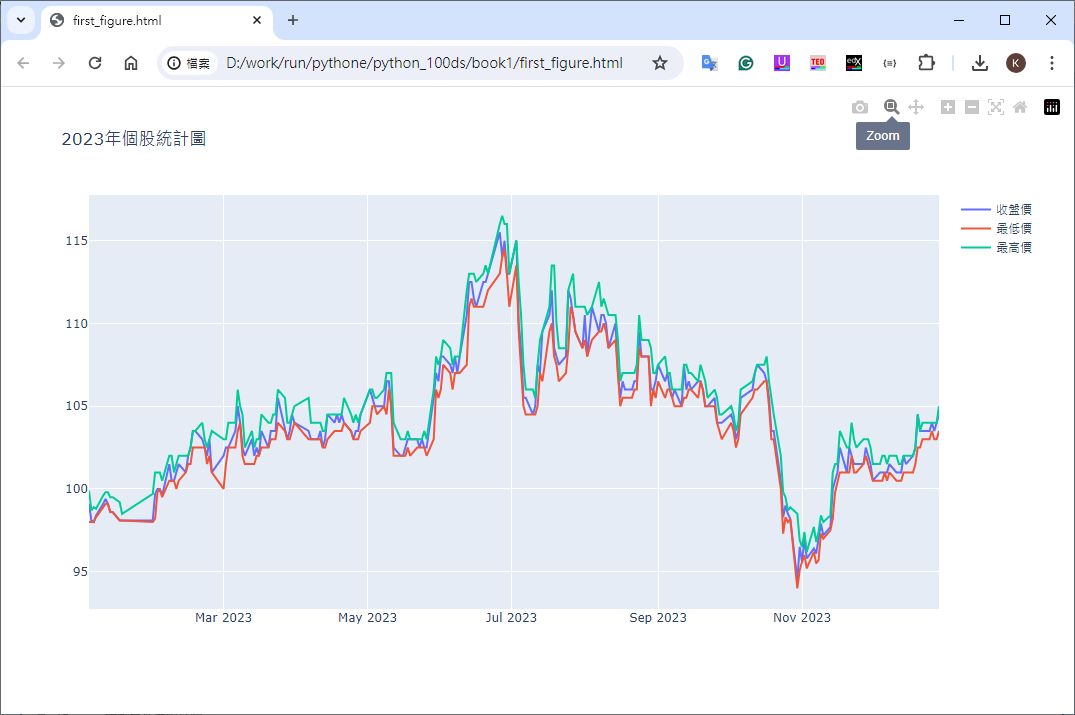
f = go.Figure()
f.add_trace(go.Scatter(x=pd_stock['日期'], y=pd_stock['收盤價'], name='收盤價'))
f.add_trace(go.Scatter(x=pd_stock['日期'], y=pd_stock['最低價'], name='最低價'))
f.add_trace(go.Scatter(x=pd_stock['日期'], y=pd_stock['最高價'], name='最高價'))
f.update_layout(title='2023年個股統計圖', showlegend=True)
f.write_html('first_figure.html', auto_open=True)
|