Deep Learning Prerequisites - The Numpy Stack in Python V2

說明

名詞

Application

Linear Regression :線性迴歸
Logistic Regression : 邏輯迴歸
Deep Neural Netowrks : 深度神經網路

K-Means Clustering : k 類聚
Density Estimation : 密度估計
Principal Components Analysis : 主成分分析
Matrix Facorization(Recommender Systems) : 矩陣分解(推薦系統使用)
Support Vector Machine(SVM) : 支援向量機
Markove Models,HMM : 馬可夫模
Game Theory : 賽局理論
Operation Research : 操作研究
Portforlio Optimization : 投資優化

Matplotlib

Line Charts:折線圖
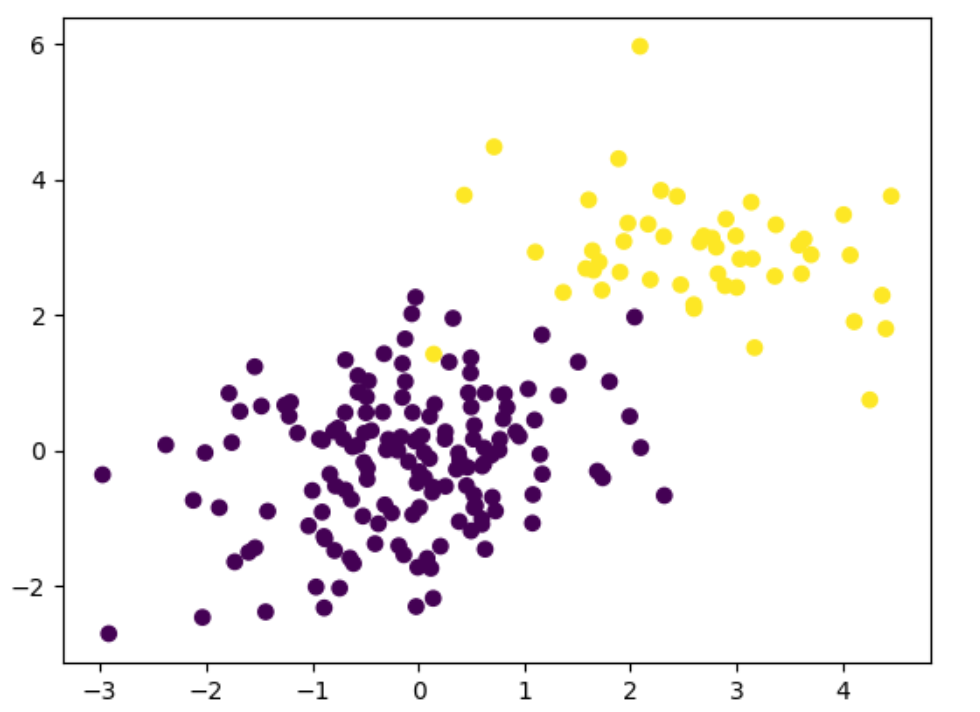
Scatterplot:散點圖
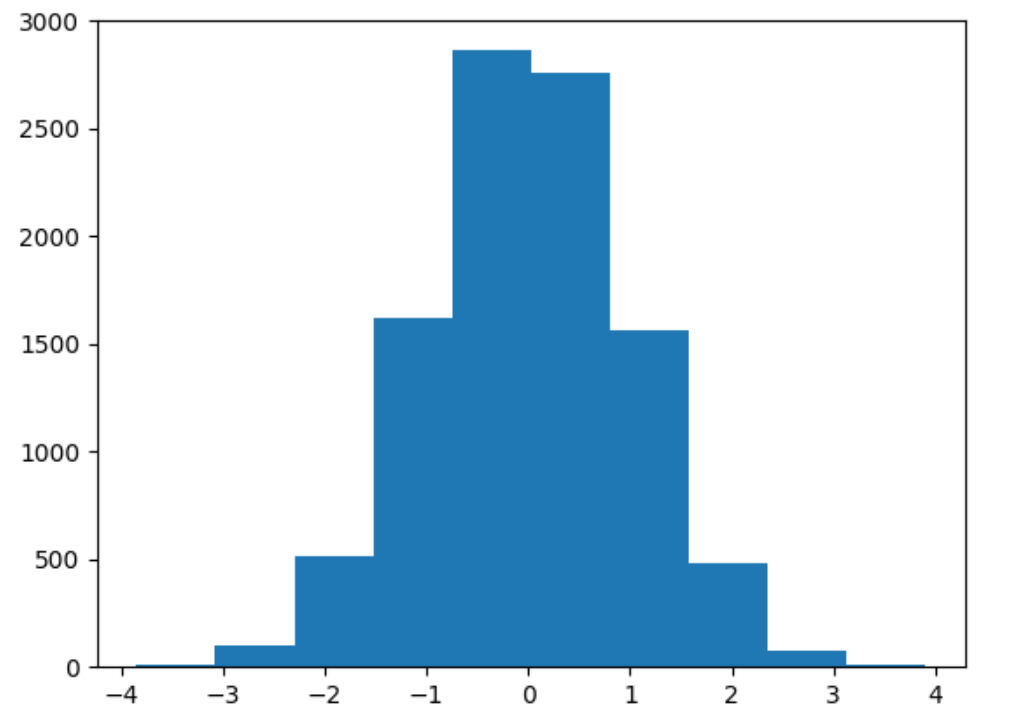
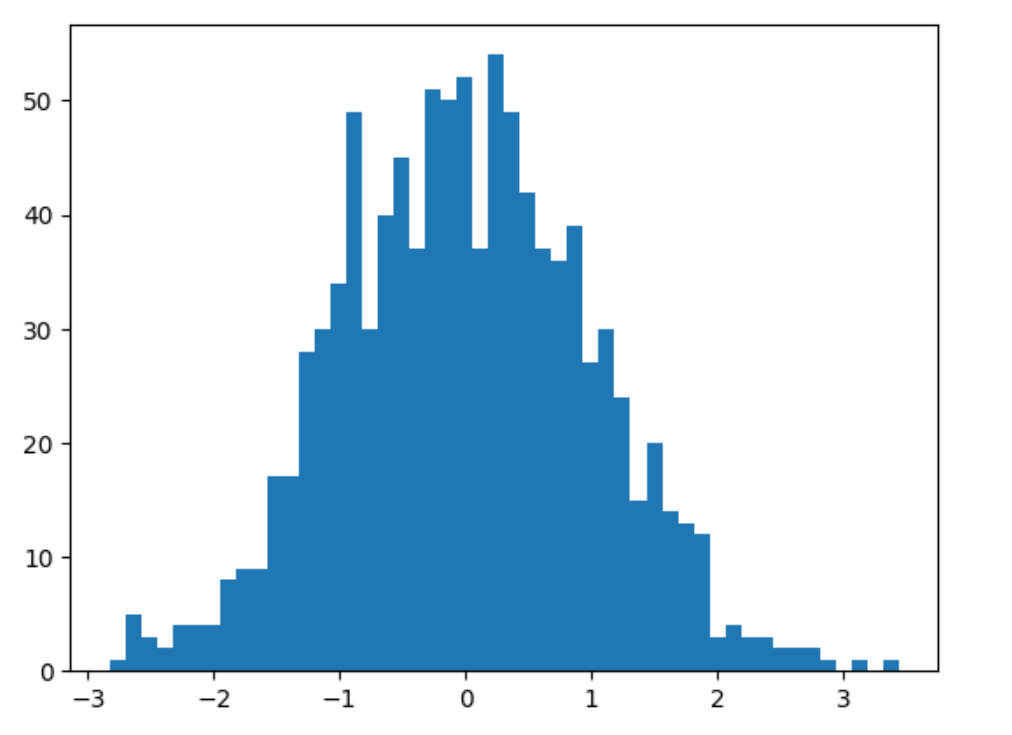
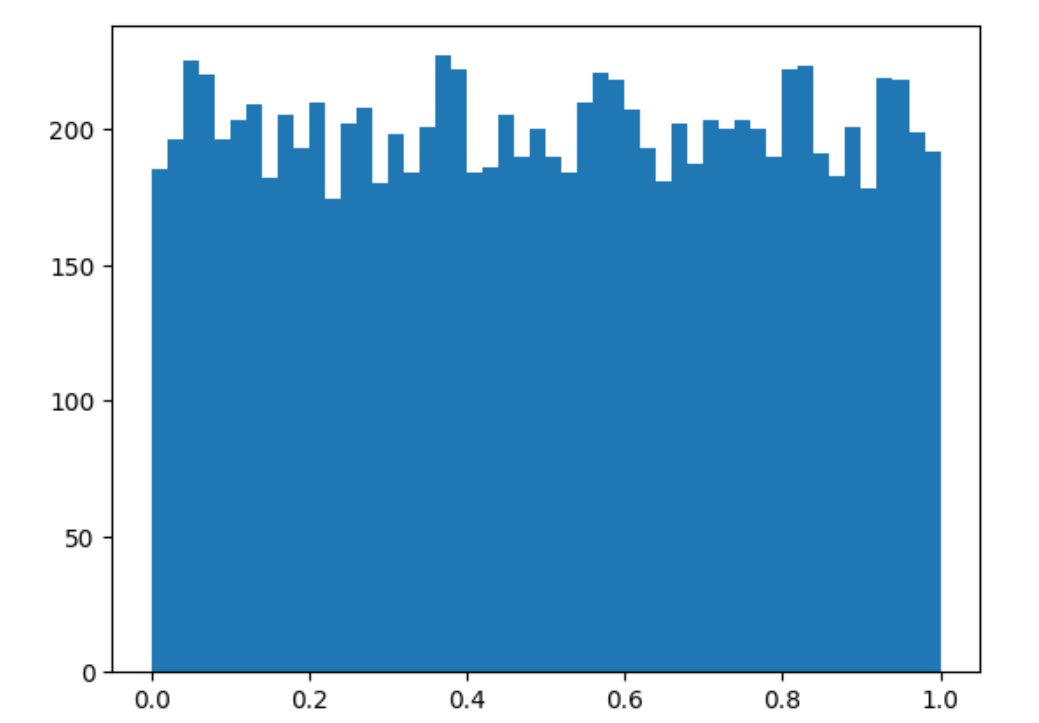
Histogram:直方圖
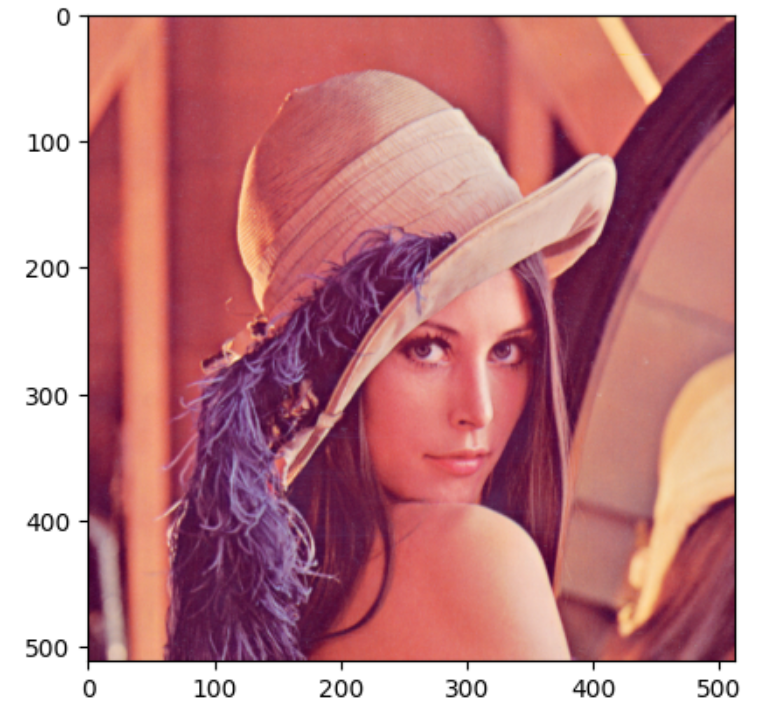
Images:圖像
scatter matrix:散點矩陣圖

數學

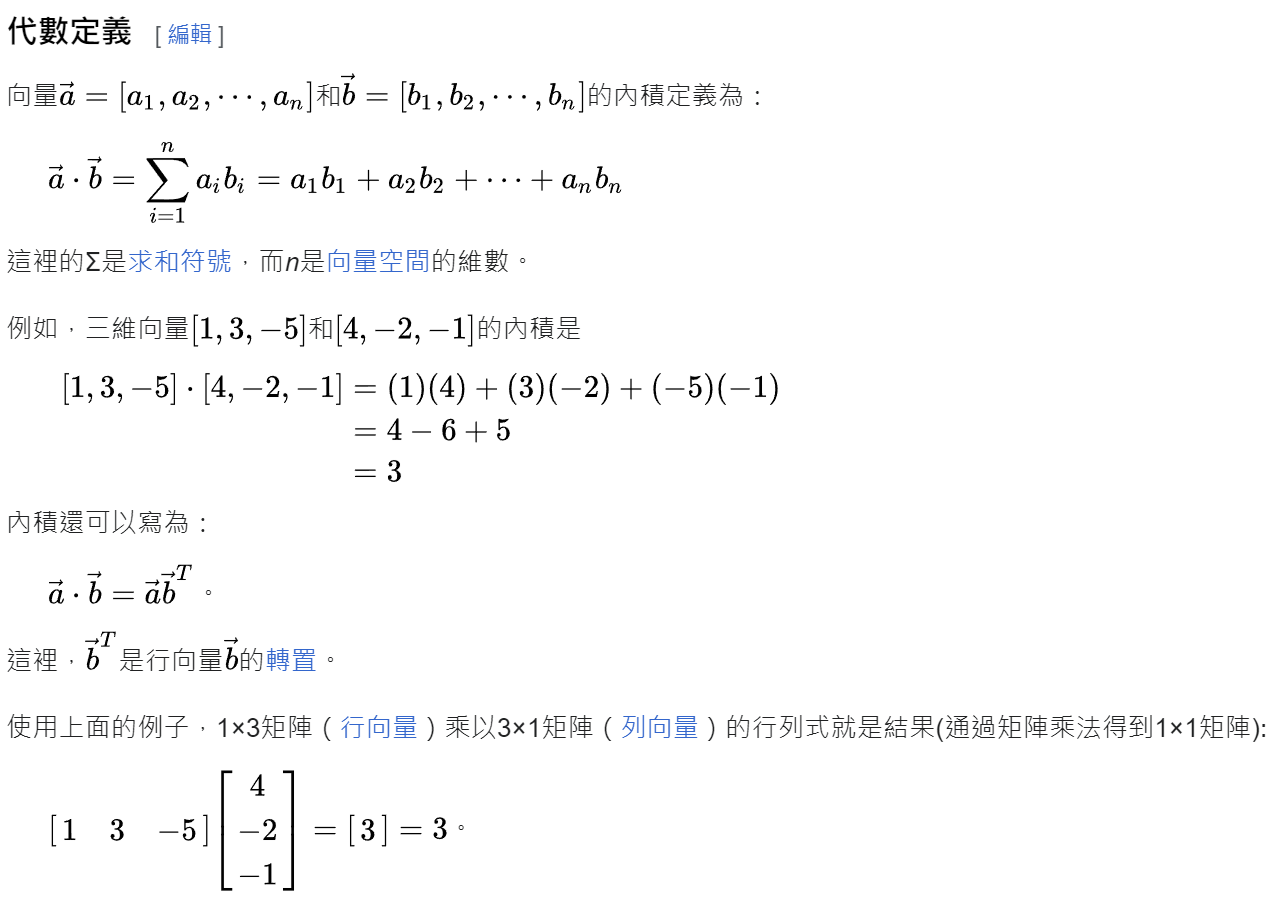
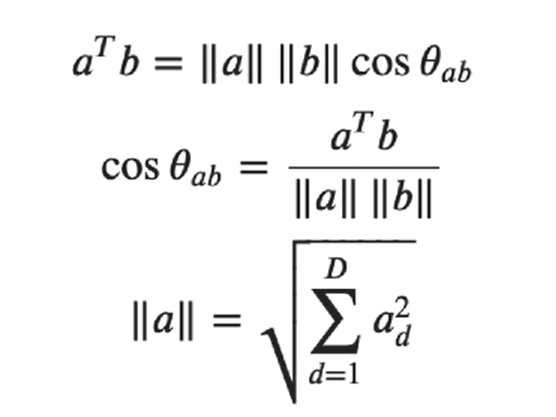
dot product/inner product(內積)

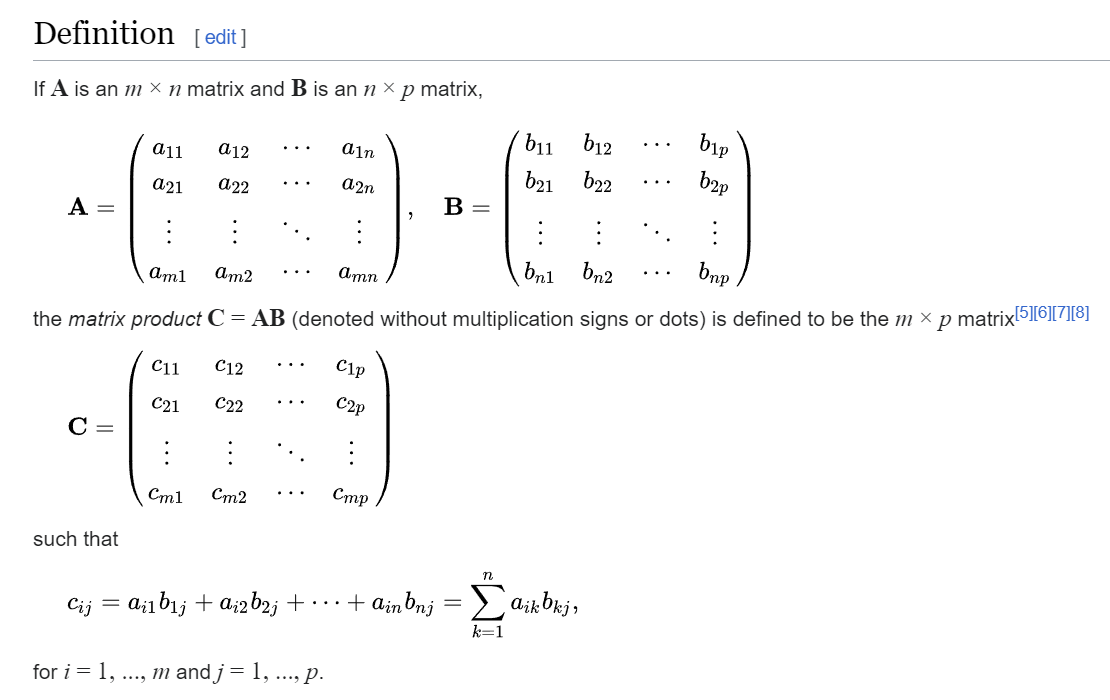
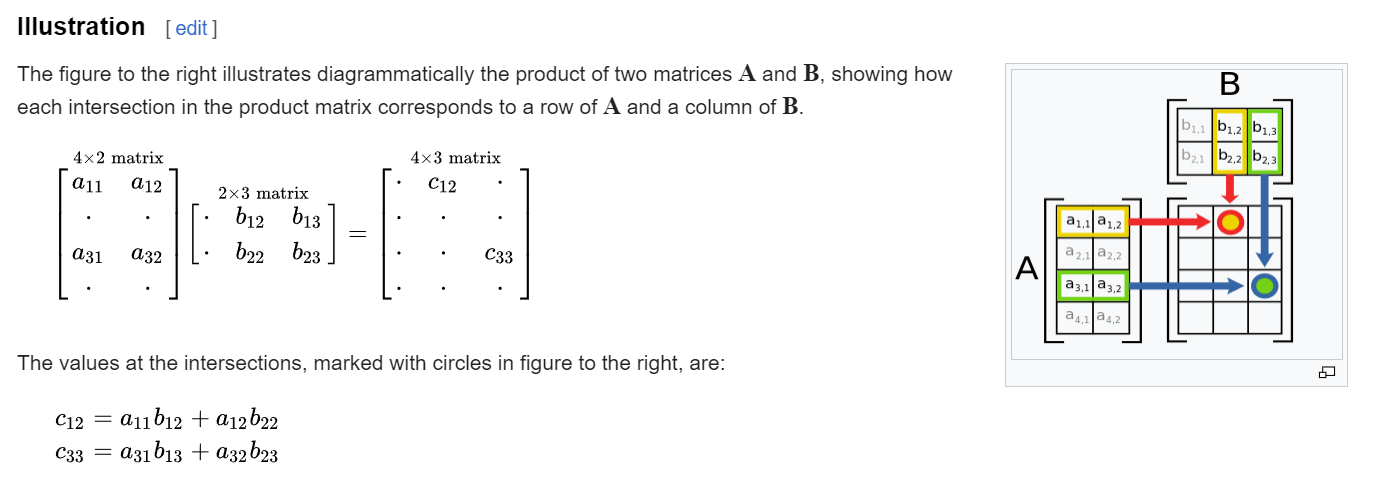
matrix multiplication

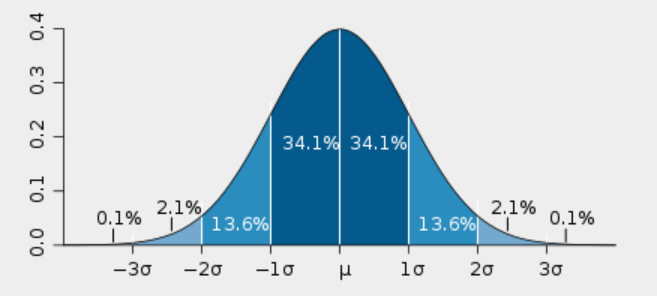
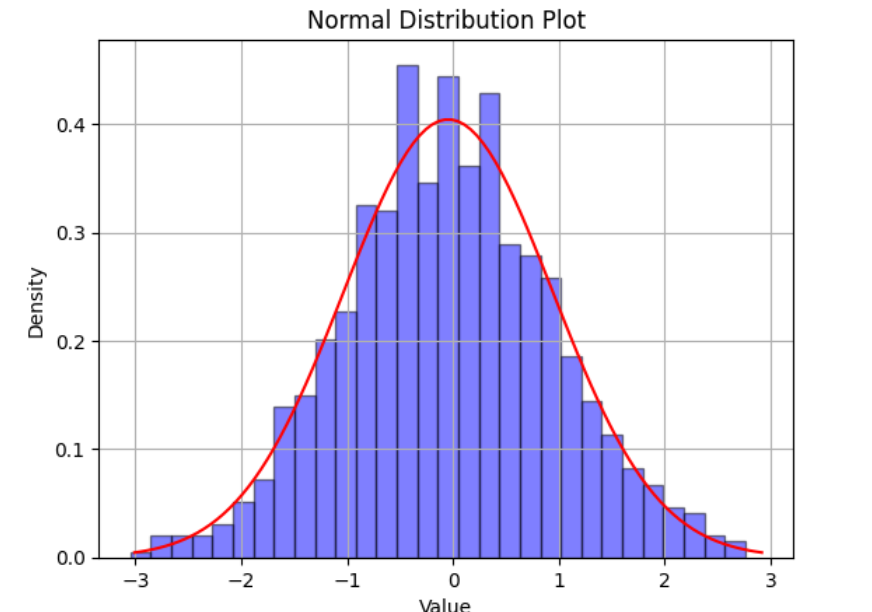
normal distribution (Gaussian distribution):常態分配

example
1
2
3
4
5
6
7
8
9
10
11
12
13
14
15
16
17
18
19
20
21
22
23
24
25
26
27
28
29
30
31
32
import pandas as pd
import numpy as np
import matplotlib.pyplot as plt

# Generate sample data from a normal distribution
np.random.seed(0) # For reproducibility
data = np.random.normal(loc=0, scale=1, size=1000) # Mean=0, Standard deviation=1, 1000 samples
# data = np.random.normal(loc=0, scale=1, size=30) # Mean=0, Standard deviation=1, 1000 samples

# Create a DataFrame
df = pd.DataFrame({'Value': data})

# Plot a histogram of the data
df['Value'].plot(kind='hist', bins=30, density=True, alpha=0.5, color='blue', edgecolor='black')
# df['Value'].hist(bins=30, density=True, alpha=0.5)


# # Plot the normal distribution curve
# std 計算標準差
mu, sigma = np.mean(data), np.std(data)
# print(f"mu={mu},sigma={sigma}")
x = np.linspace(mu - 3*sigma, mu + 3*sigma, 100)
plt.plot(x, 1/(sigma * np.sqrt(2 * np.pi)) * np.exp(- (x - mu)**2 / (2 * sigma**2)), color='red')

# # Add labels and title
plt.title('Normal Distribution Plot')
plt.xlabel('Value')
plt.ylabel('Density')

# Show the plot
plt.grid(True)
plt.show()
example for density
1
2
3
4
5
6
7
8
9
10
11
12
13
14
15
16
17
18
19
20
21
22
23
24
25
26
27
28
29
30
31
32
33
34
35
36
37
38
39
40
41
# 在一個標準化的直方圖中,density=True 時,每個長條的高度表示落入對應區間內的資料的機率密度。 
# 直方圖下的總面積將會等於1,表示在整個直方圖範圍內觀察到資料點的機率為1。
import pandas as pd
import numpy as np
import matplotlib.pyplot as plt

# 給定的數據
data = [1.764052, 0.400157, 0.978738, 2.240893, 1.867558, -0.977278, 0.950088, -0.151357, -0.103219, 0.410599,
0.144044, 1.454274, 0.761038, 0.121675, 0.443863, 0.333674, 1.494079, -0.205158, 0.313068, -0.854096,
-2.552990, 0.653619, 0.864436, -0.742165, 2.269755, -1.454366, 0.045759, -0.187184, 1.532779, 1.469359]

# 計算資料的機率密度函數
density, bins, _ = plt.hist(data, bins=30, density=True, alpha=0.5, color='blue', edgecolor='black')
print(f"density={density} {len(density)}")
print(f"bins={bins} {len(bins)}")
# 找到最小值和最大值對應的機率密度
min_density = np.min(density)
max_density = np.max(density)

print("最小值對應的機率密度:", min_density)
print("最大值對應的機率密度:", max_density)

plt.title('Probability Density Function')
plt.xlabel('Value')
plt.ylabel('Density')
plt.grid(True)
plt.show()

# density=[0.20735079 0. 0. 0. 0. 0.
# 0.20735079 0. 0. 0.20735079 0.20735079 0.20735079
# 0. 0. 0.62205238 0.20735079 0.62205238 0.41470159
# 0.62205238 0.20735079 0.20735079 0.62205238 0. 0.
# 0.20735079 0.62205238 0.20735079 0.20735079 0. 0.41470159] 30
# bins=[-2.55299 -2.39223183 -2.23147367 -2.0707155 -1.90995733 -1.74919917
# -1.588441 -1.42768283 -1.26692467 -1.1061665 -0.94540833 -0.78465017
# -0.623892 -0.46313383 -0.30237567 -0.1416175 0.01914067 0.17989883
# 0.340657 0.50141517 0.66217333 0.8229315 0.98368967 1.14444783
# 1.305206 1.46596417 1.62672233 1.7874805 1.94823867 2.10899683
# 2.269755 ] 31
# 最小值對應的機率密度: 0.0
# 最大值對應的機率密度: 0.62205237888381

numpy

list vs array

1
2
3
4
5
6
7
8
9
10
11
12
13
14
15
16
17
18
19
20
21
22
23
24
25
26
27
28
29
30
31
32
import numpy as np

L = [1, 2, 3]
A = np.array([1, 2, 3])

for e in L:
print(e)
for e in A:
print(e)

L.append(4)
L + [5]
# [1, 2, 3, 4, 5]

# array not support
# A.append(4)

A + np.array([4])
# array([5, 6, 7])
A + np.array([4,5,6])
# array([5, 7, 9])
2 * A
# array([2, 4, 6])

# L + L
[1, 2, 3, 4, 1, 2, 3, 4]

A**2
# array([1, 4, 9])
np.log(A)
np.exp(A)
np.tanh(A)

dot product

1
2
3
4
5
6
7
8
9
10
11
12
13
14
15
16
17
18
19
20
21
22
23
24
25
26
27
a = np.array([1,2])
b = np.array([3,4])
dot = 0
for e, f in zip(a,b):
dot += e * f
dot
# 11

dot = 0
for i in range(len(a)):
dot += a[i] * b[i]
dot
# 11

print(a * b)
print(np.sum(a * b))
print((a * b).sum())
print(np.dot(a,b))
print(a.dot(b))
# new python count dot
print(a @ b)
# [3 8]
# 11
# 11
# 11
# 11
# 11
1
2
3
4
5
6
7
8
9
10
11
12
13
14
15
16
17
18
19
20
21
a = np.array([1,2])
b = np.array([3,4])

# ||a||
amag = np.sqrt((a * a).sum())
amag
# 2.23606797749979

# np method
np.linalg.norm(a)
# 2.23606797749979

# 計算 cos 值
consangle = a.dot(b)/(np.linalg.norm(a) * np.linalg.norm(b))
consangle
# 0.9838699100999074

# 算出角度
angle = np.arccos(consangle)
angle
# 0.17985349979247847

speed test

1
2
3
4
5
6
7
8
9
10
11
12
13
14
15
16
17
18
19
20
21
22
23
24
25
26
import numpy as np
from datetime import datetime
a = np.random.randn(100)
b = np.random.randn(100)
T = 100000
# print(a)
# print(b)

def slow_dot_product(a, b):
result = 0
for e,f in zip(a,b):
result += e*f
return result

t0 = datetime.now()
for t in range(T):
slow_dot_product(a,b)
dt1 = datetime.now() - t0

t0 = datetime.now()
for t in range(T):
a.dot(b)
dt2 = datetime.now() - t0
print("dt1:", dt1.total_seconds(), "dt2:", dt2.total_seconds(), "dt1 / dt2:", dt1.total_seconds()/dt2.total_seconds())

# dt1: 2.672156 dt2: 0.090909 dt1 / dt2: 29.393745393745395

Matrices

1
2
3
4
5
6
7
8
9
10
11
12
13
14
15
16
17
18
19
20
21
22
23
24
25
26
27
28
29
30
31
32
33
34
35
36
37
38
39
40
41
42
43
44
45
46
47
48
49
50
51
52
53
54
55
import numpy as np

# determinant
A = np.array([[1, 2], [3, 4]])
det_A = np.linalg.det(A)
print(det_A)
# -2.0000000000000004

A
# array([[1, 2],
# [3, 4]])

# inverse of a matrix.
np.linalg.inv(A)
# array([[-2. , 1. ],
# [ 1.5, -0.5]])

np.linalg.inv(A).dot(A)
# 傳回單位矩陣
# [[1,0]
# [0,1]]
# array([[1.00000000e+00, 0.00000000e+00],
# [1.11022302e-16, 1.00000000e+00]])

# sum along diagonals of the array.
np.trace(A)
# 5 --> 1 + 4

# Extract a diagonal or construct a diagonal array.
np.diag(A)
# array([1, 4])
np.diag([1,4])
# array([[1, 0],
# [0, 4]])

# eigenvalues and right eigenvectors of a square array.
np.linalg.eig(A)
# EigResult(eigenvalues=array([-0.37228132, 5.37228132]), eigenvectors=array([[-0.82456484, -0.41597356],
# [ 0.56576746, -0.90937671]]))
Lam, V = np.linalg.eig(A)
print(V)
print(Lam)
print(V[:,0]*Lam[0] == A@ V[:,0])
# [[-0.82456484 -0.41597356]
# [ 0.56576746 -0.90937671]]
# [-0.37228132 5.37228132]
# [ True False]

# .allclose : Returns True if two arrays are element-wise equal within a tolerance.
V[:,0]*Lam[0],A@ V[:,0]
# (array([ 0.30697009, -0.21062466]), array([ 0.30697009, -0.21062466]))
np.allclose(V[:,0]*Lam[0],A@ V[:,0])
# True
np.allclose(V @ np.diag(Lam), A @ V)
# True

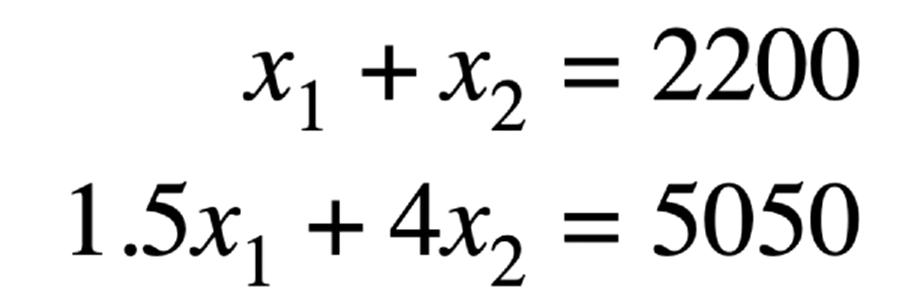
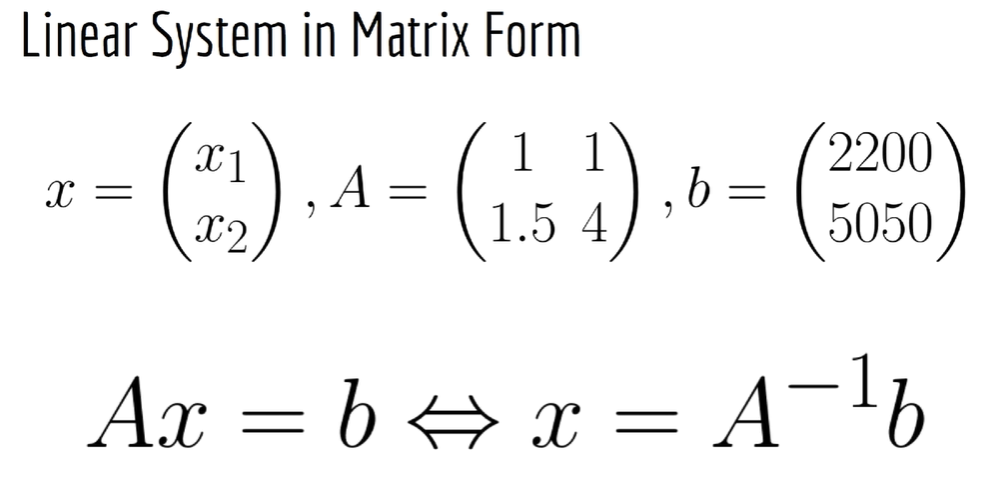
solving Linear System

1
2
3
4
5
6
A = np.array([[1, 1], [1.5, 4]])
b = np.array([2200, 5050])
np.linalg.solve(A, b)
# array([1500., 700.])
np.linalg.inv(A).dot(b)
# array([1500., 700.])

Generate Data

1
2
3
4
5
6
7
8
9
10
11
12
13
14
15
16
17
18
19
20
21
22
23
24
25
26
27
28
29
30
31
32
33
34
35
36
37
38
39
40
41
42
43
44
45
46
47
48
49
50
51
52
53
54
55
56
57
58
59
60
61
62
63
64
65
66
67
68
69
70
71
72
73
74
75
76
77
78
79
80
81
82
83
84
85
86
87
88
89
90
91
92
import numpy as np
np.zeros((2,3))
# array([[0., 0., 0.],
# [0., 0., 0.]])

np.ones((2,3))
# array([[1., 1., 1.],
# [1., 1., 1.]])
10*np.ones((2,3))
# array([[10., 10., 10.],
# [10., 10., 10.]])
# 單位矩陣 (Identity matrix)
np.eye(3)
# array([[1., 0., 0.],
# [0., 1., 0.],
# [0., 0., 1.]])

# 0~1(not include 1)
np.random.random()
# 0.9701459604234299
np.random.random((2,3))
# array([[0.39755615, 0.69273947, 0.96292757],
# [0.50830448, 0.99407473, 0.54656248]])
# include + and -
np.random.randn(2,3)
# array([[-0.76089179, -1.99800088, 0.38534243],
# [-1.44458277, -0.13887983, -0.47981575]])

R2 = np.random.randn(2,3)
print(R2)
print(R2.var())
R2.mean()
# [[ 0.84762111 1.56442554 -1.82187819]
# [ 1.30684524 0.57278059 0.35319868]]
# 1.2195975775519574
# 0.4704988268525599
R = np.random.randn(10000)
R.mean()
# 平均值近似於0
# 0.009437079797954507
np.mean(R)
# 0.009437079797954507
R.var()
# variance 1
# 0.9801145490034956
R.std()
# 0.9900073479542946

# other
R = np.random.randn(10000,3)
print(R.mean(axis=0).shape)
R.mean(axis=0)
# (3,)
# array([ 0.0078157 , -0.00292329, -0.01298782])
print(R.mean(axis=1).shape)
R.mean(axis=1)
# (10000,)
# array([-0.58203113, 0.82983485, -0.01790977, ..., -0.40049762,
# 0.76699179, 0.52129283])
print(np.cov(R).shape)
np.cov(R)
# (10000, 10000)
# array([[ 1.07905933, -0.73542729, -0.3442147 , ..., 0.72263965,
# 0.15671623, 0.21780096],
# [-0.73542729, 0.62891153, -0.23245942, ..., -0.75281916,
# -0.11010413, 0.01141977],
# [-0.3442147 , -0.23245942, 1.81824629, ..., 0.7216588 ,
# -0.03793899, -0.65423091],
# ...,
# [ 0.72263965, -0.75281916, 0.7216588 , ..., 1.01463039,
# 0.11166935, -0.18004424],
# [ 0.15671623, -0.11010413, -0.03793899, ..., 0.11166935,
# 0.02284557, 0.02750681],
# [ 0.21780096, 0.01141977, -0.65423091, ..., -0.18004424,
# 0.02750681, 0.24410679]])
np.cov(R.T)
# array([[ 1.01644249, 0.00987375, -0.01561179],
# [ 0.00987375, 0.99528132, 0.01308294],
# [-0.01561179, 0.01308294, 1.01757493]])
np.cov(R, rowvar=False)
# array([[ 1.01644249, 0.00987375, -0.01561179],
# [ 0.00987375, 0.99528132, 0.01308294],
# [-0.01561179, 0.01308294, 1.01757493]])

# 亂數整數 0 ~ 10(not include 10)
np.random.randint(0,10, size=(2,3))
# array([[1, 8, 3],
# [4, 8, 1]])
np.random.choice(10, size=(3,3))
# array([[2, 5, 5],
# [3, 0, 3],
# [3, 0, 7]])

Numpy exercise(matrix multiplication delay)

1
2
3
4
5
6
7
8
9
10
11
12
13
14
15
16
17
18
19
20
21
22
23
24
25
26
27
28
29
30
31
32
33
34
35
36
37
import numpy as np
a = np.random.randint(0,10, size=(2,3))
b = np.random.randint(0,10, size=(3,4))
print(f"a={a}")
print(f"b={b}")

def matrix_mutiplication(a , b):
# c = []
a_colume = len(a[0])
b_row = len(b)

print(f"a colume = {a_colume}")
print(f"b row = {b_row}")
if a_colume != b_row:
assert False
c = [[0 for _ in range(len(b[0]))] for _ in range(len(a))]
for i in range(len(a)):
for j in range(len(b[0])):
# print(f"{i}{j}")
for item in range(b_row):
# print(f"c[{i},{j}]={c[i][j]} a[{i}][{item}]={a[i][item]} b[{j}][{item}]={b[item][j]}")
# print(f"c({i},{j})+=a[{i}][{item}]*b[{j}][{item}]")
c[i][j] += a[i][item]*b[item][j]
# print(f"c={c}")
return np.array(c)

my_c = matrix_mutiplication(a , b)

# Matrix multiplication
# Alternatively: c = a @ b
c = np.dot(a, b)
print(f"my_c={my_c}")
print(f"c={c}")
if np.array_equal(my_c,c):
print("output same...")
else:
print("output different")
1
2
3
4
5
6
7
8
9
10
11
12
13
14
15
16
17
18
19
20
21
22
23
24
25
26
27
28
29
30
31
32
33
34
35
36
37
38
39
40
41
42
43
44
45
46
import numpy as np
from datetime import datetime

T = 100

def matrix_mutiplication(a , b):
a_colume = len(a[0])
b_row = len(b)

if a_colume != b_row:
assert False
c = [[0 for _ in range(len(b[0]))] for _ in range(len(a))]
for i in range(len(a)):
for j in range(len(b[0])):
# print(f"{i}{j}")
for item in range(b_row):
c[i][j] += a[i][item]*b[item][j]
return np.array(c)

t0 = datetime.now()
a = np.random.randint(0,10, size=(10,20))
b = np.random.randint(0,10, size=(20,20))
for t in range(T):
matrix_mutiplication(a , b)
dt1 = datetime.now() - t0

t0 = datetime.now()
for t in range(T):
a.dot(b)
dt2 = datetime.now() - t0

# my_c = matrix_mutiplication(a , b)
# c = a.dot(b)
# if np.array_equal(my_c,c):
# print("output same...")
# else:
# print("output different")

print("dt1:", dt1.total_seconds(), "dt2:", dt2.total_seconds(), "dt1 / dt2:", dt1.total_seconds()/dt2.total_seconds())
# a = np.random.randint(0,10, size=(100,20))
# b = np.random.randint(0,10, size=(20,200))
# T=10 dt1: 3.878952 dt2: 0.003858 dt1 / dt2: 1005.4307931570762
# T=100 : dt1: 30.410566 dt2: 0.038654 dt1 / dt2: 786.7378796502302
# a = np.random.randint(0,10, size=(10,20))
# b = np.random.randint(0,10, size=(20,20))
# T=100 : dt1: 0.486408 dt2: 0.001092 dt1 / dt2: 445.4285714285714

Matplotlib

Line chart

1
2
3
4
5
6
7
8
9
10
11
12
13
14
15
16
17
18
19
20
21
22
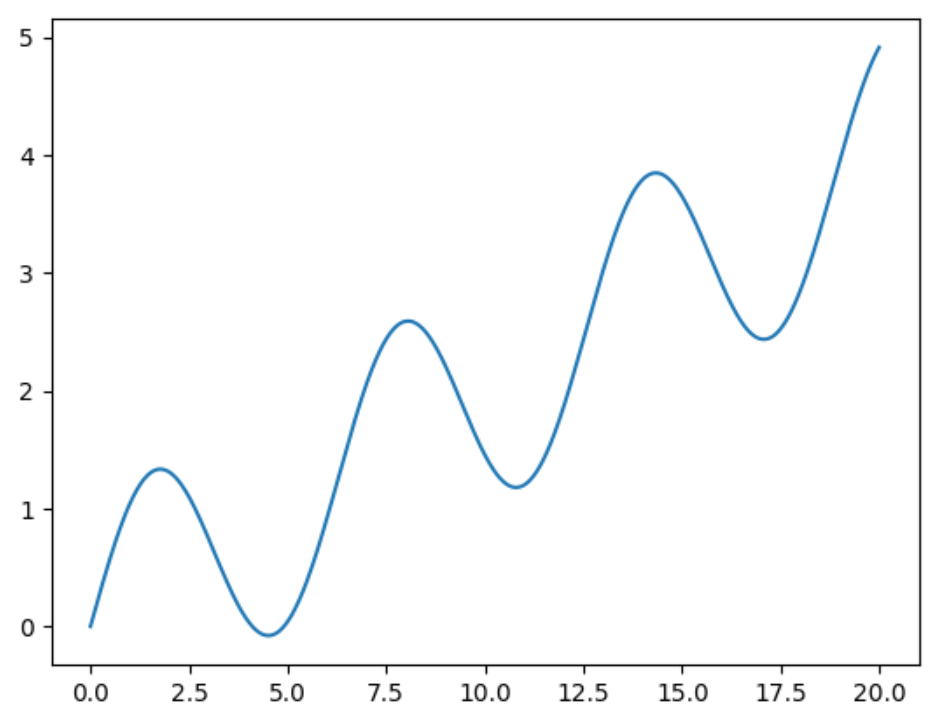
import numpy as np
import matplotlib.pyplot as plt

x = np.linspace(0,20, 1000)
# x = np.linspace(0,20, 10)
# array([ 0. , 2.22222222, 4.44444444, 6.66666667, 8.88888889,
# 11.11111111, 13.33333333, 15.55555556, 17.77777778, 20. ])

y = np.sin(x) + 0.2 * x
plt.plot(x, y)

plt.plot(x, y)
# run run computer need it
plt.show()

# 加標籤抬頭
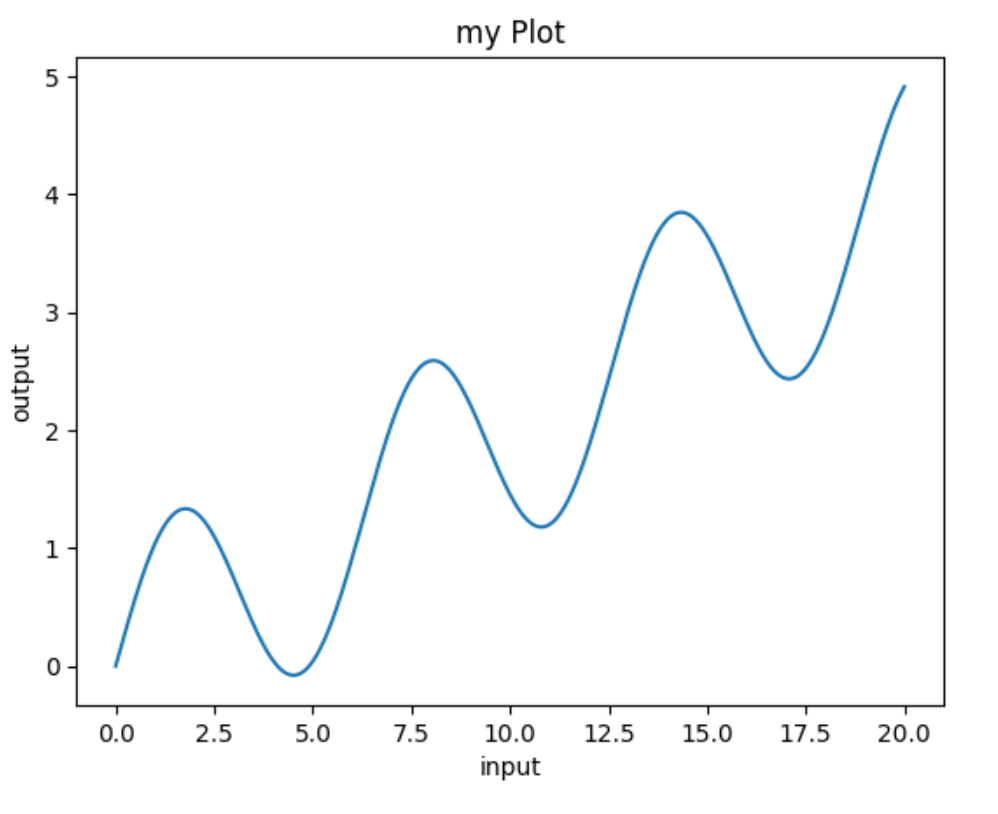
plt.plot(x, y)
plt.xlabel('input')
plt.ylabel('output')
plt.title('my Plot');
# Colaboratory 最後一個命令會有一些文字輸出,加;即可不輸出
# Text(0.5, 1.0, 'my Plot')

Scatter

1
2
3
4
5
6
7
8
9
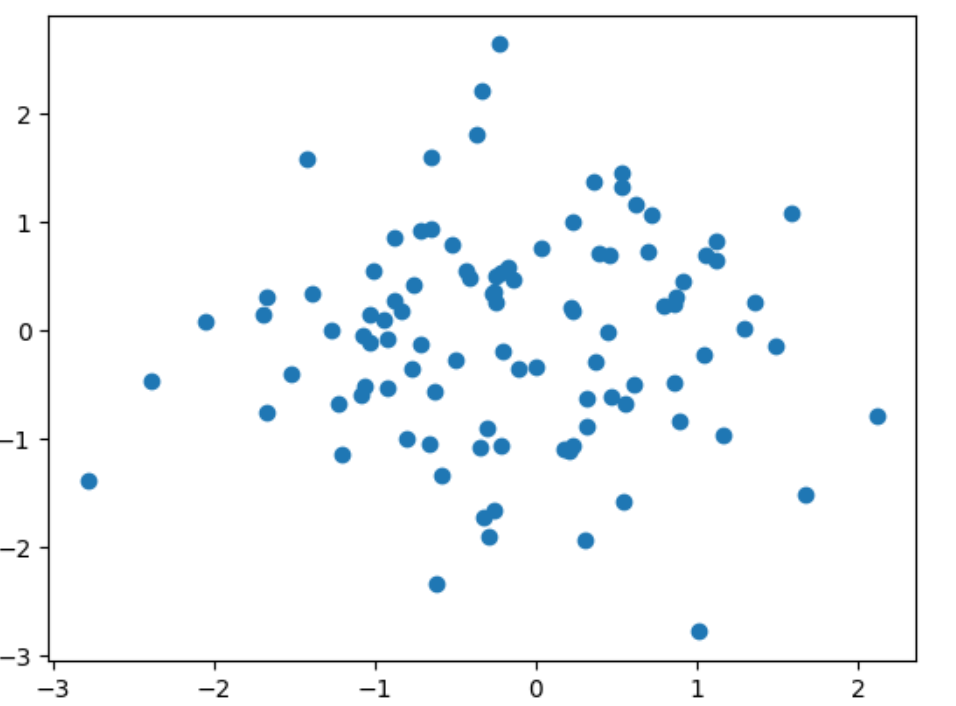
X = np.random.randn(100, 2)
plt.scatter(X[:,0], X[:,1])

X = np.random.randn(200,2)
X[:50] += 3
Y = np.zeros(200)
Y[:50] = 1
#以 Y 分顏色
plt.scatter(X[:,0], X[:,1], c=Y )

Histogram

1
2
3
4
5
6
7
8
9
10
X = np.random.randn(10000)
plt.hist(X);

# 常態分佈(normal distributation)
# bin 分組數
plt.hist(X, bins=50);

# 平均分布
X = np.random.random(10000)
plt.hist(X, bins=50);

Images

1
2
3
4
5
6
7
8
9
10
11
12
13
14
15
16
17
18
19
20
21
22
23
24
25
26
27
28
29
30
31
32
33
34
35
36
37
38
39
# download image
!wget https://github.com/lazyprogrammer/machine_learning_examples/raw/master/cnn_class/lena.png

import numpy as np
import matplotlib.pyplot as plt
from PIL import Image
im = Image.open('lena.png')
# show im type
type(im)
# PIL.PngImagePlugin.PngImageFile

# show array infomation
arr = np.array(im)
print(arr)
# [[[226 137 125]
# [226 137 125]
# [223 137 133]
# ...
# [230 148 122]
# [221 130 110]
# [200 99 90]]
# ......

# show shape
arr.shape
# (512, 512, 3)
# show image
plt.imshow(arr)

# convert to single color image
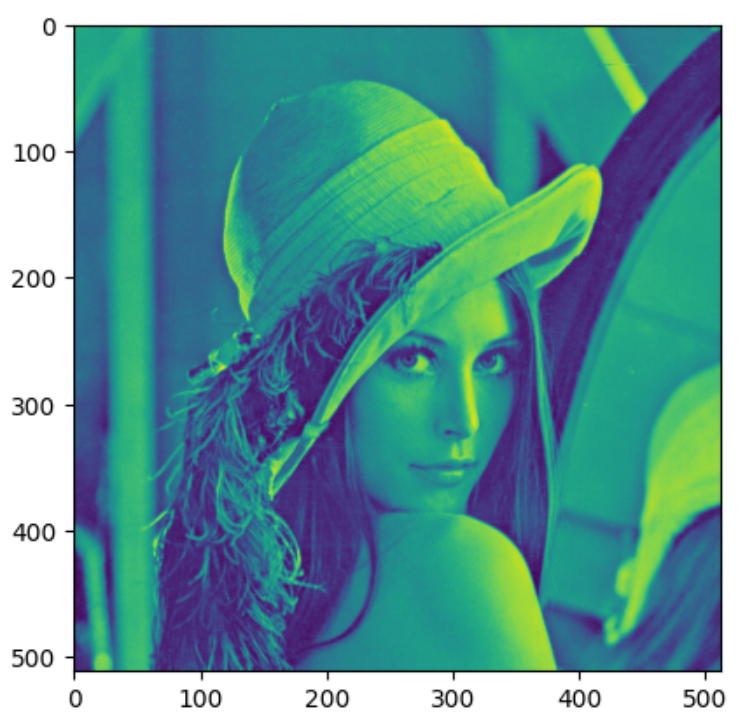
gray = arr.mean(axis=2)
# show image
gray.shape
# (512, 512)

# show single color image
plt.imshow(gray)
# show gray image
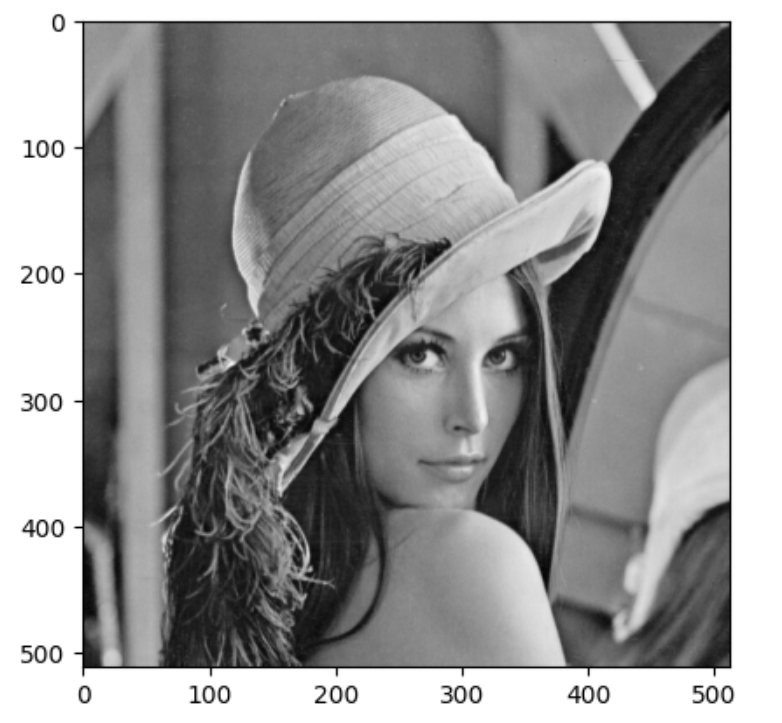
plt.imshow(gray, cmap='gray')

Matplotlib Exercise

1
2
3
4
5
6
7
8
9
10
11
12
13
14
15
16
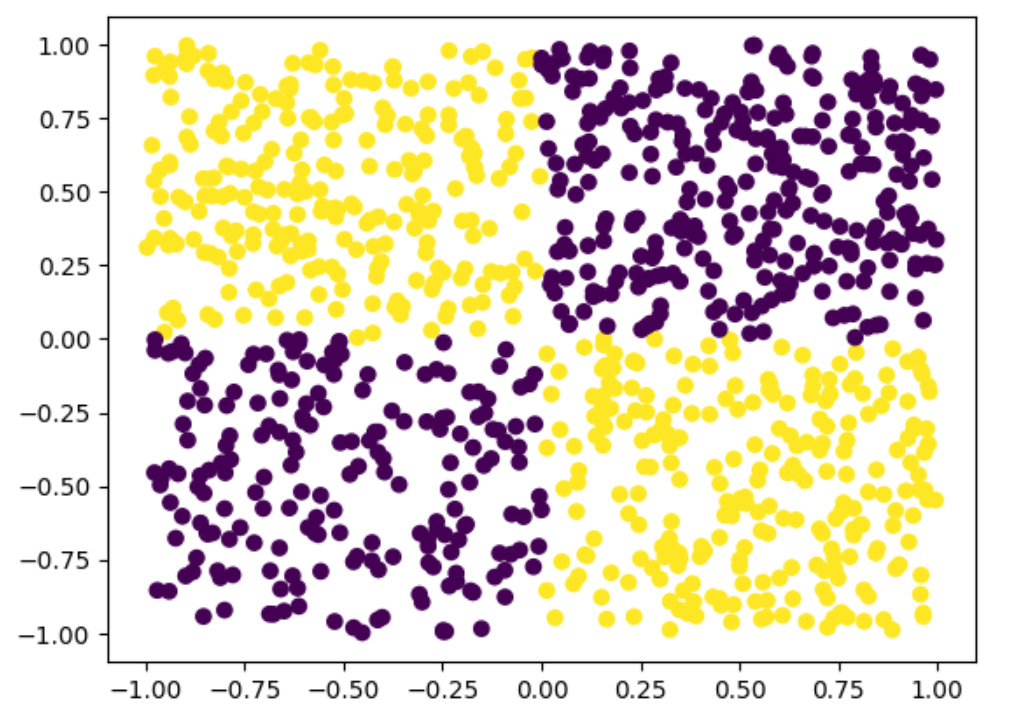
import numpy as np
import matplotlib.pyplot as plt
X1 = np.random.random(1000)
X2 = np.random.random(1000)
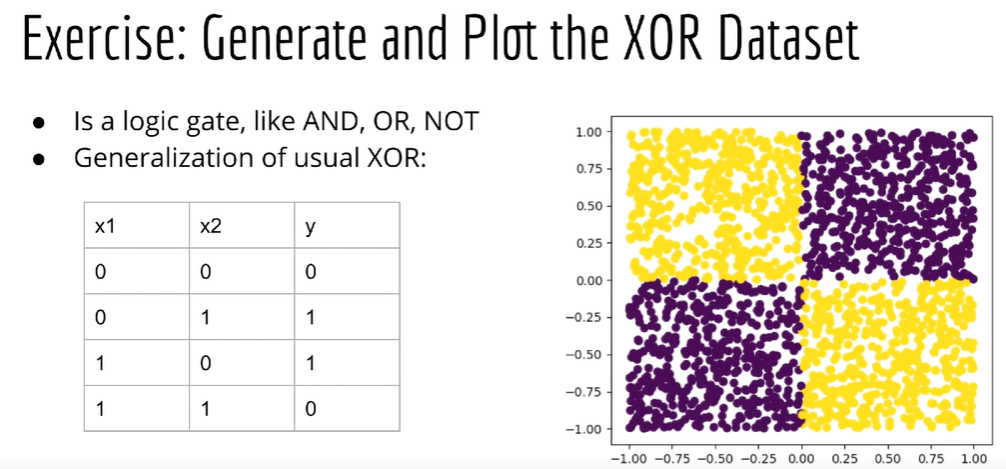
#1: X1-,X2+
X1[:250] *= -1
#2: X1+, X2-
X2[250:500] *= -1
#3: X1-,X2-
X1[500:700] *= -1
X2[500:700] *= -1
#4: X1+,X2+

Y = np.zeros(1000)
Y[:500] = 1
plt.scatter(X1, X2, c=Y)

Pandas

Loading in data

1
2
3
4
5
6
7
8
9
10
11
12
13
14
15
16
17
18
19
20
21
22
23
24
25
26
27
28
29
30
31
32
33
34
35
36
37
38
39
40
41
42
43
44
45
46
47
48
49
50
import pandas as pd
!wget https://raw.githubusercontent.com/lazyprogrammer/machine_learning_examples/master/tf2.0/sbux.csv

df = pd.read_csv('sbux.csv')
# read csv from url
df2 = pd.read_csv('https://raw.githubusercontent.com/lazyprogrammer/machine_learning_examples/master/tf2.0/sbux.csv')
type(df)
# pandas.core.frame.DataFrame

# direct see csv
!head sbux.csv
# date,open,high,low,close,volume,Name
# 2013-02-08,27.92,28.325,27.92,28.185,7146296,SBUX
# 2013-02-11,28.26,28.26,27.93,28.07,5457354,SBUX
# 2013-02-12,28.0,28.275,27.975,28.13,8665592,SBUX
# ...
# show read csv data
df.head()
# date open high low close volume Name
# 0 2013-02-08 27.920 28.325 27.920 28.185 7146296 SBUX
# ...
# 4 2013-02-14 27.765 27.905 27.675 27.775 8899188 SBUX
# show more data
df.head(10)
# date open high low close volume Name
# 0 2013-02-08 27.920 28.325 27.920 28.185 7146296 SBUX
# ...
# 9 2013-02-22 26.850 27.105 26.640 27.085 11487316 SBUX
# show tail data
df.tail()
# date open high low close volume Name
# 1254 2018-02-01 56.280 56.42 55.89 56.00 14690146 SBUX
# ...
# 1258 2018-02-07 55.080 55.43 54.44 54.46 13927022 SBUX
# show info
df.info()
# <class 'pandas.core.frame.DataFrame'>
# RangeIndex: 1259 entries, 0 to 1258
# Data columns (total 7 columns):
# # Column Non-Null Count Dtype
# --- ------ -------------- -----
# 0 date 1259 non-null object
# 1 open 1259 non-null float64
# 2 high 1259 non-null float64
# 3 low 1259 non-null float64
# 4 close 1259 non-null float64
# 5 volume 1259 non-null int64
# 6 Name 1259 non-null object
# dtypes: float64(4), int64(1), object(2)
# memory usage: 69.0+ KB

Selecting Rows and Columns

1
2
3
4
5
6
7
8
9
10
11
12
13
14
15
16
17
18
19
20
21
22
23
24
25
26
27
28
29
30
31
32
33
34
35
36
37
38
39
40
41
42
43
44
45
46
47
48
49
50
51
52
53
54
55
56
57
58
59
60
61
62
63
64
65
66
67
68
69
70
71
72
73
74
75
76
77
78
79
80
81
82
83
84
85
86
87
88
89
90
91
92
93
94
95
96
97
98
99
100
101
102
103
104
105
106
107
108
109
110
111
112
113
114
115
116
117
118
119
120
121
122
123
124
125
126
127
128
129
130
131
132
133
134
135
136
137
138
139
140
141
142
143
144
145
146
147
148
149
150
151
152
153
154
155
156
157
158
159
160
161
162
163
164
165
166
167
168
169
170
171
172
173
174
175
176
177
178
179
180
181
182
183
184
185
186
187
188
189
190
191
192
193
194
195
196
197
198
199
200
201
202
203
204
205
206
207
208
209
210
211
212
213
214
215
216
217
218
219
220
221
222
223
224
225
226
227
228
229
230
231
232
233
234
235
236
237
238
239
240
241
242
243
244
245
246
247
248
249
250
251
252
253
254
255
256
257
258
259
260
261
262
263
264
265
266
267
268
269
270
271
272
273
274
275
276
277
278
279
280
281
282
283
284
285
286
287
288
289
290
291
292
293
294
295
296
297
298
299
300
301
302
303
304
305
# show column
df.columns
# Index(['date', 'open', 'high', 'low', 'close', 'volume', 'Name'], dtype='object')
# change column title
df.columns = ['date', 'open', 'high', 'low', 'close', 'volume', 'name']
df.head()
# date open high low close volume name
# 0 2013-02-08 27.920 28.325 27.920 28.185 7146296 SBUX
# 1 2013-02-11 28.260 28.260 27.930 28.070 5457354 SBUX

# show one column
df['open']
# 0 27.920
# 1 28.260
# ...
# show 2 column
df[['open','close']]
# open close
# 0 27.920 28.185
# ...
# show type
type(df['open'])
# pandas.core.series.Series
type(df[['open','close']])
# pandas.core.frame.DataFrame

# show row
df.iloc[0]
# date 2013-02-08
# open 27.92
# high 28.325
# low 27.92
# close 28.185
# volume 7146296
# name SBUX
# Name: 0, dtype: object
df.loc[0]
# date 2013-02-08
# open 27.92
# high 28.325
# low 27.92
# close 28.185
# volume 7146296
# name SBUX
# Name: 0, dtype: object

# show for other index and loc
df2 = pd.read_csv('sbux.csv', index_col='date')
df2.head()
# open high low close volume Name
# date
# 2013-02-08 27.920 28.325 27.920 28.185 7146296 SBUX
# 2013-02-11 28.260 28.260 27.930 28.070 5457354 SBUX
df2.loc['2013-02-08']
# open 27.92
# high 28.325
# low 27.92
# close 28.185
# volume 7146296
# Name SBUX
# Name: 2013-02-08, dtype: object
type(df2.loc['2013-02-08'])
# pandas.core.series.Series

# show for condition rows
df[df['open']>64]
# date open high low close volume name
# 1087 2017-06-05 64.85 64.870 64.18 64.27 6809284 SBUX
df[df['name']!='SBUX']
# date open high low close volume name
df['name']!='SBUX'
# 0 False
# 1 False
type(df['name']!='SBUX')
# pandas.core.series.Series

# show array's condition row
import numpy as np
A = np.arange(10)
A
# array([0, 1, 2, 3, 4, 5, 6, 7, 8, 9])
A[A%2==0]
# array([0, 2, 4, 6, 8])

# frame to array
df.values
[ ]
# frame to array
df.values
# array([['2013-02-08', 27.92, 28.325, ..., 28.185, 7146296, 'SBUX'],
# ...,
# ['2018-02-07', 55.08, 55.43, ..., 54.46, 13927022, 'SBUX']],
# dtype=object)
A = df[['open', 'close']].values
A

[ ]

開始使用 AI 編寫或生成程式碼。
Loading in data
[ ]
import pandas as pd
!wget https://raw.githubusercontent.com/lazyprogrammer/machine_learning_examples/master/tf2.0/sbux.csv
--2024-03-18 07:20:43-- https://raw.githubusercontent.com/lazyprogrammer/machine_learning_examples/master/tf2.0/sbux.csv
Resolving raw.githubusercontent.com (raw.githubusercontent.com)... 185.199.110.133, 185.199.109.133, 185.199.108.133, ...
Connecting to raw.githubusercontent.com (raw.githubusercontent.com)|185.199.110.133|:443... connected.
HTTP request sent, awaiting response... 200 OK
Length: 61896 (60K) [text/plain]
Saving to: ‘sbux.csv’

sbux.csv 100%[===================>] 60.45K --.-KB/s in 0.001s

2024-03-18 07:20:43 (53.6 MB/s) - ‘sbux.csv’ saved [61896/61896]

[ ]
df = pd.read_csv('sbux.csv')
# read csv from url
df2 = pd.read_csv('https://raw.githubusercontent.com/lazyprogrammer/machine_learning_examples/master/tf2.0/sbux.csv')
[ ]
type(df)

[ ]
# direct see csv
!head sbux.csv
date,open,high,low,close,volume,Name
2013-02-08,27.92,28.325,27.92,28.185,7146296,SBUX
2013-02-11,28.26,28.26,27.93,28.07,5457354,SBUX
2013-02-12,28.0,28.275,27.975,28.13,8665592,SBUX
2013-02-13,28.23,28.23,27.75,27.915,7022056,SBUX
2013-02-14,27.765,27.905,27.675,27.775,8899188,SBUX
2013-02-15,27.805,27.85,27.085,27.17,18195730,SBUX
2013-02-19,27.18,27.305,27.01,27.225,11760912,SBUX
2013-02-20,27.3,27.42,26.59,26.655,12472506,SBUX
2013-02-21,26.535,26.82,26.26,26.675,13896450,SBUX
[ ]
# show read csv data
df.head()

[ ]
# show more data
df.head(10)

[ ]
# show tail data
df.tail()

[ ]
# show info
df.info()
<class 'pandas.core.frame.DataFrame'>
RangeIndex: 1259 entries, 0 to 1258
Data columns (total 7 columns):
# Column Non-Null Count Dtype
--- ------ -------------- -----
0 date 1259 non-null object
1 open 1259 non-null float64
2 high 1259 non-null float64
3 low 1259 non-null float64
4 close 1259 non-null float64
5 volume 1259 non-null int64
6 Name 1259 non-null object
dtypes: float64(4), int64(1), object(2)
memory usage: 69.0+ KB
Selecting Rows and Columns
[ ]
# show column
df.columns
Index(['date', 'open', 'high', 'low', 'close', 'volume', 'Name'], dtype='object')
[ ]
# change column title
df.columns = ['date', 'open', 'high', 'low', 'close', 'volume', 'name']
df.head()

[ ]
# show one column
df['open']
0 27.920
1 28.260
2 28.000
3 28.230
4 27.765
...
1254 56.280
1255 55.900
1256 55.530
1257 53.685
1258 55.080
Name: open, Length: 1259, dtype: float64
[ ]
# show 2 column
df[['open','close']]

[ ]
# show type
type(df['open'])

[ ]
type(df[['open','close']])

[ ]
# show row
df.iloc[0]
date 2013-02-08
open 27.92
high 28.325
low 27.92
close 28.185
volume 7146296
name SBUX
Name: 0, dtype: object
[ ]
df.loc[0]
date 2013-02-08
open 27.92
high 28.325
low 27.92
close 28.185
volume 7146296
name SBUX
Name: 0, dtype: object
[ ]
# show for other index and loc
df2 = pd.read_csv('sbux.csv', index_col='date')
[ ]
df2.head()

[ ]
df2.loc['2013-02-08']
open 27.92
high 28.325
low 27.92
close 28.185
volume 7146296
Name SBUX
Name: 2013-02-08, dtype: object
[ ]
type(df2.loc['2013-02-08'])

[ ]
# show for condition rows
df[df['open']>64]

[ ]
df[df['name']!='SBUX']

[ ]
df['name']!='SBUX'
0 False
1 False
2 False
3 False
4 False
...
1254 False
1255 False
1256 False
1257 False
1258 False
Name: name, Length: 1259, dtype: bool
[ ]
type(df['name']!='SBUX')

[ ]
# show array's condition row
import numpy as np
A = np.arange(10)
A
array([0, 1, 2, 3, 4, 5, 6, 7, 8, 9])
[ ]
A[A%2==0]
array([0, 2, 4, 6, 8])
[ ]
# frame to array
df.values
# array([['2013-02-08', 27.92, 28.325, ..., 28.185, 7146296, 'SBUX'],
# ['2013-02-11', 28.26, 28.26, ..., 28.07, 5457354, 'SBUX'],
# ['2013-02-12', 28.0, 28.275, ..., 28.13, 8665592, 'SBUX'],
# ...,
# ['2018-02-05', 55.53, 56.26, ..., 54.69, 16059955, 'SBUX'],
# ['2018-02-06', 53.685, 56.06, ..., 55.61, 17415065, 'SBUX'],
# ['2018-02-07', 55.08, 55.43, ..., 54.46, 13927022, 'SBUX']],
# dtype=object)
A = df[['open', 'close']].values
A
# array([[27.92 , 28.185],
# ...,
# [55.08 , 54.46 ]])
type(A)
# numpy.ndarray

# save to csv
smalldf= df[['open', 'close']]
smalldf.to_csv('output.csv')
!head output.csv
]
!head output.csv
# ,open,close
# 0,27.92,28.185
# 1,28.26,28.07
# set no index
smalldf.to_csv('output.csv', index=False)
!head output.csv
# open,close
# 27.92,28.185
# 28.26,28.07

The apply() Function

1
2
3
4
5
6
7
8
9
10
11
12
13
14
15
16
17
18
19
20
21
22
23
24
25
26
27
28
29
30
31
32
33
34
35
36
37
38
import pandas as pd
data = {
'A': [1, 2, 3],
'B': [4, 5, 6],
'C': [7, 8, 9]
}
df = pd.DataFrame(data)
print(df)

# axis=0 - column
def max_column(column):
return column.max()
result_axis_0 = df.apply(max_column, axis=0)
print("\nResult of applying the function along columns (axis=0):")
print(result_axis_0)
# axis=1 - row
def sum_row(row):
return row.sum()
result_axis_1 = df.apply(sum_row, axis=1)
print("\nResult of applying the function along rows (axis=1):")
print(result_axis_1)

# A B C
# 0 1 4 7
# 1 2 5 8
# 2 3 6 9

# Result of applying the function along columns (axis=0):
# A 3
# B 6
# C 9
# dtype: int64

# Result of applying the function along rows (axis=1):
# 0 12
# 1 15
# 2 18
# dtype: int64
1
2
3
4
5
6
7
8
9
10
11
12
13
14
15
16
17
18
19
20
import pandas as pd
df = pd.read_csv('https://raw.githubusercontent.com/lazyprogrammer/machine_learning_examples/master/tf2.0/sbux.csv')
# axis=0 - column
# axis=1 - row
def date_to_year(row):
return int(row['date'].split('-')[0])

df.apply(date_to_year, axis=1)
# 0 2013
# ...
# 1258 2018
# Length: 1259, dtype: int64

# df add year filed
df['year']=df.apply(date_to_year, axis=1)
df.head()
# date open high low close volume Name year
# 0 2013-02-08 27.920 28.325 27.920 28.185 7146296 SBUX 2013
# 1 2013-02-11 28.260 28.260 27.930 28.070 5457354 SBUX 2013
# ...

Plotting with Pandas

1
2
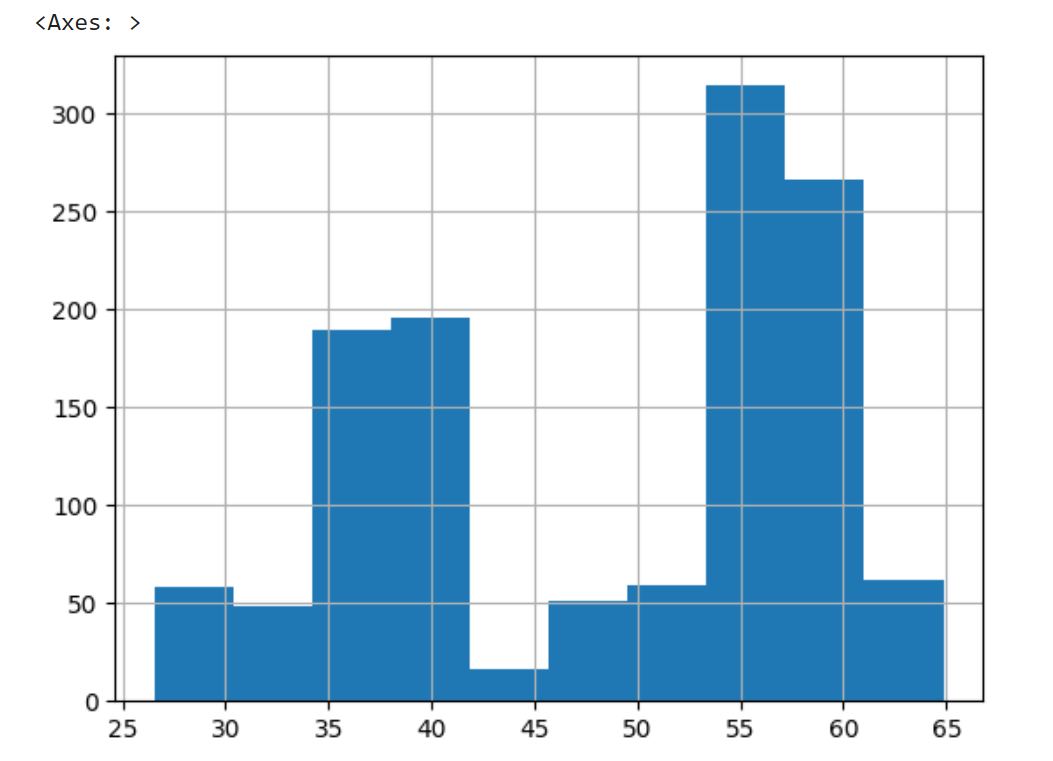
# Histogram:直方圖
df['open'].hist()
1
2
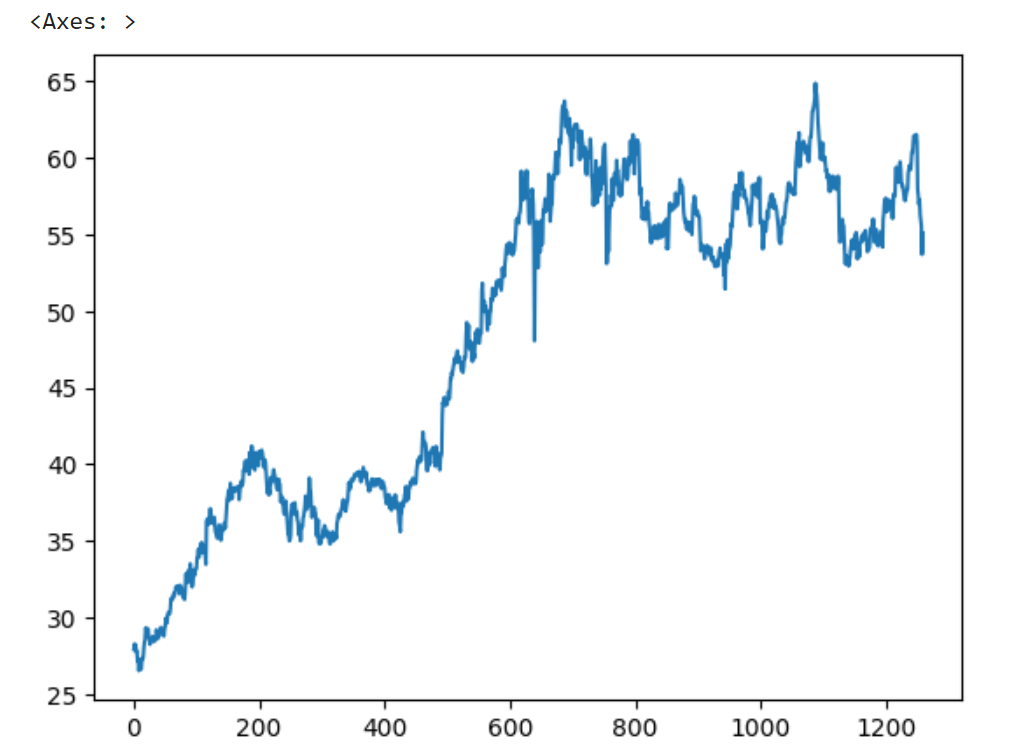
# Line Charts:折線圖
df['open'].plot()
1
2
3
4
5
6
7
8
9
10
11
12
13
14
15
16
17
18
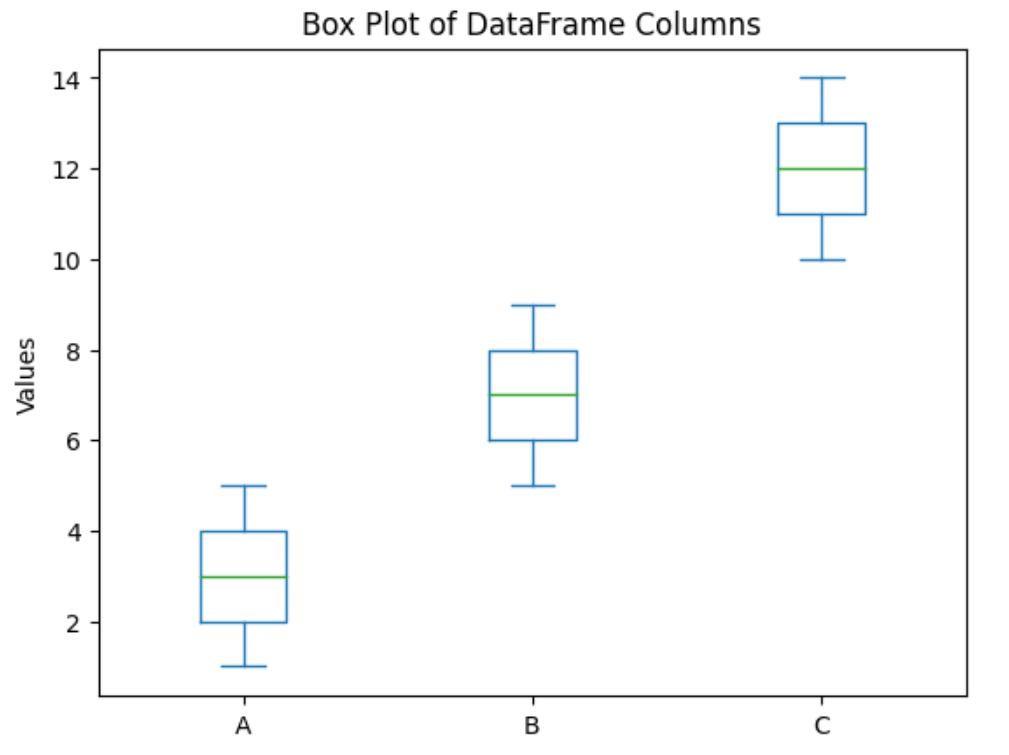
# box plot 箱線圖
import matplotlib.pyplot as plt
# Create a DataFrame
data = {
'A': [1, 2, 3, 4, 5],
'B': [5, 6, 7, 8, 9],
'C': [10, 11, 12, 13, 14]
}

df = pd.DataFrame(data)

# Plot a box plot of the DataFrame columns
df.plot.box()

# Display the plot
plt.title('Box Plot of DataFrame Columns')
plt.ylabel('Values')
plt.show()
1
2
3
4
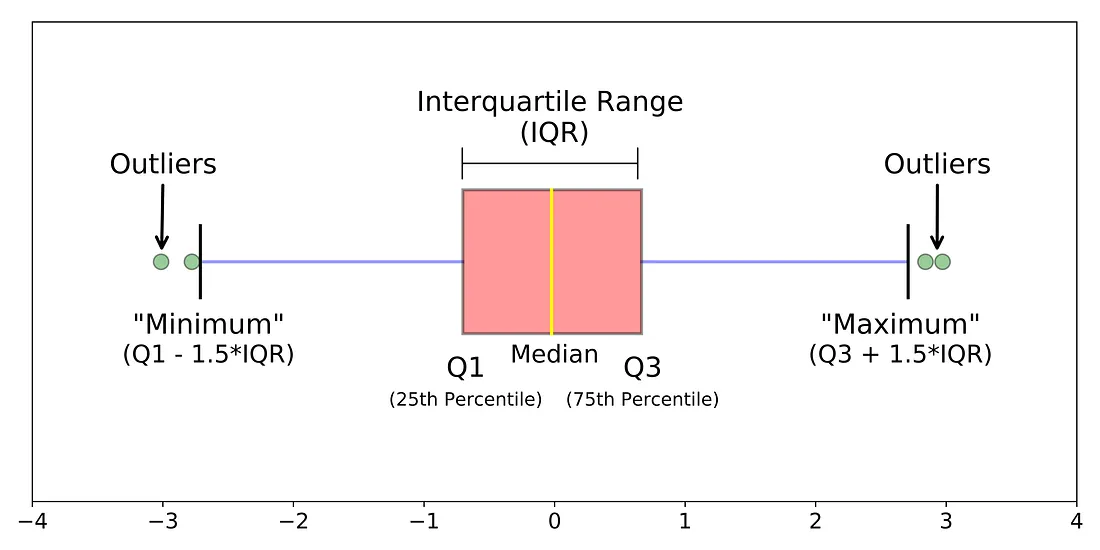
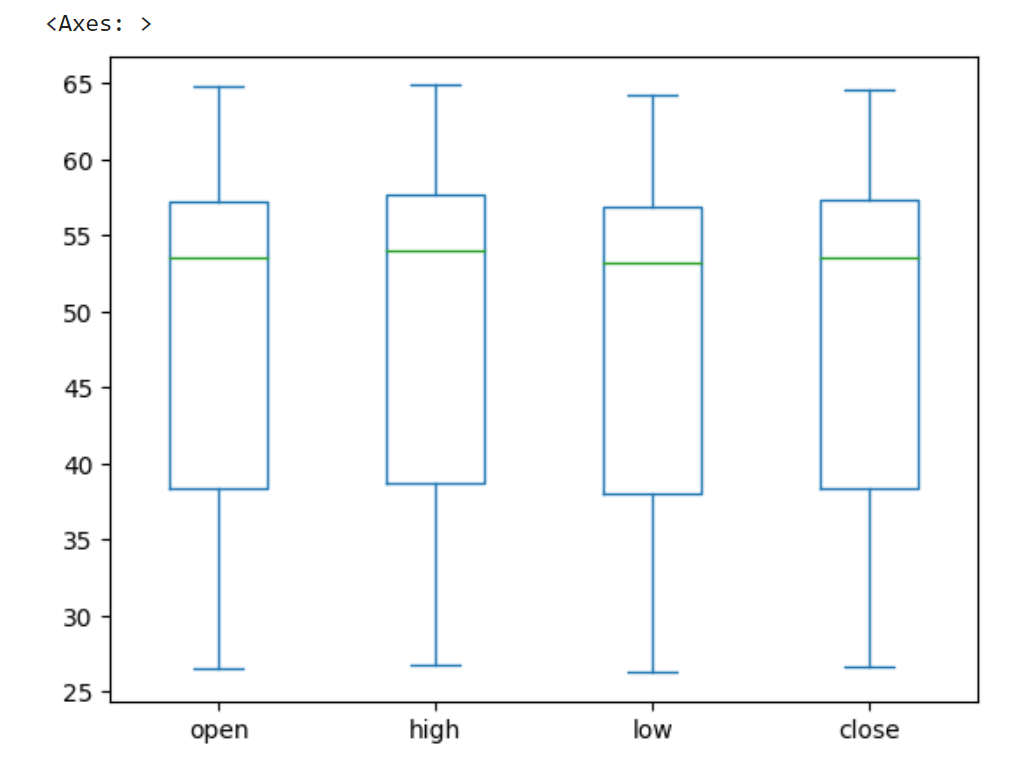
# box plot 箱線圖
import pandas as pd
df = pd.read_csv('https://raw.githubusercontent.com/lazyprogrammer/machine_learning_examples/master/tf2.0/sbux.csv')
df[['open', 'high', 'low', 'close']].plot.box()
1
2
3
4
5
6
7
8
9
10
11
12
13
14
15
16
17
18
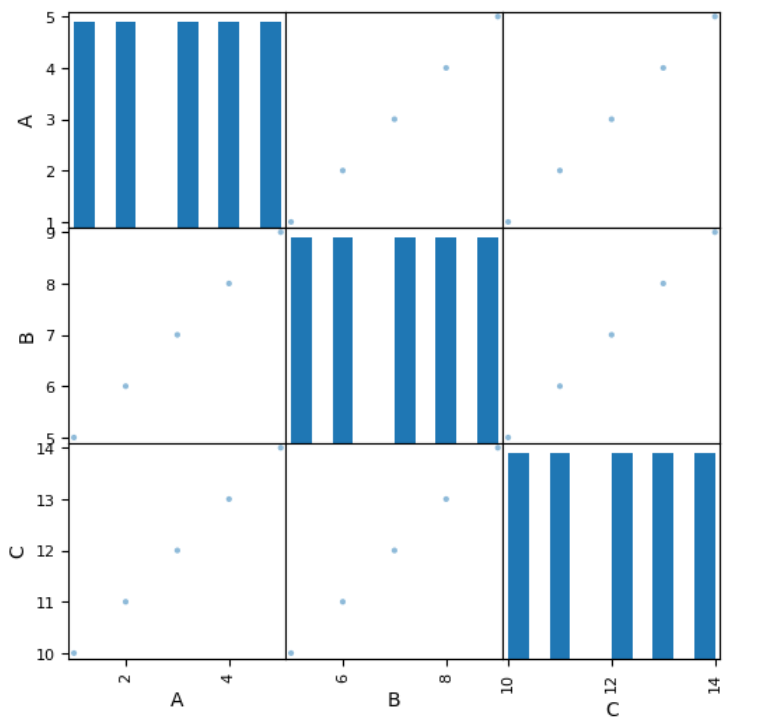
# scatter matrix 散點矩陣圖 example
# 對角 直方圖
# 兩兩數據對應關係
import pandas as pd
import matplotlib.pyplot as plt

# 建立一個包含多個變數的範例資料集
data = pd.DataFrame({
'A': [1, 2, 3, 4, 5],
'B': [5, 6, 7, 8, 9],
'C': [10, 11, 12, 13, 14]
})

# 繪製散佈矩陣圖
pd.plotting.scatter_matrix(data, figsize=(6, 6), diagonal='hist')

# 顯示圖形
plt.show()
1
2
3
4
5
6
7
8
9
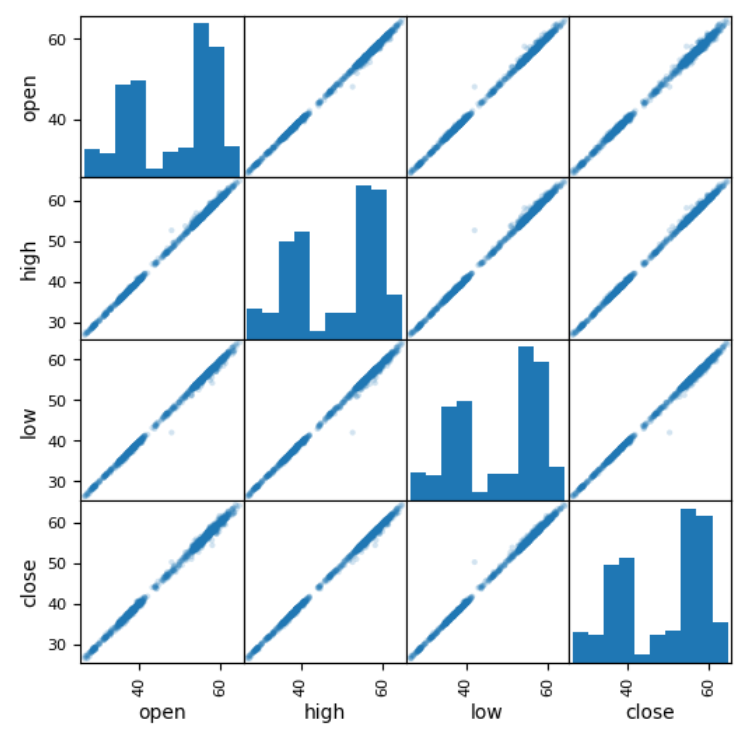
# scatter matrix 散點矩陣圖
# 對角 直方圖
# 數據統計摘要
# alpha 透明度
# figsize=(6,6) 圖像大小,inches (width, height)
import pandas as pd
df = pd.read_csv('https://raw.githubusercontent.com/lazyprogrammer/machine_learning_examples/master/tf2.0/sbux.csv')
from pandas.plotting import scatter_matrix
scatter_matrix(df[['open', 'high', 'low', 'close']], alpha=0.2, figsize=(6,6));

pandas Exercise

1
2
3
4
5
6
7
8
9
10
11
12
13
14
15
16
17
18
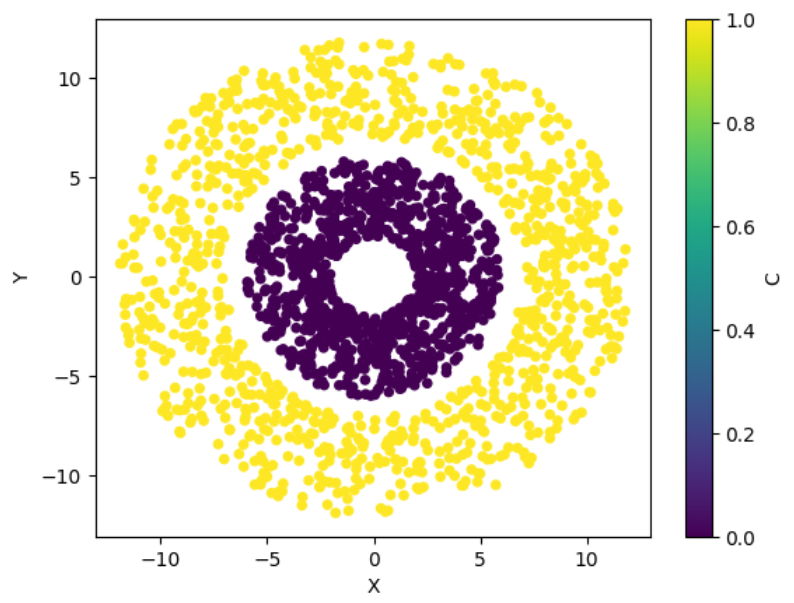
import numpy as np
import pandas as pd
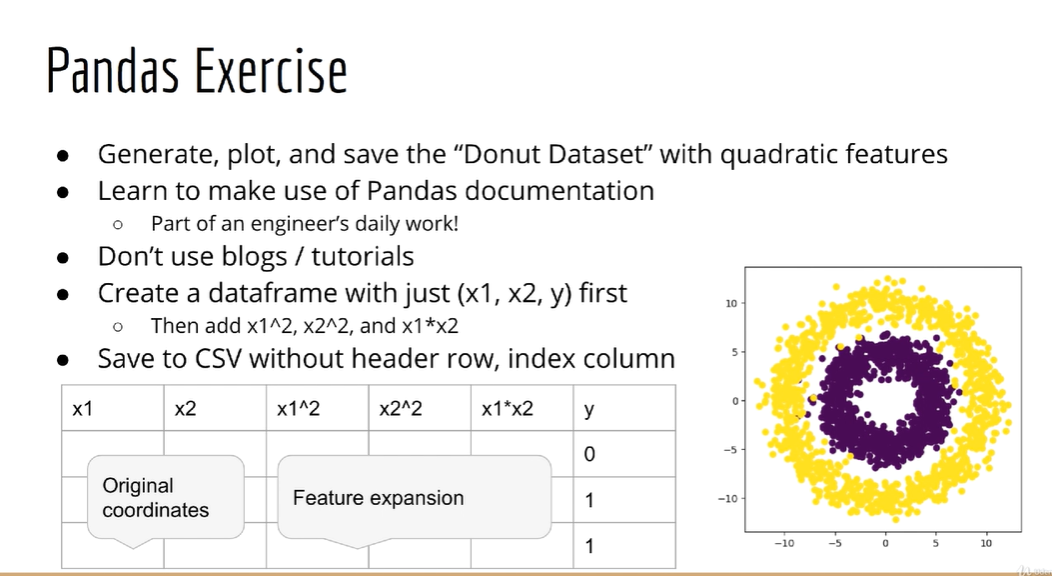
N = 2000
C1 = 1000

degrees = np.random.uniform(0, 2*np.pi, N)
R = np.concatenate((np.random.uniform(7, 12, C1),np.random.uniform(2, 6, C1)))
X = (R * np.cos(degrees))
Y = (R * np.sin(degrees))
C = np.zeros(N)
C[:C1] = 1

df = pd.DataFrame({'X':X, 'Y':Y, 'C':C})
# df.plot.scatter(x='X', y='Y', c='C')

df.to_csv('donut.csv')
df_donut = pd.read_csv('donut.csv')
df_donut.plot.scatter(x='X', y='Y', c='C')

Scipy

Adds functionality for statistics, singnal processing, computer vision
Standard normal(標準常態分佈) –> Multivarite normal(多變量常態分佈)
PDF(概率密度函数),CDF(累機分布函数)
Convolution(卷積):used in deep learning, computer vision, singnal processing and statistics

PDF and CDF

1
2
3
4
5
6
7
8
9
10
11
12
13
14
15
16
17
18
19
import numpy as np
import matplotlib.pyplot as plt
from scipy.stats import norm

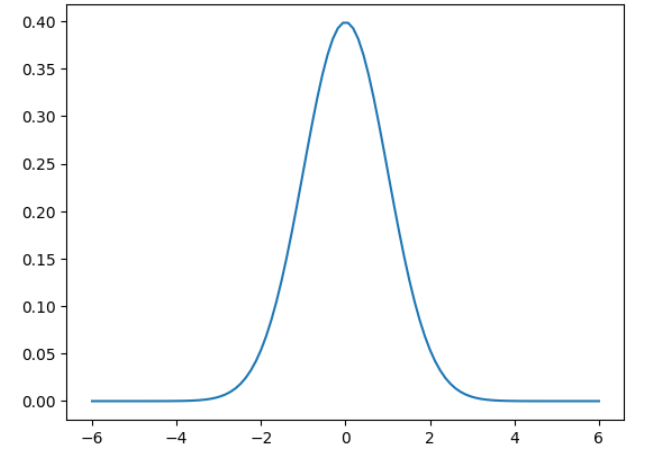
# show PDF
x = np.linspace(-6, 6, 100)
fx = norm.pdf(x, loc=0, scale=1)
plt.plot(x,fx)

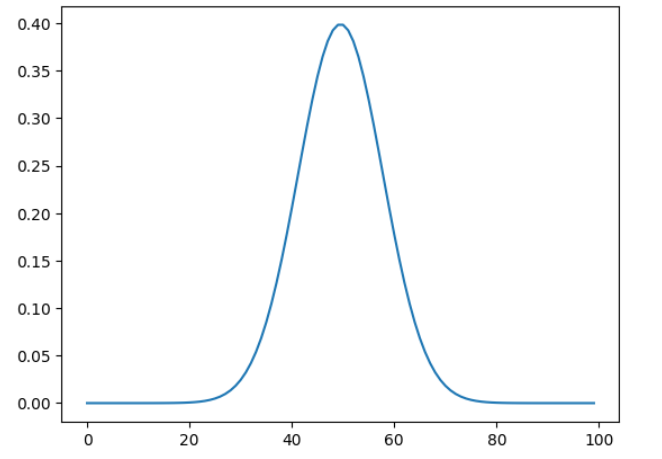
# 僅一個參數即是Y
plt.plot(fx)

# show CDF
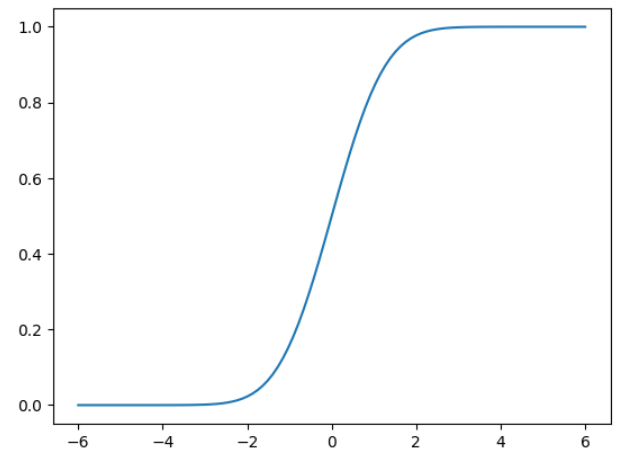
Fx = norm.cdf(x, loc=0, scale=1)
plt.plot(x,Fx)

# show log PDF
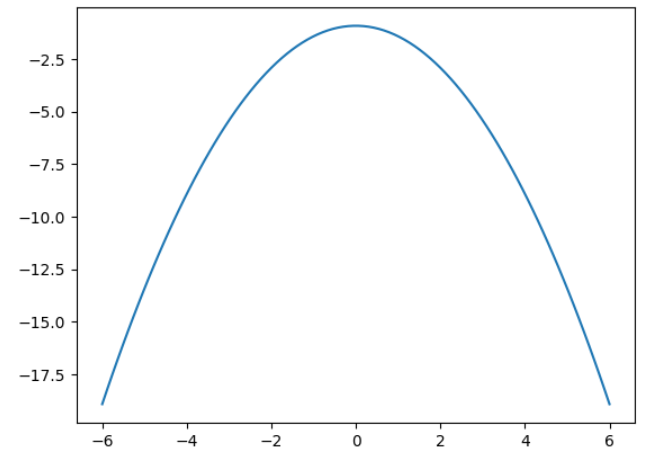
logfx = norm.logpdf(x, loc=0, scale=1)
plt.plot(x, logfx)

Convolution

1
2
3
4
5
6
7
8
9
10
11
12
13
14
15
16
17
18
19
20
21
22
23
24
from PIL import Image
import numpy as np
!wget https://github.com/lazyprogrammer/machine_learning_examples/raw/master/cnn_class/lena.png

im = Image.open('lena.png')
# 轉為灰階
gray = np.mean(im, axis=2)

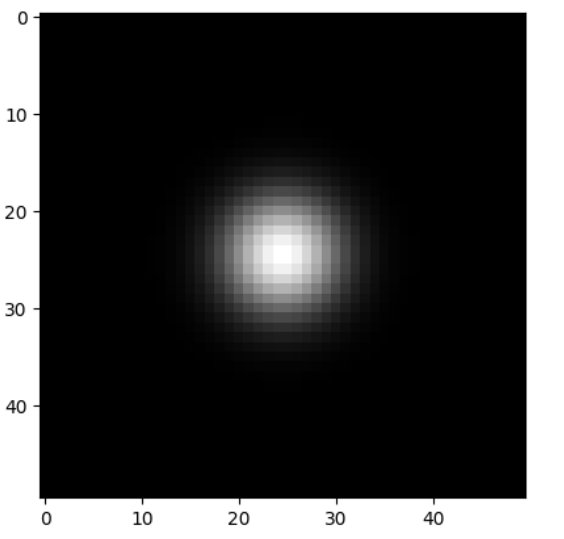
# 建立高斯濾波器
x = np.linspace(-6,6, 50)
fx = norm.pdf(x, loc=0, scale=1)
filt = np.outer(fx, fx)

#看濾波器,應是一個光點
plt.imshow(filt, cmap='gray')

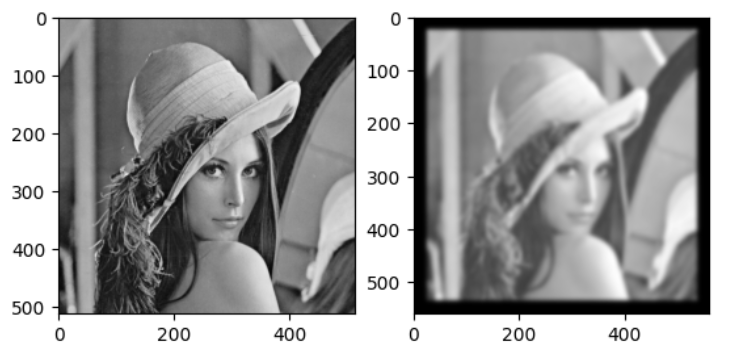
from scipy.signal import convolve2d
out = convolve2d(gray, filt)
# 產生一個兩隔的繪圖格的第一格
plt.subplot(1,2,1)
plt.imshow(gray, cmap='gray')
# 產生一個兩隔的繪圖格的第二格
plt.subplot(1,2,2)
plt.imshow(out, cmap='gray')

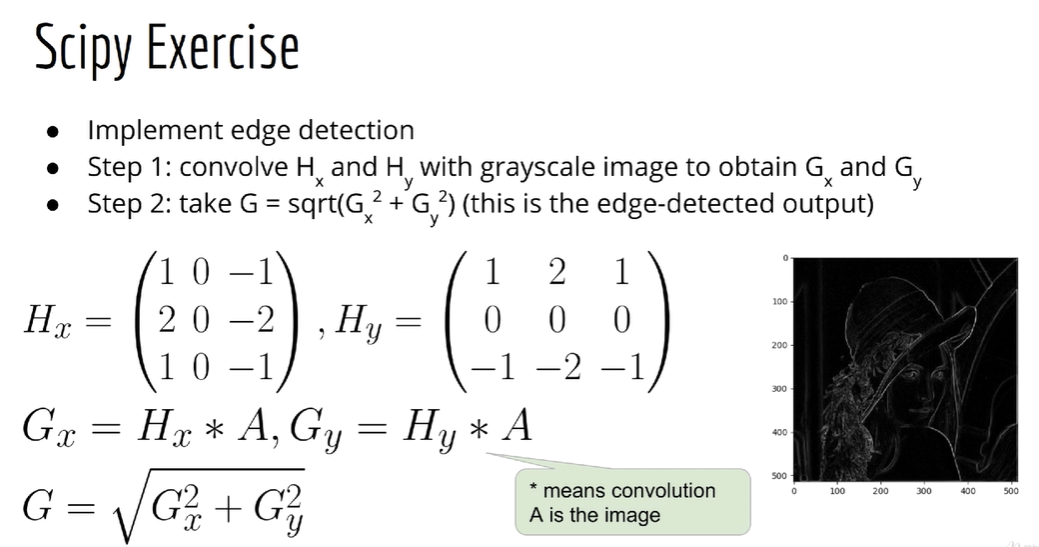
Scipy exercise

Ref