Chrome Extension

說明

chrome extension component

  • background scripts : event control
  • content scripts : change website page
  • options page
  • UI elements
    .crx
    +manifest file(manifest.json)

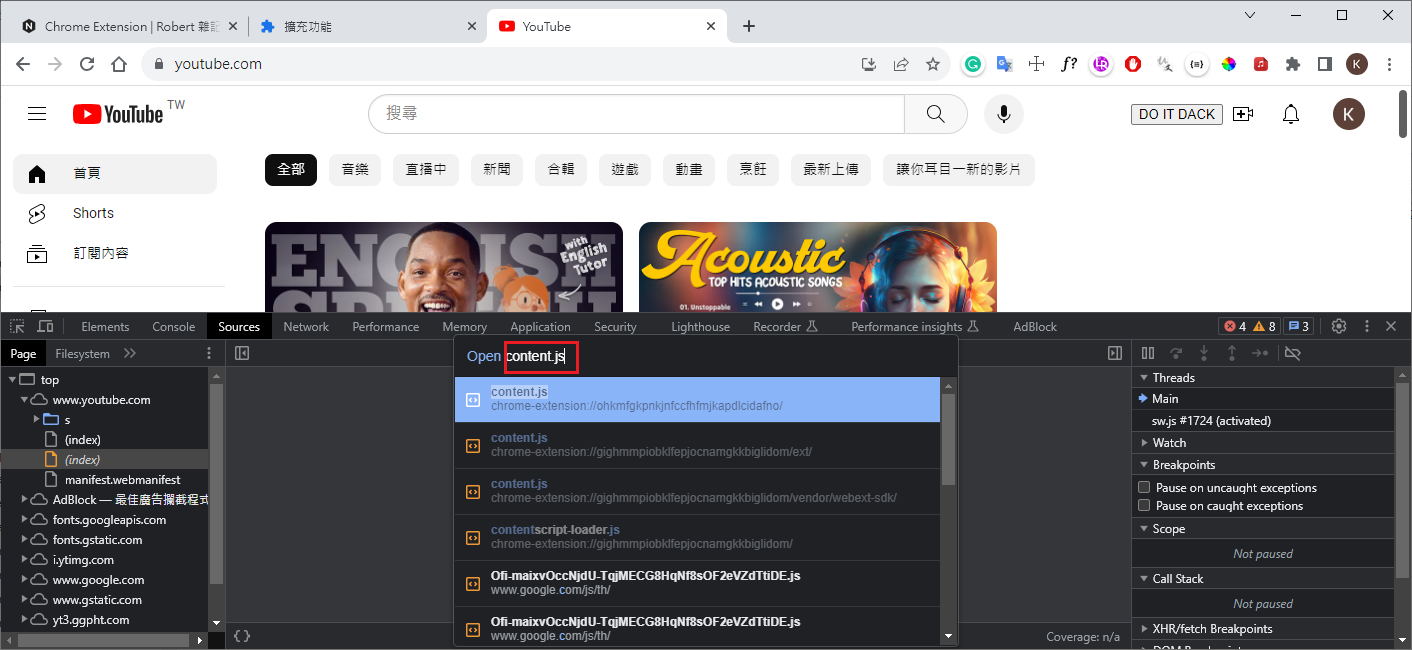
search source file

  • Source –> Ctrl + O : search file
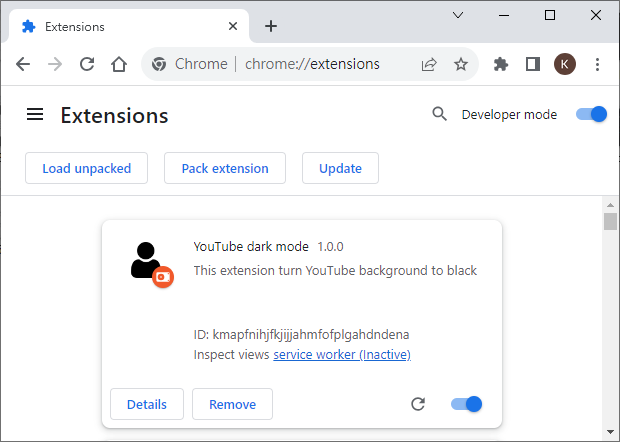
modify manifest.json name&description
1
2
3
4
5
6
7
8
9
10
11
12
13
14
15
16
17
18
19
20
21
22
23
24
25
26
27
28
29
30
{
"name": "YouTube dark mode",
"version": "1.0.0",
"description": "This extension turn YouTube background to black",
"manifest_version": 3,
"background": {
"service_worker": "background.js"
},
"content_scripts": [
{
"matches": ["https://*.youtube.com/*"],
"//": "排除某些執行 url",
"exclude_matches": ["https://*.youtube.com/watch*"],
"js": ["content.js"],
"run_at": "document_end"
}
],
"permissions": [
"bookmarks"
],
"icons": {
"16": "user.png",
"48": "user.png",
"128": "user.png"
},
"action": {
"default_title": "Created by Robert.",
"default_popup": "popup.html"
}
}

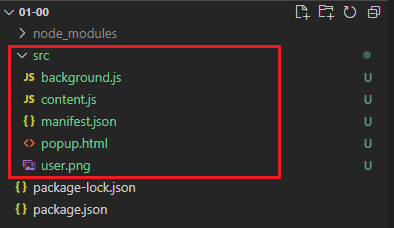
prepare for publish(move source to src,compress to .zip)
Extension other function

  • options_page
  • notifications
  • Context Menu

Extension using react warning

WARNING in asset size limit: The following asset(s) exceed the recommended size limit (244 KiB).

webpack.config.js change size
1
2
3
4
performance: {
maxEntrypointSize: 512000,
maxAssetSize: 512000,
},
webpack.config.js disable size check
1
2
3
performance: {
hints: false,
},

tool

vscode setup
basic for JavaScript
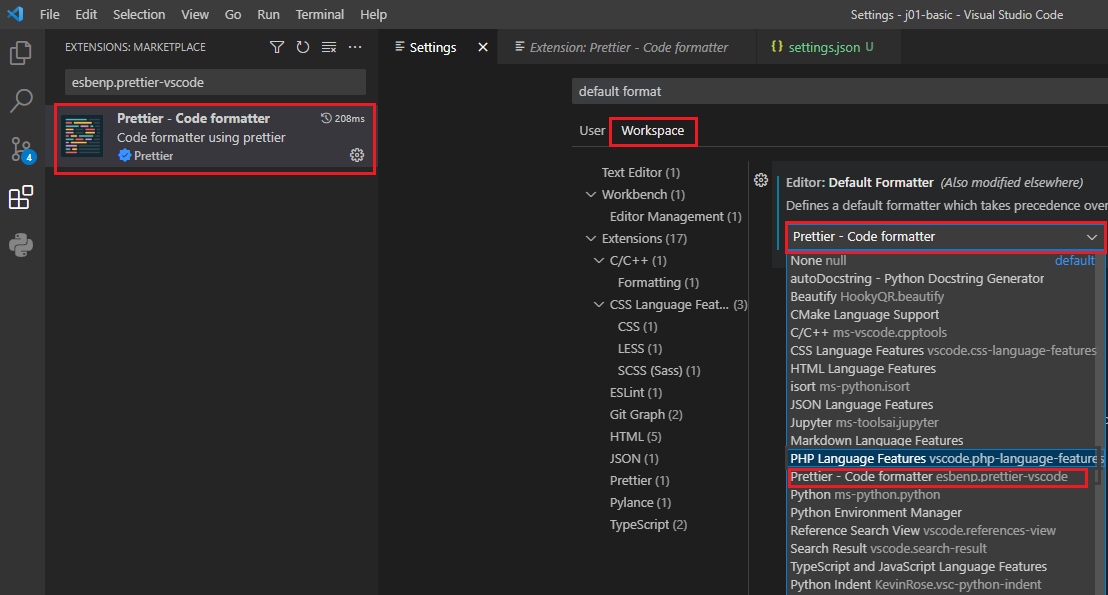
  • install Prettier - Code formatter

  • default format(Workspaces)

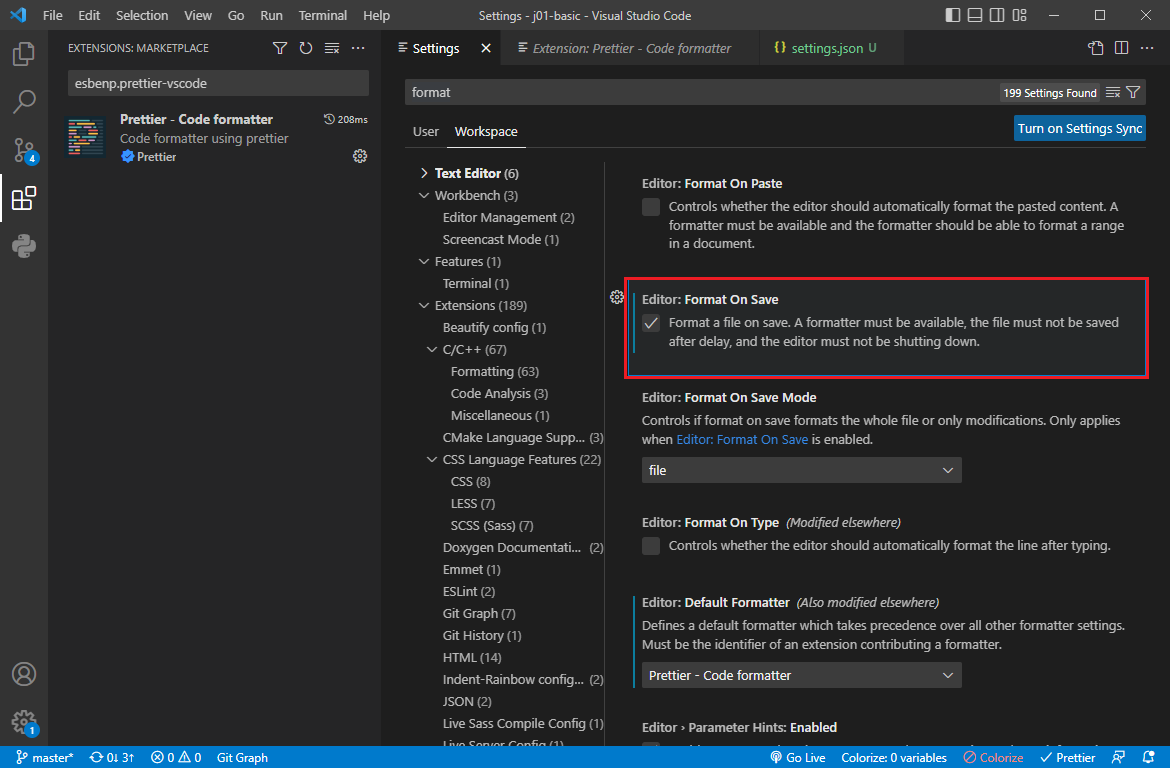
  • Format On Save

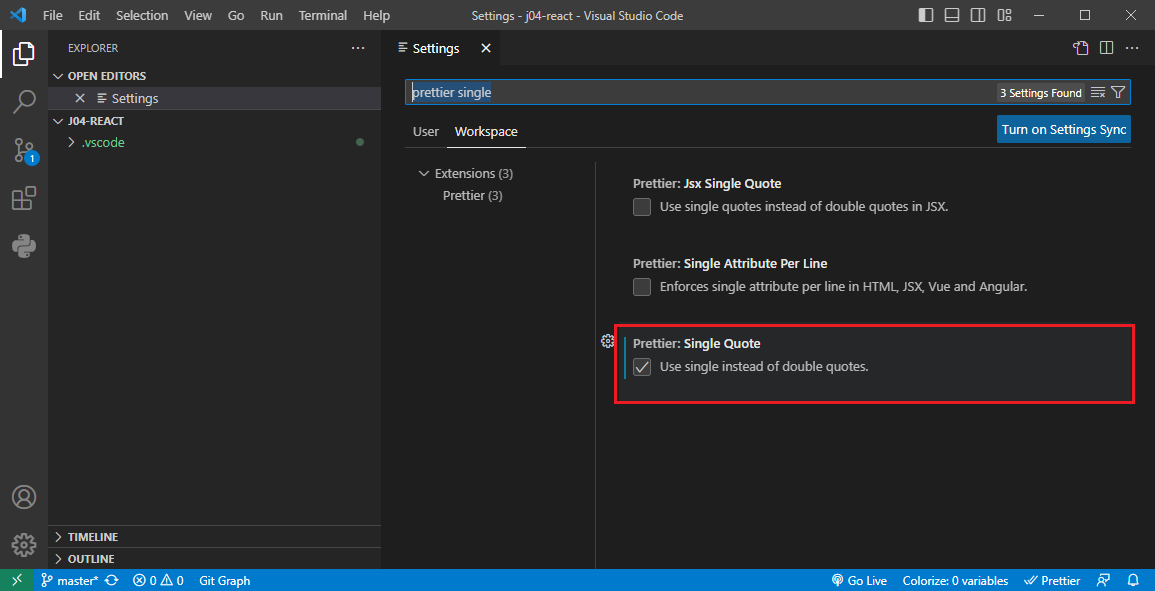
some for Rectc & TypeScript
  • prettier single quote

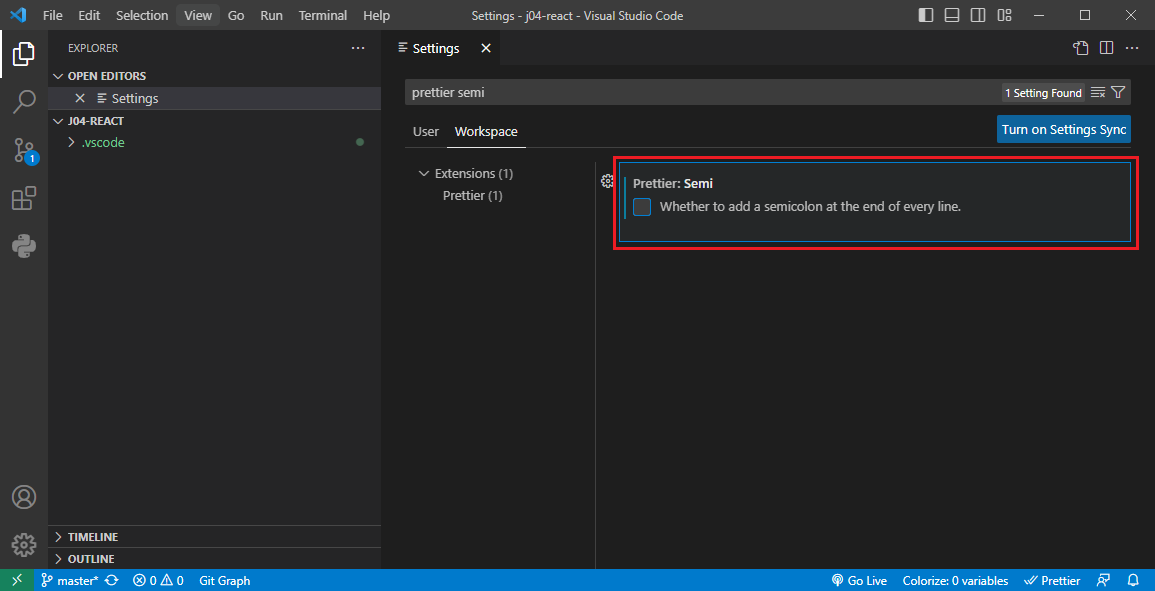
  • prettier semi

Function

version 2

manifest.json
1
2
3
4
5
6
7
8
9
10
11
12
13
14
15
16
17
18
19
20
21
22
23
24
25
26
27
28
29
30
31
32
33
34
35
36
37
38
{
"name": "__MSG_appName__",
"version": "1.0.0",
"description": "__MSG_appDescription__",
"manifest_version": 2,
"default_locale": "en",
"background": {
"scripts": ["background.js", "backgroundMessaging.js"],
"persistent": false
},
"content_scripts": [
{
"matches": ["https://*.youtube.com/*"],
"exclude_matches": ["https://*.youtube.com/watch*"],
"js": [
"content.js",
"contentMessaging.js",
"contentRequests.js"
],
"run_at": "document_end"
}
],
"permissions": [
"bookmarks",
"storage",
"tabs",
"https://api.github.com/"
],
"icons": {
"16": "darkIcon.png",
"48": "darkIcon.png",
"128": "darkIcon.png"
},
"browser_action": {
"default_title": "Created by Tomas, enjoy! :)",
"default_popup": "popup.html"
}
}

chrome storage(加入 storage 後,有時要移除再載入才會正常)

  • Storage areas
    • storage.local
    • storage.sync
manifest.json
1
2
3
4
5
6
7
8
9
10
11
12
13
14
15
16
17
18
19
20
21
22
23
24
25
26
27
28
29
30
31
{
"name": "YouTube dark mode",
"version": "1.0.0",
"description": "This extension turn YouTube background to black",
"manifest_version": 3,
"background": {
"service_worker": "background.js"
},
"content_scripts": [
{
"matches": ["https://*.youtube.com/*"],
"//": "排除某些執行 url",
"exclude_matches": ["https://*.youtube.com/watch*"],
"js": ["content.js"],
"run_at": "document_end"
}
],
"permissions": [
"bookmarks",
"storage"
],
"icons": {
"16": "user.png",
"48": "user.png",
"128": "user.png"
},
"action": {
"default_title": "Created by Robert.",
"default_popup": "popup.html"
}
}
content.js
1
2
3
4
5
6
7
8
9
10
11
12
13
14
15
16
17
18
19
20
21
22
23
24
25
26
27
28
29
30
31
32
33
34
35
36
37
38
39
40
41
42
43
44
45
46
47
48
49
50
51
52
53
54
55
56
57
58
59
60
61
62
window.onload = () => {
const button = document.createElement('button');
button.id = 'darkModeButton';
button.textContent = "DO IT DACK";

const input = document.createElement('input');
input.type = 'checkbox';
input.id = 'darkSetting'

// add button ,若使用 #buttons 最後不能顯示,可能是原程式蓋掉加入之button
// document.querySelector("#buttons").prepend(button);
document.querySelector("#end").prepend(button, input, 'Auto apply?');
button.addEventListener('click', () => {
chrome.storage.local.get(['enabled'], (result) => {
const isEnable = !result.enabled;
document.getElementById('darkSetting').checked = isEnable;
storeSetting();
})

enableDarkMode(true)
});

// save dark mode to chrome storage
input.addEventListener('click', () => storeSetting())

// save dark mode to chrome storage
checkSetting();
}

// save dark mode to chrome storage
function checkSetting() {
chrome.storage.local.get(['enabled', 'color'], (result) => {
const isEnable = result.enabled
console.log(isEnable)
console.log(result.color)

document.getElementById('darkSetting').checked = isEnable;
if (isEnable) {
enableDarkMode(true);
}
})
}

// save dark mode to chrome storage
function storeSetting() {
const isEnabled = document.getElementById('darkSetting').checked;
const setting = { enabled: isEnabled, color:'purple'} ;

chrome.storage.local.set(setting, () => {
console.log('store', setting);
})
enableDarkMode(isEnabled);
}

function enableDarkMode(flag) {
if (flag) {
document.getElementsByTagName('ytd-app')[0].style.backgroundColor= 'black';
}
else {
document.getElementsByTagName('ytd-app')[0].style.backgroundColor= '';
}
}

script comminication/message passing

manifest.json
1
2
3
4
5
6
7
8
9
10
11
12
13
14
15
16
17
18
19
20
21
22
23
24
25
26
27
28
29
30
31
32
33
34
35
36
37
{
"name": "YouTube dark mode",
"version": "1.0.0",
"description": "This extension turn YouTube background to black",
"manifest_version": 3,
"background": {
"service_worker": "background.js",
"//": "background.js support import",
"type": "module"
},
"content_scripts": [
{
"matches": ["https://*.youtube.com/*"],
"//": "排除某些執行 url",
"exclude_matches": ["https://*.youtube.com/watch*"],
"js": [
"content.js",
"contentMessaging.js"
],
"run_at": "document_end"
}
],
"permissions": [
"bookmarks",
"storage",
"tabs"
],
"icons": {
"16": "user.png",
"48": "user.png",
"128": "user.png"
},
"action": {
"default_title": "Created by Robert.",
"default_popup": "popup.html"
}
}
background.js
1
2
3
4
5
6
7
8
9
10
11
12
13
14
15
import * as message from "./backgroundMessaging.js"

chrome.runtime.onInstalled.addListener((tab) => {
console.log(tab)
console.log('Extension installed')
})

chrome.bookmarks.onCreated.addListener(() => {
console.log('Bookmark saved')
})

// 不需要有此 function
// chrome.action.onClicked.addListener( () => {
// console.log('chrome action click')
// })
backgroundMessaging.js
1
2
3
4
5
6
7
8
9
10
11
12
13
14
15
16
17
18
// chrome.bookmarks.onMoved.addListener(() => {
// console.log('Bookmark moved')
// })
chrome.runtime.onMessage.addListener((message, sender, sendResponse) => {
console.log('message', message);
console.log('sender',sender);
sendResponse({ content: "background response" });
});


chrome.bookmarks.onMoved.addListener(() => {
// send to active windows
chrome.tabs.query({ active: true, currentWindow: true},
tabs => {
chrome.tabs.sendMessage(tabs[0].id, {name: 'Robert'});
}
);
});
contentMessaging.js
1
2
3
4
5
6
7
8
9
10
11
12
13
14
15
16
17
18
// window.onload(alert('I loaded'));

window.onload(testMessage());

function testMessage() {
chrome.runtime.sendMessage(
{ payload: "Hellow from a content" },
// backback function for receive side
(response) => {
console.log(response);
}
);
}

chrome.runtime.onMessage.addListener((message, sender) => {
console.log('message', message);
console.log('sender',sender);
});
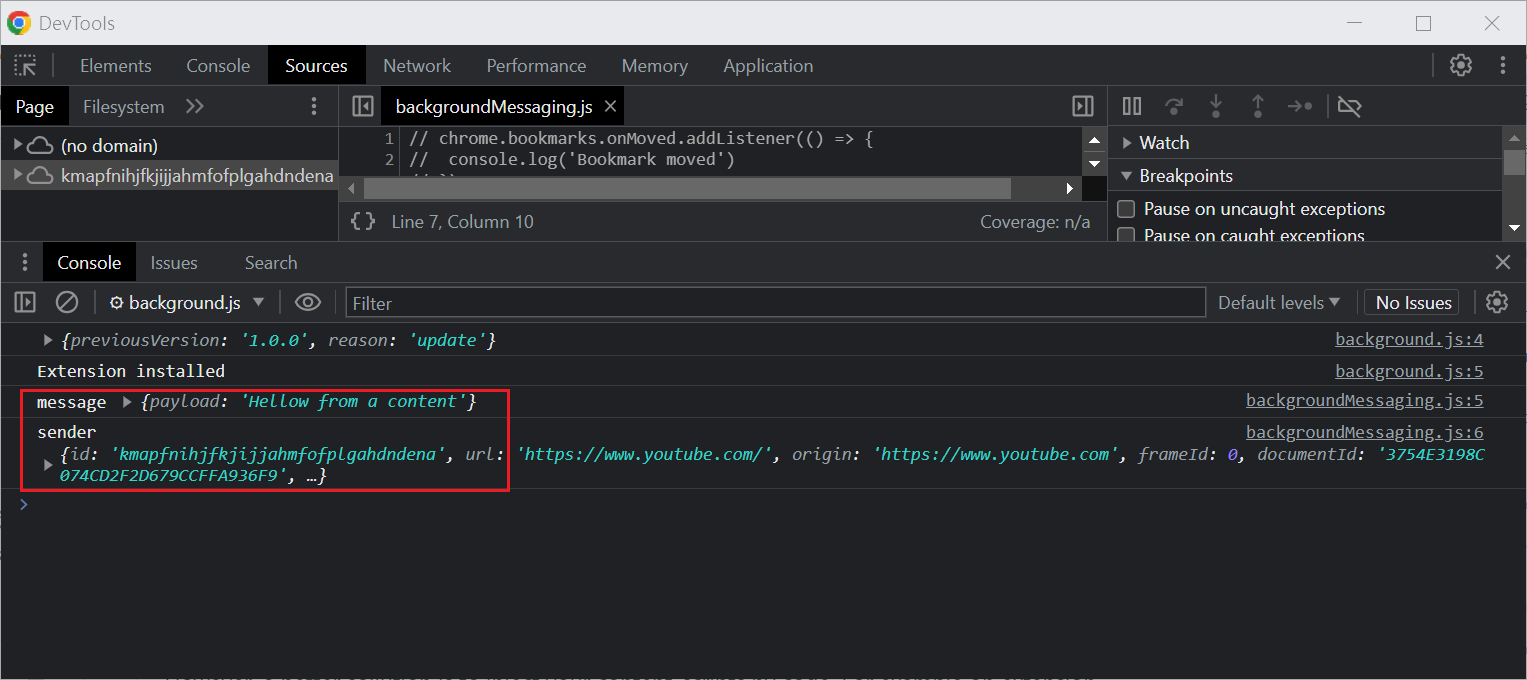
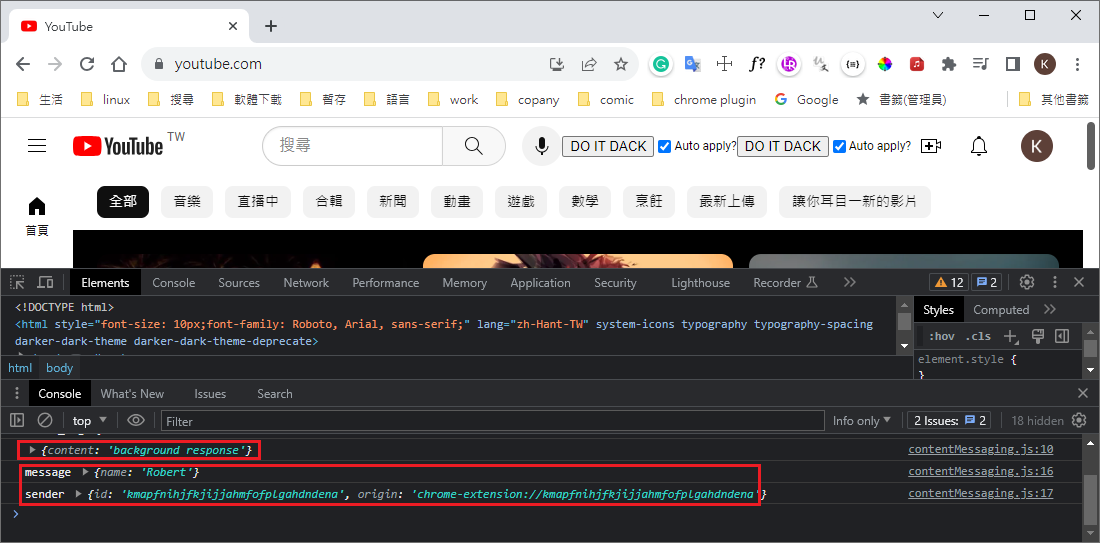
result
  • reload extension
  • reflash YouTube page
  • move bookmark

cross-origin http request(XHR)

manifest.json
1
2
3
4
5
6
7
8
9
10
11
12
13
14
15
16
17
18
19
20
21
22
23
24
25
26
27
28
29
30
31
32
33
34
35
36
37
38
39
{
"name": "YouTube dark mode",
"version": "1.0.0",
"description": "This extension turn YouTube background to black",
"manifest_version": 3,
"background": {
"service_worker": "background.js",
"//": "background.js support import",
"type": "module"
},
"content_scripts": [
{
"matches": ["https://*.youtube.com/*"],
"//": "排除某些執行 url",
"exclude_matches": ["https://*.youtube.com/watch*"],
"js": [
"content.js",
"contentMessaging.js",
"contentRequests.js"
],
"run_at": "document_end"
}
],
"permissions": [
"bookmarks",
"storage",
"tabs"
],
"host_permissions": ["https://api.github.com/"],
"icons": {
"16": "user.png",
"48": "user.png",
"128": "user.png"
},
"action": {
"default_title": "Created by Robert.",
"default_popup": "popup.html"
}
}
contentRequests.js
1
2
3
4
5
6
7
8
9
10
11
12
13
14
15
16
17
18
19
20
21
22
23
24
25
26
27
28
29
30
31
32
33
34
35
// nee github api permission(manifest.json
// "host_permissions": ["https://api.github.com"],

const requestSender = new XMLHttpRequest()

requestSender.onreadystatechange = apiHandler;


// 0 UNSENT 客戶端已被建立,但 open() 方法尚未被呼叫。
// 1 OPENED open() 方法已被呼叫。
// 2 HEADERS_RECEIVED send() 方法已被呼叫,而且可取得 header 與狀態。
// 3 LOADING 回應資料下載中,此時 responseText 會擁有部分資料。
// 4 DONE 完成下載操作。
function apiHandler(response) {
if (requestSender.readyState === 4 && requestSender.status === 200) {
// console.log(response)
console.log(response.target.response)
}
}

// sync
// requestSender.open('GET', 'https://api.github.com/users/peter', true);
// requestSender.send();
//
// requestSender.open('GET', 'https://api.github.com/users/tomas', true);
// requestSender.send();
// --> response tomas

// async
requestSender.open('GET', 'https://api.github.com/users/peter', false);
requestSender.send();

requestSender.open('GET', 'https://api.github.com/users/tomas', false);
requestSender.send();
// --> response peter and tomas
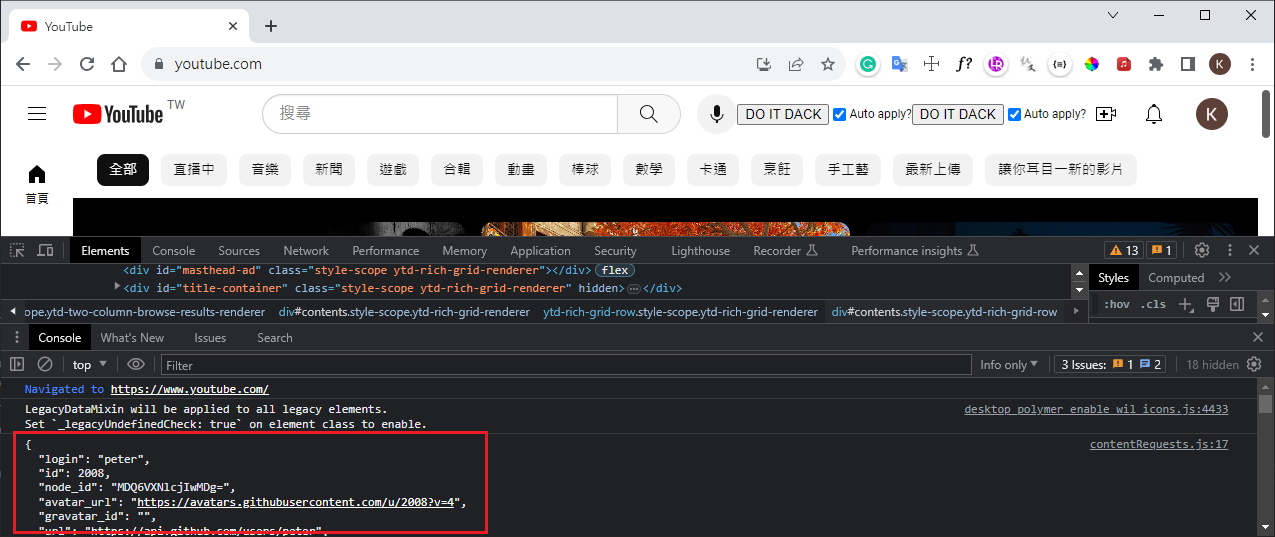
result

internationalization(localization)

manifest.json
1
2
3
4
5
6
7
8
9
10
11
12
13
14
15
16
17
18
19
20
21
22
23
24
25
26
27
28
29
30
31
32
33
34
35
36
37
38
39
40
{
"name": "__MSG_appName__",
"version": "1.0.0",
"description": "__MSG_appDescription__",
"manifest_version": 3,
"default_locale": "en",
"background": {
"service_worker": "background.js",
"//": "background.js support import",
"type": "module"
},
"content_scripts": [
{
"matches": ["https://*.youtube.com/*"],
"//": "排除某些執行 url",
"exclude_matches": ["https://*.youtube.com/watch*"],
"js": [
"content.js",
"contentMessaging.js",
"contentRequests.js"
],
"run_at": "document_end"
}
],
"permissions": [
"bookmarks",
"storage",
"tabs"
],
"host_permissions": ["https://api.github.com/"],
"icons": {
"16": "user.png",
"48": "user.png",
"128": "user.png"
},
"action": {
"default_title": "Created by Robert.",
"default_popup": "popup.html"
}
}
add message for English and Traditional Chinese
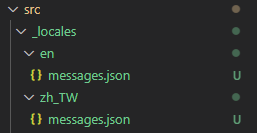
_locales/en/messages.json
1
2
3
4
5
6
7
8
9
10
11
{
"appName": {
"message": "YouTube dark mode"
},
"appDescription": {
"message": "This extension turn YouTube background to black"
},
"enableDarkModeText":{
"message": "DO IT DARK"
}
}
_locales/zh_TW/messages.json
1
2
3
4
5
6
7
8
9
10
11
{
"appName": {
"message": "YouTube 深色模式"
},
"appDescription": {
"message": "此擴展將 YouTube 背景變成黑色"
},
"enableDarkModeText":{
"message": "深色模式"
}
}
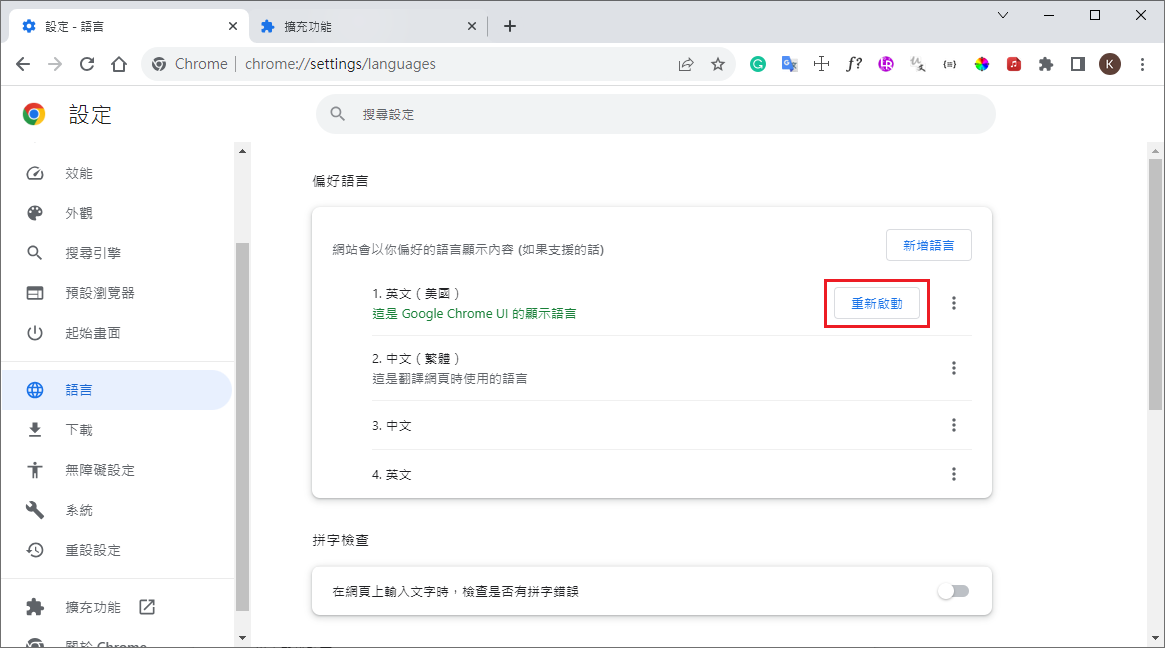
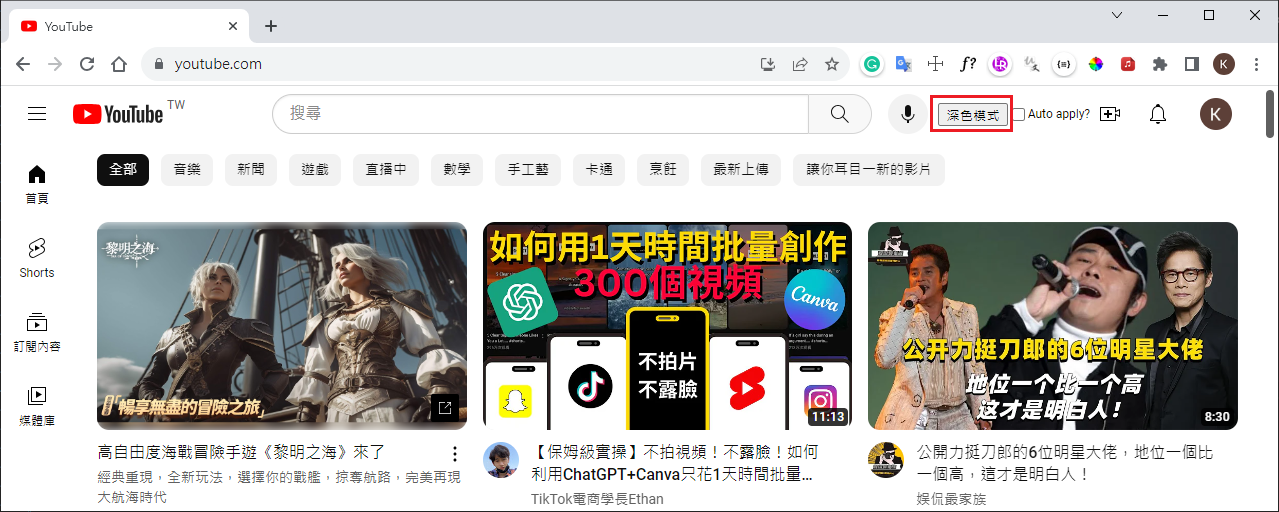
reload extension(default Traditional Chinese)
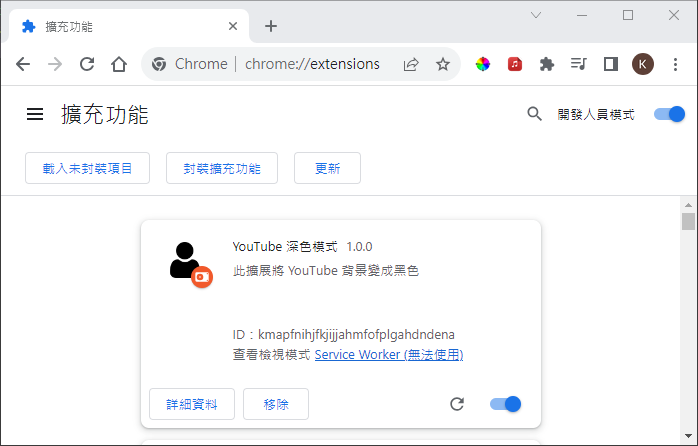
change language to english then reload extension
change button text(content.js)
1
2
3
4
5
6
7
8
9
10
11
12
13
14
15
16
17
18
19
20
21
22
23
24
25
26
27
28
29
window.onload = () => {
const button = document.createElement('button');
button.id = 'darkModeButton';
// button.textContent = "DO IT DACK";
button.textContent = chrome.i18n.getMessage("enableDarkModeText");

const input = document.createElement('input');
input.type = 'checkbox';
input.id = 'darkSetting'

// add button ,若使用 #buttons 最後不能顯示,可能是原程式蓋掉加入之button
// document.querySelector("#buttons").prepend(button);
document.querySelector("#end").prepend(button, input, 'Auto apply?');
button.addEventListener('click', () => {
chrome.storage.local.get(['enabled'], (result) => {
const isEnable = !result.enabled;
document.getElementById('darkSetting').checked = isEnable;
storeSetting();
})

enableDarkMode(true)
});

// save dark mode to chrome storage
input.addEventListener('click', () => storeSetting())

// save dark mode to chrome storage
checkSetting();
}

fix show 2 “DO IT DARK” button

contentMessaging.js
1
2
3
4
5
6
7
8
9
10
11
12
13
14
15
16
17
18
19
20
21
// window.onload(alert('I loaded'));

// call window.onload twince ,show 2 "DO IT DARK" button
// window.onload(testMessage());
testMessage()

function testMessage() {
chrome.runtime.sendMessage(
{ payload: "Hellow from a content" },
// backback function for receive side
(response) => {
// console.log(response);
;
}
);
}

chrome.runtime.onMessage.addListener((message, sender) => {
console.log('message', message);
console.log('sender',sender);
});

TypeScript build

install TypeScript module
1
2
# install TypeScript
npm install typescript --save-dev
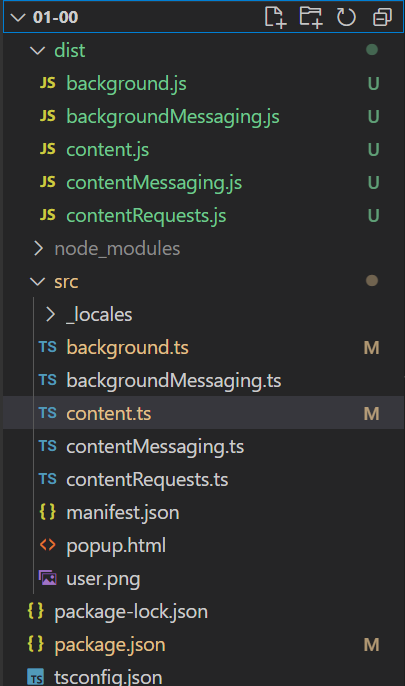
change all .js files to .ts + fix some typescript error
background.ts
1
2
3
4
5
6
7
8
9
10
11
12
13
14
15
16
17
18
// import * as message from "./backgroundMessaging.js"
// typescript fix
importScripts("./backgroundMessaging.js");


chrome.runtime.onInstalled.addListener((tab) => {
console.log(tab)
console.log('Extension installed')
})

chrome.bookmarks.onCreated.addListener(() => {
console.log('Bookmark saved')
})

// 不需要有此 function
// chrome.action.onClicked.addListener( () => {
// console.log('chrome action click')
// })
content.ts
1
2
3
4
5
6
7
8
9
10
11
12
13
14
15
16
17
18
19
20
21
22
23
24
25
26
27
28
29
30
31
32
33
34
35
36
37
38
39
40
41
42
43
44
45
46
47
48
49
50
51
52
53
54
55
56
57
58
59
60
61
62
63
64
65
66
67
68
69
70
71
72
window.onload = () => {
const button = document.createElement('button');
button.id = 'darkModeButton';
// button.textContent = "DO IT DACK";
button.textContent = chrome.i18n.getMessage("enableDarkModeText");

const input = document.createElement('input');
input.type = 'checkbox';
input.id = 'darkSetting'

// add button ,若使用 #buttons 最後不能顯示,可能是原程式蓋掉加入之button
// document.querySelector("#buttons").prepend(button);
document.querySelector("#end").prepend(button, input, 'Auto apply?');
button.addEventListener('click', () => {
chrome.storage.local.get(['enabled'], (result) => {
const isEnable = !result.enabled;
// typescript fix
const settingCheckbox = document.getElementById('darkSetting') as HTMLInputElement;
// (document.getElementById('darkSetting') as HTMLInputElement).checked = isEnable;
settingCheckbox.checked = isEnable;
storeSetting();
})

enableDarkMode(true)
});

// save dark mode to chrome storage
input.addEventListener('click', () => storeSetting())

// save dark mode to chrome storage
checkSetting();
}

// save dark mode to chrome storage
function checkSetting() {
chrome.storage.local.get(['enabled', 'color'], (result) => {
const isEnable = result.enabled
// console.log(isEnable)
// console.log(result.color)

// typescript fix
const settingCheckbox = document.getElementById('darkSetting') as HTMLInputElement;
settingCheckbox.checked = isEnable;
if (isEnable) {
enableDarkMode(true);
}
})
}

// save dark mode to chrome storage
function storeSetting() {
const settingCheckbox = document.getElementById('darkSetting') as HTMLInputElement;
const isEnabled = settingCheckbox.checked;
const setting = { enabled: isEnabled, color:'purple'} ;

chrome.storage.local.set(setting, () => {
// console.log('store', setting);
;
})
enableDarkMode(isEnabled);
}

function enableDarkMode(flag) {
// typescript fix
const websiteBody = document.getElementsByTagName('ytd-app')[0] as HTMLElement;
if (flag) {
websiteBody.style.backgroundColor= 'black';
}
else {
websiteBody.style.backgroundColor= '';
}
}
add tsconfig.json
1
2
3
4
5
6
7
8
{
"compilerOptions": {
"outDir": "./dist",
"allowJs": true,
"target": "es5"
},
"include": ["./src/**/*"]
}
add build command - package.json
1
2
3
4
5
6
7
8
9
10
11
12
13
14
15
16
17
18
19
{
"name": "01-xx",
"version": "1.0.0",
"description": "1st chrome ",
"main": "index.js",
"scripts": {
"test": "echo \"Error: no test specified\" && exit 1",
"build": "tsc"
},
"author": "",
"license": "ISC",
"dependencies": {
"@types/chrome": "^0.0.243",
"types": "^0.1.1"
},
"devDependencies": {
"typescript": "^5.1.6"
}
}
build typescript
1
npm run build

Webpack

1
2
3
4
5
# have some issue - just list need instal package
npm install webpack webpack-cli --save-dev
npm install glob --save-dev
npm install ts-loader --save-dev
npm install copy-webpack-plugin --save-dev

Start

setup

  • install node.js

  • chrome://extensions –> on developer mode(開發人員模式)

1st project

init + install type
1
2
3
4
5
6
npm init
npm install types @types/chrome

# install yarn by npm
npm install --global yarn
yarn --version
add manifest.json
1
2
3
4
5
6
{
"name": "My first extension",
"version": "1.0.0",
"description": "This is my very first coll extension",
"manifest_version": 3
}
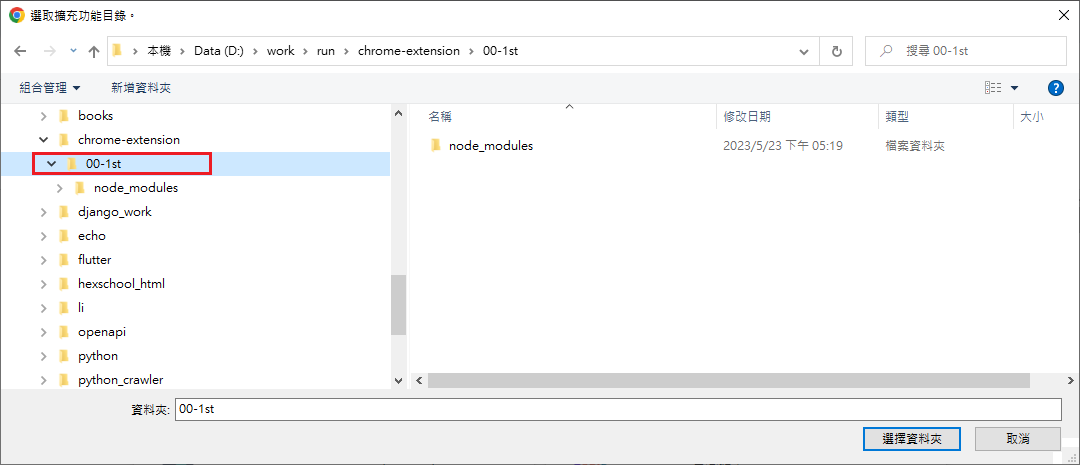
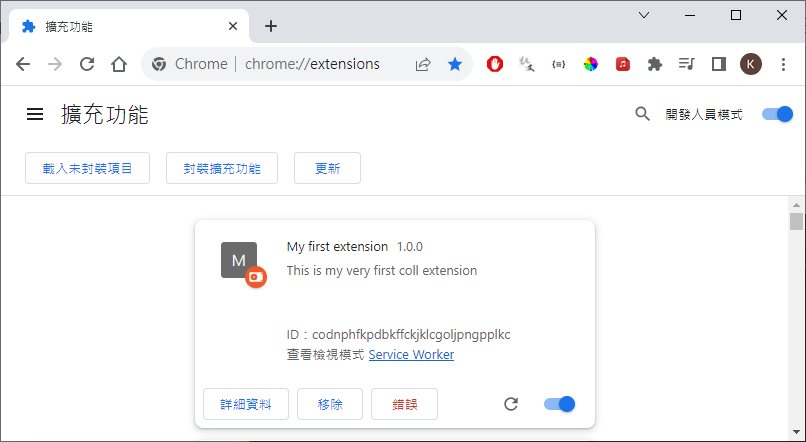
load chrome extension from local
add background scripts - for event control
manifest.json
1
2
3
4
5
6
7
8
9
{
"name": "My first extension",
"version": "1.0.0",
"description": "This is my very first coll extension",
"manifest_version": 3,
"background": {
"service_worker": "background.js"
}
}
add background.js
1
2
3
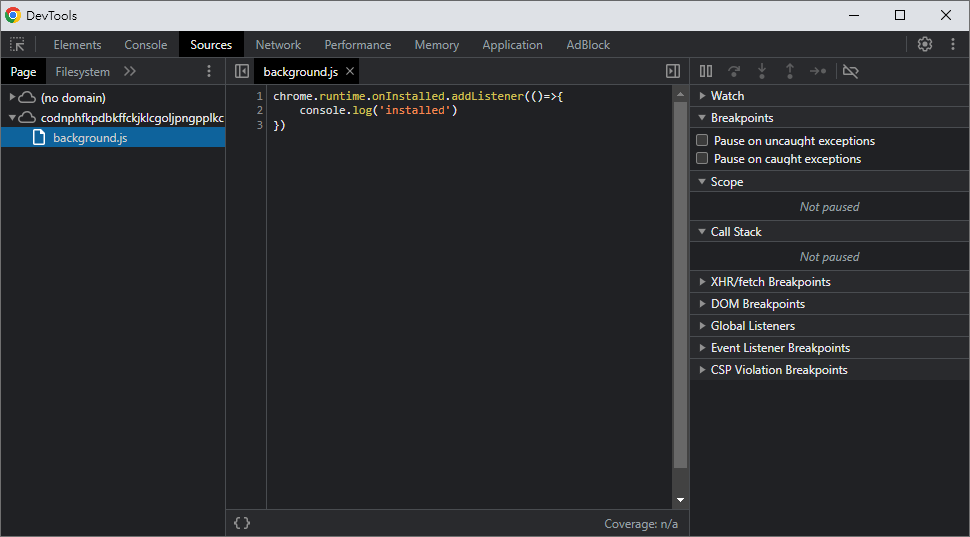
chrome.runtime.onInstalled.addListener(()=>{
console.log('installed')
})
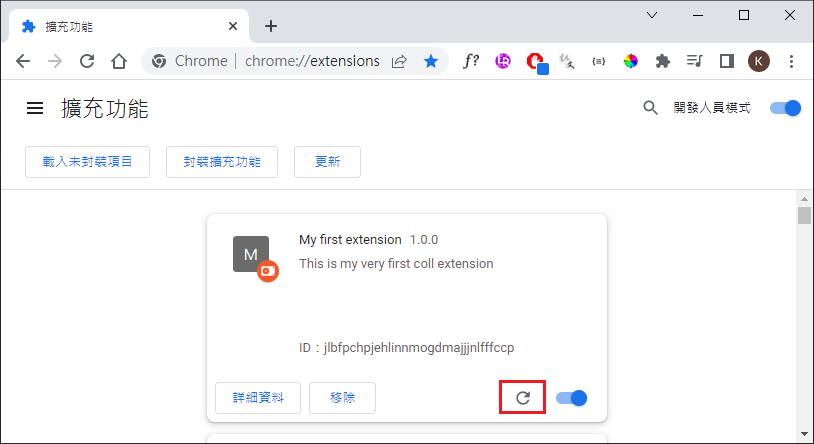
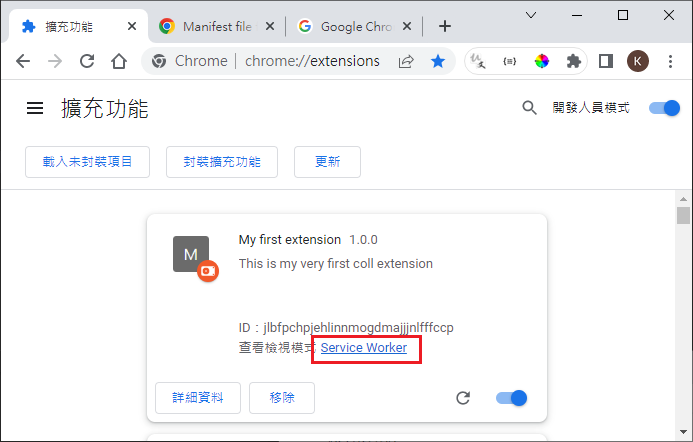
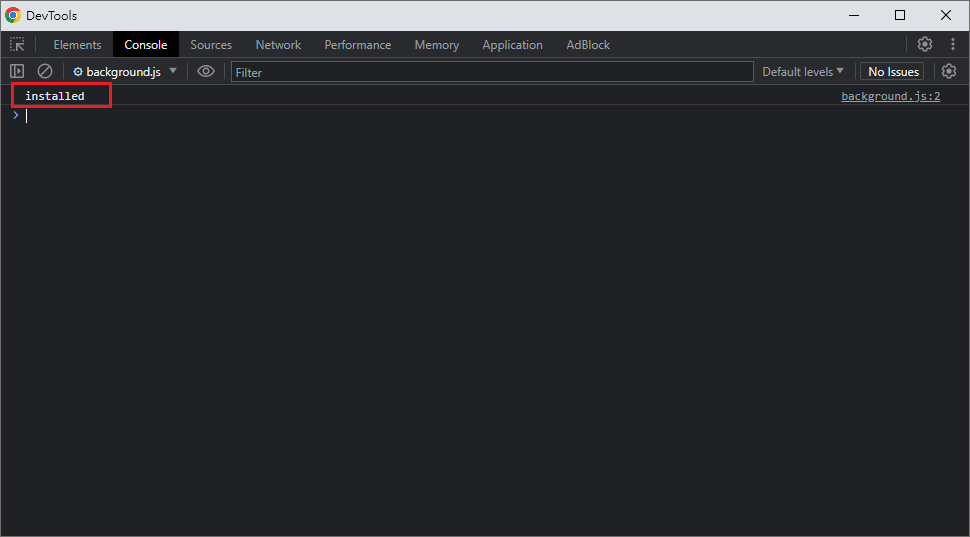
reload and see result
add bookmarks event
background.js
1
2
3
4
5
6
7
chrome.runtime.onInstalled.addListener(() => {
console.log('installed')
})

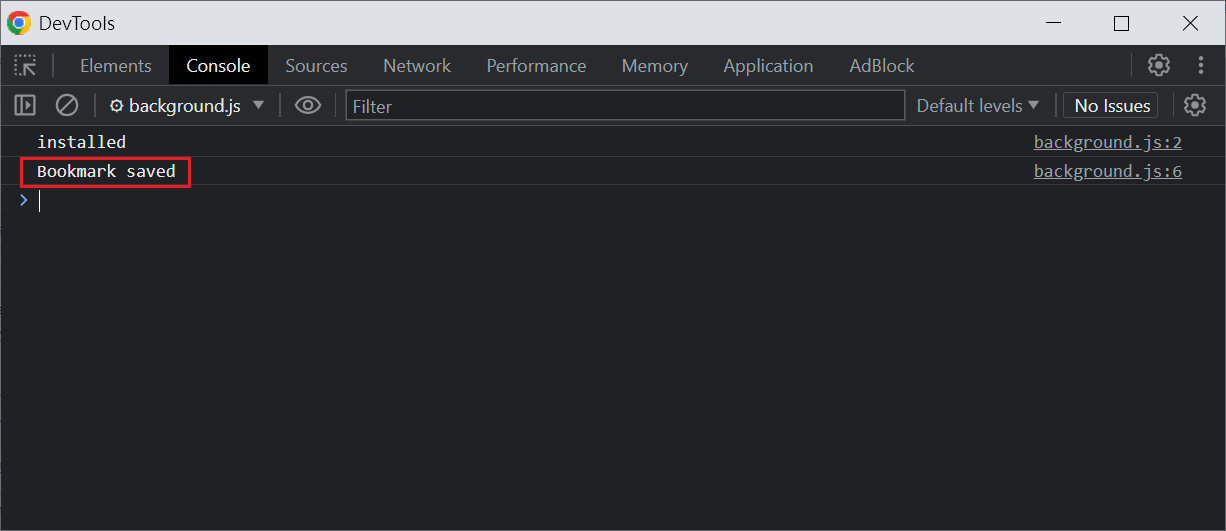
chrome.bookmarks.onCreated.addListener(() => {
console.log('Bookmark saved')
})
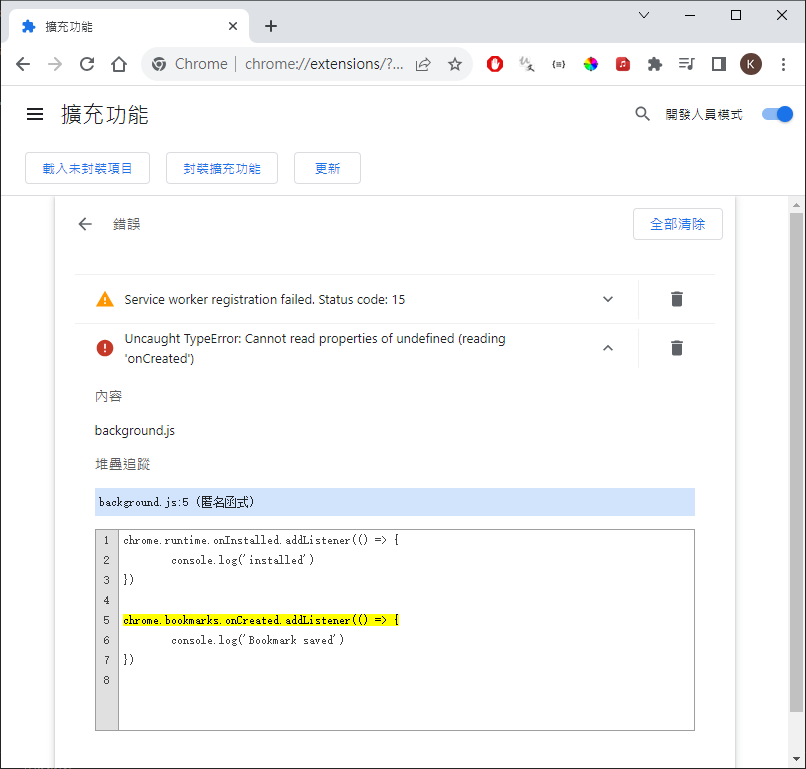
reload(error)
manifest.json add permissions for bookmarks
1
2
3
4
5
6
7
8
9
10
11
12
{
"name": "My first extension",
"version": "1.0.0",
"description": "This is my very first coll extension",
"manifest_version": 3,
"background": {
"service_worker": "background.js"
},
"permissions": [
"bookmarks"
]
}
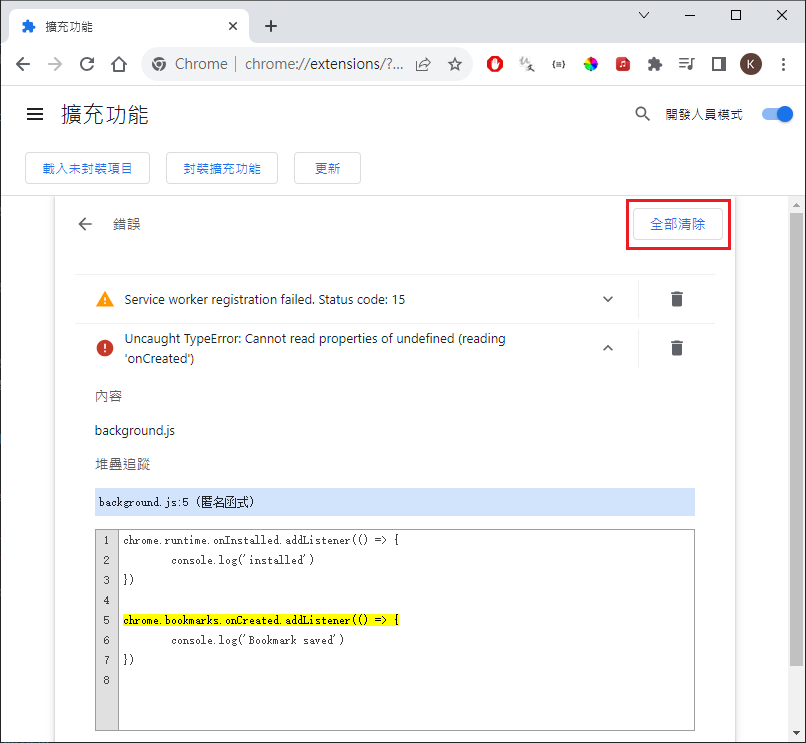
clear error then reload
open new page + save bookmark –> see triger bookmarks.onCreated
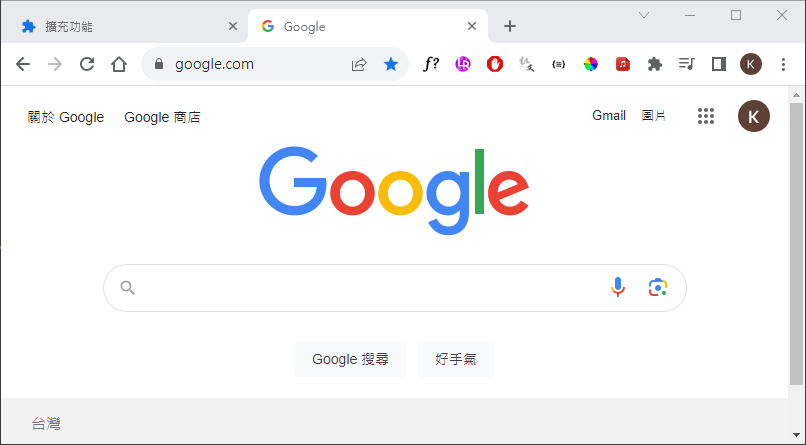
add content scripts(add text “Dark mode”) - change website page

manifest.json add content_scripts
1
2
3
4
5
6
7
8
9
10
11
12
13
14
15
16
17
{
"name": "My first extension",
"version": "1.0.0",
"description": "This is my very first coll extension",
"manifest_version": 3,
"background": {
"service_worker": "background.js"
},
"content_scripts": [
{
"js": ["content.js"]
}
],
"permissions": [
"bookmarks"
]
}
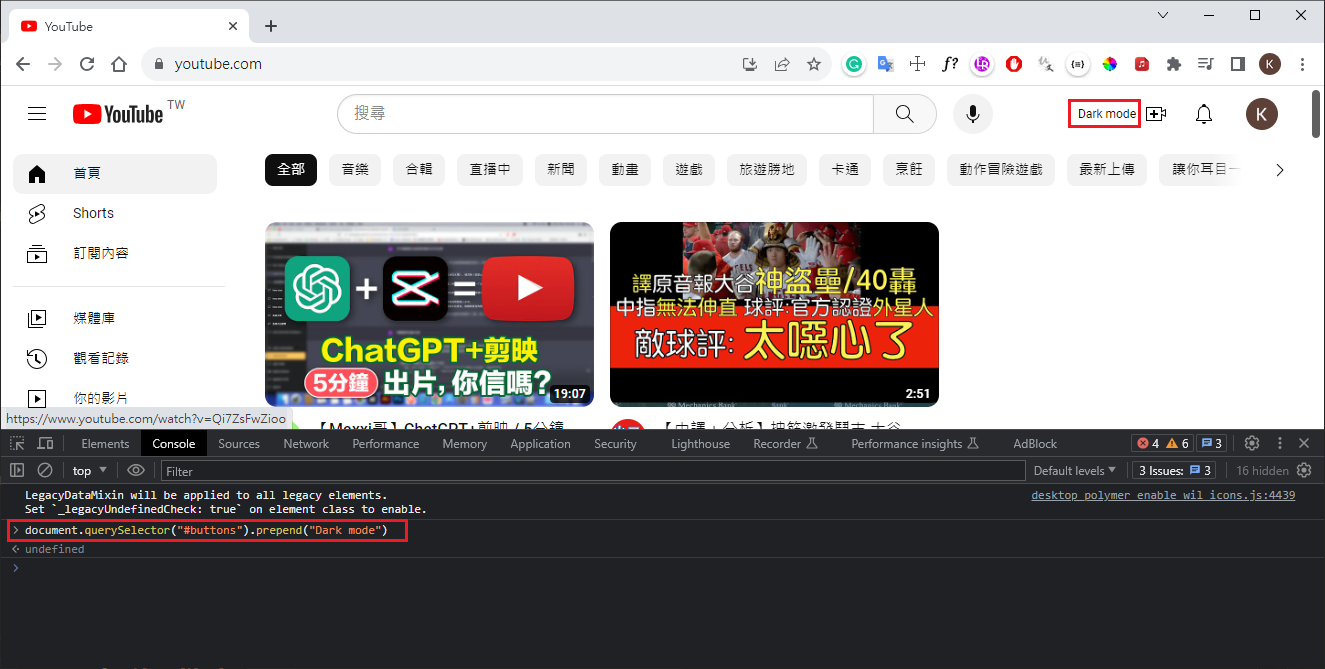
try Youtube add string “Dark mode”
add content.js
1
2
3
window.onload = () => {
document.querySelector("#buttons").prepend("Dark mode")
}
reload extension
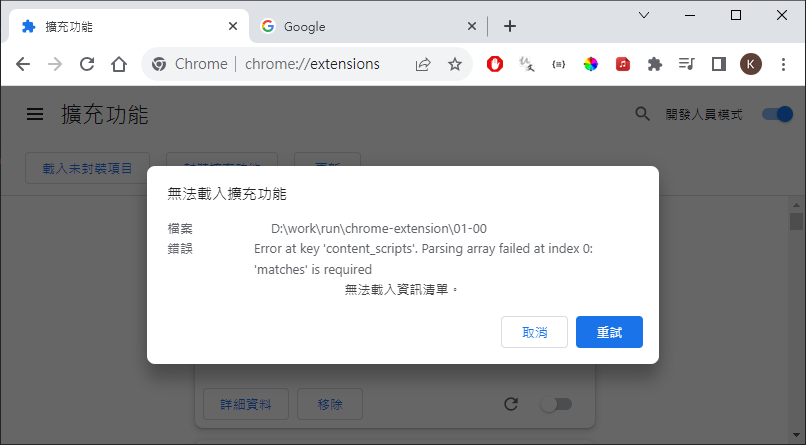
manifest.json add matches
1
2
3
4
5
6
7
8
9
10
11
12
13
14
15
16
17
18
{
"name": "My first extension",
"version": "1.0.0",
"description": "This is my very first coll extension",
"manifest_version": 3,
"background": {
"service_worker": "background.js"
},
"content_scripts": [
{
"matches": ["https://*.youtube.com/*"],
"js": ["content.js"]
}
],
"permissions": [
"bookmarks"
]
}
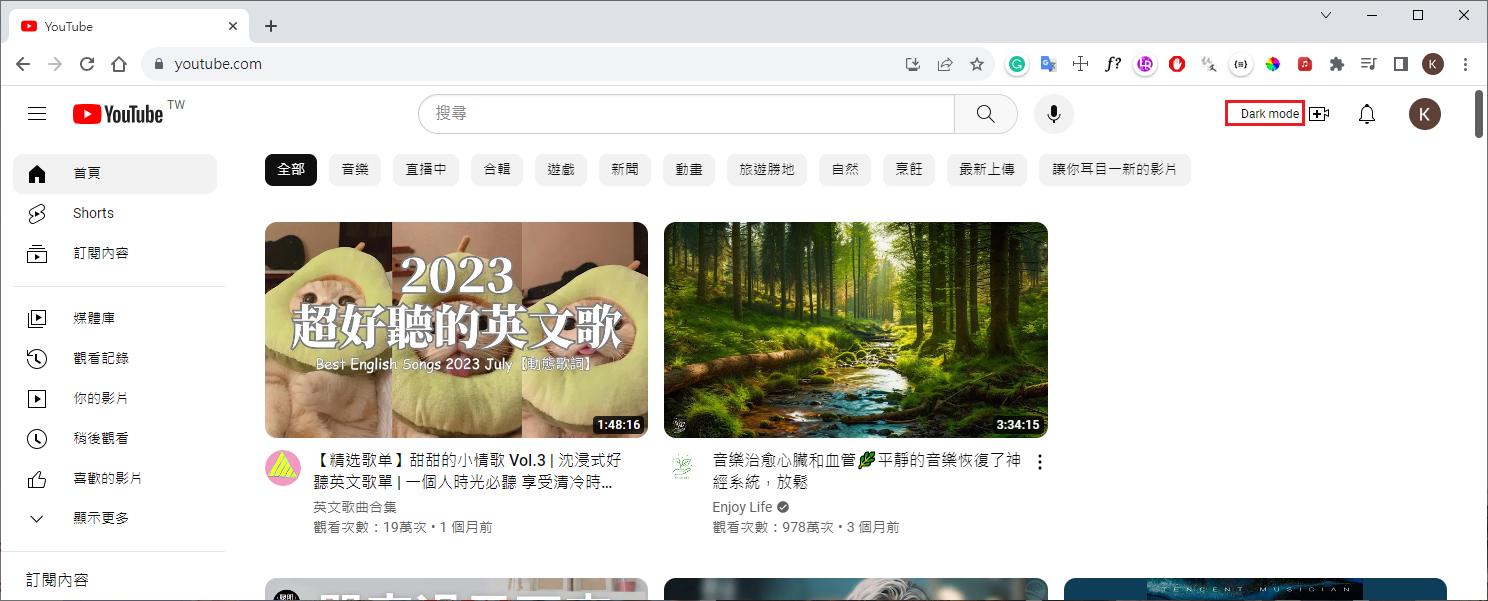
reload then refresh youtube website

content scripts(add button, click trigger drak mode)

content.js
1
2
3
4
5
6
7
8
9
10
11
12
13
window.onload = () => {
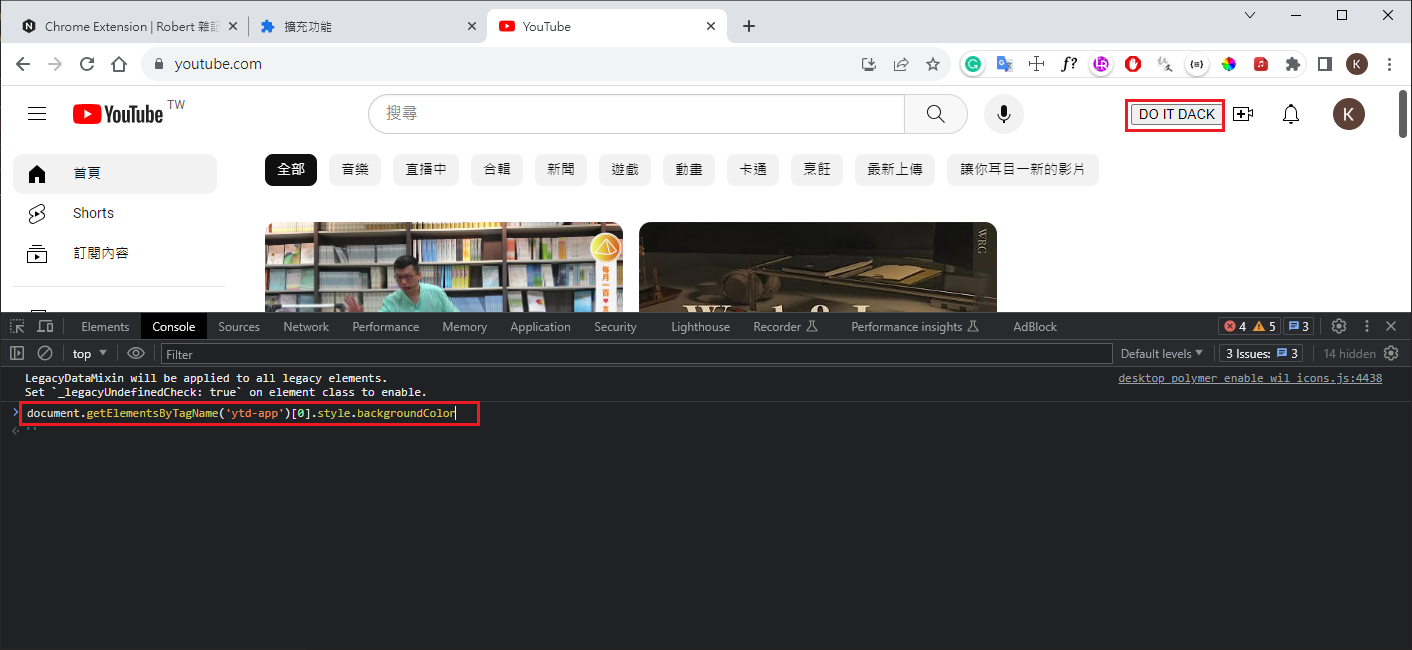
const button = document.createElement('button');
button.id = 'darkModeButton';
button.textContent = "DO IT DACK";
// add button ,若使用 #buttons 最後不能顯示,可能是原程式蓋掉加入之button
// document.querySelector("#buttons").prepend(button);
document.querySelector("#end").prepend(button);
button.addEventListener('click', () => enableDarkMode());
}

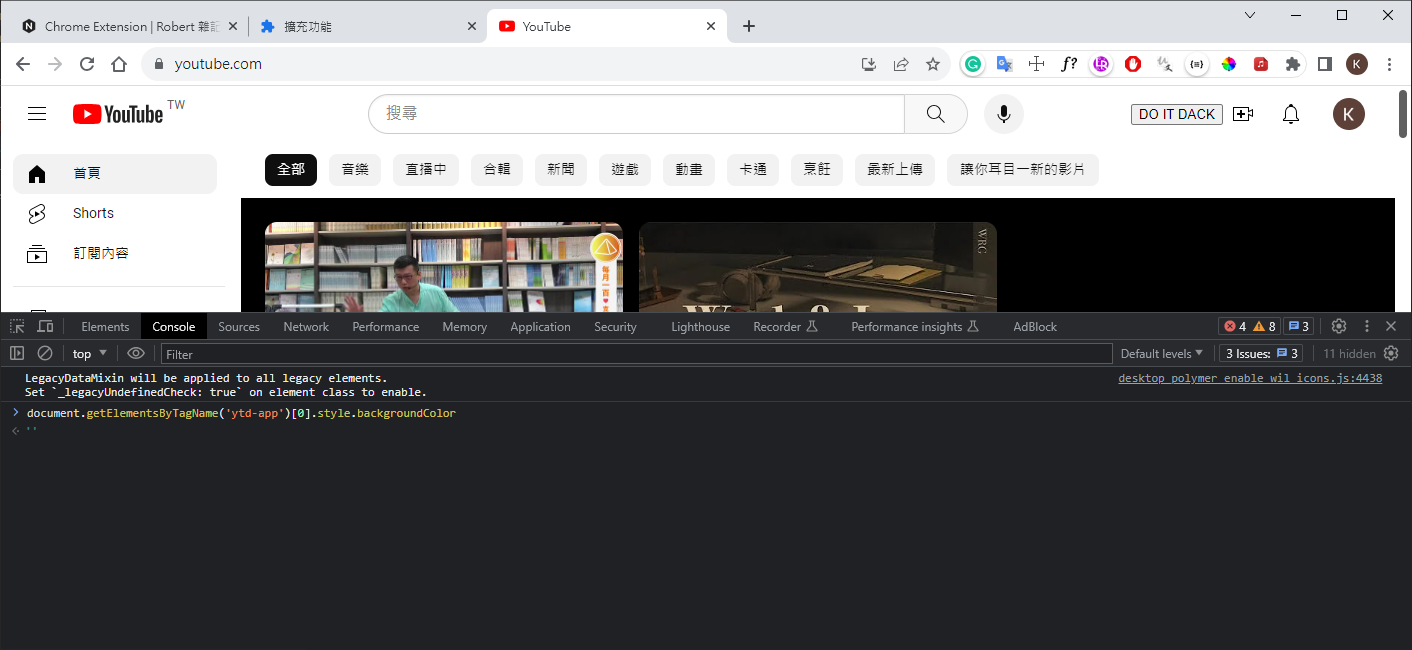
function enableDarkMode() {
document.getElementsByTagName('ytd-app')[0].style.backgroundColor= 'black';
}
manifest.json : add exclude_matches, run_at
1
2
3
4
5
6
7
8
9
10
11
12
13
14
15
16
17
18
19
20
21
22
{
"name": "My first extension",
"version": "1.0.0",
"description": "This is my very first coll extension",
"manifest_version": 3,
"background": {
"service_worker": "background.js"
},
"content_scripts": [
{
"matches": ["https://*.youtube.com/*"],
"//": "排除某些執行 url",
"exclude_matches": ["https://*.youtube.com/watch*"],
"js": ["content.js"],
"//": "調整 js 開始執行時間",
"run_at": "document_end"
}
],
"permissions": [
"bookmarks"
]
}

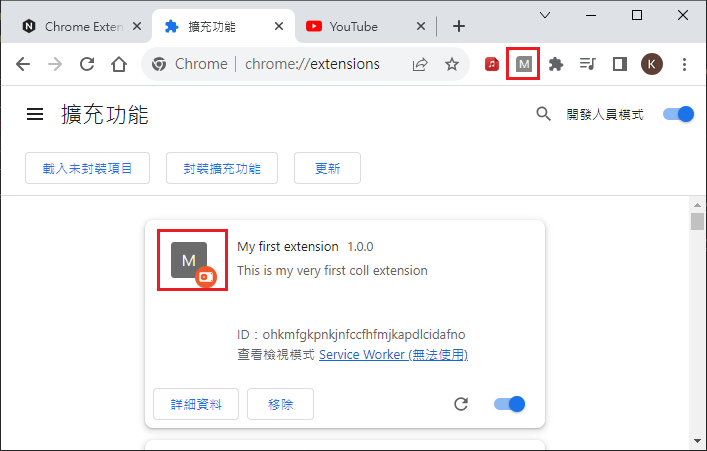
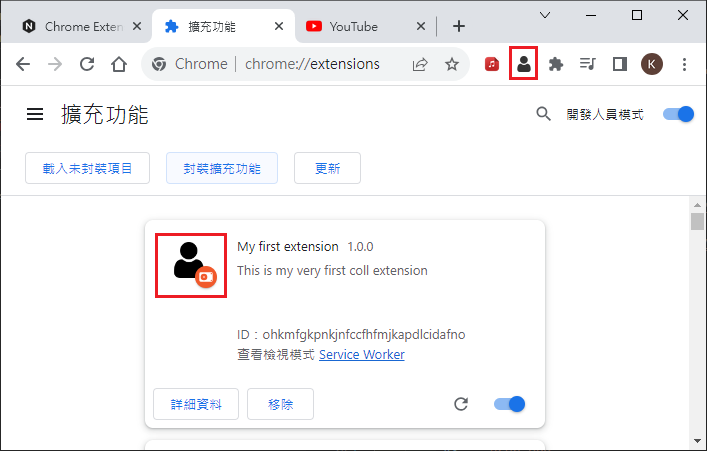
user interface(change icon)

add icon
manifest.json : add icon
1
2
3
4
5
6
7
8
9
10
11
12
13
14
15
16
17
18
19
20
21
22
23
24
25
26
27
{
"name": "My first extension",
"version": "1.0.0",
"description": "This is my very first coll extension",
"manifest_version": 3,
"background": {
"service_worker": "background.js"
},
"content_scripts": [
{
"matches": ["https://*.youtube.com/*"],
"//": "排除某些執行 url",
"exclude_matches": ["https://*.youtube.com/watch*"],
"js": ["content.js"],
"//": "調整 js 開始執行時間",
"run_at": "document_end"
}
],
"permissions": [
"bookmarks"
],
"icons": {
"16": "user.png",
"48": "user.png",
"128": "user.png"
}
}
result

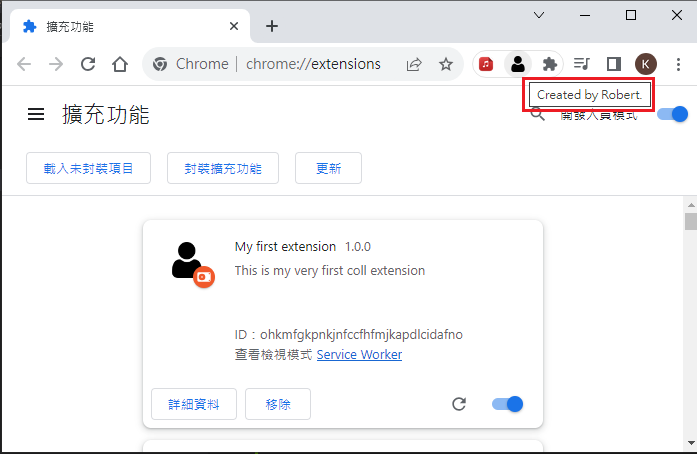
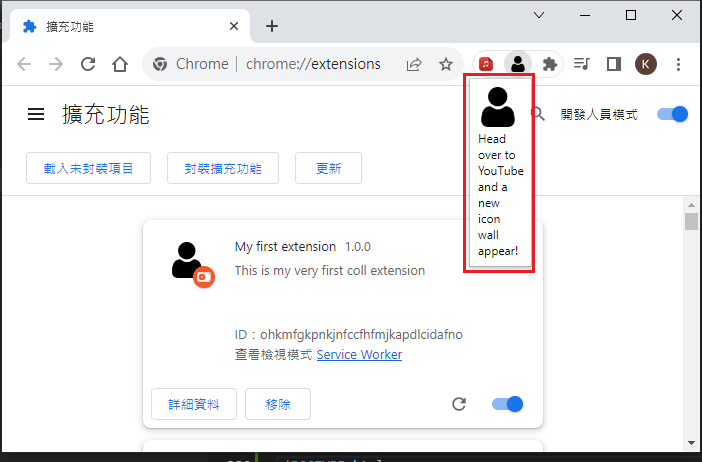
user interface(show title and popup window)

manifest.json
1
2
3
4
5
6
7
8
9
10
11
12
13
14
15
16
17
18
19
20
21
22
23
24
25
26
27
28
29
30
{
"name": "My first extension",
"version": "1.0.0",
"description": "This is my very first coll extension",
"manifest_version": 3,
"background": {
"service_worker": "background.js"
},
"content_scripts": [
{
"matches": ["https://*.youtube.com/*"],
"//": "排除某些執行 url",
"exclude_matches": ["https://*.youtube.com/watch*"],
"js": ["content.js"],
"run_at": "document_end"
}
],
"permissions": [
"bookmarks"
],
"icons": {
"16": "user.png",
"48": "user.png",
"128": "user.png"
},
"action": {
"default_title": "Created by Robert.",
"default_popup": "popup.html"
}
}
background.js
1
2
3
4
5
6
7
8
9
10
11
12
13
chrome.runtime.onInstalled.addListener((tab) => {
console.log(tab)
console.log('installed')
})

chrome.bookmarks.onCreated.addListener(() => {
console.log('Bookmark saved')
})

// 不需要有此 function
// chrome.action.onClicked.addListener( () => {
// console.log('chrome action click')
// })
1
2
3
4
5
6
7
8
9
10
11
12
13
<!DOCTYPE html>
<html lang="en">
<head>
<meta charset="UTF-8">
<meta http-equiv="X-UA-Compatible" content="IE=edge">
<meta name="viewport" content="width=device-width, initial-scale=1.0">
<title>Document</title>
</head>
<body>
<img src="./user.png" width="40">
Head over to YouTube and a new icon wall appear!
</body>
</html>
result

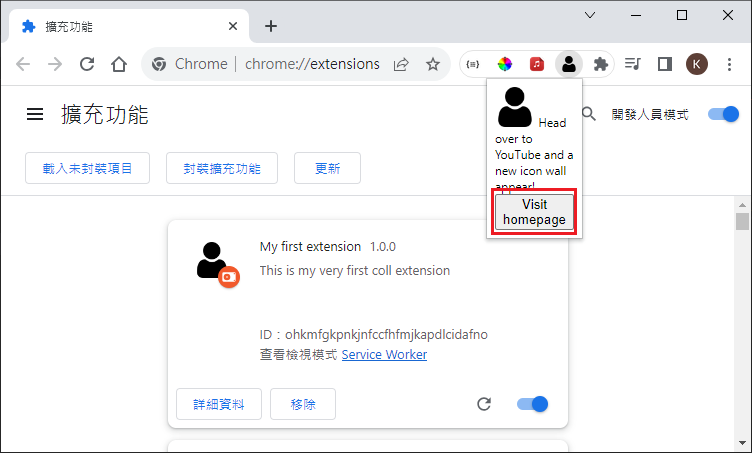
user interface(add href button)

1
2
3
4
5
6
7
8
9
10
11
12
13
14
15
16
17
18
19
<!DOCTYPE html>
<html lang="en">
<head>
<meta charset="UTF-8">
<meta http-equiv="X-UA-Compatible" content="IE=edge">
<meta name="viewport" content="width=device-width, initial-scale=1.0">
<title>Document</title>
</head>
<body>
<img src="./user.png" width="40">
Head over to YouTube and a new icon wall appear!
<!-- add href button(need add target open another page)-->
<a href="https://google.com.tw" target="_balck">
<button>Visit homepage</button>
</a>
<!-- add js -->
<script src="popup.js"></script>
</body>
</html>
result

Timer Basic

  • manifest.json

    • manifest_version(1)

    • name(1)

    • version(1)

    • description(1)

    • icons(1)

    • action(2)

    • options_page(3)

    • permissions(4)

    • background(5)

  • action

    • popup.*
    • setBadgeText
  • options_page

    • options.*
  • storage

    • permissions
    • chrome.storage.sync.set
    • chrome.storage.sync.get
    • chrome.storage.local.set
    • chrome.storage.local.get
  • background(sometime sleep)

    • “service_worker”: “background.js”
  • alarm API(trigger continue run)

    • permissions
    • chrome.alarms.create
    • chrome.alarms.onAlarm.addListener(
  • notifications API

    • permissions
    • this.registration.showNotification

manifest.json

1
2
3
4
5
6
7
8
9
10
11
12
13
14
15
16
17
18
19
20
21
22
23
24
25
26
27
28
29
{
"manifest_version": 3,
"name": "Timer Extension",
"version": "1.0.0",
"description": "Hellow Chrome world!",
"icons": {
"16": "icon.png",
"48": "icon.png",
"128": "icon.png"
},
"action": {
"icons": {
"16": "icon.png",
"24": "icon.png",
"32": "icon.png"
},
"default_title": "Timer Extension Action Title",
"default_popup": "popup.html"
},
"options_page": "options.html",
"permissions": [
"storage",
"alarms",
"notifications"
],
"background": {
"service_worker": "background.js"
}
}

background.js

1
2
3
4
5
6
7
8
9
10
11
12
13
14
15
16
17
18
19
20
21
22
23
24
25
26
27
28
29
30
31
32
33
34
35
36
37
38
39
40
41
42
43
44
45
46
47
48
49
50
51
52
53
54
// console.log("Hello from the background script!");
// console.log(this);

// let time = 0;
//
// setInterval(() => {
// time += 1;
// console.log(time);
// }, 1000);

chrome.alarms.create({
periodInMinutes: 1 / 60,
});

chrome.alarms.onAlarm.addListener((alarm) => {
// console.log(alarm);

chrome.storage.local.get(["timer", "isRunning"], (res) => {
// console.log("background");

const time = res.timer ?? 0;
const isRunning = res.isRunning ?? true;

if (!isRunning) {
return;
}

chrome.storage.local.set({
timer: time + 1,
});

chrome.action.setBadgeText({
text: `${time + 1}`,
});

chrome.storage.sync.get("notificationTime", (res) => {
const notificationTime = res.notificationTime ?? 10000;
if (time % notificationTime == 0) {
this.registration.showNotification("Chrome Timer Extension", {
body: `${notificationTime} senconds has passed! (time = ${time})`,
icon: "icon.png",
});
// console.log("tick", notificationTime, time);
}
});

// if (time % 100 == 0) {
// this.registration.showNotification("Chrome Timer Extension", {
// body: "100 senconds has passed!",
// icon: "icon.png",
// });
// }
});
});
1
2
3
4
5
6
7
8
9
10
11
12
13
14
15
16
17
18
19
20
21
22
23
<!DOCTYPE html>
<html lang="en">

<head>
<meta charset="UTF-8">
<meta http-equiv="X-UA-Compatible" content="IE=edge">
<meta name="viewport" content="width=device-width, initial-scale=1.0">
<title>Timer Extension(popup)</title>
<link rel="stylesheet" href="popup.css">
</head>

<body>
<h1>Timer Extension</h1>
<h2 id="time"></h2>
<h2 id="name"></h2>
<h2 id="timer"></h2>
<button id="start">Start Timer</button>
<button id="stop">Stop Timer</button>
<button id="reset">Reset Timer</button>
</body>
<script src="popup.js"></script>

</html>
1
2
3
4
5
6
7
8
body {
width: 400px;
height: 400px;
}

h1 {
color: blue;
}
1
2
3
4
5
6
7
8
9
10
11
12
13
14
15
16
17
18
19
20
21
22
23
24
25
26
27
28
29
30
31
32
33
34
35
36
37
38
39
40
41
42
43
44
45
46
47
48
49
50
51
52
53
54
55
56
57
58
const timeElement = document.getElementById("time");
const nameElement = document.getElementById("name");
const timerElement = document.getElementById("timer");

function updateTimeElement() {
// console.log("popup");

const currentTime = new Date().toLocaleTimeString();
timeElement.textContent = `The Time is: ${currentTime}`;

chrome.storage.local.get(["timer"], (resp) => {
const time = resp.timer ?? 0;
timerElement.textContent = `The timer is at: ${time} seconds`;
});
}

updateTimeElement();
setInterval(updateTimeElement, 1000);

// move to background.js
// chrome.action.setBadgeText(
// {
// text: "TIME",
// },
// () => {
// console.log("Finished setting badge text.");
// }
// );

chrome.storage.sync.get(["name"], (res) => {
// if undefine or null return string
const name = res.name ?? "???";
nameElement.textContent = `Your name is: ${name}`;
});

// start, stop, reset
const startBtn = document.getElementById("start");
const stopBtn = document.getElementById("stop");
const resetBtn = document.getElementById("reset");

startBtn.addEventListener("click", () => {
chrome.storage.local.set({
isRunning: true,
});
});

stopBtn.addEventListener("click", () => {
chrome.storage.local.set({
isRunning: false,
});
});

resetBtn.addEventListener("click", () => {
chrome.storage.local.set({
timer: 0,
isRunning: false,
});
});

options

options.html
1
2
3
4
5
6
7
8
9
10
11
12
13
14
15
16
17
18
19
20
<!DOCTYPE html>
<html lang="en">

<head>
<meta charset="UTF-8">
<meta http-equiv="X-UA-Compatible" content="IE=edge">
<meta name="viewport" content="width=device-width, initial-scale=1.0">
<title>Timer Entension Options</title>
<link rel="stylesheet" href="options.css">
</head>

<body>
<h1>Timer Extension Options</h1>
<input id="name-input" type="text" placeholder="Enter your name">
<input id="time-input" type="number" placeholder="Enter notification time in seconds">
<button id="save-btn">Save Options</button>
</body>
<script src="options.js"></script>

</html>
options.css
1
2
3
h1 {
color: green;
}
options.js
1
2
3
4
5
6
7
8
9
10
11
12
13
14
15
16
17
18
19
20
21
22
23
24
25
26
27
28
29
30
31
32
33
34
// console.log("Hello from the options page!");

const nameInput = document.getElementById("name-input");
const timeInput = document.getElementById("time-input");
const saveBtn = document.getElementById("save-btn");

saveBtn.addEventListener("click", () => {
// console.log(nameInput.value);

const name = nameInput.value;
const notificationTime = timeInput.value;
chrome.storage.sync.set(
{
// name: name
name,
notificationTime,
}
// () => {
// console.log(`Name is set to ${name}`);
// }
);
});

chrome.storage.sync.get(["name", "notificationTime"], (res) => {
// console.log(res);

// if undefine or null return string
nameInput.value = res.name ?? "";
timeInput.value = res.notificationTime ?? 1000;
});

setInterval(() => {
// console.log("options");
}, 1000);

Pomotoro Timer

manifest.json

1
2
3
4
5
6
7
8
9
10
11
12
13
14
15
16
17
18
19
20
21
22
23
24
25
{
"manifest_version": 3,
"name": "Pomotoro Timer",
"version": "1.0.0",
"description": "Helps you focus on some things!",
"icons": {
"16": "icon.png",
"48": "icon.png",
"128": "icon.png"
},
"action": {
"default_icon": "icon.png",
"default_title": "Pomodoro Timer",
"default_popup": "popup/popup.html"
},
"permissions": [
"storage",
"alarms",
"notifications"
],
"background": {
"service_worker": "background.js"
},
"options_page": "options/options.html"
}
1
2
3
4
5
6
7
8
9
10
11
12
13
14
15
16
17
18
19
20
21
22
23
24
25
26
27
28
29
<!DOCTYPE html>
<html lang="en">

<head>
<meta charset="UTF-8">
<meta http-equiv="X-UA-Compatible" content="IE=edge">
<meta name="viewport" content="width=device-width, initial-scale=1.0">
<link rel="stylesheet" href="popup.css">
<title>Pomodoro Timer</title>
</head>

<body>
<div class="header">
<img src="../icon.png">
</div>
<h1 id="time">00:00</h1>
<div id="btn-container">
<button id="start-timer-btn">Start Timer</button>
<button id="reset-timer-btn">Reset Timer</button>
<button id="add-task-btn">Add Task</button>
</div>
<div id="task-container">
<!-- <input type="text">
<input type="button" value="x"> -->
</div>
</body>
<script src="popup.js"></script>

</html>
1
2
3
4
5
6
7
8
9
10
11
12
13
14
15
16
17
18
19
20
21
22
23
24
25
26
27
28
29
30
31
32
33
34
35
36
37
38
39
40
41
42
43
44
45
46
47
48
49
50
51
52
53
54
55
56
57
58
59
60
61
62
63
64
65
body {
height: 400px;
width: 350px;
background-color: indianred;
}

.header {
display: flex;
justify-content: center;
height: 40px;
background-color: whitesmoke;
padding: 5px;
margin: -8px;
}

#time {
text-align: center;
font-size: 50px;
margin: 10px;
font-weight: normal;
color: whitesmoke;
}

#btn-container {
display: flex;
justify-content: space-evenly;
}

#btn-container > button {
color: indianred;
background-color: whitesmoke;
border: none;
border-radius: 5px;
padding: 8px;
font-weight: bold;
width: 100px;
cursor: pointer;
}

#task-container {
display: flex;
flex-direction: column;
align-items: center;
padding: 20px;
}

.task-input {
outline: none;
border: none;
border-radius: 4px;
margin: 5px;
padding: 5px 10px;
width: 250px;
}

.task-delete {
border: none;
outline: none;
cursor: pointer;
border-radius: 4px;
color: indianred;
font-weight: 700;
height: 25px;
width: 25px;
}
1
2
3
4
5
6
7
8
9
10
11
12
13
14
15
16
17
18
19
20
21
22
23
24
25
26
27
28
29
30
31
32
33
34
35
36
37
38
39
40
41
42
43
44
45
46
47
48
49
50
51
52
53
54
55
56
57
58
59
60
61
62
63
64
65
66
67
68
69
70
71
72
73
74
75
76
77
78
79
80
81
82
83
84
85
86
87
88
89
90
91
92
93
94
95
96
97
98
99
100
101
102
103
104
105
106
107
108
109
110
111
112
113
114
115
116
var tasks = [];

function updateTime() {
chrome.storage.local.get(["timer", "timeOption"], (res) => {
const time = document.getElementById("time");
const minutes = `${res.timeOption - Math.ceil(res.timer / 60)}`.padStart(
2,
"0"
);
const seconds =
res.timer % 60 != 0 ? `${60 - (res.timer % 60)}`.padStart(2, "0") : "00";
time.textContent = `${minutes}:${seconds}`;
// time.textContent = res.timer;
});
}

updateTime();
chrome.storage.local.get(["isRunning"], (res) => {
const startTimerBtn = document.getElementById("start-timer-btn");
startTimerBtn.textContent = res.isRunning ? "Pause Timer" : "Start Timer";
});

setInterval(updateTime, 1000);

const startTimerBtn = document.getElementById("start-timer-btn");
startTimerBtn.addEventListener("click", () => {
chrome.storage.local.get(["isRunning"], (res) => {
chrome.storage.local.set(
{
isRunning: !res.isRunning,
},
() => {
startTimerBtn.textContent = !res.isRunning
? "Pause Timer"
: "Start Timer";
}
);
});
});

const resetTimerBtn = document.getElementById("reset-timer-btn");
resetTimerBtn.addEventListener("click", () => {
chrome.storage.local.set(
{
timer: 0,
isRunning: false,
},
() => {
startTimerBtn.textContent = "Start Timer";
}
);
});

const addTaskBtn = document.getElementById("add-task-btn");
addTaskBtn.addEventListener("click", () => addTask());

chrome.storage.sync.get(["tasks"], (res) => {
tasks = res.tasks ? res.tasks : [];
renderTasks();
});

function saveTasks() {
chrome.storage.sync.set({
tasks,
});
}

function renderTask(taskNum) {
const taskRow = document.createElement("div");

const text = document.createElement("input");
text.type = "text";
text.placeholder = "Enter a task...";
text.value = tasks[taskNum];
text.classList = "task-input";
text.addEventListener("change", () => {
tasks[taskNum] = text.value;
saveTasks();
// console.log(taskNum, tasks);
});

const deleteBtn = document.createElement("input");
deleteBtn.type = "button";
deleteBtn.value = "x";
deleteBtn.className = "task-delete";
deleteBtn.addEventListener("click", () => {
deleteTask(taskNum);
});

taskRow.appendChild(text);
taskRow.appendChild(deleteBtn);

const taskContainer = document.getElementById("task-container");
taskContainer.appendChild(taskRow);
}

function addTask() {
const taskNum = tasks.length;
tasks.push("");
renderTask(taskNum);
saveTasks();
}

function deleteTask(taskNum) {
tasks.splice(taskNum, 1);
renderTasks();
saveTasks();
}

function renderTasks() {
const taskContainer = document.getElementById("task-container");
taskContainer.textContent = "";
tasks.forEach((taskText, taskNum) => {
renderTask(taskNum);
});
}

options.*

options.html
1
2
3
4
5
6
7
8
9
10
11
12
13
14
15
16
17
18
19
20
21
22
23
24
<!DOCTYPE html>
<html lang="en">

<head>
<meta charset="UTF-8">
<meta http-equiv="X-UA-Compatible" content="IE=edge">
<meta name="viewport" content="width=device-width, initial-scale=1.0">
<link rel="stylesheet" href="options.css">
<title>Pomodoro Timer Extension Options</title>
</head>

<body>
<h1>Pomodoro Timer Options</h1>
<label>
<h2>
Deafult Timer Mintues (1 - 60):
</h2>
<input id="time-option" type="number" min="1" max="60" value="25">
</label>
<button id="save-btn">Save Options</button>
</body>
<script src="options.js"></script>

</html>
options.css
1
2
3
4
5
6
7
8
9
10
11
12
13
14
15
16
17
18
19
20
21
22
23
24
25
26
27
28
29
30
31
32
33
34
35
36
body {
background-color: indianred;
}

h1 {
color: whitesmoke;
text-align: center;
font-size: 50px;
margin: 10px;
font-weight: normal;
}

h2 {
font-weight: normal;
color: whitesmoke;
}

#time-option {
outline: none;
border: none;
width: 300px;
border-radius: 4px;
padding: 10px;
}

#save-btn {
display: block;
margin-top: 40px;
border: none;
outline: none;
border-radius: 4px;
padding: 10px;
color: indianred;
font-weight: bold;
cursor: pointer;
}
options.js
1
2
3
4
5
6
7
8
9
10
11
12
13
14
15
16
17
18
19
20
21
const timeOption = document.getElementById("time-option");
timeOption.addEventListener("change", (event) => {
const val = event.target.value;
if (val < 1 || val > 60) {
timeOption.value = 25;
}
});

const saveBtn = document.getElementById("save-btn");
saveBtn.addEventListener("click", () => {
chrome.storage.local.set({
timer: 0,
timeOption: timeOption.value,
isRunning: false,
});
});

chrome.storage.local.get(["timeOption"], (res) => {
timeOption.value = res.timeOption;
console.log(res);
});

TV Show

  • background.js
    • chrome.runtime
    • chrome.contextMenus
    • chrome.search
    • chrome.tabs
  • Content scripts
  • Message
    • chrome.runtime.sendMessage
    • chrome.runtime.onMessage.addListener
    • chrome.tabs.sendMessage
  • Data Fetching:fetch()
  • chrome.tts (synthesized text-to-speech)

manifest.json

1
2
3
4
5
6
7
8
9
10
11
12
13
14
15
16
17
18
19
20
21
22
23
24
25
26
27
28
29
30
31
32
33
34
35
36
37
38
39
40
41
42
{
"manifest_version": 3,
"name": "TV Show Search",
"description": "Search for all your favourite TV shows!",
"version": "1.0",
"icons": {
"16": "icon.png",
"48": "icon.png",
"128": "icon.png"
},
"action": {
"default_icon": "icon.png",
"default_title": "TV Show Search",
"default_popup": "popup/popup.html"
},
"background": {
"service_worker": "background.js"
},
"permissions": [
"contextMenus",
"search",
"tabs",
"storage",
"tts"
],
"content_scripts": [
{
"matches": [
"<all_urls>"
],
"exclude_matches": [
"https://store.google.com/*"
],
"css": [
"contentScript.css"
],
"js": [
"contentScript.js"
]
}
]
}

background.js

1
2
3
4
5
6
7
8
9
10
11
12
13
14
15
16
17
18
19
20
21
22
23
24
25
26
27
28
29
30
31
32
33
34
35
36
37
38
39
40
41
42
43
44
45
46
47
48
49
50
51
52
53
54
55
56
57
58
59
60
61
62
63
64
65
66
67
68
69
70
71
72
73
74
75
76
77
78
79
80
81
82
83
84
85
86
87
88
89
90
chrome.runtime.onInstalled.addListener((details) => {
chrome.storage.local.set({
shows: [],
});

// console.log(details);
chrome.contextMenus.create({
title: "Search TV Show",
id: "contextMenu1",
contexts: ["page", "selection"],
});

chrome.contextMenus.create({
title: "Read This Text",
id: "contextMenu2",
contexts: ["page", "selection"],
});

// call 3rd party API
chrome.contextMenus.onClicked.addListener((event) => {
if (event.menuItemId === "contextMenu1") {
fetch(`https://api.tvmaze.com/search/shows?q=${event.selectionText}`)
.then((res) => res.json())
.then((data) => {
console.log(data);
chrome.storage.local.set({
shows: data,
});
});
} else if (event.menuItemId === "contextMenu2") {
chrome.tts.speak(event.selectionText, {
// support auto detect
// lang: "zh",
rate: 2,
});
}
});

// search
// chrome.contextMenus.onClicked.addListener((event) => {
// console.log(event);
// // google search
// // chrome.search.query({
// // disposition: "NEW_TAB",
// // // imdb TV show
// // text: `imdb ${event.selectionText}`,
// // });

// // check open website
// // chrome.tabs.query(
// // {
// // currentWindow: true,
// // },
// // (tabs) => {
// // console.log(tabs);
// // }
// // );

// // create window
// chrome.tabs.create({
// url: `https://www.imdb.com/find/?q=${event.selectionText}&ref_=nv_sr_sm`,
// });
// });

// children menu
// chrome.contextMenus.create({
// title: "Test Context Menu 1",
// id: "contextMenu1-1",
// parentId: "contextMenu1",
// contexts: ["page", "selection"],
// });
// chrome.contextMenus.create({
// title: "Test Context Menu 2",
// id: "contextMenu1-2",
// parentId: "contextMenu1",
// contexts: ["page", "selection"],
// });
});

// console.log("background script running");

// receive message from content
// chrome.runtime.onMessage.addListener((msg, sender, sendResponse) => {
// console.log("msg(background):", msg);
// console.log("sender(background):", sender);
// // console.log("sendResponse:", sendResponse);
// sendResponse("receive message from background");

// chrome.tabs.sendMessage(sender.tab.id, "Got your message from background!");
// });

contentScript.js

1
2
3
4
5
6
7
8
9
10
11
12
13
14
15
16
17
18
19
20
21
22
23
24
25
26
27
28
29
30
31
// console.log("Hello from the content script!");

// confirm("Hello from the content script!");
// const aTags = document.getElementsByTagName("a");
// for (const tag of aTags) {
// // tag.textContent = "Hello world!";
// if (tag.textContent.includes("i")) {
// tag.style = "background-color: yellow;";
// }
// }

const text = [];
const aTags = document.getElementsByTagName("a");
for (const tag of aTags) {
text.push(tag.textContent);
}

chrome.storage.local.set({
text,
});

// send message to background
// chrome.runtime.sendMessage(null, text, (response) => {
// console.log("I'm from the send response function:" + response);
// });

// receive message from background
// chrome.runtime.onMessage.addListener((message, sender, sendResponse) => {
// console.log("message(content):" + message);
// console.log("sender(content):", sender);
// });

contentScript.css

1
2
3
body {
/* background-color: palegreen !important; */
}
1
2
3
4
5
6
7
8
9
10
11
<!DOCTYPE html>
<html lang="en">
<head>
<meta charset="UTF-8" />
<meta name="viewport" content="width=device-width, initial-scale=1.0" />
<link rel="stylesheet" href="popup.css" />
<title>TV Show Search</title>
</head>
<body></body>
<script src="popup.js"></script>
</html>
1
2
3
4
body {
height: 300px;
width: 300px;
}
1
2
3
4
5
6
7
8
9
10
11
12
13
14
15
16
17
18
19
20
21
22
23
24
25
26
27
28
// receive message from content(same as background)
// chrome.runtime.onMessage.addListener((message, sender, sendResponse) => {
// console.log("message(popup):" + message);
// console.log("sender(popup):", sender);
// });

// show 3rd party json from storage
chrome.storage.local.get(["shows"], (res) => {
console.log(res);

for (const show of res.shows) {
renderShow(show);
}
});

function renderShow(show) {
const showDiv = document.createElement("div");

const title = document.createElement("h3");
title.textContent = show.show.name;

const image = document.createElement("img");
image.src = show.show.image ? show.show.image.medium : null;

showDiv.appendChild(title);
showDiv.appendChild(image);
document.body.appendChild(showDiv);
}

React Extension

說明

.ts vs .tsx
  • .jsx 是javascript文件並表明使用了JSX語法。
  • .ts 是typescript 文件的擴展名
  • .tsx 表明是typescript 文件並使用了JSX語法。

npm init

1
2
3
4
5
6
7
8
9
10
11
# npm init
$ npm init
package name: (j04-react) react-extension
version: (1.0.0)
description: Chrome extension in React!
entry point: (index.js)
test command:
git repository:
keywords:
author: Robert
license: (ISC)

test simple TypeScript compile

install TypeScript
1
2
# install typescript
npm install typescript --save-dev
test.ts
1
const test: string = 'hello'
compile
1
npx tsc *.ts

test React TypeScript compile

install React
1
2
3
# ======== course modify
# npm i react@17.0.1 --save-dev
npm i react --save-dev
tsconfig.json
1
2
3
4
5
6
7
8
9
10
11
{
"compilerOptions": {
"jsx": "react",
"module": "es6",
"target": "es6",
"moduleResolution": "node",
"esModuleInterop": true
},
"include": ["src/**/*.ts", "src/**/*.tsx"],
"exclude": ["node_modules"]
}
src/test.jsx
1
2
3
import React from 'react'

const test = <p>Hellow Wrold!</p>
compile
1
2
3
4
npx tsc *.ts
# src/test.js
# import React from 'react';
# const test = React.createElement("p", null, "Hellow Wrold!");

React Extension Template- webpack

install package
1
2
3
4
5
6
7
8
9
10
11
12
13
14
15
16
17
18
19
20
21
22
23
24
25
26
27
28
29
30
31
32
# npm init
$ npm init
# install TypeScript
npm install typescript --save-dev

# install webpack and webpack-cli
npm i webpack --save-dev
npm i webpack-cli --save-dev
# install TypeScript loader
npm i ts-loader --save-dev
# install copy-webpack-plugin
npm i --save-dev copy-webpack-plugin
# install html-webpack-plugin
npm i --save-dev html-webpack-plugin
# install react-dom
npm i --save-dev react-dom
# install style-loader/css-loader
npm i --save-dev style-loader
npm i --save-dev css-loader
# install @types
npm i --save-dev @types/react
npm i --save-dev @types/react-dom
npm i --save-dev @types/chrome
# install webpack-merge
npm i --save-dev webpack-merge
# install clean-webpack-plugin
npm i --save-dev clean-webpack-plugin

# develop build
npm run start
# product build
npm run build
package.json
1
2
3
4
5
6
7
8
9
10
11
12
13
14
15
16
17
18
19
20
21
22
23
24
25
26
27
28
{
"name": "react-extension",
"version": "1.0.0",
"description": "Chrome extension in React!",
"scripts": {
"start": "webpack --watch --progress --config webpack.dev.js",
"build": "webpack --watch --progress --config webpack.prod.js"
},
"author": "Robert",
"license": "ISC",
"devDependencies": {
"@types/chrome": "^0.0.244",
"@types/react": "^18.2.21",
"@types/react-dom": "^18.2.7",
"clean-webpack-plugin": "^4.0.0",
"copy-webpack-plugin": "^11.0.0",
"css-loader": "^6.8.1",
"html-webpack-plugin": "^5.5.3",
"react": "^18.2.0",
"react-dom": "^18.2.0",
"style-loader": "^3.3.3",
"ts-loader": "^9.4.4",
"typescript": "^5.2.2",
"webpack": "^5.88.2",
"webpack-cli": "^5.1.4",
"webpack-merge": "^5.9.0"
}
}
tsconfig.json : TypeScript configuration
1
2
3
4
5
6
7
8
9
10
11
{
"compilerOptions": {
"jsx": "react", // jsx 為 react 檔
"module": "commonjs", // 指定生成哪種模組
"target": "es6", // 指定編譯生成的JS版本
"moduleResolution": "node", // 選擇模組解析策略 : 支持使用import d from 'cjs'的方式引入commonjs包
"esModuleInterop": true // 兼容模組導入的方式
},
"include": ["src/**/*.ts", "src/**/*.tsx"],
"exclude": ["node_modules"]
}
webpack configuration
webpack.dev.js : development configuration
1
2
3
4
5
6
7
const { merge } = require('webpack-merge')
const common = require('./webpack.common.js')

module.exports = merge(common, {
mode: 'development',
devtool: 'cheap-module-source-map',
})
webpack.prod.js : production configuration
1
2
3
4
5
6
const { merge } = require('webpack-merge')
const common = require('./webpack.common.js')

module.exports = merge(common, {
mode: 'production',
})
webpack.common.js : common configuration
1
2
3
4
5
6
7
8
9
10
11
12
13
14
15
16
17
18
19
20
21
22
23
24
25
26
27
28
29
30
31
32
33
34
35
36
37
38
39
40
41
42
43
44
45
46
47
48
49
50
51
52
53
54
55
56
57
58
59
60
61
62
63
64
65
66
67
68
69
70
71
72
73
74
75
76
77
78
79
80
81
82
83
84
85
86
87
88
89
90
91
92
const path = require('path')
const CopyPlugin = require('copy-webpack-plugin')
const HtmlPlugin = require('html-webpack-plugin')
const { CleanWebpackPlugin } = require('clean-webpack-plugin')

module.exports = {
entry: {
// process tsx/ts
popup: path.resolve('src/popup/popup.tsx'),
options: path.resolve('src/options/options.tsx'),
background: path.resolve('src/background/background.ts'),
contentScript: path.resolve('src/contentScript/contentScript.ts'),
},
module: {
rules: [
// process txs/ts rule
{
use: 'ts-loader',
test: /\.tsx?$/,
exclude: /node_modules/,
},
// support load .css
{
use: ['style-loader', 'css-loader'],
test: /\.css$/i,
},
// 指定 jpg,jpeg ...處理方式
{
type: 'asset/resource',
test: /\.(jpg|jpeg|png|woff|woff2|eot|ttf|svg)$/,
},
],
},
plugins: [
// clean ./dist file
new CleanWebpackPlugin({
cleanStaleWebpackAssets: false, // run when switch product/develop
}),
new CopyPlugin({
patterns: [
// copy src/static files
{
from: path.resolve('src/static'),
to: path.resolve('dist'),
},
],
}),
// direction call HtmlPlugin
// also generate .html
// new HtmlPlugin({
// title: 'React Extension',
// filename: 'popup.html',
// template: 'src/popup/template.html',
// chunks: ['popup'],
// }),
// change call HtmlPlugin by function
// also generate .html
...getHTMLPlugins(['popup', 'options']),
],
resolve: {
// 處理省略副檔名的檔案
extensions: ['.tsx', '.tx', '.js'],
},
// set output path
output: {
filename: '[name].js',
path: path.resolve('dist'),
},
// 依據選擇的mode執行不同的優化
optimization: {
// 設定區要分割檔案區塊的項目
splitChunks: {
// 表示要用甚麼樣的方式去提取文件
// async:只處理動態引入的模塊
// all:不論是動態還是非動態引入的模塊,同時進行優化打包
// initial:把非動態模塊打包,動態模塊進行優化打包
chunks: 'all',
},
},
}

// change call HtmlPlugin by function
function getHTMLPlugins(chunks) {
return chunks.map(
(chunk) =>
new HtmlPlugin({
title: 'React Extension',
filename: `${chunk}.html`,
chunks: [chunk],
})
)
}
1
2
3
4
5
6
7
8
9
10
11
12
13
14
15
16
17
import React from 'react'
import ReactDOM from 'react-dom/client'
import './popup.css'

function App() {
return (
<div>
<img src="icon.png" />
</div>
)
}

const rootElement = document.createElement('div')
document.body.appendChild(rootElement)
const root = ReactDOM.createRoot(rootElement)

root.render(<App />)
1
2
3
body {
background-color: #1c1c1c;
}
options
options.tsx
1
2
3
4
5
6
7
8
9
10
11
12
13
14
15
16
17
import React from 'react'
import ReactDOM from 'react-dom/client'
import './options.css'

function App() {
return (
<div>
<img src="icon.png" />
</div>
)
}

const rootElement = document.createElement('div')
document.body.appendChild(rootElement)
const root = ReactDOM.createRoot(rootElement)

root.render(<App />)
options.css
1
2
3
body {
background-color: #1c1c1c;
}
background.ts
1
2
3
4
5
// console.log('Background Script')
// TODO: background script
chrome.runtime.onInstalled.addListener(() => {
// TODO: on installed function
})
contentScript.ts
1
2
// TODO: content script
// console.log('contentScript running!')

Weather Extersion

install

1
2
3
4
5
6
7
8
9
npm i

# install material ui
npm install --save--dev @mui/material @emotion/react @emotion/styled
# install Roboto font
npm install --save--dev @fontsource/roboto

# icon
npm i --save-dev @mui/icons-material

webpack.common.js

1
2
3
4
5
6
7
8
9
10
11
12
13
14
15
16
17
18
19
20
21
22
23
24
25
26
27
28
29
30
31
32
33
34
35
36
37
38
39
40
41
42
43
44
45
46
47
48
49
50
51
52
53
54
55
56
57
58
59
60
61
62
63
64
65
66
67
68
69
70
71
72
73
74
75
76
77
78
79
80
81
82
83
84
85
86
87
88
89
90
91
92
93
94
95
96
const path = require('path')
const CopyPlugin = require('copy-webpack-plugin')
const HtmlPlugin = require('html-webpack-plugin')
const { CleanWebpackPlugin } = require('clean-webpack-plugin')

module.exports = {
entry: {
// process tsx/ts
popup: path.resolve('src/popup/popup.tsx'),
options: path.resolve('src/options/options.tsx'),
background: path.resolve('src/background/background.ts'),
contentScript: path.resolve('src/contentScript/contentScript.tsx'),
},
module: {
rules: [
// process txs/ts rule
{
use: 'ts-loader',
test: /\.tsx?$/,
exclude: /node_modules/,
},
// support load .css
{
use: ['style-loader', 'css-loader'],
test: /\.css$/i,
},
// 指定 jpg,jpeg ...處理方式
{
type: 'asset/resource',
test: /\.(jpg|jpeg|png|woff|woff2|eot|ttf|svg)$/,
},
],
},
plugins: [
// clean ./dist file
new CleanWebpackPlugin({
cleanStaleWebpackAssets: false, // run when switch product/develop
}),
new CopyPlugin({
patterns: [
// copy src/static files
{
from: path.resolve('src/static'),
to: path.resolve('dist'),
},
],
}),
// direction call HtmlPlugin
// also generate .html
// new HtmlPlugin({
// title: 'React Extension',
// filename: 'popup.html',
// template: 'src/popup/template.html',
// chunks: ['popup'],
// }),
// change call HtmlPlugin by function
// also generate .html
...getHTMLPlugins(['popup', 'options']),
],
resolve: {
// 處理省略副檔名的檔案
extensions: ['.tsx', '.ts', '.js'],
},
// set output path
output: {
filename: '[name].js',
path: path.resolve('dist'),
},
// 依據選擇的mode執行不同的優化
optimization: {
// 設定區要分割檔案區塊的項目
splitChunks: {
// 表示要用甚麼樣的方式去提取文件
// async:只處理動態引入的模塊
// all:不論是動態還是非動態引入的模塊,同時進行優化打包
// initial:把非動態模塊打包,動態模塊進行優化打包
// chunks: 'all',
// 因 contentScript 不能 share Recat module, 所以不執行 chunks(優化) %?%
chunks(chunk) {
return chunk.name !== 'contentScript'
},
},
},
}

// change call HtmlPlugin by function
function getHTMLPlugins(chunks) {
return chunks.map(
(chunk) =>
new HtmlPlugin({
title: 'Weather Extension',
filename: `${chunk}.html`,
chunks: [chunk],
})
)
}

manifest.json

1
2
3
4
5
6
7
8
9
10
11
12
13
14
15
16
17
18
19
20
21
22
23
24
25
26
27
28
29
30
31
32
33
34
35
36
{
"manifest_version": 3,
"name": "Weather Extension",
"description": "Chrome Extension for Weather",
"version": "1.0.0",
"permissions": [
"tabs",
"alarms",
"contextMenus",
"storage"
],
"icons": {
"16": "icon.png",
"48": "icon.png",
"128": "icon.png"
},
"action": {
"default_popup": "popup.html",
"default_title": "Weather Extension",
"default_icon": "icon.png"
},
"options_page": "options.html",
"background": {
"service_worker": "background.js"
},
"content_scripts": [
{
"matches": [
"<all_urls>"
],
"js": [
"contentScript.js"
]
}
]
}

background.ts

1
2
3
4
5
6
7
8
9
10
11
12
13
14
15
16
17
18
19
20
21
22
23
24
25
26
27
28
29
30
31
32
33
34
35
36
37
38
39
40
41
42
43
44
45
46
47
48
49
50
51
52
53
54
55
56
import { fetchOpenWeatherData } from '../utils/api'
import {
getStoredCities,
setStoredCities,
getStoredOptions,
setStoredOptions,
} from '../utils/storage'

chrome.runtime.onInstalled.addListener(() => {
setStoredCities([])
setStoredOptions({
hasAutoOverlay: false,
homeCity: '',
tempScale: 'metric',
})

// context menu %?%
chrome.contextMenus.create({
contexts: ['selection'],
title: 'Add city to weather extension',
id: 'weatherExtension',
})

// alarm %?%
chrome.alarms.create({
// periodInMinutes: 60,
// 10 sec
periodInMinutes: 10 / 60,
})
})

// context menu %?%
chrome.contextMenus.onClicked.addListener((event) => {
getStoredCities().then((cities) => {
setStoredCities([...cities, event.selectionText])
})
})

// alarm %?%
chrome.alarms.onAlarm.addListener(() => {
getStoredOptions().then((options) => {
if (options.homeCity === '') {
return
}

fetchOpenWeatherData(options.homeCity, options.tempScale).then((data) => {
const temp = Math.round(data.main.temp)
const symbol = options.tempScale === 'metric' ? '\u2103' : '\u2109'

// chrome extension badge %?%
chrome.action.setBadgeText({
text: `${temp}${symbol}`,
})
})
})
})

utils

api.ts
1
2
3
4
5
6
7
8
9
10
11
12
13
14
15
16
17
18
19
20
21
22
23
24
25
26
27
28
29
30
31
32
33
34
35
36
37
38
39
40
41
42
43
44
45
46
47
48
import { OPEN_WEATHER_API_KEY } from './env'

export interface OpenWeatherData {
name: string
main: {
feels_like: number
humidity: number
pressure: number
temp: number
temp_max: number
temp_min: number
}
weather: {
description: string
icon: string
id: number
main: string
}[]
wind: {
deg: number
speed: number
}
}

// 定義欄位 type %?%
export type OpenWeatherTempScale = 'metric' | 'imperial'

export async function fetchOpenWeatherData(
city: string,
tempScale: OpenWeatherTempScale
): Promise<OpenWeatherData> {
const res = await fetch(
`https://api.openweathermap.org/data/2.5/weather?q=${city}&units=${tempScale}&appid=${OPEN_WEATHER_API_KEY}`
)

if (!res.ok) {
// 建立自定義的 Error object %?%
throw new Error('City not found')
}

// 會傳回所有欄位,僅定義有使用之欄位type %?%
const data: OpenWeatherData = await res.json()
return data
}

export function getWeatherIconSrc(iconCode: string) {
return `https://openweathermap.org/img/wn/${iconCode}@2x.png`
}
storage.ts
1
2
3
4
5
6
7
8
9
10
11
12
13
14
15
16
17
18
19
20
21
22
23
24
25
26
27
28
29
30
31
32
33
34
35
36
37
38
39
40
41
42
43
44
45
46
47
48
49
50
51
52
53
54
55
56
57
58
import { OpenWeatherTempScale } from './api'

// set LocalStorage interface
export interface LocalStorage {
cities?: string[]
options?: LocalStorageOptions
}

export interface LocalStorageOptions {
hasAutoOverlay: boolean
homeCity: string
tempScale: OpenWeatherTempScale
}

export type LocalStorageKeys = keyof LocalStorage

// set/get options
export function setStoredCities(cities: string[]): Promise<void> {
const vals: LocalStorage = {
cities,
}
return new Promise((resolve) => {
chrome.storage.local.set(vals, () => {
resolve()
})
})
}

export function getStoredCities(): Promise<string[] | []> {
const keys: LocalStorageKeys[] = ['cities']
return new Promise((resolve) => {
chrome.storage.local.get(keys, (res: LocalStorage) => {
// 若無 res.cities 傳回 [] %?%
resolve(res.cities ?? [])
})
})
}

// set/get option
export function setStoredOptions(options: LocalStorageOptions): Promise<void> {
const vals: LocalStorage = {
options,
}
return new Promise((resolve) => {
chrome.storage.local.set(vals, () => {
resolve()
})
})
}

export function getStoredOptions(): Promise<LocalStorageOptions> {
const keys: LocalStorageKeys[] = ['options']
return new Promise((resolve) => {
chrome.storage.local.get(keys, (res: LocalStorage) => {
resolve(res.options)
})
})
}
messages.ts
1
2
3
export enum Messages {
TOGGLE_OVERLAY,
}

components

WeatherCard.tsx
1
2
3
4
5
6
7
8
9
10
11
12
13
14
15
16
17
18
19
20
21
22
23
24
25
26
27
28
29
30
31
32
33
34
35
36
37
38
39
40
41
42
43
44
45
46
47
48
49
50
51
52
53
54
55
56
57
58
59
60
61
62
63
64
65
66
67
68
69
70
71
72
73
74
75
76
77
78
79
80
81
82
83
84
85
86
87
88
89
90
91
92
93
94
95
96
97
98
99
100
import React, { useEffect, useState } from 'react'
import {
Box,
Button,
Card,
CardActions,
CardContent,
Grid,
Typography,
} from '@mui/material'
import {
getWeatherIconSrc,
fetchOpenWeatherData,
OpenWeatherData,
OpenWeatherTempScale,
} from '../utils/api'
import './WearthCard.css'

const WeatherCardContainer: React.FC<{
children: React.ReactNode
onDelete?: () => void
}> = ({ children, onDelete }) => {
return (
<Box mx={'4px'} my={'16px'}>
<Card>
<CardContent>{children}</CardContent>
<CardActions>
{onDelete && (
<Button color="secondary" onClick={onDelete}>
<Typography className="weatherCard-body">Delete</Typography>
</Button>
)}
</CardActions>
</Card>
</Box>
)
}

// 定義欄位 type %?%
type WeatherCardState = 'loading' | 'error' | 'ready'

const WeatherCard: React.FC<{
city: string
tempScale: OpenWeatherTempScale
onDelete?: () => void
}> = ({ city, tempScale, onDelete }) => {
const [weatherData, setWeatherData] = useState<OpenWeatherData | null>(null)
const [cardState, setCardState] = useState<WeatherCardState>('loading')
useEffect(() => {
fetchOpenWeatherData(city, tempScale)
.then((data) => {
// console.log(data)
setWeatherData(data)
setCardState('ready')
})
.catch((err) => setCardState('error'))
}, [city, tempScale])

if (cardState == 'loading' || cardState == 'error') {
return (
<WeatherCardContainer onDelete={onDelete}>
<Typography className="weatherCrad-title">{city}</Typography>
<Typography className="weatherCard-body">
{cardState == 'loading'
? 'Loading...'
: 'Error: could not retrive weather data for this city.'}
</Typography>
</WeatherCardContainer>
)
}
return (
<WeatherCardContainer onDelete={onDelete}>
<Grid container justifyContent="space-around">
<Grid item>
<Typography className="weatherCrad-title">
{weatherData.name}
</Typography>
<Typography className="weatherCard-temp">
{Math.round(weatherData.main.temp)}
</Typography>
<Typography variant="body1">
Feels like: {Math.round(weatherData.main.feels_like)}
</Typography>
</Grid>
<Grid item>
{weatherData.weather.length > 0 && (
<>
<img src={getWeatherIconSrc(weatherData.weather[0].icon)} />
<Typography className="weatherCard-body">
{weatherData.weather[0].main}
</Typography>
</>
)}
</Grid>
</Grid>
</WeatherCardContainer>
)
}

export default WeatherCard
WearthCard.css
1
2
3
4
5
6
7
8
9
10
11
12
13
.weatherCard-title {
font-size: 24px !important;
}

.weatherCard-body {
font-size: 16px !important;
text-align: ecnter !important;
}

.weatherCard-temp {
font-size: 46px !important;
text-align: ecnter !important;
}

options

options.tsx
1
2
3
4
5
6
7
8
9
10
11
12
13
14
15
16
17
18
19
20
21
22
23
24
25
26
27
28
29
30
31
32
33
34
35
36
37
38
39
40
41
42
43
44
45
46
47
48
49
50
51
52
53
54
55
56
57
58
59
60
61
62
63
64
65
66
67
68
69
70
71
72
73
74
75
76
77
78
79
80
81
82
83
84
85
86
87
88
89
90
91
92
93
94
95
96
97
98
99
100
101
102
103
104
105
106
107
108
109
110
111
import React, { useEffect, useState } from 'react'
import ReactDOM from 'react-dom/client'
import {
Box,
Button,
Card,
CardContent,
Grid,
Switch,
TextField,
Typography,
} from '@mui/material'
import '@fontsource/roboto'
import './options.css'
import {
LocalStorageOptions,
getStoredOptions,
setStoredOptions,
} from '../utils/storage'

type FormState = 'ready' | 'saving'

const App: React.FC<{}> = () => {
const [options, setOptions] = useState<LocalStorageOptions | null>(null)
const [formState, setFormState] = useState<FormState>('ready')

useEffect(() => {
getStoredOptions().then((options) => setOptions(options))
}, [])

const handleHomeCityChange = (homeCity: string) => {
setOptions({
...options,
homeCity,
})
}

const handleAutoOverayChange = (hasAutoOverlay: boolean) => {
setOptions({
...options,
hasAutoOverlay,
})
}

const handleSaveButtonClick = () => {
setFormState('saving')
setStoredOptions(options).then(() => {
setTimeout(() => {
setFormState('ready')
}, 1000)
})
}

if (!options) {
return null
}

const isFieldsDisabled = formState === 'saving'

return (
<Box mx="10%" my="2%">
<Card>
<CardContent>
<Grid container direction="column" spacing="10">
<Grid item>
<Typography variant="h4">Weather Extension Options</Typography>
</Grid>
<Grid item>
<Typography variant="body1">Home City name</Typography>
<TextField
fullWidth
placeholder="Enter a home city name"
value={options.homeCity}
onChange={(event) => handleHomeCityChange(event.target.value)}
disabled={isFieldsDisabled}
variant="standard"
/>
</Grid>
<Grid item>
<Typography variant="body1">
Auto toggle overlay on webpage load
</Typography>
<Switch
color="primary"
checked={options.hasAutoOverlay}
onChange={(event, checked) => handleAutoOverayChange(checked)}
disabled={isFieldsDisabled}
/>
</Grid>
<Grid item>
<Button
variant="contained"
color="primary"
onClick={handleSaveButtonClick}
disabled={isFieldsDisabled}
>
{formState === 'ready' ? 'Save' : 'Saving...'}
</Button>
</Grid>
</Grid>
</CardContent>
</Card>
</Box>
)
}

const rootElement = document.createElement('div')
document.body.appendChild(rootElement)
const root = ReactDOM.createRoot(rootElement)

root.render(<App />)
options.css
1
2
3
4
body {
background-color: #f5f5f5;
font-family: 'Roboto';
}
1
2
3
4
5
6
7
8
9
10
11
12
13
14
15
16
17
18
19
20
21
22
23
24
25
26
27
28
29
30
31
32
33
34
35
36
37
38
39
40
41
42
43
44
45
46
47
48
49
50
51
52
53
54
55
56
57
58
59
60
61
62
63
64
65
66
67
68
69
70
71
72
73
74
75
76
77
78
79
80
81
82
83
84
85
86
87
88
89
90
91
92
93
94
95
96
97
98
99
100
101
102
103
104
105
106
107
108
109
110
111
112
113
114
115
116
117
118
119
120
121
122
123
124
125
126
127
128
129
130
131
132
133
134
135
136
137
138
139
140
141
142
143
144
145
146
147
148
149
import React, { useEffect, useState } from 'react'
import ReactDOM from 'react-dom/client'
import { Box, Grid, InputBase, Paper, IconButton } from '@mui/material'
import {
Add as AddIcon,
PictureInPicture as PictureInPictureIcon,
} from '@mui/icons-material'
import '@fontsource/roboto'
import './popup.css'
import WeatherCard from '../components/WeatherCard'
import {
getStoredCities,
setStoredCities,
getStoredOptions,
setStoredOptions,
LocalStorageOptions,
} from '../utils/storage'
import { Messages } from '../utils/messages'

const App: React.FC<{}> = () => {
const [cities, setCities] = useState<string[]>([])
const [cityInput, setCityInput] = useState<string>('')
const [options, setOptions] = useState<LocalStorageOptions | null>(null)

useEffect(() => {
getStoredCities().then((cities) => setCities(cities))
getStoredOptions().then((options) => setOptions(options))
}, [])

// add city
const handleCityButtonClick = () => {
if (cityInput == '') {
return
}
const updateCities = [...cities, cityInput]
setStoredCities(updateCities).then(() => {
setCities(updateCities)
setCityInput('')
})
}

// delete city
const handleCityDeleteButtonClick = (index: number) => {
cities.splice(index, 1)
const updateCites = [...cities]
setStoredCities(updateCites).then(() => {
setCities(updateCites)
})
}

// toggle show temperature type
const handleTempScaleButtonClick = () => {
const updateOptions: LocalStorageOptions = {
...options,
tempScale: options.tempScale === 'metric' ? 'imperial' : 'metric',
}
setStoredOptions(updateOptions).then(() => {
setOptions(updateOptions)
})
}

// Overlay control
const handleOverlayButtonClick = () => {
// send message from current tab %?%
chrome.tabs.query(
{
active: true,
currentWindow: true,
},
(tabs) => {
if (tabs.length > 0) {
// console.log('tabs =>', tabs)
// send when url = https://* %?%
// 若未設定 在 chrome://extensions/ 或 blank tab 會有問題
// need set tabs at "permissions" %?%
// 未設定抓不到 url
if (tabs[0].url.match('https://*')) {
chrome.tabs.sendMessage(tabs[0].id, Messages.TOGGLE_OVERLAY)
}
}
}
)
}

if (!options) {
return null
}

return (
<Box mx="8px" my="16px">
<Grid container justifyContent="space-evenly">
<Grid item>
<Paper>
<Box px="15px" py="5px">
<InputBase
placeholder="Add a city name"
value={cityInput}
onChange={(event) => setCityInput(event.target.value)}
/>
<IconButton onClick={handleCityButtonClick}>
<AddIcon />
</IconButton>
</Box>
</Paper>
</Grid>
<Grid item>
<Paper>
<Box py="4px">
<IconButton onClick={handleTempScaleButtonClick}>
{/* %?% options != null show 後面內容 */}
{options != null &&
(options.tempScale === 'metric' ? '\u2103' : '\u2109')}
</IconButton>
</Box>
</Paper>
</Grid>
<Grid item>
<Paper>
<Box py="4px">
<IconButton onClick={handleOverlayButtonClick}>
<PictureInPictureIcon />
</IconButton>
</Box>
</Paper>
</Grid>
</Grid>
{options != null && options.homeCity != '' && (
<WeatherCard city={options.homeCity} tempScale={options.tempScale} />
)}
{cities.map((city, index) => (
<WeatherCard
city={city}
tempScale={options.tempScale}
key={index}
onDelete={() => {
handleCityDeleteButtonClick(index)
}}
/>
))}
<Box height="16px"> </Box>
</Box>
)
}

const rootElement = document.createElement('div')
document.body.appendChild(rootElement)
const root = ReactDOM.createRoot(rootElement)

root.render(<App />)
1
2
3
4
5
6
body {
background-color: #f5f5f5;
width: 360px;
height: 512px;
font-family: 'Robot';
}

contentScript

contentScript.tsx
1
2
3
4
5
6
7
8
9
10
11
12
13
14
15
16
17
18
19
20
21
22
23
24
25
26
27
28
29
30
31
32
33
34
35
36
37
38
39
40
41
42
43
44
45
46
47
48
49
50
51
52
53
54
55
import React, { useEffect, useState } from 'react'
import ReactDOM from 'react-dom/client'
import { Card } from '@mui/material'
import WeatherCard from '../components/WeatherCard'
import { getStoredOptions, LocalStorageOptions } from '../utils/storage'
import { Messages } from '../utils/messages'
import './contentScript.css'

const App: React.FC<{}> = () => {
const [options, setOptions] = useState<LocalStorageOptions | null>(null)
const [isActive, setIsActive] = useState<boolean>(false)

useEffect(() => {
getStoredOptions().then((options) => {
setOptions(options)
setIsActive(options.hasAutoOverlay)
})
}, [])

useEffect(() => {
// message receive %?%
chrome.runtime.onMessage.addListener((msg) => {
// console.log('msg:', msg)
if (msg == Messages.TOGGLE_OVERLAY) {
setIsActive(!isActive)
}
})
}, [isActive])

if (!options) {
return null
}

return (
<>
{isActive && (
<Card className="overlayCard">
<WeatherCard
city={options.homeCity}
tempScale={options.tempScale}
onDelete={() => {
setIsActive(false)
}}
/>
</Card>
)}
</>
)
}

const rootElement = document.createElement('div')
document.body.appendChild(rootElement)
const root = ReactDOM.createRoot(rootElement)

root.render(<App />)
contentScript.css
1
2
3
4
5
6
7
8
9
.overlayCard {
position: fixed;
left: 5%;
top: 15%;
max-width: 240px;
max-height: 240px;
background-color: #f5f5f5 !important;
z-index: 99999;
}

AdBlock Extension

說明

API
  • chrome.webRequest : 分析,攔截,中斷,處理 traffic

install

1
2
3
4
5
6
# remove popup and options
# change "manifest_version": 2 - webRequestBlocking not support by version 3

# https://www.nytimes.com/section/opinion/editorials

npm i

version 2

manifest.json
1
2
3
4
5
6
7
8
9
10
11
12
13
14
15
16
17
18
19
20
21
22
23
24
25
26
27
28
29
{
"manifest_version": 2,
"name": "AdBlock Extension",
"description": "Chrome Extension for AdBlock",
"version": "1.0.0",
"icons": {
"16": "icon.png",
"48": "icon.png",
"128": "icon.png"
},
"permissions": [
"webRequest",
"webRequestBlocking",
"<all_urls>"
],
"background": {
"service_worker": "background.js"
},
"content_scripts": [
{
"matches": [
"<all_urls>"
],
"js": [
"contentScript.js"
]
}
]
}
background.ts
1
2
3
4
5
6
7
8
9
10
11
12
13
14
15
16
17
18
19
20
21
22
23
24
25
26
27
28
29
30
31
32
33
34
35
36
37
38
39
chrome.webRequest.onBeforeRequest.addListener(
(details) => {
const url = details.url
const filters = ['gooleadserves', 'googlesyndication', 'g.doubleclick']
for (const filter of filters) {
if (url.indexOf(filter) != -1) {
// print ==> https://securepubads.g.doubleclick.net/tag/js/gpt.js
console.log(url)
return {
cancel: true,
}
}
}

return {
cancel: false,
}
// console.log('details:', details)
// set block
// return {
// cancel: true,
// }
},
{
// block all
urls: ['<all_urls>'],
// no block
// urls: [''],
// define block
// urls: [
// '<all_urls>',
// '*://*.gooleadserves.com/*',
// '*://*.tpc.googlesyndication.com/*',
// '*://googleads.g.doubleclick.net/*',
// '*://tpc.googlesyndication.com/*',
// ],
},
['blocking']
)

version 3

manifest.json
1
2
3
4
5
6
7
8
9
10
11
12
13
14
15
16
17
18
19
20
21
22
23
24
25
26
27
28
29
30
31
32
33
34
35
36
{
"manifest_version": 3,
"name": "AdBlock Extension",
"description": "Chrome Extension for AdBlock",
"version": "1.0.0",
"icons": {
"16": "icon.png",
"48": "icon.png",
"128": "icon.png"
},
"permissions": [
"declarativeNetRequest"
],
"declarative_net_request": {
"rule_resources": [
{
"id": "ruleset_1",
"enabled": true,
"path": "rules_1.json"
}
]
},
"background": {
"service_worker": "background.js"
},
"content_scripts": [
{
"matches": [
"<all_urls>"
],
"js": [
"contentScript.js"
]
}
]
}
rules_1.json
1
2
3
4
5
6
7
8
9
10
11
12
13
14
15
16
17
18
19
20
21
22
23
24
25
26
27
28
29
30
31
32
33
34
35
36
37
38
39
40
41
[
{
"id": 1,
"priority": 1,
"action": {
"type": "block"
},
"condition": {
"urlFilter": "googlesyndication",
"resourceTypes": [
"image"
]
}
},
{
"id": 1,
"priority": 1,
"action": {
"type": "block"
},
"condition": {
"urlFilter": "googleadservices",
"resourceTypes": [
"image"
]
}
},
{
"id": 1,
"priority": 1,
"action": {
"type": "block"
},
"condition": {
"urlFilter": "doubleclick",
"resourceTypes": [
"image"
]
}
}
]

version block by JS

manifest.json (“enabled”: false 不使用 declarativeNetRequest)
1
2
3
4
5
6
7
8
9
10
11
12
13
14
15
16
17
18
19
20
21
22
23
24
25
26
27
28
29
30
31
32
33
34
35
36
{
"manifest_version": 3,
"name": "AdBlock Extension",
"description": "Chrome Extension for AdBlock",
"version": "1.0.0",
"icons": {
"16": "icon.png",
"48": "icon.png",
"128": "icon.png"
},
"permissions": [
"declarativeNetRequest"
],
"declarative_net_request": {
"rule_resources": [
{
"id": "ruleset_1",
"enabled": false,
"path": "rules_1.json"
}
]
},
"background": {
"service_worker": "background.js"
},
"content_scripts": [
{
"matches": [
"<all_urls>"
],
"js": [
"contentScript.js"
]
}
]
}
contentScript.tsx
1
2
3
4
5
6
7
8
9
10
11
12
13
14
15
16
17
18
19
20
21
22
23
24
25
26
27
28
29
30
31
32
33
34
35
36
37
38
39
40
41
42
// remove ad by JavaScript
// set to "enabled": false,
//
// "declarative_net_request": {
// "rule_resources": [
// {
// "id": "ruleset_1",
// "enabled": false,
// "path": "rules_1.json"
// }
// ]
// },

// 對特定網頁執行特定功能 %?%
const rules: {
[url: string]: () => void
} = {
'https://www.nytimes.com/section/opinion/editorials':
filterNYTOpinionEeditorials2,
}

// block by id
function filterNYTOpinionEeditorials() {
const app = document.getElementById('site-content')
const wrapper = document.getElementById('top-wrapper')
app.removeChild(wrapper)
}

// block by class
function filterNYTOpinionEeditorials2() {
const divs = document.getElementsByTagName('div')
for (const div of divs) {
if (div.className.indexOf('ad') != -1) {
div.style.display = 'none'
}
}
}

if (document.URL in rules) {
console.log('document.URL:', document.URL)
rules[document.URL]()
}

1
2
npm i --save-dev axios
npm i --save-dev striptags

Ref