Linux 說明

Command

install

1
2
3
# run guest addition CD(ubuntu desktop version)
cd /media/kyp/VBOX_GAS_7.0.6/
./autorun.sh

terminal

1
2
3
4
5
6
7
8
9
10
11
12
13
14
15
16
17
18
19
20
21
22
23
24
25
26
27
28
29
30
31
32
33
34
35
36
37
38
39
40
41
42
43
44
45
open terminal : CTRL-ALT-F3
return to GUI : ALT-F2

clear
# Ctrl + u : clear left
# Ctrl + l : clear up
reset # clear screen

# history
history 10
781 ls --help
782 clear
783 aronpos his
784 apropos his
785 apropos he
786 apropos his
787 clear
788 hsitory
789 history
790 history 10
history 5
787 clear
788 hsitory
789 history
790 history 10
791 history 5
# run command No 781
!781
ls --help
# clear history
kyp@u2204s:~/gitdocker$ history -c
kyp@u2204s:~/gitdocker$ history
1 history

# show directory
cd ~
pwd
/home
#same as ls -al
ll
# add dir
mkdir temp
# tree use tera term not show correct
sudo apt install tree
tree

files

1
2
3
4
5
6
7
8
9
10
11
12
13
14
15
16
# file - if file exist, update the file's date
touch newfile1.txt
echo > newfile2.txt
> newfile3.txt
echo "Anybody in here?"
Anybody in here?
# Ctrl-d close the file
cat > newfile4.txt
1
2
3

# -r
cp
mv
rm

help

1
2
3
4
5
6
7
8
9
10
11
12
13
14
15
16
17
18
19
20
21
22
23
24
25
26
27
28
29
30
31
32
33
34
35
36
37
38
39
40
41
42
43
44
45
46
47
48
49
50
51
52
53
54
55
56
57
58
59
60
61
62
63
64
65
66
# what is
whatis clear
clear (1) - clear the terminal screen
kyp@u2204s:~/gitdocker$ whatis ls
ls (1) - list directory contents
whatis docker
docker (1) - Docker image and container command line interface
kyp@u2204s:~/gitdocker$ whatis reset
reset (1) - terminal initialization
# help
history --help
ls --help
# man
man ls
# for get command
apropos his
byobu-ugraph (1) - helper script for notification history graphs
cloud-id (1) - Report the canonical cloud-id for this instance
docker-history (1) - Show the history of an image
docker-image-history (1) - Show the history of an image
git-merge (1) - Join two or more development histories together
history (3readline) - GNU History Library
lcf (1) - Determine which of the historical versions of a config...
pam_pwhistory (8) - PAM module to remember last passwords
run-this-one (1) - run just one instance at a time of some command and un...
sg_emc_trespass (8) - change ownership of SCSI LUN from another Service-Proc...
tracepath (8) - traces path to a network host discovering MTU along th...

# get file
kyp@u2204s:~/temp$ wget https://www.gutenberg.org/files/1112/1112.txt

# more
# -s squeeze multiple blank lines into one
mv 1112.txt romeo_poem.txt
whatis more
more --help
more romeo_poem.txt
more -10 romeo_poem.txt
more +145 romeo_poem.txt
more -s romeo_poem.txt

# less
# pageUp,pageDown
less romeo_poem.txt
# search
less -p "Romeo" romeo_poem.txt
# serach don'r care letter case
less -Ip "romeo" romeo_poem.txt
# show line number
less -NIp "romeo" romeo_poem.txt

# head
# show hed 10 lines
head romeo_poem.txt
# show 3 lines
head -3 romeo_poem.txt
# show 47 charcater
head -c 47 romeo_poem.txt

# tail
# show tail 10 line
tail romeo_poem.txt
# show tail 3 line
tail -3 romeo_poem.txt
# tail 5 character
tail -c 5 romeo_poem.txt

editer

1
2
3
4
5
6
7
8
9
10
11
12
13
14
# nano
Ctrl+C : show position
Ctrl+K : cut line
Ctrl+U : post
Ctrl+6 : select/unselect
Esc+6 : copy select
Ctrl+W : search
Esc+W : search next
Ctrl+\ : search+replace
Ctrl+shift+- : goto line
Esc+U : undo

# vi
# vimtutor

find

1
2
3
kyp@u2204s:~$ find / -name passwd
.....
kyp@u2204s:~$ find -name notes.txt

system

1
2
3
4
5
6
7
8
9
10
11
12
13
14
15
16
17
18
19
20
21
22
23
24
25
26
27
28
29
30
31
32
33
34
35
36
37
38
39
40
41
42
43
44
45
46
47
48
49
50
# system info
# the system is ubuntu 20.04, u2204s is I give wrong host name
uname -a
Linux u2204s 5.4.0-146-generic #163-Ubuntu SMP Fri Mar 17 18:26:02 UTC 2023 x86_64 x86_64 x86_64 GNU/Linux

# release
lsb_release -a
No LSB modules are available.
Distributor ID: Ubuntu
Description: Ubuntu 20.04.6 LTS
Release: 20.04
Codename: focal

# change mode
sudo chmod 666 /var/run/docker.sock

# password file
cat /etc/passwd
kyp:x:1000:1000:Robert:/home/kyp:/bin/bash
lxd:x:998:100::/var/snap/lxd/common/lxd:/bin/false
telnetd:x:113:120::/nonexistent:/usr/sbin/nologin

# list directory space
sudo du -d 1 -h
20K ./user1
632M ./kyp
632M .

# clear space command
# clear not use apt : /var/cache/apt/archives
sudo apt-get autoclean
sudo apt-get autoremove
# show apt
sudo du -ch /var/cache/apt/archives
4.0K /var/cache/apt/archives/partial
6.0G /var/cache/apt/archives
6.0G total
# clean all local apt : /var/cache/apt/archives
sudo du -ch /var/cache/apt/archives
4.0K /var/cache/apt/archives/partial
112K /var/cache/apt/archives
112K total

# snap
# Snappy是一個軟體部署和軟體套件管理系統。其套件稱為snap,工具名為snapd
snap list
Name Version Rev Tracking Publisher Notes
core20 20230308 1852 latest/stable canonical? base
lxd 4.0.9-a29c6f1 24061 4.0/stable/ canonical? -
snapd 2.58.3 18596 latest/stable canonical? snapd

user and group

1
2
3
4
5
6
7
8
9
10
11
12
13
14
15
16
17
18
19
20
21
22
23
24
25
# user kyp add group docker
sudo usermod -aG docker kyp
# show user kyp's group
groups kyp
kyp : kyp adm cdrom sudo dip plugdev lxd vboxsf docker

# add kyp to sudo(root)
usermod -a -G sudo kyp

# edit sudoers
sudo visudo
# checker sudoers
sudo visudo -c

# whoami
whoami
root

# switch user
su - robert
# switch to roo
su -

# add user
sudo adduser robert

process

1
2
3
4
5
6
7
8
9
10
11
# ps : show standrd process information
ps -ef
# list user kyp process
ps -u kyp
PID TTY TIME CMD
1392 ? 00:00:00 systemd
1396 ? 00:00:00 (sd-pam)
1403 pts/0 00:00:00 bash
9328 ? 00:00:00 dbus-daemon
9387 ? 00:05:49 vsftpd
10041 pts/0 00:00:00 ps

net

1
2
3
4
5
6
7
8
9
10
11
12
13
14
15
16
17
18
19
# net stat
# -a : list all
# -t : list all tcp
# -u : list all udp
# -r : show route table
# -p : show pid(and anme)
# -l : show listen only
# -n : show ip and port(not hostnam and port name)
kyp@u2204s:~$ sudo netstat -tulnp
Active Internet connections (only servers)
Proto Recv-Q Send-Q Local Address Foreign Address State PID/Program name
tcp 0 0 127.0.0.53:53 0.0.0.0:* LISTEN 716/systemd-resolve
tcp 0 0 0.0.0.0:23 0.0.0.0:* LISTEN 738/inetd
tcp 0 0 0.0.0.0:8081 0.0.0.0:* LISTEN 6977/docker-proxy
tcp6 0 0 :::21 :::* LISTEN 768/vsftpd
tcp6 0 0 :::8081 :::* LISTEN 6983/docker-proxy
udp 0 0 127.0.0.53:53 0.0.0.0:* 716/systemd-resolve
udp 0 0 192.168.18.6:68 0.0.0.0:* 714/systemd-network
udp6 0 0 fe80::a00:27ff:fe1a:546 :::* 714/systemd-network

ip (as ifconfig)

1
2
3
4
5
6
7
8
9
10
11
12
13
14
15
16
17
18
19
20
21
22
23
kyp@u2204s:~$ ip a
1: lo: <LOOPBACK,UP,LOWER_UP> mtu 65536 qdisc noqueue state UNKNOWN group default qlen 1000
link/loopback 00:00:00:00:00:00 brd 00:00:00:00:00:00
inet 127.0.0.1/8 scope host lo
valid_lft forever preferred_lft forever
inet6 ::1/128 scope host
valid_lft forever preferred_lft forever
2: enp0s3: <BROADCAST,MULTICAST,UP,LOWER_UP> mtu 1500 qdisc fq_codel state UP group default qlen 1000
link/ether 08:00:27:1a:ac:9e brd ff:ff:ff:ff:ff:ff
inet 192.168.18.6/24 brd 192.168.18.255 scope global dynamic enp0s3
valid_lft 72930sec preferred_lft 72930sec
inet6 fe80::a00:27ff:fe1a:ac9e/64 scope link
valid_lft forever preferred_lft forever
3: docker0: <BROADCAST,MULTICAST,UP,LOWER_UP> mtu 1500 qdisc noqueue state UP group default
link/ether 02:42:8a:57:20:76 brd ff:ff:ff:ff:ff:ff
inet 172.17.0.1/16 brd 172.17.255.255 scope global docker0
valid_lft forever preferred_lft forever
inet6 fe80::42:8aff:fe57:2076/64 scope link
valid_lft forever preferred_lft forever
15: vethac66745@if14: <BROADCAST,MULTICAST,UP,LOWER_UP> mtu 1500 qdisc noqueue master docker0 state UP group default
link/ether de:5a:53:74:54:ef brd ff:ff:ff:ff:ff:ff link-netnsid 0
inet6 fe80::dc5a:53ff:fe74:54ef/64 scope link
valid_lft forever preferred_lft forever

application

set root password

1
2
sudo passwd root
su -

install package

node

1
2
3
4
5
6
7
8
9
10
11
12
13
# remove from ubuntu server
$ node --version
v10.19.0
$ which node
/usr/bin/node
$ sudo apt remove nodejs

# install node 18
sudo apt update && sudo apt upgrade
curl -fsSL https://deb.nodesource.com/setup_18.x | sudo -E bash -
sudo apt-get install nodejs
$ node --version
v18.15.0

yarn

1
2
3
4
5
6
7
8
9
10
11
# install yarn
# it's too old version
# sudo apt install yarn
# kyp@u2204s:~$ yarn --version

# update latest yan version
# nodejs isn't too old
sudo npm install -g corepack
corepack prepare yarn@stable --activate
yarn --version
3.5.0

npm

1
2
3
4
5
6
sudo apt install npm
# audit
npm audit : 查看是否 node_modules 有相關資安漏洞
npm audit fix : 自動修正相關漏洞
npm update : 更新可更新的 node_modules
npm prune : 清理 node_modules 中不需要的檔案

ftp server

1
2
3
4
5
6
7
8
9
10
11
12
13
14
15
16
17
18
19
20
21
22
23
24
25
26
# ftp server 
sudo apt install vsftpd
sudo systemctl start vsftpd
# 重開機時啟動
sudo systemctl enable vsftpd

# set ftp write eneable
sudo cp /etc/vsftpd.conf /etc/vsftpd.conf_default
sudo nano /etc/vsftpd.conf
# # Uncomment this to enable any form of FTP write command.
# write_enable=YES
sudo systemctl restart vsftpd.service

# show status
$ sudo systemctl status vsftpd
? vsftpd.service - vsftpd FTP server
Loaded: loaded (/lib/systemd/system/vsftpd.service; enabled; vendor preset: enabled)
Active: active (running) since Mon 2023-04-10 02:23:42 UTC; 12s ago
Process: 2675 ExecStartPre=/bin/mkdir -p /var/run/vsftpd/empty (code=exited, status=0/SUCCESS)
Main PID: 2684 (vsftpd)
Tasks: 1 (limit: 4609)
Memory: 680.0K
CGroup: /system.slice/vsftpd.service
mq2684 /usr/sbin/vsftpd /etc/vsftpd.conf
Apr 10 02:23:42 u2204s systemd[1]: Starting vsftpd FTP server...
Apr 10 02:23:42 u2204s systemd[1]: Started vsftpd FTP server.

telnet server

1
2
3
install telnet server
sudo apt install telnetd -y
sudo systemctl status inetd

console konole

1
sudo apt install konole

ssh server

1
2
3
sudo apt-get install openssh-server
sudo systemctl enable ssh
sudo systemctl start ssh

ssh client

1
2
sudo apt-get install openssh-client
ssh kyp@192.168.126.187

issue fix

ubuntu server 擴容(LVM)磁碟 解決磁碟不足的情況(VirtualBox)

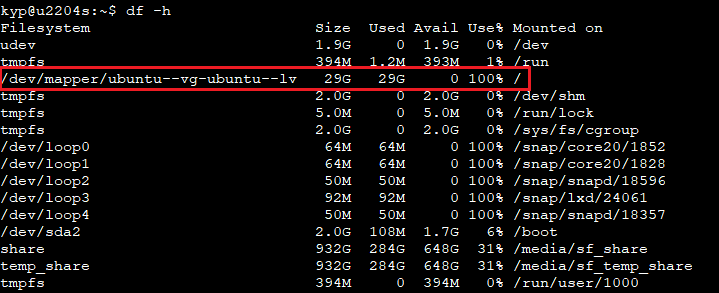
check disk size
1
df -h
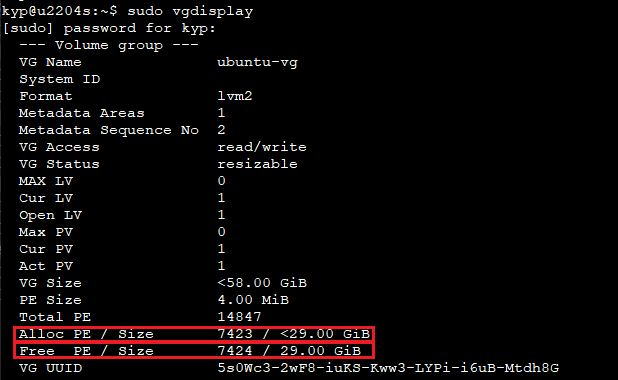
顯示存在的卷組
1
2
# use 29G, free 29G
sudo vgdisplay
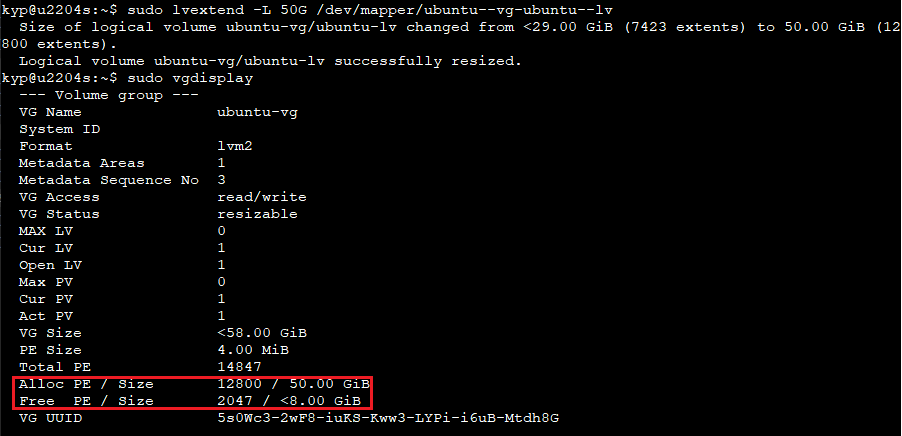
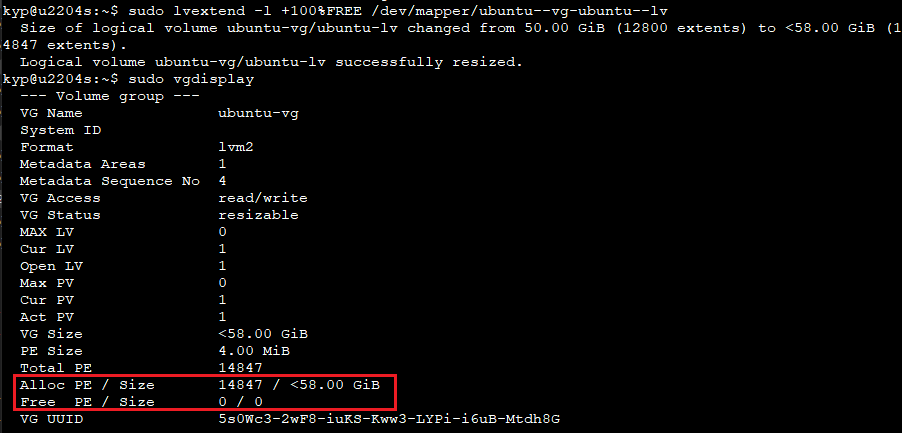
擴充size
1
2
3
4
5
# to 50G
sudo lvextend -L 50G /dev/mapper/ubuntu--vg-ubuntu--lv

# to all
sudo lvextend -l +100%FREE /dev/mapper/ubuntu--vg-ubuntu--lv
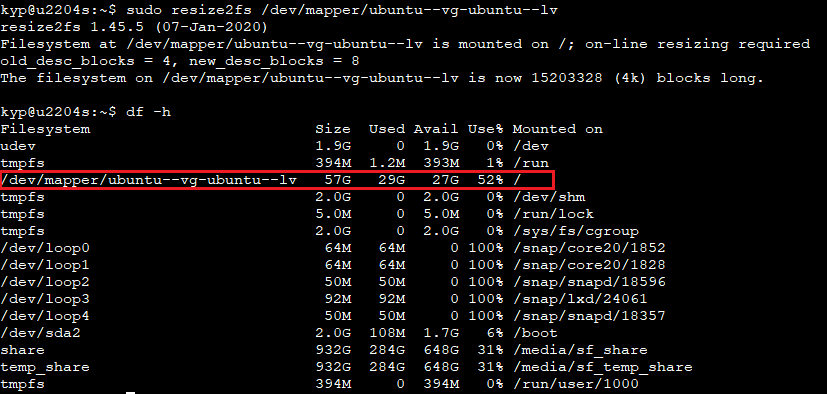
重新計算磁碟大小
1
sudo resize2fs /dev/mapper/ubuntu--vg-ubuntu--lv

Ref