Python Scrapy 說明(爬蟲框架)

說明

5 components

  • Spiders
  • Spiders (spider Middleware-extracting data)
    • scrapy.spider
    • crawlspider
  • Pipelines
  • Middleware(Downloader Middeware)
  • Engine
  • Scheduler

Spider type

  • XMLFeedSpider
  • CSVFeedSpider
  • SitemapSpider

Robots.txt (websites)

  • User-Agent
  • Allow
  • Disallow
1
2
3
4
5
6
7
8
9
10
11
12
13
14
15
16
17
18
19
20
21
22
23
24
25
26
27
28
29
30
31
32
33
34
35
# example website : https://www.facebook.com/robots.txt
# Notice: Collection of data on Facebook through automated means is
# prohibited unless you have express written permission from Facebook
# and may only be conducted for the limited purpose contained in said
# permission.
# See: http://www.facebook.com/apps/site_scraping_tos_terms.php

User-agent: Applebot
Disallow: /ajax/
Disallow: /album.php
Disallow: /checkpoint/
......

User-agent: Googlebot
Disallow: /ajax/
Disallow: /album.php
Disallow: /checkpoint/
......

User-agent: Applebot
Allow: /ajax/bootloader-endpoint/
Allow: /ajax/pagelet/generic.php/PagePostsSectionPagelet
Allow: /careers/
Allow: /safetycheck/
......

User-agent: Googlebot
Allow: /*/videos/
Allow: /ajax/bootloader-endpoint/
Allow: /ajax/pagelet/generic.php/PagePostsSectionPagelet
Allow: /careers/
Allow: /safetycheck/
Allow: /watch
......

the why’s and when’s of web scraping

  • Why web scraping?

    • Data analysis
      Data analysis relies 100% on a large amount of data(datasets).
      The more data you have the more accurate your data analysis will be.
    • Machine learning
      Machine learning requires a huge amount of data.
      The more data you have the more your system can learn.

  • Why web scrapy

    • Lead generation
    • Real estate listings
    • Price Monitoring
    • Stock marking tracking
    • Drop shipping
  • When to/not use web scraping

    • Terms of service & the Robots.txt?
    • Does the website have a public API?
    • Does the API have any limitations?
    • Does the API provide all the data you want?
    • Is the API free/paid?

scrapy sider templates

1
2
3
4
5
6
>scrapy genspider -l
Available templates:
basic
crawl
csvfeed
xmlfeed

command

install scrapy

1
2
3
4
5
6
7
8
9
10
11
# python 3.11 有問題, python 3.10 ok
# install myenv10_scrapy
rem cd \app\python_env\
# install scrapy version 1.7.1
rem pip install scrapy scrapy==1.7.1
rem py -3.10 -m virtualenv myenv10_scrapy
# install
pip install scrapy
pip install pylint
pip install autopep8
pip install ipython

install pymongo & dnspython(for MongoDB)

1
pip install pymongo dnspython

install scrapy by conda

insatll scrapy
1
2
3
4
5
6
7
8
9
10
11
12
13
14
# Anaconda download
# install virtual machine
# install scrapy
(virtual_3_7_spider) C:\Users\robertkao>conda install -c conda-forge scrapy==1.6 pylint autopep8 -y
# check version
(virtual_3_7_spider) C:\Users\robertkao>scrapy
# test scrapy shell
scrapy shell
# found error : ImportError: cannot import name 'HTTPClientFactory' from 'twisted.web.client' (unknown location)
# change twisted version from 22.4.0 to 21.7.0 solved the problem
conda uninstall twisted
conda install twisted==21.7.0 -y
# test scrapy shell ok
scrapy shell
once scrapy parse ok - but doesn’t know Why?
1
2
3
4
5
6
7
8
9
10
11
12
13
14
15
16
17
18
19
20
21
22
23
24
25
26
27
28
29
30
31
32
33
34
35
36
37
38
39
40
41
42
43
44
45
46
47
48
49
50
51
52
53
54
55
56
57
58
59
60
61
62
63
64
65
66
67
68
69
70
71
72
73
74
75
76
77
78
79
80
81
82
83
84
85
86
87
88
89
90
91
92
93
94
95
96
97
PS D:\work\run\python_crawler\102-conda\worldometers> scrapy parse --spider=countries -c parse_country --meta='{\"country_name\" : \"China\"}' https://www.worldometers.info/world-population/china-population/
2022-12-16 16:16:28 [scrapy.utils.log] INFO: Scrapy 2.6.2 started (bot: worldometers)
2022-12-16 16:16:28 [scrapy.utils.log] INFO: Versions: lxml 4.9.1.0, libxml2 2.9.14, cssselect 1.1.0, parsel 1.6.0, w3lib 1.21.0, Twisted 22.2.0, Python 3.9.13 (main, Aug 25 2022, 23:51:50) [MSC v.1916 64 bit (AMD64)], pyOpenSSL 22.0.0 (OpenSSL 1.1.1s 1 Nov 2022), cryptography 37.0.1, Platform Windows-10-10.0.19044-SP0
2022-12-16 16:16:28 [scrapy.crawler] INFO: Overridden settings:
{'BOT_NAME': 'worldometers',
'NEWSPIDER_MODULE': 'worldometers.spiders',
'ROBOTSTXT_OBEY': True,
'SPIDER_MODULES': ['worldometers.spiders']}
2022-12-16 16:16:28 [scrapy.utils.log] DEBUG: Using reactor: twisted.internet.selectreactor.SelectReactor
2022-12-16 16:16:28 [scrapy.extensions.telnet] INFO: Telnet Password: 446a57845c238b66
2022-12-16 16:16:28 [scrapy.middleware] INFO: Enabled extensions:
['scrapy.extensions.corestats.CoreStats',
'scrapy.extensions.telnet.TelnetConsole',
'scrapy.extensions.logstats.LogStats']
2022-12-16 16:16:28 [scrapy.middleware] INFO: Enabled downloader middlewares:
['scrapy.downloadermiddlewares.robotstxt.RobotsTxtMiddleware',
'scrapy.downloadermiddlewares.httpauth.HttpAuthMiddleware',
'scrapy.downloadermiddlewares.downloadtimeout.DownloadTimeoutMiddleware',
'scrapy.downloadermiddlewares.defaultheaders.DefaultHeadersMiddleware',
'scrapy.downloadermiddlewares.useragent.UserAgentMiddleware',
'scrapy.downloadermiddlewares.retry.RetryMiddleware',
'scrapy.downloadermiddlewares.redirect.MetaRefreshMiddleware',
'scrapy.downloadermiddlewares.httpcompression.HttpCompressionMiddleware',
'scrapy.downloadermiddlewares.redirect.RedirectMiddleware',
'scrapy.downloadermiddlewares.cookies.CookiesMiddleware',
'scrapy.downloadermiddlewares.httpproxy.HttpProxyMiddleware',
'scrapy.downloadermiddlewares.stats.DownloaderStats']
2022-12-16 16:16:28 [scrapy.middleware] INFO: Enabled spider middlewares:
['scrapy.spidermiddlewares.httperror.HttpErrorMiddleware',
'scrapy.spidermiddlewares.offsite.OffsiteMiddleware',
'scrapy.spidermiddlewares.referer.RefererMiddleware',
'scrapy.spidermiddlewares.urllength.UrlLengthMiddleware',
'scrapy.spidermiddlewares.depth.DepthMiddleware']
2022-12-16 16:16:28 [scrapy.middleware] INFO: Enabled item pipelines:
[]
2022-12-16 16:16:28 [scrapy.core.engine] INFO: Spider opened
2022-12-16 16:16:28 [scrapy.extensions.logstats] INFO: Crawled 0 pages (at 0 pages/min), scraped 0 items (at 0 items/min)
2022-12-16 16:16:28 [scrapy.extensions.telnet] INFO: Telnet console listening on 127.0.0.1:6024
2022-12-16 16:16:29 [scrapy.core.engine] DEBUG: Crawled (404) <GET https://www.worldometers.info/robots.txt> (referer: None)
2022-12-16 16:16:29 [protego] DEBUG: Rule at line 2 without any user agent to enforce it on.
2022-12-16 16:16:29 [protego] DEBUG: Rule at line 10 without any user agent to enforce it on.
2022-12-16 16:16:29 [protego] DEBUG: Rule at line 12 without any user agent to enforce it on.
2022-12-16 16:16:29 [protego] DEBUG: Rule at line 14 without any user agent to enforce it on.
2022-12-16 16:16:29 [protego] DEBUG: Rule at line 16 without any user agent to enforce it on.
2022-12-16 16:16:29 [scrapy.core.engine] DEBUG: Crawled (200) <GET https://www.worldometers.info/world-population/china-population/> (referer: None)
2022-12-16 16:16:29 [scrapy.core.engine] INFO: Closing spider (finished)
2022-12-16 16:16:29 [scrapy.statscollectors] INFO: Dumping Scrapy stats:
{'downloader/request_bytes': 494,
'downloader/request_count': 2,
'downloader/request_method_count/GET': 2,
'downloader/response_bytes': 13588,
'downloader/response_count': 2,
'downloader/response_status_count/200': 1,
'downloader/response_status_count/404': 1,
'elapsed_time_seconds': 1.187387,
'finish_reason': 'finished',
'finish_time': datetime.datetime(2022, 12, 16, 8, 16, 29, 771491),
'httpcompression/response_bytes': 67695,
'httpcompression/response_count': 2,
'log_count/DEBUG': 8,
'log_count/INFO': 10,
'response_received_count': 2,
'robotstxt/request_count': 1,
'robotstxt/response_count': 1,
'robotstxt/response_status_count/404': 1,
'scheduler/dequeued': 1,
'scheduler/dequeued/memory': 1,
'scheduler/enqueued': 1,
'scheduler/enqueued/memory': 1,
'start_time': datetime.datetime(2022, 12, 16, 8, 16, 28, 584104)}
2022-12-16 16:16:29 [scrapy.core.engine] INFO: Spider closed (finished)

>>> STATUS DEPTH LEVEL 1 <<<
# Scraped Items ------------------------------------------------------------
[{'country_name': 'China', 'population': '1,439,323,776', 'year': '2020'},
{'country_name': 'China', 'population': '1,433,783,686', 'year': '2019'},
{'country_name': 'China', 'population': '1,427,647,786', 'year': '2018'},
{'country_name': 'China', 'population': '1,421,021,791', 'year': '2017'},
{'country_name': 'China', 'population': '1,414,049,351', 'year': '2016'},
{'country_name': 'China', 'population': '1,406,847,870', 'year': '2015'},
{'country_name': 'China', 'population': '1,368,810,615', 'year': '2010'},
{'country_name': 'China', 'population': '1,330,776,380', 'year': '2005'},
{'country_name': 'China', 'population': '1,290,550,765', 'year': '2000'},
{'country_name': 'China', 'population': '1,240,920,535', 'year': '1995'},
{'country_name': 'China', 'population': '1,176,883,674', 'year': '1990'},
{'country_name': 'China', 'population': '1,075,589,361', 'year': '1985'},
{'country_name': 'China', 'population': '1,000,089,235', 'year': '1980'},
{'country_name': 'China', 'population': '926,240,885', 'year': '1975'},
{'country_name': 'China', 'population': '827,601,394', 'year': '1970'},
{'country_name': 'China', 'population': '724,218,968', 'year': '1965'},
{'country_name': 'China', 'population': '660,408,056', 'year': '1960'},
{'country_name': 'China', 'population': '612,241,554', 'year': '1955'}]

# Requests -----------------------------------------------------------------
[]

PS D:\work\run\python_crawler\102-conda\worldometers>

create project

1
2
3
4
5
6
7
myenv10_scrapy) D:\work\run\python_crawler\101-scrapy>scrapy startproject glassesshop
New Scrapy project 'glassesshop', using template directory 'D:\app\python_env\myenv10_scrapy\lib\site-packages\scrapy\templates\project', created in:
D:\work\run\python_crawler\101-scrapy\glassesshop

You can start your first spider with:
cd glassesshop
scrapy genspider example example.com

create spider

1
2
3
4
(myenv10_scrapy) D:\work\run\python_crawler\101-scrapy>cd glassesshop
(myenv10_scrapy) D:\work\run\python_crawler\101-scrapy\glassesshop>scrapy genspider products https://www.glassesshop.com/bestsellers
Created spider 'products' using template 'basic' in module:
glassesshop.spiders.products

create spider(crawl template)

1
2
3
4
(myenv10_scrapy) D:\work\run\python_crawler\101-scrapy>cd imdb
(myenv10_scrapy) D:\work\run\python_crawler\101-scrapy\imdb>scrapy genspider -t crawl best_movies imdb.com
Created spider 'best_movies' using template 'crawl' in module:
imdb.spiders.best_movies

run

1
2
3
4
5
6
7
(myenv10_scrapy) D:\work\run\python_crawler\101-scrapy\worldmeters>scrapy crawl countries

# no show log
(myenv10_scrapy) D:\work\run\python_crawler\101-scrapy\demo_downloader>scrapy crawl mp3_downloader --nolog

# show warning
(myenv10_scrapy) D:\work\run\python_crawler\101-scrapy\demo_downloader>scrapy crawl mp3_downloader -L WARN

data generate by dataset(json, csv, xml)

1
2
3
4
5
6
# generate json file
scrapy crawl countries -o population_dataset.json
# generate csv file
scrapy crawl countries -o population_dataset.csv
# generate xml file
scrapy crawl countries -o population_dataset.xml

manual control

version & help

1
2
3
4
5
6
7
8
9
10
11
12
13
14
15
16
17
18
19
20
21
22
23
24
25
26
(myenv10_scrapy) D:\work\git\python_crawler>scrapy
......
[s] Available Scrapy objects:
[s] scrapy scrapy module (contains scrapy.Request, scrapy.Selector, etc)
[s] crawler <scrapy.crawler.Crawler object at 0x0000025B9E971C00>
[s] item {}
[s] settings <scrapy.settings.Settings object at 0x0000025B9E973340>
[s] Useful shortcuts:
[s] fetch(url[, redirect=True]) Fetch URL and update local objects (by default, redirects are followed)
[s] fetch(req) Fetch a scrapy.Request and update local objects
[s] shelp() Shell help (print this help)
[s] view(response) View response in a browser
2022-12-15 13:47:24 [asyncio] DEBUG: Using proactor: IocpProactor
In [1]: fetch("https://www.worldometers.info/world-population/population-by-cou
...: ntry")
2022-12-15 13:47:32 [scrapy.core.engine] INFO: Spider opened
2022-12-15 13:47:33 [scrapy.downloadermiddlewares.redirect] DEBUG: Redirecting (301) to <GET https://www.worldometers.info/world-population/population-by-country/> from <GET https://www.worldometers.info/world-population/population-by-country>
2022-12-15 13:47:33 [scrapy.core.engine] DEBUG: Crawled (200) <GET https://www.worldometers.info/world-population/population-by-country/> (referer: None)

In [2]: title = response.xpath("//h1/text()")

In [3]: title
Out[3]: [<Selector xpath='//h1/text()' data='Countries in the world by population ...'>]

In [4]: title.get()
Out[4]: 'Countries in the world by population (2022)'

shell get url

1
2
3
4
5
6
7
8
9
10
11
12
13
14
15
16
17
18
19
20
21
(myenv10_scrapy) D:\work\run\python_crawler\101-scrapy\worldmeters>
scrapy shell "https://www.worldometers.info/world-population/population-by-country/"
2022-12-09 12:24:35 [scrapy.utils.log] INFO: Scrapy 2.7.1 started (bot: worldmeters)
......

[s] shelp() Shell help (print this help)
[s] view(response) View response in a browser
2022-12-09 12:24:37 [asyncio] DEBUG: Using selector: SelectSelector
In [1]:

In [1]: countries = response.xpath("//td/a")

In [2]: countries
Out[2]:
[<Selector xpath='//td/a' data='<a href="/world-population/china-popu...'>,
<Selector xpath='//td/a' data='<a href="/world-population/india-popu...'>,
......
<Selector xpath='//td/a' data='<a href="/world-population/tokelau-po...'>,
<Selector xpath='//td/a' data='<a href="/world-population/holy-see-p...'>]

In [3]:

fetch and view

1
2
3
4
5
6
7
8
9
10
11
12
13
14
15
16
17
18
19
20
21
22
23
24
25
26
27
28
29
(myenv10_scrapy) D:\work\run\python_crawler>scrapy shell
......
[s] Available Scrapy objects:
[s] scrapy scrapy module (contains scrapy.Request, scrapy.Selector, etc)
[s] crawler <scrapy.crawler.Crawler object at 0x000002AD58F421A0>
[s] item {}
[s] settings <scrapy.settings.Settings object at 0x000002AD58F43AF0>
[s] Useful shortcuts:
[s] fetch(url[, redirect=True]) Fetch URL and update local objects (by default, redirects are followed)
[s] fetch(req) Fetch a scrapy.Request and update local objects
[s] shelp() Shell help (print this help)
[s] view(response) View response in a browser
2022-12-15 14:02:50 [asyncio] DEBUG: Using proactor: IocpProactor
In [1]: fetch("https://www.worldometers.info/world-population/population-by-cou
...: ntry")
2022-12-15 14:02:57 [scrapy.core.engine] INFO: Spider opened
2022-12-15 14:02:58 [scrapy.downloadermiddlewares.redirect] DEBUG: Redirecting (301) to <GET https://www.worldometers.info/world-population/population-by-country/> from <GET https://www.worldometers.info/world-population/population-by-country>
2022-12-15 14:02:59 [scrapy.core.engine] DEBUG: Crawled (200) <GET https://www.worldometers.info/world-population/population-by-country/> (referer: None)

In [2]: title = response.xpath("//h1/text()")

In [3]: title
Out[3]: [<Selector xpath='//h1/text()' data='Countries in the world by population ...'>]

In [4]: title.get()
Out[4]: 'Countries in the world by population (2022)'

In [5]: view(response)
Out[5]: True

Packages

Selector

1
2
3
4
5
6
7
8
9
10
11
12
13
14
from scrapy.selector import Selector

# process from GET(json format)
def parse(self, response):
resp_dict = json.loads(response.body)
html = resp_dict.get('d').get('Result').get('html')
sel = Selector(text=html)
listings = sel.xpath("//div[@class='shell']")

# print html or write to file
print(html)
print("=====================")
with open('index.html', 'w') as f:
f.write(html)

settings.py

set JSON utf-8 format

1
2
# set JSON utf-8 format
FEED_EXPORT_ENCODING = 'utf-8'

set close scrapy for item count

1
CLOSESPIDER_ITEMCOUNT = 100

set User-Agent(2 way)

1
2
3
4
# Crawl responsibly by identifying yourself (and your website) on the user-agent
#USER_AGENT = 'tinydeal (+http://www.yourdomain.com)'
# change user agent
USER_AGENT = 'Mozilla/5.0 (Windows NT 10.0; Win64; x64) AppleWebKit/537.36 (KHTML, like Gecko) Chrome/108.0.0.0 Safari/537.36'
1
2
3
4
5
6
7
8
9
# Override the default request headers:
#DEFAULT_REQUEST_HEADERS = {
# 'Accept': 'text/html,application/xhtml+xml,application/xml;q=0.9,*/*;q=0.8',
# 'Accept-Language': 'en',
#}
# change default heads
DEFAULT_REQUEST_HEADERS = {
'User-Agent': 'Mozilla/5.0 (Windows NT 10.0; Win64; x64) AppleWebKit/537.36 (KHTML, like Gecko) Chrome/108.0.0.0 Safari/537.36'
}

save Scrapy crawl Command output

1
2
LOG_STDOUT = True
LOG_FILE = 'scrapy_output.txt'

coding

starting spider .py

1
2
3
4
5
6
7
8
9
10
11
12
13
14
15
16
17
import scrapy

class SpecialOffersSpider(scrapy.Spider):
name = 'special_offers'
allowed_domains = ['web.archive.org']
# start_urls = ['http://web.archive.org/']
# change web site
start_urls = ['https://web.archive.org/web/20190225123327/https://www.tinydeal.com/specials.html']

def parse(self, response):
for product in response.xpath('//ul[@class="productlisting-ul"]/div/li'):
yield {
'title' : product.xpath('.//a[@class="p_box_title"]/text()').get(),
'url' : response.urljoin(product.xpath('.//a[@class="p_box_title"]/@href').get()),
'discounted_price' : product.xpath('.//div[@class="p_box_price"]/span[1]/text()').get(),
'original_price' : product.xpath('.//div[@class="p_box_price"]/span[2]/text()').get()
}

bsolute url

1
2
3
4
# absolute url
# absolute_url = f'https://www.worldometers.info{link}'
absolute_url = response.urljoin(link)
yield scrapy.Request(url=absolute_url)

relative url

1
2
# relative url
yield response.follow(url=link, callback=self.parse_country)

add meta for callback parameter

1
2
3
4
5
6
7
8
9
10
11
12
13
14
15
16
17
18
19
20
21
22
23
24
25
26
27
28
29
30
31
32
33
34
35
import scrapy

class CountriesSpider(scrapy.Spider):
name = 'countries'
allowed_domains = ['www.worldometers.info']
# start_urls = ['https://www.worldometers.info/']
start_urls = ['https://www.worldometers.info/world-population/population-by-country']

def parse(self, response):
countries = response.xpath("//td/a")
for country in countries:
name = country.xpath(".//text()").get()
link = country.xpath(".//@href").get()

# absolute url
# absolute_url = f'https://www.worldometers.info{link}'
# absolute_url = response.urljoin(link)
# yield scrapy.Request(url=absolute_url)

# relative url
# add meta for callback parameter
yield response.follow(url=link, callback=self.parse_country, meta={'country_name': name})

def parse_country(self, response):
# add meta for callback parameter
name = response.request.meta['country_name']
rows = response.xpath("(//table[@class='table table-striped table-bordered table-hover table-condensed table-list'])[1]/tbody/tr")
for row in rows:
year = row.xpath("./td[1]/text()").get()
population = row.xpath("./td[2]/strong/text()").get()
yield {
'country_name' : name,
'year' : year,
'population': population
}

dealing with pagination

1
2
3
4
5
6
7
8
9
10
11
12
13
14
15
16
17
18
19
20
21
import scrapy

class SpecialOffersSpider(scrapy.Spider):
name = 'special_offers'
allowed_domains = ['web.archive.org']
# start_urls = ['http://web.archive.org/']
# change web site
start_urls = ['https://web.archive.org/web/20190225123327/https://www.tinydeal.com/specials.html']

def parse(self, response):
for product in response.xpath('//ul[@class="productlisting-ul"]/div/li'):
yield {
'title' : product.xpath('.//a[@class="p_box_title"]/text()').get(),
'url' : response.urljoin(product.xpath('.//a[@class="p_box_title"]/@href').get()),
'discounted_price' : product.xpath('.//div[@class="p_box_price"]/span[1]/text()').get(),
'original_price' : product.xpath('.//div[@class="p_box_price"]/span[2]/text()').get()
}

next_page = response.xpath('//a[@class="nextPage"]/@href').get()
if next_page:
yield scrapy.Request(url=next_page, callback=self.parse)

add headers

1
2
3
4
5
6
7
8
9
10
11
12
13
14
15
16
17
18
19
20
21
22
23
24
25
26
27
28
29
30
31
32
import scrapy

class SpecialOffersSpider(scrapy.Spider):
name = 'special_offers'
allowed_domains = ['web.archive.org']
# start_urls = ['http://web.archive.org/']
# change web site

# change user agent
# start_urls = ['https://web.archive.org/web/20190225123327/https://www.tinydeal.com/specials.html']
def start_requests(self):
yield scrapy.Request(url='https://web.archive.org/web/20190225123327/https://www.tinydeal.com/specials.html', callback=self.parse, headers={
'User-Agent': 'Mozilla/5.0 (Windows NT 10.0; Win64; x64) AppleWebKit/537.36 (KHTML, like Gecko) Chrome/108.0.0.0 Safari/537.36'
})

def parse(self, response):
for product in response.xpath('//ul[@class="productlisting-ul"]/div/li'):
yield {
'title': product.xpath('.//a[@class="p_box_title"]/text()').get(),
'url': response.urljoin(product.xpath('.//a[@class="p_box_title"]/@href').get()),
'discounted_price': product.xpath('.//div[@class="p_box_price"]/span[1]/text()').get(),
'original_price': product.xpath('.//div[@class="p_box_price"]/span[2]/text()').get(),
# show response.request User-Agent
'User-Agent': response.request.headers['User-Agent']
}

next_page = response.xpath('//a[@class="nextPage"]/@href').get()
if next_page:
# change user agent
yield scrapy.Request(url=next_page, callback=self.parse, headers={
'User-Agent': 'Mozilla/5.0 (Windows NT 10.0; Win64; x64) AppleWebKit/537.36 (KHTML, like Gecko) Chrome/108.0.0.0 Safari/537.36'
})

add headers(crawl template)

1
2
3
4
5
6
7
8
9
10
11
12
13
14
15
16
17
18
19
20
21
22
23
24
25
26
27
28
29
30
31
32
33
34
35
36
37
38
39
40
41
# best_movies.py
import scrapy
from scrapy.linkextractors import LinkExtractor
from scrapy.spiders import CrawlSpider, Rule


class BestMoviesSpider(CrawlSpider):
name = 'best_movies'
allowed_domains = ['imdb.com']

# change user agent
# start_urls = ['https://www.imdb.com/search/title/?genres=drama&groups=top_250&sort=user_rating,desc']
user_agent = 'Mozilla/5.0 (Windows NT 10.0; Win64; x64) AppleWebKit/537.36 (KHTML, like Gecko) Chrome/108.0.0.0 Safari/537.36'

def start_requests(self):
yield scrapy.Request(url='https://www.imdb.com/search/title/?genres=drama&groups=top_250&sort=user_rating,desc', headers={
'User-Agent': self.user_agent
})

rules = (
Rule(LinkExtractor(restrict_xpaths="//h3[@class='lister-item-header']/a"), callback='parse_item', follow=True, process_request='set_user_agent'),
# add next page rule
Rule(LinkExtractor(restrict_xpaths="(//a[@class='lister-page-next next-page'])[2]"))
)


# for scrappier 2.0
def set_user_agent(self, request, spider):
request.headers['User-Agent'] = self.user_agent
return request

def parse_item(self, response):
yield {
'title': response.xpath("//div[@class='sc-80d4314-1 fbQftq']/h1/text()").get(),
'year': response.xpath("//span[@class='sc-8c396aa2-2 itZqyK']/text()").get(),
'duration': ''.join(response.xpath("//ul[@class='ipc-inline-list ipc-inline-list--show-dividers sc-8c396aa2-0 kqWovI baseAlt']/li[3]/text()").getall()),
'genre': response.xpath("//div[@class='ipc-chip-list__scroller']/a/span/text()").getall(),
'rating': response.xpath("//div[@data-testid='hero-rating-bar__aggregate-rating__score']/span[1]/text()").get(),
'movie_url': response.url,
'user-agent': response.request.headers['User-Agent']
}

fake_useragent

settings.py
1
2
3
4
5
6
7
8
# Enable or disable downloader middlewares
# See https://docs.scrapy.org/en/latest/topics/downloader-middleware.html
#DOWNLOADER_MIDDLEWARES = {
# 'ithome2.middlewares.Ithome2DownloaderMiddleware': 543,
#}
DOWNLOADER_MIDDLEWARES = {
'ithome2.middlewares.Item2AgentMiddleware': 543,
}
middlewares.py
1
2
3
4
5
6
7
8
9
10
11
12
13
14
15
16
17
18
# add user agent
from fake_useragent import UserAgent
from scrapy.downloadermiddlewares.useragent import UserAgentMiddleware

class Item2AgentMiddleware(UserAgentMiddleware):
def __init__(self, user_agent=''):
self.user_agent = user_agent

def process_request(self, request, spider):
ua = UserAgent()
request.headers['User-Agent'] = ua.random


def process_response(self, request, response, spider):
# log test
spider.logger.info(f'Item2AgentMiddleware-process_response User-Agent of [{request.url}] is [{request.headers["User-Agent"]}]')

return response

output 2 json files(by coding)

pipelines.py
1
2
3
4
5
6
7
8
9
10
11
12
13
14
15
16
17
18
19
20
21
22
23
24
25
26
27
28
29
30
31
32
33
34
35
36
37
38
39
40
41
42
43
44
45
46
47
48
49
50
51
52
53
54
55
56
57
58
59
60
61
62
63
64
65
66
67
68
69
70
71
72
73
74
75
76
77
78
79
80
81
82
83
84
85
86
87
88
89
90
91
92
# useful for handling different item types with a single interface
from itemadapter import ItemAdapter
from scrapy.exceptions import DropItem
from pymongo import MongoClient
from datetime import datetime
import ithome2.items as items
import ithome2.env as env
# save item to json
import json

class Ithome2Pipeline:
def process_item(self, item, spider):
if type(item).__name__ == 'IthomeArticleItem':
if item['view_count'] < 100:
raise DropItem(f'[{item["title"]}] 瀏覽數小於 100')

return item


class MongoPipeline:
collection_article = 'articles'
collection_response = 'response'

def open_spider(self, spider):
dbname = 'ithome2'
user = env.MONGO_USER
password = env.MONGO_PASSWORD
host = 'localhost'
port = 27017
MONGO_URI = f'mongodb://{user}:{password}@{host}:{port}/'
self.client = MongoClient(MONGO_URI)
self.db = self.client[dbname]
# save item to json
self.file1 = open('art.json', 'w', encoding='utf-8')
self.file2 = open('resp.json', 'w', encoding='utf-8')
self.file1.write('[\n')
self.file2.write('[\n')

def close_spider(self, spider):
self.client.close()
# save item to json
self.file1.write(']')
self.file2.write(']')
self.file1.close()
self.file2.close()

def process_item(self, item, spider):
# if type(item).__name__ == 'IthomeArticleItem':
if type(item) is items.IthomeArticleItem:
# 查詢資料庫中是否有相同網址的資料存在
doc = self.db[self.collection_article].find_one({'url': item['url']})
item['update_time'] = datetime.now()

if not doc:
# 沒有就新增
item['_id'] = str(self.db[self.collection_article].insert_one(dict(item)).inserted_id)
else:
# 已存在則更新
self.db[self.collection_article].update_one(
{'_id': doc['_id']},
{'$set': dict(item)}
)
item['_id'] = str(doc['_id'])

# save item to json
values = dict(item)
values['update_time'] = values['update_time'].strftime("%Y-%m-%d %H:%M:%S")
line = json.dumps(values, ensure_ascii=False) + ",\n"
self.file1.write(line)

# if type(item).__name__ == 'IthomeReplyItem':
if type(item) is items.IthomeReplyItem:
# save item to json
values = dict(item)
del values['_id']
values['publish_time'] = values['publish_time'].strftime("%Y-%m-%d %H:%M:%S")
values['article_id'] = str(values['article_id'])
line = json.dumps(values, ensure_ascii=False) + ",\n"
self.file2.write(line)

document = self.db[self.collection_response].find_one(item['_id'])
if not document:
insert_result = self.db[self.collection_response].insert_one(dict(item))
else:
del item['_id']
self.db[self.collection_response].update_one(
{'_id': document['_id']},
{'$set': dict(item)},
upsert=True
)

return item

Pipelines

enabel pipelines

  • add log at open_spider and close_spider
  • get setting value
settings.py
1
2
3
4
5
6
7
8
9
10
# Configure item pipelines
# See https://docs.scrapy.org/en/latest/topics/item-pipeline.html
# enable pipleline
ITEM_PIPELINES = {
'imdb.pipelines.ImdbPipeline': 300
# if add filter, need have higher pripority
# 'imdb.pipelines.FillterDuplicate': 100,
}

MONGO_URL = "Hello World"
pipelines.py
1
2
3
4
5
6
7
8
9
10
11
12
13
14
15
16
17
18
19
20
21
22
23
24
25
26
27
28
29
# Define your item pipelines here
#
# Don't forget to add your pipeline to the ITEM_PIPELINES setting
# See: https://docs.scrapy.org/en/latest/topics/item-pipeline.html


# useful for handling different item types with a single interface
from itemadapter import ItemAdapter
# add loggin to open_spider and close_spider
import logging

class ImdbPipeline:

# add get setting value
@classmethod
def from_crawler(cls, crawler):
logging.warning(crawler.settings.get("MONGO_URL"))
return cls()

# add loggin to open_spider and close_spider
def open_spider(self, spider):
logging.warning("SPIDER OPEND FROM PIPLINE")

# add loggin to open_spider and close_spider
def close_spider(self, spider):
logging.warning("SPIDER CLOSE FROM PIPLINE")

def process_item(self, item, spider):
return item
run
1
2
3
4
5
6
7
8
9
10
11
12
13
14
15
(myenv10_scrapy) D:\work\run\python_crawler\101-scrapy\imdb>scrapy crawl best_movies
......
# get setting value
2022-12-27 13:54:48 [root] WARNING: Hello World
2022-12-27 13:54:48 [scrapy.middleware] INFO: Enabled item pipelines:
['imdb.pipelines.ImdbPipeline']
2022-12-27 13:54:48 [scrapy.core.engine] INFO: Spider opened
# open spider
2022-12-27 13:54:48 [root] WARNING: SPIDER OPEND FROM PIPLINE
......
2022-12-27 13:55:29 [scrapy.core.engine] INFO: Closing spider (finished)
# close spider
2022-12-27 13:55:29 [root] WARNING: SPIDER CLOSE FROM PIPLINE
2022-12-27 13:55:29 [scrapy.statscollectors] INFO: Dumping Scrapy stats:
......

Store data in MongoDB

pipelines.py
1
2
3
4
5
6
7
8
9
10
11
12
13
14
15
16
17
18
19
20
21
22
23
24
25
26
27
28
# Define your item pipelines here
#
# Don't forget to add your pipeline to the ITEM_PIPELINES setting
# See: https://docs.scrapy.org/en/latest/topics/item-pipeline.html


# useful for handling different item types with a single interface
from itemadapter import ItemAdapter
# for MongoDB
import pymongo

# for MongoDB - changhe name
class MongodbPipeline:
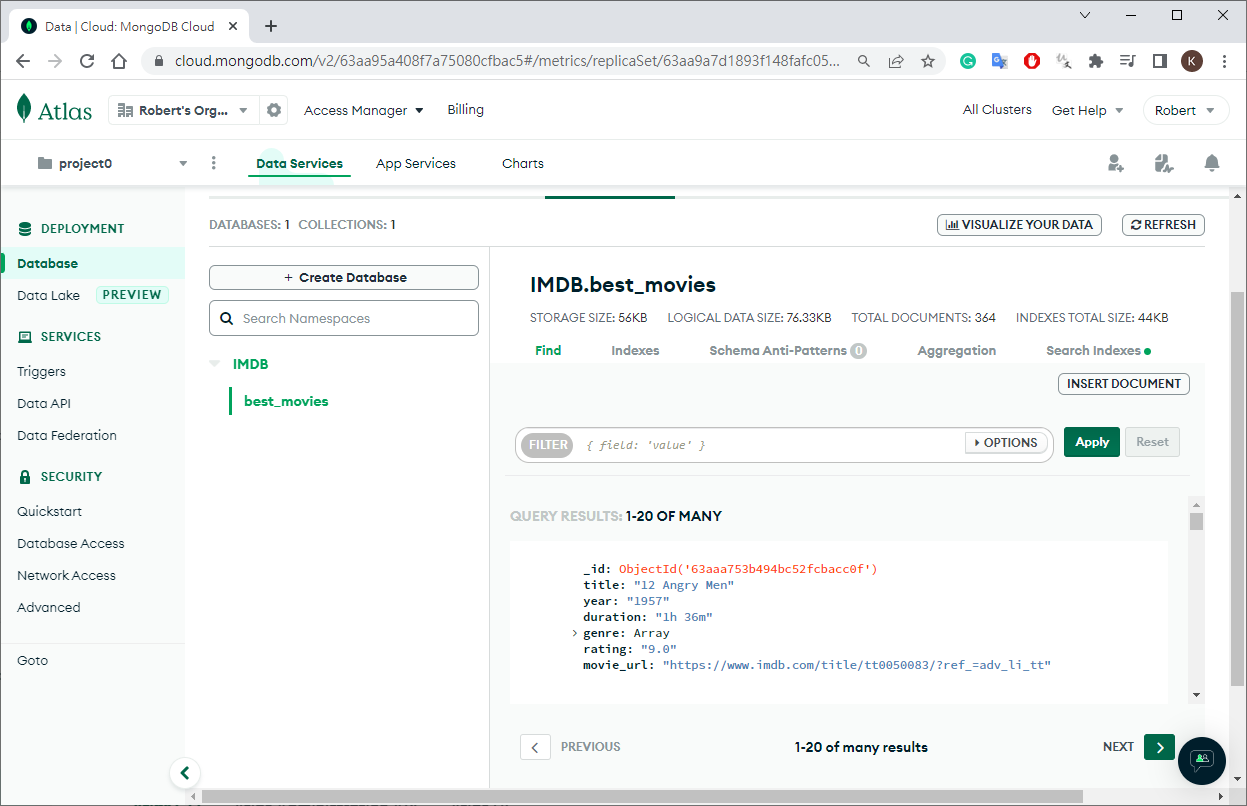
collection_name = "best_movies"

def open_spider(self, spider):
# for MongoDB
self.client = pymongo.MongoClient("mongodb+srv://robert:testtest@cluster0.vpuxrtz.mongodb.net/?retryWrites=true&w=majority")
self.db = self.client["IMDB"]

def close_spider(self, spider):
# for MongoDB
self.client.close()

def process_item(self, item, spider):
# for MongoDB
self.db[self.collection_name].insert_one(item)
return item
settings.py
1
2
3
4
5
6
# Configure item pipelines
# See https://docs.scrapy.org/en/latest/topics/item-pipeline.html
# enable pipleline - for MongoDB
ITEM_PIPELINES = {
'imdb.pipelines.MongodbPipeline': 300
}
run
1
(myenv10_scrapy) D:\work\run\python_crawler\101-scrapy\imdb>scrapy crawl best_movies
MongoDB

Store data in SQLite3

pipelines.py
1
2
3
4
5
6
7
8
9
10
11
12
13
14
15
16
17
18
19
20
21
22
23
24
25
26
27
28
29
30
31
32
33
34
35
36
37
38
39
40
41
42
43
44
45
46
47
48
49
50
51
52
53
54
55
56
57
58
59
60
61
62
63
64
65
66
67
68
69
70
71
72
73
74
75
76
77
# Define your item pipelines here
#
# Don't forget to add your pipeline to the ITEM_PIPELINES setting
# See: https://docs.scrapy.org/en/latest/topics/item-pipeline.html


# useful for handling different item types with a single interface
from itemadapter import ItemAdapter
# for MongoDB
import pymongo
# for SQlite
import sqlite3
# for mongodb client link
import mongodb_altas
# delete imdb if exist
# import os

# for MongoDB - changhe name
class MongodbPipeline:
collection_name = "best_movies"

def open_spider(self, spider):
# for MongoDB
# for mongodb client link
self.client = pymongo.MongoClient(mongodb_altas.mogodb_link)
self.db = self.client["IMDB"]

def close_spider(self, spider):
# for MongoDB
self.client.close()

def process_item(self, item, spider):
# for MongoDB
self.db[self.collection_name].insert_one(item)
return item

# for SQlite
class SQLitePipeline:

def open_spider(self, spider):
# delete imdb if exist
# if os.path.exists("imdb.db"):
# os.remove("imdb.db")

self.connection = sqlite3.connect("imdb.db")
self.c = self.connection.cursor()
try:
self.c.execute('''
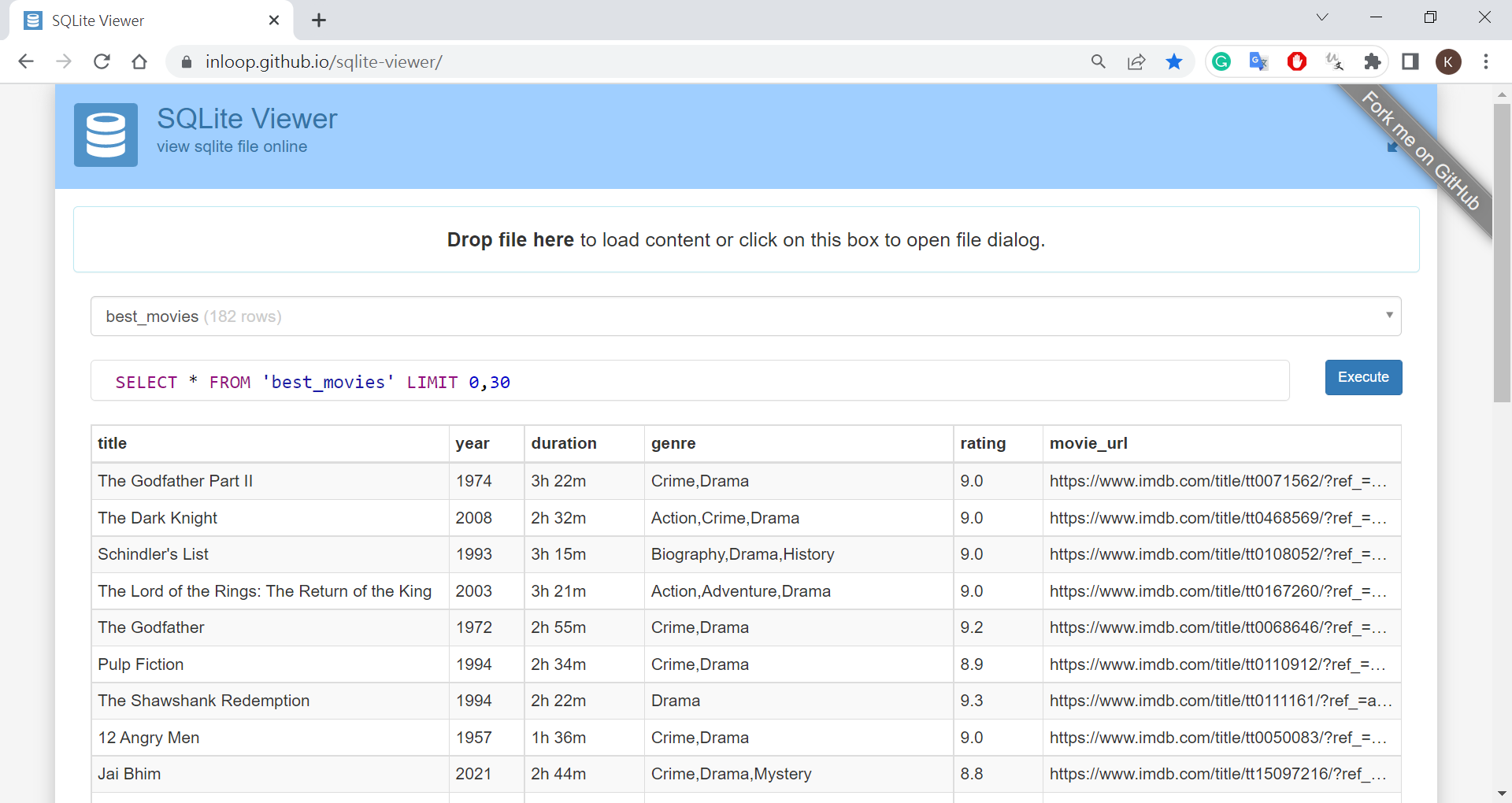
CREATE TABLE best_movies(
title TEXT,
year TEXT,
duration TEXT,
genre TEXT,
rating TEXT,
movie_url TEXT
)
''')
self.connection.commit()
except sqlite3.OperationalError:
pass

def close_spider(self, spider):
self.connection.close()

def process_item(self, item, spider):
self.c.execute("""
INSERT INTO best_movies (title,year,duration,genre,rating,movie_url) values(?,?,?,?,?,?)
""",(
item.get('title'),
item.get('year'),
item.get('duration'),
','.join(item.get('genre')),
item.get('rating'),
item.get('movie_url')
))
self.connection.commit()
return item
settings.py
1
2
3
4
5
6
7
8
9
10
11
# Configure item pipelines
# See https://docs.scrapy.org/en/latest/topics/item-pipeline.html
# enable pipleline - for MongoDB
# ITEM_PIPELINES = {
# 'imdb.pipelines.MongodbPipeline': 300
# }
# enable pipleline - for SQlite
# for SQlite
ITEM_PIPELINES = {
'imdb.pipelines.SQLitePipeline': 300
}
run
1
(myenv10_scrapy) D:\work\run\python_crawler\101-scrapy\imdb>scrapy crawl best_movies
SQLite3

Middleware

install fake-useragent

1
pip install fake-useragent

UserAgent

settings.py
1
2
3
4
5
6
7
8
# Enable or disable downloader middlewares
# See https://docs.scrapy.org/en/latest/topics/downloader-middleware.html
#DOWNLOADER_MIDDLEWARES = {
# 'ithome2.middlewares.Ithome2DownloaderMiddleware': 543,
#}
DOWNLOADER_MIDDLEWARES = {
'ithome2.middlewares.Item2AgentMiddleware': 543,
}
middlewares.py
1
2
3
4
5
6
7
8
9
10
11
12
13
14
15
16
17
18
19
20
21
22
23
from scrapy import signals

# useful for handling different item types with a single interface
from itemadapter import is_item, ItemAdapter

# add user agent
from fake_useragent import UserAgent
from scrapy.downloadermiddlewares.useragent import UserAgentMiddleware

class Item2AgentMiddleware(UserAgentMiddleware):
def __init__(self, user_agent=''):
self.user_agent = user_agent

def process_request(self, request, spider):
ua = UserAgent()
request.headers['User-Agent'] = ua.random


def process_response(self, request, response, spider):
# log test
spider.logger.info(f'Item2AgentMiddleware-process_response User-Agent of [{request.url}] is [{request.headers["User-Agent"]}]')

return response

Scrapy API

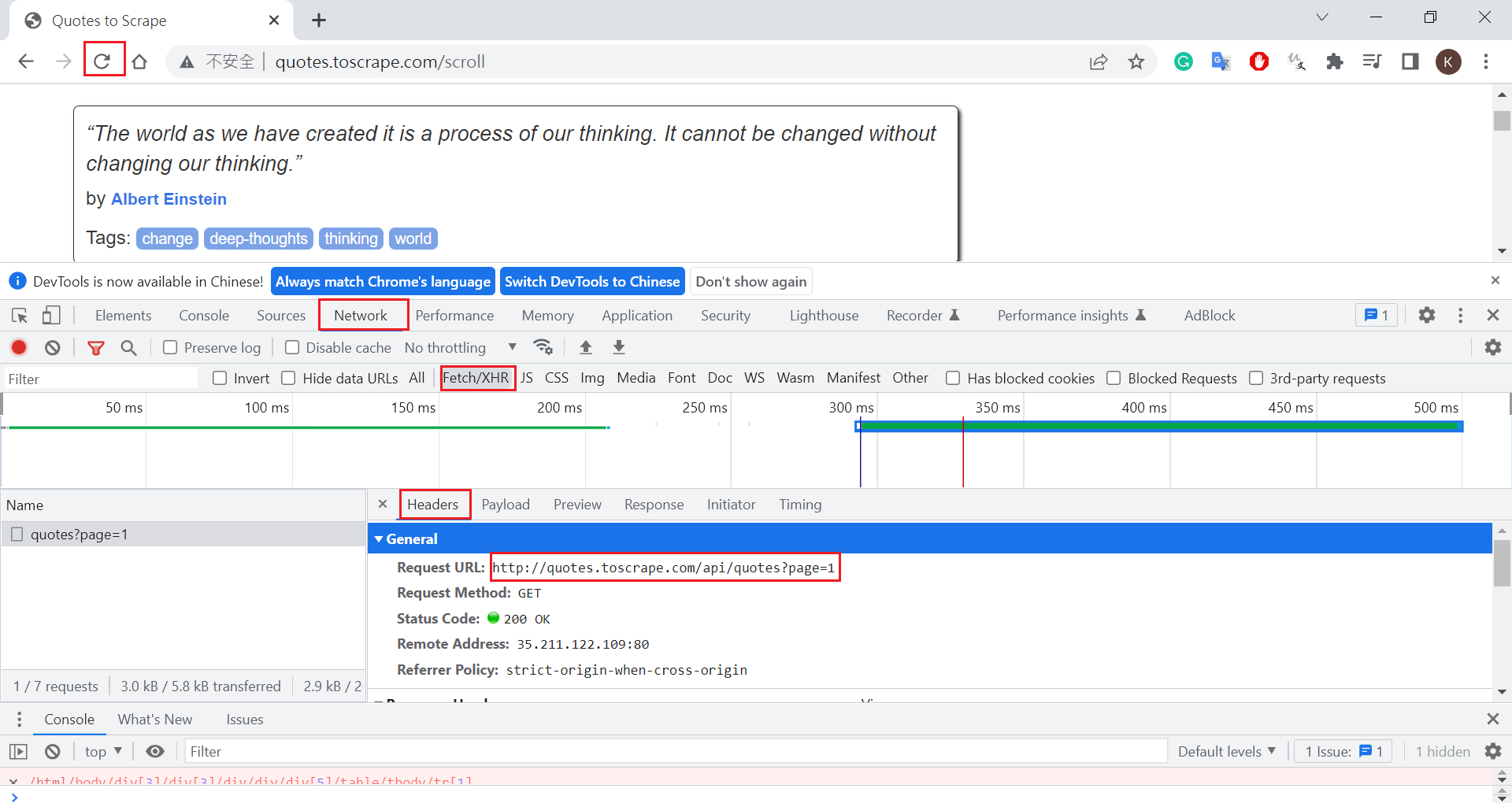
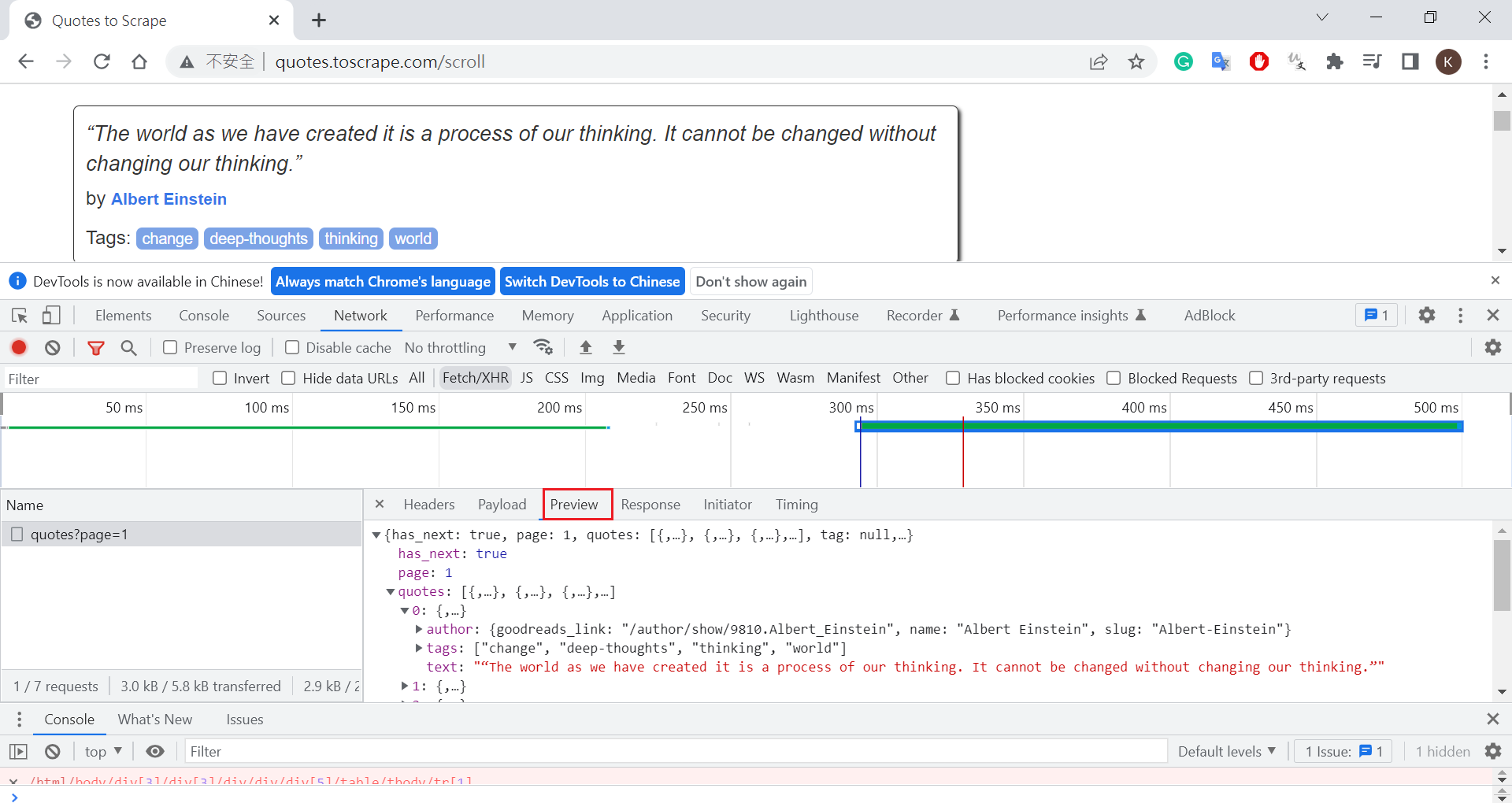
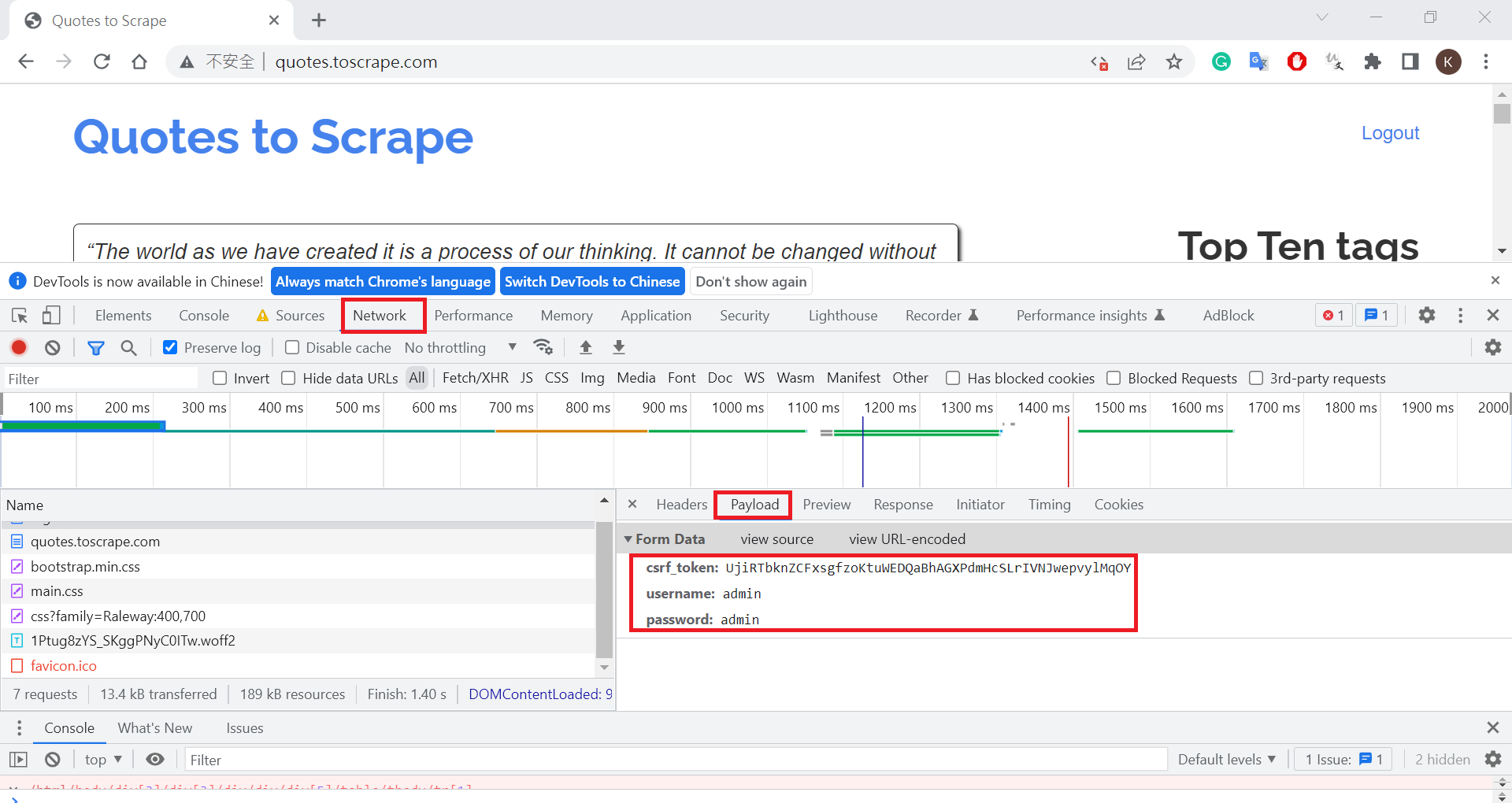
Quotes to Scrape

check API from chrom
create project and spider
1
2
3
4
5
6
7
8
9
10
11
(myenv10_scrapy) D:\work\run\python_crawler\101-scrapy>scrapy startproject demo_api
New Scrapy project 'demo_api', using template directory 'D:\app\python_env\myenv10_scrapy\lib\site-packages\scrapy\templates\project', created in:
D:\work\run\python_crawler\101-scrapy\demo_api
You can start your first spider with:
cd demo_api
scrapy genspider example example.com

(myenv10_scrapy) D:\work\run\python_crawler\101-scrapy>cd demo_api
(myenv10_scrapy) D:\work\run\python_crawler\101-scrapy\demo_api>scrapy genspider quotes quotes.toscrape.com
Created spider 'quotes' using template 'basic' in module:
demo_api.spiders.quotes
quotes.py
1
2
3
4
5
6
7
8
9
10
11
12
13
14
15
16
17
18
19
20
21
22
23
24
25
26
27
import scrapy
import json

class QuotesSpider(scrapy.Spider):
name = 'quotes'
allowed_domains = ['quotes.toscrape.com']
start_urls = ['http://quotes.toscrape.com/api/quotes?page=1']

def parse(self, response):
# print(response.body)
resp = json.loads(response.body)
quotes = resp.get('quotes')
# print(quotes)
for quote in quotes:
yield {
'author': quote.get('author').get('name'),
'tags': quote.get('tags'),
'quote_test': quote.get('text')
}

page_next = resp.get('has_next')
if page_next:
next_page_number = resp.get('page') + 1
yield scrapy.Request(
url=f'http://quotes.toscrape.com/api/quotes?page={next_page_number}',
callback = self.parse
)
run
1
PS D:\work\run\python_crawler\101-scrapy\demo_api> scrapy crawl quotes

OPEN LIBRARY

check API from chrome
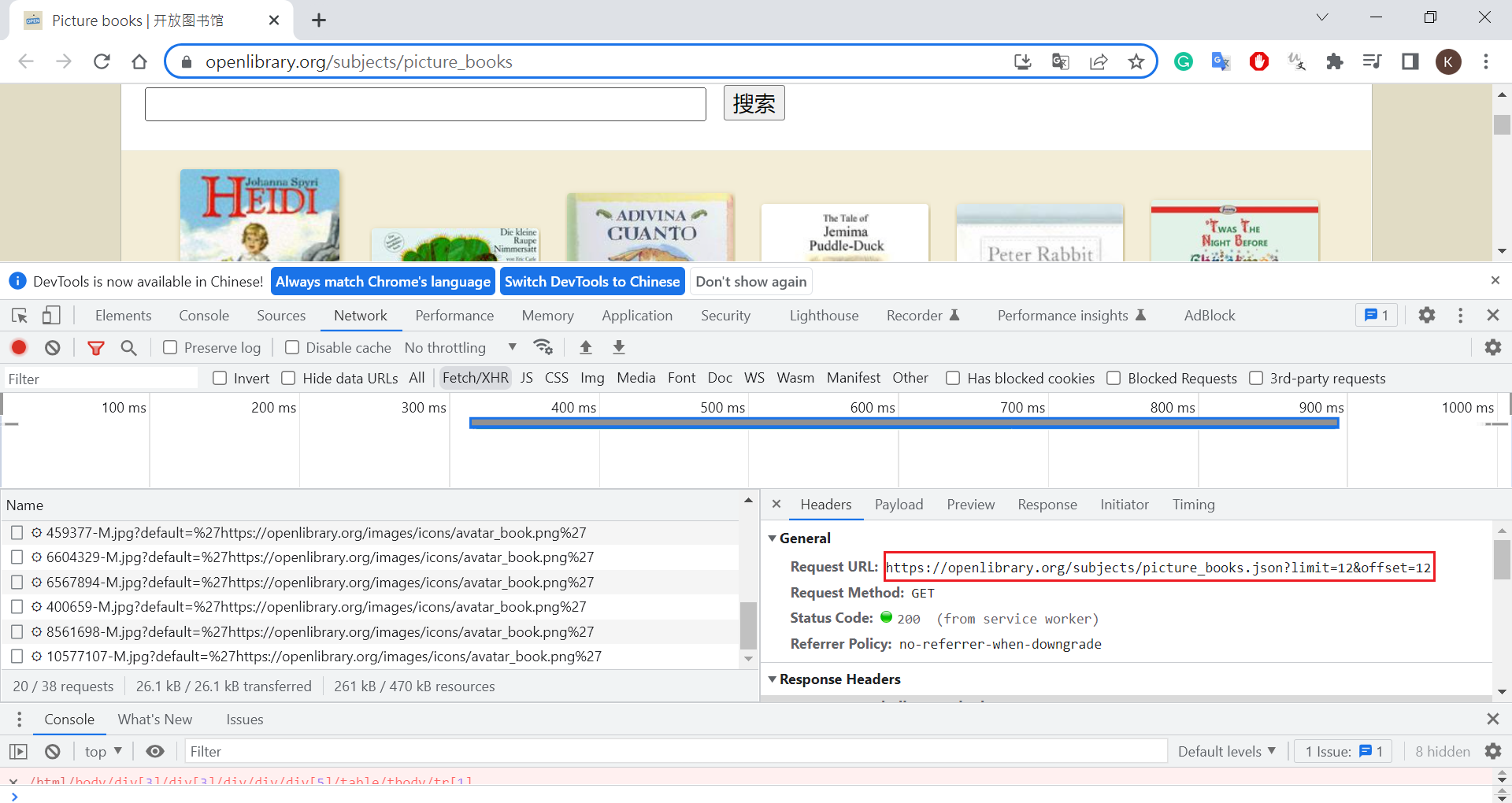
create spider
1
2
3
PS D:\work\run\python_crawler\101-scrapy\demo_api> scrapy genspider ebooks "openlibrary.org/subjects/picture_books.json?limit=12&offset=12"
Created spider 'ebooks' using template 'basic' in module:
demo_api.spiders.ebooks
ebooks.py
1
2
3
4
5
6
7
8
9
10
11
12
13
14
15
16
17
18
19
20
21
22
23
24
25
26
27
28
29
30
31
32
import scrapy
from scrapy.exceptions import CloseSpider
import json


class EbookSpider(scrapy.Spider):
name = 'ebooks'
allowed_domains = ['openlibrary.org']
start_urls = ['https://openlibrary.org/subjects/picture_books.json?limit=12&offset=0']

INCREMENT_BY = 12
offset = 0

def parse(self, response):
resp = json.loads(response.body)

ebooks = resp.get('works')
print(ebooks)
for ebook in ebooks:
yield {
'title': ebook.get('title'),
'subject': ebook.get('subject')
}

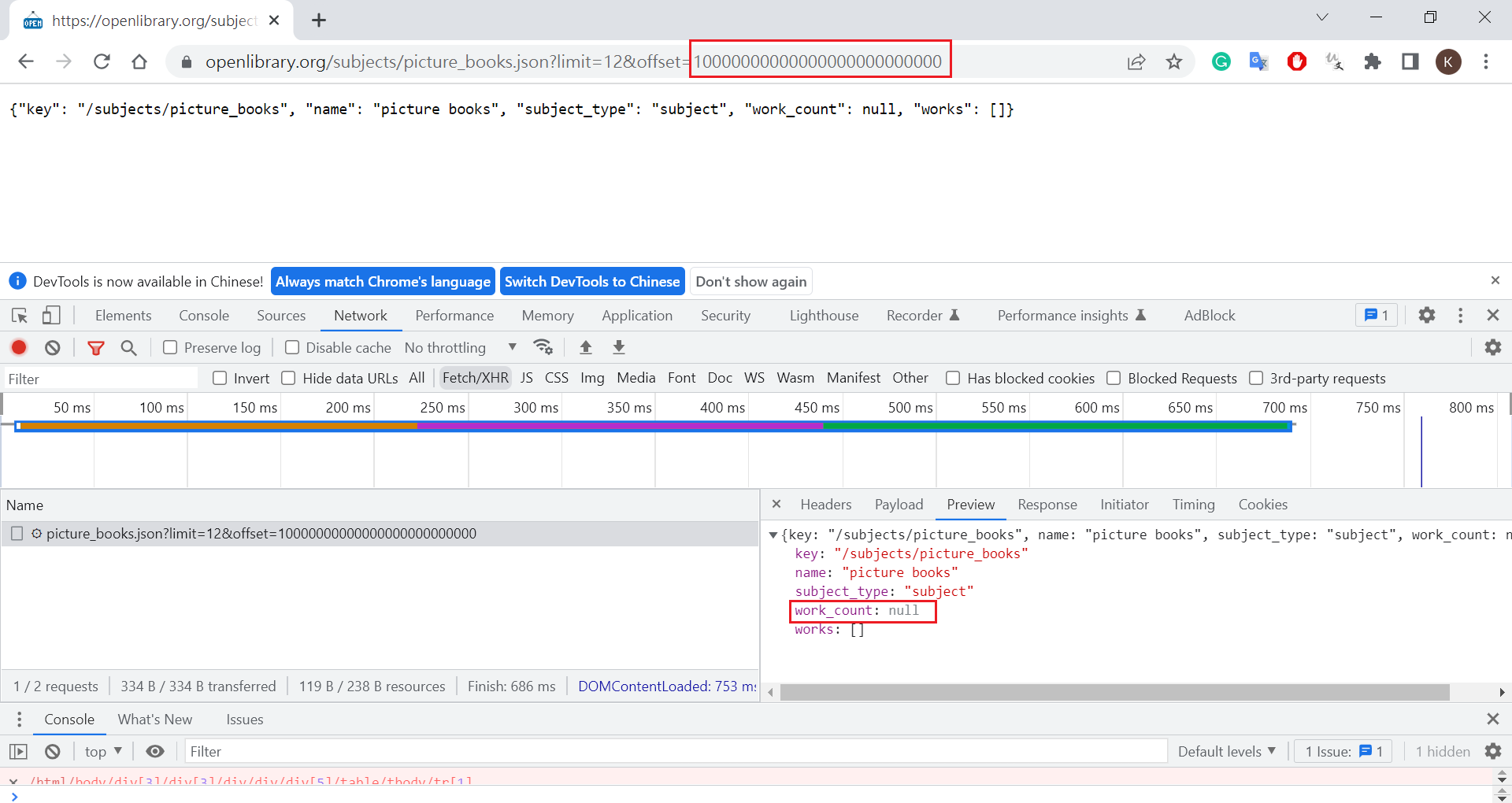
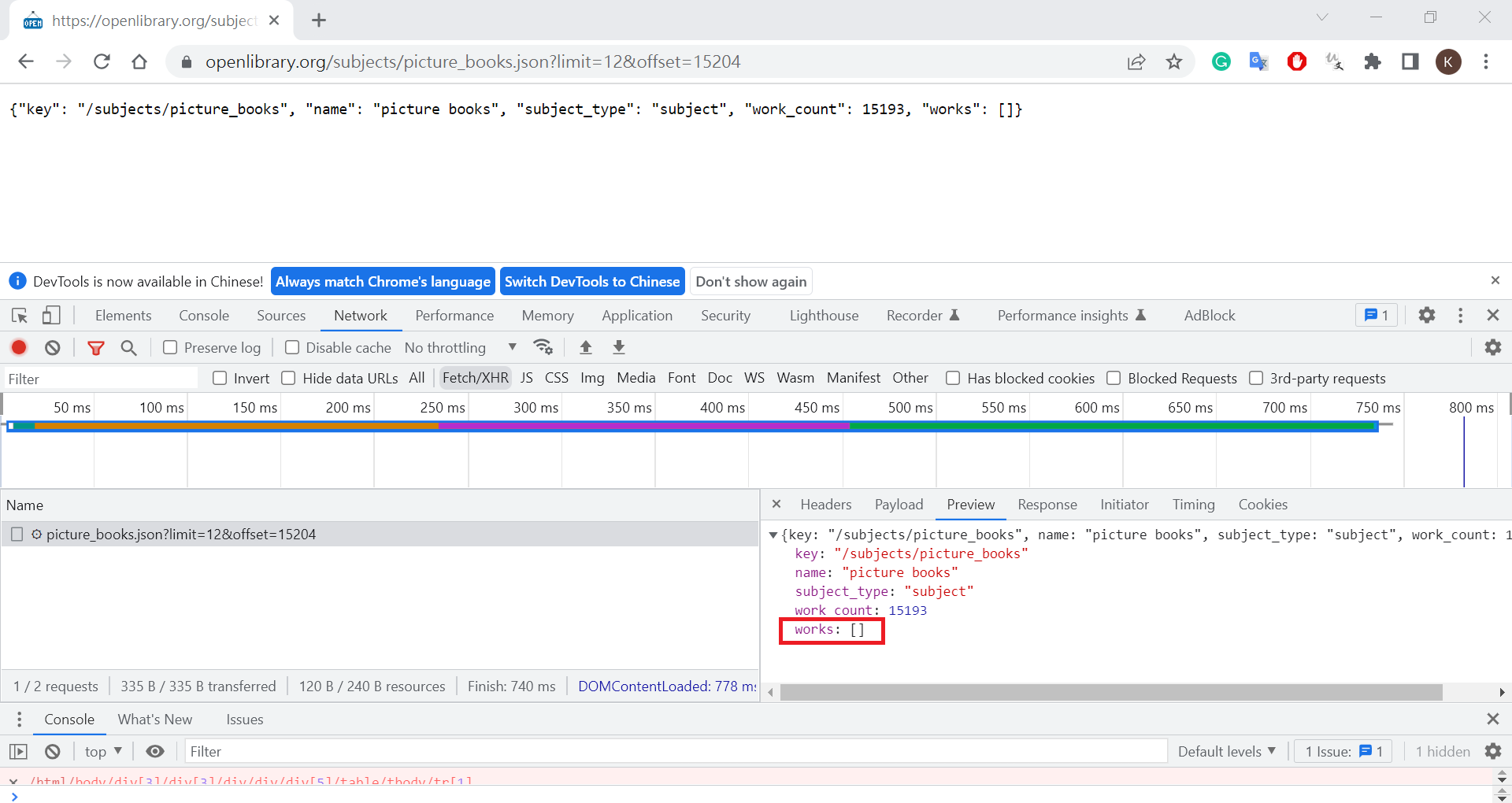
if len(ebooks) == 0:
raise CloseSpider("Reached last page...")

self.offset += self.INCREMENT_BY
yield scrapy.Request(
url=f'https://openlibrary.org/subjects/picture_books.json?limit=12&offset={self.offset}',
callback = self.parse
)
run
1
2
3
4
5
6
7
8
9
10
11
12
13
14
15
16
17
18
19
20
21
22
23
24
25
26
27
28
29
30
31
32
33
PS D:\work\run\python_crawler\101-scrapy\demo_api> scrapy crawl ebooks
.....
2022-12-28 17:18:33 [scrapy.core.scraper] DEBUG: Scraped from <200 https://openlibrary.org/subjects/picture_books.json?limit=12&offset=15192>
{'title': 'The red tractor', 'subject': ['Juvenile fiction', 'Farm life', 'Picture books', 'Fiction']}
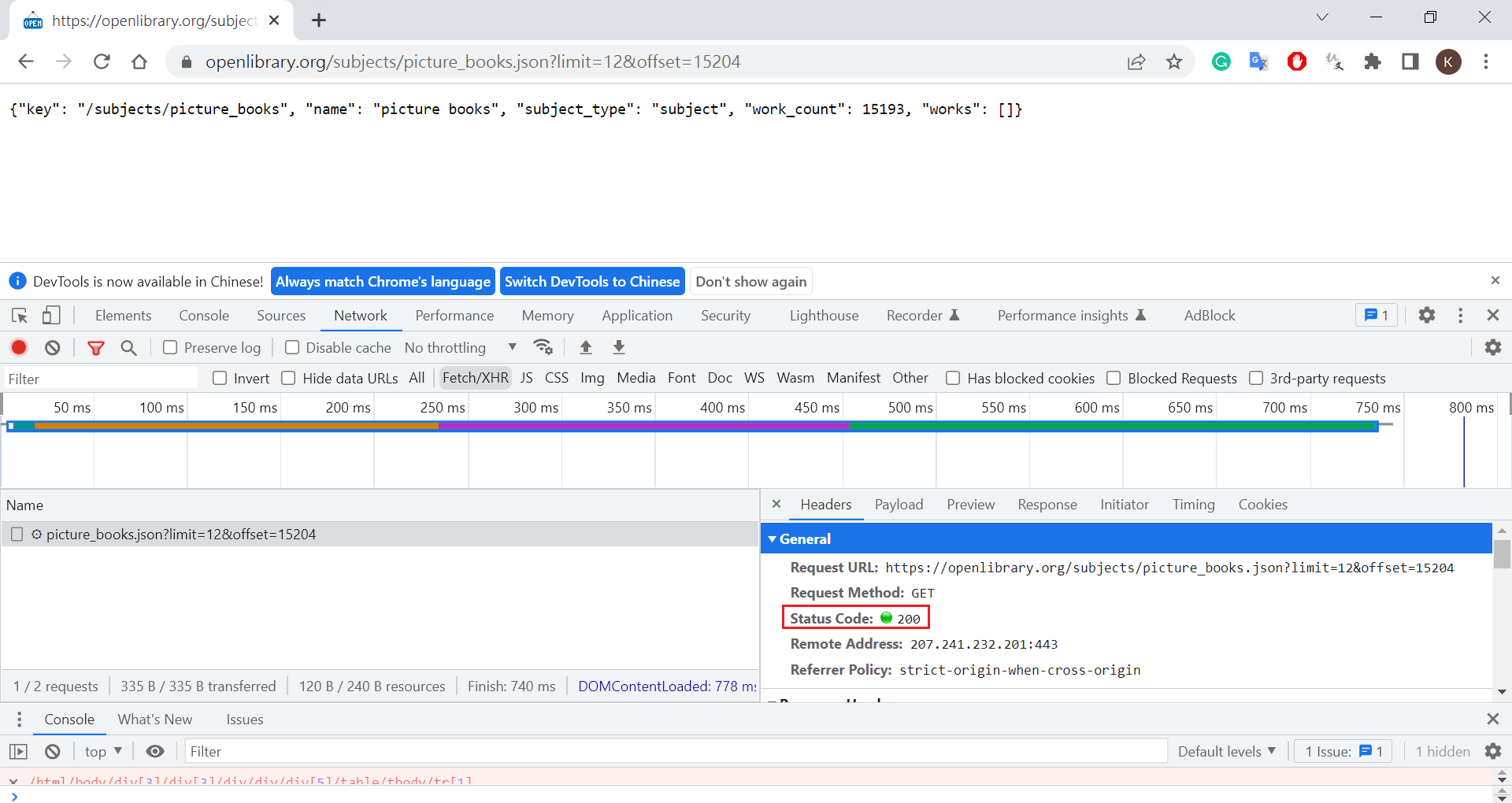
2022-12-28 17:18:34 [scrapy.core.engine] DEBUG: Crawled (200) <GET https://openlibrary.org/subjects/picture_books.json?limit=12&offset=15204> (referer: https://openlibrary.org/subjects/picture_books.json?limit=12&offset=15192)
[]
2022-12-28 17:18:34 [scrapy.core.engine] INFO: Closing spider (Reached last page...)
2022-12-28 17:18:34 [scrapy.statscollectors] INFO: Dumping Scrapy stats:
{'downloader/request_bytes': 1525,
'downloader/request_count': 5,
'downloader/request_method_count/GET': 5,
'downloader/response_bytes': 55307,
'downloader/response_count': 5,
'downloader/response_status_count/200': 5,
'elapsed_time_seconds': 3.215997,
'finish_reason': 'Reached last page...',
'finish_time': datetime.datetime(2022, 12, 28, 9, 18, 34, 167565),
'httpcompression/response_bytes': 199,
'httpcompression/response_count': 1,
'item_scraped_count': 25,
'log_count/DEBUG': 33,
'log_count/INFO': 10,
'request_depth_max': 3,
'response_received_count': 5,
'robotstxt/request_count': 1,
'robotstxt/response_count': 1,
'robotstxt/response_status_count/200': 1,
'scheduler/dequeued': 4,
'scheduler/dequeued/memory': 4,
'scheduler/enqueued': 4,
'scheduler/enqueued/memory': 4,
'start_time': datetime.datetime(2022, 12, 28, 9, 18, 30, 951568)}
2022-12-28 17:18:34 [scrapy.core.engine] INFO: Spider closed (Reached last page...)

Login to websites

Quote to Scrape

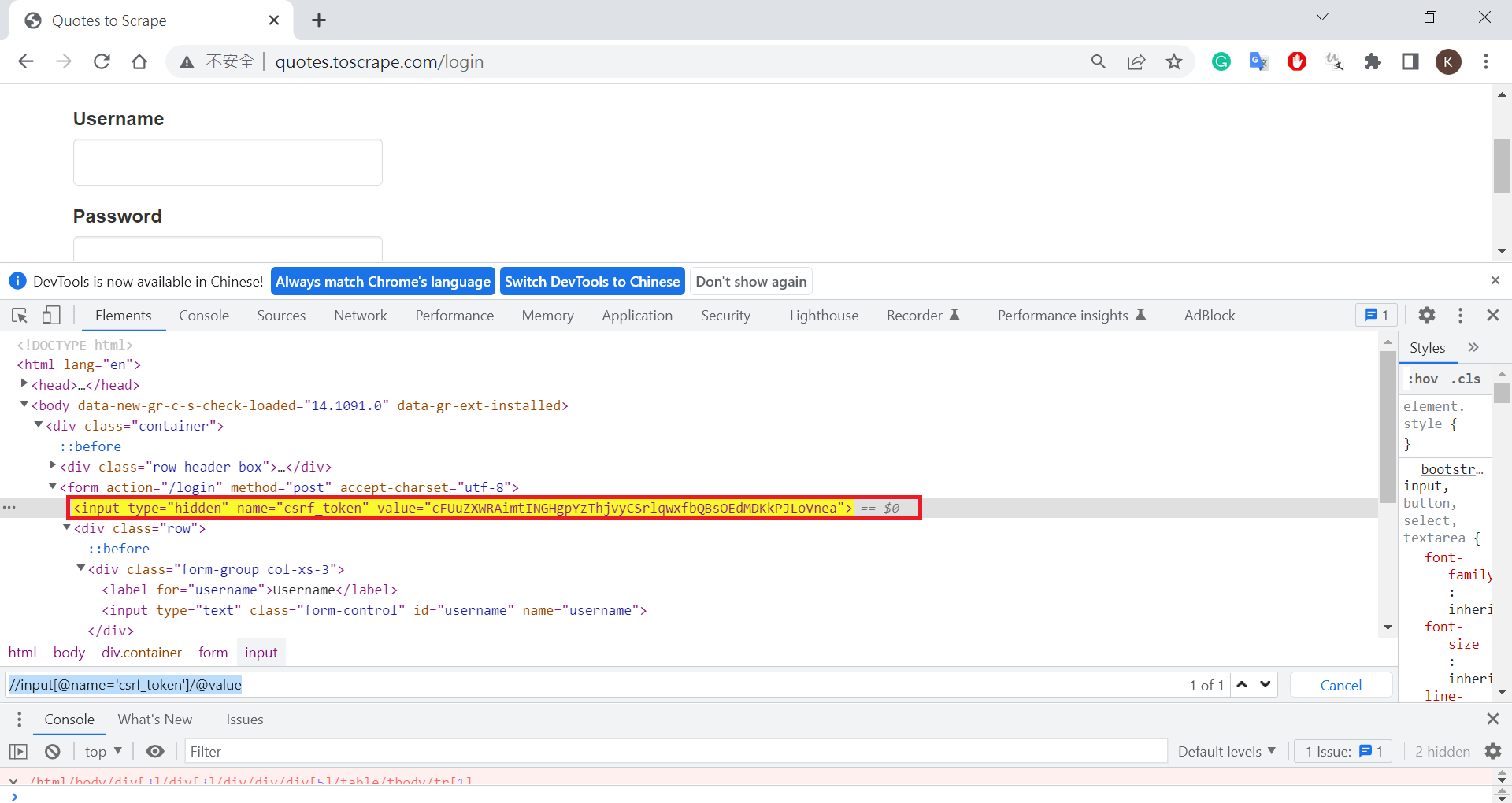
check from chrome
create project and spider
1
2
3
4
5
6
7
8
9
10
11
(myenv10_scrapy) D:\work\run\python_crawler\101-scrapy>scrapy startproject demo_login
New Scrapy project 'demo_login', using template directory 'D:\app\python_env\myenv10_scrapy\lib\site-packages\scrapy\templates\project', created in:
D:\work\run\python_crawler\101-scrapy\demo_login
You can start your first spider with:
cd demo_login
scrapy genspider example example.com

(myenv10_scrapy) D:\work\run\python_crawler\101-scrapy>cd demo_login
(myenv10_scrapy) D:\work\run\python_crawler\101-scrapy\demo_login>scrapy genspider quotes_login quotes.toscrape.com/login
Created spider 'quotes_login' using template 'basic' in module:
demo_login.spiders.quotes_login
quotes_login.py
1
2
3
4
5
6
7
8
9
10
11
12
13
14
15
16
17
18
19
20
21
22
23
24
25
26
import scrapy
from scrapy import FormRequest


class QuotesLoginSpider(scrapy.Spider):
name = 'quotes_login'
allowed_domains = ['quotes.toscrape.com']
start_urls = ['https://quotes.toscrape.com/login']

def parse(self, response):
csrf_token = response.xpath('//input[@name="csrf_token"]/@value').get()
yield FormRequest.from_response(
response,
# no formxpath also ok
# formxpath='//form',
formdata= {
'csrf_token': csrf_token,
'username': 'admin',
'password': 'admin'
},
callback = self.after_login
)

def after_login(self, response):
if response.xpath("//a[@href='/logout']").get():
print('logged in...')
run
1
2
3
4
5
6
7
(myenv10_scrapy) D:\work\run\python_crawler\101-scrapy\demo_login>scrapy crawl quotes_login
......
2022-12-29 11:48:34 [scrapy.downloadermiddlewares.redirect] DEBUG: Redirecting (302) to <GET http://quotes.toscrape.com/> from <POST https://quotes.toscrape.com/login>
2022-12-29 11:48:34 [scrapy.core.engine] DEBUG: Crawled (200) <GET http://quotes.toscrape.com/> (referer: None)
logged in...
2022-12-29 11:48:34 [scrapy.core.engine] INFO: Closing spider (finished)
......

Open Library

create spider
1
2
3
(myenv10_scrapy) D:\work\run\python_crawler\101-scrapy\demo_login>scrapy genspider openlibrary_login openlibrary.org/account/login
Created spider 'openlibrary_login' using template 'basic' in module:
demo_login.spiders.openlibrary_login
open_library.py
1
2
username = 'xxx@....'
password = 'p...'
openlibrary_login.py
1
2
3
4
5
6
7
8
9
10
11
12
13
14
15
16
17
18
19
20
21
22
23
24
25
26
27
28
29
30
import scrapy
from scrapy import FormRequest
import open_library


class OpenlibaryLoginSpider(scrapy.Spider):
name = 'openlibrary_login'
allowed_domains = ['openlibrary.org']
start_urls = ['https://openlibrary.org/account/login']

def parse(self, response):
yield FormRequest.from_response(
response,
formid='register',
formdata = {
'username': open_library.username,
'password': open_library.password,
'redirect': '/',
'debug_token': '',
'login': '登录'
},
callback = self.after_login
)

def after_login(self, response):
print("=================")
if response.xpath("//input[@type='password']").get():
print('login failed...')
else:
print('logged in...')
run
1
2
3
4
5
(myenv10_scrapy) D:\work\run\python_crawler\101-scrapy\demo_login>scrapy crawl openlibrary_login
......
=================
logged in...
......

Aarchive Org

create spider
1
2
3
(myenv10_scrapy) D:\work\run\python_crawler\101-scrapy\demo_login>scrapy genspider openlibrary_login2 archive.org/account/login
Created spider 'openlibrary_login2' using template 'basic' in module:
demo_login.spiders.openlibrary_login2
openlibrary_login2.py
1
2
3
4
5
6
7
8
9
10
11
12
13
14
15
16
17
18
19
20
21
22
23
24
25
26
27
28
29
30
31
32
33
34
35
import scrapy
from scrapy import FormRequest
import open_library


class OpenlibaryLoginSpider(scrapy.Spider):
name = 'openlibrary_login2'
allowed_domains = ['archive.org']
start_urls = ['https://archive.org/account/login']

def parse(self, response):
yield FormRequest.from_response(
response,
# formxpath also need
formxpath='//form[@class="iaform login-form"]',
formdata = {
'username': open_library.username,
'password': open_library.password,
# 'remember': response.xpath("//input[@name='remember']/@value").get(),
# 'referer': response.xpath("//input[@name='referer']/@value").get(),
# 'login': response.xpath("//input[@name='login']/@value").get(),
'login': 'true',
'remember': 'true',
'referer': 'https://archive.org/',
'submit-to-login': 'Log in'
},
callback = self.after_login
)

def after_login(self, response):
print("=================")
if response.xpath("//input[@type='password']").get():
print('login failed...')
else:
print('logged in...')
run
1
2
3
4
5
(myenv10_scrapy) D:\work\run\python_crawler\101-scrapy\demo_login>scrapy crawl openlibrary_login2
=================
......
logged in...
......

Quote to Scrape - Script

create spider
1
2
3
myenv10_scrapy) D:\work\run\python_crawler\101-scrapy\demo_login>scrapy genspider quotes_login2 quotes.toscrape.com/login
Created spider 'quotes_login2' using template 'basic' in module:
demo_login.spiders.quotes_login2
quotes_login2.py
1
2
3
4
5
6
7
8
9
10
11
12
13
14
15
16
17
18
19
20
21
22
23
24
25
26
27
28
29
30
31
32
33
34
35
36
37
38
39
40
41
42
43
44
45
46
import scrapy
from scrapy_splash import SplashRequest, SplashFormRequest


class QuotesLogin2Spider(scrapy.Spider):
name = 'quotes_login2'
allowed_domains = ['quotes.toscrape.com']
start_urls = ['http://quotes.toscrape.com/']


script = '''
-- https://quotes.toscrape.com/login
function main(splash, args)
assert(splash:go(args.url))
assert(splash:wait(0.5))
return splash:html()
en
'''

def start_requests(self):
yield SplashRequest(
url='https://quotes.toscrape.com/login',
endpoint='execute',
args = {
'lua_source': self.script
},
callback=self.parse
)

def parse(self, response):
csrf_token = response.xpath('//input[@name="csrf_token"]/@value').get()
yield SplashFormRequest.from_response(
response,
# no formxpath also ok
formxpath='//form',
formdata= {
'csrf_token': csrf_token,
'username': 'admin',
'password': 'admin'
},
callback = self.after_login
)

def after_login(self, response):
if response.xpath("//a[@href='/logout']").get():
print('logged in...')
run
1
2
3
4
5
(myenv10_scrapy) D:\work\run\python_crawler\101-scrapy\demo_login>scrapy crawl openlibrary_login2
......
=================
logged in...
......

ByPass Cloudflare

CoinMarketCap - block by status code 429(too many request)

create project and spider
1
2
3
4
5
6
7
8
9
10
11
(myenv10_scrapy) D:\work\run\python_crawler\101-scrapy>scrapy startproject coinmarketcap
New Scrapy project 'coinmarketcap', using template directory 'D:\app\python_env\myenv10_scrapy\lib\site-packages\scrapy\templates\project', created in:
D:\work\run\python_crawler\101-scrapy\coinmarketcap
You can start your first spider with:
cd coinmarketcap
scrapy genspider example example.com

(myenv10_scrapy) D:\work\run\python_crawler\101-scrapy>cd coinmarketcap
(myenv10_scrapy) D:\work\run\python_crawler\101-scrapy\coinmarketcap>scrapy genspider -t crawl coins https://web.archive.org/web/20190101085451/https://coinmarketcap.com/
Created spider 'coins' using template 'crawl' in module:
coinmarketcap.spiders.coins
coins.py
1
2
3
4
5
6
7
8
9
10
11
12
13
14
15
16
17
18
19
20
21
22
23
24
25
import scrapy
from scrapy.linkextractors import LinkExtractor
from scrapy.spiders import CrawlSpider, Rule


class CoinsSpider(CrawlSpider):
name = 'coins'
allowed_domains = ['web.archive.org']
start_urls = ['https://web.archive.org/web/20190101085451/https://coinmarketcap.com/']

rules = (
Rule(LinkExtractor(restrict_xpaths="//a[@class='currency-name-container link-secondary']"), callback='parse_item', follow=True),
)

def parse_item(self, response):
item = {}
#item['domain_id'] = response.xpath('//input[@id="sid"]/@value').get()
#item['name'] = response.xpath('//div[@id="name"]').get()
#item['description'] = response.xpath('//div[@id="description"]').get()
yield {
'name': response.xpath("normalize-space((//h1/text())[2])").get(),
'rank': response.xpath("//span[@class='label label-success']/text()").get(),
'price(USD)': response.xpath("//span[@class='h2 text-semi-bold details-panel-item--price__value']/text()").get()
}
return item
run
1
2
3
4
5
6
7
8
9
10
11
12
13
(myenv10_scrapy) D:\work\run\python_crawler\101-scrapy\coinmarketcap>scrapy crawl coins
......
2022-12-30 11:53:54 [scrapy.core.engine] DEBUG: Crawled (200) <GET https://web.archive.org/web/20190101221303/https://coinmarketcap.com/currencies/ethereum/> (referer: https://web.archive.org/web/20190101085451/https://coinmarketcap.com/)
2022-12-30 11:53:54 [scrapy.core.scraper] DEBUG: Scraped from <200 https://web.archive.org/web/20181231070605/https://coinmarketcap.com/currencies/bitcoin-cash/>
{'name': 'Bitcoin Cash', 'rank': ' Rank 4', 'price(USD)': '160.12'}
2022-12-30 11:53:54 [scrapy.core.scraper] DEBUG: Scraped from <200 https://web.archive.org/web/20190101221303/https://coinmarketcap.com/currencies/ethereum/>
{'name': 'Ethereum', 'rank': ' Rank 3', 'price(USD)': '139.89'}
# return code 429
2022-12-30 11:53:54 [scrapy.downloadermiddlewares.retry] DEBUG: Retrying <GET https://web.archive.org/web/20190104162538/https://coinmarketcap.com/currencies/bitcoin-sv/> (failed 2 times): 429 Unknown Status
2022-12-30 11:53:54 [scrapy.downloadermiddlewares.redirect] DEBUG: Redirecting (302) to <GET https://web.archive.org/web/20190104162517/https://coinmarketcap.com/currencies/theta/> from <GET https://web.archive.org/web/20190101085451/https://coinmarketcap.com/currencies/theta/>
2022-12-30 11:53:54 [scrapy.core.engine] DEBUG: Crawled (200) <GET https://web.archive.org/web/20190104162631/https://coinmarketcap.com/currencies/iota/> (referer: https://web.archive.org/web/20190101085451/https://coinmarketcap.com/)
2022-12-30 11:53:54 [scrapy.core.scraper] DEBUG: Scraped from <200 https://web.archive.org/web/20190104162631/https://coinmarketcap.com/currencies/iota/>
......

fix block by status code 429(依課程修改但沒有用)

install
1
pip install scrapy_cloudflare_middleware
settings.py
1
2
3
4
DOWNLOADER_MIDDLEWARES = {
# The priority of 560 is important, because we want this middleware to kick in just before the scrapy built-in `RetryMiddleware`.
'scrapy_cloudflare_middleware.middlewares.CloudFlareMiddleware': 560
}
CloudFlare Middleware modify

D:\app\python_env\myenv10_scrapy\Lib\site-packages\scrapy_cloudflare_middleware\middlewares.py

1
2
3
4
5
6
7
8
9
10
11
12
13
14
15
class CloudFlareMiddleware:
"""Scrapy middleware to bypass the CloudFlare's anti-bot protection"""

@staticmethod
def is_cloudflare_challenge(response):
"""Test if the given response contains the cloudflare's anti-bot protection"""

return (
# add handle for status code 429
# response.status == 503
response.status == 503 or response.status == 429
and response.headers.get('Server', '').startswith(b'cloudflare')
and 'jschl_vc' in response.text
and 'jschl_answer' in response.text
)
run
1
2
3
4
5
6
7
8
9
10
11
12
13
14
(myenv10_scrapy) D:\work\run\python_crawler\101-scrapy\coinmarketcap>scrapy crawl coins
......
2023-01-03 09:30:12 [scrapy.core.engine] DEBUG: Crawled (200) <GET https://web.archive.org/web/20190228115956/https://coinmarketcap.com/currencies/moac/> (referer: https://web.archive.org/web/20190101085451/https://coinmarketcap.com/)
2023-01-03 09:30:12 [scrapy.core.scraper] DEBUG: Scraped from <200 https://web.archive.org/web/20190228115956/https://coinmarketcap.com/currencies/moac/>
{'name': 'MOAC', 'rank': ' Rank 95', 'price(USD)': '0.598146'}
# also found stauso code 429
2023-01-03 09:30:12 [scrapy.downloadermiddlewares.retry] ERROR: Gave up retrying <GET https://web.archive.org/web/20190104162556/https://coinmarketcap.com/currencies/tron/> (failed 3 times): 429 Unknown Status
2023-01-03 09:30:12 [scrapy.core.engine] DEBUG: Crawled (429) <GET https://web.archive.org/web/20190104162556/https://coinmarketcap.com/currencies/tron/> (referer: https://web.archive.org/web/20190101085451/https://coinmarketcap.com/)
2023-01-03 09:30:12 [scrapy.downloadermiddlewares.redirect] DEBUG: Redirecting (302) to <GET https://web.archive.org/web/20190209111611/https://coinmarketcap.com/currencies/maximine-coin/> from <GET https://web.archive.org/web/20190101085451/https://coinmarketcap.com/currencies/maximine-coin/>
2023-01-03 09:30:12 [scrapy.downloadermiddlewares.retry] ERROR: Gave up retrying <GET https://web.archive.org/web/20190104162547/https://coinmarketcap.com/currencies/litecoin/> (failed 3 times): 429 Unknown Status
2023-01-03 09:30:12 [scrapy.core.engine] DEBUG: Crawled (429) <GET https://web.archive.org/web/20190104162547/https://coinmarketcap.com/currencies/litecoin/> (referer: https://web.archive.org/web/20190101085451/https://coinmarketcap.com/)
2023-01-03 09:30:12 [scrapy.downloadermiddlewares.redirect] DEBUG: Redirecting (302) to <GET https://web.archive.org/web/20190104162550/https://coinmarketcap.com/currencies/mixin/> from <GET https://web.archive.org/web/20190101085451/https://coinmarketcap.com/currencies/mixin/>
2023-01-03 09:30:12 [scrapy.downloadermiddlewares.redirect] DEBUG: Redirecting (302) to <GET https://web.archive.org/web/20190104162513/https://coinmarketcap.com/currencies/hypercash/> from <GET https://web.archive.org/web/20190101085451/https://coinmarketcap.com/currencies/hypercash/>
......

fix block by status code 429 - call splash(還是會回429)

create projector and spider
1
2
3
4
5
6
7
8
9
10
11
(myenv10_scrapy) D:\work\run\python_crawler\106-scrapy-splash>scrapy startproject coinmarketcap
New Scrapy project 'coinmarketcap', using template directory 'D:\app\python_env\myenv10_scrapy\lib\site-packages\scrapy\templates\project', created in:
D:\work\run\python_crawler\106-scrapy-splash\coinmarketcap
You can start your first spider with:
cd coinmarketcap
scrapy genspider example example.com

(myenv10_scrapy) D:\work\run\python_crawler\106-scrapy-splash>cd coinmarketcap
(myenv10_scrapy) D:\work\run\python_crawler\106-scrapy-splash\coinmarketcap>scrapy genspider coins2 web.archive.org/web/20190101085451/https://coinmarketcap.com/
Created spider 'coins2' using template 'basic' in module:
coinmarketcap.spiders.coins2
basic setting
1
2
3
4
5
6
7
8
9
10
11
12
13
14
15
16
17
18
19
20
21
22
23
24
# put lastest
SPLASH_URL = 'http://localhost:8050'

# Enable or disable downloader middlewares
# See https://docs.scrapy.org/en/latest/topics/downloader-middleware.html
#DOWNLOADER_MIDDLEWARES = {
# 'livecoin.middlewares.LivecoinDownloaderMiddleware': 543,
#}
DOWNLOADER_MIDDLEWARES = {
'scrapy_splash.SplashCookiesMiddleware': 723,
'scrapy_splash.SplashMiddleware': 725,
'scrapy.downloadermiddlewares.httpcompression.HttpCompressionMiddleware': 810,
}

# Enable or disable spider middlewares
# See https://docs.scrapy.org/en/latest/topics/spider-middleware.html
#SPIDER_MIDDLEWARES = {
# 'livecoin.middlewares.LivecoinSpiderMiddleware': 543,
#}
SPIDER_MIDDLEWARES = {
'scrapy_splash.SplashDeduplicateArgsMiddleware': 100,
}

DUPEFILTER_CLASS = 'scrapy_splash.SplashAwareDupeFilter'
coins2.py
1
2
3
4
5
6
7
8
9
10
11
12
13
14
15
16
17
18
19
20
21
22
23
24
25
26
27
28
29
30
31
32
33
34
35
36
37
38
39
40
41
42
43
44
45
46
47
48
49
50
51
52
53
54
55
56
57
58
59
import scrapy
from scrapy_splash import SplashRequest


class Coins2Spider(scrapy.Spider):
name = 'coins2'
allowed_domains = ['web.archive.org']
# start_urls = ['https://web.archive.org/web/20190101085451/https://coinmarketcap.com/']

script = '''
-- https://web.archive.org/web/20190101085451/https://coinmarketcap.com/
function main(splash, args)
assert(splash:go(args.url))
assert(splash:wait(5))
return splash:html()
end
'''

script2 = '''
-- https://web.archive.org/web/20190101085451/https://coinmarketcap.com/
function main(splash, args)
assert(splash:go(args.url))
assert(splash:wait(1))
return splash:html()
end
'''

def start_requests(self):
yield SplashRequest(
url='https://web.archive.org/web/20190101085451/https://coinmarketcap.com/',
endpoint='execute',
args = {
'lua_source': self.script
},
callback=self.parse
)

def parse(self, response):
coins = response.xpath("//a[@class='currency-name-container link-secondary']")
i = 1
for coin in coins:
print(f"({i})============")
i += 1
yield SplashRequest(
url = f'https://web.archive.org{coin.xpath(".//@href").get()}',
endpoint='execute',
args = {
'lua_source': self.script2
},
callback=self.parse_next
)

def parse_next(self, response):
print("next ============")
yield {
'name': response.xpath("normalize-space((//h1/text())[2])").get(),
'rank': response.xpath("//span[@class='label label-success']/text()").get(),
'price(USD)': response.xpath("//span[@class='h2 text-semi-bold details-panel-item--price__value']/text()").get()
}
run
1
2
3
4
5
6
7
8
9
10
11
12
13
14
15
16
17
18
19
20
21
22
23
24
25
26
27
28
29
30
31
32
33
34
35
36
37
38
39
40
41
42
43
(myenv10_scrapy) D:\work\run\python_crawler\106-scrapy-splash\coinmarketcap>scrapy crawl coins2
......
2023-01-03 09:59:04 [scrapy.core.engine] DEBUG: Crawled (404) <GET https://web.archive.org/robots.txt> (referer: None)
2023-01-03 09:59:15 [scrapy.core.engine] DEBUG: Crawled (200) <GET https://web.archive.org/web/20190101085451/https://coinmarketcap.com/ via http://localhost:8050/execute> (referer: None)
(1)============
(2)============
......
(100)============
# found status code 429
2023-01-03 09:59:19 [scrapy_splash.middleware] WARNING: Bad request to Splash: {'error': 400, 'type': 'ScriptError', 'description': 'Error happened while executing Lua script', 'info': {'source': '[string "..."]', 'line_number': 4, 'error': 'http429', 'type': 'LUA_ERROR', 'message': 'Lua error: [string "..."]:4: http429'}}
2023-01-03 09:59:19 [scrapy.downloadermiddlewares.retry] DEBUG: Retrying <GET https://web.archive.org/web/20190101085451/https://coinmarketcap.com/currencies/waves/ via http://localhost:8050/execute> (failed 1 times): 429 Unknown Status
2023-01-03 09:59:30 [scrapy.core.engine] DEBUG: Crawled (200) <GET https://web.archive.org/web/20190101085451/https://coinmarketcap.com/currencies/tezos/ via http://localhost:8050/execute> (referer: None)
next ============
2023-01-03 09:59:31 [scrapy.core.scraper] DEBUG: Scraped from <200 https://web.archive.org/web/20190101085451/https://coinmarketcap.com/currencies/tezos/>
{'name': 'Tezos', 'rank': ' Rank 22', 'price(USD)': '0.482671'}
2023-01-03 09:59:33 [scrapy.core.engine] DEBUG: Crawled (200) <GET https://web.archive.org/web/20190101085451/https://coinmarketcap.com/currencies/usd-coin/ via http://localhost:8050/execute> (referer: None)
2023-01-03 09:59:33 [scrapy.core.engine] DEBUG: Crawled (200) <GET https://web.archive.org/web/20190101085451/https://coinmarketcap.com/currencies/bitcoin/ via http://localhost:8050/execute> (referer: None)
next ============
2023-01-03 09:59:33 [scrapy.core.scraper] DEBUG: Scraped from <200 https://web.archive.org/web/20190101085451/https://coinmarketcap.com/currencies/usd-coin/>
{'name': 'USD Coin', 'rank': ' Rank 24', 'price(USD)': '1.02'}
next ============
2023-01-03 09:59:33 [scrapy.core.scraper] DEBUG: Scraped from <200 https://web.archive.org/web/20190101085451/https://coinmarketcap.com/currencies/bitcoin/>
{'name': 'Bitcoin', 'rank': ' Rank 1', 'price(USD)': '3763.14'}
2023-01-03 09:59:34 [scrapy.core.engine] DEBUG: Crawled (200) <GET https://web.archive.org/web/20190101085451/https://coinmarketcap.com/currencies/ethereum-classic/ via http://localhost:8050/execute> (referer: None)
next ============
2023-01-03 09:59:34 [scrapy.core.scraper] DEBUG: Scraped from <200 https://web.archive.org/web/20190101085451/https://coinmarketcap.com/currencies/ethereum-classic/>
{'name': 'Ethereum Classic', 'rank': ' Rank 17', 'price(USD)': '5.11'}
2023-01-03 09:59:34 [scrapy.core.engine] DEBUG: Crawled (200) <GET https://web.archive.org/web/20190101085451/https://coinmarketcap.com/currencies/dogecoin/ via http://localhost:8050/execute> (referer: None)
next ============
2023-01-03 09:59:34 [scrapy.core.scraper] DEBUG: Scraped from <200 https://web.archive.org/web/20190101085451/https://coinmarketcap.com/currencies/dogecoin/>
{'name': 'Dogecoin', 'rank': ' Rank 23', 'price(USD)': '0.002353'}
2023-01-03 09:59:34 [scrapy.core.engine] DEBUG: Crawled (200) <GET https://web.archive.org/web/20190101085451/https://coinmarketcap.com/currencies/neo/ via http://localhost:8050/execute> (referer: None)
next ============
2023-01-03 09:59:35 [scrapy.core.scraper] DEBUG: Scraped from <200 https://web.archive.org/web/20190101085451/https://coinmarketcap.com/currencies/neo/>
{'name': 'NEO', 'rank': ' Rank 18', 'price(USD)': '7.81'}
2023-01-03 09:59:36 [scrapy.core.engine] DEBUG: Crawled (200) <GET https://web.archive.org/web/20190101085451/https://coinmarketcap.com/currencies/maker/ via http://localhost:8050/execute> (referer: None)
next ============
2023-01-03 09:59:36 [scrapy.core.scraper] DEBUG: Scraped from <200 https://web.archive.org/web/20190101085451/https://coinmarketcap.com/currencies/maker/>
{'name': 'Maker', 'rank': ' Rank 20', 'price(USD)': '458.21'}
# found status code 429
2023-01-03 09:59:37 [scrapy_splash.middleware] WARNING: Bad request to Splash: {'error': 400, 'type': 'ScriptError', 'description': 'Error happened while executing Lua script', 'info': {'source': '[string "..."]', 'line_number': 4, 'error': 'http429', 'type': 'LUA_ERROR', 'message': 'Lua error: [string "..."]:4: http429'}}
2023-01-03 09:59:37 [scrapy.downloadermiddlewares.retry] DEBUG: Retrying <GET https://web.archive.org/web/20190101085451/https://coinmarketcap.com/currencies/cardano/ via http://localhost:8050/execute> (failed 1 times): 429 Unknown Status
......

CoinMarketCap - bs4 + cloudscraper

install beautifulsoup4
1
2
pip install beautifulsoup4
pip install cloudscraper
bypass_coinmarket.py
1
2
3
4
5
6
7
8
9
10
11
12
13
14
15
16
17
18
19
20
21
22
23
24
25
from bs4 import BeautifulSoup as beauty
import cloudscraper

scraper = cloudscraper.create_scraper(delay=10, browser='chrome')
url = "https://web.archive.org/web/20190101085451/https://coinmarketcap.com/"

info = scraper.get(url).text
soup = beauty(info, "html.parser")
soup = soup.find_all('a', 'currency-name-container link-secondary')

for data in soup:
sub_url = f"https://web.archive.org{data['href']}"
print("===============")
# print(data.get_text())
print(sub_url)

info2 = scraper.get(sub_url).text
soup2 = beauty(info2, "html.parser")
if soup2.find('span', 'label label-success'):
h1_str = soup2.find('h1').text.strip().split('\x0a')
print(f"name: {h1_str[0]}")
print(f"rank: {soup2.find('span', 'label label-success').text}")
print(f"price(USD): {soup2.find('span', 'h2 text-semi-bold details-panel-item--price__value').text}")
else:
print(f"error link: {data.get_text()}")
run
1
2
3
4
5
6
7
8
9
10
11
12
13
14
15
16
17
18
19
20
21
22
23
24
25
26
27
28
29
30
31
32
33
34
35
36
37
38
39
40
41
42
43
44
45
(myenv10_scrapy) D:\work\run\python_crawler\101-scrapy\simple>python bypass_coinmarket.py
===============
https://web.archive.org/web/20190101085451/https://coinmarketcap.com/currencies/bitcoin/
name: Bitcoin
rank: Rank 1
price(USD): 3763.14
===============
https://web.archive.org/web/20190101085451/https://coinmarketcap.com/currencies/ripple/
name: XRP
rank: Rank 2
price(USD): 0.376038
===============
https://web.archive.org/web/20190101085451/https://coinmarketcap.com/currencies/ethereum/
name: Ethereum
rank: Rank 3
price(USD): 139.89
===============
https://web.archive.org/web/20190101085451/https://coinmarketcap.com/currencies/bitcoin-cash/
name: Bitcoin Cash
rank: Rank 4
price(USD): 160.12
===============
https://web.archive.org/web/20190101085451/https://coinmarketcap.com/currencies/eos/
name: EOS
rank: Rank 5
price(USD): 2.63
# some link have problem
===============
https://web.archive.org/web/20190101085451/https://coinmarketcap.com/currencies/stellar/
error link: Stellar
......
# some link have problem
===============
https://web.archive.org/web/20190101085451/https://coinmarketcap.com/currencies/crypto-com/
error link
===============
https://web.archive.org/web/20190101085451/https://coinmarketcap.com/currencies/zcoin/
name: Zcoin
rank: Rank 93
price(USD): 5.43
===============
https://web.archive.org/web/20190101085451/https://coinmarketcap.com/currencies/theta/
name: THETA
rank: Rank 98
price(USD): 0.049800

fiverr - bs4 + cloudscraper

  • debug=True, 可顯示一些 message, return code 有時 307, 有時 403 不正確回應
bypass_fiverr.py
1
2
3
4
5
6
7
8
9
10
11
12
13
14
15
16
17
18
19
20
21
22
23
24
25
26
27
28
29
30
31
32
33
from bs4 import BeautifulSoup as beauty
import cloudscraper

# scraper = cloudscraper.create_scraper(delay=10, browser='chrome',debug=True)
scraper = cloudscraper.create_scraper(delay=10, browser='chrome')
url = "https://www.fiverr.com/categories/online-marketing"


info = scraper.get(url).text
# print("0 ===============")
# print(info)
soup = beauty(info, "html.parser")
# print("1 ===============")
# print(soup)
soup = soup.find_all('a', 'item-name')
print("2 ===============")
print(soup)

for data in soup:
sub_url = 'https://www.fiverr.com'+data['href']
print("===============")
print(data.get_text())
# print(sub_url)

# info2 = scraper.get(sub_url).text
# soup2 = beauty(info2, "html.parser")
# if soup2.find('p', 'sc-subtitle'):
# print(f"title: {soup2.find('h1').text}")
# print(f"description: {soup2.find('p', 'sc-subtitle').text}")
# else :
# print("error")
# print(f"title: {soup2.find('h1')}")
# print(f"description: {soup2.find('p', 'sc-subtitle')}")
run
1
2
3
(myenv10_scrapy) D:\work\run\python_crawler\101-scrapy\simple>python bypass_fiverr.py
2 ===============
[]

fiverr - block 403

  • crawl_items, basic_items 執行都有問題
  • 執行 crawl_items, 好像也會執行到 basic_items
create project and spider
1
2
3
4
5
6
7
8
9
10
11
12
13
14
(myenv10_scrapy) D:\work\git\python_crawler\101-scrapy>scrapy startproject fiverr
New Scrapy project 'fiverr', using template directory 'D:\app\python_env\myenv10_scrapy\lib\site-packages\scrapy\templates\project', created in:
D:\work\git\python_crawler\101-scrapy\fiverr
You can start your first spider with:
cd fiverr
scrapy genspider example example.com

(myenv10_scrapy) D:\work\git\python_crawler\101-scrapy>cd fiverr
(myenv10_scrapy) D:\work\git\python_crawler\101-scrapy\fiverr>scrapy genspider -t crawl crawl_items www.fiverr.com/categories/online-marketing?source=category_tree
Created spider 'crawl_items' using template 'crawl' in module:
fiverr.spiders.crawl_items
(myenv10_scrapy) D:\work\git\python_crawler\101-scrapy\fiverr>scrapy genspider basic_items www.fiverr.com/categories/online-marketing?source=category_tree
Created spider 'basic_items' using template 'crawl' in module:
fiverr.spiders.basic_items
run
1
2
3
4
5
6
7
8
9
10
11
12
13
14
15
(myenv10_scrapy) D:\work\run\python_crawler\101-scrapy\fiverr>scrapy crawl crawl_items
10 ==============
<Selector xpath=None data='<html lang="en-US"><head><meta charse...'>
11 ==============
[]
12 ==============
......

(myenv10_scrapy) D:\work\run\python_crawler\101-scrapy\fiverr>scrapy crawl basic_items
10 ==============
<Selector xpath=None data='<html lang="en-US"><head><meta charse...'>
11 ==============
[]
12 ==============
......
install beautifulsoup4 and cloudscraper
1
2
(myenv10_scrapy) D:\work\git\python_crawler\101-scrapy\simple>pip install beautifulsoup4
(myenv10_scrapy) D:\work\git\python_crawler\101-scrapy\simple>pip install cloudscraper

Downloading Files Using Scrapy

mp3-59

create project and spider
1
2
3
4
5
6
7
8
9
10
11
(myenv10_scrapy) D:\work\run\python_crawler\101-scrapy>scrapy startproject demo_downloader
New Scrapy project 'demo_downloader', using template directory 'D:\app\python_env\myenv10_scrapy\lib\site-packages\scrapy\templates\project', created in:
D:\work\run\python_crawler\101-scrapy\demo_downloader
You can start your first spider with:
cd demo_downloader
scrapy genspider example example.com

(myenv10_scrapy) D:\work\run\python_crawler\101-scrapy>cd demo_downloader
(myenv10_scrapy) D:\work\run\python_crawler\101-scrapy\demo_downloader>scrapy genspider mp3_downloader ftp.icm.edu.pl/packages/mp3/59/
Created spider 'mp3_downloader' using template 'basic' in module:
demo_downloader.spiders.mp3_downloader
mp3_downloader.py
1
2
3
4
5
6
7
8
9
10
11
12
13
14
15
16
17
18
import scrapy

class Mp3DownloaderSpider(scrapy.Spider):
name = 'mp3_downloader'
allowed_domains = ['ftp.icm.edu.pl']
start_urls = ['https://ftp.icm.edu.pl/packages/mp3/59/']

def parse(self, response):
# //following::tr[4]/td[2]/a[not(contains(@href,'jpg'))] - also ok
for link in response.xpath("//following::tr[4]/td[2]/a[contains(@href,'mp3')]"):
relative_url = link.xpath(".//@href").get()
absolute_url = response.urljoin(relative_url)
print("==============")
print(f"absolute_url : {absolute_url}")
yield {
'Title': relative_url,
'file_urls': [absolute_url]
}
settings.py
1
2
3
4
5
6
7
8
9
10
# Configure item pipelines
# See https://docs.scrapy.org/en/latest/topics/item-pipeline.html
#ITEM_PIPELINES = {
# 'demo_downloader.pipelines.DemoDownloaderPipeline': 300,
#}
ITEM_PIPELINES = {
'scrapy.pipelines.files.FilesPipeline': 1,
# 'demo_downloader.pipelines.CustomFilePipeLines': 1,
}
FILES_STORE = 'mp3'
items.py
1
2
3
4
5
6
7
8
9
10
11
12
13
14
# Define here the models for your scraped items
#
# See documentation in:
# https://docs.scrapy.org/en/latest/topics/items.html

import scrapy

class DemoDownloaderItem(scrapy.Item):
# define the fields for your item here like:
# name = scrapy.Field()
# pass
Title = scrapy.Field()
file_urls = scrapy.Field()
files = scrapy.Field()
run
1
2
3
4
5
6
7
8
9
10
11
12
13
14
15
16
17
18
19
20
21
22
23
24
25
26
27
28
29
30
31
32
33
34
35
36
37
38
39
40
41
42
43
44
45
46
47
(myenv10_scrapy) D:\work\run\python_crawler\101-scrapy\demo_downloader>scrapy crawl mp3_downloader
.....
2023-01-04 13:45:54 [scrapy.core.engine] DEBUG: Crawled (200) <GET https://ftp.icm.edu.pl/packages/mp3/59/> (referer: None)
==============
absolute_url : https://ftp.icm.edu.pl/packages/mp3/59/Blood__AAA_version.mp3
2023-01-04 13:45:54 [scrapy.pipelines.files] DEBUG: File (uptodate): Downloaded file from <GET https://ftp.icm.edu.pl/packages/mp3/59/Blood__AAA_version.mp3> referred in <None>
==============
absolute_url : https://ftp.icm.edu.pl/packages/mp3/59/DeeJay_Somic_-_Nowy_Vizir(the_commercial_compilation).mp3
2023-01-04 13:45:54 [scrapy.pipelines.files] DEBUG: File (uptodate): Downloaded file from <GET https://ftp.icm.edu.pl/packages/mp3/59/DeeJay_Somic_-_Nowy_Vizir(the_commercial_compilation).mp3> referred in <None>
==============
absolute_url : https://ftp.icm.edu.pl/packages/mp3/59/Feel_in_luv_with_an_alien__F_cK_K.mp3
2023-01-04 13:45:54 [scrapy.pipelines.files] DEBUG: File (uptodate): Downloaded file from <GET https://ftp.icm.edu.pl/packages/mp3/59/Feel_in_luv_with_an_alien__F_cK_K.mp3> referred in <None>
==============
absolute_url : https://ftp.icm.edu.pl/packages/mp3/59/Klan_Soundtrack__hardcore_version.mp3
2023-01-04 13:45:54 [scrapy.pipelines.files] DEBUG: File (uptodate): Downloaded file from <GET https://ftp.icm.edu.pl/packages/mp3/59/Klan_Soundtrack__hardcore_version.mp3> referred in <None>
==============
absolute_url : https://ftp.icm.edu.pl/packages/mp3/59/Na_Na_Na__F_cK_K_Family_hardcore_remix.mp3
2023-01-04 13:45:54 [scrapy.pipelines.files] DEBUG: File (uptodate): Downloaded file from <GET https://ftp.icm.edu.pl/packages/mp3/59/Na_Na_Na__F_cK_K_Family_hardcore_remix.mp3> referred in <None>
==============
absolute_url : https://ftp.icm.edu.pl/packages/mp3/59/Oda_Do_Mlodosci.mp3
2023-01-04 13:45:54 [scrapy.pipelines.files] DEBUG: File (uptodate): Downloaded file from <GET https://ftp.icm.edu.pl/packages/mp3/59/Oda_Do_Mlodosci.mp3> referred in <None>
==============
absolute_url : https://ftp.icm.edu.pl/packages/mp3/59/Prognoza_Pogody.mp3
2023-01-04 13:45:54 [scrapy.pipelines.files] DEBUG: File (uptodate): Downloaded file from <GET https://ftp.icm.edu.pl/packages/mp3/59/Prognoza_Pogody.mp3> referred in <None>
==============
absolute_url : https://ftp.icm.edu.pl/packages/mp3/59/Shalala_Boom_Were_Going_to_Kiss_Uncle_Down.mp3
2023-01-04 13:45:54 [scrapy.pipelines.files] DEBUG: File (uptodate): Downloaded file from <GET https://ftp.icm.edu.pl/packages/mp3/59/Shalala_Boom_Were_Going_to_Kiss_Uncle_Down.mp3> referred in <None>
2023-01-04 13:45:54 [scrapy.core.scraper] DEBUG: Scraped from <200 https://ftp.icm.edu.pl/packages/mp3/59/>
# scrapy.Field
# save file full/7d1835bbcc24b42fb05911df015306bfb3e80087.mp3
{'Title': 'Blood__AAA_version.mp3',
'file_urls': ['https://ftp.icm.edu.pl/packages/mp3/59/Blood__AAA_version.mp3'],
'files': [
{ 'url': 'https://ftp.icm.edu.pl/packages/mp3/59/Blood__AAA_version.mp3',
'path': 'full/7d1835bbcc24b42fb05911df015306bfb3e80087.mp3',
'checksum': '8013d9ea5f6d3d596f76d8047b41a7f9',
'status': 'uptodate'
}]}
2023-01-04 13:45:54 [scrapy.core.scraper] DEBUG: Scraped from <200 https://ftp.icm.edu.pl/packages/mp3/59/>
{'Title': 'DeeJay_Somic_-_Nowy_Vizir(the_commercial_compilation).mp3', 'file_urls': ['https://ftp.icm.edu.pl/packages/mp3/59/DeeJay_Somic_-_Nowy_Vizir(the_commercial_compilation).mp3'], 'files': [{'url': 'https://ftp.icm.edu.pl/packages/mp3/59/DeeJay_Somic_-_Nowy_Vizir(the_commercial_compilation).mp3', 'path': 'full/cbccc9a40c2019c3ce88467c78191bfd8cd9af8f.mp3', 'checksum': 'c323a1ff9802b7e4a5b2447350b388a9', 'status': 'uptodate'}]}
2023-01-04 13:45:54 [scrapy.core.scraper] DEBUG: Scraped from <200 https://ftp.icm.edu.pl/packages/mp3/59/>
{'Title': 'Feel_in_luv_with_an_alien__F_cK_K.mp3', 'file_urls': ['https://ftp.icm.edu.pl/packages/mp3/59/Feel_in_luv_with_an_alien__F_cK_K.mp3'], 'files': [{'url': 'https://ftp.icm.edu.pl/packages/mp3/59/Feel_in_luv_with_an_alien__F_cK_K.mp3', 'path': 'full/0d71bff3e1f0e797bb62f4c61428856110ecc123.mp3', 'checksum': 'df42fcb95c2a89f57d75af27584f3634', 'status': 'uptodate'}]}
2023-01-04 13:45:54 [scrapy.core.scraper] DEBUG: Scraped from <200 https://ftp.icm.edu.pl/packages/mp3/59/>
{'Title': 'Klan_Soundtrack__hardcore_version.mp3', 'file_urls': ['https://ftp.icm.edu.pl/packages/mp3/59/Klan_Soundtrack__hardcore_version.mp3'], 'files': [{'url': 'https://ftp.icm.edu.pl/packages/mp3/59/Klan_Soundtrack__hardcore_version.mp3', 'path': 'full/666dda5772db9d8bc5a1d8829156b42f05d52e20.mp3', 'checksum': 'e45ea17db6cb6d3a62a5fe2cad1aea54', 'status': 'uptodate'}]}
2023-01-04 13:45:54 [scrapy.core.scraper] DEBUG: Scraped from <200 https://ftp.icm.edu.pl/packages/mp3/59/>
{'Title': 'Na_Na_Na__F_cK_K_Family_hardcore_remix.mp3', 'file_urls': ['https://ftp.icm.edu.pl/packages/mp3/59/Na_Na_Na__F_cK_K_Family_hardcore_remix.mp3'], 'files': [{'url': 'https://ftp.icm.edu.pl/packages/mp3/59/Na_Na_Na__F_cK_K_Family_hardcore_remix.mp3', 'path': 'full/15d1d6111af5b0ea7984fa70312d9c6cdce4287b.mp3', 'checksum': '815f83bd1d41fe0504fabe26569eb30d', 'status': 'uptodate'}]}
.....

mp3-59 - fix file name

settings.py
1
2
3
4
5
6
7
8
9
10
# Configure item pipelines
# See https://docs.scrapy.org/en/latest/topics/item-pipeline.html
#ITEM_PIPELINES = {
# 'demo_downloader.pipelines.DemoDownloaderPipeline': 300,
#}
ITEM_PIPELINES = {
# 'scrapy.pipelines.files.FilesPipeline': 1,
'demo_downloader.pipelines.CustomFilePipeLines': 1,
}
FILES_STORE = 'mp3'
pipelines.py
1
2
3
4
5
6
7
8
9
10
11
12
13
14
15
16
17
18
19
20
21
22
23
24
25
# Define your item pipelines here
#
# Don't forget to add your pipeline to the ITEM_PIPELINES setting
# See: https://docs.scrapy.org/en/latest/topics/item-pipeline.html


# useful for handling different item types with a single interface
# from itemadapter import ItemAdapter


# class DemoDownloaderPipeline:
# def process_item(self, item, spider):
# return item


# from scrapy.pipelines.files import FilesPipeline
import scrapy.pipelines.files as scrapy_file


class CustomFilePipeLines(scrapy_file.FilesPipeline):
def file_path(self, request, response=None, info=None, *, item=None):
print("CustomFilePipeLines ===========")
print(item.get('Title'))
return item.get('Title')
run
1
2
3
4
5
6
7
8
9
10
11
12
13
14
15
16
17
18
19
20
21
22
23
24
25
26
27
28
29
30
31
32
33
34
35
36
37
38
39
40
41
42
43
44
45
46
47
48
49
50
51
52
53
54
55
56
57
58
59
60
61
62
63
64
65
66
67
68
69
70
71
72
73
74
75
76
77
78
79
80
81
(myenv10_scrapy) D:\work\run\python_crawler\101-scrapy\demo_downloader>scrapy crawl mp3_downloader
......
2023-01-04 14:00:13 [scrapy.core.engine] DEBUG: Crawled (200) <GET https://ftp.icm.edu.pl/packages/mp3/59/> (referer: None)
# by mp3_downloader.py
==============
absolute_url : https://ftp.icm.edu.pl/packages/mp3/59/Blood__AAA_version.mp3
# by pipelines.py
CustomFilePipeLines ===========
Blood__AAA_version.mp3
==============
absolute_url : https://ftp.icm.edu.pl/packages/mp3/59/DeeJay_Somic_-_Nowy_Vizir(the_commercial_compilation).mp3
CustomFilePipeLines ===========
DeeJay_Somic_-_Nowy_Vizir(the_commercial_compilation).mp3
==============
absolute_url : https://ftp.icm.edu.pl/packages/mp3/59/Feel_in_luv_with_an_alien__F_cK_K.mp3
CustomFilePipeLines ===========
Feel_in_luv_with_an_alien__F_cK_K.mp3
==============
absolute_url : https://ftp.icm.edu.pl/packages/mp3/59/Klan_Soundtrack__hardcore_version.mp3
CustomFilePipeLines ===========
Klan_Soundtrack__hardcore_version.mp3
==============
absolute_url : https://ftp.icm.edu.pl/packages/mp3/59/Na_Na_Na__F_cK_K_Family_hardcore_remix.mp3
CustomFilePipeLines ===========
Na_Na_Na__F_cK_K_Family_hardcore_remix.mp3
==============
absolute_url : https://ftp.icm.edu.pl/packages/mp3/59/Oda_Do_Mlodosci.mp3
CustomFilePipeLines ===========
Oda_Do_Mlodosci.mp3
==============
absolute_url : https://ftp.icm.edu.pl/packages/mp3/59/Prognoza_Pogody.mp3
CustomFilePipeLines ===========
Prognoza_Pogody.mp3
==============
absolute_url : https://ftp.icm.edu.pl/packages/mp3/59/Shalala_Boom_Were_Going_to_Kiss_Uncle_Down.mp3
CustomFilePipeLines ===========
Shalala_Boom_Were_Going_to_Kiss_Uncle_Down.mp3
# get 1st
2023-01-04 14:00:15 [scrapy.core.engine] DEBUG: Crawled (200) <GET https://ftp.icm.edu.pl/packages/mp3/59/Blood__AAA_version.mp3> (referer: None)
# download 1st
2023-01-04 14:00:15 [scrapy.pipelines.files] DEBUG: File (downloaded): Downloaded file from <GET https://ftp.icm.edu.pl/packages/mp3/59/Blood__AAA_version.mp3> referred in <None>
CustomFilePipeLines ===========
Blood__AAA_version.mp3
CustomFilePipeLines ===========
Blood__AAA_version.mp3
2023-01-04 14:00:15 [scrapy.core.scraper] DEBUG: Scraped from <200 https://ftp.icm.edu.pl/packages/mp3/59/>
# scrapy.Field 1st
# save file Blood__AAA_version.mp3
{'Title': 'Blood__AAA_version.mp3',
'file_urls': ['https://ftp.icm.edu.pl/packages/mp3/59/Blood__AAA_version.mp3'],
'files': [
{ 'url': 'https://ftp.icm.edu.pl/packages/mp3/59/Blood__AAA_version.mp3',
'path': 'Blood__AAA_version.mp3',
'checksum': '8013d9ea5f6d3d596f76d8047b41a7f9',
'status': 'downloaded'
}]}
2023-01-04 14:00:15 [scrapy.core.engine] DEBUG: Crawled (200) <GET https://ftp.icm.edu.pl/packages/mp3/59/Prognoza_Pogody.mp3> (referer: None)
2023-01-04 14:00:15 [scrapy.pipelines.files] DEBUG: File (downloaded): Downloaded file from <GET https://ftp.icm.edu.pl/packages/mp3/59/Prognoza_Pogody.mp3> referred in <None>
CustomFilePipeLines ===========
Prognoza_Pogody.mp3
CustomFilePipeLines ===========
Prognoza_Pogody.mp3
2023-01-04 14:00:16 [scrapy.core.scraper] DEBUG: Scraped from <200 https://ftp.icm.edu.pl/packages/mp3/59/>
{'Title': 'Prognoza_Pogody.mp3', 'file_urls': ['https://ftp.icm.edu.pl/packages/mp3/59/Prognoza_Pogody.mp3'], 'files': [{'url': 'https://ftp.icm.edu.pl/packages/mp3/59/Prognoza_Pogody.mp3', 'path': 'Prognoza_Pogody.mp3', 'checksum': '7adb9211d73199b0e6c347fff5b718cb', 'status': 'downloaded'}]}
2023-01-04 14:00:16 [scrapy.core.engine] DEBUG: Crawled (200) <GET https://ftp.icm.edu.pl/packages/mp3/59/Klan_Soundtrack__hardcore_version.mp3> (referer: None)
2023-01-04 14:00:16 [scrapy.pipelines.files] DEBUG: File (downloaded): Downloaded file from <GET https://ftp.icm.edu.pl/packages/mp3/59/Klan_Soundtrack__hardcore_version.mp3> referred in <None>
CustomFilePipeLines ===========
Klan_Soundtrack__hardcore_version.mp3
CustomFilePipeLines ===========
Klan_Soundtrack__hardcore_version.mp3
2023-01-04 14:00:16 [scrapy.core.scraper] DEBUG: Scraped from <200 https://ftp.icm.edu.pl/packages/mp3/59/>
{'Title': 'Klan_Soundtrack__hardcore_version.mp3', 'file_urls': ['https://ftp.icm.edu.pl/packages/mp3/59/Klan_Soundtrack__hardcore_version.mp3'], 'files': [{'url': 'https://ftp.icm.edu.pl/packages/mp3/59/Klan_Soundtrack__hardcore_version.mp3', 'path': 'Klan_Soundtrack__hardcore_version.mp3', 'checksum': 'e45ea17db6cb6d3a62a5fe2cad1aea54', 'status': 'downloaded'}]}
2023-01-04 14:00:16 [scrapy.core.engine] DEBUG: Crawled (200) <GET https://ftp.icm.edu.pl/packages/mp3/59/DeeJay_Somic_-_Nowy_Vizir(the_commercial_compilation).mp3> (referer: None)
2023-01-04 14:00:16 [scrapy.pipelines.files] DEBUG: File (downloaded): Downloaded file from <GET https://ftp.icm.edu.pl/packages/mp3/59/DeeJay_Somic_-_Nowy_Vizir(the_commercial_compilation).mp3> referred in <None>
CustomFilePipeLines ===========
DeeJay_Somic_-_Nowy_Vizir(the_commercial_compilation).mp3
CustomFilePipeLines ===========
DeeJay_Somic_-_Nowy_Vizir(the_commercial_compilation).mp3
2023-01-04 14:00:16 [scrapy.core.scraper] DEBUG: Scraped from <200 https://ftp.icm.edu.pl/packages/mp3/59/>
{'Title': 'DeeJay_Somic_-_Nowy_Vizir(the_commercial_compilation).mp3', 'file_urls': ['https://ftp.icm.edu.pl/packages/mp3/59/DeeJay_Somic_-_Nowy_Vizir(the_commercial_compilation).mp3'], 'files': [{'url': 'https://ftp.icm.edu.pl/packages/mp3/59/DeeJay_Somic_-_Nowy_Vizir(the_commercial_compilation).mp3', 'path': 'DeeJay_Somic_-_Nowy_Vizir(the_commercial_compilation).mp3', 'checksum': 'c323a1ff9802b7e4a5b2447350b388a9', 'status': 'downloaded'}]}
......

download image by python

1
2
3
4
5
6
7
8
9
10
11
12
13
14
15
16
17
18
19
20
21
22
23
24
25
26
27
28
29
30
31
32
33
34
35
36
37
38
39
40
41
42
43
44
45
46
47
48
49
import scrapy
from scrapy_splash import SplashRequest
import ppt.items as items
from scrapy.loader import ItemLoader
import urllib
import os


class BeautySpider(scrapy.Spider):
JPG = '.jpg'
PNG = '.png'
IMAGE_FOLDER = 'images'
IMAGE_MAX = 5
name = 'beauty'
allowed_domains = ['www.ptt.cc']
URL_ENTRY = 'https://www.ptt.cc/bbs/Beauty/index.html'
index = 1

......

def post_parse(self, response):
if self.index < self.IMAGE_MAX:
title = response.xpath("(//div[@class='article-metaline']//span[@class='article-meta-value'])[2]/text()").get()
lists = response.xpath("//div[@class='richcontent']")
list_index = 1
for list in lists:
image_url = list.xpath(".//img/@src").get()
loader = ItemLoader(item=items.PptPostItem())
loader.add_value('image_urls', [image_url])
loader.add_value('index', self.index)
if self.PNG in image_url:
file_name = f"{title}{list_index}{self.PNG}"
elif self.JPG in image_url:
file_name = f"{title}{list_index}{self.JPG}"
else:
file_name = f"{title}{list_index}None{self.JPG}"
list_index += 1

self.image_download(image_url, file_name, self.IMAGE_FOLDER)
self.index += 1
yield loader.load_item()

if self.index > self.IMAGE_MAX:
break

def image_download(self, url, name, folder):
dir=os.path.abspath(folder)
work_path=os.path.join(dir,name)
urllib.request.urlretrieve(url, work_path)

Debug

Parse Command

Seem scrapy has issue
1
2
3
4
5
6
7
8
9
10
11
12
13
14
15
16
17
18
19
20
21
22
23
24
25
26
27
28
29
30
31
32
33
34
35
36
37
38
import scrapy
# from scrapy.shell import inspect_response

class CountriesSpider(scrapy.Spider):
name = 'countries'
allowed_domains = ['www.worldometers.info']
# start_urls = ['https://www.worldometers.info/']
start_urls = ['https://www.worldometers.info/world-population/population-by-country']

def parse(self, response):
countries = response.xpath("//td/a")
for country in countries:
name = country.xpath(".//text()").get()
link = country.xpath(".//@href").get()

# absolute url
# absolute_url = f'https://www.worldometers.info{link}'
# absolute_url = response.urljoin(link)
# yield scrapy.Request(url=absolute_url)

# relative url
# add meta for callback parameter
yield response.follow(url=link, callback=self.parse_country, meta={'country_name': name})

def parse_country(self, response):
# inspect_response(response, self)

# add meta for callback parameter
name = response.request.meta['country_name']
rows = response.xpath("(//table[@class='table table-striped table-bordered table-hover table-condensed table-list'])[1]/tbody/tr")
for row in rows:
year = row.xpath("./td[1]/text()").get()
population = row.xpath("./td[2]/strong/text()").get()
yield {
'country_name' : name,
'year' : year,
'population': population
}
1
2
3
4
5
6
7
8
# seem scrapy have meta's issue
(myenv10_scrapy) D:\work\run\python_crawler\101-scrapy\worldmeters>
scrapy parse --spider=countries -c parse_country --meta='{"country_name" : "China"}' https://www.worldometers.info/world-population/china-population/
Usage
=====
scrapy parse [options] <url>
# issue for meta input
parse: error: Invalid -m/--meta value, pass a valid json string to -m or --meta. Example: --meta='{"foo" : "bar"}'

Scrapy Shell

Seem scrapy has issue
1
2
3
4
5
6
7
8
9
10
11
12
13
14
15
16
17
18
19
20
21
22
23
24
25
26
27
28
29
30
31
32
33
34
35
36
37
38
import scrapy
from scrapy.shell import inspect_response

class CountriesSpider(scrapy.Spider):
name = 'countries'
allowed_domains = ['www.worldometers.info']
# start_urls = ['https://www.worldometers.info/']
start_urls = ['https://www.worldometers.info/world-population/population-by-country']

def parse(self, response):
countries = response.xpath("//td/a")
for country in countries:
name = country.xpath(".//text()").get()
link = country.xpath(".//@href").get()

# absolute url
# absolute_url = f'https://www.worldometers.info{link}'
# absolute_url = response.urljoin(link)
# yield scrapy.Request(url=absolute_url)

# relative url
# add meta for callback parameter
yield response.follow(url=link, callback=self.parse_country, meta={'country_name': name})

def parse_country(self, response):
inspect_response(response, self)

# add meta for callback parameter
# name = response.request.meta['country_name']
# rows = response.xpath("(//table[@class='table table-striped table-bordered table-hover table-condensed table-list'])[1]/tbody/tr")
# for row in rows:
# year = row.xpath("./td[1]/text()").get()
# population = row.xpath("./td[2]/strong/text()").get()
# yield {
# 'country_name' : name,
# 'year' : year,
# 'population': population
# }
1
2
3
scrapy crawl countries
# It doesn't open scrapy shell after run
# seem scrapy issue

Open in browser

1
2
3
4
5
6
7
8
9
10
11
12
13
14
15
16
17
18
19
20
21
22
23
24
25
26
27
28
29
30
31
32
33
34
35
36
37
38
import scrapy
from scrapy.utils.response import open_in_browser

class CountriesSpider(scrapy.Spider):
name = 'countries'
allowed_domains = ['www.worldometers.info']
# start_urls = ['https://www.worldometers.info/']
start_urls = ['https://www.worldometers.info/world-population/population-by-country']

def parse(self, response):
# countries = response.xpath("//td/a")
# for country in countries:
# name = country.xpath(".//text()").get()
# link = country.xpath(".//@href").get()

# absolute url
# absolute_url = f'https://www.worldometers.info{link}'
# absolute_url = response.urljoin(link)
# yield scrapy.Request(url=absolute_url)

# relative url
# add meta for callback parameter
yield response.follow(url="https://www.worldometers.info/world-population/china-population/", callback=self.parse_country, meta={'country_name': 'China'})

def parse_country(self, response):
open_in_browser(response)

# add meta for callback parameter
# name = response.request.meta['country_name']
# rows = response.xpath("(//table[@class='table table-striped table-bordered table-hover table-condensed table-list'])[1]/tbody/tr")
# for row in rows:
# year = row.xpath("./td[1]/text()").get()
# population = row.xpath("./td[2]/strong/text()").get()
# yield {
# 'country_name' : name,
# 'year' : year,
# 'population': population
# }
1
2
scrapy crawl countries
# then browser open

Logging

1
2
3
4
5
6
7
8
9
10
11
12
13
14
15
16
17
18
19
20
21
22
23
24
25
26
27
28
29
30
31
32
33
34
35
36
37
38
39
40
41
42
43
import scrapy
import logging

class CountriesSpider(scrapy.Spider):
name = 'countries_logging'
allowed_domains = ['www.worldometers.info']
# start_urls = ['https://www.worldometers.info/']
start_urls = ['https://www.worldometers.info/world-population/population-by-country']

def parse(self, response):
# countries = response.xpath("//td/a")
# for country in countries:
# name = country.xpath(".//text()").get()
# link = country.xpath(".//@href").get()

# absolute url
# absolute_url = f'https://www.worldometers.info{link}'
# absolute_url = response.urljoin(link)
# yield scrapy.Request(url=absolute_url)

# relative url
# add meta for callback parameter
yield response.follow(url="https://www.worldometers.info/world-population/china-population/", callback=self.parse_country, meta={'country_name': 'China'})

def parse_country(self, response):
# logging.info(response.status)
# 2022-12-19 17:08:59 [root] INFO: 200
# 2022-12-19 17:08:59 [scrapy.core.engine] INFO: Closing spider (finished)
logging.warning(response.status)
# 2022-12-19 17:10:58 [root] WARNING: 200
# 2022-12-19 17:10:58 [scrapy.core.engine] INFO: Closing spider (finished)

# add meta for callback parameter
# name = response.request.meta['country_name']
# rows = response.xpath("(//table[@class='table table-striped table-bordered table-hover table-condensed table-list'])[1]/tbody/tr")
# for row in rows:
# year = row.xpath("./td[1]/text()").get()
# population = row.xpath("./td[2]/strong/text()").get()
# yield {
# 'country_name' : name,
# 'year' : year,
# 'population': population
# }
1
2
3
4
5
6
7
8
# run 
(myenv10_scrapy) D:\work\run\python_crawler\101-scrapy\worldmeters>scrapy crawl countries_logging
......
# logging show
2022-12-19 17:10:58 [root] WARNING: 200
2022-12-19 17:10:58 [scrapy.core.engine] INFO: Closing spider (finished)
2022-12-19 17:10:58 [scrapy.statscollectors] INFO: Dumping Scrapy stats:
......

run python debug(need set to corect python enviroment)

runner.py
1
2
3
4
5
6
7
8
9
10
11
12
# runner.py for worldmeters.spiders.countries
import scrapy
from scrapy.crawler import CrawlerProcess
from scrapy.utils.project import get_project_settings
# set crawl code
from worldmeters.spiders.countries import CountriesSpider

# get configure
process = CrawlerProcess(settings=get_project_settings())
# set crawl entry
process.crawl(CountriesSpider)
process.start()
F5 run debug

Test Scrapy

  • conda 3.7 scrapy 1.6 (wisted 21.7.0)
    • scrapy shell - ok
    • scrapy shell(inspect_response) - ok
    • Parse Command - not ok
  • conda 3.7 scrapy 2.62 (wisted 21.7.0)
    • scrapy shell - ok
    • scrapy shell(inspect_response) - ok
    • Parse Command - not ok
  • conda 3.9 scrapy 2.62 (wisted 21.7.0)
    • scrapy shell - ok
    • scrapy shell(inspect_response) - not ok
    • Parse Command - not ok
  • python 3.10 scrapy 2.71
    • scrapy shell - ok
    • scrapy shell(inspect_response) - not ok
    • Parse Command - not ok

XPath expression

Xpath guide

function
  • normalize-space
    1
    2
    3
    4
    5
    # All leading whitespace is removed.
    # All trailing whitespace is removed.
    # Within the string, any sequence of whitespace characters is replaced with a single space.
    # Removes all new lines and tabs present in a string
    category = listing.xpath("normalize-space(.//span[@class='category']/div/text())").get()

test html for XPath expression

1
2
3
4
5
6
7
8
9
10
11
12
13
14
15
16
17
18
19
20
21
22
23
24
25
26
27
28
29
30
31
32
33
34
35
36
37
38
<!DOCTYPE html>
<html lang="en">

<head>
<title>XPath and CSS Selectors</title>
</head>

<body>
<h1>XPath Selectors simplified</h1>

<div class="intro">
<p>
I'm paragraph within a div with a class set to intro
<span id="location">I'm a span with ID set to location and i'm within a paragraph</span>
</p>
<p id="outside">I'm a paragraph with ID set to outside and i'm within a div with a class set to intro</p>
</div>

<div class="outro">
<p id="unique">I'm in a div with a class attribute set to outro</p>
</div>

<p>Hi i'm placed immediately after a div</p>

<span class='intro'>Div with a class attribute set to intro</span>

<ul id="items">
<li data-identifier="7">Item 1</li>
<li>Item 2</li>
<li>Item 3</li>
<li>Item 4</li>
</ul>

<a href="https://www.google.com">Google</a>
<a href="http://www.google.fr">Google France</a>
</body>

</html>

XPath expression

1
2
3
4
5
6
7
8
9
10
11
12
13
14
15
16
17
18
19
20
21
22
23
24
25
26
27
28
29
30
31
32
33
34
35
36
37
38
39
40
41
42
43
44
45
46
47
//div[@class="intro" or @class='outro']/p/text()
//a[starts-with(@href,'https')]

# not support XPath version 1
//a[ends-with(@href,'fr')]

//a[contains(@href,'fr')]
//a[contains(@href,'google')]
//a[contains(text(),'France')]
//ul[@id='items']/li[1]
//ul[@id='items']/li[position()=1 or position()=4]
//ul[@id='items']/li[position()=1 or position()=last()]
//ul[@id='items']/li[position()>1]

//p[@id='unique']/parent::div
//p[@id='unique']/parent::node()
# 所有 ancestor
//p[@id='unique']/ancestor::node()
# 包含本身
//p[@id='unique']/ancestor-or-self::node()

# 之前的 element
//p[@id='unique']/preceding::node()
//p[@id='unique']/preceding::h1
# nothing
//p[@id='unique']/preceding::body
# 之前的 element(同層)
//p[@id='outside']/preceding-sibling::node()

//div[@class='intro']/child::p
//div[@class='intro']/child::node()
# 後面所有 element
//div[@class='intro']/following::node() 後面所有 element
//div[@class='intro']/following-sibling::node()
# 內層
//div[@class='intro']/descendant::node()

# 2nd pattern (index 1)
//a[@class='lister-page-next next-page'])[2]

# contain class
//div[contains(@class,"ReactVirtualized__Table__row tableRow___3EtiS ")]

# tag svg
//*[local-name() = 'svg'][contains(@aria-label, '搜尋')]
# aria-label field
//input[contains(@aria-label, '搜尋輸入')]

CSS selectors

test html for CSS selectors

1
2
3
4
5
6
7
8
9
10
11
12
13
14
15
16
17
18
19
20
21
22
23
24
25
26
27
28
29
30
31
32
33
34
<!DOCTYPE html>
<html lang="en">

<head>
<title>XPath and CSS Selectors</title>
</head>

<body>
<h1>CSS Selectors simplified</h1>
<div class="intro">
<p>
I'm paragraph within a div with a class set to intro
<span id="location">I'm a span with ID set to location and i'm within a paragraph</span>
</p>
<p id="outside">I'm a paragraph with ID set to outside and i'm within a div with a class set to intro</p>
</div>
<p>Hi i'm placed immediately after a div with a class set to intro</p>
<span class='intro'>Div with a class attribute set to intro</span>

<ul id="items">
<li data-identifier="7">Item 1</li>
<li>Item 2</li>
<li>Item 3</li>
<li>Item 4</li>
</ul>

<a href="https://www.google.com">Google</a>
<a href="http://www.google.fr">Google France</a>

<p class='bold italic'>Hi, I have two classes</p>
<p class='bold'>Hi i'm bold</p>
</body>

</html>

CSS selectors

1
2
3
4
5
6
7
8
9
10
11
12
13
14
15
16
17
18
19
20
21
22
li[data-identifier=7]
a[href^='https']
a[href$='fr']
a[href*='google']

div.intro
div.intro p, #location

# all children
div.intro > p
#items > li

# 後面第一個(非內部)
div.intro + p

# 後面所有(非內部)
div.intro ~ p

# li 同層的 item
li:nth-child(1), li:nth-child(3)
li:nth-child(odd)
li:nth-child(even)

run by python

python run process

run_scrapy_subprocess.py
1
2
3
4
import subprocess

# python run process
subprocess.run('scrapy crawl articles')
run
1
(myenv10_scrapy) D:\work\git\python_crawler\109-scrapy-practice2\ithome2>python run_scrapy_subprocess.py

scrapy run crawler Process

run_scrapy_crawlerprocess.py
1
2
3
4
5
6
7
from scrapy.crawler import CrawlerProcess
from scrapy.utils.project import get_project_settings

# scrapy run crawler Process
process = CrawlerProcess(get_project_settings())
process.crawl('articles')
process.start()
run
1
(myenv10_scrapy) D:\work\git\python_crawler\109-scrapy-practice2\ithome2>python run_scrapy_crawlerprocess.py

run by Twisted reactor

run_scrapy_crawlerrunner.py
1
2
3
4
5
6
7
8
9
10
11
12
13
from  scrapy.crawler import CrawlerRunner
from scrapy.utils.project import get_project_settings
from scrapy.utils.reactor import install_reactor
# need put in front of "from twisted.internet import reactor"
install_reactor('twisted.internet.asyncioreactor.AsyncioSelectorReactor')
from twisted.internet import reactor

# run by Twisted reactor
runner = CrawlerRunner(get_project_settings())
d = runner.crawl('articles')

d.addBoth(lambda _: reactor.stop())
reactor.run()
run
1
(myenv10_scrapy) D:\work\git\python_crawler\109-scrapy-practice2\ithome2>python run_scrapy_crawlerrunner.py

Tool

Evaluate and validate XPath/CSS selectors in Chrome Developer Tools

  • open Chrome Devtools
  • select Elements
  • Press Ctrl + F enable DOM searching

VscCode automatically formatted the JSON file

  • press Alt + sheft + F

vs code plugin

  • Python extension for Visual Studio Code(Microsoft)
  • Python Environment Manager
  • SQLite : explore and query SQLite databases.
  • Sort JSON array : sort json array by certain field

excel 開 utf-8 .csv file

Chrome plugin

Wait

  • scrapy detail
  • python 正規表達式 - import re
  • CSS selectors
  • python @classmethod
  • Python MongoDB
  • class str

Ref